Free, open-source live rig for keyboard players: your VST3 sounds, setlists and chord charts, a song timeline with live controls, a stage-ready Perform mode and practice warm-ups. Windows, macOS and Linux.
See the code








Download · Getting started · User guide · Get help · What's new · ♥ Sponsor
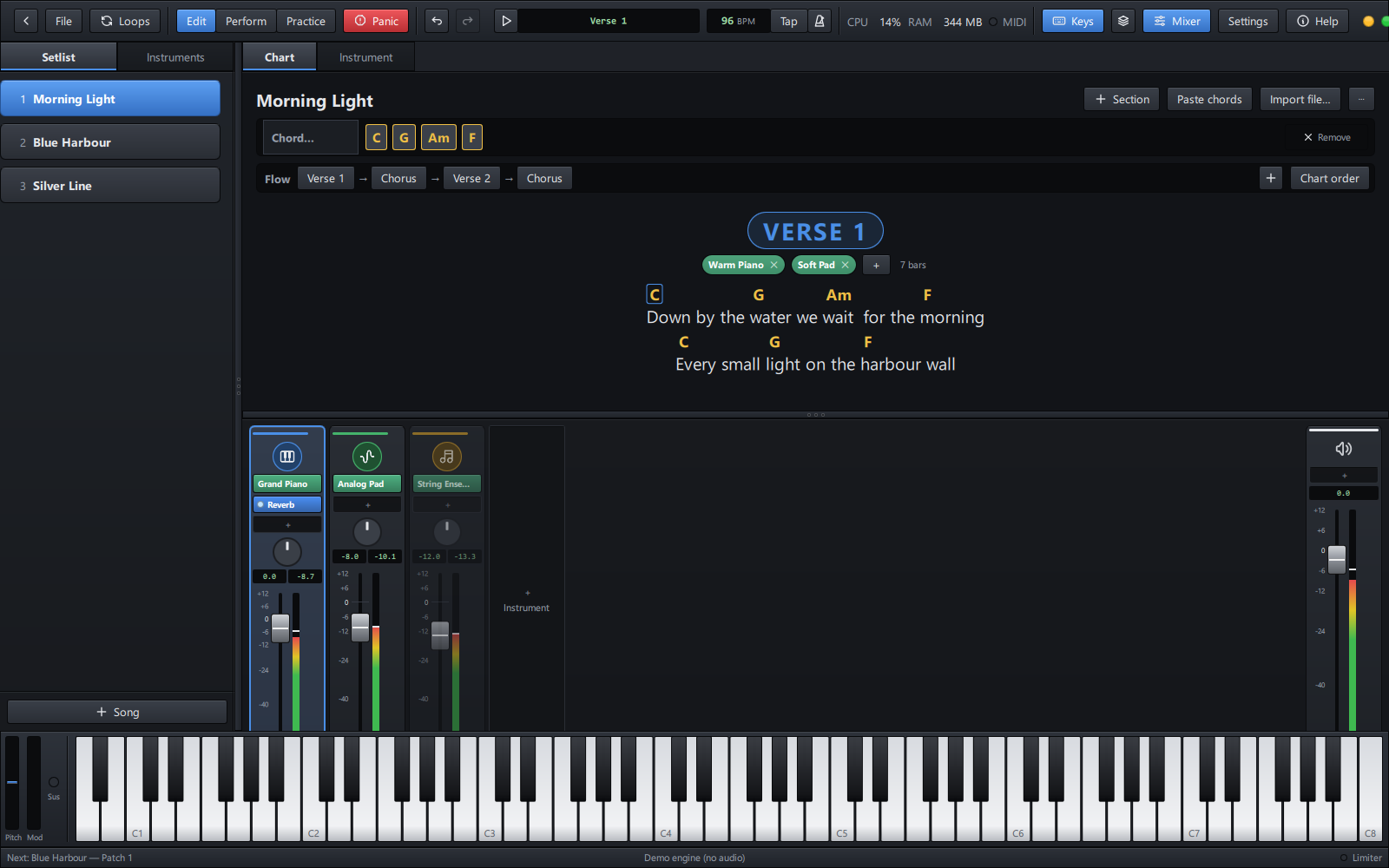
GigChain Keys is a live-performance host for keyboard players, in the spirit of MainStage and Gig Performer. It plays the VST3 instruments and effects already on your computer, keeps every song of the night in a setlist with its own sounds, shows each song's chords and lyrics big enough to read from the keys, and turns those chords into notes falling onto a keyboard so you can practise them.
It is free, with no adverts, no licence keys and no nag screens. It is open source too, under the GPL.
[!IMPORTANT] Public alpha: testers wanted. GigChain Keys is in early testing. It works and is played on real rigs, but it has not yet met the wide range of computers, audio interfaces, keyboards and plugins out there. Features and setlist files may still change between versions, and you may meet bugs. Please try it at home and in rehearsal before trusting it on a gig, keep copies of your setlists, and tell us what works and what breaks. Your feedback decides what gets fixed and built next.
| System | Download | Notes |
|---|---|---|
| Windows 10 / 11 (64-bit) | Installer (GigChainKeys-<version>-x64-setup.exe) | Recommended. Installs for you or for everyone, upgrades in place, uninstalls from Apps & features. |
Portable zip (GigChainKeys-<version>-x64-portable.zip) | No install: unzip anywhere (a USB stick, too) and run GigChainKeys.exe. | |
| macOS 13+ (Apple Silicon) | Disk image (GigChainKeys-<version>-arm64.dmg) | Less tested than Windows: Mac reports are especially welcome. See First start on a Mac below. |
| Linux (64-bit) | AppImage (GigChainKeys-<version>-x86_64.AppImage) | One file for most distributions (Ubuntu 22.04+, Fedora, Arch, Mint…): make it executable and run it. |
.deb (gigchain-keys_<version>_amd64.deb) | Ubuntu, Debian, Mint, Pop!_OS: double-click to install. Adds a menu entry and opens .gigchain setlists. |
All versions, with their release notes, are on the Releases page.
During the alpha, the Windows installer and the macOS app are not
code-signed. Code-signing certificates carry a yearly cost, and they will
be added as the project grows and community interest and
sponsorship make that possible. Until then, Windows
and macOS show a one-time warning on first start; the steps below get past
it. The builds are made from the source in this repository by its public
build scripts, and every release lists the SHA-256 checksum of each file
(SHA256SUMS.txt), so you can check your download is the genuine one:
Get-FileHash .\GigChainKeys-0.1.0-x64-setup.exe -Algorithm SHA256 # Windows (PowerShell)
shasum -a 256 GigChainKeys-0.1.0-arm64.dmg                          # macOS (Terminal)
sha256sum GigChainKeys-0.3.0-x86_64.AppImage                         # Linux
AppImage: make it executable, then run it (or double-click it in your file manager):
chmod +x GigChainKeys-*-x86_64.AppImage
./GigChainKeys-*-x86_64.AppImage
(If it says "FUSE" is missing, install libfuse2, or run it with
--appimage-extract-and-run.)
.deb: sudo apt install ./gigchain-keys_*_amd64.deb, then start
GigChain Keys from your menu or type gigchain-keys. Remove it with
sudo apt remove gigchain-keys.
Sound goes through PulseAudio or PipeWire (or JACK, chosen in Settings);
Linux VST3 plugins are found in ~/.vst3 and /usr/lib/vst3.
Windows SmartScreen may say "Windows protected your PC". Click More info, then Run anyway. This happens once.
The app is not notarized by Apple yet. Open the disk image, drag GigChain Keys to Applications, and open it once. When macOS refuses, go to System Settings → Privacy & Security and click Open Anyway.
Instruments: any VST3 instruments and effects. GigChain Keys finds them in the usual VST3 folders by itself. No instruments yet? These free ones cover pianos, synths and pads:
| Instrument | What it gives you | Get it |
|---|---|---|
| Splice INSTRUMENT (LABS) | Pianos, pads, strings and more: Spitfire's LABS sounds. Free with a Splice account. | splice.com |
| Surge XT | A big synth: hundreds of pads, leads, basses and keys. Open source. | surge-synthesizer.github.io |
| Vital | A modern synth with lush pads and leads. Free version with an account. | vital.audio |
| Dexed | Classic 80s electric pianos, bells and basses (a DX7). Open source. | asb2m10.github.io/dexed |
| Salamander Grand Piano | A sampled concert grand, in the free sfizz player. | sfzinstruments.github.io |
The app shows the same list (Help > Get free instruments). They are the makers' own downloads, not part of GigChain Keys.
A MIDI keyboard (USB or a MIDI interface). A sustain pedal, knobs and pads are used when present.
An audio interface is recommended for low latency (ASIO on Windows). Your computer's own sound works too.
| 🎹 Plays your plugins | Hosts VST3 instruments and effects with their own windows. Every sound in the setlist is loaded up front, so switching songs is instant, and held notes and reverb tails ring on across the change. |
| 🎚️ A real mixer | Logic-style channel strips: instrument, effects, pan, fader, meters, mute and solo. A master strip with its own effects, and a safety limiter before your speakers. |
| 🎼 Splits, layers and knobs | Key zones, transpose and velocity layers per instrument. Right-click any fader, pan knob or plugin setting and learn a knob, fader or pedal on your keyboard for it. Expression, mod wheel, breath and sustain go straight to the instruments. |
| 🎛️ Works with your keyboard | Its Play, Stop, ◀◀ ▶▶, Loop and Click buttons work by themselves when it speaks MIDI Start/Stop, MMC or Mackie Control (the DAW mode of Korg nanoKONTROL, M-Audio, Arturia, Novation, Akai…); any other button is learned in one press. |
| 📜 Setlists | All the night's songs in one file, in order. Change songs with the keyboard, a pedal or a pad. Undo for every edit. |
| 📝 Chord charts | Paste a song from any chord website and each chord lands on its word. Edit it where you read it, like cells: a chord box over every word to type into, words changed in place, chords dragged from word to word. |
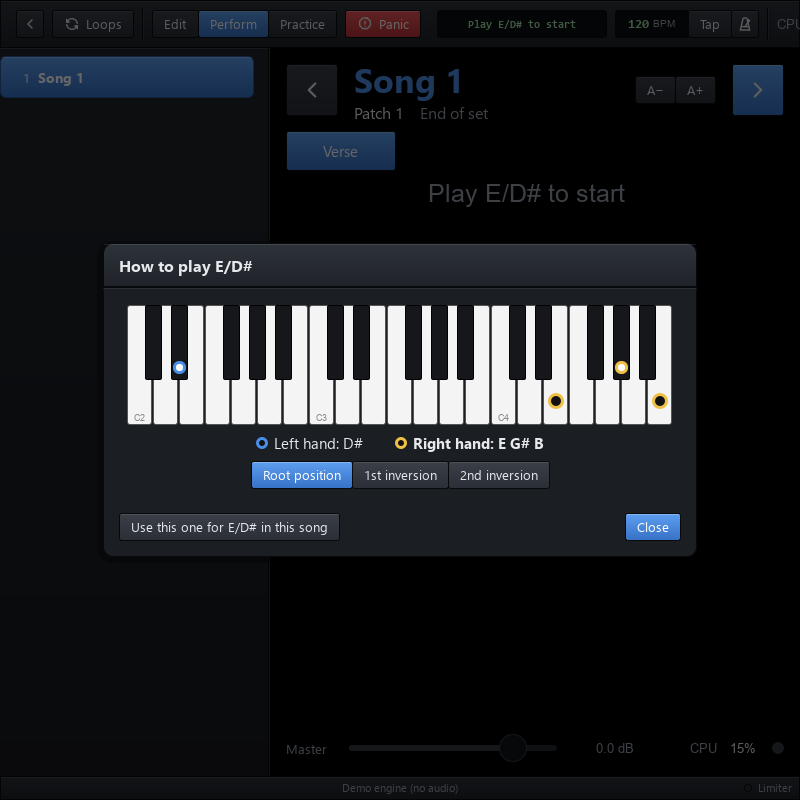
| 🎹 How to play a chord | Forgot one on stage? Tap it: a keyboard with a dot on each key to press (left and right hand), its notes by name, and its inversions. Keep the one you like for the song. |
| 🔀 Sections that change the sound | Every instrument plays together (layers), or one at a time. Each part of the chart (verse, chorus, solo…) can pick which instruments play, and they change by themselves as the song goes. |
| ⏱️ The song's timeline | Press Play (Space, your keyboard's Play button, or a pedal) and the song runs at its tempo along its flow (Verse 1 → Chorus → Verse 2 → Chorus ×3…): sounds change at each part, the chord lights in the chart. Live controls land on the bar line: next part, repeat it, loop it, stop at its end. |
| 🎤 Perform mode | Full screen, built for the stage and for touch screens: the chart big and clear, big Play, Next part and Loop part buttons, the song's parts as tiles (tap one to go there), nothing you can knock by accident. |
| 🔁 Loop station | Record a loop of any instrument, in time with the song, and layer on top: street-performer style, from buttons on your keyboard. |
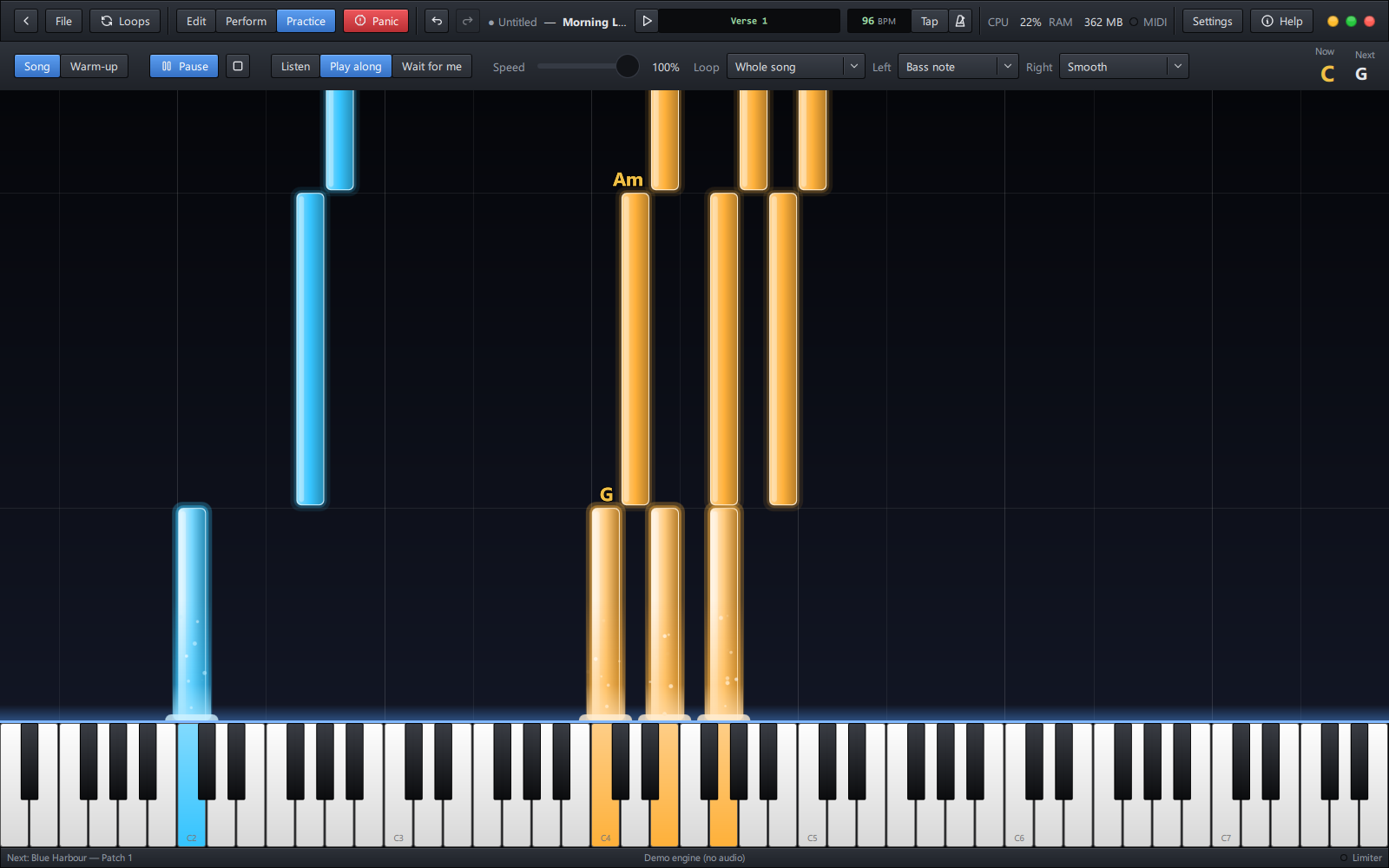
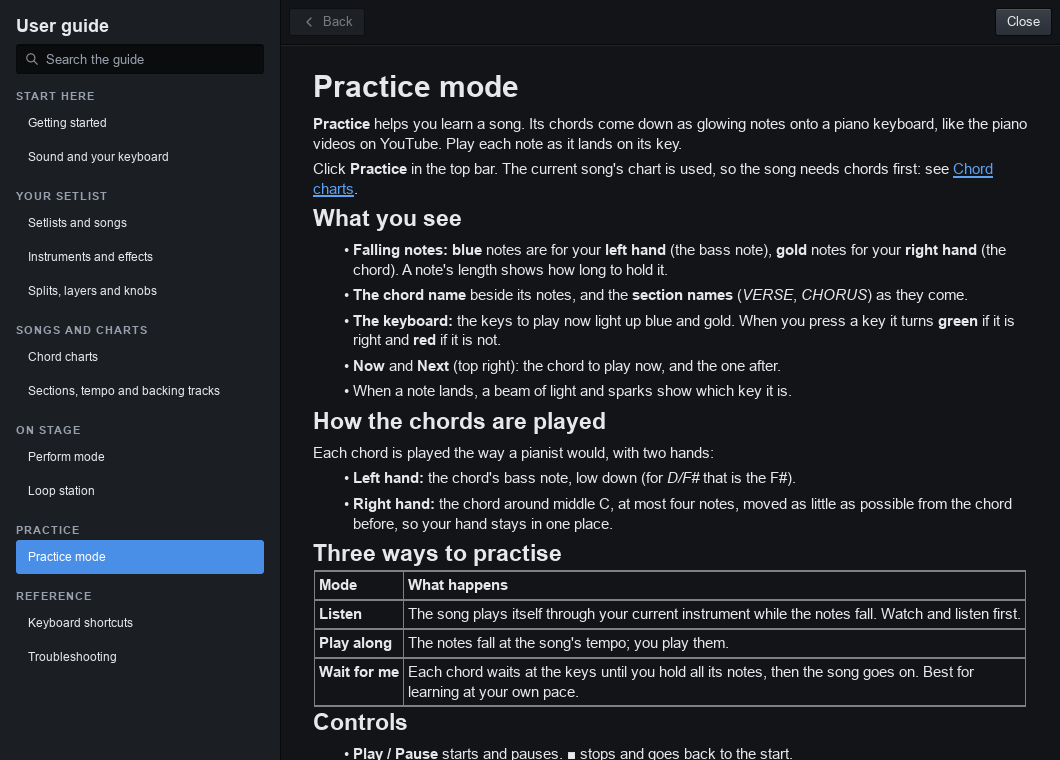
| 🎓 Practice mode | The song's chords fall onto a keyboard as glowing notes, YouTube-piano style. Listen, Play along, or Wait for me, slowed down and looped. The left hand plays the bass, an octave, root and fifth or the full chord; the right hand smooth, in root position or in your chosen inversions. |
| 🔥 Warm-ups | A daily warm-up at your level (Beginner, Intermediate, Pro): each exercise right hand, left hand, then both, the finger to use on every note. Every run scored (notes, timing, evenness, hands together) with one tip; three clean runs raise the tempo, and passing a level opens the next. |
| 🥁 Tempo, click and backing tracks | A tempo per song, tap tempo, a click, MIDI clock in and out, and a backing track (WAV, MP3, FLAC…) per song. |
| 🛟 Built not to fail | Plugins are scanned in a separate process; a plugin that crashes while loading is switched off next time; an unplugged keyboard or audio interface comes back by itself. |
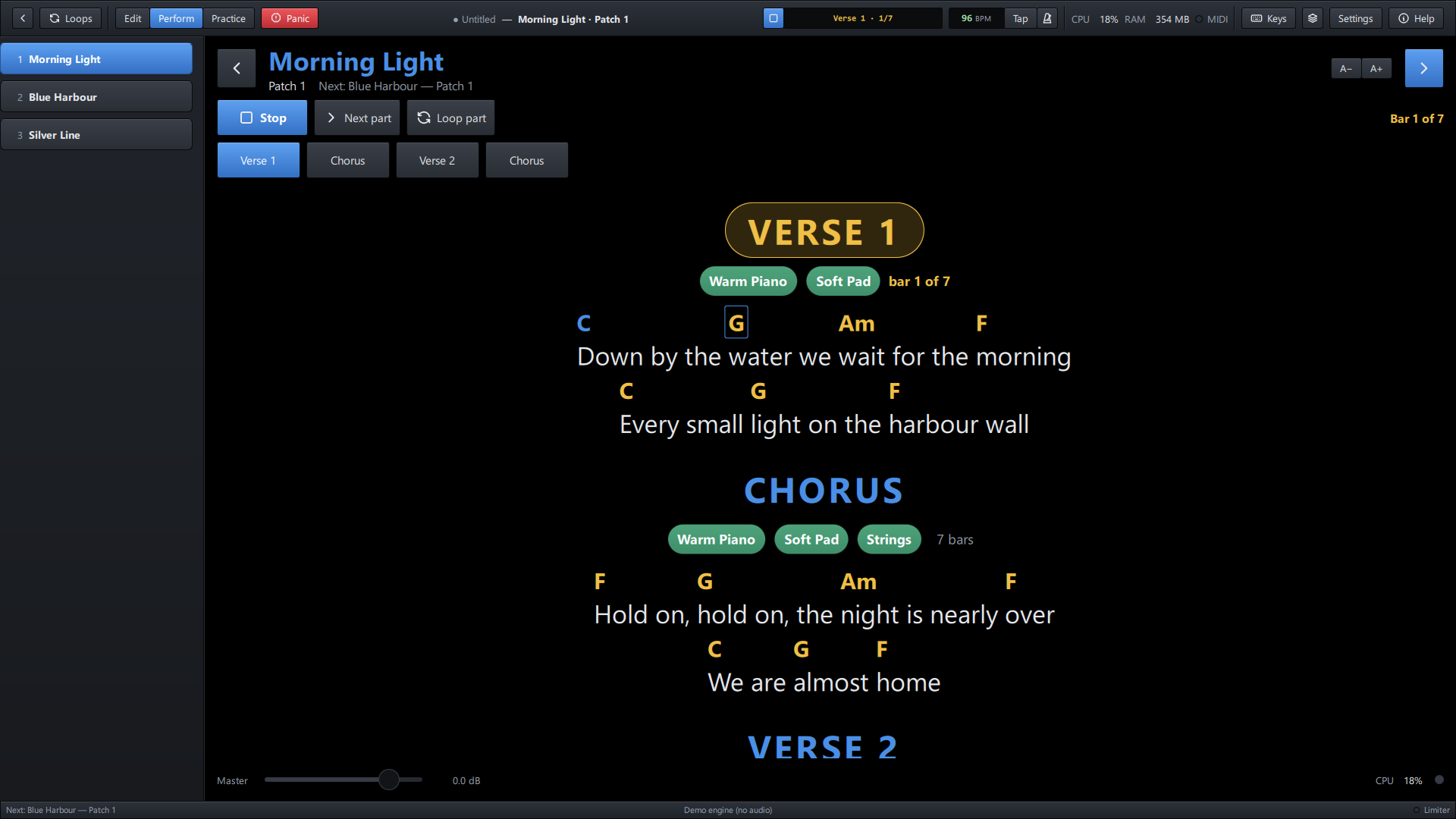
Perform: the song plays along its parts; Next part and Loop part land on the bar line.
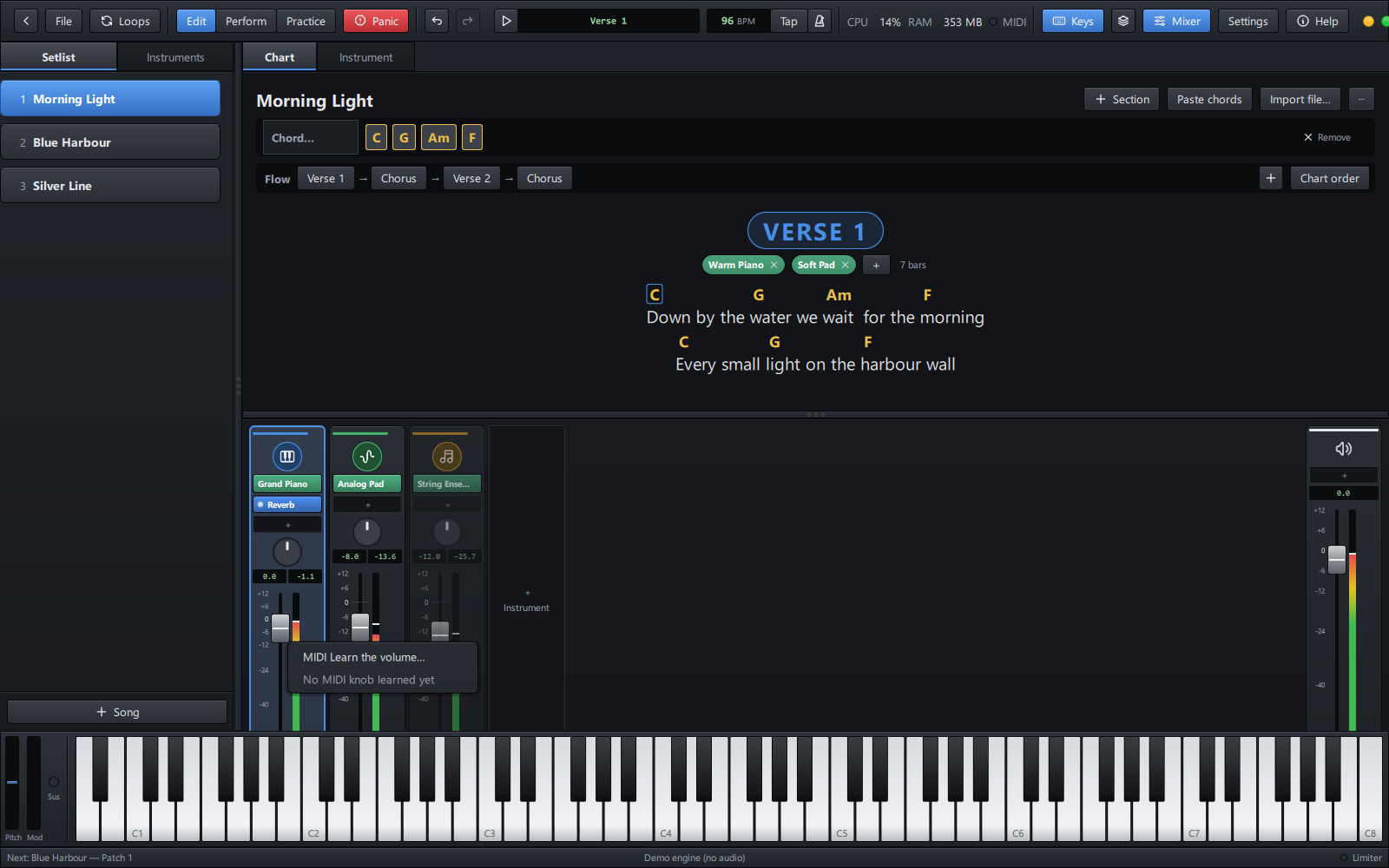
Right-click a fader, a pan knob or the master: MIDI Learn, then turn a knob on your keyboard.
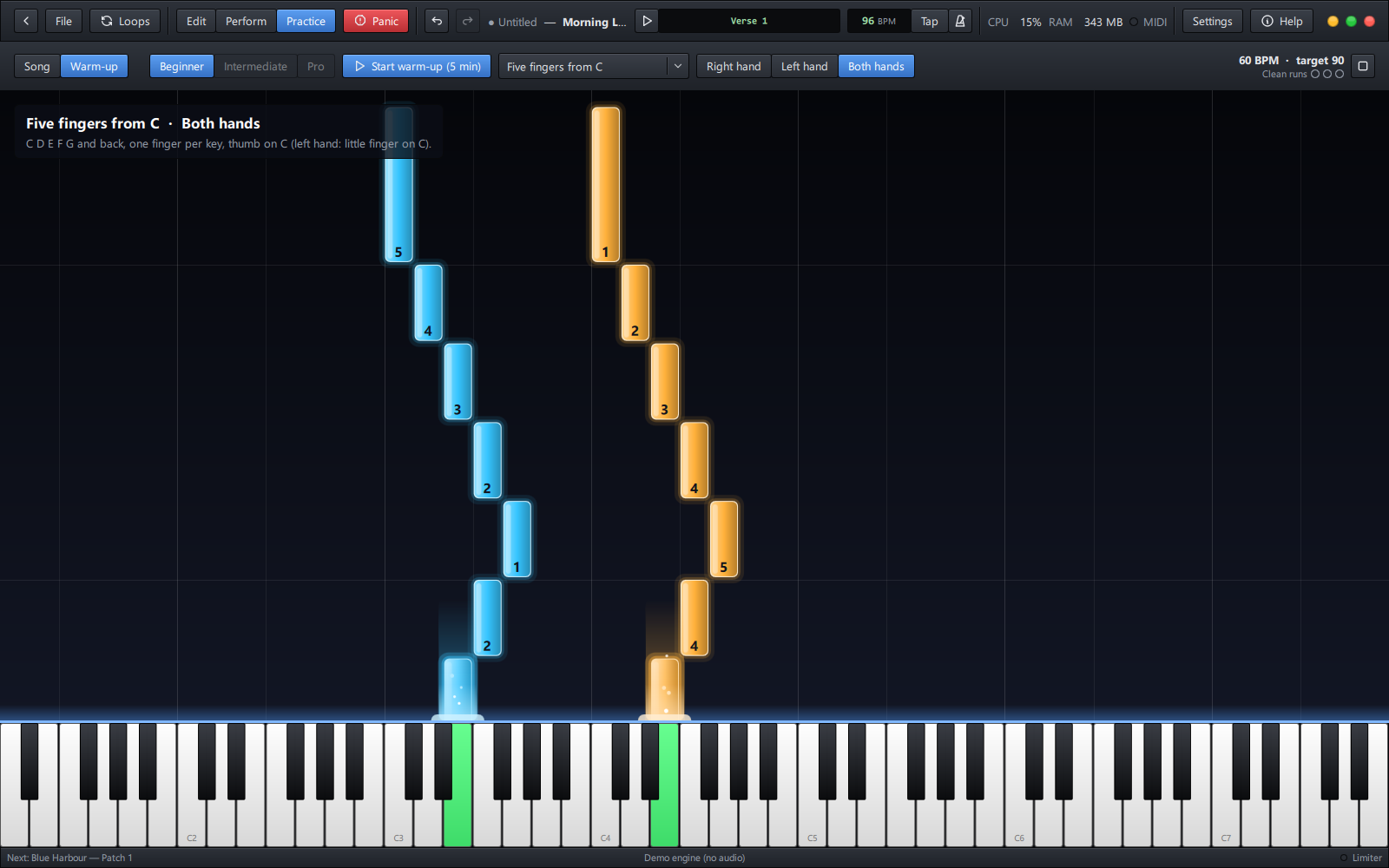
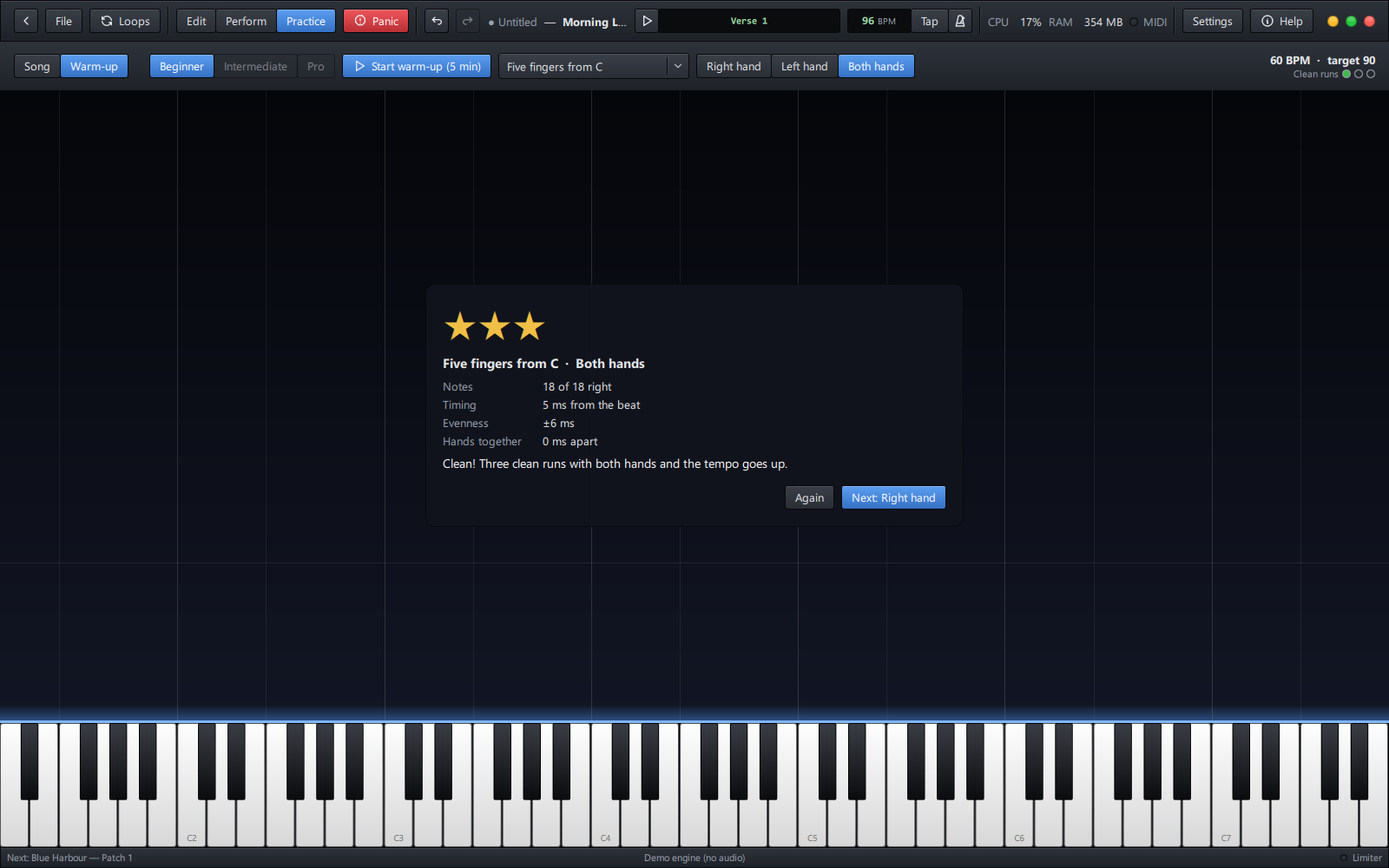
Warm-ups: the finger for every note, then the score.
The Getting started page walks through it step by step. Inside the app, press F1 (or click Help) at any time.
The user guide is built into the app (Help → User guide, or F1) and is also here on GitHub:
| Start here | Getting started · Sound and your keyboard |
| Your setlist | Setlists and songs · Instruments and effects · Splits, layers and knobs |
| Songs and charts | Chord charts · Sections, tempo and backing tracks |
| On stage | Perform mode · Loop station |
| Practice | Practice mode |
| Reference | Keyboard shortcuts · Troubleshooting |
GigChain Keys is free and stays free: no adverts, no paid version, no keys. If it helps your gigs, a donation keeps it going. It pays for the time to fix and build things, and the first goal is code-signing certificates, so Windows and macOS install GigChain Keys without a warning.

One-off or monthly, any amount, through GitHub Sponsors. Thank you!
GigChain Keys uses numbered versions. Each release lists what is new and what was fixed in the changelog and on the Releases page.
| Stage | Versions | What it means |
|---|---|---|
| Alpha (now) | 0.1, 0.2… | Open testing. Features still arriving and changing; feedback shapes them. |
| Beta | later 0.x | Feature-complete for 1.0; polishing and fixing. |
| Stable | 1.0 and up | Ready to rely on for gigs; setlist files stay compatible. |
| Version | Status |
|---|---|
| 0.3.0 | Alpha: Linux AppImage and .deb; you move the song (Perform's Play, Next part, Loop part, made for touch screens); MIDI Learn and keyboard transport buttons; instruments named for their sound; Practice warm-ups |
| 0.2.2 | Alpha: free instruments to get, from the app (pianos, synths, pads) |
| 0.2.1 | Alpha: the song's timeline with live controls; instruments all together or one at a time; keyboard shortcuts for the stage |
| 0.2 | Alpha: the chart edited as cells, chord diagrams, the song's flow and steadier chord follow, Practice hand styles |
| 0.1 | First public alpha: Windows 10/11; macOS (Apple Silicon) |
What is coming next is in the roadmap: bundled free instruments, a tablet remote for the music stand, melody and intro practice, and more.
GigChain Keys is written in C++20 with Qt 6 (QML) and hosts plugins with the Steinberg VST3 SDK; audio and MIDI go through RtAudio and RtMidi.
Everyone taking part is expected to follow the code of conduct.
GigChain Keys is free software: you can share and change it under the terms of the GNU General Public License, version 3 or later (LICENSE).
It is built with:
The full notices ship with the app (THIRD-PARTY-NOTICES.txt).
VST is a registered trademark of Steinberg Media Technologies GmbH. ASIO is a trademark of Steinberg Media Technologies GmbH. MainStage, Logic and Gig Performer are trademarks of their owners; GigChain Keys is not affiliated with them.
Free, open-source live rig for keyboard players: your VST3 sounds, setlists and chord charts, a song timeline with live controls, a stage-ready Perform mode and practice warm-ups. Windows, macOS and Linux.
See the code
Download · Getting started · User guide · Get help · What's new · ♥ Sponsor
GigChain Keys is a live-performance host for keyboard players, in the spirit of MainStage and Gig Performer. It plays the VST3 instruments and effects already on your computer, keeps every song of the night in a setlist with its own sounds, shows each song's chords and lyrics big enough to read from the keys, and turns those chords into notes falling onto a keyboard so you can practise them.
It is free, with no adverts, no licence keys and no nag screens. It is open source too, under the GPL.
[!IMPORTANT] Public alpha: testers wanted. GigChain Keys is in early testing. It works and is played on real rigs, but it has not yet met the wide range of computers, audio interfaces, keyboards and plugins out there. Features and setlist files may still change between versions, and you may meet bugs. Please try it at home and in rehearsal before trusting it on a gig, keep copies of your setlists, and tell us what works and what breaks. Your feedback decides what gets fixed and built next.
| System | Download | Notes |
|---|---|---|
| Windows 10 / 11 (64-bit) | Installer (GigChainKeys-<version>-x64-setup.exe) | Recommended. Installs for you or for everyone, upgrades in place, uninstalls from Apps & features. |
Portable zip (GigChainKeys-<version>-x64-portable.zip) | No install: unzip anywhere (a USB stick, too) and run GigChainKeys.exe. | |
| macOS 13+ (Apple Silicon) | Disk image (GigChainKeys-<version>-arm64.dmg) | Less tested than Windows: Mac reports are especially welcome. See First start on a Mac below. |
| Linux (64-bit) | AppImage (GigChainKeys-<version>-x86_64.AppImage) | One file for most distributions (Ubuntu 22.04+, Fedora, Arch, Mint…): make it executable and run it. |
.deb (gigchain-keys_<version>_amd64.deb) | Ubuntu, Debian, Mint, Pop!_OS: double-click to install. Adds a menu entry and opens .gigchain setlists. |
All versions, with their release notes, are on the Releases page.
During the alpha, the Windows installer and the macOS app are not
code-signed. Code-signing certificates carry a yearly cost, and they will
be added as the project grows and community interest and
sponsorship make that possible. Until then, Windows
and macOS show a one-time warning on first start; the steps below get past
it. The builds are made from the source in this repository by its public
build scripts, and every release lists the SHA-256 checksum of each file
(SHA256SUMS.txt), so you can check your download is the genuine one:
Get-FileHash .\GigChainKeys-0.1.0-x64-setup.exe -Algorithm SHA256 # Windows (PowerShell)
shasum -a 256 GigChainKeys-0.1.0-arm64.dmg                          # macOS (Terminal)
sha256sum GigChainKeys-0.3.0-x86_64.AppImage                         # Linux
AppImage: make it executable, then run it (or double-click it in your file manager):
chmod +x GigChainKeys-*-x86_64.AppImage
./GigChainKeys-*-x86_64.AppImage
(If it says "FUSE" is missing, install libfuse2, or run it with
--appimage-extract-and-run.)
.deb: sudo apt install ./gigchain-keys_*_amd64.deb, then start
GigChain Keys from your menu or type gigchain-keys. Remove it with
sudo apt remove gigchain-keys.
Sound goes through PulseAudio or PipeWire (or JACK, chosen in Settings);
Linux VST3 plugins are found in ~/.vst3 and /usr/lib/vst3.
Windows SmartScreen may say "Windows protected your PC". Click More info, then Run anyway. This happens once.
The app is not notarized by Apple yet. Open the disk image, drag GigChain Keys to Applications, and open it once. When macOS refuses, go to System Settings → Privacy & Security and click Open Anyway.
Instruments: any VST3 instruments and effects. GigChain Keys finds them in the usual VST3 folders by itself. No instruments yet? These free ones cover pianos, synths and pads:
| Instrument | What it gives you | Get it |
|---|---|---|
| Splice INSTRUMENT (LABS) | Pianos, pads, strings and more: Spitfire's LABS sounds. Free with a Splice account. | splice.com |
| Surge XT | A big synth: hundreds of pads, leads, basses and keys. Open source. | surge-synthesizer.github.io |
| Vital | A modern synth with lush pads and leads. Free version with an account. | vital.audio |
| Dexed | Classic 80s electric pianos, bells and basses (a DX7). Open source. | asb2m10.github.io/dexed |
| Salamander Grand Piano | A sampled concert grand, in the free sfizz player. | sfzinstruments.github.io |
The app shows the same list (Help > Get free instruments). They are the makers' own downloads, not part of GigChain Keys.
A MIDI keyboard (USB or a MIDI interface). A sustain pedal, knobs and pads are used when present.
An audio interface is recommended for low latency (ASIO on Windows). Your computer's own sound works too.
| 🎹 Plays your plugins | Hosts VST3 instruments and effects with their own windows. Every sound in the setlist is loaded up front, so switching songs is instant, and held notes and reverb tails ring on across the change. |
| 🎚️ A real mixer | Logic-style channel strips: instrument, effects, pan, fader, meters, mute and solo. A master strip with its own effects, and a safety limiter before your speakers. |
| 🎼 Splits, layers and knobs | Key zones, transpose and velocity layers per instrument. Right-click any fader, pan knob or plugin setting and learn a knob, fader or pedal on your keyboard for it. Expression, mod wheel, breath and sustain go straight to the instruments. |
| 🎛️ Works with your keyboard | Its Play, Stop, ◀◀ ▶▶, Loop and Click buttons work by themselves when it speaks MIDI Start/Stop, MMC or Mackie Control (the DAW mode of Korg nanoKONTROL, M-Audio, Arturia, Novation, Akai…); any other button is learned in one press. |
| 📜 Setlists | All the night's songs in one file, in order. Change songs with the keyboard, a pedal or a pad. Undo for every edit. |
| 📝 Chord charts | Paste a song from any chord website and each chord lands on its word. Edit it where you read it, like cells: a chord box over every word to type into, words changed in place, chords dragged from word to word. |
| 🎹 How to play a chord | Forgot one on stage? Tap it: a keyboard with a dot on each key to press (left and right hand), its notes by name, and its inversions. Keep the one you like for the song. |
| 🔀 Sections that change the sound | Every instrument plays together (layers), or one at a time. Each part of the chart (verse, chorus, solo…) can pick which instruments play, and they change by themselves as the song goes. |
| ⏱️ The song's timeline | Press Play (Space, your keyboard's Play button, or a pedal) and the song runs at its tempo along its flow (Verse 1 → Chorus → Verse 2 → Chorus ×3…): sounds change at each part, the chord lights in the chart. Live controls land on the bar line: next part, repeat it, loop it, stop at its end. |
| 🎤 Perform mode | Full screen, built for the stage and for touch screens: the chart big and clear, big Play, Next part and Loop part buttons, the song's parts as tiles (tap one to go there), nothing you can knock by accident. |
| 🔁 Loop station | Record a loop of any instrument, in time with the song, and layer on top: street-performer style, from buttons on your keyboard. |
| 🎓 Practice mode | The song's chords fall onto a keyboard as glowing notes, YouTube-piano style. Listen, Play along, or Wait for me, slowed down and looped. The left hand plays the bass, an octave, root and fifth or the full chord; the right hand smooth, in root position or in your chosen inversions. |
| 🔥 Warm-ups | A daily warm-up at your level (Beginner, Intermediate, Pro): each exercise right hand, left hand, then both, the finger to use on every note. Every run scored (notes, timing, evenness, hands together) with one tip; three clean runs raise the tempo, and passing a level opens the next. |
| 🥁 Tempo, click and backing tracks | A tempo per song, tap tempo, a click, MIDI clock in and out, and a backing track (WAV, MP3, FLAC…) per song. |
| 🛟 Built not to fail | Plugins are scanned in a separate process; a plugin that crashes while loading is switched off next time; an unplugged keyboard or audio interface comes back by itself. |
Perform: the song plays along its parts; Next part and Loop part land on the bar line.
Right-click a fader, a pan knob or the master: MIDI Learn, then turn a knob on your keyboard.
Warm-ups: the finger for every note, then the score.
The Getting started page walks through it step by step. Inside the app, press F1 (or click Help) at any time.
The user guide is built into the app (Help → User guide, or F1) and is also here on GitHub:
| Start here | Getting started · Sound and your keyboard |
| Your setlist | Setlists and songs · Instruments and effects · Splits, layers and knobs |
| Songs and charts | Chord charts · Sections, tempo and backing tracks |
| On stage | Perform mode · Loop station |
| Practice | Practice mode |
| Reference | Keyboard shortcuts · Troubleshooting |
GigChain Keys is free and stays free: no adverts, no paid version, no keys. If it helps your gigs, a donation keeps it going. It pays for the time to fix and build things, and the first goal is code-signing certificates, so Windows and macOS install GigChain Keys without a warning.
One-off or monthly, any amount, through GitHub Sponsors. Thank you!
GigChain Keys uses numbered versions. Each release lists what is new and what was fixed in the changelog and on the Releases page.
| Stage | Versions | What it means |
|---|---|---|
| Alpha (now) | 0.1, 0.2… | Open testing. Features still arriving and changing; feedback shapes them. |
| Beta | later 0.x | Feature-complete for 1.0; polishing and fixing. |
| Stable | 1.0 and up | Ready to rely on for gigs; setlist files stay compatible. |
| Version | Status |
|---|---|
| 0.3.0 | Alpha: Linux AppImage and .deb; you move the song (Perform's Play, Next part, Loop part, made for touch screens); MIDI Learn and keyboard transport buttons; instruments named for their sound; Practice warm-ups |
| 0.2.2 | Alpha: free instruments to get, from the app (pianos, synths, pads) |
| 0.2.1 | Alpha: the song's timeline with live controls; instruments all together or one at a time; keyboard shortcuts for the stage |
| 0.2 | Alpha: the chart edited as cells, chord diagrams, the song's flow and steadier chord follow, Practice hand styles |
| 0.1 | First public alpha: Windows 10/11; macOS (Apple Silicon) |
What is coming next is in the roadmap: bundled free instruments, a tablet remote for the music stand, melody and intro practice, and more.
GigChain Keys is written in C++20 with Qt 6 (QML) and hosts plugins with the Steinberg VST3 SDK; audio and MIDI go through RtAudio and RtMidi.
Everyone taking part is expected to follow the code of conduct.
GigChain Keys is free software: you can share and change it under the terms of the GNU General Public License, version 3 or later (LICENSE).
It is built with:
The full notices ship with the app (THIRD-PARTY-NOTICES.txt).
VST is a registered trademark of Steinberg Media Technologies GmbH. ASIO is a trademark of Steinberg Media Technologies GmbH. MainStage, Logic and Gig Performer are trademarks of their owners; GigChain Keys is not affiliated with them.



