CraftsMan: High-fidelity Mesh Generation with 3D Native Diffusion and Interactive Geometry Refiner
See the code
Weiyu Li*1,2, Jiarui Liu*1,2, Hongyu Yan*1, Rui Chen1, Yixun Liang1,2, Xuelin Chen3, Ping Tan1,2, Xiaoxiao Long1,2
1HKUST, 2LightIllusions, 3Adobe Research
from craftsman import CraftsManPipeline
import torch

# load from local ckpt
# mkdir ckpts && cd ckpts
# mkdir craftsman-DoraVAE && cd craftsman-DoraVAE
# wget https://pub-c7137d332b4145b6b321a6c01fcf8911.r2.dev/craftsman-DoraVAE/config.yaml
# wget https://pub-c7137d332b4145b6b321a6c01fcf8911.r2.dev/craftsman-DoraVAE/model.ckpt
# pipeline = CraftsManPipeline.from_pretrained("./ckpts/craftsman-DoraVAE", device="cuda:0", torch_dtype=torch.bfloat16)

# load from huggingface model hub, I uploading...
pipeline = CraftsManPipeline.from_pretrained("craftsman3d/craftsman-DoraVAE", device="cuda:0", torch_dtype=torch.bfloat16)

# inference
mesh = pipeline("https://pub-f9073a756ec645d692ce3d171c2e1232.r2.dev/data/werewolf.png").meshes[0]
mesh.export("werewolf.obj")
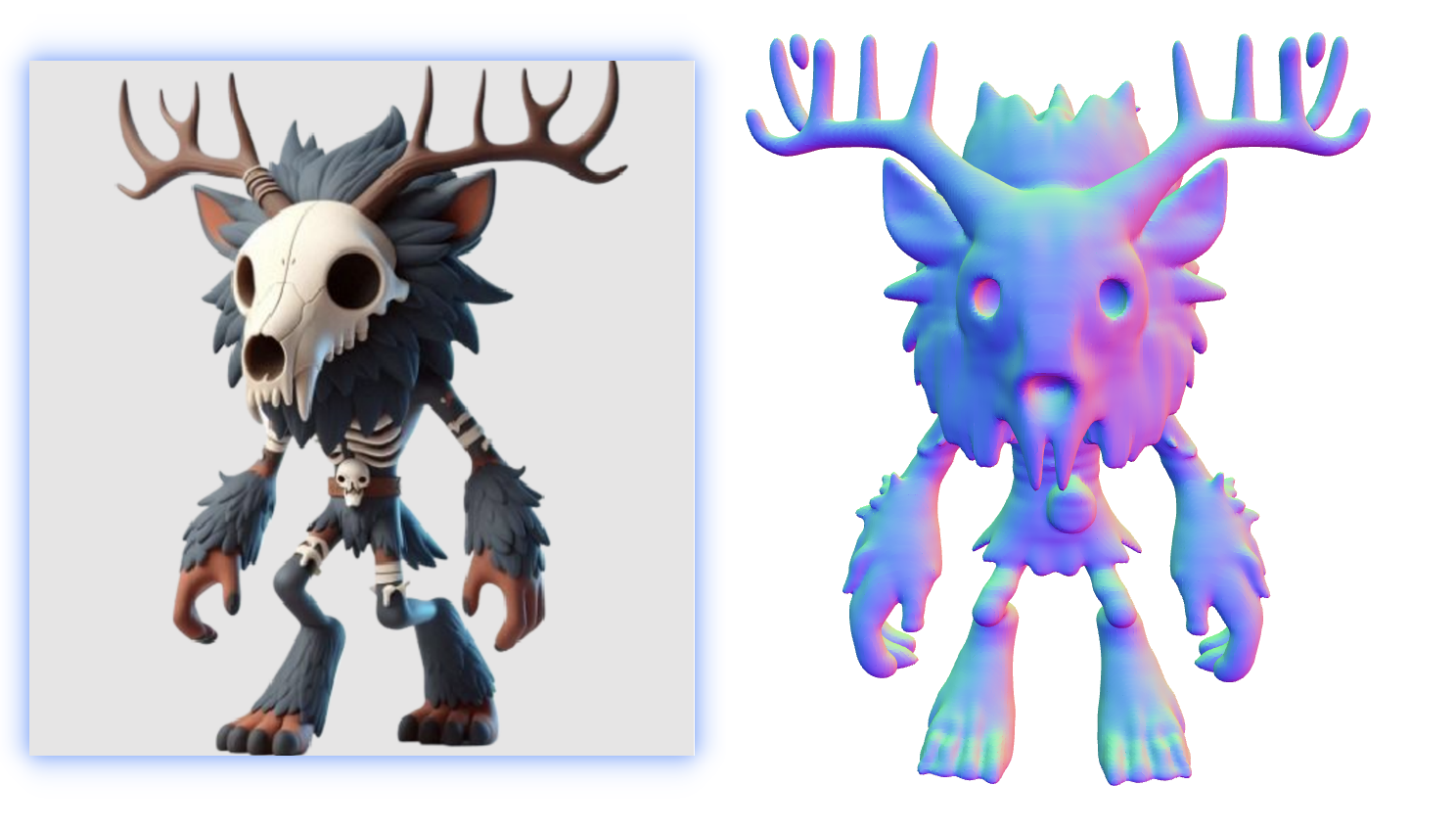
The results should be like this:
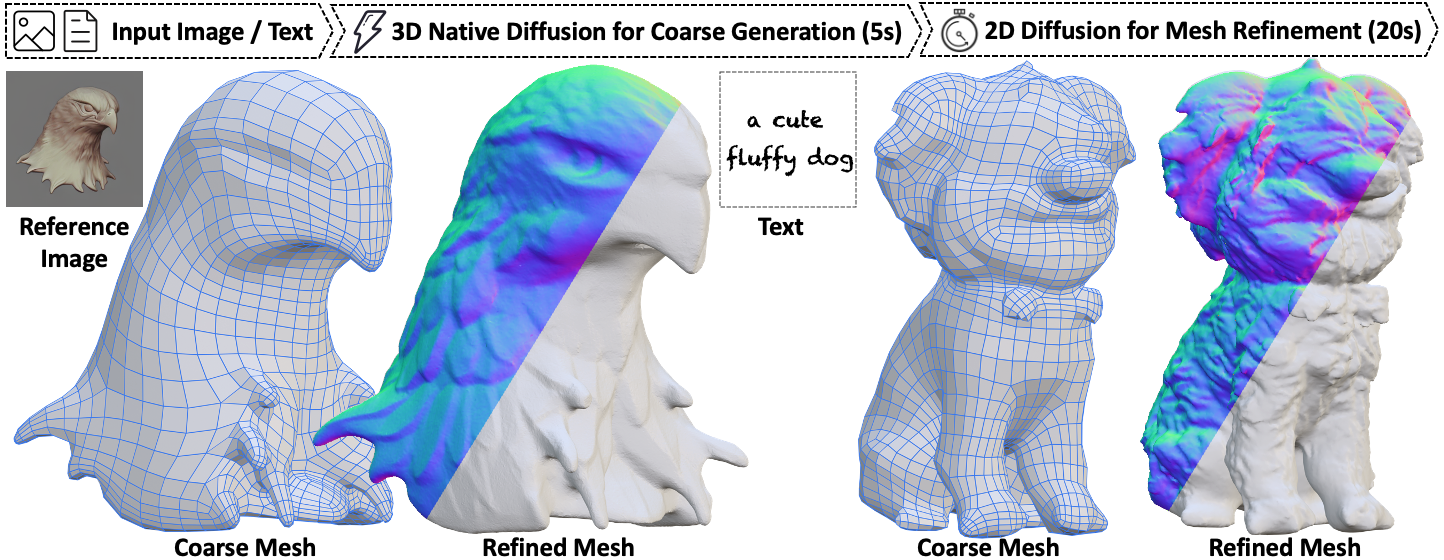
This repo contains source code (training / inference) of 3D diffusion model, pretrained weights and gradio demo code of our 3D mesh generation project, you can find more visualizations on our project page and try our demo. If you have high-quality 3D data or some other ideas, we very much welcome any form of cooperation.
watertight_and_sampling.pyThe mesh refinement part is performed on a GTX 3080 GPU.
😃 We also provide a Dockerfile for easy installation, see Setup using Docker.
Clone this repository.
git clone https://github.com/wyysf-98/CraftsMan.git
Install the required packages.
conda create -n CraftsMan python=3.10 -y
conda activate CraftsMan
# conda install -c "nvidia/label/cuda-12.1.1" cudatoolkit
# conda install pytorch==2.5.1 torchvision==0.20.1 torchaudio==2.5.1 pytorch-cuda=12.1 -c pytorch -c nvidia
pip install torch==2.5.1 torchvision==0.20.1
pip install -r docker/requirements.txt
pip install torch-cluster -f https://data.pyg.org/whl/torch-2.5.1+cu124.html
This repo will port some recent techniques for 3D diffusion model and the history version like the arxiv version can be found in different branch.
We provide the training and the inference code here for future research. The latent set VAE model is heavily build on the same structure of Michelangelo. The latent set diffusion model is based on a DiT/Pixart-alpha and with 500M parameters.
Currently, We provide the models with single view image as condition with DiT.
We will consider open source the further models according to the real situation.
If you run the inference.py without specifying the model path, it will automatically download the model from the huggingface model hub.
Or you can download the model manually:
## you can just manually get the model using wget:
mkdir ckpts
cd ckpts
mkdir craftsman-v1-5
cd craftsman-v1-5
wget https://huggingface.co/craftsman3d/craftsman/resolve/main/config.yaml
wget https://huggingface.co/craftsman3d/craftsman/resolve/main/model.ckpt
### for DoraVAE version(https://aruichen.github.io/Dora/)
cd ..
mkdir craftsman-doravae
cd craftsman-doravae
wget https://huggingface.co/craftsman3d/craftsman-doravae/resolve/main/config.yaml
wget https://huggingface.co/craftsman3d/craftsman-doravae/resolve/main/model.ckpt

## OR you can git clone the repo:
git lfs install
git clone https://huggingface.co/craftsman3d/craftsman
### for DoraVAE version(https://aruichen.github.io/Dora/)
git clone https://huggingface.co/craftsman3d/craftsman-doravae
If you download the models using wget, you should manually put them under the ckpts/craftsman directory.
We provide gradio demos for easy usage.
python gradio_app.py --model_path ./ckpts/craftsman
To generate 3D meshes from images folders via command line, simply run:
python inference.py --input eval_data --device 0 --model ./ckpts/craftsman
For more configs, please refer to the inference.py.
We provide our training code to facilitate future research. And we provide a data sample in data.
100k data sample for VAE training can be downloaded from (to be uploaded)
100k data sample for diffusion training can be downloaded from https://pub-c7137d332b4145b6b321a6c01fcf8911.r2.dev/Objaverse_100k.zip
selected 190k UUID for training can be downloaded from https://pub-c7137d332b4145b6b321a6c01fcf8911.r2.dev/objaverse_190k.json
selected 320k UUID for training can be downloaded from https://pub-c7137d332b4145b6b321a6c01fcf8911.r2.dev/objaverse_320k.json
For more training details and configs, please refer to the configs folder.
### training the shape-autoencoder
python train.py --config ./configs/shape-autoencoder/michelangelo-l768-e64-ne8-nd16.yaml \
                 --train --gpu 0

### training the image-to-shape diffusion model
# for single view conditioned generation
python train.py --config ./configs/image-to-shape-diffusion/clip-dinov2-pixart-diffusion-dit32.yaml --train --gpu 0

# for multi view conditioned generation (original paper)
python train.py --config ./configs/image-to-shape-diffusion/clip-mvrgb-modln-l256-e64-ne8-nd16-nl6.yaml --train --gpu 0

# for DoraVAE single view diffusion version (We can not provide the data for you due to the license issue, you can processed it by yourself)
# (https://github.com/Seed3D/Dora/tree/main/sharp_edge_sampling)
python train.py --config ./configs/image-to-shape-diffusion/DoraVAE-dinov2reglarge518-pixart-rectified-flow-dit32.yaml --train --gpu 0
Q: Tips to get better results. 0. Due to limited resources, we will gradually expand the dataset and training scale, and therefore we will release more pre-trained models in the future.
CraftsMan3D is under MIT License.
@misc{li2024craftsman,
title         = {CraftsMan3D: High-fidelity Mesh Generation with 3D Native Generation and Interactive Geometry Refiner},
author        = {Weiyu Li and Jiarui Liu and Hongyu Yan and Rui Chen and Yixun Liang and Xuelin Chen and Ping Tan and Xiaoxiao Long},
year          = {2024},
archivePrefix = {arXiv preprint arXiv:2405.14979},
primaryClass  = {cs.CG}
}
CraftsMan: High-fidelity Mesh Generation with 3D Native Diffusion and Interactive Geometry Refiner
See the code
Weiyu Li*1,2, Jiarui Liu*1,2, Hongyu Yan*1, Rui Chen1, Yixun Liang1,2, Xuelin Chen3, Ping Tan1,2, Xiaoxiao Long1,2
1HKUST, 2LightIllusions, 3Adobe Research
from craftsman import CraftsManPipeline
import torch

# load from local ckpt
# mkdir ckpts && cd ckpts
# mkdir craftsman-DoraVAE && cd craftsman-DoraVAE
# wget https://pub-c7137d332b4145b6b321a6c01fcf8911.r2.dev/craftsman-DoraVAE/config.yaml
# wget https://pub-c7137d332b4145b6b321a6c01fcf8911.r2.dev/craftsman-DoraVAE/model.ckpt
# pipeline = CraftsManPipeline.from_pretrained("./ckpts/craftsman-DoraVAE", device="cuda:0", torch_dtype=torch.bfloat16)

# load from huggingface model hub, I uploading...
pipeline = CraftsManPipeline.from_pretrained("craftsman3d/craftsman-DoraVAE", device="cuda:0", torch_dtype=torch.bfloat16)

# inference
mesh = pipeline("https://pub-f9073a756ec645d692ce3d171c2e1232.r2.dev/data/werewolf.png").meshes[0]
mesh.export("werewolf.obj")
The results should be like this:
This repo contains source code (training / inference) of 3D diffusion model, pretrained weights and gradio demo code of our 3D mesh generation project, you can find more visualizations on our project page and try our demo. If you have high-quality 3D data or some other ideas, we very much welcome any form of cooperation.
watertight_and_sampling.pyThe mesh refinement part is performed on a GTX 3080 GPU.
😃 We also provide a Dockerfile for easy installation, see Setup using Docker.
Clone this repository.
git clone https://github.com/wyysf-98/CraftsMan.git
Install the required packages.
conda create -n CraftsMan python=3.10 -y
conda activate CraftsMan
# conda install -c "nvidia/label/cuda-12.1.1" cudatoolkit
# conda install pytorch==2.5.1 torchvision==0.20.1 torchaudio==2.5.1 pytorch-cuda=12.1 -c pytorch -c nvidia
pip install torch==2.5.1 torchvision==0.20.1
pip install -r docker/requirements.txt
pip install torch-cluster -f https://data.pyg.org/whl/torch-2.5.1+cu124.html
This repo will port some recent techniques for 3D diffusion model and the history version like the arxiv version can be found in different branch.
We provide the training and the inference code here for future research. The latent set VAE model is heavily build on the same structure of Michelangelo. The latent set diffusion model is based on a DiT/Pixart-alpha and with 500M parameters.
Currently, We provide the models with single view image as condition with DiT.
We will consider open source the further models according to the real situation.
If you run the inference.py without specifying the model path, it will automatically download the model from the huggingface model hub.
Or you can download the model manually:
## you can just manually get the model using wget:
mkdir ckpts
cd ckpts
mkdir craftsman-v1-5
cd craftsman-v1-5
wget https://huggingface.co/craftsman3d/craftsman/resolve/main/config.yaml
wget https://huggingface.co/craftsman3d/craftsman/resolve/main/model.ckpt
### for DoraVAE version(https://aruichen.github.io/Dora/)
cd ..
mkdir craftsman-doravae
cd craftsman-doravae
wget https://huggingface.co/craftsman3d/craftsman-doravae/resolve/main/config.yaml
wget https://huggingface.co/craftsman3d/craftsman-doravae/resolve/main/model.ckpt

## OR you can git clone the repo:
git lfs install
git clone https://huggingface.co/craftsman3d/craftsman
### for DoraVAE version(https://aruichen.github.io/Dora/)
git clone https://huggingface.co/craftsman3d/craftsman-doravae
If you download the models using wget, you should manually put them under the ckpts/craftsman directory.
We provide gradio demos for easy usage.
python gradio_app.py --model_path ./ckpts/craftsman
To generate 3D meshes from images folders via command line, simply run:
python inference.py --input eval_data --device 0 --model ./ckpts/craftsman
For more configs, please refer to the inference.py.
We provide our training code to facilitate future research. And we provide a data sample in data.
100k data sample for VAE training can be downloaded from (to be uploaded)
100k data sample for diffusion training can be downloaded from https://pub-c7137d332b4145b6b321a6c01fcf8911.r2.dev/Objaverse_100k.zip
selected 190k UUID for training can be downloaded from https://pub-c7137d332b4145b6b321a6c01fcf8911.r2.dev/objaverse_190k.json
selected 320k UUID for training can be downloaded from https://pub-c7137d332b4145b6b321a6c01fcf8911.r2.dev/objaverse_320k.json
For more training details and configs, please refer to the configs folder.
### training the shape-autoencoder
python train.py --config ./configs/shape-autoencoder/michelangelo-l768-e64-ne8-nd16.yaml \
                 --train --gpu 0

### training the image-to-shape diffusion model
# for single view conditioned generation
python train.py --config ./configs/image-to-shape-diffusion/clip-dinov2-pixart-diffusion-dit32.yaml --train --gpu 0

# for multi view conditioned generation (original paper)
python train.py --config ./configs/image-to-shape-diffusion/clip-mvrgb-modln-l256-e64-ne8-nd16-nl6.yaml --train --gpu 0

# for DoraVAE single view diffusion version (We can not provide the data for you due to the license issue, you can processed it by yourself)
# (https://github.com/Seed3D/Dora/tree/main/sharp_edge_sampling)
python train.py --config ./configs/image-to-shape-diffusion/DoraVAE-dinov2reglarge518-pixart-rectified-flow-dit32.yaml --train --gpu 0
Q: Tips to get better results. 0. Due to limited resources, we will gradually expand the dataset and training scale, and therefore we will release more pre-trained models in the future.
CraftsMan3D is under MIT License.
@misc{li2024craftsman,
title         = {CraftsMan3D: High-fidelity Mesh Generation with 3D Native Generation and Interactive Geometry Refiner},
author        = {Weiyu Li and Jiarui Liu and Hongyu Yan and Rui Chen and Yixun Liang and Xuelin Chen and Ping Tan and Xiaoxiao Long},
year          = {2024},
archivePrefix = {arXiv preprint arXiv:2405.14979},
primaryClass  = {cs.CG}
}




 Local Website