
A local code review tool designed for the coding agent workflow
TypeScript
205
90 commits
updated Jun 23, 2026
README
diffx
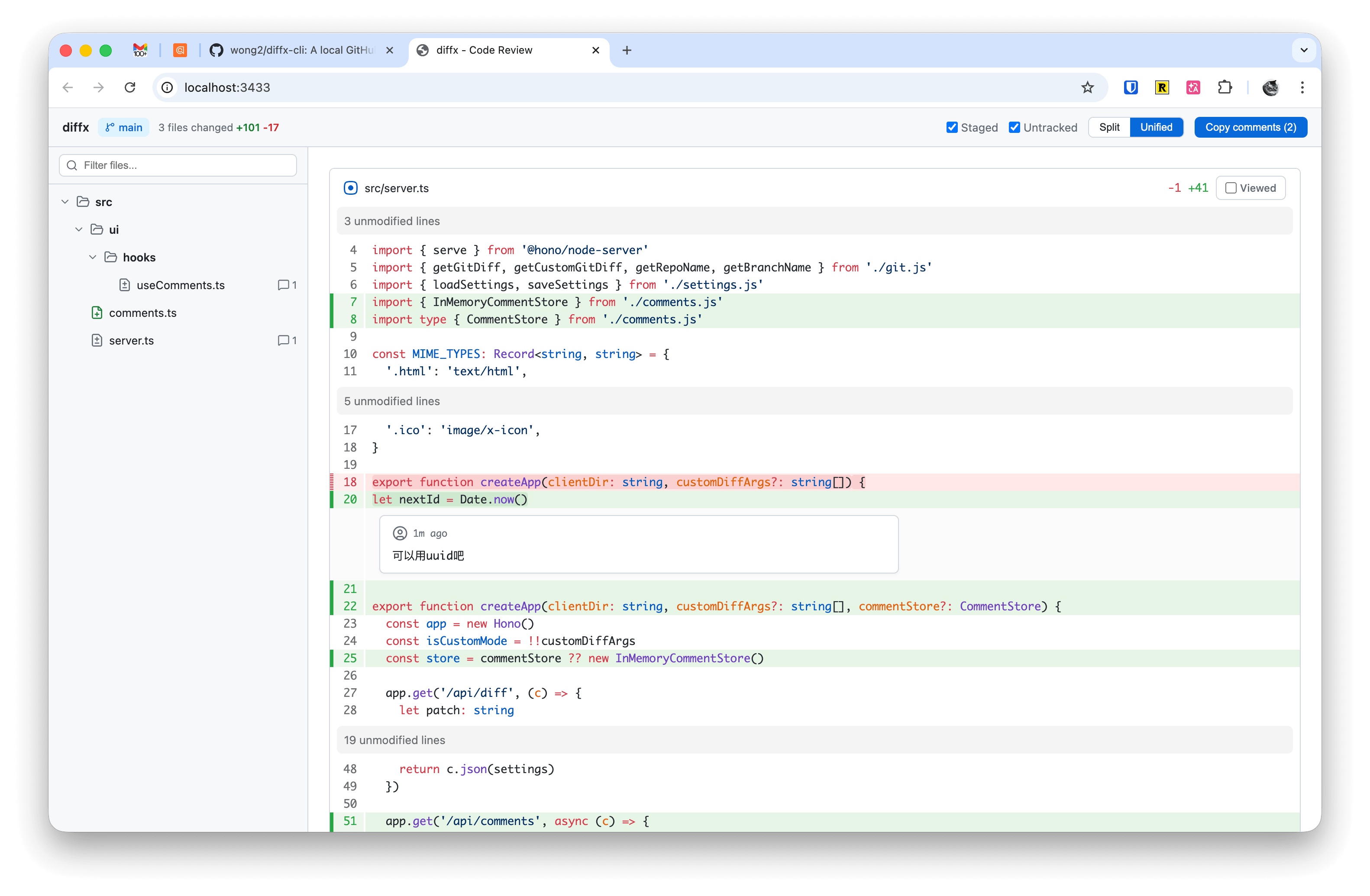
A local code review tool designed for the coding agent workflow. Review AI-generated changes in a GitHub PR-like web UI, leave inline comments, then hand them back to your coding agent to fix.
Install
npm install -g diffx-cli
Usage
Run in any git repository:
diffx
This starts a local server and opens your browser with a diff review UI.
Options
diffx [options] [-- <git-diff-args>]

Options:
  -p, --port <port>   Server port (default: 3433)
  --no-open           Don't auto-open browser

Examples:
  diffx                          # Review working tree changes
  diffx -p 8080                  # Use custom port
  diffx -- HEAD~3                # Diff against 3 commits ago
  diffx -- main..HEAD            # Diff between branches
  diffx -- --cached -- src/      # Staged changes in src/
Features
- Split / Unified view — Toggle between side-by-side and inline diff
- Syntax highlighting — Powered by Shiki with GitHub themes
- File tree — Hierarchical file browser with search filter and file change-type icons
- Inline comments — Click the
+button on any line to add a review comment - Comment replies — AI agents can reply to comments via API, displayed with bot avatar in the UI
- Comment status tracker — Sidebar widget showing open, replied, and resolved comment counts with click-to-navigate links
- Copy comments — One-click copy all comments as structured XML for AI coding agents
- Image preview — Side-by-side comparison for added, modified, and deleted images
- Viewed tracking — Mark files as reviewed to track progress
- Staged / Untracked toggles — Choose which changes to include
- Custom diff commands — Pass any
git diffarguments after-- - EditorConfig support — Respects
.editorconfigfor per-file tab size - Persistent settings — Your preferences are saved across sessions
Comment Output Format
When you click "Copy comments", the output is structured XML optimized for AI agents:
<code-review-comments>
<file path="src/utils/parser.ts">
<comment line="42">
<code>+ const parsedToken = tokenize(input)</code>
Rename `x` to `parsedToken` for clarity.
</comment>
<comment line="15">
<code>- if (input != null) {</code>
This null check removal may cause a bug when `input` is undefined.
</comment>
</file>
</code-review-comments>
Each comment includes the commented code line with a +/- prefix indicating whether it's an added or removed line.
Agent Skills
Install the diffx skills to use diffx directly from your AI coding agent:
npx skills add wong2/diffx
The review workflow uses two commands:
/diffx-start-review— Launches the diffx server and opens the browser. Review your changes and leave inline comments./diffx-finish-review— The agent fetches all comments from the running diffx server via API, applies the requested changes, and marks each comment as resolved. The browser UI updates in real time as comments are resolved.
License
MIT
Contributors


Similar repos


Languages
TypeScript
78.4%
CSS
18.2%
JavaScript
3.2%
A local code review tool designed for the coding agent workflow
TypeScript
205
90 commits
updated Jun 23, 2026
README
diffx
A local code review tool designed for the coding agent workflow. Review AI-generated changes in a GitHub PR-like web UI, leave inline comments, then hand them back to your coding agent to fix.
Install
npm install -g diffx-cli
Usage
Run in any git repository:
diffx
This starts a local server and opens your browser with a diff review UI.
Options
diffx [options] [-- <git-diff-args>]

Options:
  -p, --port <port>   Server port (default: 3433)
  --no-open           Don't auto-open browser

Examples:
  diffx                          # Review working tree changes
  diffx -p 8080                  # Use custom port
  diffx -- HEAD~3                # Diff against 3 commits ago
  diffx -- main..HEAD            # Diff between branches
  diffx -- --cached -- src/      # Staged changes in src/
Features
- Split / Unified view — Toggle between side-by-side and inline diff
- Syntax highlighting — Powered by Shiki with GitHub themes
- File tree — Hierarchical file browser with search filter and file change-type icons
- Inline comments — Click the
+button on any line to add a review comment - Comment replies — AI agents can reply to comments via API, displayed with bot avatar in the UI
- Comment status tracker — Sidebar widget showing open, replied, and resolved comment counts with click-to-navigate links
- Copy comments — One-click copy all comments as structured XML for AI coding agents
- Image preview — Side-by-side comparison for added, modified, and deleted images
- Viewed tracking — Mark files as reviewed to track progress
- Staged / Untracked toggles — Choose which changes to include
- Custom diff commands — Pass any
git diffarguments after-- - EditorConfig support — Respects
.editorconfigfor per-file tab size - Persistent settings — Your preferences are saved across sessions
Comment Output Format
When you click "Copy comments", the output is structured XML optimized for AI agents:
<code-review-comments>
<file path="src/utils/parser.ts">
<comment line="42">
<code>+ const parsedToken = tokenize(input)</code>
Rename `x` to `parsedToken` for clarity.
</comment>
<comment line="15">
<code>- if (input != null) {</code>
This null check removal may cause a bug when `input` is undefined.
</comment>
</file>
</code-review-comments>
Each comment includes the commented code line with a +/- prefix indicating whether it's an added or removed line.
Agent Skills
Install the diffx skills to use diffx directly from your AI coding agent:
npx skills add wong2/diffx
The review workflow uses two commands:
/diffx-start-review— Launches the diffx server and opens the browser. Review your changes and leave inline comments./diffx-finish-review— The agent fetches all comments from the running diffx server via API, applies the requested changes, and marks each comment as resolved. The browser UI updates in real time as comments are resolved.
License
MIT
Similar repos
Contributors
Languages
TypeScript
78.4%
CSS
18.2%
JavaScript
3.2%