
stable diffusion multi-user django server code with multi-GPU load balancing
See the codeREADME
Stable Diffusion Multi-user
stable diffusion multi-user server API deployment that supports autoscaling, webui extension API...
Contents:
- [Option-1] Deploy with Django API
- [Option-2] Deploy using Runpod Serverless
- [Option-3] Deploy on Replicate
[Option-1] Deploy with Django API
Features:
- a server code that provides stable-diffusion http API, including:
- CHANGELOG-230904: Support torch2.0, support extension API when calling txt2img&img2img, support all API parameters same as webui
- txt2img
- img2img
- check generating progress
- interrupt generating
- list available models
- change models
- ...
- supports civitai models and lora, etc.
- supports multi-user queuing
- supports multi-user separately changing models, and won't affect each other
- provides downstream load-balancing server code that automatically do load-balancing among available GPU servers, and ensure that user requests are sent to the same server within one generation cycle
- can be used to deploy multiple stable-diffusion models in one GPU card to make the full use of GPU, check this article for details
You can build your own UI, community features, account login&payment, etc. based on these functions!
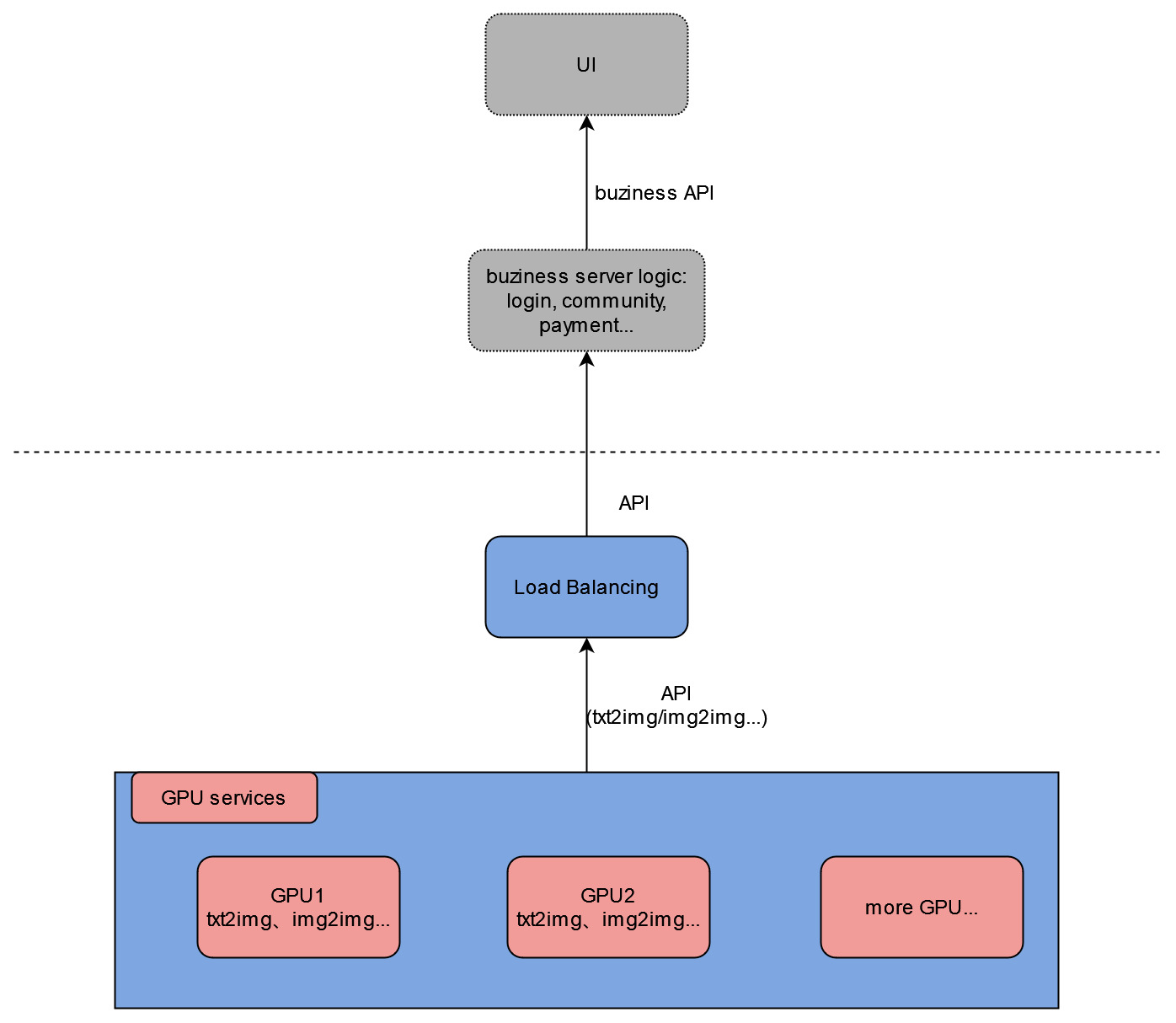
Project directory structure
The project can be roughly divided into two parts: django server code, and stable-diffusion-webui code that we use to initialize and run models. And I'll mainly explain the django server part.
In the main project directory:
modules/: stable-diffusion-webui modulesmodels/: stable diffusion modelssd_multi/: the django project nameurls.py: server API path configuration
simple/: the main django codeviews.py: main API processing logiclb_views.py: load-balancing API
requirements.txt: stable diffusion pip requirementssetup.sh: run it with options to setup the server environmentgen_http_conf.py: called insetup.shto setup the apache configuration
Deploy the GPU server
- SSH to the GPU server
- clone or download the repository
- cd to the main project directory(that contains
manage.py) - run
sudo bash setup.shwith options(checkout thesetup.shfor options)(recommende order: follow the file order:env,venv,sd_model,apache)- if some downloads are slow, you can always download manually and upload to your server
- if you want to change listening ports: change both
/etc/apache2/ports.confand/etc/apache2/sites-available/sd_multi.conf
- restart apache:
sudo service apache2 restart
API definition
/: view the homepage, used to test that apache is configured successfully/txt2img_v2/: txt2img with the same parameters as sd-webui, also supports extension parameters(such as controlnet)/img2img_v2/: img2img with the same parameters as sd-webui, also supports extension parameters(such as controlnet)- previous API version: checkout
old_django_api.md
Deploy the load-balancing server
- SSH to a CPU server
- clone or download the repository
- cd to the main project directory(that contains
manage.py) - run
sudo bash setup.sh lb - run
mv sd_multi/urls.py sd_multi/urls1.py && mv sd_multi/urls_lb.py sd_multi/urls.py - modify
ip_listvariable with your own server ip+port insimple/lb_views.py - restart apache:
sudo service apache2 restart - to test it, view
ip+port/multi_demo/url path
Test the load-balancing server locally
If you don't want to deploy the load balancing server but still want to test the functions, you can start the load-balancing server on your local computer.
- clone or download the repository
- requirements: python3, django, django-cors-headers, replicate
- modify
ip_listvariable with your own GPU server ip+port insimple/lb_views.py - cd to the main project directory(that contains
manage.py) - run
mv sd_multi/urls.py sd_multi/urls1.py&&mv sd_multi/urls_lb.py sd_multi/urls.py(Rename) - run
python manage.py runserver - click the url that shows up in the terminal, view
/multi_demo/path
Finally, you can call your http API(test it using postman).
[Option-2] Deploy using Runpod Serverless
Features:
- Autoscaling with highly customized scaling strategy
- Supports sd-webui checkpoints, Loras...
- Docker image separated with model files, upload and replace models anytime you want
see sd-docker-slim for deploy guide and also a ready-to-use docker image.
[Option-3] Deploy on Replicate
A replicate demo is deployed here
Features:
- Autoscaling
- latest sd-webui source code, latest torch&cuda version
- Docker image with torch 2.2
- Supports sd-webui API with extensions
- Supports sd-webui checkpoints, Loras...
Deploy steps:
- create a model on (replicate)(https://replicate.com)
- get a Linux GPU machine with 50GB disk space
- clone the repository:
git clone https://github.com/wolverinn/stable-diffusion-multi-user.git
cd stable-diffusion-multi-user/replicate-cog-slim/
- modify line-30 in
replicate-cog-slim/cog.yamlto your own replicate model - [optional] modify
replicate-cog-slim/predicy.py'spredict()function for custom API inputs & outputs - install cog: https://replicate.com/docs/guides/push-a-model
- install docker: https://docs.docker.com/engine/install/ubuntu/#set-up-the-repository
- download the checkpoints/Lora/extensions/other models you want to deploy to corresponding directories under
replicate-cog-slim/ - run commands:
cog login
cog push
Then you can see your model on replicate, and you can use it via API or replicate website.
Contributors

47 commits
Similar repos


Languages
Python
85.6%
Jupyter Notebook
8.9%
Cuda
2.1%
JavaScript
1.5%
C++
1.2%
stable diffusion multi-user django server code with multi-GPU load balancing
See the codeREADME
Stable Diffusion Multi-user
stable diffusion multi-user server API deployment that supports autoscaling, webui extension API...
Contents:
- [Option-1] Deploy with Django API
- [Option-2] Deploy using Runpod Serverless
- [Option-3] Deploy on Replicate
[Option-1] Deploy with Django API
Features:
- a server code that provides stable-diffusion http API, including:
- CHANGELOG-230904: Support torch2.0, support extension API when calling txt2img&img2img, support all API parameters same as webui
- txt2img
- img2img
- check generating progress
- interrupt generating
- list available models
- change models
- ...
- supports civitai models and lora, etc.
- supports multi-user queuing
- supports multi-user separately changing models, and won't affect each other
- provides downstream load-balancing server code that automatically do load-balancing among available GPU servers, and ensure that user requests are sent to the same server within one generation cycle
- can be used to deploy multiple stable-diffusion models in one GPU card to make the full use of GPU, check this article for details
You can build your own UI, community features, account login&payment, etc. based on these functions!
Project directory structure
The project can be roughly divided into two parts: django server code, and stable-diffusion-webui code that we use to initialize and run models. And I'll mainly explain the django server part.
In the main project directory:
modules/: stable-diffusion-webui modulesmodels/: stable diffusion modelssd_multi/: the django project nameurls.py: server API path configuration
simple/: the main django codeviews.py: main API processing logiclb_views.py: load-balancing API
requirements.txt: stable diffusion pip requirementssetup.sh: run it with options to setup the server environmentgen_http_conf.py: called insetup.shto setup the apache configuration
Deploy the GPU server
- SSH to the GPU server
- clone or download the repository
- cd to the main project directory(that contains
manage.py) - run
sudo bash setup.shwith options(checkout thesetup.shfor options)(recommende order: follow the file order:env,venv,sd_model,apache)- if some downloads are slow, you can always download manually and upload to your server
- if you want to change listening ports: change both
/etc/apache2/ports.confand/etc/apache2/sites-available/sd_multi.conf
- restart apache:
sudo service apache2 restart
API definition
/: view the homepage, used to test that apache is configured successfully/txt2img_v2/: txt2img with the same parameters as sd-webui, also supports extension parameters(such as controlnet)/img2img_v2/: img2img with the same parameters as sd-webui, also supports extension parameters(such as controlnet)- previous API version: checkout
old_django_api.md
Deploy the load-balancing server
- SSH to a CPU server
- clone or download the repository
- cd to the main project directory(that contains
manage.py) - run
sudo bash setup.sh lb - run
mv sd_multi/urls.py sd_multi/urls1.py && mv sd_multi/urls_lb.py sd_multi/urls.py - modify
ip_listvariable with your own server ip+port insimple/lb_views.py - restart apache:
sudo service apache2 restart - to test it, view
ip+port/multi_demo/url path
Test the load-balancing server locally
If you don't want to deploy the load balancing server but still want to test the functions, you can start the load-balancing server on your local computer.
- clone or download the repository
- requirements: python3, django, django-cors-headers, replicate
- modify
ip_listvariable with your own GPU server ip+port insimple/lb_views.py - cd to the main project directory(that contains
manage.py) - run
mv sd_multi/urls.py sd_multi/urls1.py&&mv sd_multi/urls_lb.py sd_multi/urls.py(Rename) - run
python manage.py runserver - click the url that shows up in the terminal, view
/multi_demo/path
Finally, you can call your http API(test it using postman).
[Option-2] Deploy using Runpod Serverless
Features:
- Autoscaling with highly customized scaling strategy
- Supports sd-webui checkpoints, Loras...
- Docker image separated with model files, upload and replace models anytime you want
see sd-docker-slim for deploy guide and also a ready-to-use docker image.
[Option-3] Deploy on Replicate
A replicate demo is deployed here
Features:
- Autoscaling
- latest sd-webui source code, latest torch&cuda version
- Docker image with torch 2.2
- Supports sd-webui API with extensions
- Supports sd-webui checkpoints, Loras...
Deploy steps:
- create a model on (replicate)(https://replicate.com)
- get a Linux GPU machine with 50GB disk space
- clone the repository:
git clone https://github.com/wolverinn/stable-diffusion-multi-user.git
cd stable-diffusion-multi-user/replicate-cog-slim/
- modify line-30 in
replicate-cog-slim/cog.yamlto your own replicate model - [optional] modify
replicate-cog-slim/predicy.py'spredict()function for custom API inputs & outputs - install cog: https://replicate.com/docs/guides/push-a-model
- install docker: https://docs.docker.com/engine/install/ubuntu/#set-up-the-repository
- download the checkpoints/Lora/extensions/other models you want to deploy to corresponding directories under
replicate-cog-slim/ - run commands:
cog login
cog push
Then you can see your model on replicate, and you can use it via API or replicate website.
Similar repos
Contributors
47 commits
Languages
Python
85.6%
Jupyter Notebook
8.9%
Cuda
2.1%
JavaScript
1.5%
C++
1.2%