Class for logging excessive blocking on the main thread
Swift
1,873
47 commits
updated Jun 14, 2024






Class for logging excessive blocking on the main thread. It watches the main thread and checks if it doesn’t get blocked for more than defined threshold.
👮 Main thread was blocked for 1.25s 👮
You can also inspect which part of your code is blocking the main thread.
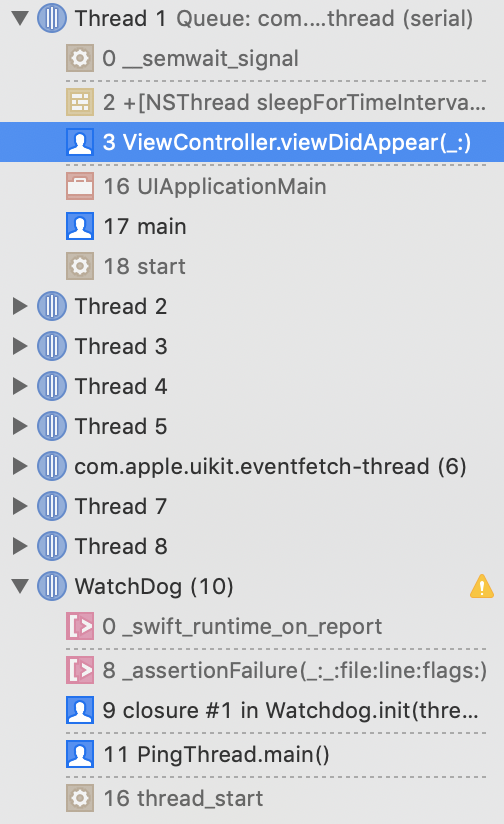
Simply, just instantiate Watchdog with number of seconds that must pass to consider the main thread blocked. Additionally you can enable strictMode that stops the execution whenever the threshold is reached. This way, you can inspect which part of your code is blocking the main thread.
let watchdog = Watchdog(threshold: 0.4, strictMode: true)
Don't forget to retain Watchdog somewhere or it will get released when it goes out of scope.
Add the following to your Cartfile:
github "wojteklu/Watchdog"
Then run carthage update.
Follow the current instructions in Carthage's README for up to date installation instructions.
Add the following to your Podfile:
pod 'Watchdog'
You will also need to make sure you're opting into using frameworks:
use_frameworks!
Manually add the file into your Xcode project. Slightly simpler, but updates are also manual.
Wojtek Lukaszuk @wojteklu
Watchdog is available under the MIT license. See the LICENSE file for more info.
3,230 followers · starred Oct 2015
428 followers · starred Sep 2023
1,338 followers · starred Sep 2015
2,072 followers · starred Sep 2015
Class for logging excessive blocking on the main thread
Swift
1,873
47 commits
updated Jun 14, 2024
Class for logging excessive blocking on the main thread. It watches the main thread and checks if it doesn’t get blocked for more than defined threshold.
👮 Main thread was blocked for 1.25s 👮
You can also inspect which part of your code is blocking the main thread.
Simply, just instantiate Watchdog with number of seconds that must pass to consider the main thread blocked. Additionally you can enable strictMode that stops the execution whenever the threshold is reached. This way, you can inspect which part of your code is blocking the main thread.
let watchdog = Watchdog(threshold: 0.4, strictMode: true)
Don't forget to retain Watchdog somewhere or it will get released when it goes out of scope.
Add the following to your Cartfile:
github "wojteklu/Watchdog"
Then run carthage update.
Follow the current instructions in Carthage's README for up to date installation instructions.
Add the following to your Podfile:
pod 'Watchdog'
You will also need to make sure you're opting into using frameworks:
use_frameworks!
Manually add the file into your Xcode project. Slightly simpler, but updates are also manual.
Wojtek Lukaszuk @wojteklu
Watchdog is available under the MIT license. See the LICENSE file for more info.
3,230 followers · starred Oct 2015
428 followers · starred Sep 2023
1,338 followers · starred Sep 2015
2,072 followers · starred Sep 2015