
A Jekyll blog theme that looks and works like a macOS desktop — Dock, Finder, Spotlight, Terminal and more, on GitHub Pages
See the codeSee what people are saying
README
Ephemeris
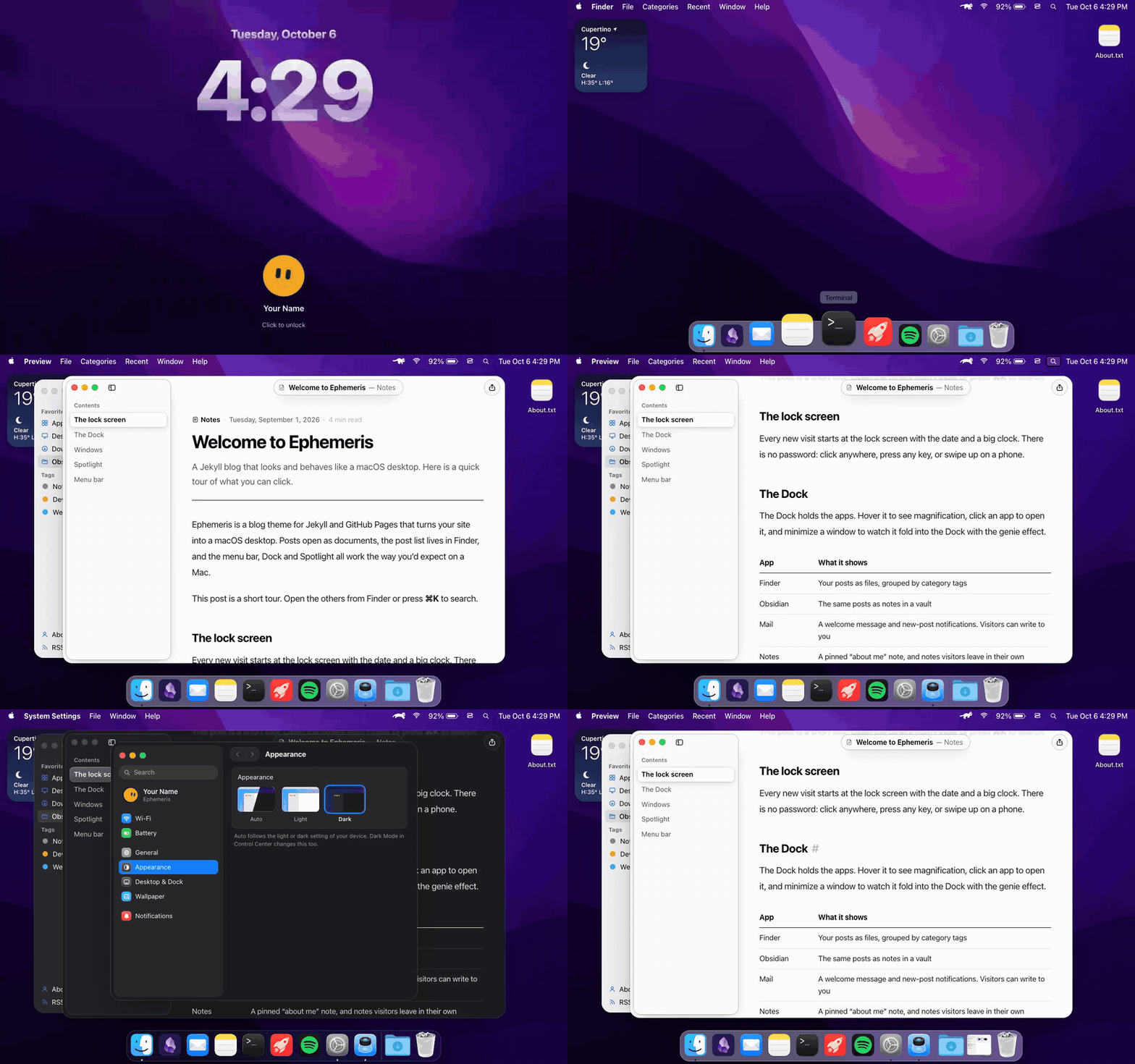
A Jekyll blog that looks and works like a macOS desktop. Posts open as documents, the post list lives in Finder, and the Dock, menu bar and Spotlight all behave the way you'd expect on a Mac.
Features
- Desktop: lock screen, wallpaper, desktop icons, a weather widget, and a menu bar with Wi-Fi, battery, Control Center, Spotlight and Notification Center
- Dock: GPU-accelerated magnification, running-app dots, bounce on launch, minimize with the genie effect, and a Downloads stack
- Windows: drag, resize from any edge, snap to halves and quarters, zoom, minimize, Mission Control (⌥↑) and an app switcher (⌥Tab)
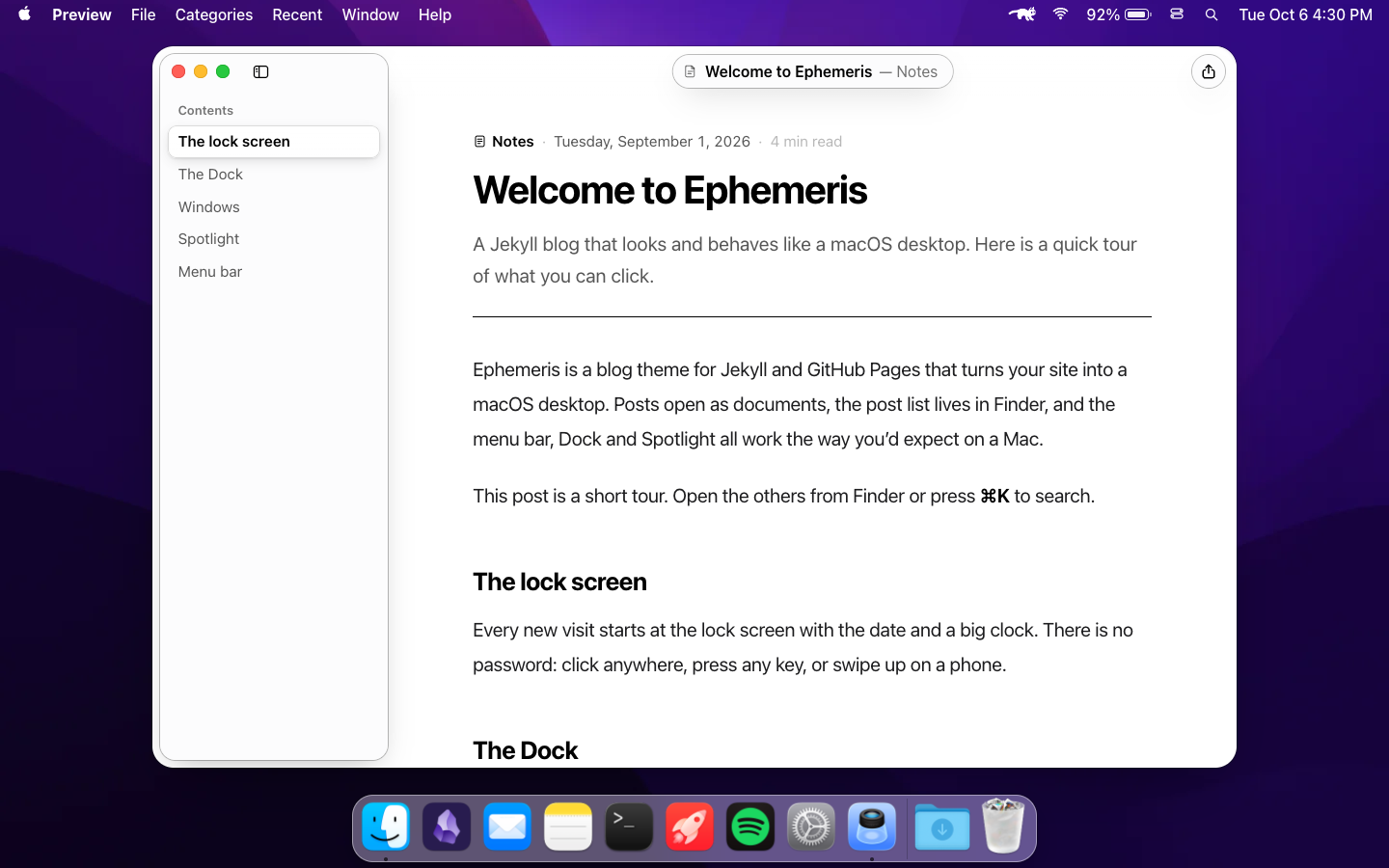
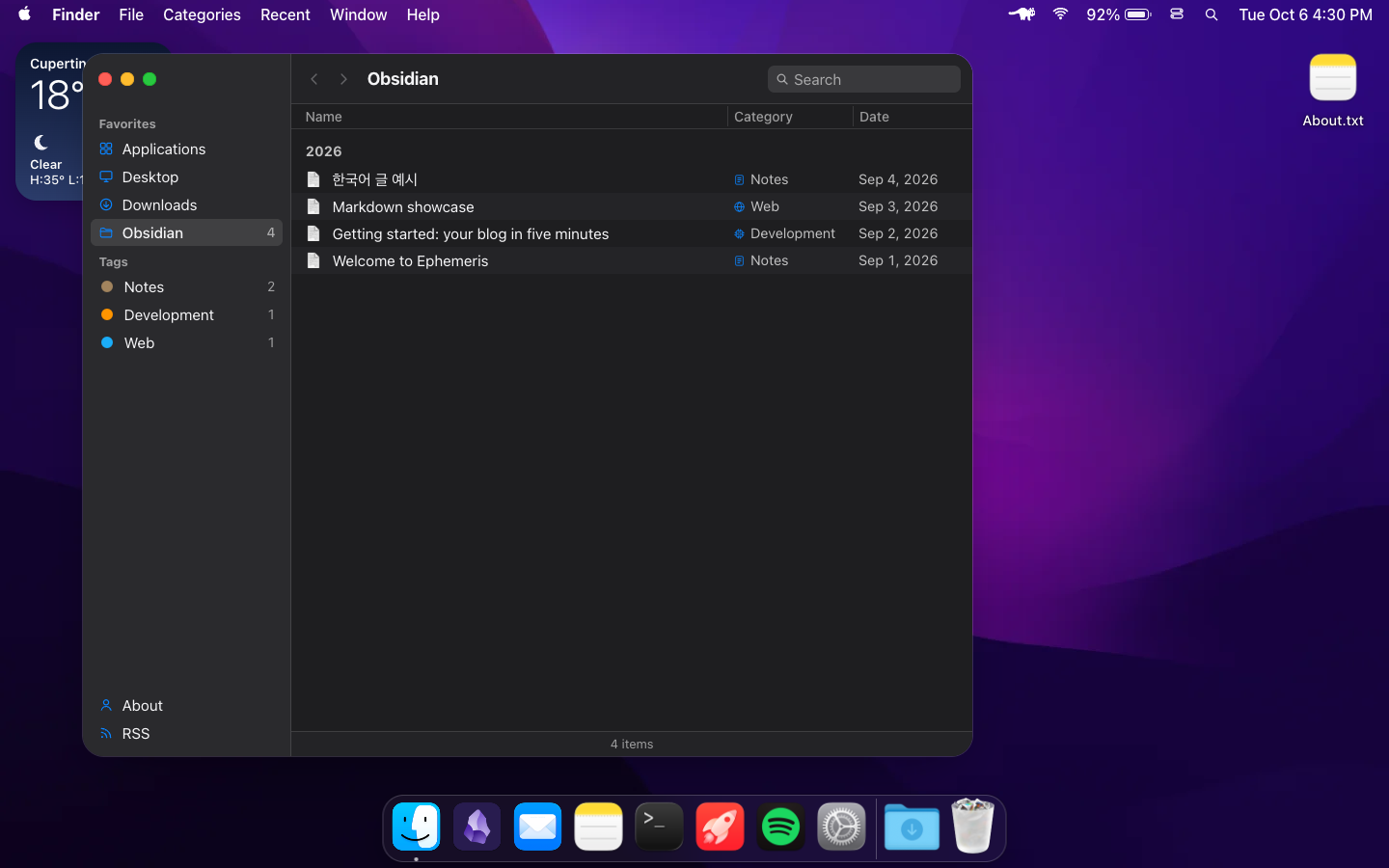
- Your posts, three ways: Finder (files and category tags), Obsidian (notes in a vault) and Preview (the reading window with a table of contents)
- Apps: Mail (visitors write to you), Notes (an "about me" note plus visitors' own notes), Terminal (
ls,cat,open,neofetch…), Calendar, Games (your projects), Spotify (a YouTube-backed album player) and System Settings - System Settings: Appearance (Auto/Light/Dark), Wallpaper (pictures, colors, a Linux-command grid), Dock size and magnification. Choices are remembered per visitor
- Spotlight (⌘K / Ctrl+K): searches posts, apps and categories, and does quick math
- Mac details: SF Pro / Apple SD Gothic Neo system fonts, the macOS cursor, a RunCat menu-bar cat that runs faster when the page is busy, and gray traffic lights on inactive windows
- For readers: RSS, sitemap, SEO and share thumbnails,
prefers-reduced-motionandprefers-reduced-transparencysupport, keyboard navigation everywhere, and a phone layout - No build step to run yourself: GitHub Pages builds it. Plain Jekyll 3/4, vanilla JS and no npm in the site itself
 |  |
Quick start
- Click Use this template → Create a new repository. Name it
<your-username>.github.iofor a site athttps://<your-username>.github.io. - Edit
_config.yml: at leasttitle,author,emailandurl, then thedesktop:block at the bottom. - In the repository, open Settings → Pages → Build and deployment, choose Deploy from a branch, select
mainand/ (root), and save. - Replace the sample posts in
_posts/with your own.
A minute later your desktop is online.
Configuration
Everything personal is in _config.yml and _data/. You never need to touch the JavaScript.
_config.yml
| Key | What it does |
|---|---|
title | Blog name: browser tab, About This Mac, Obsidian vault, Terminal |
author | Your name: lock screen, About This Mac, Mail, the © line |
email | Address the Mail app sends visitors' messages to. Leave it empty to turn Send off |
url, baseurl | Your site's address. baseurl only if it lives in a sub-path like /blog |
description | Default description for search engines and link previews |
timezone | Post dates and URLs are counted in this time zone |
wallpaper, wallpaper_2x, wallpaper_dark, wallpaper_dark_2x, wallpaper_tone | The default wallpaper. wallpaper_tone: dark makes menu-bar text white |
wallpaper_color, wallpaper_grid | Optional: a solid color instead of a picture, or the Linux-command grid |
desktop:
  username: guest           # Terminal prompt and whoami
  hostname: Ephemeris       # Terminal prompt host
  wifi: Home-5G             # Wi-Fi network shown as connected
  weather:                  # desktop widget (Open-Meteo, no API key)
    city: Cupertino
    latitude: 37.3230
    longitude: -122.0322
  coins: [BTC-USD, ETH-USD] # Notification Center widget (Coinbase). [] hides it
  about_category: Personal Blog   # "Category" row in About This Mac
  druid: false              # keep false (an app from the original blog, not included)
jekyll serve doesn't reload _config.yml while it runs, so restart it after editing.
_data/
| File | What it holds |
|---|---|
categories.yml | Post categories: name, icon, color, plus ko (extra search words) |
about_me.yml | The pinned "about me" note in Notes. {posts} and {latest} are filled in |
projects.yml | Your projects, shown as app icons in Games. Icons go in assets/images/apps/ |
music.yml | The album the Spotify app plays: artwork plus YouTube video ids |
Writing posts
Create _posts/YYYY-MM-DD-title.md:
---
layout: minimal_post
title: "My first post"
categories: [notes]
date: 2026-09-03 10:00:00 +0900
description: "One line for Finder, Spotlight and link previews."
---

Hello, desktop!
categoriestakes one slug from_data/categories.yml.##and###headings become the table of contents in the Preview sidebar.- Code blocks get syntax highlighting and a copy button. Images can be clicked to zoom.
Customizing
- Wallpaper: drop pictures into
assets/images/and point thewallpaper*keys at them. Visitors can still pick another one in System Settings. - Dock icons:
assets/images/dock/<app>-128.pngand-256.png(macOS-style rounded squares with their margins). - Colors and sizes: design tokens are at the top of
_sass/mac/_tokens.scss. Dark mode overrides are in_sass/mac/_dark.scss.
Local development
bundle install
bundle exec jekyll serve      # http://localhost:4000
The music player won't play on 127.0.0.1 because of YouTube's embed rules. Use localhost.
Tools (optional, not part of the site)
| Folder | What it does |
|---|---|
tools/og | Bakes 1200×630 share thumbnails into assets/og/ for each post: cd tools/og && npm install && node generate.mjs |
tools/demo | Records docs/demo.gif from a running dev server (needs Chrome and ffmpeg): cd tools/demo && npm install && node record.mjs |
tools/genie | Rebuilds the vendored html-to-image used by the genie effect |
Browser support
The latest Chrome, Edge, Safari and Firefox on desktop and mobile. It uses CSS backdrop-filter, individual transform properties (scale, translate) and ES modules.
Credits and license
The theme's code is released under the MIT License. Fonts, third-party images and services keep their own terms. See NOTICE.md.
This is an independent fan project, not affiliated with Apple Inc. Apple, macOS, Finder and related names and logos are trademarks of Apple Inc. The bundled macOS wallpaper and icons belong to Apple and their respective owners. They're fine for a personal blog, but replace them with your own artwork for any commercial use.
Similar repos


A Jekyll blog theme that looks and works like a macOS desktop — Dock, Finder, Spotlight, Terminal and more, on GitHub Pages
See the codeSee what people are saying
README
Ephemeris
A Jekyll blog that looks and works like a macOS desktop. Posts open as documents, the post list lives in Finder, and the Dock, menu bar and Spotlight all behave the way you'd expect on a Mac.
Features
- Desktop: lock screen, wallpaper, desktop icons, a weather widget, and a menu bar with Wi-Fi, battery, Control Center, Spotlight and Notification Center
- Dock: GPU-accelerated magnification, running-app dots, bounce on launch, minimize with the genie effect, and a Downloads stack
- Windows: drag, resize from any edge, snap to halves and quarters, zoom, minimize, Mission Control (⌥↑) and an app switcher (⌥Tab)
- Your posts, three ways: Finder (files and category tags), Obsidian (notes in a vault) and Preview (the reading window with a table of contents)
- Apps: Mail (visitors write to you), Notes (an "about me" note plus visitors' own notes), Terminal (
ls,cat,open,neofetch…), Calendar, Games (your projects), Spotify (a YouTube-backed album player) and System Settings - System Settings: Appearance (Auto/Light/Dark), Wallpaper (pictures, colors, a Linux-command grid), Dock size and magnification. Choices are remembered per visitor
- Spotlight (⌘K / Ctrl+K): searches posts, apps and categories, and does quick math
- Mac details: SF Pro / Apple SD Gothic Neo system fonts, the macOS cursor, a RunCat menu-bar cat that runs faster when the page is busy, and gray traffic lights on inactive windows
- For readers: RSS, sitemap, SEO and share thumbnails,
prefers-reduced-motionandprefers-reduced-transparencysupport, keyboard navigation everywhere, and a phone layout - No build step to run yourself: GitHub Pages builds it. Plain Jekyll 3/4, vanilla JS and no npm in the site itself
| |
Quick start
- Click Use this template → Create a new repository. Name it
<your-username>.github.iofor a site athttps://<your-username>.github.io. - Edit
_config.yml: at leasttitle,author,emailandurl, then thedesktop:block at the bottom. - In the repository, open Settings → Pages → Build and deployment, choose Deploy from a branch, select
mainand/ (root), and save. - Replace the sample posts in
_posts/with your own.
A minute later your desktop is online.
Configuration
Everything personal is in _config.yml and _data/. You never need to touch the JavaScript.
_config.yml
| Key | What it does |
|---|---|
title | Blog name: browser tab, About This Mac, Obsidian vault, Terminal |
author | Your name: lock screen, About This Mac, Mail, the © line |
email | Address the Mail app sends visitors' messages to. Leave it empty to turn Send off |
url, baseurl | Your site's address. baseurl only if it lives in a sub-path like /blog |
description | Default description for search engines and link previews |
timezone | Post dates and URLs are counted in this time zone |
wallpaper, wallpaper_2x, wallpaper_dark, wallpaper_dark_2x, wallpaper_tone | The default wallpaper. wallpaper_tone: dark makes menu-bar text white |
wallpaper_color, wallpaper_grid | Optional: a solid color instead of a picture, or the Linux-command grid |
desktop:
  username: guest           # Terminal prompt and whoami
  hostname: Ephemeris       # Terminal prompt host
  wifi: Home-5G             # Wi-Fi network shown as connected
  weather:                  # desktop widget (Open-Meteo, no API key)
    city: Cupertino
    latitude: 37.3230
    longitude: -122.0322
  coins: [BTC-USD, ETH-USD] # Notification Center widget (Coinbase). [] hides it
  about_category: Personal Blog   # "Category" row in About This Mac
  druid: false              # keep false (an app from the original blog, not included)
jekyll serve doesn't reload _config.yml while it runs, so restart it after editing.
_data/
| File | What it holds |
|---|---|
categories.yml | Post categories: name, icon, color, plus ko (extra search words) |
about_me.yml | The pinned "about me" note in Notes. {posts} and {latest} are filled in |
projects.yml | Your projects, shown as app icons in Games. Icons go in assets/images/apps/ |
music.yml | The album the Spotify app plays: artwork plus YouTube video ids |
Writing posts
Create _posts/YYYY-MM-DD-title.md:
---
layout: minimal_post
title: "My first post"
categories: [notes]
date: 2026-09-03 10:00:00 +0900
description: "One line for Finder, Spotlight and link previews."
---

Hello, desktop!
categoriestakes one slug from_data/categories.yml.##and###headings become the table of contents in the Preview sidebar.- Code blocks get syntax highlighting and a copy button. Images can be clicked to zoom.
Customizing
- Wallpaper: drop pictures into
assets/images/and point thewallpaper*keys at them. Visitors can still pick another one in System Settings. - Dock icons:
assets/images/dock/<app>-128.pngand-256.png(macOS-style rounded squares with their margins). - Colors and sizes: design tokens are at the top of
_sass/mac/_tokens.scss. Dark mode overrides are in_sass/mac/_dark.scss.
Local development
bundle install
bundle exec jekyll serve      # http://localhost:4000
The music player won't play on 127.0.0.1 because of YouTube's embed rules. Use localhost.
Tools (optional, not part of the site)
| Folder | What it does |
|---|---|
tools/og | Bakes 1200×630 share thumbnails into assets/og/ for each post: cd tools/og && npm install && node generate.mjs |
tools/demo | Records docs/demo.gif from a running dev server (needs Chrome and ffmpeg): cd tools/demo && npm install && node record.mjs |
tools/genie | Rebuilds the vendored html-to-image used by the genie effect |
Browser support
The latest Chrome, Edge, Safari and Firefox on desktop and mobile. It uses CSS backdrop-filter, individual transform properties (scale, translate) and ES modules.
Credits and license
The theme's code is released under the MIT License. Fonts, third-party images and services keep their own terms. See NOTICE.md.
This is an independent fan project, not affiliated with Apple Inc. Apple, macOS, Finder and related names and logos are trademarks of Apple Inc. The bundled macOS wallpaper and icons belong to Apple and their respective owners. They're fine for a personal blog, but replace them with your own artwork for any commercial use.