RP2040 & RP2350 USB gamepad emulation for multiple platforms.
C++
1,324
79 commits
updated Nov 12, 2025
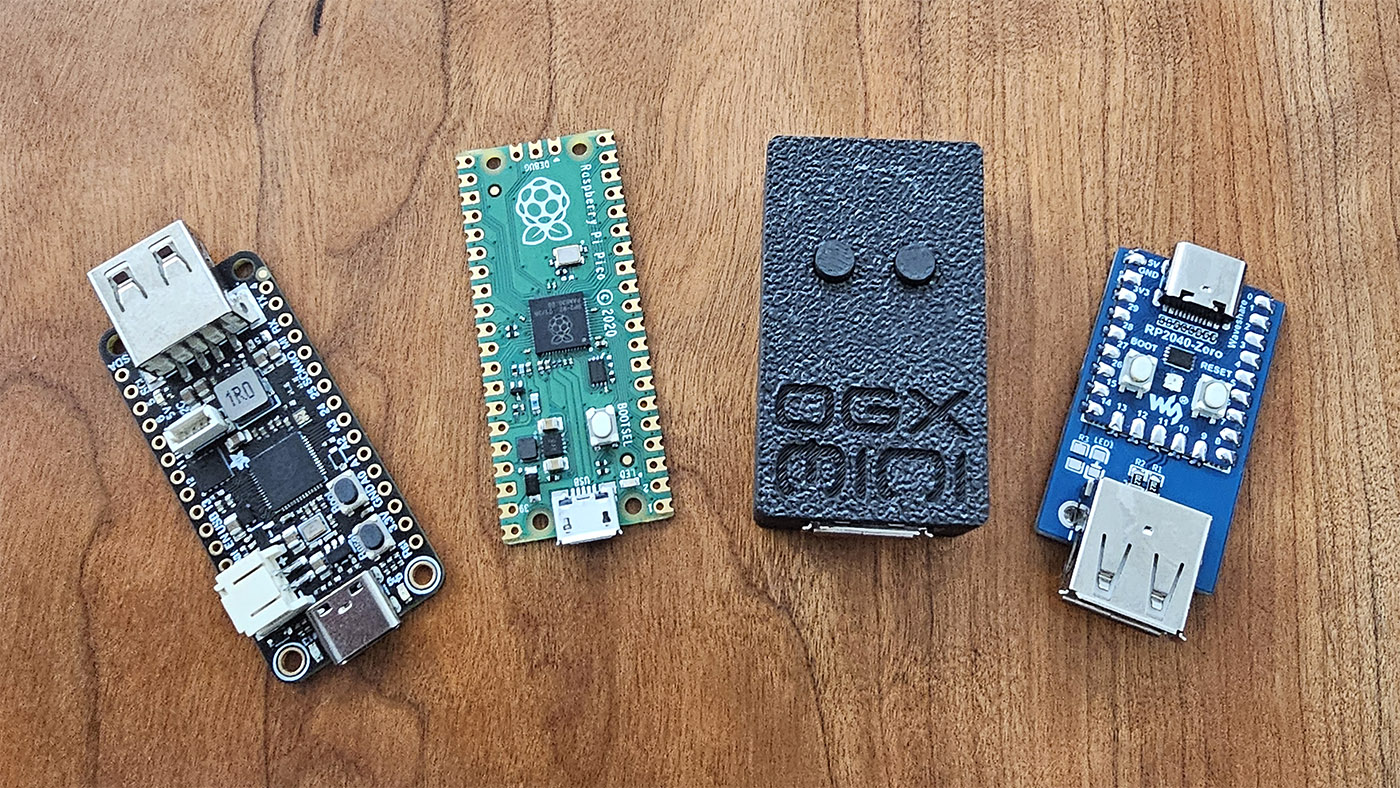
Firmware for the RP2040, capable of emulating gamepads for several game consoles. The firmware comes in many flavors, supported on the Adafruit Feather USB Host board, Pi Pico, Pi Pico 2, Pi Pico W, Pi Pico 2 W, Waveshare RP2040-Zero, Pico/ESP32 hybrid, and a 4-Channel RP2040-Zero setup.
Visit the web app here to change your mappings and deadzone settings. To pair the OGX-Mini with the web app via USB, plug your controller in, then connect it to your PC, hold Start + Left Bumper + Right Bumper to enter web app mode. Click "Connect via USB" in the web app and select the OGX-Mini. You can also pair via Bluetooth, no extra steps are needed in that case.
By default the OGX-Mini will emulate an OG Xbox controller, you must hold a button combo for 3 seconds to change which platform you want to play on. Your chosen mode will persist after powering off the device.
Start = Plus (Switch) = Options (Dualsense/DS4)
After a new mode is stored, the RP2040 will reset itself so you don't need to unplug it.
Note: There are some third party controllers that can change their VID/PID, these might not work correctly.
Note: Bluetooth functionality is in early testing, some may have quirks.
Please visit this page for a more comprehensive list of supported controllers and Bluetooth pairing instructions.
For Pi Pico, RP2040-Zero, 4 channel, and ESP32 configurations, please see the hardware folder for diagrams.
I've designed a PCB for the RP2040-Zero so you can make a small form-factor adapter yourself. The gerber files, schematic, and BOM are in Hardware folder.
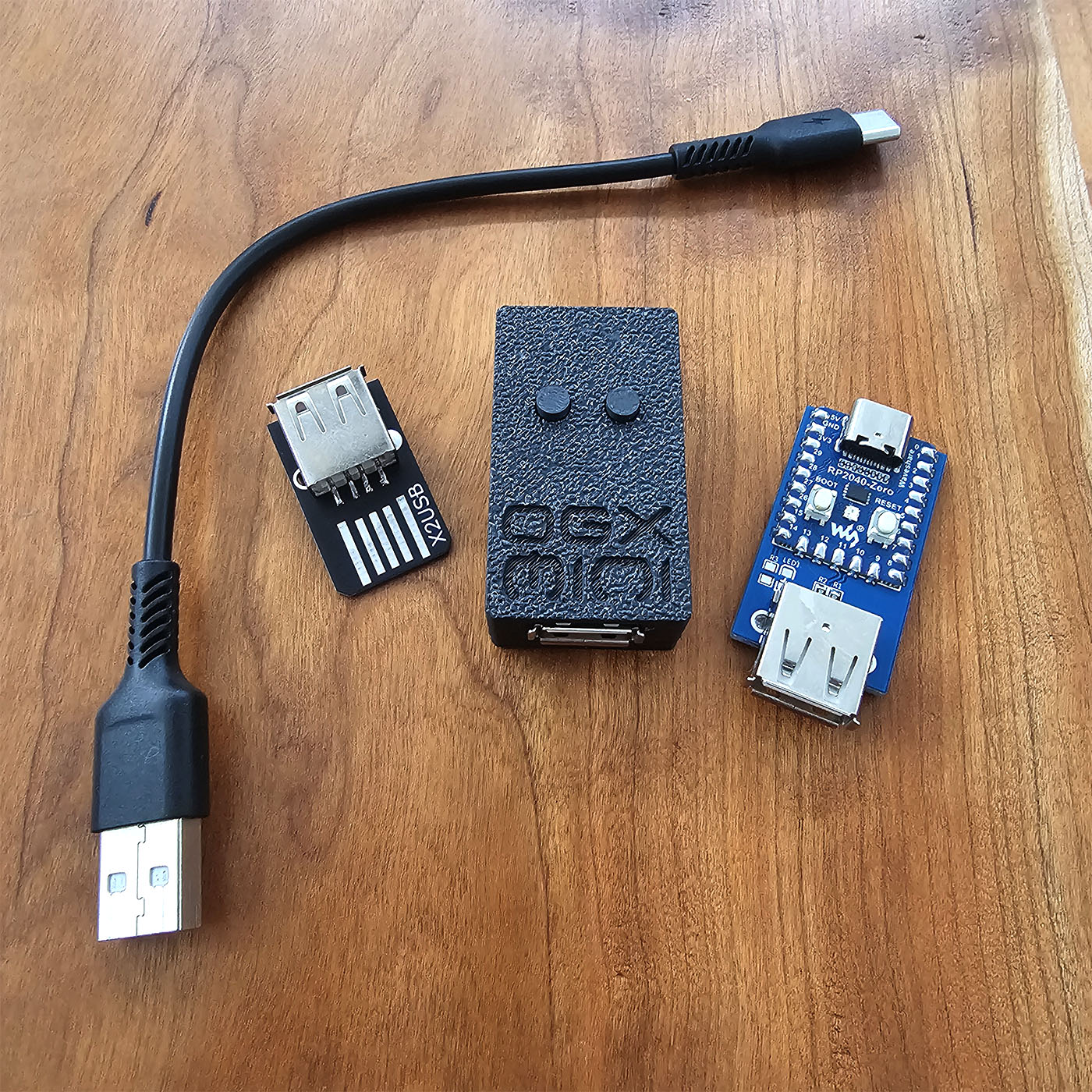
If you would like a prebuilt unit, you can purchase one, with cable and Xbox adapter included, from my Etsy store.
If your third party controller isn't working, but the original version is listed above, send me the device's VID and PID and I'll add it so it's recognized properly.
You can compile this for different boards with the CMake argument OGXM_BOARD while configuring the project.
The options are:
PI_PICOPI_PICO2PI_PICOWPI_PICO2WRP2040_ZEROADAFRUIT_FEATHERESP32_BLUEPAD32_I2CESP32_BLUERETRO_I2CEXTERNAL_4CH_I2CYou can also set MAX_GAMEPADS which, if greater than one, will only support DInput (PS3) and Switch.
You'll need git, python3, CMake, Ninja and the GCC ARM toolchain installed. CMake scripts will patch some files in Bluepad32 and BTStack and also make sure all git submodules (plus their submodules and dependencies) are downloaded. Here's an example on Windows:
git clone --recursive https://github.com/wiredopposite/OGX-Mini.git
cd OGX-Mini/Firmware/RP2040
cmake -S . -B build -G Ninja -DCMAKE_BUILD_TYPE=Release -DOGXM_BOARD=PI_PICOW -DMAX_GAMEPADS=1
cmake --build build
Or just install the GCC ARM toolchain and use the CMake Tools extension in VSCode.
Please see the Hardware directory for a diagram showing how to hookup the ESP32 to your RP2040.
You will need ESP-IDF v5.1, esptool, python3, and git installed. If you use VSCode, you can install the ESP-IDF extension and configure the project for ESP-IDF v5.1, it'll download everything for you and then you just click the build button at the bottom of the window.
When you build with ESP-IDF, Cmake will run a python script that copies the necessary BTStack files into the components directory, this is needed since BTStack isn't configured as an ESP-IDF component when you download it with git.
489 followers · starred Jun 2025
43 followers · starred Jul 2025
510 followers · starred Sep 2025
43 followers · starred Sep 2025
RP2040 & RP2350 USB gamepad emulation for multiple platforms.
C++
1,324
79 commits
updated Nov 12, 2025
Firmware for the RP2040, capable of emulating gamepads for several game consoles. The firmware comes in many flavors, supported on the Adafruit Feather USB Host board, Pi Pico, Pi Pico 2, Pi Pico W, Pi Pico 2 W, Waveshare RP2040-Zero, Pico/ESP32 hybrid, and a 4-Channel RP2040-Zero setup.
Visit the web app here to change your mappings and deadzone settings. To pair the OGX-Mini with the web app via USB, plug your controller in, then connect it to your PC, hold Start + Left Bumper + Right Bumper to enter web app mode. Click "Connect via USB" in the web app and select the OGX-Mini. You can also pair via Bluetooth, no extra steps are needed in that case.
By default the OGX-Mini will emulate an OG Xbox controller, you must hold a button combo for 3 seconds to change which platform you want to play on. Your chosen mode will persist after powering off the device.
Start = Plus (Switch) = Options (Dualsense/DS4)
After a new mode is stored, the RP2040 will reset itself so you don't need to unplug it.
Note: There are some third party controllers that can change their VID/PID, these might not work correctly.
Note: Bluetooth functionality is in early testing, some may have quirks.
Please visit this page for a more comprehensive list of supported controllers and Bluetooth pairing instructions.
For Pi Pico, RP2040-Zero, 4 channel, and ESP32 configurations, please see the hardware folder for diagrams.
I've designed a PCB for the RP2040-Zero so you can make a small form-factor adapter yourself. The gerber files, schematic, and BOM are in Hardware folder.
If you would like a prebuilt unit, you can purchase one, with cable and Xbox adapter included, from my Etsy store.
If your third party controller isn't working, but the original version is listed above, send me the device's VID and PID and I'll add it so it's recognized properly.
You can compile this for different boards with the CMake argument OGXM_BOARD while configuring the project.
The options are:
PI_PICOPI_PICO2PI_PICOWPI_PICO2WRP2040_ZEROADAFRUIT_FEATHERESP32_BLUEPAD32_I2CESP32_BLUERETRO_I2CEXTERNAL_4CH_I2CYou can also set MAX_GAMEPADS which, if greater than one, will only support DInput (PS3) and Switch.
You'll need git, python3, CMake, Ninja and the GCC ARM toolchain installed. CMake scripts will patch some files in Bluepad32 and BTStack and also make sure all git submodules (plus their submodules and dependencies) are downloaded. Here's an example on Windows:
git clone --recursive https://github.com/wiredopposite/OGX-Mini.git
cd OGX-Mini/Firmware/RP2040
cmake -S . -B build -G Ninja -DCMAKE_BUILD_TYPE=Release -DOGXM_BOARD=PI_PICOW -DMAX_GAMEPADS=1
cmake --build build
Or just install the GCC ARM toolchain and use the CMake Tools extension in VSCode.
Please see the Hardware directory for a diagram showing how to hookup the ESP32 to your RP2040.
You will need ESP-IDF v5.1, esptool, python3, and git installed. If you use VSCode, you can install the ESP-IDF extension and configure the project for ESP-IDF v5.1, it'll download everything for you and then you just click the build button at the bottom of the window.
When you build with ESP-IDF, Cmake will run a python script that copies the necessary BTStack files into the components directory, this is needed since BTStack isn't configured as an ESP-IDF component when you download it with git.
489 followers · starred Jun 2025
43 followers · starred Jul 2025
510 followers · starred Sep 2025
43 followers · starred Sep 2025



