
The Repository is the Workspace
See the codeSee what people are saying
README
Noodle
The repository is the workspace
Open-source terminal REST client
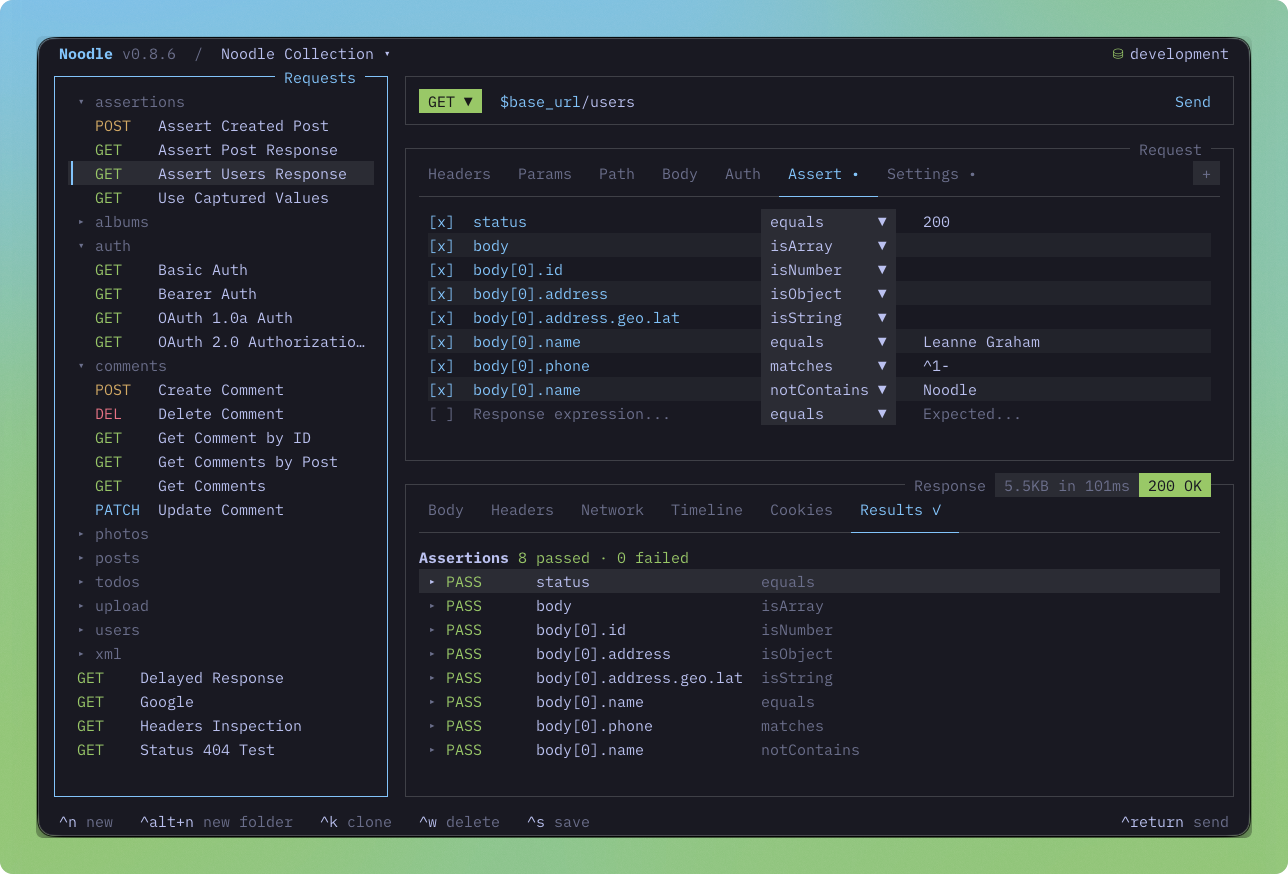
Write, send, inspect, and automate HTTP requests from readable files without leaving your terminal. Keep every collection versioned beside the code it exercises, ready for the TUI, CLI, scripts, and coding agents.
Get started · Website · Docs · Changelog · Security · Sponsor
Install
curl -LsSf https://noodlerest.dev/install.sh | sh
Prebuilt binaries support macOS and Linux on arm64 and x86_64, plus Windows x64 in beta. See installation options for Homebrew and source builds.
Windows x64 (beta)
Windows x64 binaries are included from v0.9.7. Install from PowerShell:
irm https://noodlerest.dev/install.ps1 | iex
The installer verifies the release checksum, installs to
%LOCALAPPDATA%\Programs\Noodle\noodle.exe, and updates your user PATH.
Open a new terminal after installation. Windows ARM64 is not supported.
Set NOODLE_VERSION, NOODLE_INSTALL_DIR, or NOODLE_SKIP_PATH_UPDATE=1
before running the script to override the version, destination, or PATH update.
Run noodle update to stage an update, then close and reopen Noodle to apply it.
Windows executables are unsigned; browser downloads may trigger Windows trust
prompts. Ordinary-account and interactive terminal testing remains pending.
For prerelease testing, manually dispatched CI runs provide a Windows beta ZIP
containing noodle.exe, checksums, and build information.
Quick start
Follow the quick start guide to create a collection, send your first request, and inspect the response.
Features
- 📁 File-based collections: Keep requests in YAML, organize them into folders, and version them with Git.
- ✏️ Request editor: Edit URLs, parameters, headers, JSON, XML, forms, and file uploads in the terminal.
- 🔍 Response inspection: Explore JSON and XML in Source or Visual views, filter JSON with JSONPath, and inspect headers and network traces.
- 📥 Images and downloads: Preview supported images, save response files, and open them in their default app.
- 🗝️ Environments and secrets: Switch between environments, reuse variables, and store secrets in the OS vault.
- 🔐 Authentication: Use bearer tokens, basic auth, API keys, OAuth 1.0a, OAuth 2.0, NTLMv2, and AWS SigV4.
- 🛡️ Proxies and TLS: Configure proxy policies, custom certificate authorities, and mutual TLS.
- 🧪 Response assertions: Check status, timing, headers, and JSON values in the TUI or CI.
- ✅ Scripted tests: Check responses with synchronous or async tests, JSON Schema draft-07, property, length, type, and partial-object matchers.
- 🎯 Response captures: Pass response values to later requests or save them to an environment or secret.
- 📜 Scripting: Prepare requests and process responses with sandboxed JavaScript. Share inline scripts or external JavaScript files across collections and folders. Pre scripts, post scripts, and tests each run collection → folders → request, so request-specific successful writes override inherited values. Author Pre Script, Post Script, and Tests in the TUI with completion, diagnostics, folding, and formatting; browse logs in Console.
- 🎲 Body templates:
Generate test data and timestamps with
$randomand$timeplaceholders. - ⚡ Collection runner and automation: Run requests or folders with tag filters, fail-fast behavior, delays, CSV/JSON iteration data, and JSON results. Try the local data-run example.
- 🕘 Response history and cookies: Revisit past responses and manage a cookie jar for each collection.
- 🎨 Themes and keybindings: Follow your terminal palette or choose a theme, and customize your shortcuts.
- 🔄 Import and export: Bring OpenAPI, Swagger, Postman, and Insomnia collections into Noodle; preserve compatible Postman and Insomnia scripts without translating foreign APIs. Imports that retain scripts or tests require a new collection. Export to OpenAPI or Postman.
- 🤖 AI agent skills:
Install the Noodle skill with
noodle agent installso coding agents can create, maintain, and run collections.
Documentation
- All guides and references
- CLI commands
- Collection format
- Script scopes and inheritance
- External JavaScript files
- Script cookbook
- Changelog
Contributing
Noodle is built with Bun, TypeScript, React, and OpenTUI.
bun install
bun run dev
This starts the local HTTP, HTTPS, authentication, and proxy services and opens
the development collection in dev/collection/. Run bun run dev:server for
services alone, or bun run dev:check to validate the local scenarios. See the
development guide for suites and fixture credentials.
See AGENTS.md for the architecture, conventions, and test commands.
Sponsor
Noodle is free and open source. If it saves you time, you can sponsor its continued development. Sponsorship supports maintenance, bug fixes, documentation, and platform testing.
License
Significant stargazers

710 followers · starred Aug 2026

145 followers · starred Jul 2026

224 followers · starred Aug 2026

122 followers · starred Aug 2026
Similar repos


The Repository is the Workspace
See the codeSee what people are saying
README
Noodle
The repository is the workspace
Open-source terminal REST client
Write, send, inspect, and automate HTTP requests from readable files without leaving your terminal. Keep every collection versioned beside the code it exercises, ready for the TUI, CLI, scripts, and coding agents.
Get started · Website · Docs · Changelog · Security · Sponsor
Install
curl -LsSf https://noodlerest.dev/install.sh | sh
Prebuilt binaries support macOS and Linux on arm64 and x86_64, plus Windows x64 in beta. See installation options for Homebrew and source builds.
Windows x64 (beta)
Windows x64 binaries are included from v0.9.7. Install from PowerShell:
irm https://noodlerest.dev/install.ps1 | iex
The installer verifies the release checksum, installs to
%LOCALAPPDATA%\Programs\Noodle\noodle.exe, and updates your user PATH.
Open a new terminal after installation. Windows ARM64 is not supported.
Set NOODLE_VERSION, NOODLE_INSTALL_DIR, or NOODLE_SKIP_PATH_UPDATE=1
before running the script to override the version, destination, or PATH update.
Run noodle update to stage an update, then close and reopen Noodle to apply it.
Windows executables are unsigned; browser downloads may trigger Windows trust
prompts. Ordinary-account and interactive terminal testing remains pending.
For prerelease testing, manually dispatched CI runs provide a Windows beta ZIP
containing noodle.exe, checksums, and build information.
Quick start
Follow the quick start guide to create a collection, send your first request, and inspect the response.
Features
- 📁 File-based collections: Keep requests in YAML, organize them into folders, and version them with Git.
- ✏️ Request editor: Edit URLs, parameters, headers, JSON, XML, forms, and file uploads in the terminal.
- 🔍 Response inspection: Explore JSON and XML in Source or Visual views, filter JSON with JSONPath, and inspect headers and network traces.
- 📥 Images and downloads: Preview supported images, save response files, and open them in their default app.
- 🗝️ Environments and secrets: Switch between environments, reuse variables, and store secrets in the OS vault.
- 🔐 Authentication: Use bearer tokens, basic auth, API keys, OAuth 1.0a, OAuth 2.0, NTLMv2, and AWS SigV4.
- 🛡️ Proxies and TLS: Configure proxy policies, custom certificate authorities, and mutual TLS.
- 🧪 Response assertions: Check status, timing, headers, and JSON values in the TUI or CI.
- ✅ Scripted tests: Check responses with synchronous or async tests, JSON Schema draft-07, property, length, type, and partial-object matchers.
- 🎯 Response captures: Pass response values to later requests or save them to an environment or secret.
- 📜 Scripting: Prepare requests and process responses with sandboxed JavaScript. Share inline scripts or external JavaScript files across collections and folders. Pre scripts, post scripts, and tests each run collection → folders → request, so request-specific successful writes override inherited values. Author Pre Script, Post Script, and Tests in the TUI with completion, diagnostics, folding, and formatting; browse logs in Console.
- 🎲 Body templates:
Generate test data and timestamps with
$randomand$timeplaceholders. - ⚡ Collection runner and automation: Run requests or folders with tag filters, fail-fast behavior, delays, CSV/JSON iteration data, and JSON results. Try the local data-run example.
- 🕘 Response history and cookies: Revisit past responses and manage a cookie jar for each collection.
- 🎨 Themes and keybindings: Follow your terminal palette or choose a theme, and customize your shortcuts.
- 🔄 Import and export: Bring OpenAPI, Swagger, Postman, and Insomnia collections into Noodle; preserve compatible Postman and Insomnia scripts without translating foreign APIs. Imports that retain scripts or tests require a new collection. Export to OpenAPI or Postman.
- 🤖 AI agent skills:
Install the Noodle skill with
noodle agent installso coding agents can create, maintain, and run collections.
Documentation
- All guides and references
- CLI commands
- Collection format
- Script scopes and inheritance
- External JavaScript files
- Script cookbook
- Changelog
Contributing
Noodle is built with Bun, TypeScript, React, and OpenTUI.
bun install
bun run dev
This starts the local HTTP, HTTPS, authentication, and proxy services and opens
the development collection in dev/collection/. Run bun run dev:server for
services alone, or bun run dev:check to validate the local scenarios. See the
development guide for suites and fixture credentials.
See AGENTS.md for the architecture, conventions, and test commands.
Sponsor
Noodle is free and open source. If it saves you time, you can sponsor its continued development. Sponsorship supports maintenance, bug fixes, documentation, and platform testing.
License
Similar repos
Significant stargazers
710 followers · starred Aug 2026
145 followers · starred Jul 2026
224 followers · starred Aug 2026
122 followers · starred Aug 2026