
ComfyUI node for modular, human‑like Kani TTS. Generate natural, high‑quality speech from text
Python
38
8 commits
updated Oct 17, 2025
README
ComfyUI-KaniTTS
A custom node for ComfyUI that integrates KaniTTS, a family of high-speed, high-fidelity Text-to-Speech models optimized for real-time applications.
Report Bug
·
Request Feature



About The Project
KaniTTS is a high-speed, high-fidelity Text-to-Speech (TTS) model family designed for real-time conversational AI applications. It uses a novel two-stage pipeline, combining a powerful language model with an efficient audio codec to deliver exceptional speed and audio quality.
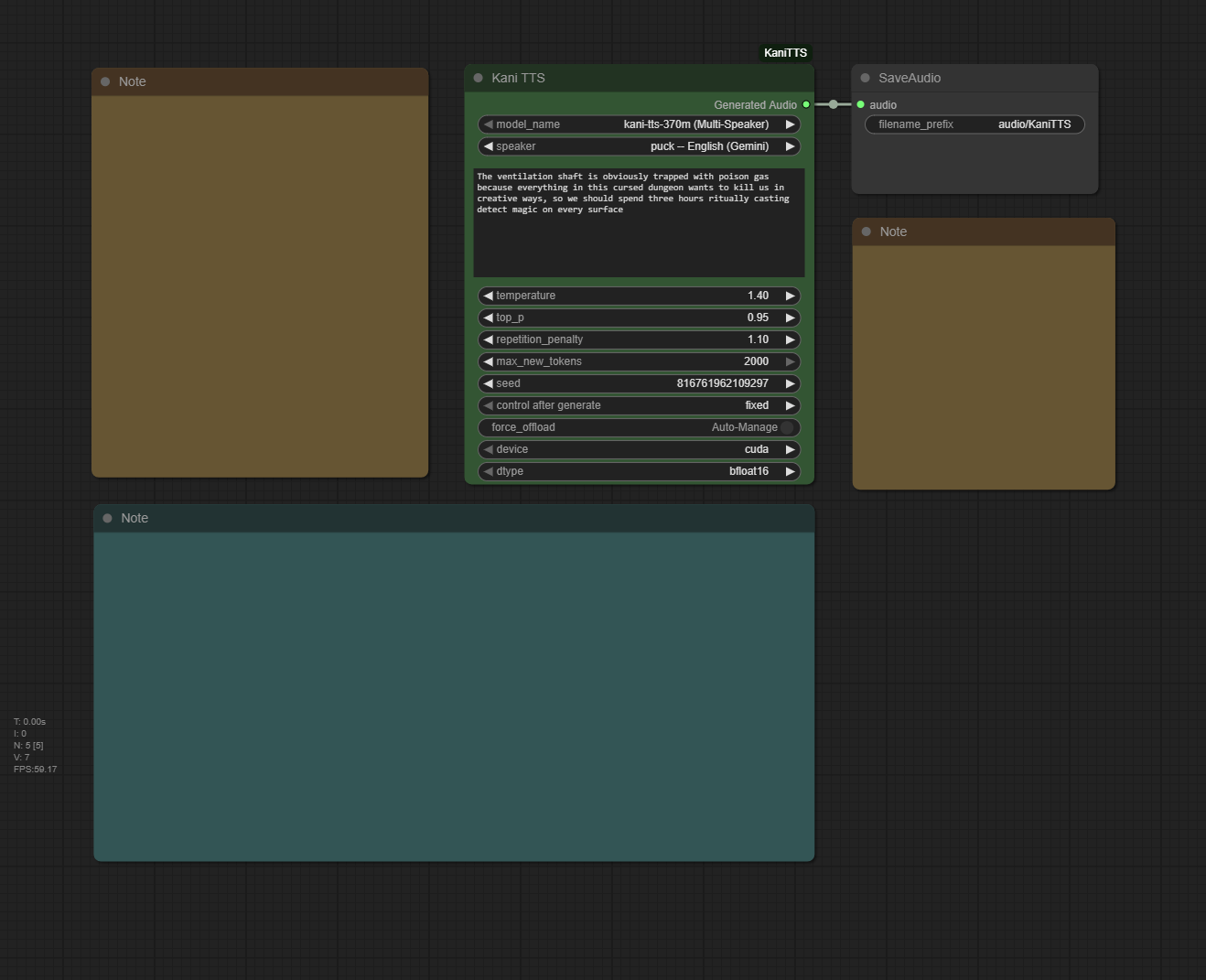
This custom node handles everything from model downloading and memory management to audio processing, allowing you to generate high-quality speech directly from a text script using a variety of voices and models.
✨ Key Features:
- Multi-Speaker Synthesis: Use the
kani-tts-370mmodel to choose from a diverse list of predefined voices in multiple languages. - Variety of Models: Access five different KaniTTS models, including base versions for creative, randomized voices and fine-tuned versions for specific vocal characteristics.
- Automatic Model Management: All required KaniTTS and NeMo codec models are downloaded automatically and managed efficiently by ComfyUI to save VRAM.
- Fine-Grained Control: Adjust parameters like temperature, top-p, and repetition penalty to tune the performance and style of the generated speech.
- High-Efficiency Synthesis: KaniTTS is optimized for low-latency inference on edge devices or affordable servers, generating 15 seconds of audio in under a second on modern GPUs.
══════════════════════════════════
Beyond the code, I believe in the power of community and continuous learning. I invite you to join the 'TokenDiff AI News' and 'TokenDiff Community Hub'
TokenDiff AI News🗞️ AI for every home, creativity for every mind! |
TokenDiff Community Hub💬 questions, help, and thoughtful discussion. |
══════════════════════════════════
🚀 Getting Started
The easiest way to install is via ComfyUI Manager. Search for ComfyUI-KaniTTS and click "Install".
Alternatively, to install manually:
-
Clone the Repository:
Navigate to your
ComfyUI/custom_nodes/directory and clone this repository:git clone https://github.com/wildminder/ComfyUI-KaniTTS.git
[!WARNING] KaniTTS requires specific and potentially conflicting dependencies. It is highly recommended to use a dedicated Python environment for ComfyUI.
-
Install Dependencies:
Open a terminal or command prompt, activate your environment, navigate into the cloned directory, and install the required packages:
cd ComfyUI/custom_nodes/ComfyUI-KaniTTS pip install -r requirements.txt -
Start/Restart ComfyUI: Launch ComfyUI. The "Kani TTS" node will appear under the
audio/ttscategory. The first time you use the node, it will automatically download the selected model to yourComfyUI/models/tts/folder.
░░░░░░░░░░░░░░░░░░░░░░░░░░░░░░░░░░
[!CAUTION] The automatic installation of
nemo_toolkitoften fails on Windows due to dependencies that require compilation (pynini,editdistance, etc.). The recommended method is to manually install the pre-built packages (.whlfiles) for your Python version.
Step A: Download Required Packages
- Identify your Python version. Open a command prompt and run
python --version(e.g.,Python 3.12.4). - Download the appropriate
.whlfiles for your Python version from the table below. All files are hosted on the Python-Windows-WHL Hugging Face repository.
| Package Name | Version | Python Version | Download Link |
|---|---|---|---|
nemo_toolkit | 2.6.0rc0 | 3.12 / 3.13 | nemo_toolkit-2.6.0rc0-py3-none-any.whl |
pynini | 2.1.6.post1 | 3.12 | pynini-2.1.6.post1-cp312-cp312-win_amd64.whl |
pynini | 2.1.7 | 3.13 | pynini-2.1.7-py313.whl |
editdistance | 0.8.1 | 3.13 | editdistance-0.8.1-cp313-cp313-win_amd64.whl |
megatron_core | 0.13.1 | 3.12 | megatron_core-0.13.1-cp312-cp312-win_amd64.whl |
megatron_core | 0.13.1 | 3.13 | megatron_core-0.13.1-cp313-cp313-win_amd64.whl |
texterrors | 1.0.9 | 3.12 | texterrors-1.0.9-cp312-cp312-win_amd64.whl |
texterrors | 1.0.9 | 3.13 | texterrors-1.0.9-cp313-cp313-win_amd64.whl |
░░░░░░░░░░░░░░░░░░░░░░░░░░░░░░░░░░
Models
This node automatically downloads the required KaniTTS models and their dependencies (like the NeMo audio codec).
| Model Name | Parameters | Description / Key Features | Hugging Face Link |
|---|---|---|---|
kani-tts-370m | 370M | Multi-Speaker. The most flexible model, supporting a wide range of predefined voices in multiple languages. | nineninesix/kani-tts-370m |
kani-tts-450m-0.1-pt | 450M | Base Model. Pretrained on English. Generates a generic/randomized voice. Good for creative applications or as a base for fine-tuning. | nineninesix/kani-tts-450m-0.1-pt |
kani-tts-450m-0.1-ft | 450M | Finetuned (Male). A version of the 450M model finetuned to produce a consistent male voice. | nineninesix/kani-tts-450m-0.1-ft |
kani-tts-450m-0.2-pt | 450M | Base Model 2. Pretrained with broader multilingual support (EN, DE, AR, CN, KR, FR, JP, ES). Generates a generic/randomized voice. | nineninesix/kani-tts-450m-0.2-pt |
kani-tts-450m-0.2-ft | 450M | Finetuned (Female). A version of the 450M model finetuned to produce a consistent female voice. | nineninesix/kani-tts-450m-0.2-ft |
Click to view details on the `kani-tts-370m` speakers
david— David, English (British)puck— Puck, English (Gemini)kore— Kore, English (Gemini)andrew— Andrew, Englishjenny— Jenny, English (Irish)simon— Simon, Englishkatie— Katie, Englishseulgi— Seulgi, Koreanbert— Bert, Germanthorsten— Thorsten, German (Hessisch)maria— Maria, Spanishmei— Mei, Chinese (Cantonese)ming— Ming, Chinese (Shanghai OpenAI)karim— Karim, Arabicnur— Nur, Arabic
🛠️ Usage
- Add the Node: Add the
Kani TTSnode to your graph from theaudio/ttscategory. - Select a Model: Choose your desired KaniTTS model from the
model_namedropdown. - Select a Speaker (for 370m model): If you chose the
kani-tts-370mmodel, thespeakerdropdown will be active. Select a voice or leave it asNonefor a random voice. For all other models, leave this set toNone. - Enter Text: Write the text you want to synthesize in the
textfield. - Generate: Queue the prompt. The node will process the text and generate a single audio file.
[!NOTE] This node performs Text-to-Speech using predefined or randomized voices. It does not perform voice cloning from a user-provided audio file.
Node Inputs
model_name: Select the KaniTTS model to use. Models are downloaded automatically.speaker: Select a predefined voice. This is only effective when using thekani-tts-370mmodel.text: The target text to synthesize into speech.temperature: Controls randomness. Higher values are more creative but can be less coherent.top_p: Nucleus sampling probability. Helps control the diversity of the generated speech.repetition_penalty: Penalizes the model for repeating words or sounds, reducing robotic output.max_new_tokens: The maximum length of the generated audio tokens.seed: A seed for reproducibility. Set to -1 for a random seed on each run.force_offload: Forces the model to be completely offloaded from VRAM after generation.device: The compute device to use for inference (e.g.,cuda,cpu).dtype: The data type for model precision (e.g.,bfloat16,float16).bfloat16is recommended for modern GPUs.
🎤 Choosing the Right Voice
KaniTTS offers several types of models. Here’s a guide to help you pick the perfect one for your needs.
🥇 The Multi-Speaker Powerhouse: kani-tts-370m
This is your go-to model for control and variety. It contains multiple high-quality, pre-defined voices.
- Select
kani-tts-370m (Multi-Speaker)in themodel_namedropdown. - Choose your desired voice from the
speakerdropdown. - The model will generate speech using that specific speaker's characteristics.
🎭 The Finetuned Specialists: 450m-ft Models
These models are experts at producing one specific type of voice. Use them when you need a consistent male or female character.
- Select
kani-tts-450m-0.1-ft (Male)orkani-tts-450m-0.2-ft (Female)as themodel_name. - Ensure the
speakerdropdown is set toNone. - The model will generate speech in its pre-defined vocal style.
🎨 The Creative Bases: 450m-pt Models
These are the foundational models. They don't have a specific voice baked in, so they will generate a different, randomized voice each time (unless you fix the seed).
- Select
kani-tts-450m-0.1-pt (Base)orkani-tts-450m-0.2-pt (Base 2)as themodel_name. - Ensure the
speakerdropdown is set toNone. - The model will creatively infer a suitable voice for the text.
⚠️ Risks and Limitations
- Potential for Misuse: Speech synthesis technology can be misused. Users of this node must not use it to create content that is illegal, harmful, threatening, or defamatory, or that infringes upon the rights of individuals. It is strictly forbidden to impersonate individuals without consent.
- Technical Limitations: Performance may degrade with very long inputs (> 2000 tokens). Emotion control is basic and requires dedicated fine-tuning.
- Inherited Biases: The models are trained on public datasets and may inherit biases in prosody or pronunciation from the training data.
- This node is released for research and development purposes. Please use it responsibly.
License
The KaniTTS models and their components are subject to the Apache 2.0 License.
Acknowledgments
- nineninesix-ai for creating and open-sourcing the incredible KaniTTS project.
- The ComfyUI team for their powerful and extensible platform.
Contributors

8 commits
Similar repos


Languages
Python
100.0%
ComfyUI node for modular, human‑like Kani TTS. Generate natural, high‑quality speech from text
Python
38
8 commits
updated Oct 17, 2025
README
ComfyUI-KaniTTS
A custom node for ComfyUI that integrates KaniTTS, a family of high-speed, high-fidelity Text-to-Speech models optimized for real-time applications.
Report Bug
·
Request Feature
About The Project
KaniTTS is a high-speed, high-fidelity Text-to-Speech (TTS) model family designed for real-time conversational AI applications. It uses a novel two-stage pipeline, combining a powerful language model with an efficient audio codec to deliver exceptional speed and audio quality.
This custom node handles everything from model downloading and memory management to audio processing, allowing you to generate high-quality speech directly from a text script using a variety of voices and models.
✨ Key Features:
- Multi-Speaker Synthesis: Use the
kani-tts-370mmodel to choose from a diverse list of predefined voices in multiple languages. - Variety of Models: Access five different KaniTTS models, including base versions for creative, randomized voices and fine-tuned versions for specific vocal characteristics.
- Automatic Model Management: All required KaniTTS and NeMo codec models are downloaded automatically and managed efficiently by ComfyUI to save VRAM.
- Fine-Grained Control: Adjust parameters like temperature, top-p, and repetition penalty to tune the performance and style of the generated speech.
- High-Efficiency Synthesis: KaniTTS is optimized for low-latency inference on edge devices or affordable servers, generating 15 seconds of audio in under a second on modern GPUs.
══════════════════════════════════
Beyond the code, I believe in the power of community and continuous learning. I invite you to join the 'TokenDiff AI News' and 'TokenDiff Community Hub'
TokenDiff AI News🗞️ AI for every home, creativity for every mind! |
TokenDiff Community Hub💬 questions, help, and thoughtful discussion. |
══════════════════════════════════
🚀 Getting Started
The easiest way to install is via ComfyUI Manager. Search for ComfyUI-KaniTTS and click "Install".
Alternatively, to install manually:
-
Clone the Repository:
Navigate to your
ComfyUI/custom_nodes/directory and clone this repository:git clone https://github.com/wildminder/ComfyUI-KaniTTS.git
[!WARNING] KaniTTS requires specific and potentially conflicting dependencies. It is highly recommended to use a dedicated Python environment for ComfyUI.
-
Install Dependencies:
Open a terminal or command prompt, activate your environment, navigate into the cloned directory, and install the required packages:
cd ComfyUI/custom_nodes/ComfyUI-KaniTTS pip install -r requirements.txt -
Start/Restart ComfyUI: Launch ComfyUI. The "Kani TTS" node will appear under the
audio/ttscategory. The first time you use the node, it will automatically download the selected model to yourComfyUI/models/tts/folder.
░░░░░░░░░░░░░░░░░░░░░░░░░░░░░░░░░░
[!CAUTION] The automatic installation of
nemo_toolkitoften fails on Windows due to dependencies that require compilation (pynini,editdistance, etc.). The recommended method is to manually install the pre-built packages (.whlfiles) for your Python version.
Step A: Download Required Packages
- Identify your Python version. Open a command prompt and run
python --version(e.g.,Python 3.12.4). - Download the appropriate
.whlfiles for your Python version from the table below. All files are hosted on the Python-Windows-WHL Hugging Face repository.
| Package Name | Version | Python Version | Download Link |
|---|---|---|---|
nemo_toolkit | 2.6.0rc0 | 3.12 / 3.13 | nemo_toolkit-2.6.0rc0-py3-none-any.whl |
pynini | 2.1.6.post1 | 3.12 | pynini-2.1.6.post1-cp312-cp312-win_amd64.whl |
pynini | 2.1.7 | 3.13 | pynini-2.1.7-py313.whl |
editdistance | 0.8.1 | 3.13 | editdistance-0.8.1-cp313-cp313-win_amd64.whl |
megatron_core | 0.13.1 | 3.12 | megatron_core-0.13.1-cp312-cp312-win_amd64.whl |
megatron_core | 0.13.1 | 3.13 | megatron_core-0.13.1-cp313-cp313-win_amd64.whl |
texterrors | 1.0.9 | 3.12 | texterrors-1.0.9-cp312-cp312-win_amd64.whl |
texterrors | 1.0.9 | 3.13 | texterrors-1.0.9-cp313-cp313-win_amd64.whl |
░░░░░░░░░░░░░░░░░░░░░░░░░░░░░░░░░░
Models
This node automatically downloads the required KaniTTS models and their dependencies (like the NeMo audio codec).
| Model Name | Parameters | Description / Key Features | Hugging Face Link |
|---|---|---|---|
kani-tts-370m | 370M | Multi-Speaker. The most flexible model, supporting a wide range of predefined voices in multiple languages. | nineninesix/kani-tts-370m |
kani-tts-450m-0.1-pt | 450M | Base Model. Pretrained on English. Generates a generic/randomized voice. Good for creative applications or as a base for fine-tuning. | nineninesix/kani-tts-450m-0.1-pt |
kani-tts-450m-0.1-ft | 450M | Finetuned (Male). A version of the 450M model finetuned to produce a consistent male voice. | nineninesix/kani-tts-450m-0.1-ft |
kani-tts-450m-0.2-pt | 450M | Base Model 2. Pretrained with broader multilingual support (EN, DE, AR, CN, KR, FR, JP, ES). Generates a generic/randomized voice. | nineninesix/kani-tts-450m-0.2-pt |
kani-tts-450m-0.2-ft | 450M | Finetuned (Female). A version of the 450M model finetuned to produce a consistent female voice. | nineninesix/kani-tts-450m-0.2-ft |
Click to view details on the `kani-tts-370m` speakers
david— David, English (British)puck— Puck, English (Gemini)kore— Kore, English (Gemini)andrew— Andrew, Englishjenny— Jenny, English (Irish)simon— Simon, Englishkatie— Katie, Englishseulgi— Seulgi, Koreanbert— Bert, Germanthorsten— Thorsten, German (Hessisch)maria— Maria, Spanishmei— Mei, Chinese (Cantonese)ming— Ming, Chinese (Shanghai OpenAI)karim— Karim, Arabicnur— Nur, Arabic
🛠️ Usage
- Add the Node: Add the
Kani TTSnode to your graph from theaudio/ttscategory. - Select a Model: Choose your desired KaniTTS model from the
model_namedropdown. - Select a Speaker (for 370m model): If you chose the
kani-tts-370mmodel, thespeakerdropdown will be active. Select a voice or leave it asNonefor a random voice. For all other models, leave this set toNone. - Enter Text: Write the text you want to synthesize in the
textfield. - Generate: Queue the prompt. The node will process the text and generate a single audio file.
[!NOTE] This node performs Text-to-Speech using predefined or randomized voices. It does not perform voice cloning from a user-provided audio file.
Node Inputs
model_name: Select the KaniTTS model to use. Models are downloaded automatically.speaker: Select a predefined voice. This is only effective when using thekani-tts-370mmodel.text: The target text to synthesize into speech.temperature: Controls randomness. Higher values are more creative but can be less coherent.top_p: Nucleus sampling probability. Helps control the diversity of the generated speech.repetition_penalty: Penalizes the model for repeating words or sounds, reducing robotic output.max_new_tokens: The maximum length of the generated audio tokens.seed: A seed for reproducibility. Set to -1 for a random seed on each run.force_offload: Forces the model to be completely offloaded from VRAM after generation.device: The compute device to use for inference (e.g.,cuda,cpu).dtype: The data type for model precision (e.g.,bfloat16,float16).bfloat16is recommended for modern GPUs.
🎤 Choosing the Right Voice
KaniTTS offers several types of models. Here’s a guide to help you pick the perfect one for your needs.
🥇 The Multi-Speaker Powerhouse: kani-tts-370m
This is your go-to model for control and variety. It contains multiple high-quality, pre-defined voices.
- Select
kani-tts-370m (Multi-Speaker)in themodel_namedropdown. - Choose your desired voice from the
speakerdropdown. - The model will generate speech using that specific speaker's characteristics.
🎭 The Finetuned Specialists: 450m-ft Models
These models are experts at producing one specific type of voice. Use them when you need a consistent male or female character.
- Select
kani-tts-450m-0.1-ft (Male)orkani-tts-450m-0.2-ft (Female)as themodel_name. - Ensure the
speakerdropdown is set toNone. - The model will generate speech in its pre-defined vocal style.
🎨 The Creative Bases: 450m-pt Models
These are the foundational models. They don't have a specific voice baked in, so they will generate a different, randomized voice each time (unless you fix the seed).
- Select
kani-tts-450m-0.1-pt (Base)orkani-tts-450m-0.2-pt (Base 2)as themodel_name. - Ensure the
speakerdropdown is set toNone. - The model will creatively infer a suitable voice for the text.
⚠️ Risks and Limitations
- Potential for Misuse: Speech synthesis technology can be misused. Users of this node must not use it to create content that is illegal, harmful, threatening, or defamatory, or that infringes upon the rights of individuals. It is strictly forbidden to impersonate individuals without consent.
- Technical Limitations: Performance may degrade with very long inputs (> 2000 tokens). Emotion control is basic and requires dedicated fine-tuning.
- Inherited Biases: The models are trained on public datasets and may inherit biases in prosody or pronunciation from the training data.
- This node is released for research and development purposes. Please use it responsibly.
License
The KaniTTS models and their components are subject to the Apache 2.0 License.
Acknowledgments
- nineninesix-ai for creating and open-sourcing the incredible KaniTTS project.
- The ComfyUI team for their powerful and extensible platform.
Similar repos
Contributors
8 commits
Languages
Python
100.0%