Keep Rails databases in sync across Git branches. Automatically roll back stale migrations, prevent database errors and unwanted schema diffs, and inspect migration history with a web dashboard.
See the code
Manage stale migrations, fix database drift, and understand schema changes in Rails.
actual_db_schema keeps your database aligned with the migrations on your current Git branch. It tracks executed migration source code and rolls back phantom migrations left behind by other branches. It also provides a web dashboard, annotated schema diffs, migration history, and manual cleanup tools for development, staging, and sandbox environments.
Explore ActualDbSchema on WideFix for a visual walkthrough and an overview of the branch-switching workflow.
Switching Git branches changes your code and migration files, but does not undo migrations already applied to your database. A column, table, index, or constraint from another branch can break the application or its tests. For example, an extra NOT NULL column can cause ActiveRecord::NotNullViolation when the current branch inserts a record.
ActualDbSchema rolls back tracked migrations missing from the current branch, removing their database changes when their reversals succeed.
Without a stored copy of a migration, you may need to find the branch that introduced it, check it out, roll it back, and return to your work. These stale migrations are called phantom migrations: they have been applied to the database, but their files are absent from the current branch.
The gem saves migration source code and branch metadata so it can identify and roll back phantom migrations without checking out their original branch. Cleanup runs as part of the schema dump triggered by rails db:migrate. An optional post-checkout Git hook runs cleanup when you switch branches. You can also inspect and roll back migrations manually through rake tasks or the web UI.
Why does schema.rb keep changing after db:migrate, even when you have not changed a migration? Rails dumps your database's actual structure, including leftover tables, columns, and indexes from other branches. Those changes pollute db/schema.rb or db/structure.sql and can lead to unrelated pull request changes and Git merge conflicts.
ActualDbSchema rolls back tracked phantom migrations before the schema dump, preventing their leftover changes from appearing in the generated file. Legitimate schema changes from the current branch still appear in the diff. Both schema formats are supported.
Resetting a development database and replaying migrations can take time and discard local data. ActualDbSchema targets tracked phantom migrations instead of requiring a full database reset. Each rollback still executes the migration's reversal and can remove data in affected tables or columns.
When a schema diff contains unexpected changes, it can be hard to tell which migration introduced them. The annotated schema diff associates changes with migration source files, available through a rake task or the web UI. This helps you investigate a diff before deciding how to resolve it.
The web dashboard lets you inspect migration status, source code, branch metadata, and phantom migrations across configured databases. It supports individual migration actions and remains accessible when pending migrations would otherwise block Rails requests.
Your database can contain migration version records whose source files are no longer available. The broken migration cleanup tools identify and delete these orphaned records through the UI or a rake task. Deleting a version record does not reverse its database changes; use phantom migration rollback when stored source code is available.
Branch-specific migrations can leave several databases or tenant schemas out of sync, not just the primary development database. ActualDbSchema processes configured databases, supports a configurable list of tenant schemas, and lets you exclude infrastructure databases.
For staging or sandbox environments, optional database-backed migration storage retains executed migration sources in the database rather than relying on one machine's local files. Features can be enabled per environment.
The optional console migrations feature exposes migration methods such as add_column, add_index, and create_table directly in the Rails console. This helps with local schema experiments and manual repairs; it does not create a migration file for you.
Suppose a feature branch adds a required users.nickname column. After switching to main, which has no such migration, inserts may fail because the application does not populate that column. The next schema dump can also add the unrelated column to schema.rb.
With actual_db_schema installed (Quick Start), keep using your normal workflow:
git switch main
bundle exec rails db:migrate
The gem uses its stored migration source to roll back the phantom migration before Rails dumps the schema. When the rollback succeeds, the extra column is removed, fixing both the stale constraint and its unwanted schema diff.
The gem needs a stored copy of a migration to roll it back, so install it before running migrations you want it to track. Irreversible migrations and rollbacks that depend on unavailable branch code require manual intervention; failed rollbacks are reported. Phantom migrations are rolled back in reverse migration order.
ActualDbSchema does not detect edits to an already-applied migration that remains on the current branch. Its schema cleanup targets phantom migrations; it does not sort schema columns or resolve every Git merge conflict.
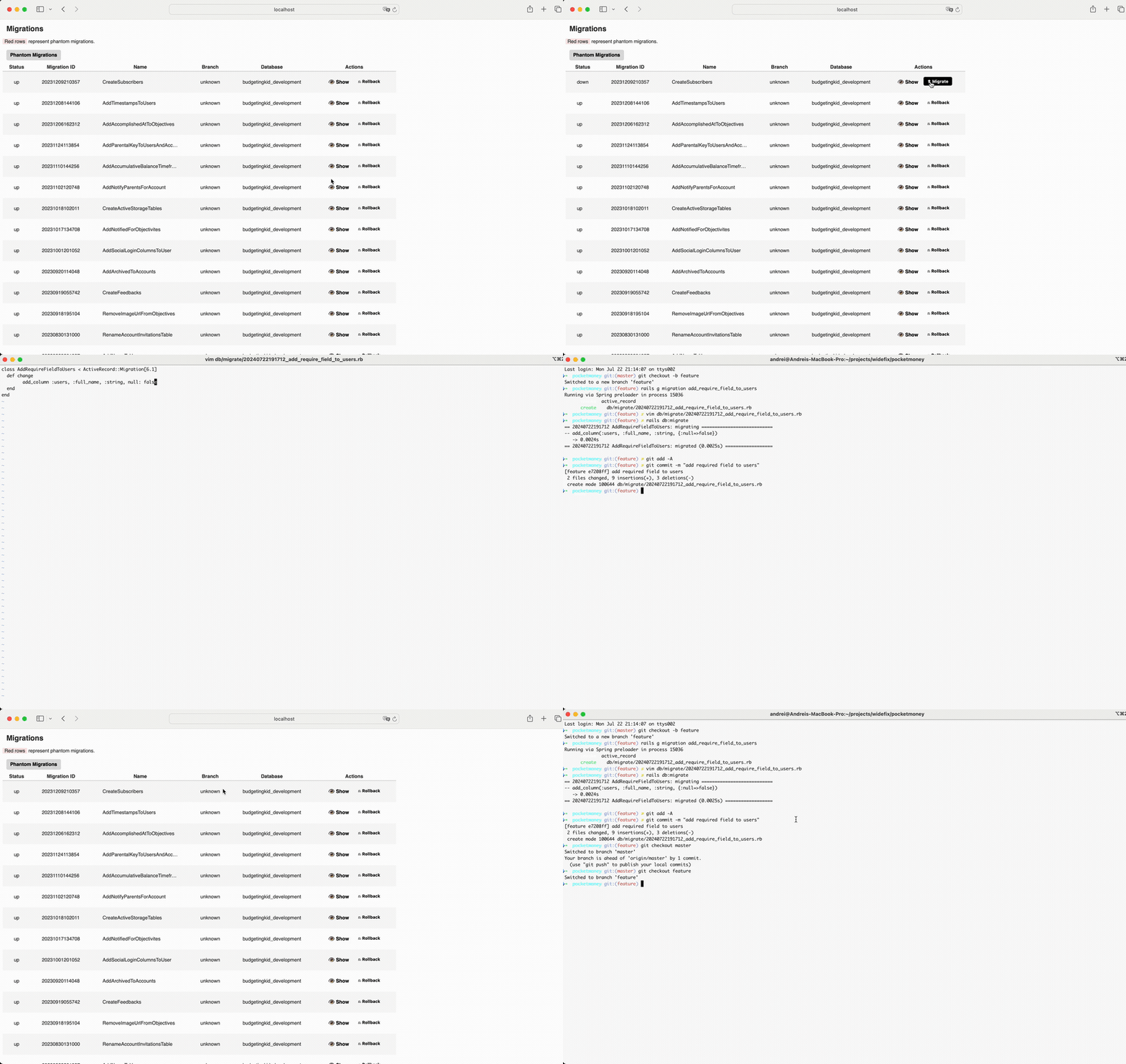
Watch the full-resolution video
schema.rb and structure.sqldb:migrateAdd to your Gemfile:
group :development do
  gem "actual_db_schema"
end
Install and configure:
bundle install
rails actual_db_schema:install
That's it! Now just run rails db:migrate as usual - phantom migrations roll back automatically.
This gem stores migrations executed while it is installed, including their source code, in the tmp/migrated folder by default. Database storage is also available. Before the Rails db:schema:dump task runs, it attempts to roll back the phantom migrations.
The phantom migrations list is the difference between the migrations you've executed (in the tmp/migrated folder) and the current ones (in the db/migrate folder).
Run rails db:migrate in your current branch as usual. With automatic rollback enabled (the default), actual_db_schema rolls back tracked phantom migrations in reverse migration order before the schema dump, removing their leftover schema changes when the rollbacks succeed.
Add this line to your application's Gemfile:
group :development do
  gem "actual_db_schema"
end
And then execute:
$ bundle install
If you cannot commit changes to the repo or Gemfile, consider the local Gemfile installation described in this post.
Next, generate your ActualDbSchema initializer file by running:
rails actual_db_schema:install
This will create a config/initializers/actual_db_schema.rb file that lists all available configuration options, allowing you to customize them as needed. The installation process will also prompt you to install the post-checkout Git hook, which automatically rolls back phantom migrations when switching branches. If enabled, this hook will run the schema actualization rake task every time you switch branches, which can slow down branch changes. Therefore, you might not always want this automatic actualization on every switch; in that case, running rails db:migrate manually provides a faster, more controlled alternative.
For more details on the available configuration options, see the sections below.
Just run rails db:migrate inside the current branch. It will roll back all phantom migrations for all configured databases in your database.yml.
[!WARNING] This solution implies that all migrations are reversible. The irreversible migrations should be solved manually. At the moment, the gem ignores them. You will see warnings in the terminal for each irreversible migrations.
The gem offers the following rake tasks that can be manually run according to your preferences:
rails db:rollback_branches - run it to manually rolls back phantom migrations.rails db:rollback_branches:manual - run it to manually rolls back phantom migrations one by one.rails db:phantom_migrations - displays a list of phantom migrations.By default, actual_db_schema stores all run migrations in the tmp/migrated folder. However, if you want to change this location, you can configure it in two ways:
Set the environment variable ACTUAL_DB_SCHEMA_MIGRATED_FOLDER to your desired folder path:
export ACTUAL_DB_SCHEMA_MIGRATED_FOLDER="custom/migrated"
Add the following line to your initializer file (config/initializers/actual_db_schema.rb):
config.migrated_folder = Rails.root.join("custom", "migrated")
If you want to share executed migrations across environments (e.g., staging or sandboxes), store them in the main database instead of the local filesystem:
config.migrations_storage = :db
Or via environment variable:
export ACTUAL_DB_SCHEMA_MIGRATIONS_STORAGE="db"
If both are set, the initializer setting (config.migrations_storage) takes precedence.
Access the migration management UI at:
http://localhost:3000/rails/phantom_migrations
View and manage:
By default, the UI is enabled in the development environment. If you prefer to enable the UI for another environment, you can do so in two ways:
Set the environment variable ACTUAL_DB_SCHEMA_UI_ENABLED to true:
export ACTUAL_DB_SCHEMA_UI_ENABLED=true
Add the following line to your initializer file (config/initializers/actual_db_schema.rb):
config.ui_enabled = true
With this option, the UI can be disabled for all environments or be enabled in specific ones.
By default, the automatic rollback of migrations is enabled. If you prefer to perform manual rollbacks, you can disable the automatic rollback in two ways:
Set the environment variable ACTUAL_DB_SCHEMA_AUTO_ROLLBACK_DISABLED to true:
export ACTUAL_DB_SCHEMA_AUTO_ROLLBACK_DISABLED=true
Add the following line to your initializer file (config/initializers/actual_db_schema.rb):
config.auto_rollback_disabled = true
ActualDbSchema emits an ActiveSupport::Notifications event for each successful phantom rollback:
rollback_migration.actual_db_schema| Field | Description |
|---|---|
version | Migration version that was rolled back |
name | Migration class name |
database | Current database name from Active Record config |
schema | Tenant schema name (or nil for default schema) |
branch | Branch associated with the migration metadata |
manual_mode | Whether rollback was run in manual mode |
You can subscribe to rollback events in your initializer to track statistics or perform custom actions:
# config/initializers/actual_db_schema.rb
ActiveSupport::Notifications.subscribe(ActualDbSchema::Instrumentation::ROLLBACK_EVENT) do |_name, _start, _finish, _id, payload|
  ActualDbSchema::RollbackStatsRepository.record(payload)
end
The RollbackStatsRepository persists rollback events to a database table (actual_db_schema_rollback_events) that is automatically excluded from schema dumps.
Read aggregated stats at runtime:
ActualDbSchema::RollbackStatsRepository.stats
# => { total: 3, by_database: { "primary" => 3 }, by_schema: { "default" => 3 }, by_branch: { "main" => 3 } }

ActualDbSchema::RollbackStatsRepository.total_rollbacks
# => 3

ActualDbSchema::RollbackStatsRepository.reset!
# Clears all recorded stats
By default, the automatic rollback of migrations on branch switch is disabled. If you prefer to automatically rollback phantom migrations whenever you switch branches with git checkout, you can enable it in two ways:
Set the environment variable ACTUAL_DB_SCHEMA_GIT_HOOKS_ENABLED to true:
export ACTUAL_DB_SCHEMA_GIT_HOOKS_ENABLED=true
Add the following line to your initializer file (config/initializers/actual_db_schema.rb):
config.git_hooks_enabled = true
After enabling Git hooks in your configuration, run the rake task to install the post-checkout hook:
rake actual_db_schema:install_git_hooks
This task will prompt you to choose one of the three options:
db:rollback_branchesdb:migrateBased on your selection, a post-checkout hook will be installed or updated in your .git/hooks folder.
For Rails 6.1+ applications using multiple databases (especially with infrastructure databases like Solid Queue, Solid Cable, or Solid Cache), you can exclude specific databases from ActualDbSchema's processing to prevent connection conflicts.
Modern Rails applications often use the connects_to pattern for infrastructure databases. These databases maintain their own isolated connection pools, and ActualDbSchema's global connection switching can interfere with active queries. This is particularly common with:
excluded_databases ConfigurationExplicitly exclude databases by name in your initializer:
# config/initializers/actual_db_schema.rb
ActualDbSchema.configure do |config|
  config.excluded_databases = [:queue, :cable, :cache]
end
Set the environment variable ACTUAL_DB_SCHEMA_EXCLUDED_DATABASES with a comma-separated list:
export ACTUAL_DB_SCHEMA_EXCLUDED_DATABASES="queue,cable,cache"
Note: If both the environment variable and the configuration setting in the initializer are provided, the configuration setting takes precedence as it's applied after the default settings are loaded.
If your application leverages multiple schemas for multi-tenancy — such as those implemented by the apartment gem or similar solutions — you can configure ActualDbSchema to handle migrations across all schemas. To do so, add the following configuration to your initializer file (config/initializers/actual_db_schema.rb):
config.multi_tenant_schemas = -> { # list of all active schemas }
config.multi_tenant_schemas = -> { ["public", "tenant1", "tenant2"] }
If schema.rb generates a diff, it can be helpful to find out which migrations caused the changes. This helps you decide whether to resolve the diff on your own or discuss it with your teammates to determine the next steps. The diff_schema_with_migrations Rake task generates a diff of the schema.rb file, annotated with the migrations responsible for each change. This makes it easier to trace which migration introduced a specific schema modification, enabling faster and more informed decision-making regarding how to handle the diff.
By default, the task uses db/schema.rb and db/migrate as the schema and migrations paths. You can also provide custom paths as arguments.
Alternatively, if you use Web UI, you can see this diff at http://localhost:3000/rails/schema. This way is often more convenient than running the Rake task manually.
Run the task with default paths:
rake actual_db_schema:diff_schema_with_migrations
Run the task with custom paths:
rake actual_db_schema:diff_schema_with_migrations[path/to/custom_schema.rb, path/to/custom_migrations]
Sometimes, it's necessary to modify the database without creating migration files. This can be useful for fixing a corrupted schema, conducting experiments (such as adding and removing indexes), or quickly adjusting the schema in development. This gem allows you to run the same commands used in migrations directly in the Rails console.
By default, Console Migrations is disabled. You can enable it in two ways:
Set the environment variable ACTUAL_DB_SCHEMA_CONSOLE_MIGRATIONS_ENABLED to true:
export ACTUAL_DB_SCHEMA_CONSOLE_MIGRATIONS_ENABLED=true
Add the following line to your initializer file (config/initializers/actual_db_schema.rb):
config.console_migrations_enabled = true
Once enabled, you can run migration commands directly in the Rails console:
# Create a new table
create_table :posts do |t|
  t.string :title
end

# Add a column
add_column :users, :age, :integer

# Remove an index
remove_index :users, :email

# Rename a column
rename_column :users, :username, :handle
A migration is considered broken if it has been migrated in the database but the corresponding migration file is missing. This functionality allows you to safely delete these broken versions from the database to keep it clean.
You can delete broken migrations using either of the following methods:
Navigate to the following URL in your web browser:
http://localhost:3000/rails/broken_versions
This page lists all broken versions and provides an option to delete them.
To delete all broken migrations, run:
rake actual_db_schema:delete_broken_versions
To delete specific migrations, pass the migration version(s) and optionally a database:
rake actual_db_schema:delete_broken_versions[<version>, <version>]
<version> – The migration version(s) to delete (space-separated if multiple).<database> (optional) – Specify a database if using multiple databases.# Delete all broken migrations
rake actual_db_schema:delete_broken_versions
# Delete specific migrations
rake actual_db_schema:delete_broken_versions["20250224103352 20250224103358"]
# Delete specific migrations from a specific database
rake actual_db_schema:delete_broken_versions["20250224103352 20250224103358", "primary"]
After checking out the repo, run bin/setup to install dependencies. Then, run rake test to run the tests. You can also run bin/console for an interactive prompt that will allow you to experiment.
To install this gem onto your local machine, run bundle exec rake install.
To release a new version do the following in the order:
version.rb;bundle install to update Gemfile.lock;bundle exec rake release. This will create a git tag for the version, push git commits and the created tag, and push the .gem file to rubygems.org;The following versions can be specifically tested using Appraisal
To run tests with a specific version of Rails using Appraisal:
bundle exec appraisal rails.6.0 rake test
bundle exec appraisal rails.6.0 rake test TEST=test/rake_task_test.rb
bundle exec appraisal rails.6.0 rake test TEST=test/rake_task_test.rb TESTOPTS="--name=/db::db:rollback_branches#test_0003_keeps/"
By default, rake test runs tests using SQLite3. To explicitly run tests with SQLite3, PostgreSQL, or MySQL, you can use the following tasks:
SQLite3:
bundle exec rake test:sqlite3
PostgreSQL (requires Docker):
bundle exec rake test:postgresql
MySQL (requires Docker):
bundle exec rake test:mysql2
bundle exec rake test:all
Bug reports and pull requests are welcome on GitHub at https://github.com/widefix/actual_db_schema. This project is intended to be a safe, welcoming space for collaboration, and contributors are expected to adhere to the code of conduct.
ActualDbSchema is built and maintained by WideFix, a team specializing in maintaining, upgrading, and improving existing Ruby on Rails applications.
Need help with your Rails application's migrations, upgrades, or performance? Learn about WideFix's Rails services.
For testable data migration hooks, see our companion gem, MigrationData.
The gem is available as open source under the terms of the MIT License.
Everyone interacting in the ActualDbSchema project's codebases, issue trackers, chat rooms and mailing lists is expected to follow the code of conduct.
1,672 followers · starred Feb 2025
242 followers · starred Mar 2024
647 followers · starred Oct 2025
1,223 followers · starred Jul 2023
Keep Rails databases in sync across Git branches. Automatically roll back stale migrations, prevent database errors and unwanted schema diffs, and inspect migration history with a web dashboard.
See the code
Manage stale migrations, fix database drift, and understand schema changes in Rails.
actual_db_schema keeps your database aligned with the migrations on your current Git branch. It tracks executed migration source code and rolls back phantom migrations left behind by other branches. It also provides a web dashboard, annotated schema diffs, migration history, and manual cleanup tools for development, staging, and sandbox environments.
Explore ActualDbSchema on WideFix for a visual walkthrough and an overview of the branch-switching workflow.
Switching Git branches changes your code and migration files, but does not undo migrations already applied to your database. A column, table, index, or constraint from another branch can break the application or its tests. For example, an extra NOT NULL column can cause ActiveRecord::NotNullViolation when the current branch inserts a record.
ActualDbSchema rolls back tracked migrations missing from the current branch, removing their database changes when their reversals succeed.
Without a stored copy of a migration, you may need to find the branch that introduced it, check it out, roll it back, and return to your work. These stale migrations are called phantom migrations: they have been applied to the database, but their files are absent from the current branch.
The gem saves migration source code and branch metadata so it can identify and roll back phantom migrations without checking out their original branch. Cleanup runs as part of the schema dump triggered by rails db:migrate. An optional post-checkout Git hook runs cleanup when you switch branches. You can also inspect and roll back migrations manually through rake tasks or the web UI.
Why does schema.rb keep changing after db:migrate, even when you have not changed a migration? Rails dumps your database's actual structure, including leftover tables, columns, and indexes from other branches. Those changes pollute db/schema.rb or db/structure.sql and can lead to unrelated pull request changes and Git merge conflicts.
ActualDbSchema rolls back tracked phantom migrations before the schema dump, preventing their leftover changes from appearing in the generated file. Legitimate schema changes from the current branch still appear in the diff. Both schema formats are supported.
Resetting a development database and replaying migrations can take time and discard local data. ActualDbSchema targets tracked phantom migrations instead of requiring a full database reset. Each rollback still executes the migration's reversal and can remove data in affected tables or columns.
When a schema diff contains unexpected changes, it can be hard to tell which migration introduced them. The annotated schema diff associates changes with migration source files, available through a rake task or the web UI. This helps you investigate a diff before deciding how to resolve it.
The web dashboard lets you inspect migration status, source code, branch metadata, and phantom migrations across configured databases. It supports individual migration actions and remains accessible when pending migrations would otherwise block Rails requests.
Your database can contain migration version records whose source files are no longer available. The broken migration cleanup tools identify and delete these orphaned records through the UI or a rake task. Deleting a version record does not reverse its database changes; use phantom migration rollback when stored source code is available.
Branch-specific migrations can leave several databases or tenant schemas out of sync, not just the primary development database. ActualDbSchema processes configured databases, supports a configurable list of tenant schemas, and lets you exclude infrastructure databases.
For staging or sandbox environments, optional database-backed migration storage retains executed migration sources in the database rather than relying on one machine's local files. Features can be enabled per environment.
The optional console migrations feature exposes migration methods such as add_column, add_index, and create_table directly in the Rails console. This helps with local schema experiments and manual repairs; it does not create a migration file for you.
Suppose a feature branch adds a required users.nickname column. After switching to main, which has no such migration, inserts may fail because the application does not populate that column. The next schema dump can also add the unrelated column to schema.rb.
With actual_db_schema installed (Quick Start), keep using your normal workflow:
git switch main
bundle exec rails db:migrate
The gem uses its stored migration source to roll back the phantom migration before Rails dumps the schema. When the rollback succeeds, the extra column is removed, fixing both the stale constraint and its unwanted schema diff.
The gem needs a stored copy of a migration to roll it back, so install it before running migrations you want it to track. Irreversible migrations and rollbacks that depend on unavailable branch code require manual intervention; failed rollbacks are reported. Phantom migrations are rolled back in reverse migration order.
ActualDbSchema does not detect edits to an already-applied migration that remains on the current branch. Its schema cleanup targets phantom migrations; it does not sort schema columns or resolve every Git merge conflict.
Watch the full-resolution video
schema.rb and structure.sqldb:migrateAdd to your Gemfile:
group :development do
  gem "actual_db_schema"
end
Install and configure:
bundle install
rails actual_db_schema:install
That's it! Now just run rails db:migrate as usual - phantom migrations roll back automatically.
This gem stores migrations executed while it is installed, including their source code, in the tmp/migrated folder by default. Database storage is also available. Before the Rails db:schema:dump task runs, it attempts to roll back the phantom migrations.
The phantom migrations list is the difference between the migrations you've executed (in the tmp/migrated folder) and the current ones (in the db/migrate folder).
Run rails db:migrate in your current branch as usual. With automatic rollback enabled (the default), actual_db_schema rolls back tracked phantom migrations in reverse migration order before the schema dump, removing their leftover schema changes when the rollbacks succeed.
Add this line to your application's Gemfile:
group :development do
  gem "actual_db_schema"
end
And then execute:
$ bundle install
If you cannot commit changes to the repo or Gemfile, consider the local Gemfile installation described in this post.
Next, generate your ActualDbSchema initializer file by running:
rails actual_db_schema:install
This will create a config/initializers/actual_db_schema.rb file that lists all available configuration options, allowing you to customize them as needed. The installation process will also prompt you to install the post-checkout Git hook, which automatically rolls back phantom migrations when switching branches. If enabled, this hook will run the schema actualization rake task every time you switch branches, which can slow down branch changes. Therefore, you might not always want this automatic actualization on every switch; in that case, running rails db:migrate manually provides a faster, more controlled alternative.
For more details on the available configuration options, see the sections below.
Just run rails db:migrate inside the current branch. It will roll back all phantom migrations for all configured databases in your database.yml.
[!WARNING] This solution implies that all migrations are reversible. The irreversible migrations should be solved manually. At the moment, the gem ignores them. You will see warnings in the terminal for each irreversible migrations.
The gem offers the following rake tasks that can be manually run according to your preferences:
rails db:rollback_branches - run it to manually rolls back phantom migrations.rails db:rollback_branches:manual - run it to manually rolls back phantom migrations one by one.rails db:phantom_migrations - displays a list of phantom migrations.By default, actual_db_schema stores all run migrations in the tmp/migrated folder. However, if you want to change this location, you can configure it in two ways:
Set the environment variable ACTUAL_DB_SCHEMA_MIGRATED_FOLDER to your desired folder path:
export ACTUAL_DB_SCHEMA_MIGRATED_FOLDER="custom/migrated"
Add the following line to your initializer file (config/initializers/actual_db_schema.rb):
config.migrated_folder = Rails.root.join("custom", "migrated")
If you want to share executed migrations across environments (e.g., staging or sandboxes), store them in the main database instead of the local filesystem:
config.migrations_storage = :db
Or via environment variable:
export ACTUAL_DB_SCHEMA_MIGRATIONS_STORAGE="db"
If both are set, the initializer setting (config.migrations_storage) takes precedence.
Access the migration management UI at:
http://localhost:3000/rails/phantom_migrations
View and manage:
By default, the UI is enabled in the development environment. If you prefer to enable the UI for another environment, you can do so in two ways:
Set the environment variable ACTUAL_DB_SCHEMA_UI_ENABLED to true:
export ACTUAL_DB_SCHEMA_UI_ENABLED=true
Add the following line to your initializer file (config/initializers/actual_db_schema.rb):
config.ui_enabled = true
With this option, the UI can be disabled for all environments or be enabled in specific ones.
By default, the automatic rollback of migrations is enabled. If you prefer to perform manual rollbacks, you can disable the automatic rollback in two ways:
Set the environment variable ACTUAL_DB_SCHEMA_AUTO_ROLLBACK_DISABLED to true:
export ACTUAL_DB_SCHEMA_AUTO_ROLLBACK_DISABLED=true
Add the following line to your initializer file (config/initializers/actual_db_schema.rb):
config.auto_rollback_disabled = true
ActualDbSchema emits an ActiveSupport::Notifications event for each successful phantom rollback:
rollback_migration.actual_db_schema| Field | Description |
|---|---|
version | Migration version that was rolled back |
name | Migration class name |
database | Current database name from Active Record config |
schema | Tenant schema name (or nil for default schema) |
branch | Branch associated with the migration metadata |
manual_mode | Whether rollback was run in manual mode |
You can subscribe to rollback events in your initializer to track statistics or perform custom actions:
# config/initializers/actual_db_schema.rb
ActiveSupport::Notifications.subscribe(ActualDbSchema::Instrumentation::ROLLBACK_EVENT) do |_name, _start, _finish, _id, payload|
  ActualDbSchema::RollbackStatsRepository.record(payload)
end
The RollbackStatsRepository persists rollback events to a database table (actual_db_schema_rollback_events) that is automatically excluded from schema dumps.
Read aggregated stats at runtime:
ActualDbSchema::RollbackStatsRepository.stats
# => { total: 3, by_database: { "primary" => 3 }, by_schema: { "default" => 3 }, by_branch: { "main" => 3 } }

ActualDbSchema::RollbackStatsRepository.total_rollbacks
# => 3

ActualDbSchema::RollbackStatsRepository.reset!
# Clears all recorded stats
By default, the automatic rollback of migrations on branch switch is disabled. If you prefer to automatically rollback phantom migrations whenever you switch branches with git checkout, you can enable it in two ways:
Set the environment variable ACTUAL_DB_SCHEMA_GIT_HOOKS_ENABLED to true:
export ACTUAL_DB_SCHEMA_GIT_HOOKS_ENABLED=true
Add the following line to your initializer file (config/initializers/actual_db_schema.rb):
config.git_hooks_enabled = true
After enabling Git hooks in your configuration, run the rake task to install the post-checkout hook:
rake actual_db_schema:install_git_hooks
This task will prompt you to choose one of the three options:
db:rollback_branchesdb:migrateBased on your selection, a post-checkout hook will be installed or updated in your .git/hooks folder.
For Rails 6.1+ applications using multiple databases (especially with infrastructure databases like Solid Queue, Solid Cable, or Solid Cache), you can exclude specific databases from ActualDbSchema's processing to prevent connection conflicts.
Modern Rails applications often use the connects_to pattern for infrastructure databases. These databases maintain their own isolated connection pools, and ActualDbSchema's global connection switching can interfere with active queries. This is particularly common with:
excluded_databases ConfigurationExplicitly exclude databases by name in your initializer:
# config/initializers/actual_db_schema.rb
ActualDbSchema.configure do |config|
  config.excluded_databases = [:queue, :cable, :cache]
end
Set the environment variable ACTUAL_DB_SCHEMA_EXCLUDED_DATABASES with a comma-separated list:
export ACTUAL_DB_SCHEMA_EXCLUDED_DATABASES="queue,cable,cache"
Note: If both the environment variable and the configuration setting in the initializer are provided, the configuration setting takes precedence as it's applied after the default settings are loaded.
If your application leverages multiple schemas for multi-tenancy — such as those implemented by the apartment gem or similar solutions — you can configure ActualDbSchema to handle migrations across all schemas. To do so, add the following configuration to your initializer file (config/initializers/actual_db_schema.rb):
config.multi_tenant_schemas = -> { # list of all active schemas }
config.multi_tenant_schemas = -> { ["public", "tenant1", "tenant2"] }
If schema.rb generates a diff, it can be helpful to find out which migrations caused the changes. This helps you decide whether to resolve the diff on your own or discuss it with your teammates to determine the next steps. The diff_schema_with_migrations Rake task generates a diff of the schema.rb file, annotated with the migrations responsible for each change. This makes it easier to trace which migration introduced a specific schema modification, enabling faster and more informed decision-making regarding how to handle the diff.
By default, the task uses db/schema.rb and db/migrate as the schema and migrations paths. You can also provide custom paths as arguments.
Alternatively, if you use Web UI, you can see this diff at http://localhost:3000/rails/schema. This way is often more convenient than running the Rake task manually.
Run the task with default paths:
rake actual_db_schema:diff_schema_with_migrations
Run the task with custom paths:
rake actual_db_schema:diff_schema_with_migrations[path/to/custom_schema.rb, path/to/custom_migrations]
Sometimes, it's necessary to modify the database without creating migration files. This can be useful for fixing a corrupted schema, conducting experiments (such as adding and removing indexes), or quickly adjusting the schema in development. This gem allows you to run the same commands used in migrations directly in the Rails console.
By default, Console Migrations is disabled. You can enable it in two ways:
Set the environment variable ACTUAL_DB_SCHEMA_CONSOLE_MIGRATIONS_ENABLED to true:
export ACTUAL_DB_SCHEMA_CONSOLE_MIGRATIONS_ENABLED=true
Add the following line to your initializer file (config/initializers/actual_db_schema.rb):
config.console_migrations_enabled = true
Once enabled, you can run migration commands directly in the Rails console:
# Create a new table
create_table :posts do |t|
  t.string :title
end

# Add a column
add_column :users, :age, :integer

# Remove an index
remove_index :users, :email

# Rename a column
rename_column :users, :username, :handle
A migration is considered broken if it has been migrated in the database but the corresponding migration file is missing. This functionality allows you to safely delete these broken versions from the database to keep it clean.
You can delete broken migrations using either of the following methods:
Navigate to the following URL in your web browser:
http://localhost:3000/rails/broken_versions
This page lists all broken versions and provides an option to delete them.
To delete all broken migrations, run:
rake actual_db_schema:delete_broken_versions
To delete specific migrations, pass the migration version(s) and optionally a database:
rake actual_db_schema:delete_broken_versions[<version>, <version>]
<version> – The migration version(s) to delete (space-separated if multiple).<database> (optional) – Specify a database if using multiple databases.# Delete all broken migrations
rake actual_db_schema:delete_broken_versions
# Delete specific migrations
rake actual_db_schema:delete_broken_versions["20250224103352 20250224103358"]
# Delete specific migrations from a specific database
rake actual_db_schema:delete_broken_versions["20250224103352 20250224103358", "primary"]
After checking out the repo, run bin/setup to install dependencies. Then, run rake test to run the tests. You can also run bin/console for an interactive prompt that will allow you to experiment.
To install this gem onto your local machine, run bundle exec rake install.
To release a new version do the following in the order:
version.rb;bundle install to update Gemfile.lock;bundle exec rake release. This will create a git tag for the version, push git commits and the created tag, and push the .gem file to rubygems.org;The following versions can be specifically tested using Appraisal
To run tests with a specific version of Rails using Appraisal:
bundle exec appraisal rails.6.0 rake test
bundle exec appraisal rails.6.0 rake test TEST=test/rake_task_test.rb
bundle exec appraisal rails.6.0 rake test TEST=test/rake_task_test.rb TESTOPTS="--name=/db::db:rollback_branches#test_0003_keeps/"
By default, rake test runs tests using SQLite3. To explicitly run tests with SQLite3, PostgreSQL, or MySQL, you can use the following tasks:
SQLite3:
bundle exec rake test:sqlite3
PostgreSQL (requires Docker):
bundle exec rake test:postgresql
MySQL (requires Docker):
bundle exec rake test:mysql2
bundle exec rake test:all
Bug reports and pull requests are welcome on GitHub at https://github.com/widefix/actual_db_schema. This project is intended to be a safe, welcoming space for collaboration, and contributors are expected to adhere to the code of conduct.
ActualDbSchema is built and maintained by WideFix, a team specializing in maintaining, upgrading, and improving existing Ruby on Rails applications.
Need help with your Rails application's migrations, upgrades, or performance? Learn about WideFix's Rails services.
For testable data migration hooks, see our companion gem, MigrationData.
The gem is available as open source under the terms of the MIT License.
Everyone interacting in the ActualDbSchema project's codebases, issue trackers, chat rooms and mailing lists is expected to follow the code of conduct.
1,672 followers · starred Feb 2025
242 followers · starred Mar 2024
647 followers · starred Oct 2025
1,223 followers · starred Jul 2023