Nelm is a Helm 4 alternative. It is a Kubernetes deployment tool that manages Helm Charts and deploys them to Kubernetes. The Nelm goal is to provide a modern alternative to Helm, with long-standing issues fixed and many new major features introduced.
Go
1,111
1,162 commits
updated Oct 12, 2026

Nelm is a Helm 4 alternative. It is a Kubernetes deployment tool that manages Helm Charts and deploys them to Kubernetes. It is also the deployment engine of werf. Nelm does everything that Helm does, but better, and even quite some on top of it. Nelm is based on an improved and partially rewritten Helm codebase, to introduce:
terraform plan-like capabilities with two-stage deployment support;The Nelm goal is to provide a modern alternative to Helm, with long-standing issues fixed and many new major features introduced. Nelm moves fast, but our focus remains on Helm Chart and Release compatibility, to ease the migration from Helm.
Nelm is production-ready: as the werf deployment engine, it was battle-tested across thousands of projects for years.
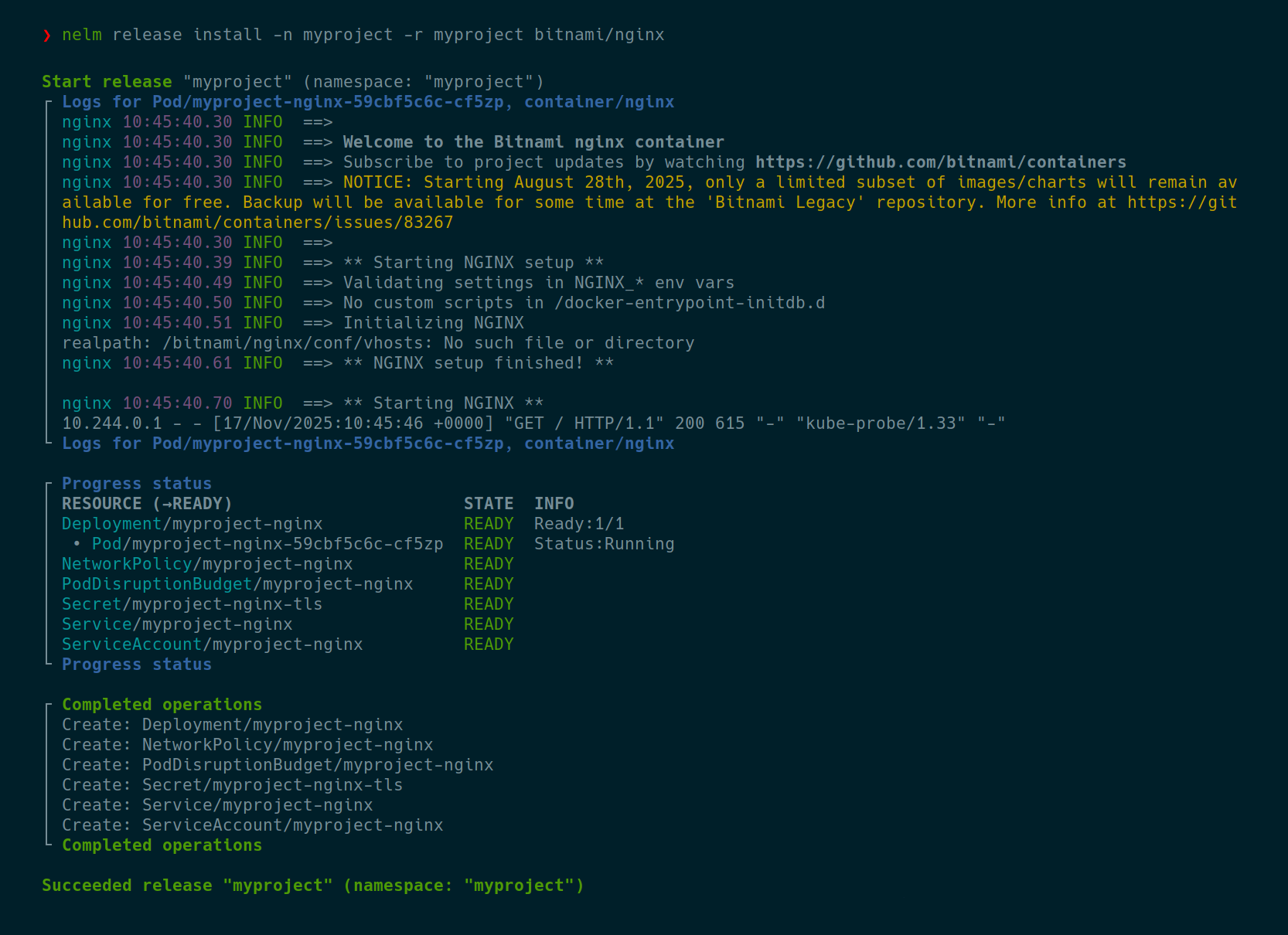
werf.io/weight annotationwerf.io/deploy-dependency-<id> annotationwerf.io/delete-dependency-<id> annotationwerf.io/ownership annotationwerf.io/deploy-on annotationwerf.io/delete-policy annotationwerf.io/resource-policy annotationwerf.io/delete-propagation annotationwerf.io/track-termination-mode annotationwerf.io/fail-mode annotationwerf.io/failures-allowed-per-replica annotationwerf.io/no-activity-timeout annotationwerf.io/sensitive annotationwerf.io/sensitive-paths annotationwerf.io/log-regex annotationwerf.io/log-regex-for-<container_name> annotationwerf.io/log-regex-skip annotationwerf.io/log-regex-skip-for-<container_name> annotationwerf.io/skip-logs annotationwerf.io/skip-logs-for-containers annotationwerf.io/show-logs-only-for-number-of-replicas annotationwerf.io/show-logs-only-for-containers annotationwerf.io/show-service-messages annotationwerf_secret_file functiondump_debug functionprintf_debug functioninclude_debug functiontpl_debug functionNELM_FEAT_PREVIEW_V2 environment variableNELM_FEAT_REMOTE_CHARTS environment variableNELM_FEAT_NATIVE_RELEASE_LIST environment variableNELM_FEAT_NATIVE_RELEASE_UNINSTALL environment variableNELM_FEAT_PERIODIC_STACK_TRACES environment variableNELM_FEAT_MORE_DETAILED_EXIT_CODE_FOR_PLAN environment variableFollow instructions on GitHub Releases.
Create a directory for a new chart:
mkdir mychart
cd mychart
Create Chart.yaml with the following content:
apiVersion: v2
name: mychart
version: 1.0.0
dependencies:
- name: cert-manager
  version: 1.13.3
  repository: https://charts.jetstack.io
Generate Chart.lock:
nelm chart dependency download
Create values.yaml with the following content:
cert-manager:
  installCRDs: true
  startupapicheck:
    enabled: false
Deploy the first release:
nelm release install -n myproject -r myproject
Plan the second release with an increased number of replicas, where only a single field in a single Deployment will be updated:
nelm release plan install -n myproject -r myproject --set cert-manager.replicaCount=2
Deploy the second release, where only the Deployment will be updated:
nelm release install -n myproject -r myproject --set cert-manager.replicaCount=2
Release commands:
  release install                    Deploy a chart to Kubernetes.
  release rollback                   Rollback to a previously deployed release.
  release plan install               Plan a release install to Kubernetes.
  release uninstall                  Uninstall a Helm Release from Kubernetes.
  release list                       List all releases in a namespace.
  release history                    Show release history.
  release get                        Get information about a deployed release.

Chart commands:
  chart lint                         Lint a chart.
  chart render                       Render a chart.
  chart download                     Download a chart from a repository.
  chart upload                       Upload a chart to a repository.
  chart pack                         Pack a chart into an archive to distribute via a repository.

Secret commands:
  chart secret key create            Create a new chart secret key.
  chart secret key rotate            Reencrypt secret files with a new secret key.
  chart secret values-file edit      Interactively edit encrypted values file.
  chart secret values-file encrypt   Encrypt values file and print result to stdout.
  chart secret values-file decrypt   Decrypt values file and print result to stdout.
  chart secret file edit             Interactively edit encrypted file.
  chart secret file encrypt          Encrypt file and print result to stdout.
  chart secret file decrypt          Decrypt file and print result to stdout.

Dependency commands:
  chart dependency download          Download chart dependencies from Chart.lock.
  chart dependency update            Update Chart.lock and download chart dependencies.

Repo commands:
  chart repo add                     Set up a new chart repository.
  chart repo remove                  Remove a chart repository.
  chart repo update                  Update info about available charts for all chart repositories.
  chart repo login                   Log in to an OCI registry with charts.
  chart repo logout                  Log out from an OCI registry with charts.

Other commands:
  completion bash                    Generate the autocompletion script for bash
  completion fish                    Generate the autocompletion script for fish
  completion powershell              Generate the autocompletion script for powershell
  completion zsh                     Generate the autocompletion script for zsh
  version                            Show version.
Nelm is built upon the Helm codebase with some parts of Helm reimplemented. It is backward-compatible with Helm Charts and Helm Releases.
Helm Charts can be deployed by Nelm with no changes. All the obscure Helm Chart features, such as lookup functions, are supported.
To store release information, Nelm uses Helm Releases. You can deploy the same release with Helm and Nelm interchangeably, and it will work just fine. No migration needed from/to Helm.
Nelm has a different CLI layout, flags and environment variables, but we largely support all the same features as Helm.
Helm plugins support is not planned due to technical difficulties with the Helm plugins API. Instead, we intend to implement functionality of the most useful plugins natively, like we already did with nelm release plan install and nelm chart secret.
Generally, the migration from Helm to Nelm should be as simple as changing Helm commands to Nelm commands in your CI, for example:
| Helm command | Nelm command equivalent |
|---|---|
helm upgrade --install --atomic --wait -n myns myrls ./chart | nelm release install --auto-rollback -n myns -r myrls ./chart |
helm uninstall -n myns myrls | nelm release uninstall -n myns -r myrls |
helm template ./chart | nelm chart render ./chart |
helm dependency build | nelm chart dependency download |
The resource deployment subsystem of Helm is rewritten from scratch in Nelm. During the deployment, Nelm builds the Directed Acyclic Graph (DAG) of all operations we want to perform in the cluster to do the release, then the DAG is executed. The DAG allowed us to implement advanced resource ordering capabilities, such as:
werf.io/weight annotation: similar to helm.sh/hook-weight, but also works for non-hook resources. Resources with the same weight deployed in parallel.werf.io/deploy-dependency-<id> annotation: do not deploy the annotated resource until the dependency is present or ready. Works for both release resources and external cluster resources (e.g. resources created by a third-party operator). This is the most powerful and effective way to enforce deployment order in Nelm.werf.io/delete-dependency-<id> annotation: do not delete the annotated resource until the dependency is absent. Works for both release resources and external cluster resources.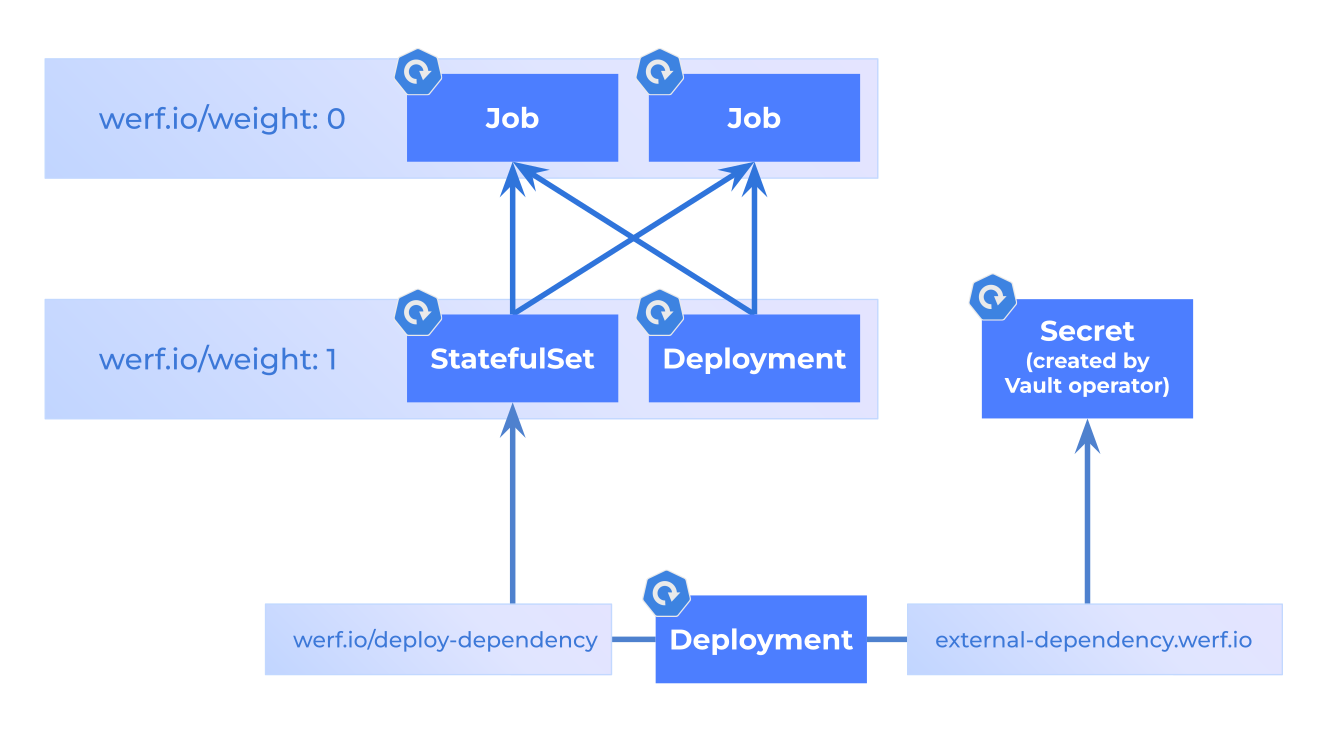
Helm doesn't offer any resource lifecycle capabilities, except helm.sh/resource-policy: keep and helm.sh/hook-delete-policy for Hooks. On top of these, Nelm offers the following:
werf.io/delete-policy annotation. Inspired by helm.sh/hook-delete-policy, but works for any resource. Set before-creation to always recreate the resource, before-creation-if-immutable to only recreate if the resource is immutable, succeeded or failed to delete the resource on success or failure.werf.io/ownership annotation. anyone allows to get Hook-like behavior for regular resources: don't delete the resource if it is removed from the Chart or when the whole release is removed, and never check or apply release annotations.werf.io/deploy-on annotation. Inspired by helm.sh/hook. Render and deploy the resource only on install/upgrade/rollback/uninstall in a pre/main/post stage.werf.io/resource-policy annotation. Inspired by helm.sh/resource-policy, but adds more options: set skip-create, skip-update, skip-recreate or skip-delete to skip the corresponding operation.These annotations make Helm Hooks obsolete: regular resources can do all the same things now.
Nelm has powerful resource tracking built from the ground up, much more advanced than what Helm has:
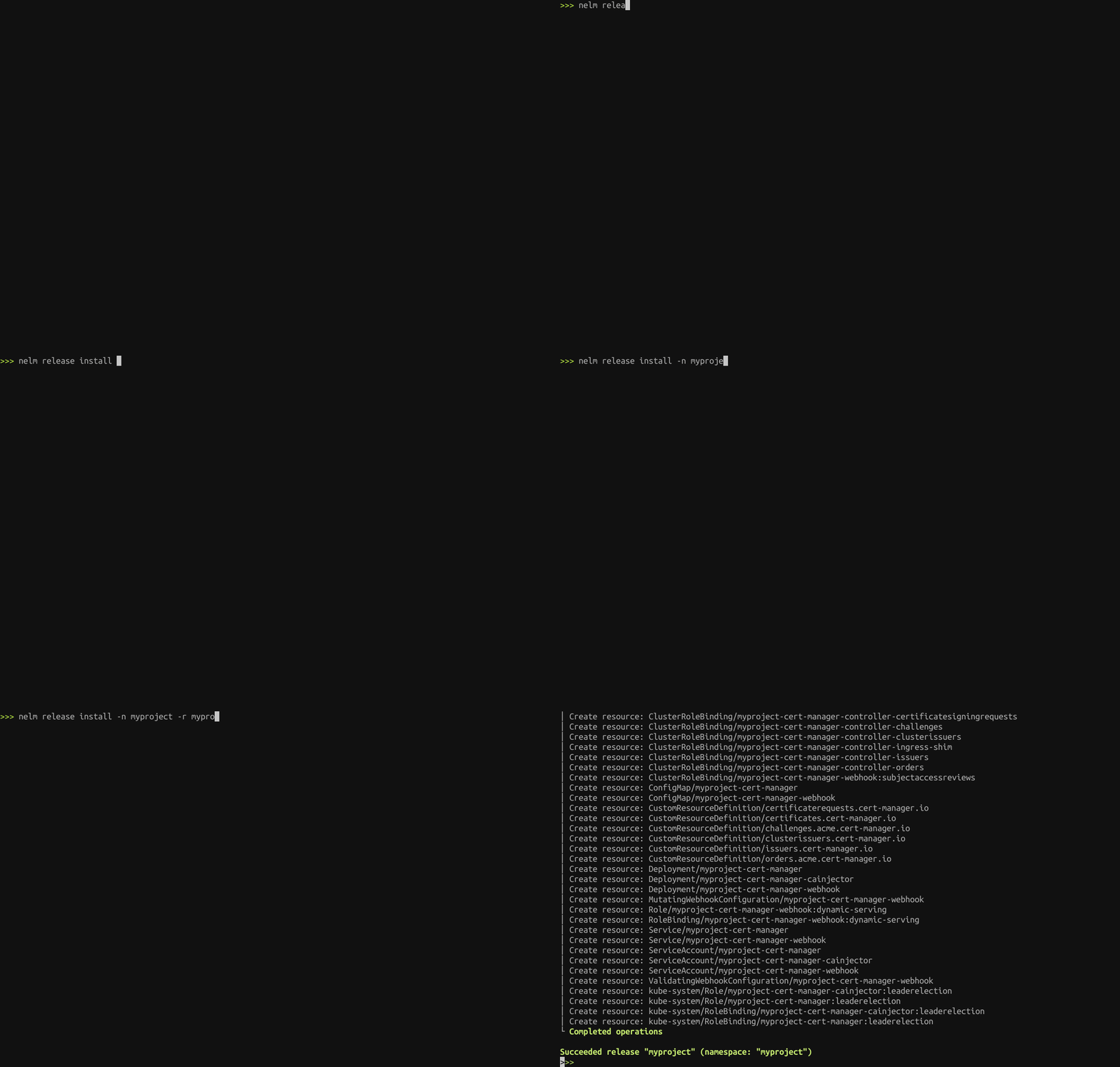
During the deployment, Nelm finds Pods of deploying resources and periodically prints their container logs. With annotation werf.io/show-service-messages: "true", resource events are also printed. Can be configured with CLI flags and annotations.
nelm release plan install shows exactly what's going to happen in the cluster on the next release. It shows diffs between the current and to-be resource versions, utilizing robust dry-run Kubernetes Server-Side Apply capabilities.
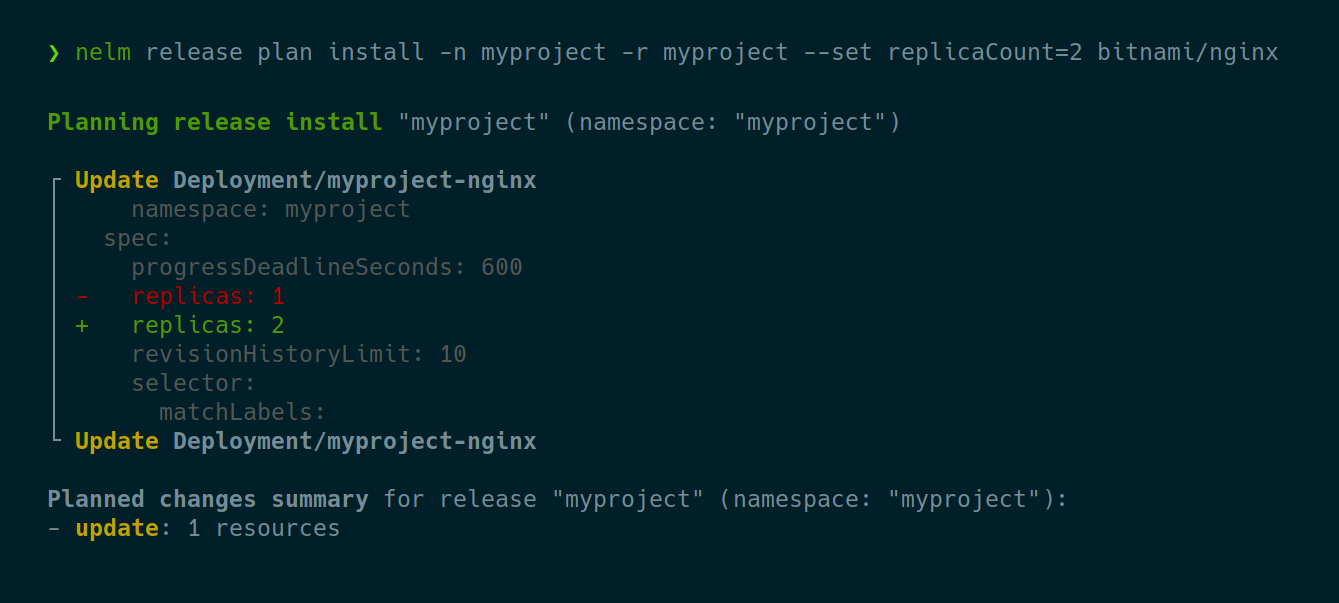
To ensure that these exact changes will be applied during the release install, you can utilize a two-stage deployment workflow:
--save-plan flag:nelm release plan install --save-plan=plan.gz
nelm release install --use-plan=plan.gz
nelm chart secret commands manage encrypted values files such as secret-values.yaml or encrypted arbitrary files like secret/mysecret.txt. These files are decrypted in-memory during templating and can be used in templates as .Values.my.secret.value and {{ werf_secret_file "mysecret.txt" }}, respectively.
CRDs from the crds/ directory of the chart deployed not only on the very first release install, but also on release upgrades. Also, CRDs not only can be created, but can be updated as well.
Nelm-specific features are described below. For general documentation, see Helm docs and werf docs.
Values files can be encrypted and stored in a Helm chart or a git repo. Such values files are decrypted in-memory during templating.
Create a secret key:
export NELM_SECRET_KEY="$(nelm chart secret key create)"
Create a new secret-values file:
nelm chart secret values-file edit secret-values.yaml
... with the following content:
password: verysecurepassword123
Reference encrypted value in Helm templates:
password: {{ .Values.password }}
Render the chart:
nelm chart render
password: verysecurepassword123
NOTE: $NELM_SECRET_KEY must be set for any command that encrypts/decrypts secrets, including nelm chart render.
Arbitrary files can be encrypted and stored in the secret/ directory of a Helm chart. Such files are decrypted in-memory during templating.
Create a secret key:
export NELM_SECRET_KEY="$(nelm chart secret key create)"
Create a new secret file:
nelm chart secret file edit secret/config.yaml
... with the following content:
user: john-doe
password: verysecurepassword123
Reference encrypted secret in Helm templates:
config: {{ werf_secret_file "config.yaml" | nindent 4 }}
Render the chart:
nelm chart render
config:
  user: john-doe
  password: verysecurepassword123
Nelm-specific features are described below. For general documentation, see Helm docs and werf docs.
werf.io/weight annotationThis annotation works the same as helm.sh/hook-weight, but can be used for both hooks and non-hook resources. Resources with the same weight are grouped together, then the groups deployed one after the other, from low to high weight. Resources in the same group are deployed in parallel. This annotation has higher priority than helm.sh/hook-weight, but lower than werf.io/deploy-dependency-<id>.
Example:
werf.io/weight: "10"
werf.io/weight: "-10"
Format:
werf.io/weight: "<any number>"
Default:
0
werf.io/deploy-dependency-<id> annotationThe resource will deploy only after all of its dependencies are satisfied. It waits until the specified resource is just present or is also ready. It serves as a more powerful alternative to hooks and werf.io/weight. This annotation has higher priority than werf.io/weight and helm.sh/hook-weight. This annotation has no effect on internal (release) dependencies if the resource on which we depend upon is outside the stage (pre, main, post, ...) of the resource with the annotation.
If external=true or external=auto and the dependency is not found in the release, then the dependency is treated as external to the release: name, kind and version must be specified.
Example:
werf.io/deploy-dependency-db: state=ready,kind=StatefulSet,name=postgres
werf.io/deploy-dependency-app: state=present,kind=Deployment,group=apps,version=v1,name=app,namespace=app
werf.io/deploy-dependency-secret: state=ready,kind=Secret,version=v1,name=my-vault-secret,external=true
Format:
werf.io/deploy-dependency-<anything>: state=ready|present[,name=<name>][,namespace=<namespace>][,kind=<kind>][,group=<group>][,version=<version>][,external=auto|true|false]
werf.io/delete-dependency-<id> annotationThe resource will be deleted only after all of its dependencies are satisfied. It waits until the specified resource is absent. This annotation has no effect on internal (release) dependencies if the resource on which we depend upon is outside the stage (pre, main, post, ...) of the resource with the annotation.
If external=true or external=auto and the dependency is not found in the release, then the dependency is treated as external to the release: name, kind and version must be specified.
Example:
werf.io/delete-dependency-db: state=absent,kind=StatefulSet,name=postgres
werf.io/delete-dependency-app: state=absent,kind=Deployment,group=apps,version=v1,name=app,namespace=app
werf.io/delete-dependency-secret: state=absent,kind=Secret,version=v1,name=my-vault-secret,external=true
Format:
werf.io/delete-dependency-<anything>: state=absent[,name=<name>][,namespace=<namespace>][,kind=<kind>][,group=<group>][,version=<version>][,external=auto|true|false]
werf.io/ownership annotationInspired by Helm hooks. Sets the ownership of the resource. release means that the resource is deleted if removed from the chart or when the release is uninstalled, and release annotations of the resource are applied/validated during deploy. anyone means the opposite: resource is never deleted on uninstall or when removed from the chart, and release annotations are not applied/validated during deploy.
Example:
werf.io/ownership: anyone
Format:
werf.io/ownership: anyone|release
Default:
"release" for general resources, "anyone" for hooks and CRDs from "crds/" directory
werf.io/deploy-on annotationInspired by helm.sh/hook. Render the resource for deployment only on the specified deploy types and stages. Has precedence over helm.sh/hook.
Beware that with werf.io/ownership: release if the resource is rendered for install, but, for example, not for upgrade, then it is going to be deployed on install, but then deleted on upgrade, so you might want to consider werf.io/ownership: anyone.
Example:
werf.io/deploy-on: pre-install,upgrade
Format:
werf.io/deploy-on: [pre-install][,install][,post-install][,pre-upgrade][,upgrade][,post-upgrade][,pre-rollback][,rollback][,post-rollback][,pre-uninstall][,uninstall][,post-uninstall]
Default:
"install,upgrade,rollback" for general resources, populated from "helm.sh/hook" for hooks
werf.io/delete-policy annotationInspired by helm.sh/hook-delete-policy. Controls resource deletions during resource deployment. before-creation means always recreate the resource, before-creation-if-immutable means recreate the resource only when its update fails because an immutable field changed (for example, field is immutable for a Job selector, or updates to statefulset spec for fields other than ... are forbidden for a StatefulSet), succeeded means delete the resource at the end of the current deployment stage if the resource was successfully deployed, failed means delete the resource if it's readiness check failed. Has precedence over helm.sh/hook-delete-policy.
Example:
werf.io/delete-policy: before-creation,succeeded
Format:
werf.io/delete-policy: [before-creation][,before-creation-if-immutable][,succeeded][,failed]
Default:
nothing for general resources (unless Job, then "before-creation-if-immutable"), mapped from "helm.sh/hook-delete-policy" for hooks
werf.io/resource-policy annotationInspired by helm.sh/resource-policy. Define which operations Nelm may perform on the resource — creation, update, recreation and deletion. Has precedence over helm.sh/resource-policy. Allowed values:
skip-create: don't create the resource if it is absent in the cluster.skip-update: don't update the resource if it is already present in the cluster.skip-recreate: don't recreate the resource.skip-delete: don't delete the resource if it is removed from the chart or when the release is uninstalled.keep: a Helm-compatible alias for skip-delete.Recreations caused by werf.io/delete-policy or helm.sh/hook-delete-policy are skipped by skip-recreate, and deletions caused by them are skipped by skip-delete.
skip-create, skip-update and skip-recreate only work if set in the chart, while skip-delete also works if set on the resource in the cluster.
Example:
werf.io/resource-policy: skip-update,skip-delete
Format:
werf.io/resource-policy: [skip-create][,skip-update][,skip-recreate][,skip-delete][,keep]
Default:
nothing for general resources, "skip-delete" for the release Namespace, mapped from "helm.sh/resource-policy" if set
werf.io/delete-propagation annotationSet the deletion propagation policy for the resource. Foreground means delete the resource after deleting all of its dependents, Background means delete the resource immediately, and delete all of its dependents in the background, and Orphan means delete the resource, but leave all of its dependents untouched.
Example:
werf.io/delete-propagation: Background
Format:
werf.io/delete-propagation: Foreground|Background|Orphan
Default:
Foreground
werf.io/track-termination-mode annotationConfigure when to stop resource readiness tracking:
WaitUntilResourceReady: wait until the resource is ready.NonBlocking: don't wait until the resource is ready.Example:
werf.io/track-termination-mode: NonBlocking
Format:
werf.io/track-termination-mode: WaitUntilResourceReady|NonBlocking
Default:
WaitUntilResourceReady
werf.io/fail-mode annotationConfigure what should happen when errors during tracking for the resource exceeded werf.io/failures-allowed-per-replica:
FailWholeDeployProcessImmediately: fail the release.IgnoreAndContinueDeployProcess: do nothing.Example:
werf.io/fail-mode: IgnoreAndContinueDeployProcess
Format:
werf.io/fail-mode: FailWholeDeployProcessImmediately|IgnoreAndContinueDeployProcess
Default:
FailWholeDeployProcessImmediately
werf.io/failures-allowed-per-replica annotationSet the number of allowed errors during resource tracking. When exceeded, act according to werf.io/fail-mode.
Example:
werf.io/failures-allowed-per-replica: "0"
Format:
werf.io/failures-allowed-per-replica: "<any positive number or zero>"
Default:
1
werf.io/no-activity-timeout annotationTake it as a resource tracking error if no new events or resource updates are received during resource tracking for the specified time.
Example:
werf.io/no-activity-timeout: 8m30s
Format (more info):
werf.io/no-activity-timeout: <golang duration>
Default:
4m
werf.io/sensitive annotationDEPRECATED. Use werf.io/sensitive-paths instead.
Hide sensitive field values in diffs. "true" hides the values of data.* and stringData.* only — all other fields, the field keys themselves and metadata stay visible. Hidden values are replaced with a placeholder showing the value size (bytes or entries) and a short hash.
"false" disables this automatic hiding, unless a non-empty werf.io/sensitive-paths annotation is also set, which takes precedence.
To hide sensitive values in other fields (e.g. custom spec fields) use werf.io/sensitive-paths with explicit JSONPath expressions. The --show-sensitive-diffs option of nelm release plan install and nelm release plan show disables hiding entirely.
Example:
werf.io/sensitive: "true"
Format:
werf.io/sensitive: "true|false"
Default:
"false", but for "v1/Secret" — "true"
werf.io/sensitive-paths annotationHide the values of resource fields that match the specified comma-separated JSONPath expressions. Replaces (not extends) the default list of hidden fields and overrides werf.io/sensitive, including werf.io/sensitive: "false". If no expressions are specified, werf.io/sensitive or the resource type's default behavior applies. Include $.data.* and $.stringData.* when adding custom paths to keep Secret data redacted, as in the example below.
The --show-sensitive-diffs option of nelm release plan install and nelm release plan show disables hiding entirely.
Example:
werf.io/sensitive-paths: "$.spec.template.spec.containers[*].env[*].value,$.data.*,$.stringData.*"
Format:
werf.io/sensitive-paths: <JSONPath>,<JSONPath>,...
werf.io/log-regex annotationOnly show log lines that match the specified regex.
Example:
werf.io/log-regex: ".*ERR|err|WARN|warn.*"
Format (more info):
werf.io/log-regex: <re2 regex>
werf.io/log-regex-for-<container_name> annotationFor the specified container, only show log lines that match the specified regex.
Example:
werf.io/log-regex-for-backend: ".*ERR|err|WARN|warn.*"
Format (more info):
werf.io/log-regex-for-backend: <re2 regex>
werf.io/log-regex-skip annotationDon't show log lines that match the specified regex.
Example:
werf.io/log-regex-skip: ".*TRACE|trace|DEBUG|debug.*"
Format (more info):
werf.io/log-regex-skip: <re2 regex>
werf.io/log-regex-skip-for-<container_name> annotationFor the specified container, exclude log lines that match the specified regex.
Example:
werf.io/log-regex-skip-for-backend: ".*ERR|err|WARN|warn.*"
Format (more info):
werf.io/log-regex-skip-for-backend: <re2 regex>
werf.io/skip-logs annotationDon't print container logs during resource tracking.
Example:
werf.io/skip-logs: "true"
Format:
werf.io/skip-logs: "true|false"
Default:
false
werf.io/skip-logs-for-containers annotationDon't print logs for specified containers during resource tracking.
Example:
werf.io/skip-logs-for-containers: "backend,frontend"
Format:
werf.io/skip-logs-for-containers: <container_name>[,<container_name>...]
werf.io/show-logs-only-for-number-of-replicas annotationPrint logs only for the specified number of replicas during resource tracking. We print logs only for a single replica by default to avoid excessive log output and to optimize resource usage.
Example:
werf.io/show-logs-only-for-number-of-replicas: "999"
Format:
werf.io/show-logs-only-for-number-of-replicas: "<any positive number or zero>"
Default:
1
werf.io/show-logs-only-for-containers annotationPrint logs only for specified containers during resource tracking.
Example:
werf.io/show-logs-only-for-containers: "backend,frontend"
Format:
werf.io/show-logs-only-for-containers: <container_name>[,<container_name>...]
werf.io/show-service-messages annotationShow resource events during resource tracking.
Example:
werf.io/show-service-messages: "true"
Format:
werf.io/show-service-messages: "true|false"
Default:
false
werf_secret_file functionRead the specified secret file from the secret/ directory of the Helm chart.
Example:
config: {{ werf_secret_file "config.yaml" | nindent 4 }}
Format:
{{ werf_secret_file "<filename, relative to secret/ dir>" }}
dump_debug functionIf the log level is debug, then pretty-dumps the passed value to the logs. Handles just fine any kind of complex types, including .Values, or event root context. Never prints to the templating output.
Example:
{{ dump_debug $ }}
Format:
{{ dump_debug "<value of any type>" }}
printf_debug functionIf the log level is debug, then prints the result to the logs. Never prints to the templating output.
Example:
{{ printf_debug "myval: %s" .Values.myval }}
Format:
{{ printf_debug "<format string>" <args...> }}
include_debug functionWorks exactly like the include function, but if the log level is debug, then also prints various include-related debug information to the logs. Useful for debugging complex includes/defines.
Example:
{{ include_debug "mytemplate" . }}
Format:
{{ include_debug "<template name>" <context> }}
tpl_debug functionWorks exactly like the tpl function, but if the log level is debug, then also prints various tpl-related debug information to the logs. Useful for debugging complex tpl templates.
Example:
{{ tpl_debug "{{ .Values.myval }}" . }}
Format:
{{ tpl_debug "<template string>" <context> }}
NELM_FEAT_PREVIEW_V2 environment variableActivates all feature gates that will be enabled by default in v2.
Example:
export NELM_FEAT_PREVIEW_V2=true
nelm release list
NELM_FEAT_REMOTE_CHARTS environment variableAllows specifying not only local, but also remote charts as a command-line argument to commands such as nelm release install. Adds the --chart-version option as well.
Will be the default in the next major release.
Example:
export NELM_FEAT_REMOTE_CHARTS=true
nelm release install -n myproject -r myproject --chart-version 19.1.1 bitnami/nginx
NELM_FEAT_NATIVE_RELEASE_LIST environment variableUse native Nelm implementation of the release list command instead of helm list exposed as release list. Implementations differ a bit, but serve the same purpose.
Will be the default in the next major release.
Example:
export NELM_FEAT_NATIVE_RELEASE_LIST=true
nelm release list
NELM_FEAT_NATIVE_RELEASE_UNINSTALL environment variableUse a new native Nelm implementation of the release uninstall command. Not fully backwards compatible with previous implementation.
Will be the default in the next major release.
Example:
export NELM_FEAT_NATIVE_RELEASE_UNINSTALL=true
nelm release uninstall -n myproject -r myproject
NELM_FEAT_PERIODIC_STACK_TRACES environment variableEvery few seconds print stack traces of all goroutines. Useful for debugging purposes.
Example:
export NELM_FEAT_PERIODIC_STACK_TRACES=true
nelm release install -n myproject -r myproject
NELM_FEAT_MORE_DETAILED_EXIT_CODE_FOR_PLAN environment variableWhen the --exit-code flag is specified for nelm release plan install, return exit code 3, if no resource changes planned, but release still must be installed. Previously, exit code 2 was returned in this case.
Will be the default in the next major release.
Example:
export NELM_FEAT_MORE_DETAILED_EXIT_CODE_FOR_PLAN=true
nelm release plan install -n myproject -r myproject --exit-code
For documentation on regular Helm features, see Helm docs. A lot of useful documentation can be found in werf docs.
--values and --set options will be merged with chart values files, then applied to the cluster, as expected.See CONTRIBUTING.md.
825 followers · starred Apr 2025
292 followers · starred Aug 2026
260 followers · starred Apr 2025
251 followers · starred May 2026
Nelm is a Helm 4 alternative. It is a Kubernetes deployment tool that manages Helm Charts and deploys them to Kubernetes. The Nelm goal is to provide a modern alternative to Helm, with long-standing issues fixed and many new major features introduced.
Go
1,111
1,162 commits
updated Oct 12, 2026
Nelm is a Helm 4 alternative. It is a Kubernetes deployment tool that manages Helm Charts and deploys them to Kubernetes. It is also the deployment engine of werf. Nelm does everything that Helm does, but better, and even quite some on top of it. Nelm is based on an improved and partially rewritten Helm codebase, to introduce:
terraform plan-like capabilities with two-stage deployment support;The Nelm goal is to provide a modern alternative to Helm, with long-standing issues fixed and many new major features introduced. Nelm moves fast, but our focus remains on Helm Chart and Release compatibility, to ease the migration from Helm.
Nelm is production-ready: as the werf deployment engine, it was battle-tested across thousands of projects for years.
werf.io/weight annotationwerf.io/deploy-dependency-<id> annotationwerf.io/delete-dependency-<id> annotationwerf.io/ownership annotationwerf.io/deploy-on annotationwerf.io/delete-policy annotationwerf.io/resource-policy annotationwerf.io/delete-propagation annotationwerf.io/track-termination-mode annotationwerf.io/fail-mode annotationwerf.io/failures-allowed-per-replica annotationwerf.io/no-activity-timeout annotationwerf.io/sensitive annotationwerf.io/sensitive-paths annotationwerf.io/log-regex annotationwerf.io/log-regex-for-<container_name> annotationwerf.io/log-regex-skip annotationwerf.io/log-regex-skip-for-<container_name> annotationwerf.io/skip-logs annotationwerf.io/skip-logs-for-containers annotationwerf.io/show-logs-only-for-number-of-replicas annotationwerf.io/show-logs-only-for-containers annotationwerf.io/show-service-messages annotationwerf_secret_file functiondump_debug functionprintf_debug functioninclude_debug functiontpl_debug functionNELM_FEAT_PREVIEW_V2 environment variableNELM_FEAT_REMOTE_CHARTS environment variableNELM_FEAT_NATIVE_RELEASE_LIST environment variableNELM_FEAT_NATIVE_RELEASE_UNINSTALL environment variableNELM_FEAT_PERIODIC_STACK_TRACES environment variableNELM_FEAT_MORE_DETAILED_EXIT_CODE_FOR_PLAN environment variableFollow instructions on GitHub Releases.
Create a directory for a new chart:
mkdir mychart
cd mychart
Create Chart.yaml with the following content:
apiVersion: v2
name: mychart
version: 1.0.0
dependencies:
- name: cert-manager
  version: 1.13.3
  repository: https://charts.jetstack.io
Generate Chart.lock:
nelm chart dependency download
Create values.yaml with the following content:
cert-manager:
  installCRDs: true
  startupapicheck:
    enabled: false
Deploy the first release:
nelm release install -n myproject -r myproject
Plan the second release with an increased number of replicas, where only a single field in a single Deployment will be updated:
nelm release plan install -n myproject -r myproject --set cert-manager.replicaCount=2
Deploy the second release, where only the Deployment will be updated:
nelm release install -n myproject -r myproject --set cert-manager.replicaCount=2
Release commands:
  release install                    Deploy a chart to Kubernetes.
  release rollback                   Rollback to a previously deployed release.
  release plan install               Plan a release install to Kubernetes.
  release uninstall                  Uninstall a Helm Release from Kubernetes.
  release list                       List all releases in a namespace.
  release history                    Show release history.
  release get                        Get information about a deployed release.

Chart commands:
  chart lint                         Lint a chart.
  chart render                       Render a chart.
  chart download                     Download a chart from a repository.
  chart upload                       Upload a chart to a repository.
  chart pack                         Pack a chart into an archive to distribute via a repository.

Secret commands:
  chart secret key create            Create a new chart secret key.
  chart secret key rotate            Reencrypt secret files with a new secret key.
  chart secret values-file edit      Interactively edit encrypted values file.
  chart secret values-file encrypt   Encrypt values file and print result to stdout.
  chart secret values-file decrypt   Decrypt values file and print result to stdout.
  chart secret file edit             Interactively edit encrypted file.
  chart secret file encrypt          Encrypt file and print result to stdout.
  chart secret file decrypt          Decrypt file and print result to stdout.

Dependency commands:
  chart dependency download          Download chart dependencies from Chart.lock.
  chart dependency update            Update Chart.lock and download chart dependencies.

Repo commands:
  chart repo add                     Set up a new chart repository.
  chart repo remove                  Remove a chart repository.
  chart repo update                  Update info about available charts for all chart repositories.
  chart repo login                   Log in to an OCI registry with charts.
  chart repo logout                  Log out from an OCI registry with charts.

Other commands:
  completion bash                    Generate the autocompletion script for bash
  completion fish                    Generate the autocompletion script for fish
  completion powershell              Generate the autocompletion script for powershell
  completion zsh                     Generate the autocompletion script for zsh
  version                            Show version.
Nelm is built upon the Helm codebase with some parts of Helm reimplemented. It is backward-compatible with Helm Charts and Helm Releases.
Helm Charts can be deployed by Nelm with no changes. All the obscure Helm Chart features, such as lookup functions, are supported.
To store release information, Nelm uses Helm Releases. You can deploy the same release with Helm and Nelm interchangeably, and it will work just fine. No migration needed from/to Helm.
Nelm has a different CLI layout, flags and environment variables, but we largely support all the same features as Helm.
Helm plugins support is not planned due to technical difficulties with the Helm plugins API. Instead, we intend to implement functionality of the most useful plugins natively, like we already did with nelm release plan install and nelm chart secret.
Generally, the migration from Helm to Nelm should be as simple as changing Helm commands to Nelm commands in your CI, for example:
| Helm command | Nelm command equivalent |
|---|---|
helm upgrade --install --atomic --wait -n myns myrls ./chart | nelm release install --auto-rollback -n myns -r myrls ./chart |
helm uninstall -n myns myrls | nelm release uninstall -n myns -r myrls |
helm template ./chart | nelm chart render ./chart |
helm dependency build | nelm chart dependency download |
The resource deployment subsystem of Helm is rewritten from scratch in Nelm. During the deployment, Nelm builds the Directed Acyclic Graph (DAG) of all operations we want to perform in the cluster to do the release, then the DAG is executed. The DAG allowed us to implement advanced resource ordering capabilities, such as:
werf.io/weight annotation: similar to helm.sh/hook-weight, but also works for non-hook resources. Resources with the same weight deployed in parallel.werf.io/deploy-dependency-<id> annotation: do not deploy the annotated resource until the dependency is present or ready. Works for both release resources and external cluster resources (e.g. resources created by a third-party operator). This is the most powerful and effective way to enforce deployment order in Nelm.werf.io/delete-dependency-<id> annotation: do not delete the annotated resource until the dependency is absent. Works for both release resources and external cluster resources.
Helm doesn't offer any resource lifecycle capabilities, except helm.sh/resource-policy: keep and helm.sh/hook-delete-policy for Hooks. On top of these, Nelm offers the following:
werf.io/delete-policy annotation. Inspired by helm.sh/hook-delete-policy, but works for any resource. Set before-creation to always recreate the resource, before-creation-if-immutable to only recreate if the resource is immutable, succeeded or failed to delete the resource on success or failure.werf.io/ownership annotation. anyone allows to get Hook-like behavior for regular resources: don't delete the resource if it is removed from the Chart or when the whole release is removed, and never check or apply release annotations.werf.io/deploy-on annotation. Inspired by helm.sh/hook. Render and deploy the resource only on install/upgrade/rollback/uninstall in a pre/main/post stage.werf.io/resource-policy annotation. Inspired by helm.sh/resource-policy, but adds more options: set skip-create, skip-update, skip-recreate or skip-delete to skip the corresponding operation.These annotations make Helm Hooks obsolete: regular resources can do all the same things now.
Nelm has powerful resource tracking built from the ground up, much more advanced than what Helm has:
During the deployment, Nelm finds Pods of deploying resources and periodically prints their container logs. With annotation werf.io/show-service-messages: "true", resource events are also printed. Can be configured with CLI flags and annotations.
nelm release plan install shows exactly what's going to happen in the cluster on the next release. It shows diffs between the current and to-be resource versions, utilizing robust dry-run Kubernetes Server-Side Apply capabilities.
To ensure that these exact changes will be applied during the release install, you can utilize a two-stage deployment workflow:
--save-plan flag:nelm release plan install --save-plan=plan.gz
nelm release install --use-plan=plan.gz
nelm chart secret commands manage encrypted values files such as secret-values.yaml or encrypted arbitrary files like secret/mysecret.txt. These files are decrypted in-memory during templating and can be used in templates as .Values.my.secret.value and {{ werf_secret_file "mysecret.txt" }}, respectively.
CRDs from the crds/ directory of the chart deployed not only on the very first release install, but also on release upgrades. Also, CRDs not only can be created, but can be updated as well.
Nelm-specific features are described below. For general documentation, see Helm docs and werf docs.
Values files can be encrypted and stored in a Helm chart or a git repo. Such values files are decrypted in-memory during templating.
Create a secret key:
export NELM_SECRET_KEY="$(nelm chart secret key create)"
Create a new secret-values file:
nelm chart secret values-file edit secret-values.yaml
... with the following content:
password: verysecurepassword123
Reference encrypted value in Helm templates:
password: {{ .Values.password }}
Render the chart:
nelm chart render
password: verysecurepassword123
NOTE: $NELM_SECRET_KEY must be set for any command that encrypts/decrypts secrets, including nelm chart render.
Arbitrary files can be encrypted and stored in the secret/ directory of a Helm chart. Such files are decrypted in-memory during templating.
Create a secret key:
export NELM_SECRET_KEY="$(nelm chart secret key create)"
Create a new secret file:
nelm chart secret file edit secret/config.yaml
... with the following content:
user: john-doe
password: verysecurepassword123
Reference encrypted secret in Helm templates:
config: {{ werf_secret_file "config.yaml" | nindent 4 }}
Render the chart:
nelm chart render
config:
  user: john-doe
  password: verysecurepassword123
Nelm-specific features are described below. For general documentation, see Helm docs and werf docs.
werf.io/weight annotationThis annotation works the same as helm.sh/hook-weight, but can be used for both hooks and non-hook resources. Resources with the same weight are grouped together, then the groups deployed one after the other, from low to high weight. Resources in the same group are deployed in parallel. This annotation has higher priority than helm.sh/hook-weight, but lower than werf.io/deploy-dependency-<id>.
Example:
werf.io/weight: "10"
werf.io/weight: "-10"
Format:
werf.io/weight: "<any number>"
Default:
0
werf.io/deploy-dependency-<id> annotationThe resource will deploy only after all of its dependencies are satisfied. It waits until the specified resource is just present or is also ready. It serves as a more powerful alternative to hooks and werf.io/weight. This annotation has higher priority than werf.io/weight and helm.sh/hook-weight. This annotation has no effect on internal (release) dependencies if the resource on which we depend upon is outside the stage (pre, main, post, ...) of the resource with the annotation.
If external=true or external=auto and the dependency is not found in the release, then the dependency is treated as external to the release: name, kind and version must be specified.
Example:
werf.io/deploy-dependency-db: state=ready,kind=StatefulSet,name=postgres
werf.io/deploy-dependency-app: state=present,kind=Deployment,group=apps,version=v1,name=app,namespace=app
werf.io/deploy-dependency-secret: state=ready,kind=Secret,version=v1,name=my-vault-secret,external=true
Format:
werf.io/deploy-dependency-<anything>: state=ready|present[,name=<name>][,namespace=<namespace>][,kind=<kind>][,group=<group>][,version=<version>][,external=auto|true|false]
werf.io/delete-dependency-<id> annotationThe resource will be deleted only after all of its dependencies are satisfied. It waits until the specified resource is absent. This annotation has no effect on internal (release) dependencies if the resource on which we depend upon is outside the stage (pre, main, post, ...) of the resource with the annotation.
If external=true or external=auto and the dependency is not found in the release, then the dependency is treated as external to the release: name, kind and version must be specified.
Example:
werf.io/delete-dependency-db: state=absent,kind=StatefulSet,name=postgres
werf.io/delete-dependency-app: state=absent,kind=Deployment,group=apps,version=v1,name=app,namespace=app
werf.io/delete-dependency-secret: state=absent,kind=Secret,version=v1,name=my-vault-secret,external=true
Format:
werf.io/delete-dependency-<anything>: state=absent[,name=<name>][,namespace=<namespace>][,kind=<kind>][,group=<group>][,version=<version>][,external=auto|true|false]
werf.io/ownership annotationInspired by Helm hooks. Sets the ownership of the resource. release means that the resource is deleted if removed from the chart or when the release is uninstalled, and release annotations of the resource are applied/validated during deploy. anyone means the opposite: resource is never deleted on uninstall or when removed from the chart, and release annotations are not applied/validated during deploy.
Example:
werf.io/ownership: anyone
Format:
werf.io/ownership: anyone|release
Default:
"release" for general resources, "anyone" for hooks and CRDs from "crds/" directory
werf.io/deploy-on annotationInspired by helm.sh/hook. Render the resource for deployment only on the specified deploy types and stages. Has precedence over helm.sh/hook.
Beware that with werf.io/ownership: release if the resource is rendered for install, but, for example, not for upgrade, then it is going to be deployed on install, but then deleted on upgrade, so you might want to consider werf.io/ownership: anyone.
Example:
werf.io/deploy-on: pre-install,upgrade
Format:
werf.io/deploy-on: [pre-install][,install][,post-install][,pre-upgrade][,upgrade][,post-upgrade][,pre-rollback][,rollback][,post-rollback][,pre-uninstall][,uninstall][,post-uninstall]
Default:
"install,upgrade,rollback" for general resources, populated from "helm.sh/hook" for hooks
werf.io/delete-policy annotationInspired by helm.sh/hook-delete-policy. Controls resource deletions during resource deployment. before-creation means always recreate the resource, before-creation-if-immutable means recreate the resource only when its update fails because an immutable field changed (for example, field is immutable for a Job selector, or updates to statefulset spec for fields other than ... are forbidden for a StatefulSet), succeeded means delete the resource at the end of the current deployment stage if the resource was successfully deployed, failed means delete the resource if it's readiness check failed. Has precedence over helm.sh/hook-delete-policy.
Example:
werf.io/delete-policy: before-creation,succeeded
Format:
werf.io/delete-policy: [before-creation][,before-creation-if-immutable][,succeeded][,failed]
Default:
nothing for general resources (unless Job, then "before-creation-if-immutable"), mapped from "helm.sh/hook-delete-policy" for hooks
werf.io/resource-policy annotationInspired by helm.sh/resource-policy. Define which operations Nelm may perform on the resource — creation, update, recreation and deletion. Has precedence over helm.sh/resource-policy. Allowed values:
skip-create: don't create the resource if it is absent in the cluster.skip-update: don't update the resource if it is already present in the cluster.skip-recreate: don't recreate the resource.skip-delete: don't delete the resource if it is removed from the chart or when the release is uninstalled.keep: a Helm-compatible alias for skip-delete.Recreations caused by werf.io/delete-policy or helm.sh/hook-delete-policy are skipped by skip-recreate, and deletions caused by them are skipped by skip-delete.
skip-create, skip-update and skip-recreate only work if set in the chart, while skip-delete also works if set on the resource in the cluster.
Example:
werf.io/resource-policy: skip-update,skip-delete
Format:
werf.io/resource-policy: [skip-create][,skip-update][,skip-recreate][,skip-delete][,keep]
Default:
nothing for general resources, "skip-delete" for the release Namespace, mapped from "helm.sh/resource-policy" if set
werf.io/delete-propagation annotationSet the deletion propagation policy for the resource. Foreground means delete the resource after deleting all of its dependents, Background means delete the resource immediately, and delete all of its dependents in the background, and Orphan means delete the resource, but leave all of its dependents untouched.
Example:
werf.io/delete-propagation: Background
Format:
werf.io/delete-propagation: Foreground|Background|Orphan
Default:
Foreground
werf.io/track-termination-mode annotationConfigure when to stop resource readiness tracking:
WaitUntilResourceReady: wait until the resource is ready.NonBlocking: don't wait until the resource is ready.Example:
werf.io/track-termination-mode: NonBlocking
Format:
werf.io/track-termination-mode: WaitUntilResourceReady|NonBlocking
Default:
WaitUntilResourceReady
werf.io/fail-mode annotationConfigure what should happen when errors during tracking for the resource exceeded werf.io/failures-allowed-per-replica:
FailWholeDeployProcessImmediately: fail the release.IgnoreAndContinueDeployProcess: do nothing.Example:
werf.io/fail-mode: IgnoreAndContinueDeployProcess
Format:
werf.io/fail-mode: FailWholeDeployProcessImmediately|IgnoreAndContinueDeployProcess
Default:
FailWholeDeployProcessImmediately
werf.io/failures-allowed-per-replica annotationSet the number of allowed errors during resource tracking. When exceeded, act according to werf.io/fail-mode.
Example:
werf.io/failures-allowed-per-replica: "0"
Format:
werf.io/failures-allowed-per-replica: "<any positive number or zero>"
Default:
1
werf.io/no-activity-timeout annotationTake it as a resource tracking error if no new events or resource updates are received during resource tracking for the specified time.
Example:
werf.io/no-activity-timeout: 8m30s
Format (more info):
werf.io/no-activity-timeout: <golang duration>
Default:
4m
werf.io/sensitive annotationDEPRECATED. Use werf.io/sensitive-paths instead.
Hide sensitive field values in diffs. "true" hides the values of data.* and stringData.* only — all other fields, the field keys themselves and metadata stay visible. Hidden values are replaced with a placeholder showing the value size (bytes or entries) and a short hash.
"false" disables this automatic hiding, unless a non-empty werf.io/sensitive-paths annotation is also set, which takes precedence.
To hide sensitive values in other fields (e.g. custom spec fields) use werf.io/sensitive-paths with explicit JSONPath expressions. The --show-sensitive-diffs option of nelm release plan install and nelm release plan show disables hiding entirely.
Example:
werf.io/sensitive: "true"
Format:
werf.io/sensitive: "true|false"
Default:
"false", but for "v1/Secret" — "true"
werf.io/sensitive-paths annotationHide the values of resource fields that match the specified comma-separated JSONPath expressions. Replaces (not extends) the default list of hidden fields and overrides werf.io/sensitive, including werf.io/sensitive: "false". If no expressions are specified, werf.io/sensitive or the resource type's default behavior applies. Include $.data.* and $.stringData.* when adding custom paths to keep Secret data redacted, as in the example below.
The --show-sensitive-diffs option of nelm release plan install and nelm release plan show disables hiding entirely.
Example:
werf.io/sensitive-paths: "$.spec.template.spec.containers[*].env[*].value,$.data.*,$.stringData.*"
Format:
werf.io/sensitive-paths: <JSONPath>,<JSONPath>,...
werf.io/log-regex annotationOnly show log lines that match the specified regex.
Example:
werf.io/log-regex: ".*ERR|err|WARN|warn.*"
Format (more info):
werf.io/log-regex: <re2 regex>
werf.io/log-regex-for-<container_name> annotationFor the specified container, only show log lines that match the specified regex.
Example:
werf.io/log-regex-for-backend: ".*ERR|err|WARN|warn.*"
Format (more info):
werf.io/log-regex-for-backend: <re2 regex>
werf.io/log-regex-skip annotationDon't show log lines that match the specified regex.
Example:
werf.io/log-regex-skip: ".*TRACE|trace|DEBUG|debug.*"
Format (more info):
werf.io/log-regex-skip: <re2 regex>
werf.io/log-regex-skip-for-<container_name> annotationFor the specified container, exclude log lines that match the specified regex.
Example:
werf.io/log-regex-skip-for-backend: ".*ERR|err|WARN|warn.*"
Format (more info):
werf.io/log-regex-skip-for-backend: <re2 regex>
werf.io/skip-logs annotationDon't print container logs during resource tracking.
Example:
werf.io/skip-logs: "true"
Format:
werf.io/skip-logs: "true|false"
Default:
false
werf.io/skip-logs-for-containers annotationDon't print logs for specified containers during resource tracking.
Example:
werf.io/skip-logs-for-containers: "backend,frontend"
Format:
werf.io/skip-logs-for-containers: <container_name>[,<container_name>...]
werf.io/show-logs-only-for-number-of-replicas annotationPrint logs only for the specified number of replicas during resource tracking. We print logs only for a single replica by default to avoid excessive log output and to optimize resource usage.
Example:
werf.io/show-logs-only-for-number-of-replicas: "999"
Format:
werf.io/show-logs-only-for-number-of-replicas: "<any positive number or zero>"
Default:
1
werf.io/show-logs-only-for-containers annotationPrint logs only for specified containers during resource tracking.
Example:
werf.io/show-logs-only-for-containers: "backend,frontend"
Format:
werf.io/show-logs-only-for-containers: <container_name>[,<container_name>...]
werf.io/show-service-messages annotationShow resource events during resource tracking.
Example:
werf.io/show-service-messages: "true"
Format:
werf.io/show-service-messages: "true|false"
Default:
false
werf_secret_file functionRead the specified secret file from the secret/ directory of the Helm chart.
Example:
config: {{ werf_secret_file "config.yaml" | nindent 4 }}
Format:
{{ werf_secret_file "<filename, relative to secret/ dir>" }}
dump_debug functionIf the log level is debug, then pretty-dumps the passed value to the logs. Handles just fine any kind of complex types, including .Values, or event root context. Never prints to the templating output.
Example:
{{ dump_debug $ }}
Format:
{{ dump_debug "<value of any type>" }}
printf_debug functionIf the log level is debug, then prints the result to the logs. Never prints to the templating output.
Example:
{{ printf_debug "myval: %s" .Values.myval }}
Format:
{{ printf_debug "<format string>" <args...> }}
include_debug functionWorks exactly like the include function, but if the log level is debug, then also prints various include-related debug information to the logs. Useful for debugging complex includes/defines.
Example:
{{ include_debug "mytemplate" . }}
Format:
{{ include_debug "<template name>" <context> }}
tpl_debug functionWorks exactly like the tpl function, but if the log level is debug, then also prints various tpl-related debug information to the logs. Useful for debugging complex tpl templates.
Example:
{{ tpl_debug "{{ .Values.myval }}" . }}
Format:
{{ tpl_debug "<template string>" <context> }}
NELM_FEAT_PREVIEW_V2 environment variableActivates all feature gates that will be enabled by default in v2.
Example:
export NELM_FEAT_PREVIEW_V2=true
nelm release list
NELM_FEAT_REMOTE_CHARTS environment variableAllows specifying not only local, but also remote charts as a command-line argument to commands such as nelm release install. Adds the --chart-version option as well.
Will be the default in the next major release.
Example:
export NELM_FEAT_REMOTE_CHARTS=true
nelm release install -n myproject -r myproject --chart-version 19.1.1 bitnami/nginx
NELM_FEAT_NATIVE_RELEASE_LIST environment variableUse native Nelm implementation of the release list command instead of helm list exposed as release list. Implementations differ a bit, but serve the same purpose.
Will be the default in the next major release.
Example:
export NELM_FEAT_NATIVE_RELEASE_LIST=true
nelm release list
NELM_FEAT_NATIVE_RELEASE_UNINSTALL environment variableUse a new native Nelm implementation of the release uninstall command. Not fully backwards compatible with previous implementation.
Will be the default in the next major release.
Example:
export NELM_FEAT_NATIVE_RELEASE_UNINSTALL=true
nelm release uninstall -n myproject -r myproject
NELM_FEAT_PERIODIC_STACK_TRACES environment variableEvery few seconds print stack traces of all goroutines. Useful for debugging purposes.
Example:
export NELM_FEAT_PERIODIC_STACK_TRACES=true
nelm release install -n myproject -r myproject
NELM_FEAT_MORE_DETAILED_EXIT_CODE_FOR_PLAN environment variableWhen the --exit-code flag is specified for nelm release plan install, return exit code 3, if no resource changes planned, but release still must be installed. Previously, exit code 2 was returned in this case.
Will be the default in the next major release.
Example:
export NELM_FEAT_MORE_DETAILED_EXIT_CODE_FOR_PLAN=true
nelm release plan install -n myproject -r myproject --exit-code
For documentation on regular Helm features, see Helm docs. A lot of useful documentation can be found in werf docs.
--values and --set options will be merged with chart values files, then applied to the cluster, as expected.See CONTRIBUTING.md.
825 followers · starred Apr 2025
292 followers · starred Aug 2026
260 followers · starred Apr 2025
251 followers · starred May 2026