
[CVPR'2026]: GaussianGrow: Geometry-aware Gaussian Growing from 3D Point Clouds with Text Guidance
Python
22
5 commits
updated May 27, 2026
README
GaussianGrow: Geometry-aware Gaussian Growing from 3D Point Clouds with Text Guidance
(CVPR 2026)
Weiqi Zhang* · Junsheng Zhou*† · Haotian Geng · Kanle Shi · Shenkun Xu · Yi Fang · Yu-Shen Liu†
(* Equal Contribution † Corresponding Author)
1School of Software, Tsinghua University 2Kuaishou Technology 3CAIR and CIDSAI, NYU Abu Dhabi
Paper | Project Page

Generation Results
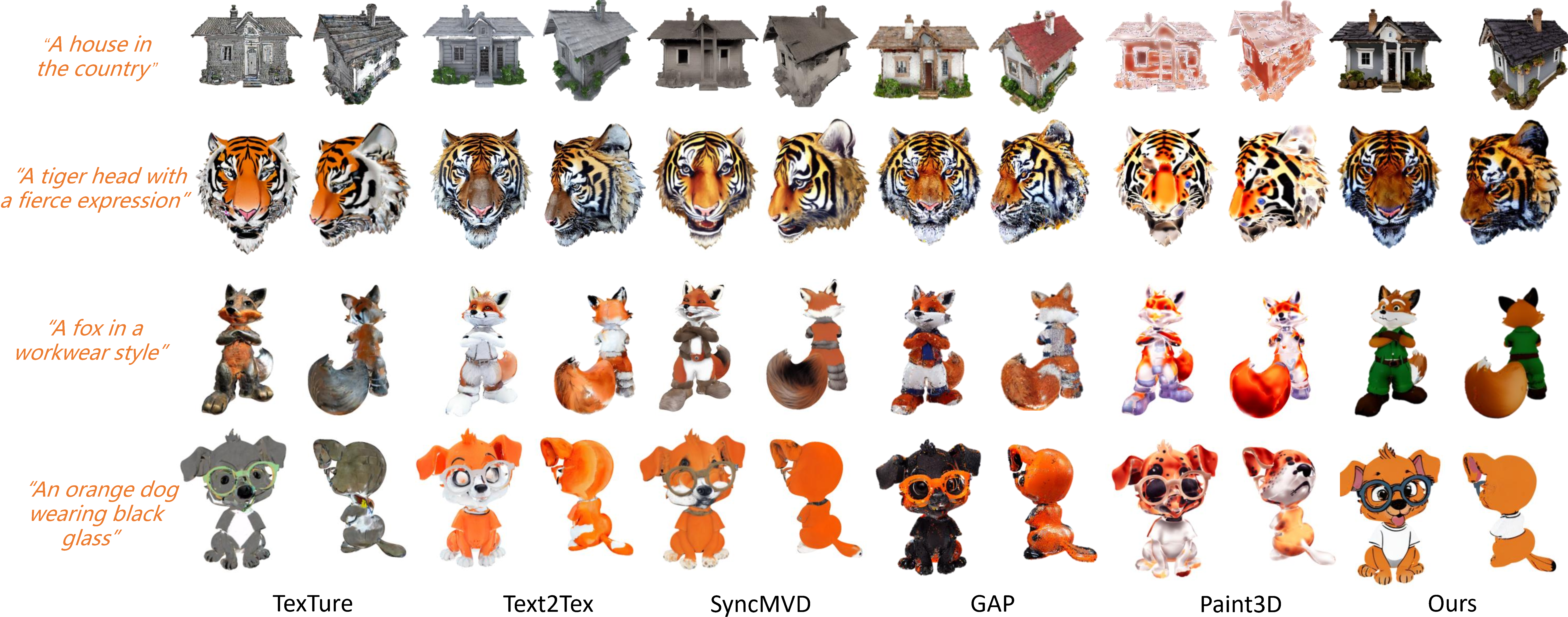
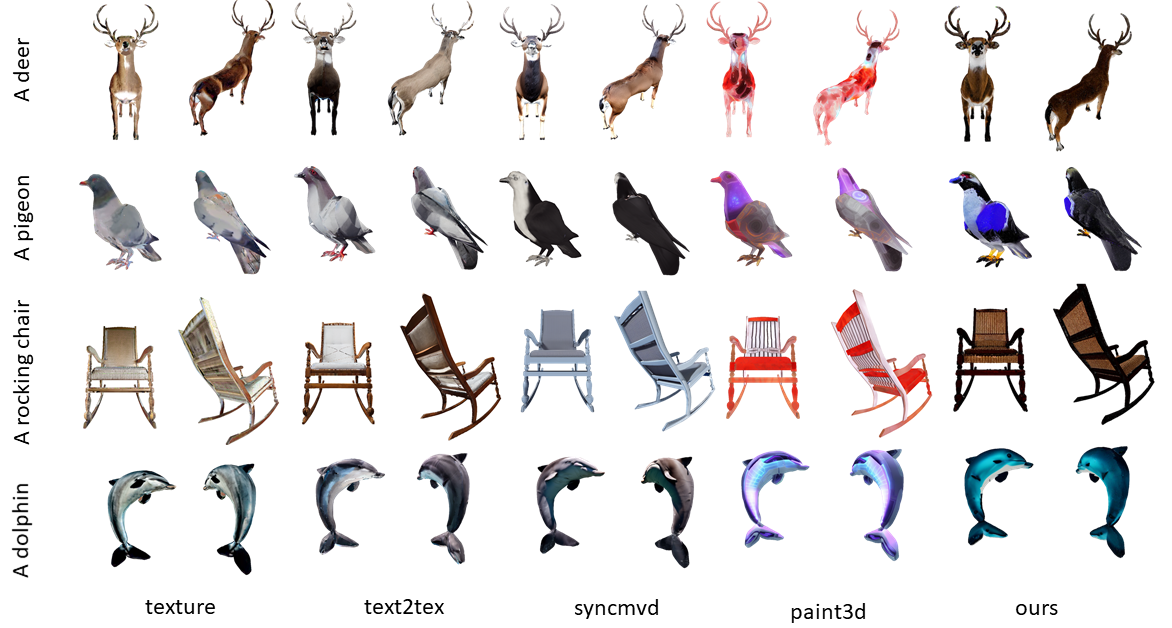
Visual Comparison of Text-Guided Generation
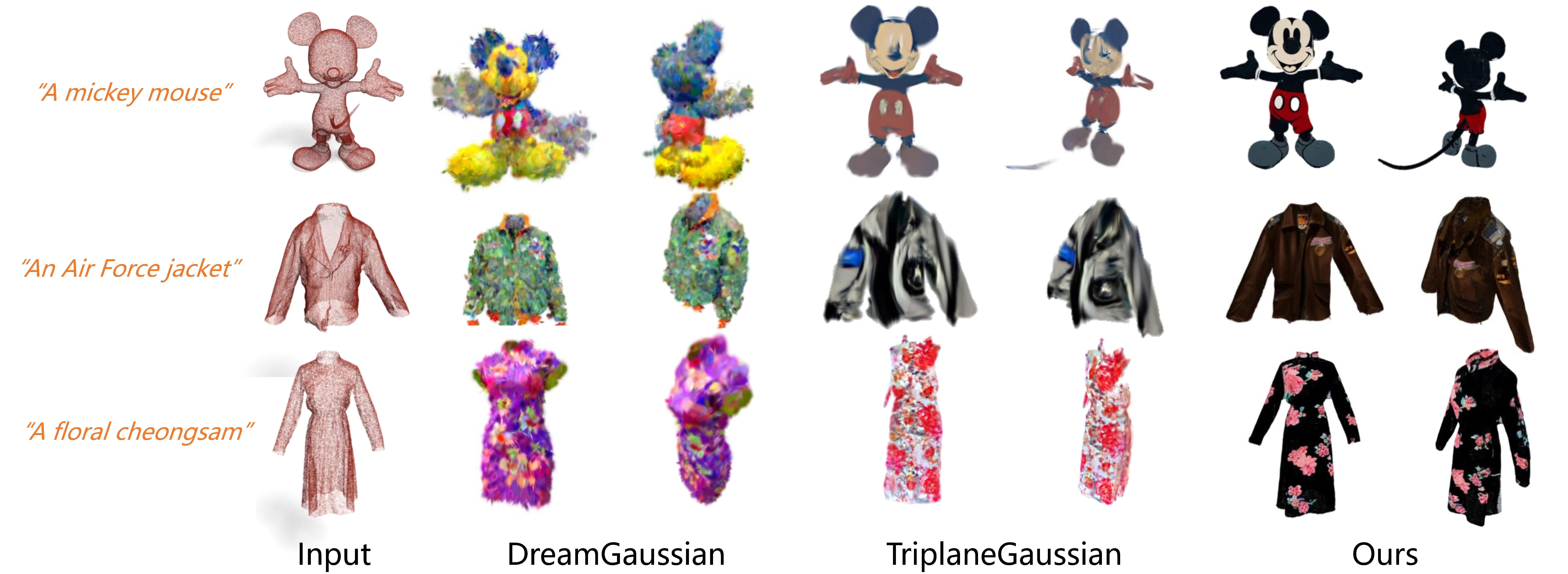
Point-to-Gaussian Generation
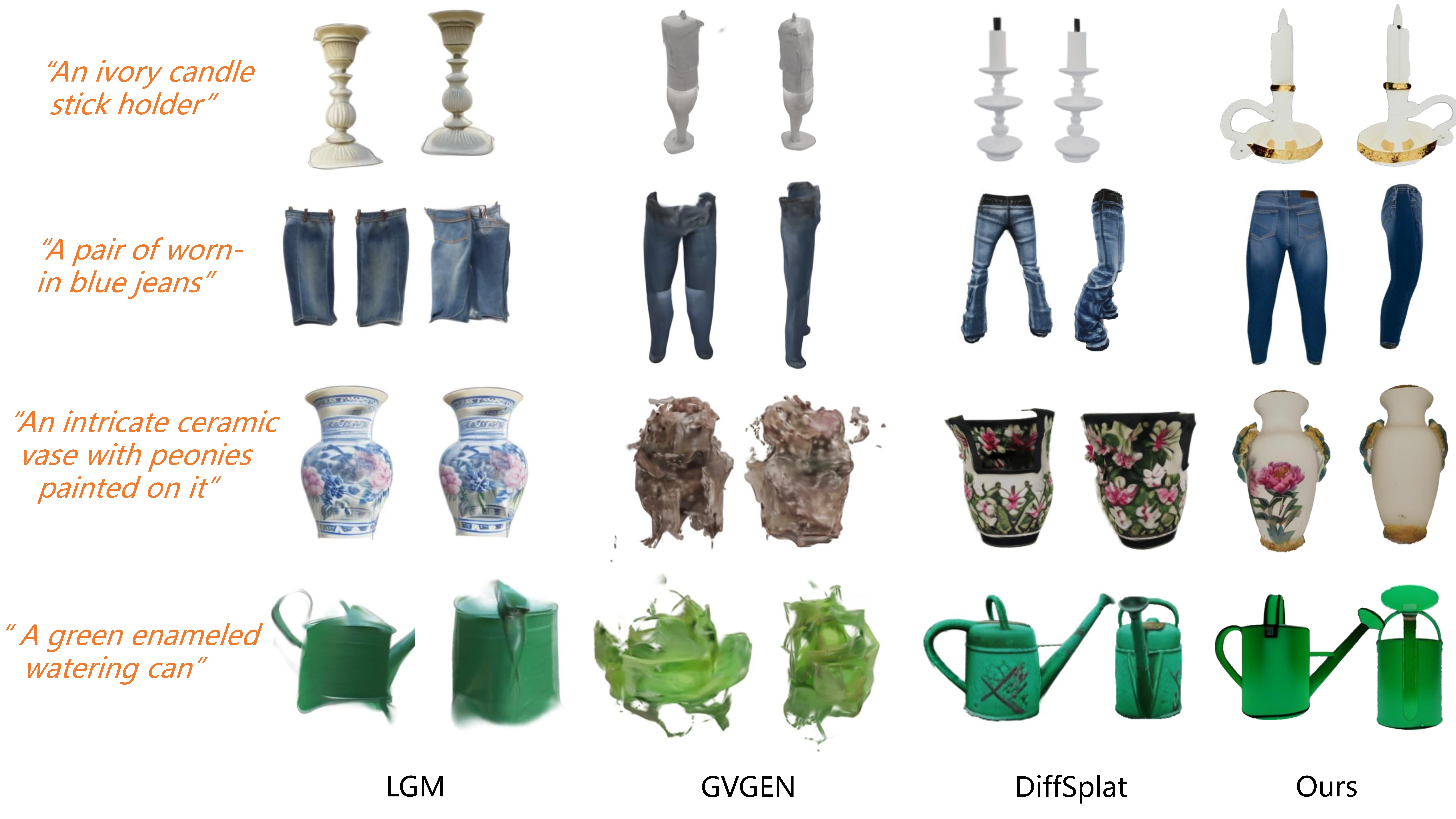
Text-to-3D Generation
More Visual Results
Code
The runnable GaussianGrow release is now included in this repository. The code release keeps the main pipeline, a small example mesh, and required local CUDA extension sources, while excluding model weights, generated outputs, videos, caches, conda packages, and compiled binaries.
Repository Layout
.
├── scripts/                    # Pipeline entrypoints and mesh utilities
├── gaussian_grow/              # GaussianGrow package code
├── scene/, utils/, arguments/   # 3D Gaussian Splatting support code
├── gaussian_renderer/          # Gaussian renderer wrapper
├── Hunyuan3D/                  # Minimal Hunyuan3D texture wrapper and hy3dgen code
├── models/ControlNet/          # ControlNet code, without model weights
├── models/delight/             # Optional Hunyuan3D delight helper
├── extensions/                 # Local CUDA extensions
└── examples/fire_dragon/       # Small example input mesh
Environment
Use Python 3.9 with a CUDA-enabled PyTorch build. Install PyTorch and PyTorch3D first using versions compatible with your GPU/CUDA driver, then install the Python dependencies:
pip install -r requirements.txt
pip install -e .
Install the local CUDA extensions:
scripts/install_extensions.sh
This installs the three local extensions used by the release pipeline:
depthid_render, depthid_render_mask_control_v2, and find_max_in_circles.
The Hunyuan3D texture stage also installs its bundled custom_rasterizer.
Install the remaining Gaussian rasterization dependencies:
git clone --recursive https://github.com/hbb1/diff-surfel-rasterization.git third_party/diff-surfel-rasterization
pip install -e third_party/diff-surfel-rasterization

git clone --recursive https://github.com/graphdeco-inria/gaussian-splatting.git third_party/gaussian-splatting
pip install -e third_party/gaussian-splatting/submodules/simple-knn
Check the environment before launching the full pipeline:
python scripts/check_setup.py
Required Assets
This repository does not ship model weights. Set these paths before running:
export CAPUDF_ROOT=/path/to/CAP-UDF
export HUNYUAN3D_MODEL_PATH=/path/to/Hunyuan3D-2
export HUNYUAN3D_DELIGHT_MODEL_PATH=/path/to/Hunyuan3D-2/hunyuan3d-delight-v2-0
export CONTROLNET_DEPTH_CKPT=/path/to/control_sd15_depth.pth
Download control_sd15_depth.pth from the ControlNet model release. Either set CONTROLNET_DEPTH_CKPT to the checkpoint path or place it at:
models/ControlNet/models/control_sd15_depth.pth
HUNYUAN3D_DELIGHT_MODEL_PATH is optional. If it is not set, the final refinement runs without the delight model unless HUNYUAN3D_MODEL_PATH/hunyuan3d-delight-v2-0 exists.
Run The Pipeline
The default example uses examples/fire_dragon/dragon_normalized.obj:
CUDA_VISIBLE_DEVICES=0 scripts/run_gaussian_grow.sh
scripts/run_gaussian_grow.sh runs the same preflight check by default. Set SKIP_PREFLIGHT=1 only when you have already checked the environment and want to skip this guard.
Override the input and prompt with environment variables:
INPUT_DIR=/path/to/mesh_dir \
OBJ_NAME=my_mesh_normalized \
OBJ_FILE=my_mesh_normalized.obj \
OUTPUT_DIR=outputs/my_mesh \
PROMPT="A stylized ceramic fox with blue floral patterns" \
CUDA_VISIBLE_DEVICES=0 \
scripts/run_gaussian_grow.sh
The pipeline runs four stages, which correspond to the two-stage method in the paper:
scripts/stage1_initialize_gaussians.py— initialise 2D Gaussians from the input point cloud and fit a CAP-UDF field (paper §3.1 Preliminary Preparation, plus the geometric maps in §3.2).scripts/stage2_generate_main_view.py— synthesise the reference (primary) appearance via Depth-Aware ControlNet + Stable Diffusion (paper §3.2 Multi-view Image Generation, primary view).scripts/stage3_texture_mesh.py— run the Hunyuan3D-Paint multi-view diffusion model and write the K=10 view images plusazim.json/elev.json(paper §3.2 cardinal + additional views).scripts/stage4_refine_gaussians.py— optimise Gaussians per view, refine the overlap regions, and iteratively inpaint the unseen regions (paper §3.3 Iterative Gaussian Inpainting + Spatial Inpainting).
Outputs are written to OUTPUT_DIR; the final Gaussian splat is OUTPUT_DIR/update/gaussian/final.ply.
Hardware Notes
The pipeline assumes a single CUDA GPU. Stage scripts auto-tune their render resolution based on --device:
--device a6000(default): high resolution (1024×1024,uv_size=3000), recommended on a ≥48 GB GPU.--device 2080: low-resolution profile (uv_size=1000) for limited-VRAM setups.
The Hunyuan3D texture stage alone needs roughly 24 GB of VRAM, and Stable Diffusion + ControlNet in stages 2 and 4 add another 10 GB or so.
Acknowledgements
GaussianGrow builds on a number of open research projects. We thank the authors of:
- 2D Gaussian Splatting (2DGS) and 3D Gaussian Splatting — Gaussian representation and rasterisation.
- CAP-UDF — unsigned distance field learning for raw point clouds.
- Hunyuan3D-2 — multi-view diffusion model used for appearance synthesis.
- ControlNet and Stable Diffusion — depth-aware reference view generation and inpainting.
- TexTure and GAP — earlier text-guided texturing pipelines that inspired the view-driven optimisation loop.
See THIRD_PARTY.md for the full bundled-component and license map.
Citation
If you find our code or paper useful, please consider citing
@inproceedings{gaussiangrow,
      title={GaussianGrow: Geometry-aware Gaussian Growing from 3D Point Clouds with Text Guidance},
      author={Zhang, Weiqi and Zhou, Junsheng and Geng, Haotian and Shi, Kanle and Xu, Shenkun and Fang, Yi and Liu, Yu-Shen},
      booktitle={Proceedings of the IEEE/CVF Conference on Computer Vision and Pattern Recognition (CVPR)},
      year={2026}
    }
Similar repos


Languages
Python
97.9%
C++
1.4%
[CVPR'2026]: GaussianGrow: Geometry-aware Gaussian Growing from 3D Point Clouds with Text Guidance
Python
22
5 commits
updated May 27, 2026
README
GaussianGrow: Geometry-aware Gaussian Growing from 3D Point Clouds with Text Guidance
(CVPR 2026)
Weiqi Zhang* · Junsheng Zhou*† · Haotian Geng · Kanle Shi · Shenkun Xu · Yi Fang · Yu-Shen Liu†
(* Equal Contribution † Corresponding Author)
1School of Software, Tsinghua University 2Kuaishou Technology 3CAIR and CIDSAI, NYU Abu Dhabi
Paper | Project Page
Generation Results
Visual Comparison of Text-Guided Generation
Point-to-Gaussian Generation
Text-to-3D Generation
More Visual Results
Code
The runnable GaussianGrow release is now included in this repository. The code release keeps the main pipeline, a small example mesh, and required local CUDA extension sources, while excluding model weights, generated outputs, videos, caches, conda packages, and compiled binaries.
Repository Layout
.
├── scripts/                    # Pipeline entrypoints and mesh utilities
├── gaussian_grow/              # GaussianGrow package code
├── scene/, utils/, arguments/   # 3D Gaussian Splatting support code
├── gaussian_renderer/          # Gaussian renderer wrapper
├── Hunyuan3D/                  # Minimal Hunyuan3D texture wrapper and hy3dgen code
├── models/ControlNet/          # ControlNet code, without model weights
├── models/delight/             # Optional Hunyuan3D delight helper
├── extensions/                 # Local CUDA extensions
└── examples/fire_dragon/       # Small example input mesh
Environment
Use Python 3.9 with a CUDA-enabled PyTorch build. Install PyTorch and PyTorch3D first using versions compatible with your GPU/CUDA driver, then install the Python dependencies:
pip install -r requirements.txt
pip install -e .
Install the local CUDA extensions:
scripts/install_extensions.sh
This installs the three local extensions used by the release pipeline:
depthid_render, depthid_render_mask_control_v2, and find_max_in_circles.
The Hunyuan3D texture stage also installs its bundled custom_rasterizer.
Install the remaining Gaussian rasterization dependencies:
git clone --recursive https://github.com/hbb1/diff-surfel-rasterization.git third_party/diff-surfel-rasterization
pip install -e third_party/diff-surfel-rasterization

git clone --recursive https://github.com/graphdeco-inria/gaussian-splatting.git third_party/gaussian-splatting
pip install -e third_party/gaussian-splatting/submodules/simple-knn
Check the environment before launching the full pipeline:
python scripts/check_setup.py
Required Assets
This repository does not ship model weights. Set these paths before running:
export CAPUDF_ROOT=/path/to/CAP-UDF
export HUNYUAN3D_MODEL_PATH=/path/to/Hunyuan3D-2
export HUNYUAN3D_DELIGHT_MODEL_PATH=/path/to/Hunyuan3D-2/hunyuan3d-delight-v2-0
export CONTROLNET_DEPTH_CKPT=/path/to/control_sd15_depth.pth
Download control_sd15_depth.pth from the ControlNet model release. Either set CONTROLNET_DEPTH_CKPT to the checkpoint path or place it at:
models/ControlNet/models/control_sd15_depth.pth
HUNYUAN3D_DELIGHT_MODEL_PATH is optional. If it is not set, the final refinement runs without the delight model unless HUNYUAN3D_MODEL_PATH/hunyuan3d-delight-v2-0 exists.
Run The Pipeline
The default example uses examples/fire_dragon/dragon_normalized.obj:
CUDA_VISIBLE_DEVICES=0 scripts/run_gaussian_grow.sh
scripts/run_gaussian_grow.sh runs the same preflight check by default. Set SKIP_PREFLIGHT=1 only when you have already checked the environment and want to skip this guard.
Override the input and prompt with environment variables:
INPUT_DIR=/path/to/mesh_dir \
OBJ_NAME=my_mesh_normalized \
OBJ_FILE=my_mesh_normalized.obj \
OUTPUT_DIR=outputs/my_mesh \
PROMPT="A stylized ceramic fox with blue floral patterns" \
CUDA_VISIBLE_DEVICES=0 \
scripts/run_gaussian_grow.sh
The pipeline runs four stages, which correspond to the two-stage method in the paper:
scripts/stage1_initialize_gaussians.py— initialise 2D Gaussians from the input point cloud and fit a CAP-UDF field (paper §3.1 Preliminary Preparation, plus the geometric maps in §3.2).scripts/stage2_generate_main_view.py— synthesise the reference (primary) appearance via Depth-Aware ControlNet + Stable Diffusion (paper §3.2 Multi-view Image Generation, primary view).scripts/stage3_texture_mesh.py— run the Hunyuan3D-Paint multi-view diffusion model and write the K=10 view images plusazim.json/elev.json(paper §3.2 cardinal + additional views).scripts/stage4_refine_gaussians.py— optimise Gaussians per view, refine the overlap regions, and iteratively inpaint the unseen regions (paper §3.3 Iterative Gaussian Inpainting + Spatial Inpainting).
Outputs are written to OUTPUT_DIR; the final Gaussian splat is OUTPUT_DIR/update/gaussian/final.ply.
Hardware Notes
The pipeline assumes a single CUDA GPU. Stage scripts auto-tune their render resolution based on --device:
--device a6000(default): high resolution (1024×1024,uv_size=3000), recommended on a ≥48 GB GPU.--device 2080: low-resolution profile (uv_size=1000) for limited-VRAM setups.
The Hunyuan3D texture stage alone needs roughly 24 GB of VRAM, and Stable Diffusion + ControlNet in stages 2 and 4 add another 10 GB or so.
Acknowledgements
GaussianGrow builds on a number of open research projects. We thank the authors of:
- 2D Gaussian Splatting (2DGS) and 3D Gaussian Splatting — Gaussian representation and rasterisation.
- CAP-UDF — unsigned distance field learning for raw point clouds.
- Hunyuan3D-2 — multi-view diffusion model used for appearance synthesis.
- ControlNet and Stable Diffusion — depth-aware reference view generation and inpainting.
- TexTure and GAP — earlier text-guided texturing pipelines that inspired the view-driven optimisation loop.
See THIRD_PARTY.md for the full bundled-component and license map.
Citation
If you find our code or paper useful, please consider citing
@inproceedings{gaussiangrow,
      title={GaussianGrow: Geometry-aware Gaussian Growing from 3D Point Clouds with Text Guidance},
      author={Zhang, Weiqi and Zhou, Junsheng and Geng, Haotian and Shi, Kanle and Xu, Shenkun and Fang, Yi and Liu, Yu-Shen},
      booktitle={Proceedings of the IEEE/CVF Conference on Computer Vision and Pattern Recognition (CVPR)},
      year={2026}
    }
Similar repos
Languages
Python
97.9%
C++
1.4%