[CVPR 2026] FaceCam: Portrait Video Camera Control via Scale-Aware Conditioning
See the codeWeijie Lyu, Ming-Hsuan Yang, Zhixin Shu
University of California, Merced - Adobe Research
&label=FaceCam&labelColor=%23f5f5dc&color=hsl(204%2C%2086%25%2C%2053%25))

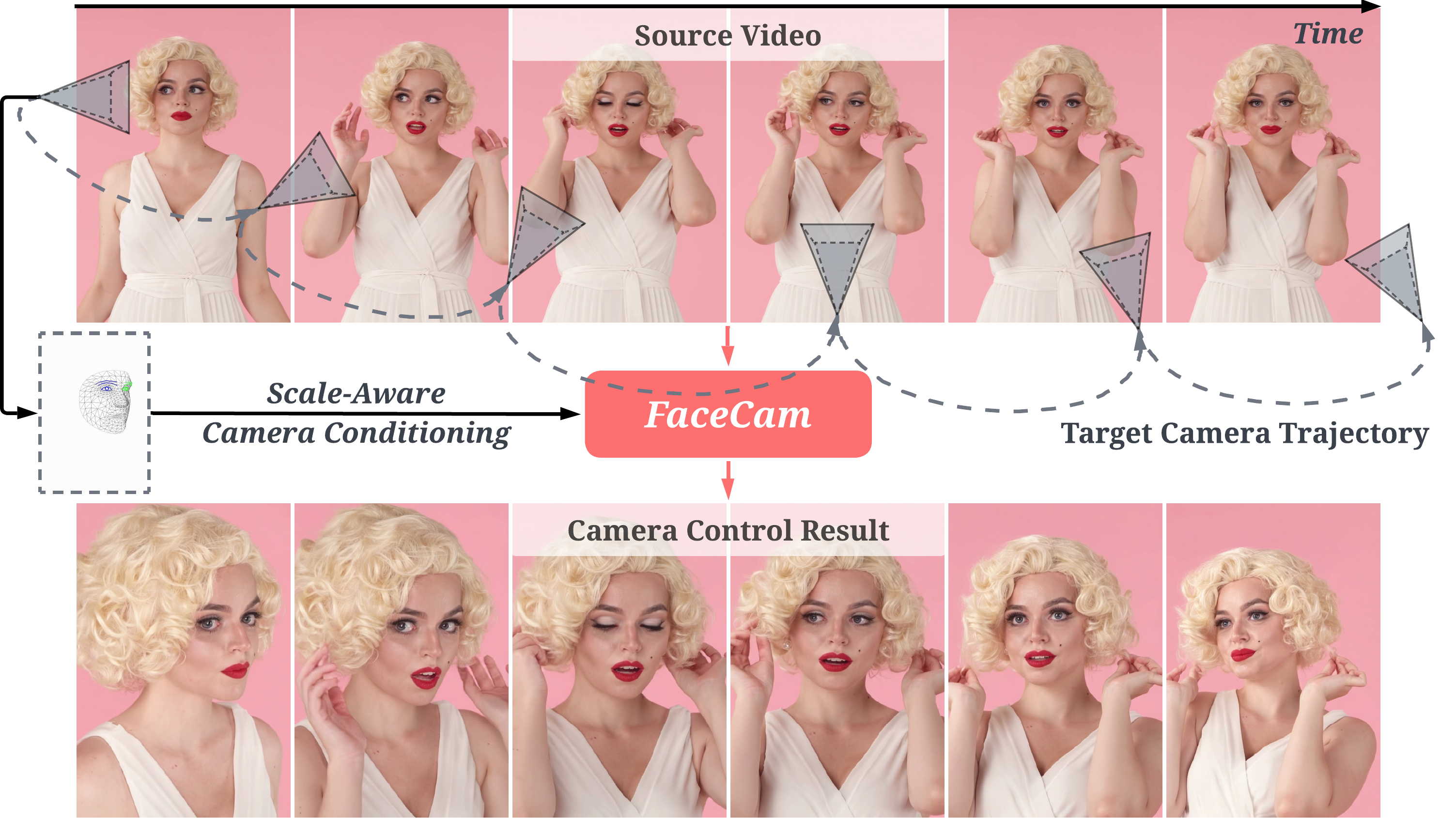
FaceCam generates portrait videos with precise camera control from a single input video and a target camera trajectory.
conda create -n facecam python=3.11 -y
conda activate facecam

# Install the package (includes core dependencies)
pip install -e .

# Additional required packages
pip install xformers # Choose a version which is compatible with your PyTorch
pip install git+https://github.com/graphdeco-inria/diff-gaussian-rasterization --no-build-isolation
pip install mediapipe==0.10.21
We support the Wan 2.2 14B model. Create the directory and download all required assets:
mkdir -p models ckpts
1. Base model weights (via ModelScope):
pip install modelscope
modelscope download --model Wan-AI/Wan2.2-I2V-A14B --local_dir ./models/Wan-AI/Wan2.2-I2V-A14B
2. FaceCam assets (checkpoints, proxy 3D head) from Hugging Face:
pip install huggingface_hub
huggingface-cli download wlyu/FaceCam --local-dir ./ckpts
Alternatively, download from Google Drive: checkpoints and proxy 3D head.
3. Face landmarker (MediaPipe model):
wget -O ckpts/face_landmarker_v2_with_blendshapes.task -q \
  https://storage.googleapis.com/mediapipe-models/face_landmarker/face_landmarker/float16/1/face_landmarker.task
The expected layout:
models/
└── Wan-AI/
    └── Wan2.2-I2V-A14B/
        ├── high_noise_model/
        ├── low_noise_model/
        ├── models_t5_umt5-xxl-enc-bf16.pth
        └── Wan2.1_VAE.pth

ckpts/
├── face_landmarker_v2_with_blendshapes.task
├── gaussians.ply
└── wan2.2_14b/
    ├── high/released_version/
    └── low/released_version/
# Wan 2.2 14B (default 704×480, 81 frames)
python inference.py \
    --model_dir ./models \
    --ckpt_dir  ./ckpts \
    --input_path ./inputs \
    --output_dir ./outputs
--input_path accepts either a single .mp4/.mov file or a directory of videos.
For each input video <name>.mp4, the script saves:
<name>.mp4 — the generated video<name>_input.mp4 — the cropped input video<name>_camera.mp4 — the camera condition visualization⚠️ Note ⚠️
random_camera_params function in inference.py.crop_video function in diffsynth/utils/mediapipe_utils.py, which may not bring the best result. You can customize this function and view the cropped input video and camera condition video saved here before diffusion generation.Use accelerate to distribute samples across GPUs:
accelerate launch --num_processes 4 inference.py \
    --model_dir ./models \
    --ckpt_dir  ./ckpts \
    --input_path ./inputs \
    --output_dir ./outputs
For GPUs with limited memory (e.g. running with 48GB VRAM), enable CPU offloading so that only the active model component stays on GPU:
python inference.py \
    --model_dir ./models \
    --ckpt_dir  ./ckpts \
    --input_path ./inputs \
    --output_dir ./outputs \
    --low_vram
This trades speed for memory — the text encoder, DiTs, and VAE are moved between CPU and GPU as needed instead of keeping everything resident.
If you find our work useful for your research, please consider citing our paper:
@misc{facecam,
  title         = {FaceCam: Portrait Video Camera Control via Scale-Aware Conditioning},
  author        = {Weijie Lyu and Ming-Hsuan Yang and Zhixin Shu},
  year          = {2026},
  eprint        = {2603.05506},
  archivePrefix = {arXiv},
  primaryClass  = {cs.CV},
  url           = {https://arxiv.org/abs/2603.05506},
}
This work is built upon Wan and DiffSynth. We thank the authors for their excellent work.
This is a self-reimplementation of FaceCam. The code has been reimplemented and the weights retrained. Results may differ slightly from those reported in the paper.
149 followers · starred Mar 2026
121 followers · starred May 2026
[CVPR 2026] FaceCam: Portrait Video Camera Control via Scale-Aware Conditioning
See the codeWeijie Lyu, Ming-Hsuan Yang, Zhixin Shu
University of California, Merced - Adobe Research
FaceCam generates portrait videos with precise camera control from a single input video and a target camera trajectory.
conda create -n facecam python=3.11 -y
conda activate facecam

# Install the package (includes core dependencies)
pip install -e .

# Additional required packages
pip install xformers # Choose a version which is compatible with your PyTorch
pip install git+https://github.com/graphdeco-inria/diff-gaussian-rasterization --no-build-isolation
pip install mediapipe==0.10.21
We support the Wan 2.2 14B model. Create the directory and download all required assets:
mkdir -p models ckpts
1. Base model weights (via ModelScope):
pip install modelscope
modelscope download --model Wan-AI/Wan2.2-I2V-A14B --local_dir ./models/Wan-AI/Wan2.2-I2V-A14B
2. FaceCam assets (checkpoints, proxy 3D head) from Hugging Face:
pip install huggingface_hub
huggingface-cli download wlyu/FaceCam --local-dir ./ckpts
Alternatively, download from Google Drive: checkpoints and proxy 3D head.
3. Face landmarker (MediaPipe model):
wget -O ckpts/face_landmarker_v2_with_blendshapes.task -q \
  https://storage.googleapis.com/mediapipe-models/face_landmarker/face_landmarker/float16/1/face_landmarker.task
The expected layout:
models/
└── Wan-AI/
    └── Wan2.2-I2V-A14B/
        ├── high_noise_model/
        ├── low_noise_model/
        ├── models_t5_umt5-xxl-enc-bf16.pth
        └── Wan2.1_VAE.pth

ckpts/
├── face_landmarker_v2_with_blendshapes.task
├── gaussians.ply
└── wan2.2_14b/
    ├── high/released_version/
    └── low/released_version/
# Wan 2.2 14B (default 704×480, 81 frames)
python inference.py \
    --model_dir ./models \
    --ckpt_dir  ./ckpts \
    --input_path ./inputs \
    --output_dir ./outputs
--input_path accepts either a single .mp4/.mov file or a directory of videos.
For each input video <name>.mp4, the script saves:
<name>.mp4 — the generated video<name>_input.mp4 — the cropped input video<name>_camera.mp4 — the camera condition visualization⚠️ Note ⚠️
random_camera_params function in inference.py.crop_video function in diffsynth/utils/mediapipe_utils.py, which may not bring the best result. You can customize this function and view the cropped input video and camera condition video saved here before diffusion generation.Use accelerate to distribute samples across GPUs:
accelerate launch --num_processes 4 inference.py \
    --model_dir ./models \
    --ckpt_dir  ./ckpts \
    --input_path ./inputs \
    --output_dir ./outputs
For GPUs with limited memory (e.g. running with 48GB VRAM), enable CPU offloading so that only the active model component stays on GPU:
python inference.py \
    --model_dir ./models \
    --ckpt_dir  ./ckpts \
    --input_path ./inputs \
    --output_dir ./outputs \
    --low_vram
This trades speed for memory — the text encoder, DiTs, and VAE are moved between CPU and GPU as needed instead of keeping everything resident.
If you find our work useful for your research, please consider citing our paper:
@misc{facecam,
  title         = {FaceCam: Portrait Video Camera Control via Scale-Aware Conditioning},
  author        = {Weijie Lyu and Ming-Hsuan Yang and Zhixin Shu},
  year          = {2026},
  eprint        = {2603.05506},
  archivePrefix = {arXiv},
  primaryClass  = {cs.CV},
  url           = {https://arxiv.org/abs/2603.05506},
}
This work is built upon Wan and DiffSynth. We thank the authors for their excellent work.
This is a self-reimplementation of FaceCam. The code has been reimplemented and the weights retrained. Results may differ slightly from those reported in the paper.
149 followers · starred Mar 2026
121 followers · starred May 2026





