Professional ACME Client for Windows (and now cross-platform via Certify Management Hub). Certificate Management UI, powered by Let's Encrypt and compatible with all ACME v2 CAs. Used by over 150,000 organisations. Download from certifytheweb.com
See the codeACME enabled Certificate Manager, powered by Let's Encrypt and other ACME certificate authorities. This app makes it easy to automatically request, install and continuously renew free certificates for Windows/IIS or for any other services which requires a certificate. The system now includes the Certify Management Hub which is a cross-platform and self hosted administrative UI.
Certify The Web is used by hundreds of thousands of organisations to manage millions of certificates each month and is the perfect solution for administrators who want visibility of certificate management for their domains. Centralised dashboard status reporting is also available.
If you use our app, spread the word and don't forget to Star us on GitHub!
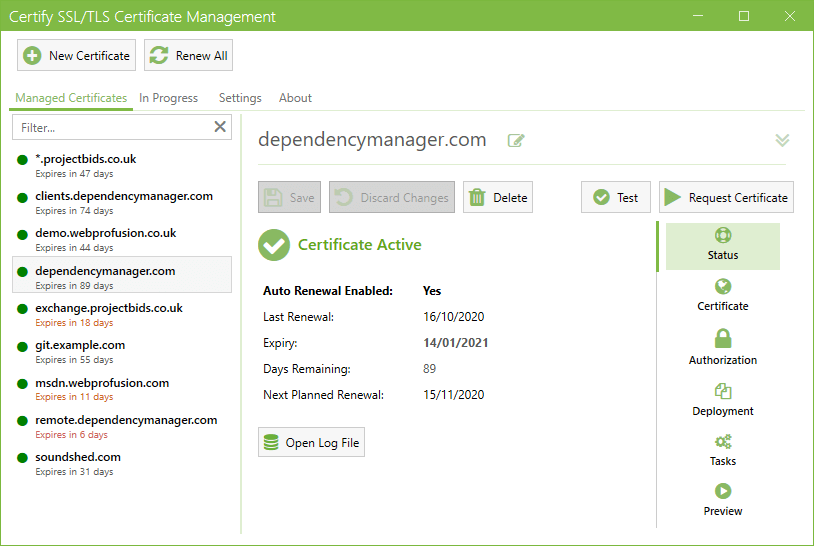
The app is free to download and evaluate, with no feature restrictions and no time limit. License keys are available for commercial organisations, users who wish to help fund development or users who require support.
choco install certifytheweb.Users with more complex requirements can explore the different validation modes, deployment modes and other advanced options.
https://docs.certifytheweb.com
Create a directory for the various repos to clone to, e.g. C:\git\certify_dev and clone the following repos into this location:
In addition, create a \libs subdirectory and clone:
Run dotnet build Certify.Core.Service.sln and dotnet build Certify.UI.sln or open using Visual Studio. The UI needs the service running to connect to for normal operation.
When developing plugins, the plugin and dependencies of the plugin need to be copied to the debug \plugins\ location for the service to load them.
585 followers · starred Jun 2025
432 followers · starred Feb 2019
34 followers · starred Jun 2022
44 followers · starred May 2026
Professional ACME Client for Windows (and now cross-platform via Certify Management Hub). Certificate Management UI, powered by Let's Encrypt and compatible with all ACME v2 CAs. Used by over 150,000 organisations. Download from certifytheweb.com
See the codeACME enabled Certificate Manager, powered by Let's Encrypt and other ACME certificate authorities. This app makes it easy to automatically request, install and continuously renew free certificates for Windows/IIS or for any other services which requires a certificate. The system now includes the Certify Management Hub which is a cross-platform and self hosted administrative UI.
Certify The Web is used by hundreds of thousands of organisations to manage millions of certificates each month and is the perfect solution for administrators who want visibility of certificate management for their domains. Centralised dashboard status reporting is also available.
If you use our app, spread the word and don't forget to Star us on GitHub!
The app is free to download and evaluate, with no feature restrictions and no time limit. License keys are available for commercial organisations, users who wish to help fund development or users who require support.
choco install certifytheweb.Users with more complex requirements can explore the different validation modes, deployment modes and other advanced options.
https://docs.certifytheweb.com
Create a directory for the various repos to clone to, e.g. C:\git\certify_dev and clone the following repos into this location:
In addition, create a \libs subdirectory and clone:
Run dotnet build Certify.Core.Service.sln and dotnet build Certify.UI.sln or open using Visual Studio. The UI needs the service running to connect to for normal operation.
When developing plugins, the plugin and dependencies of the plugin need to be copied to the debug \plugins\ location for the service to load them.
585 followers · starred Jun 2025
432 followers · starred Feb 2019
34 followers · starred Jun 2022
44 followers · starred May 2026



