Go version of WebP Server. A tool that will serve your JPG/PNG/BMP/SVGs as WebP/AVIF format with compression, on-the-fly.
See the code




Documentation | Website | Blog
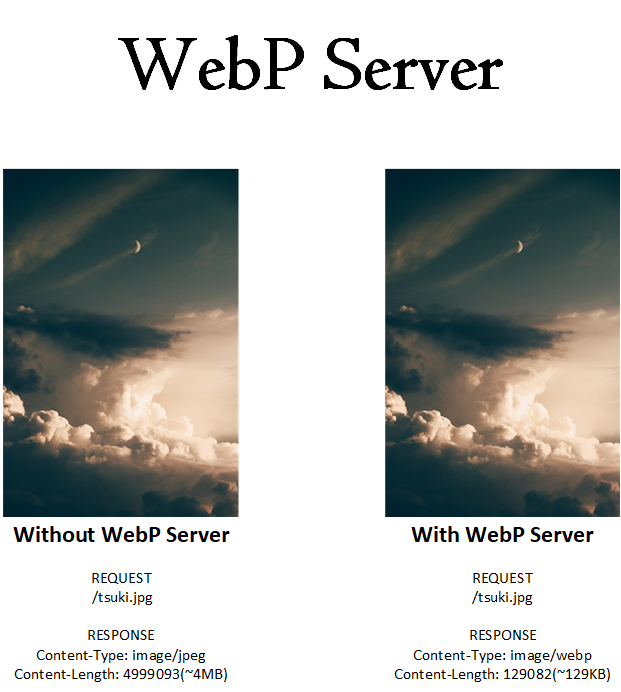
This is a Server based on Golang, which allows you to serve WebP images on the fly.
Currently supported image format: JPEG, PNG, BMP, GIF, SVG, HEIC, NEF, WEBP
e.g When you visit
https://your.website/pics/tsuki.jpg,it will serve asimage/webp/image/avifformat without changing the URL.GIF image will not be converted to AVIF format because the converted AVIF image is not animated.
We strongly recommend using Docker to run WebP Server Go because running it directly with the binary may encounter issues with glibc and some dependency libraries, which can be quite tricky to resolve.
flowchart LR
client["Client\nGET /some-images/tsuki.jpg"] --> server["WebP Server Go\n:3333"]

subgraph host["Host machine"]
hostPics["/path/to/pics"]
hostExhaust["./exhaust"]
hostMeta["./metadata"]
end

subgraph container["Docker container"]
cPics["/opt/pics (source images)"]
cExhaust["/opt/exhaust (optimized cache)"]
cMeta["/opt/metadata (source metadata)"]
end

hostPics <-- "volume mount" --> cPics
hostExhaust <-- "volume mount" --> cExhaust
hostMeta <-- "volume mount" --> cMeta

server --> cPics
server --> cExhaust
server --> cMeta
server --> response["Return optimized image\n(webp/avif/jxl)"]
This helps separate responsibilities clearly:
picsstores original files,exhauststores converted outputs, andmetadatastores source metadata used for cache validation.
Make sure you've got Docker and docker-compose installed, create a directory and create docker-compose.yml file inside it like this:
version: '3'

services:
  webp:
    image: webpsh/webp-server-go
    # image: ghcr.io/webp-sh/webp_server_go
    restart: always
    volumes:
      - ./path/to/pics:/opt/pics
      - ./exhaust:/opt/exhaust
      - ./metadata:/opt/metadata
    ports:
      - 127.0.0.1:3333:3333
Suppose your website and image has the following pattern.
| Image Path | Website Path |
|---|---|
/var/www/img.webp.sh/path/tsuki.jpg | https://img.webp.sh/path/tsuki.jpg |
Then
./path/to/pics should be changed to /var/www/img.webp.sh./exhaust is cache folder for output images, by default it will be in exhaust directory alongside with docker-compose.yml file, if you'd like to keep cached images in another folder, you can change ./exhaust to /some/other/path/to/exhaust./metadata is cache folder for images' metadata, by default it will be in metadata directory alongside with docker-compose.yml fileStart the container using:
docker-compose up -d
Now the server should be running on 127.0.0.1:3333, visiting http://127.0.0.1:3333/path/tsuki.jpg will see the optimized version of /var/www/img.webp.sh/path/tsuki.jpg, you can now add reverse proxy to make it public, for example, let Nginx to proxy_pass http://127.0.0.1:3333/;, and your WebP Server is on-the-fly!
If you'd like to use a customized config.json, you can follow the steps in Configuration | WebP Server Documentation to genereate one, and mount it into the container's /etc/config.json, example docker-compose.yml as follows:
version: '3'

services:
  webp:
    image: webpsh/webp-server-go
    # image: ghcr.io/webp-sh/webp_server_go
    restart: always
    volumes:
      - ./path/to/pics:/opt/pics
      - ./path/to/exhaust:/opt/exhaust
      - ./path/to/metadata:/opt/metadata
      - ./config.json:/etc/config.json
    ports:
      - 127.0.0.1:3333:3333
You can refer to Configuration | WebP Server Documentation for more info, such as custom config, AVIF support etc.
Or, if you need some examples, you can refer to Configuration Examples | WebP Server Documentation.
If you'd like to use with binary, please consult to Use with Binary(Advanced) | WebP Server Documentation
spoiler alert: you may encounter issues with
glibcand some dependency libraries.
For supervisor or detailed Nginx configuration, please read our documentation at https://docs.webp.sh/
We are currently building a new service called WebP Cloud Services, it now has three parts:
https://www.gravatar.com/avatar/09eba3a443a7ea91cf818f6b27607d66 to https://gravatar.webp.se/avatar/09eba3a443a7ea91cf818f6b27607d66 for rendering will get a smaller version of gravater, making your website fasterblur, sharpen for image processing.For detailed information, please visit WebP Cloud Services Website or WebP Cloud Services Docs. |
WebP Server is under the GPLv3. See the LICENSE file for details.
Please refer to SECURITY.md for more information.
3,493 followers · starred Oct 2024
100 followers · starred Nov 2022
46 followers · starred Apr 2024
158 followers · starred Mar 2021
Go version of WebP Server. A tool that will serve your JPG/PNG/BMP/SVGs as WebP/AVIF format with compression, on-the-fly.
See the code
Documentation | Website | Blog
This is a Server based on Golang, which allows you to serve WebP images on the fly.
Currently supported image format: JPEG, PNG, BMP, GIF, SVG, HEIC, NEF, WEBP
e.g When you visit
https://your.website/pics/tsuki.jpg,it will serve asimage/webp/image/avifformat without changing the URL.GIF image will not be converted to AVIF format because the converted AVIF image is not animated.
We strongly recommend using Docker to run WebP Server Go because running it directly with the binary may encounter issues with glibc and some dependency libraries, which can be quite tricky to resolve.
flowchart LR
client["Client\nGET /some-images/tsuki.jpg"] --> server["WebP Server Go\n:3333"]

subgraph host["Host machine"]
hostPics["/path/to/pics"]
hostExhaust["./exhaust"]
hostMeta["./metadata"]
end

subgraph container["Docker container"]
cPics["/opt/pics (source images)"]
cExhaust["/opt/exhaust (optimized cache)"]
cMeta["/opt/metadata (source metadata)"]
end

hostPics <-- "volume mount" --> cPics
hostExhaust <-- "volume mount" --> cExhaust
hostMeta <-- "volume mount" --> cMeta

server --> cPics
server --> cExhaust
server --> cMeta
server --> response["Return optimized image\n(webp/avif/jxl)"]
This helps separate responsibilities clearly:
picsstores original files,exhauststores converted outputs, andmetadatastores source metadata used for cache validation.
Make sure you've got Docker and docker-compose installed, create a directory and create docker-compose.yml file inside it like this:
version: '3'

services:
  webp:
    image: webpsh/webp-server-go
    # image: ghcr.io/webp-sh/webp_server_go
    restart: always
    volumes:
      - ./path/to/pics:/opt/pics
      - ./exhaust:/opt/exhaust
      - ./metadata:/opt/metadata
    ports:
      - 127.0.0.1:3333:3333
Suppose your website and image has the following pattern.
| Image Path | Website Path |
|---|---|
/var/www/img.webp.sh/path/tsuki.jpg | https://img.webp.sh/path/tsuki.jpg |
Then
./path/to/pics should be changed to /var/www/img.webp.sh./exhaust is cache folder for output images, by default it will be in exhaust directory alongside with docker-compose.yml file, if you'd like to keep cached images in another folder, you can change ./exhaust to /some/other/path/to/exhaust./metadata is cache folder for images' metadata, by default it will be in metadata directory alongside with docker-compose.yml fileStart the container using:
docker-compose up -d
Now the server should be running on 127.0.0.1:3333, visiting http://127.0.0.1:3333/path/tsuki.jpg will see the optimized version of /var/www/img.webp.sh/path/tsuki.jpg, you can now add reverse proxy to make it public, for example, let Nginx to proxy_pass http://127.0.0.1:3333/;, and your WebP Server is on-the-fly!
If you'd like to use a customized config.json, you can follow the steps in Configuration | WebP Server Documentation to genereate one, and mount it into the container's /etc/config.json, example docker-compose.yml as follows:
version: '3'

services:
  webp:
    image: webpsh/webp-server-go
    # image: ghcr.io/webp-sh/webp_server_go
    restart: always
    volumes:
      - ./path/to/pics:/opt/pics
      - ./path/to/exhaust:/opt/exhaust
      - ./path/to/metadata:/opt/metadata
      - ./config.json:/etc/config.json
    ports:
      - 127.0.0.1:3333:3333
You can refer to Configuration | WebP Server Documentation for more info, such as custom config, AVIF support etc.
Or, if you need some examples, you can refer to Configuration Examples | WebP Server Documentation.
If you'd like to use with binary, please consult to Use with Binary(Advanced) | WebP Server Documentation
spoiler alert: you may encounter issues with
glibcand some dependency libraries.
For supervisor or detailed Nginx configuration, please read our documentation at https://docs.webp.sh/
We are currently building a new service called WebP Cloud Services, it now has three parts:
https://www.gravatar.com/avatar/09eba3a443a7ea91cf818f6b27607d66 to https://gravatar.webp.se/avatar/09eba3a443a7ea91cf818f6b27607d66 for rendering will get a smaller version of gravater, making your website fasterblur, sharpen for image processing.For detailed information, please visit WebP Cloud Services Website or WebP Cloud Services Docs. |
WebP Server is under the GPLv3. See the LICENSE file for details.
Please refer to SECURITY.md for more information.
3,493 followers · starred Oct 2024
100 followers · starred Nov 2022
46 followers · starred Apr 2024
158 followers · starred Mar 2021