hvpp is a lightweight Intel x64/VT-x hypervisor written in C++ focused primarily on virtualization of already running operating system
C++
1,358
155 commits
updated Mar 15, 2021
hvpp is a lightweight Intel x64/VT-x hypervisor written in C++ focused primarily on virtualization of already running operating system.
Although several open-source research hypervisors aimed at simplicity already exist, in my opinion this field is still somewhat unexplored and needs more open-source projects. This can especially help those who have just started exploring virtualization technologies and are looking for small/reference projects. If you're one of them, my bets are that you're really disappointed right now, because all you've got are barely dozen of (great!) projects and huge pile of Intel Manual pages.
C++ has been chosen as a language for this project because of two reasons:
Even though this project is primarily developed for Windows, I've decided to not use traditional Windows Driver naming
convention (aka DrvCamelCase). Instead, traditional C++ snake_case is used. The reason is that hypervisor is very
"stand-alone" and doesn't depend on many OS functions. Therefore I decided to treat it as a regular C++ project.
If you want to challenge yourself in low-level programming, my advice would be to try and write a simple hypervisor. During the process you'll get invaluable knowledge and experience and you'll probably discover many new things. For instance here's a selection of some things I've learned thanks to writing this project:
MmGetPhysicalMemoryRanges() (and \REGISTRY\MACHINE\HARDWARE\RESOURCEMAP)KeIpiGenericCall - which can be used instead of undocumented KeGenericCallDpc (but at the cost of higher IRQL)mov cr3, <source> instructions in the guest)Also - as obvious as it might sound - I'd like to point out that if you decide to write your own VT-x hypervisor, you'll NEED Intel® 64 and IA-32 architectures software developer’s manual combined volumes: 1, 2A, 2B, 2C, 2D, 3A, 3B, 3C, 3D, and 4. So download the PDF - together with Adobe Acrobat Reader - because trust me, you don't want to read and navigate through 5000 pages with browser's built-in PDF reader.
CPUID, (WB)INVD, INVLPG, RDTSC(P), MOV CR, MOV DR, IN/OUT, RDMSR, WRMSR, SGDT, SIDT, LGDT,
LIDT, SLDT, STR, LLDT, LTR, XSETBV and INVPCID instructionsVMCALL instruction (used for termination of hvpp)VMCLEAR, VMLAUNCH, VMRESUME, VMPTRLD, VMPTRST, VMREAD, VMWRITE, VMFUNC, VMXOFF, VMXON, INVEPT
and INVVPID instructions raise #UD (invalid opcode exception)ExAllocatePoolWithTag). But in VM-exit handler, interrupts are disabled
and your IRQL is effectively HIGH_LEVEL.CPUID instruction interception, hiding hooks
in user-mode applications via EPT and communication with hvpp via VMCALLNote: hvpp is compiled as a static library, which is linked with the hvppdrv project.
hypervisor::start(vmexit_handler& handler)
vmexit_handler instance to each VCPUvcpu_t::start()
vcpu_t::vmx_enter()vmexit_handler::setup() is called, which allows anyone to initialize the VM-exit handler and/or modify the VMCS
before the launch (see vmexit_custom_handler::setup() in hvppdrv, vmexit_custom.cpp)hypervisor::stop()
vcpu_t::stop()
vmexit_handler::teardown() is called and switches into VMX mode (vmexit_passthrough_handler::teardown() does
it by VMCALL instruction)vcpu_t::vmx_leave() is called - it leaves VMX mode with VMXOFF instructionCompile hvpp using Visual Studio 2017. Solution file is included. The only required dependency is WDK.
You can run hvpp on Windows 7 or higher. Windows 10 is recommended though, because it supports TraceLogging.
Enable Test-Signing boot configuration option (note that you'll need administrative privileges to use
bcdedit and sc commands):
bcdedit /set testsigning on
Register driver with Service Control Manager (yes, it's important to leave these spaces):
sc create hvpp type= kernel binPath= "C:\full\path\to\hvppdrv.sys"
Now you should restart your computer for testsigning to take effect, otherwise you'll be unable to start the driver.
But before you do, you might want to prepare DebugView from SysInternals and
traceview.exe tool from the WDK (note that traceview will work properly only on Windows 10).
After restart, launch DebugView and TraceView. In TraceView:
File -> Create New Log Session, click on Add Provider
Manually Entered Control GUID or Hashed Name916fcd3e-673b-4610-aaba-0b71e28acd40 (arbitrarily chosen, see lib/win32/tracelog.cpp)OKSource Of WPP Format Information set to Auto
OKNext, which will bring you to Log Session Options dialog
Log Session Name editbox you can give this logging session any name you like, e.g. HvppSession or you can
leave it as it isLog Trace Event Data To File, which saves whole logging session into an .ETL fileFinishTraceView is now set-up and ready to show tracelogs from hvpp. You can launch hvpp
now:
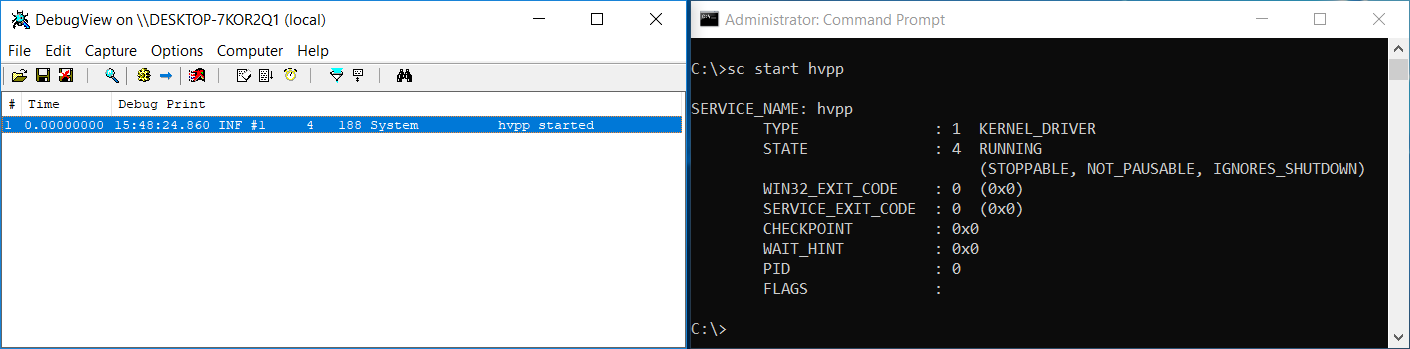
sc start hvpp
hvpp now performs various checks and enters VMX mode if they pass. In case of success you should see message
hvpp started in the DebugView.
Run hvppctrl:
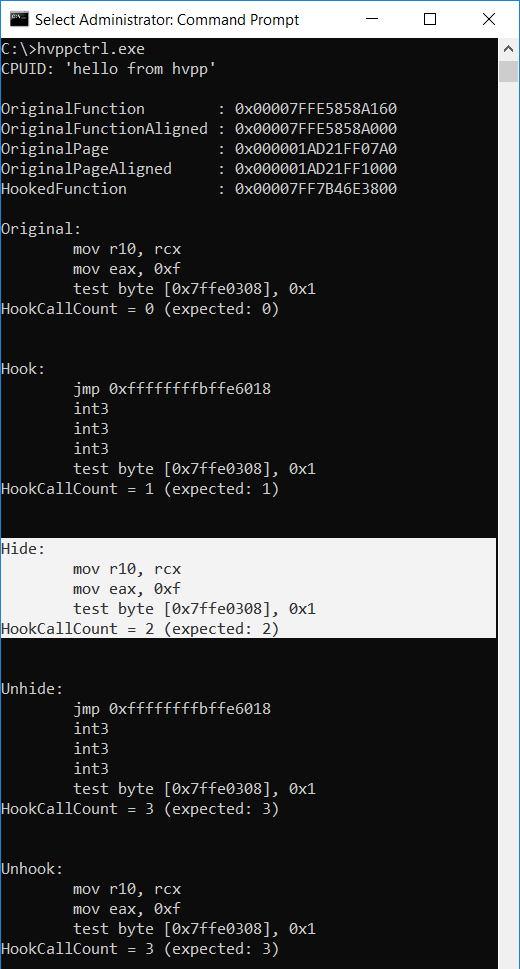
hvppctrl.exe
hvppctrl performs CPUID instruction with EAX = 0x70707668 ('hvpp') which hvpp should intercept and return
string hello from hvpp in EAX, EBX, ECX and EDX registers (see vmexit_custom.cpp).
hvppctrl should print this string.
hvppctrl tries to "stealthily" hook ntdll!ZwClose function using EPT. The exact process is described
further below.
hvppctrl performs IOCTL, which should instruct hvpp to set one-time breakpoint when IN/OUT instruction
manipulating with port 0x64 (keyboard) is executed.
ZwClose function in ntdll.dll
NULL parameter, this function call will most likely fail with some NTSTATUS error code,
which it ignores)HookCallCount and it's expected value (explained below)ntdll!ZwClose fuction using Detours
jmp being first instruction)NULL parameter)
HookCallCountHookCallCount and it's expected value - it should be 1 now, as the hooked function has been called
for the first time nowVMCALL instruction and RCX = 0xc1 (arbitrarily chosen), RDX = AddressOfReadPage and
R8 = AddressOfExecutePage - this instructs hvpp to hide the hook
jmp)NULL parameter)
HookCallCount
will be incremented againHookCallCount and it's expected value - it should be 2VMCALL instruction and RCX = 0xc2 (arbitrarily chosen) - this instructs hvpp to unhide the
hook
jmp as a
first instruction againNULL parameter)
HookCallCount will be incremented
againHookCallCount and it's expected value - it should be 3ntdll!ZwClose function
NULL parameter)
HookCallCount should not be incremented nowHookCallCount and it's expected value - it should be still 3
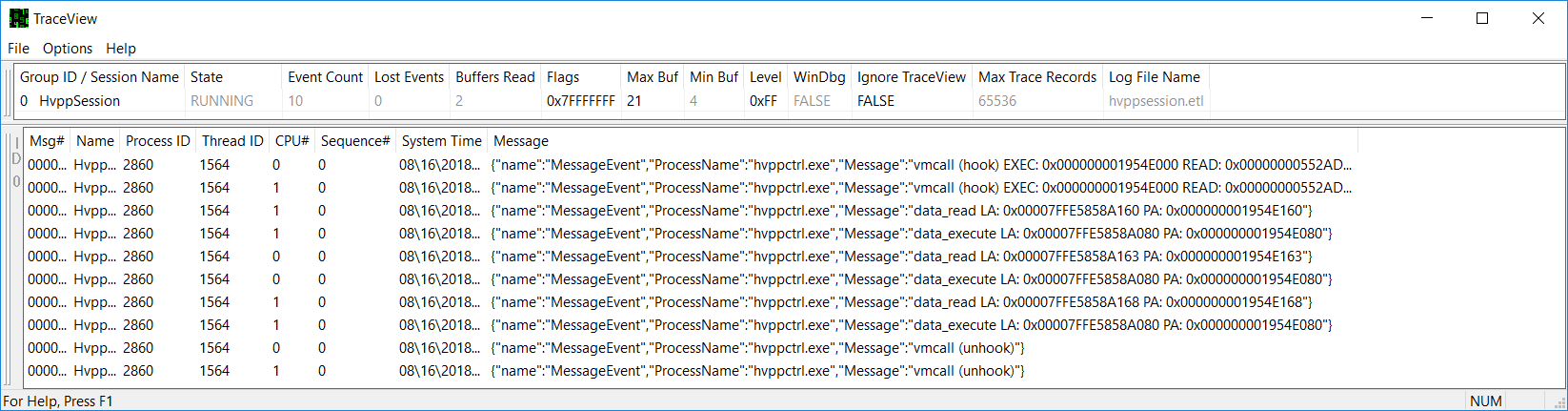
At the same time you should see tracelog messages in the TraceView - they are generated on each VMCALL and on each
EPT Violation.
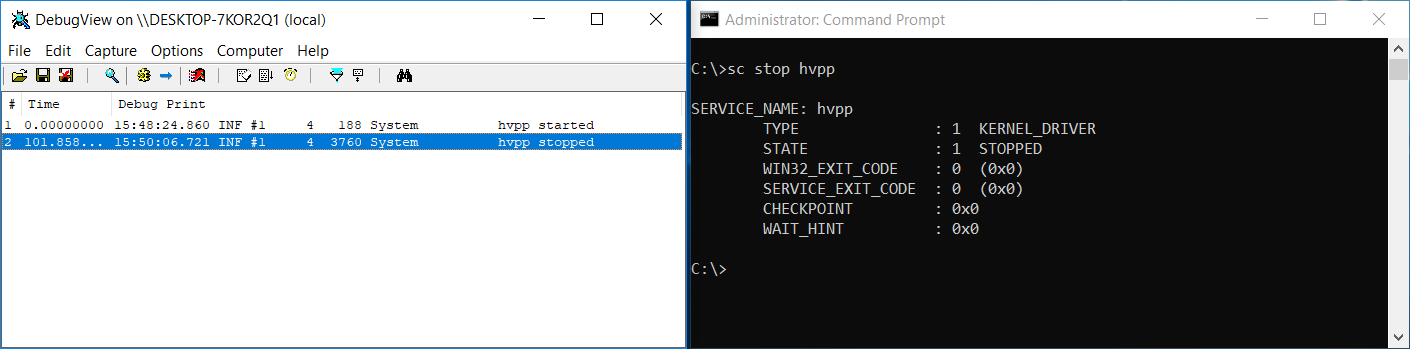
When you decide you want to turn off the hvpp, just execute:
sc stop hvpp
This software is open-source under the MIT license. See the LICENSE.txt file in this repository.
Detours is licensed under MIT license (a copy of the license is included here).
udis86 is licensed under the terms of the 2-clause "Simplified BSD License" (a copy of the license is included here).
SimpleVisor: https://github.com/ionescu007/SimpleVisor
HyperPlatform: https://github.com/tandasat/HyperPlatform
HyperBone: https://github.com/DarthTon/HyperBone
Bareflank: https://github.com/Bareflank/hypervisor
ksm: https://github.com/asamy/ksm
MoRE: https://github.com/ainfosec/MoRE
hyperdbg: https://github.com/rmusser01/hyperdbg
virtdbg: https://github.com/upring/virtdbg
BluePill: https://invisiblethingslab.com/resources/bh07/nbp-0.32-public.zip
Phrack #69: http://www.phrack.org/issues/69/15.html
NOVA Microhypervisor: https://github.com/udosteinberg/NOVA
Finally, I'd especially like to suggest reading interesting writings from Satoshi Tanda (github, twitter):
And notes from LordNoteworthy (github, twitter):
If you find this project interesting, you can buy me a coffee
  BTC 3GwZMNGvLCZMi7mjL8K6iyj6qGbhkVMNMF
  LTC MQn5YC7bZd4KSsaj8snSg4TetmdKDkeCYk
175 followers · starred Nov 2018
9 followers · starred Aug 2023
102 followers · starred Sep 2018
23 followers · starred Aug 2018
hvpp is a lightweight Intel x64/VT-x hypervisor written in C++ focused primarily on virtualization of already running operating system
C++
1,358
155 commits
updated Mar 15, 2021
hvpp is a lightweight Intel x64/VT-x hypervisor written in C++ focused primarily on virtualization of already running operating system.
Although several open-source research hypervisors aimed at simplicity already exist, in my opinion this field is still somewhat unexplored and needs more open-source projects. This can especially help those who have just started exploring virtualization technologies and are looking for small/reference projects. If you're one of them, my bets are that you're really disappointed right now, because all you've got are barely dozen of (great!) projects and huge pile of Intel Manual pages.
C++ has been chosen as a language for this project because of two reasons:
Even though this project is primarily developed for Windows, I've decided to not use traditional Windows Driver naming
convention (aka DrvCamelCase). Instead, traditional C++ snake_case is used. The reason is that hypervisor is very
"stand-alone" and doesn't depend on many OS functions. Therefore I decided to treat it as a regular C++ project.
If you want to challenge yourself in low-level programming, my advice would be to try and write a simple hypervisor. During the process you'll get invaluable knowledge and experience and you'll probably discover many new things. For instance here's a selection of some things I've learned thanks to writing this project:
MmGetPhysicalMemoryRanges() (and \REGISTRY\MACHINE\HARDWARE\RESOURCEMAP)KeIpiGenericCall - which can be used instead of undocumented KeGenericCallDpc (but at the cost of higher IRQL)mov cr3, <source> instructions in the guest)Also - as obvious as it might sound - I'd like to point out that if you decide to write your own VT-x hypervisor, you'll NEED Intel® 64 and IA-32 architectures software developer’s manual combined volumes: 1, 2A, 2B, 2C, 2D, 3A, 3B, 3C, 3D, and 4. So download the PDF - together with Adobe Acrobat Reader - because trust me, you don't want to read and navigate through 5000 pages with browser's built-in PDF reader.
CPUID, (WB)INVD, INVLPG, RDTSC(P), MOV CR, MOV DR, IN/OUT, RDMSR, WRMSR, SGDT, SIDT, LGDT,
LIDT, SLDT, STR, LLDT, LTR, XSETBV and INVPCID instructionsVMCALL instruction (used for termination of hvpp)VMCLEAR, VMLAUNCH, VMRESUME, VMPTRLD, VMPTRST, VMREAD, VMWRITE, VMFUNC, VMXOFF, VMXON, INVEPT
and INVVPID instructions raise #UD (invalid opcode exception)ExAllocatePoolWithTag). But in VM-exit handler, interrupts are disabled
and your IRQL is effectively HIGH_LEVEL.CPUID instruction interception, hiding hooks
in user-mode applications via EPT and communication with hvpp via VMCALLNote: hvpp is compiled as a static library, which is linked with the hvppdrv project.
hypervisor::start(vmexit_handler& handler)
vmexit_handler instance to each VCPUvcpu_t::start()
vcpu_t::vmx_enter()vmexit_handler::setup() is called, which allows anyone to initialize the VM-exit handler and/or modify the VMCS
before the launch (see vmexit_custom_handler::setup() in hvppdrv, vmexit_custom.cpp)hypervisor::stop()
vcpu_t::stop()
vmexit_handler::teardown() is called and switches into VMX mode (vmexit_passthrough_handler::teardown() does
it by VMCALL instruction)vcpu_t::vmx_leave() is called - it leaves VMX mode with VMXOFF instructionCompile hvpp using Visual Studio 2017. Solution file is included. The only required dependency is WDK.
You can run hvpp on Windows 7 or higher. Windows 10 is recommended though, because it supports TraceLogging.
Enable Test-Signing boot configuration option (note that you'll need administrative privileges to use
bcdedit and sc commands):
bcdedit /set testsigning on
Register driver with Service Control Manager (yes, it's important to leave these spaces):
sc create hvpp type= kernel binPath= "C:\full\path\to\hvppdrv.sys"
Now you should restart your computer for testsigning to take effect, otherwise you'll be unable to start the driver.
But before you do, you might want to prepare DebugView from SysInternals and
traceview.exe tool from the WDK (note that traceview will work properly only on Windows 10).
After restart, launch DebugView and TraceView. In TraceView:
File -> Create New Log Session, click on Add Provider
Manually Entered Control GUID or Hashed Name916fcd3e-673b-4610-aaba-0b71e28acd40 (arbitrarily chosen, see lib/win32/tracelog.cpp)OKSource Of WPP Format Information set to Auto
OKNext, which will bring you to Log Session Options dialog
Log Session Name editbox you can give this logging session any name you like, e.g. HvppSession or you can
leave it as it isLog Trace Event Data To File, which saves whole logging session into an .ETL fileFinishTraceView is now set-up and ready to show tracelogs from hvpp. You can launch hvpp
now:
sc start hvpp
hvpp now performs various checks and enters VMX mode if they pass. In case of success you should see message
hvpp started in the DebugView.
Run hvppctrl:
hvppctrl.exe
hvppctrl performs CPUID instruction with EAX = 0x70707668 ('hvpp') which hvpp should intercept and return
string hello from hvpp in EAX, EBX, ECX and EDX registers (see vmexit_custom.cpp).
hvppctrl should print this string.
hvppctrl tries to "stealthily" hook ntdll!ZwClose function using EPT. The exact process is described
further below.
hvppctrl performs IOCTL, which should instruct hvpp to set one-time breakpoint when IN/OUT instruction
manipulating with port 0x64 (keyboard) is executed.
ZwClose function in ntdll.dll
NULL parameter, this function call will most likely fail with some NTSTATUS error code,
which it ignores)HookCallCount and it's expected value (explained below)ntdll!ZwClose fuction using Detours
jmp being first instruction)NULL parameter)
HookCallCountHookCallCount and it's expected value - it should be 1 now, as the hooked function has been called
for the first time nowVMCALL instruction and RCX = 0xc1 (arbitrarily chosen), RDX = AddressOfReadPage and
R8 = AddressOfExecutePage - this instructs hvpp to hide the hook
jmp)NULL parameter)
HookCallCount
will be incremented againHookCallCount and it's expected value - it should be 2VMCALL instruction and RCX = 0xc2 (arbitrarily chosen) - this instructs hvpp to unhide the
hook
jmp as a
first instruction againNULL parameter)
HookCallCount will be incremented
againHookCallCount and it's expected value - it should be 3ntdll!ZwClose function
NULL parameter)
HookCallCount should not be incremented nowHookCallCount and it's expected value - it should be still 3
At the same time you should see tracelog messages in the TraceView - they are generated on each VMCALL and on each
EPT Violation.
When you decide you want to turn off the hvpp, just execute:
sc stop hvpp
This software is open-source under the MIT license. See the LICENSE.txt file in this repository.
Detours is licensed under MIT license (a copy of the license is included here).
udis86 is licensed under the terms of the 2-clause "Simplified BSD License" (a copy of the license is included here).
SimpleVisor: https://github.com/ionescu007/SimpleVisor
HyperPlatform: https://github.com/tandasat/HyperPlatform
HyperBone: https://github.com/DarthTon/HyperBone
Bareflank: https://github.com/Bareflank/hypervisor
ksm: https://github.com/asamy/ksm
MoRE: https://github.com/ainfosec/MoRE
hyperdbg: https://github.com/rmusser01/hyperdbg
virtdbg: https://github.com/upring/virtdbg
BluePill: https://invisiblethingslab.com/resources/bh07/nbp-0.32-public.zip
Phrack #69: http://www.phrack.org/issues/69/15.html
NOVA Microhypervisor: https://github.com/udosteinberg/NOVA
Finally, I'd especially like to suggest reading interesting writings from Satoshi Tanda (github, twitter):
And notes from LordNoteworthy (github, twitter):
If you find this project interesting, you can buy me a coffee
  BTC 3GwZMNGvLCZMi7mjL8K6iyj6qGbhkVMNMF
  LTC MQn5YC7bZd4KSsaj8snSg4TetmdKDkeCYk
175 followers · starred Nov 2018
9 followers · starred Aug 2023
102 followers · starred Sep 2018
23 followers · starred Aug 2018