
WattzGOAT is an intentionally vulnerable web application.
Python
0
19 commits
updated Sep 30, 2026
See what people are saying
README
WattzGOAT
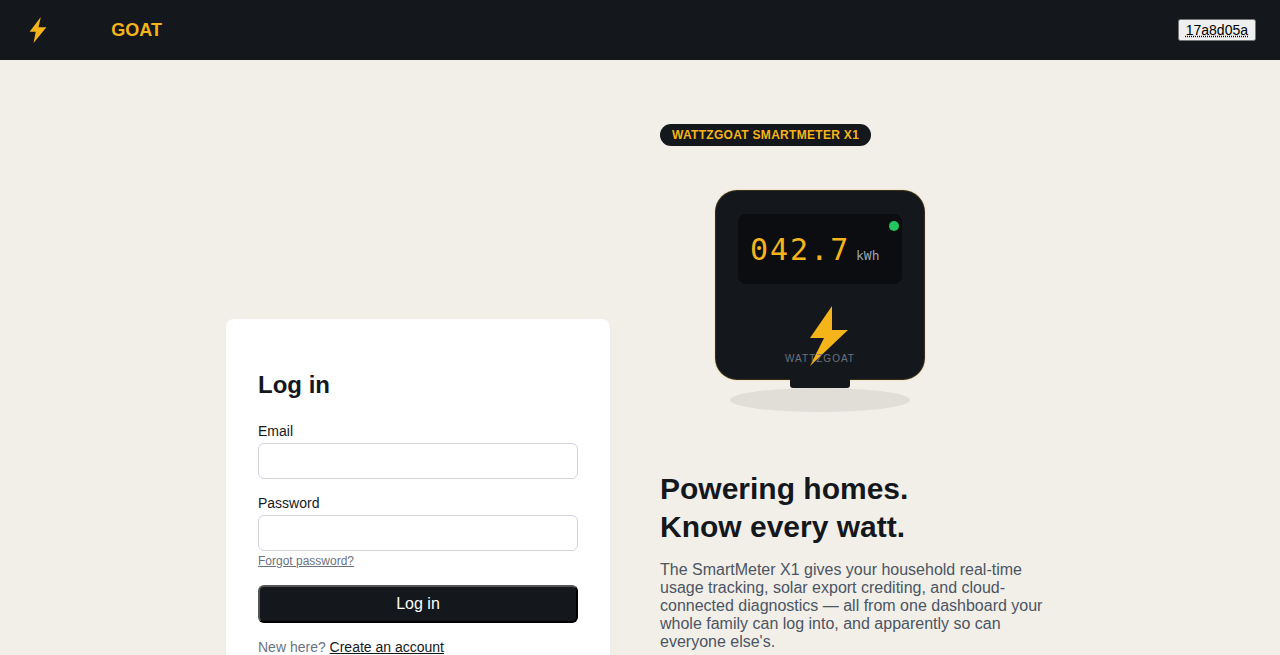
WattzGOAT is an intentionally vulnerable web application built to be hacked. It is a made-up smart meter company with a customer portal, and it's a lab, not a real product. Customers can check their meter, top up their balance, report solar power, look at bills and contact support. Admins can manage meters and look after support tickets.
The site is vulnerable on purpose, so you can practise finding real security weaknesses in a safe place.
Key features
- A full customer portal (signup, meter dashboard, recharge, solar export, bills, support tickets) plus an admin side, so there's a realistic amount of surface to explore, not just a single vulnerable form.
- 48 hidden weaknesses to find and exploit, from easy to hard.
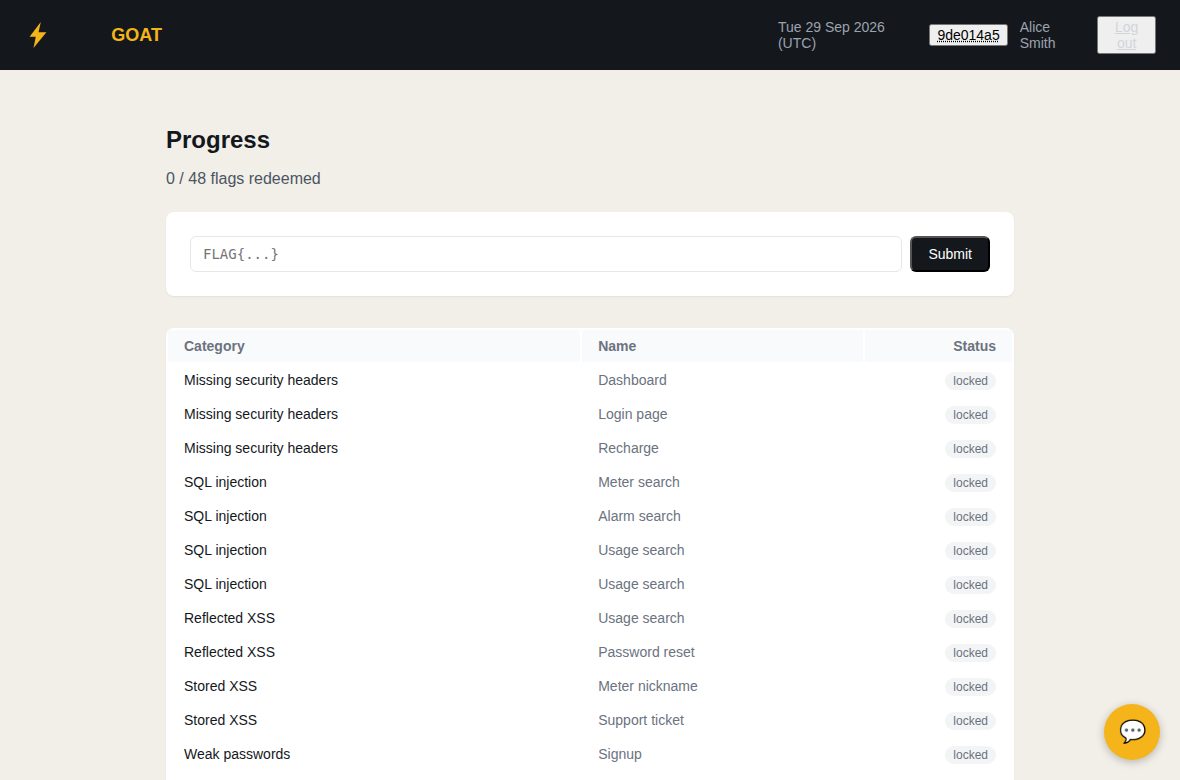
- A capture-the-flag style Progress page that tracks which ones you've found.
- A simulated AI assistant with its own set of weaknesses to find.
- Runs as a single Docker container with no other setup.
How you learn with it
WattzGOAT works like a capture the flag (CTF) game. There are 48 flags hidden in the site. You get a flag by finding a weakness and using it. Five of the 48 are bonus flags about a simulated AI assistant.
The weaknesses are the kind of problems described in the OWASP Top 10, things like broken access control and injection, so what you practise here applies to real websites too.
To get started, create an account or log in with one of the sample customer accounts, then look around and try things out. When you find a flag, you can enter it on the Progress page, which keeps track of the ones you have found.
Sample customer accounts have emails like alice.smith@example.com. Their passwords are the first name followed by 123.
Quick start
If you already have Docker installed, this gets you running in one step. See "What you need" and "Start WattzGOAT" below for the full explanation.
docker run -d --name wattzgoat -p 5000:5000 -p 5001:5001 -e INSTANCE_HOST=127.0.0.1 -e STANDALONE=true -e STANDALONE_PASSWORD=YourPasswordHere ghcr.io/wattzgoat/wattzgoat-web:latest
Then open https://127.0.0.1:5000 in your browser.
How it fits together
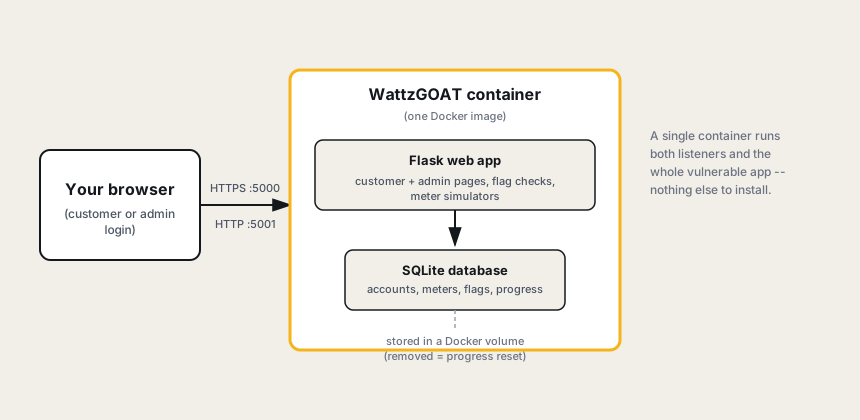
WattzGOAT runs as a single container: the web app and its database both live inside it, reachable over two ports (one HTTPS, one plain HTTP; a couple of the exercises specifically need the unencrypted one). Nothing else needs to be installed or run alongside it.
Warning
This site is insecure on purpose.
- Run it only on your own computer, or on a private network that you control.
- Never put it on the internet.
- Never type real passwords or personal details into it.
All company names, accounts and data in the site are made up.
Built with AI
This project was built with the help of AI tools and contains AI-written code. The weaknesses are there on purpose, but the code may also have other bugs or security problems that were not planned. Please keep this in mind and follow the warning above.
What you need
- A computer running Windows, macOS or Linux.
- An internet connection for the first setup.
- Docker, to run the site. Follow the official install steps at https://docs.docker.com/get-started/get-docker/.
- Git, only if you want to build the site from the source code. Follow the official install steps at https://git-scm.com/downloads.
To check that Docker works, run these two commands. If the second one prints a "Hello from Docker!" message, you are ready.
docker --version
docker run --rm hello-world
Start WattzGOAT
You can either use the ready-made image or build it yourself. Both give you the same site. Use the same commands on Linux, macOS and Windows (in PowerShell).
Option 1: use the ready-made image
docker run -d --name wattzgoat -p 5000:5000 -p 5001:5001 -e INSTANCE_HOST=127.0.0.1 -e STANDALONE=true -e STANDALONE_PASSWORD=YourPasswordHere ghcr.io/wattzgoat/wattzgoat-web:latest
Docker downloads the image the first time you run this.
Option 2: build it from the source code
git clone https://github.com/wattzgoat/wattzgoat-web.git
cd wattzgoat-web
docker build -t wattzgoat .
docker run -d --name wattzgoat -p 5000:5000 -p 5001:5001 -e INSTANCE_HOST=127.0.0.1 -e STANDALONE=true -e STANDALONE_PASSWORD=YourPasswordHere wattzgoat
The build downloads some packages, so it needs an internet connection and takes a few minutes.
What the settings mean
| Setting | What it does |
|---|---|
-p 5000:5000 | Makes the site available on port 5000 (HTTPS). |
-p 5001:5001 | Makes the site also available on port 5001 (plain HTTP). Some exercises use it, so keep both ports. |
INSTANCE_HOST | The IP address you will type into your browser. Use 127.0.0.1 if the browser is on the same computer. If you run WattzGOAT on another machine, use that machine's IP address, for example 192.168.1.50. It must be an IP address, not a name. |
STANDALONE | Set to true when you run a single copy on its own. |
STANDALONE_PASSWORD | A password of your choice. Replace YourPasswordHere with your own. |
Open the site
Go to https://127.0.0.1:5000 in your browser (or use the IP address you set in INSTANCE_HOST).
Your browser will warn you that the connection is not private. This is normal, because the site makes its own security certificate. Choose Advanced, then continue to the site.
Everyday commands
| What you want to do | Command |
|---|---|
| See that it is running | docker ps |
| Read the logs | docker logs wattzgoat |
| Stop it | docker stop wattzgoat |
| Start it again (keeps your progress) | docker start wattzgoat |
| Start again from scratch | docker rm -f wattzgoat, then run the start command again |
Removing the container clears everything, including the flags you have found.
To update to a newer version
Get the new version first, then replace the old container. Updating clears your progress, because the old container is removed.
- Ready-made image:
docker pull ghcr.io/wattzgoat/wattzgoat-web:latestdocker rm -f wattzgoat- Run the start command again.
- Built from source:
git pulldocker build -t wattzgoat .docker rm -f wattzgoat- Run the start command again.
If something goes wrong
- "Port is already allocated": another program is using that port. Change the number on the left of the port setting, for example
-p 8443:5000, and open https://127.0.0.1:8443 instead. - The page does not load: run
docker psto check the container is running. If it is not, rundocker logs wattzgoatto see why. - The container stops right after starting: check that
INSTANCE_HOSTis an IP address, such as127.0.0.1, and not a name likelocalhost. - On Windows or macOS, Docker commands fail: make sure Docker Desktop is open and running.
Contributing
Ideas and bug reports are welcome. Please open an issue on the GitHub Issues page.
If you would like to add or change something, you can send a pull request. Pull requests are reviewed before they are merged. For bigger changes, please open an issue first so we can talk about it.
The weaknesses in the site are there on purpose, so they are not bugs. Problems that stop the site from working, or weaknesses that were not planned, are worth reporting.
To run the automated tests, you need Python 3.12 and a fresh copy of the site running (see above):
pip install -r tests/requirements-dev.txt
pytest tests
Set WATTZGOAT_BASE_URL to the address of your copy if it is not https://127.0.0.1:5000. The tests change data in the site, so use a fresh copy each time.
License
WattzGOAT is licensed under the Apache License 2.0. You are free to use, copy and change it. See the LICENSE file for the full terms.
Copyright 2026 WattzGOAT
Similar repos


Languages
Python
75.8%
HTML
22.7%
WattzGOAT is an intentionally vulnerable web application.
Python
0
19 commits
updated Sep 30, 2026
See what people are saying
README
WattzGOAT
WattzGOAT is an intentionally vulnerable web application built to be hacked. It is a made-up smart meter company with a customer portal, and it's a lab, not a real product. Customers can check their meter, top up their balance, report solar power, look at bills and contact support. Admins can manage meters and look after support tickets.
The site is vulnerable on purpose, so you can practise finding real security weaknesses in a safe place.
Key features
- A full customer portal (signup, meter dashboard, recharge, solar export, bills, support tickets) plus an admin side, so there's a realistic amount of surface to explore, not just a single vulnerable form.
- 48 hidden weaknesses to find and exploit, from easy to hard.
- A capture-the-flag style Progress page that tracks which ones you've found.
- A simulated AI assistant with its own set of weaknesses to find.
- Runs as a single Docker container with no other setup.
How you learn with it
WattzGOAT works like a capture the flag (CTF) game. There are 48 flags hidden in the site. You get a flag by finding a weakness and using it. Five of the 48 are bonus flags about a simulated AI assistant.
The weaknesses are the kind of problems described in the OWASP Top 10, things like broken access control and injection, so what you practise here applies to real websites too.
To get started, create an account or log in with one of the sample customer accounts, then look around and try things out. When you find a flag, you can enter it on the Progress page, which keeps track of the ones you have found.
Sample customer accounts have emails like alice.smith@example.com. Their passwords are the first name followed by 123.
Quick start
If you already have Docker installed, this gets you running in one step. See "What you need" and "Start WattzGOAT" below for the full explanation.
docker run -d --name wattzgoat -p 5000:5000 -p 5001:5001 -e INSTANCE_HOST=127.0.0.1 -e STANDALONE=true -e STANDALONE_PASSWORD=YourPasswordHere ghcr.io/wattzgoat/wattzgoat-web:latest
Then open https://127.0.0.1:5000 in your browser.
How it fits together
WattzGOAT runs as a single container: the web app and its database both live inside it, reachable over two ports (one HTTPS, one plain HTTP; a couple of the exercises specifically need the unencrypted one). Nothing else needs to be installed or run alongside it.
Warning
This site is insecure on purpose.
- Run it only on your own computer, or on a private network that you control.
- Never put it on the internet.
- Never type real passwords or personal details into it.
All company names, accounts and data in the site are made up.
Built with AI
This project was built with the help of AI tools and contains AI-written code. The weaknesses are there on purpose, but the code may also have other bugs or security problems that were not planned. Please keep this in mind and follow the warning above.
What you need
- A computer running Windows, macOS or Linux.
- An internet connection for the first setup.
- Docker, to run the site. Follow the official install steps at https://docs.docker.com/get-started/get-docker/.
- Git, only if you want to build the site from the source code. Follow the official install steps at https://git-scm.com/downloads.
To check that Docker works, run these two commands. If the second one prints a "Hello from Docker!" message, you are ready.
docker --version
docker run --rm hello-world
Start WattzGOAT
You can either use the ready-made image or build it yourself. Both give you the same site. Use the same commands on Linux, macOS and Windows (in PowerShell).
Option 1: use the ready-made image
docker run -d --name wattzgoat -p 5000:5000 -p 5001:5001 -e INSTANCE_HOST=127.0.0.1 -e STANDALONE=true -e STANDALONE_PASSWORD=YourPasswordHere ghcr.io/wattzgoat/wattzgoat-web:latest
Docker downloads the image the first time you run this.
Option 2: build it from the source code
git clone https://github.com/wattzgoat/wattzgoat-web.git
cd wattzgoat-web
docker build -t wattzgoat .
docker run -d --name wattzgoat -p 5000:5000 -p 5001:5001 -e INSTANCE_HOST=127.0.0.1 -e STANDALONE=true -e STANDALONE_PASSWORD=YourPasswordHere wattzgoat
The build downloads some packages, so it needs an internet connection and takes a few minutes.
What the settings mean
| Setting | What it does |
|---|---|
-p 5000:5000 | Makes the site available on port 5000 (HTTPS). |
-p 5001:5001 | Makes the site also available on port 5001 (plain HTTP). Some exercises use it, so keep both ports. |
INSTANCE_HOST | The IP address you will type into your browser. Use 127.0.0.1 if the browser is on the same computer. If you run WattzGOAT on another machine, use that machine's IP address, for example 192.168.1.50. It must be an IP address, not a name. |
STANDALONE | Set to true when you run a single copy on its own. |
STANDALONE_PASSWORD | A password of your choice. Replace YourPasswordHere with your own. |
Open the site
Go to https://127.0.0.1:5000 in your browser (or use the IP address you set in INSTANCE_HOST).
Your browser will warn you that the connection is not private. This is normal, because the site makes its own security certificate. Choose Advanced, then continue to the site.
Everyday commands
| What you want to do | Command |
|---|---|
| See that it is running | docker ps |
| Read the logs | docker logs wattzgoat |
| Stop it | docker stop wattzgoat |
| Start it again (keeps your progress) | docker start wattzgoat |
| Start again from scratch | docker rm -f wattzgoat, then run the start command again |
Removing the container clears everything, including the flags you have found.
To update to a newer version
Get the new version first, then replace the old container. Updating clears your progress, because the old container is removed.
- Ready-made image:
docker pull ghcr.io/wattzgoat/wattzgoat-web:latestdocker rm -f wattzgoat- Run the start command again.
- Built from source:
git pulldocker build -t wattzgoat .docker rm -f wattzgoat- Run the start command again.
If something goes wrong
- "Port is already allocated": another program is using that port. Change the number on the left of the port setting, for example
-p 8443:5000, and open https://127.0.0.1:8443 instead. - The page does not load: run
docker psto check the container is running. If it is not, rundocker logs wattzgoatto see why. - The container stops right after starting: check that
INSTANCE_HOSTis an IP address, such as127.0.0.1, and not a name likelocalhost. - On Windows or macOS, Docker commands fail: make sure Docker Desktop is open and running.
Contributing
Ideas and bug reports are welcome. Please open an issue on the GitHub Issues page.
If you would like to add or change something, you can send a pull request. Pull requests are reviewed before they are merged. For bigger changes, please open an issue first so we can talk about it.
The weaknesses in the site are there on purpose, so they are not bugs. Problems that stop the site from working, or weaknesses that were not planned, are worth reporting.
To run the automated tests, you need Python 3.12 and a fresh copy of the site running (see above):
pip install -r tests/requirements-dev.txt
pytest tests
Set WATTZGOAT_BASE_URL to the address of your copy if it is not https://127.0.0.1:5000. The tests change data in the site, so use a fresh copy each time.
License
WattzGOAT is licensed under the Apache License 2.0. You are free to use, copy and change it. See the LICENSE file for the full terms.
Copyright 2026 WattzGOAT
Similar repos
Languages
Python
75.8%
HTML
22.7%