
README
Prot2Chat
Welcome to Prot2Chat repository!
Paper: https://doi.org/10.1093/bioinformatics/btaf396 (https://arxiv.org/abs/2502.06846)
Here is a quick tutorial for the Prot2Chat protein Q&A system, which enables you to obtain information about proteins through an interactive Q&A mode on the web page.
Enviroment installation
Create a virtual environment
conda create -n prot2chat python=3.9
conda activate prot2chat
Then clone our project:
git clone https://github.com/wangzc1233/Prot2Chat.git
Install packages
You should replace the /your/path/to/prot2chat to your own path to prot2chat directory.
cd /your/path/to/prot2chat
bash requirement.sh
Prepare the models
Download base_model_weight from https://drive.google.com/file/d/1UgzkSda2wJew95FrVfF246IilB5ekTSc/view?usp=drive_link;
Download new adapter_weight and lora_weight from https://drive.google.com/file/d/1vb4K2oufxzyS5BeO25hyaJBY9hqR7dn4/view?usp=drive_link. (It also includes the modified ProteinMPNN we used.)
You can also find and download the model weight files at https://huggingface.co/zcw51699/prot2chat/tree/main/zcw51699/prot2chat.
Don't forget to place the downloaded model and weight files in the specified folders. For example, put the ProteinMPNN in prot2chat/ProteinMPNN.
Prepare input data
We have provided several PDB file(providing protein structure and sequence information) samples in /pdbs, and some question - answer samples in /QA_data. You can also use your own protein file and Q&A data.
Run Prot2Chat in Web
Use demo.py
You should replace the /your/path/to/prot2chat to your own path to prot2chat directory.
cd /your/path/to/prot2chat
python demo.py --model_path your_path_to_base_model_weight --lora_path your_path_to_lora_weight --adapter_path your_path_to_adapter_weight --port your_port_ID --gpu your_GPU_IDs
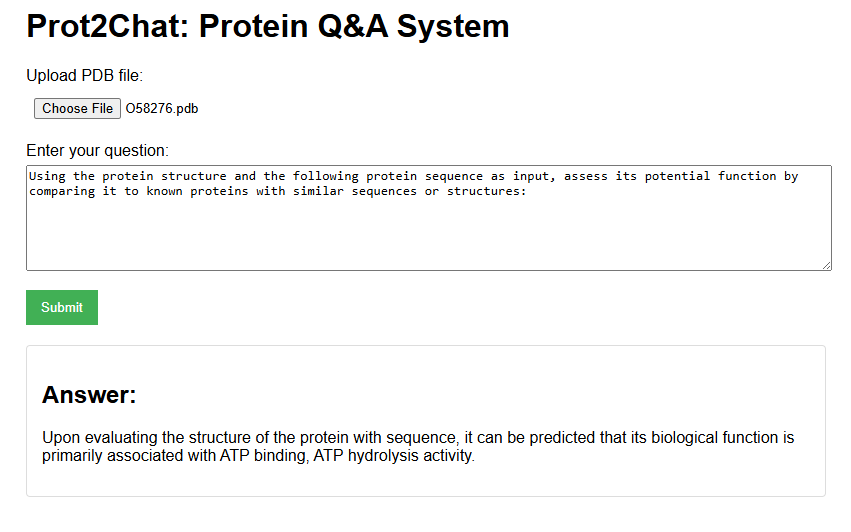
After a successful run, access http://localhost:your_port_ID/ in your local browser. The effect is as follows:
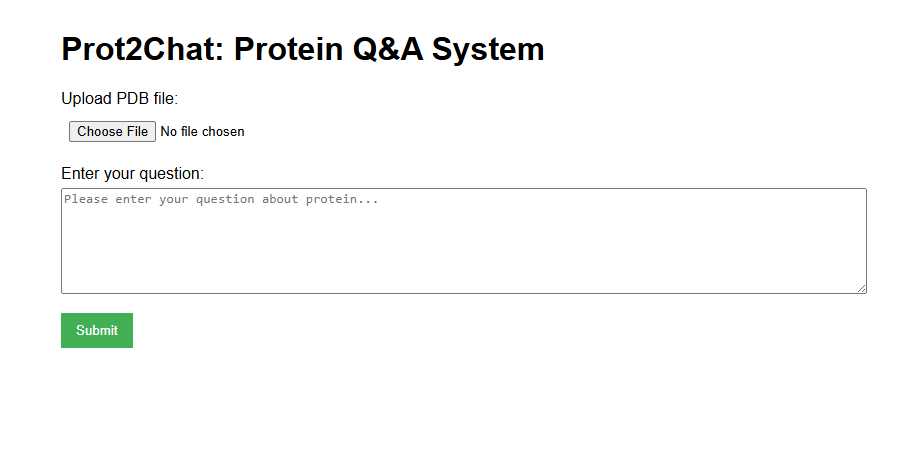
Select a protein PDB file and enter your question to get an answer.
Contributors

47 commits
Similar repos


Languages
Python
99.4%
README
Prot2Chat
Welcome to Prot2Chat repository!
Paper: https://doi.org/10.1093/bioinformatics/btaf396 (https://arxiv.org/abs/2502.06846)
Here is a quick tutorial for the Prot2Chat protein Q&A system, which enables you to obtain information about proteins through an interactive Q&A mode on the web page.
Enviroment installation
Create a virtual environment
conda create -n prot2chat python=3.9
conda activate prot2chat
Then clone our project:
git clone https://github.com/wangzc1233/Prot2Chat.git
Install packages
You should replace the /your/path/to/prot2chat to your own path to prot2chat directory.
cd /your/path/to/prot2chat
bash requirement.sh
Prepare the models
Download base_model_weight from https://drive.google.com/file/d/1UgzkSda2wJew95FrVfF246IilB5ekTSc/view?usp=drive_link;
Download new adapter_weight and lora_weight from https://drive.google.com/file/d/1vb4K2oufxzyS5BeO25hyaJBY9hqR7dn4/view?usp=drive_link. (It also includes the modified ProteinMPNN we used.)
You can also find and download the model weight files at https://huggingface.co/zcw51699/prot2chat/tree/main/zcw51699/prot2chat.
Don't forget to place the downloaded model and weight files in the specified folders. For example, put the ProteinMPNN in prot2chat/ProteinMPNN.
Prepare input data
We have provided several PDB file(providing protein structure and sequence information) samples in /pdbs, and some question - answer samples in /QA_data. You can also use your own protein file and Q&A data.
Run Prot2Chat in Web
Use demo.py
You should replace the /your/path/to/prot2chat to your own path to prot2chat directory.
cd /your/path/to/prot2chat
python demo.py --model_path your_path_to_base_model_weight --lora_path your_path_to_lora_weight --adapter_path your_path_to_adapter_weight --port your_port_ID --gpu your_GPU_IDs
After a successful run, access http://localhost:your_port_ID/ in your local browser. The effect is as follows:
Select a protein PDB file and enter your question to get an answer.
Similar repos
Contributors
47 commits
Languages
Python
99.4%