
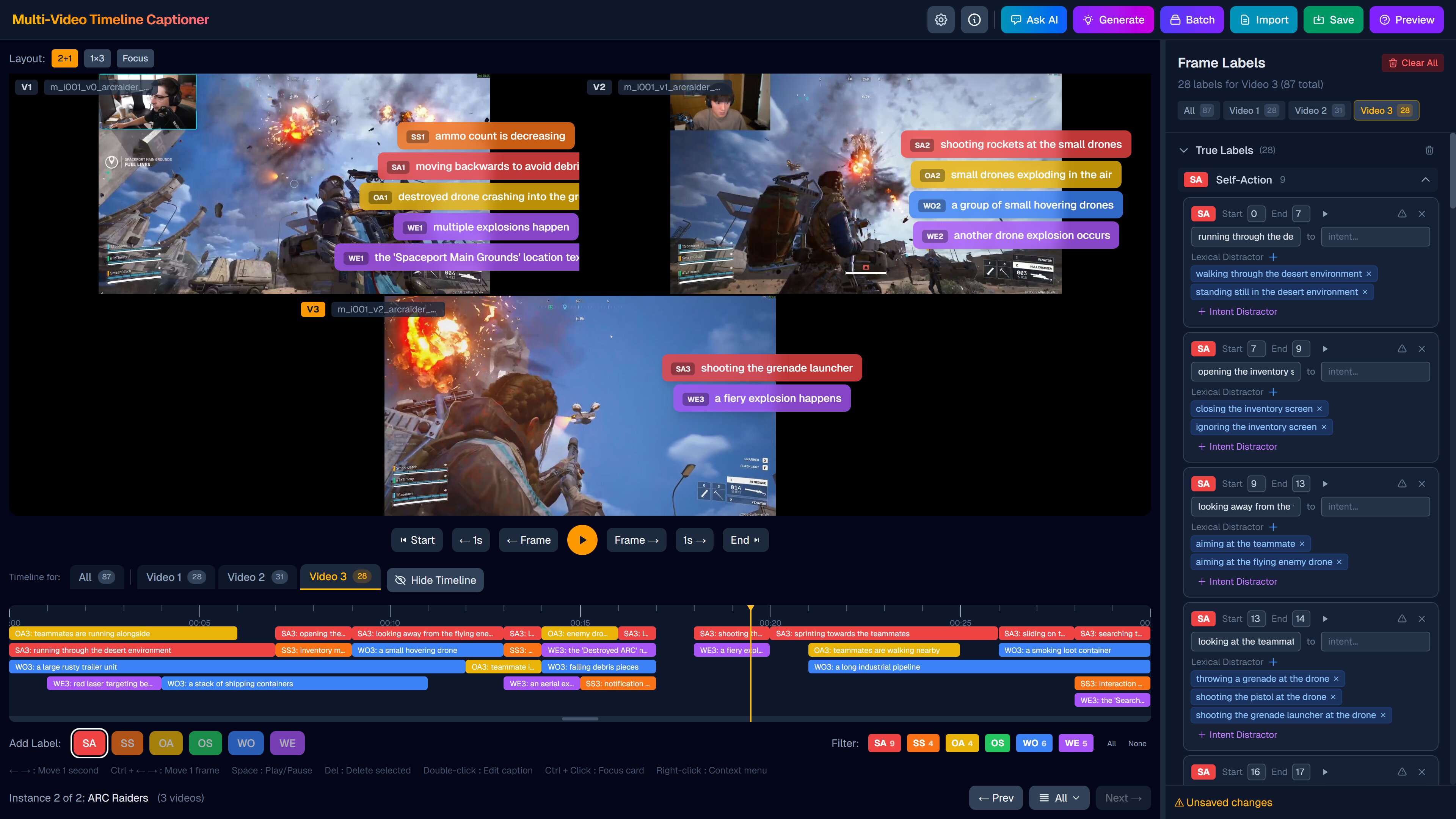
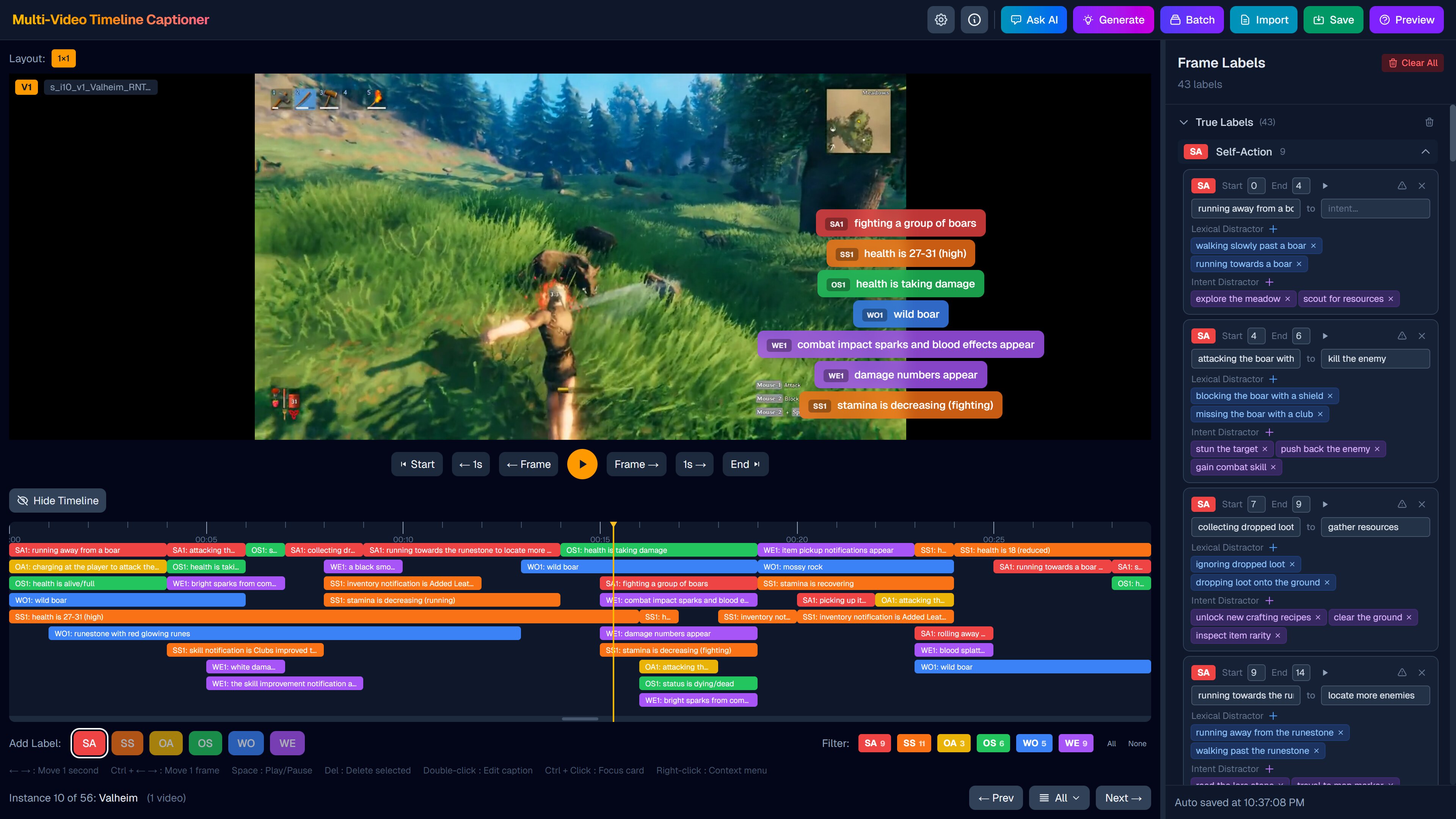
A web-based annotation tool for synchronized multi-video timeline labeling and AI-assisted question generation, built for the GameplayQA benchmark.
See the codeREADME
GameplayQA Multi-Video Timeline Captioner












This tool supports the paper:
GameplayQA: A Benchmarking Framework for Decision-Dense POV-Synced Multi-Video Understanding of 3D Virtual Agents For more details, visit the project website.

Updates
- 04/06/2026 Our paper is accepted to ACL 2026 !
Live Demo
A live demo is hosted here: https://sync-video-label.vercel.app
Click the "Load Example Project" button on the landing page to explore the app with a pre-loaded dataset.
Note: The demo is read-only. Saving annotations and exporting files requires running the app locally. Video files are purposely made low quality to reduce file size.
Quick Start
1. Install and run
npm install
npm run dev
Open http://localhost:3000 in your browser.
2. Try the example project
The example project is included in this repo. Check out data/project-example/videos/ for sample videos and data/project-example/project_example.json as a reference for the project file format.
You can also directly see it in the Live Demo link above.
3. Import your own data
- Prepare your video files and a
project.jsonfollowing the formats described in Data Folder Structure and Project File Format. Only the project folder, video files, and the JSON file are required — all other folders are created automatically. - Rename
.env.local.exampleto.env.localand fill in your API keys for OpenRouter or Google AI Studio:
OPENROUTER_API_KEY=
GOOGLE_API_KEY=
- Import your
project.jsonin the app. You should be able to see the videos. Click the "Generate" button to test AI functionalities.
Data Folder Structure
Organize your data into project folders:
data/
├── project-a/                    # Project folder
│   ├── videos/                   # Video files
│   │   ├── video1.mp4
│   │   └── video2.mp4
│   ├── annotation/               # Saved annotations (output)
│   │   └── instance-001.json
│   ├── autosave/                 # Auto-saved annotation progress
│   │   └── instance-001.json
│   ├── prediction/               # Pre-generated labels (optional)
│   │   └── instance-001.json
│   ├── questions/                # Exported questions from question editor
│   │   └── instance-001-2025-01-01T00-00-00.json
│   ├── autosave_question/        # Auto-saved question editor progress
│   │   └── instance-001.json
│   └── project.json              # Project configuration file
├── project-b/                    # Another project
│   └── ...
Project File Format
Create a JSON file to define your labeling project:
{
  "name": "My Project",
  "instances": [
    {
      "id": "instance-001",
      "name": "Scene 1",
      "videos": ["data/project-a/videos/video1.mp4", "data/project-a/videos/video2.mp4"],
      "prediction": "instance-001.json"
    }
  ]
}
| Field | Description |
|---|---|
id | Unique identifier for the instance |
name | Display name |
videos | Array of video paths (relative to project root) |
prediction | Optional prediction file to auto-load (relative to data/prediction/) |
Usage
- Create a project folder in
data/(e.g.,data/my-project/) - Place your videos in
videos/subfolder - Create a
project.jsonfile defining your instances - Click the empty area to import your project file
- Drag on the timeline to create labels
- Double-click labels to add captions
- Click "Save Annotation" to export
Citation
If you find this project helpful, please consider citing our paper:
@article{wang2026gameplayqa,
  title   = {GameplayQA: A Benchmarking Framework for Decision-Dense POV-Synced Multi-Video Understanding of 3D Virtual Agents},
  author  = {Wang, Yunzhe and Xu, Runhui and Zheng, Kexin and Zhang, Tianyi and Kogundi, Jayavibhav Niranjan and Hans, Soham and Ustun, Volkan},
  year    = {2026},
  eprint  = {2603.24329},
  archivePrefix = {arXiv},
  primaryClass  = {cs.CL},
  url     = {https://arxiv.org/abs/2603.24329}
}
Contributors

15 commits
Similar repos


Languages
TypeScript
99.7%
A web-based annotation tool for synchronized multi-video timeline labeling and AI-assisted question generation, built for the GameplayQA benchmark.
See the codeREADME
GameplayQA Multi-Video Timeline Captioner
This tool supports the paper:
GameplayQA: A Benchmarking Framework for Decision-Dense POV-Synced Multi-Video Understanding of 3D Virtual Agents For more details, visit the project website.
Updates
- 04/06/2026 Our paper is accepted to ACL 2026 !
Live Demo
A live demo is hosted here: https://sync-video-label.vercel.app
Click the "Load Example Project" button on the landing page to explore the app with a pre-loaded dataset.
Note: The demo is read-only. Saving annotations and exporting files requires running the app locally. Video files are purposely made low quality to reduce file size.
Quick Start
1. Install and run
npm install
npm run dev
Open http://localhost:3000 in your browser.
2. Try the example project
The example project is included in this repo. Check out data/project-example/videos/ for sample videos and data/project-example/project_example.json as a reference for the project file format.
You can also directly see it in the Live Demo link above.
3. Import your own data
- Prepare your video files and a
project.jsonfollowing the formats described in Data Folder Structure and Project File Format. Only the project folder, video files, and the JSON file are required — all other folders are created automatically. - Rename
.env.local.exampleto.env.localand fill in your API keys for OpenRouter or Google AI Studio:
OPENROUTER_API_KEY=
GOOGLE_API_KEY=
- Import your
project.jsonin the app. You should be able to see the videos. Click the "Generate" button to test AI functionalities.
Data Folder Structure
Organize your data into project folders:
data/
├── project-a/                    # Project folder
│   ├── videos/                   # Video files
│   │   ├── video1.mp4
│   │   └── video2.mp4
│   ├── annotation/               # Saved annotations (output)
│   │   └── instance-001.json
│   ├── autosave/                 # Auto-saved annotation progress
│   │   └── instance-001.json
│   ├── prediction/               # Pre-generated labels (optional)
│   │   └── instance-001.json
│   ├── questions/                # Exported questions from question editor
│   │   └── instance-001-2025-01-01T00-00-00.json
│   ├── autosave_question/        # Auto-saved question editor progress
│   │   └── instance-001.json
│   └── project.json              # Project configuration file
├── project-b/                    # Another project
│   └── ...
Project File Format
Create a JSON file to define your labeling project:
{
  "name": "My Project",
  "instances": [
    {
      "id": "instance-001",
      "name": "Scene 1",
      "videos": ["data/project-a/videos/video1.mp4", "data/project-a/videos/video2.mp4"],
      "prediction": "instance-001.json"
    }
  ]
}
| Field | Description |
|---|---|
id | Unique identifier for the instance |
name | Display name |
videos | Array of video paths (relative to project root) |
prediction | Optional prediction file to auto-load (relative to data/prediction/) |
Usage
- Create a project folder in
data/(e.g.,data/my-project/) - Place your videos in
videos/subfolder - Create a
project.jsonfile defining your instances - Click the empty area to import your project file
- Drag on the timeline to create labels
- Double-click labels to add captions
- Click "Save Annotation" to export
Citation
If you find this project helpful, please consider citing our paper:
@article{wang2026gameplayqa,
  title   = {GameplayQA: A Benchmarking Framework for Decision-Dense POV-Synced Multi-Video Understanding of 3D Virtual Agents},
  author  = {Wang, Yunzhe and Xu, Runhui and Zheng, Kexin and Zhang, Tianyi and Kogundi, Jayavibhav Niranjan and Hans, Soham and Ustun, Volkan},
  year    = {2026},
  eprint  = {2603.24329},
  archivePrefix = {arXiv},
  primaryClass  = {cs.CL},
  url     = {https://arxiv.org/abs/2603.24329}
}
Similar repos
Contributors
15 commits
Languages
TypeScript
99.7%