CynsesAI PCAP Analyzer is a comprehensive network security analysis tool designed to process PCAP files, identify potential threats, and provide detailed insights into network traffic. It leverages powerful open-source tools like Suricata and Zeek, enriches findings with threat intelligence, detects anomalies, classifies network traffic, and generates interactive visualizations and comprehensive reports.
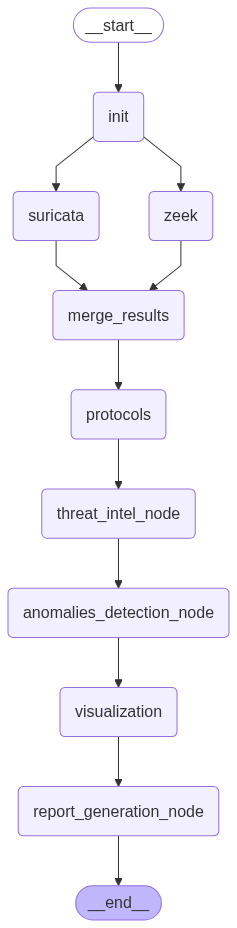
The analysis process is orchestrated as a graph of interconnected tasks:
Prerequisites:
npm install -g @mermaid-js/mermaid-cli (requires Node.js and npm)suricata and zeek commands are in your system's PATH.Clone the Repository:
git clone <repository_url>
cd CynsesAI-PCAP-Analyzer
Install Dependencies:
pip install -r requirements.txt
Configuration:
config/settings.py.example to config/settings.py (if an example file is provided - otherwise, directly edit config/settings.py).config/settings.py with your API keys for:
CHUTES_API_KEY (if using Chutes AI for LLM)ABUSEIPDB_API_KEYVIRUSTOTAL_API_KEY (Note: VirusTotal integration is mentioned but might need explicit implementation in threat_intel.py if not fully present)PCAP_FILE: Path to your input PCAP file (e.g., GoldenEye.pcap).SURICATA_CONFIG: Path to your suricata.yaml configuration file.SURICATA_RULES_DIR: Path to Suricata rules directory.SURICATA_OUTPUT_DIR: Directory for Suricata outputs.ZEEK_OUTPUT_DIR: Directory for Zeek outputs.GRAPH_OUTPUT_DIR: Directory for generated graph images.Place your PCAP file: Ensure the PCAP file you want to analyze is correctly pointed to by PCAP_FILE in config/settings.py or place it in the root directory (e.g., sample.pcap, GoldenEye.pcap).
Run the Analysis:
python main.py
The script will prompt you if you want to run the network traffic classifier.
Outputs:
pcap_analysis_report.md: The main Markdown report containing the analysis summary.attack_graphs/ directory: Contains generated visualizations:
enterprise_attack_graph.png: Static attack graph.interactive_attack_graph.html: Interactive Plotly graph.security_summary.html: HTML summary with charts.attack_flow.png: Mermaid diagram showing attack flow.suricata_output/ and zeek_output/: Raw logs from Suricata and Zeek.main.py: The main script that orchestrates the analysis workflow using LangGraph.config/settings.py: Configuration file for API keys, paths, and other settings.modules/: Contains the core logic for each analysis step:
suricata_parser.py: Runs Suricata and parses its output.zeek.py: Runs Zeek and processes its logs.network_traffic_classifier.py: Classifies network traffic.protocol_analysis.py: Analyzes network protocols from Zeek logs.threat_intel.py: Enriches data with threat intelligence.anomaly_detection.py: Detects anomalies in Suricata alerts.visualization.py: Generates various network graphs and visualizations.report_generation.py: Compiles the final analysis report.Rules/: Contains Suricata rule files.cache_dir/: Caches results from LLM calls and threat intelligence lookups to speed up subsequent runs.Rules/ directory and update suricata.yaml accordingly.main.py to add, remove, or change analysis nodes.modules/visualization.py to change the appearance and layout of graphs.Contributions are welcome! Please feel free to fork the repository, make your changes, and submit a pull request. For major changes, please open an issue first to discuss what you would like to change.
git checkout -b feature/AmazingFeature)git commit -m 'Add some AmazingFeature')git push origin feature/AmazingFeature)Distributed under the MIT License. See LICENSE file for more information..
CynsesAI PCAP Analyzer is a comprehensive network security analysis tool designed to process PCAP files, identify potential threats, and provide detailed insights into network traffic. It leverages powerful open-source tools like Suricata and Zeek, enriches findings with threat intelligence, detects anomalies, classifies network traffic, and generates interactive visualizations and comprehensive reports.
The analysis process is orchestrated as a graph of interconnected tasks:
Prerequisites:
npm install -g @mermaid-js/mermaid-cli (requires Node.js and npm)suricata and zeek commands are in your system's PATH.Clone the Repository:
git clone <repository_url>
cd CynsesAI-PCAP-Analyzer
Install Dependencies:
pip install -r requirements.txt
Configuration:
config/settings.py.example to config/settings.py (if an example file is provided - otherwise, directly edit config/settings.py).config/settings.py with your API keys for:
CHUTES_API_KEY (if using Chutes AI for LLM)ABUSEIPDB_API_KEYVIRUSTOTAL_API_KEY (Note: VirusTotal integration is mentioned but might need explicit implementation in threat_intel.py if not fully present)PCAP_FILE: Path to your input PCAP file (e.g., GoldenEye.pcap).SURICATA_CONFIG: Path to your suricata.yaml configuration file.SURICATA_RULES_DIR: Path to Suricata rules directory.SURICATA_OUTPUT_DIR: Directory for Suricata outputs.ZEEK_OUTPUT_DIR: Directory for Zeek outputs.GRAPH_OUTPUT_DIR: Directory for generated graph images.Place your PCAP file: Ensure the PCAP file you want to analyze is correctly pointed to by PCAP_FILE in config/settings.py or place it in the root directory (e.g., sample.pcap, GoldenEye.pcap).
Run the Analysis:
python main.py
The script will prompt you if you want to run the network traffic classifier.
Outputs:
pcap_analysis_report.md: The main Markdown report containing the analysis summary.attack_graphs/ directory: Contains generated visualizations:
enterprise_attack_graph.png: Static attack graph.interactive_attack_graph.html: Interactive Plotly graph.security_summary.html: HTML summary with charts.attack_flow.png: Mermaid diagram showing attack flow.suricata_output/ and zeek_output/: Raw logs from Suricata and Zeek.main.py: The main script that orchestrates the analysis workflow using LangGraph.config/settings.py: Configuration file for API keys, paths, and other settings.modules/: Contains the core logic for each analysis step:
suricata_parser.py: Runs Suricata and parses its output.zeek.py: Runs Zeek and processes its logs.network_traffic_classifier.py: Classifies network traffic.protocol_analysis.py: Analyzes network protocols from Zeek logs.threat_intel.py: Enriches data with threat intelligence.anomaly_detection.py: Detects anomalies in Suricata alerts.visualization.py: Generates various network graphs and visualizations.report_generation.py: Compiles the final analysis report.Rules/: Contains Suricata rule files.cache_dir/: Caches results from LLM calls and threat intelligence lookups to speed up subsequent runs.Rules/ directory and update suricata.yaml accordingly.main.py to add, remove, or change analysis nodes.modules/visualization.py to change the appearance and layout of graphs.Contributions are welcome! Please feel free to fork the repository, make your changes, and submit a pull request. For major changes, please open an issue first to discuss what you would like to change.
git checkout -b feature/AmazingFeature)git commit -m 'Add some AmazingFeature')git push origin feature/AmazingFeature)Distributed under the MIT License. See LICENSE file for more information..



