An open-source multi-provider AI assisted CLI development tool. Use whatever LLM you want to code in your terminal.
See the code LLxprt Code

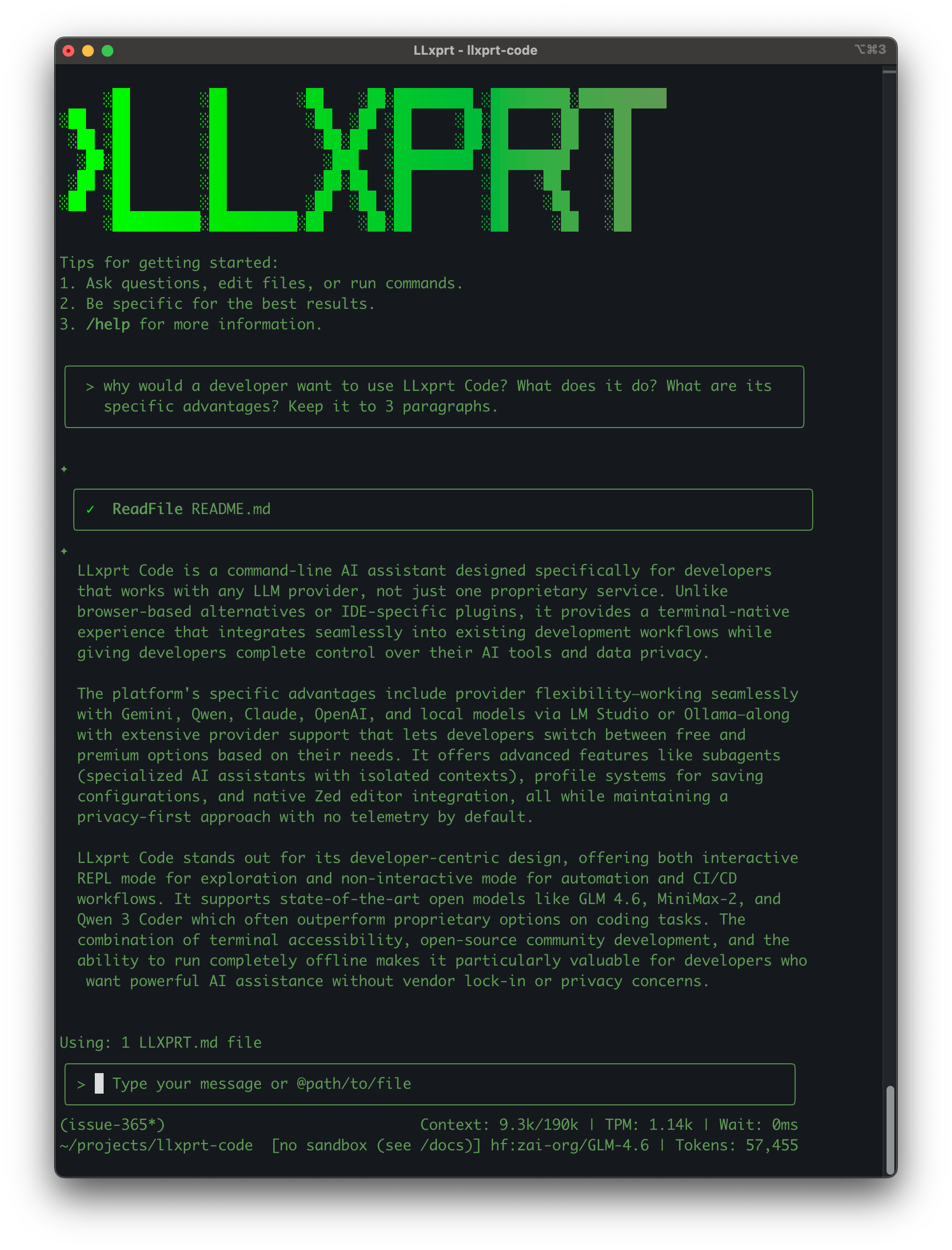
AI-powered coding assistant that works with any LLM provider. Command-line interface for querying and editing codebases, generating applications, and automating development workflows.
Get started immediately with powerful LLM options:
# Gemini (Google account or API key)
/auth gemini enable
/provider gemini
/model gemini-2.5-flash

# Your Claude Pro / Max subscription
/auth anthropic enable
/provider anthropic
/model claude-opus-5

# Your ChatGPT Plus / Pro subscription (Codex)
/auth codex enable
/provider codex
/model gpt-5.5

# Kimi subscription (Kimi K3, 1M context, native vision, thinking always on)
/provider kimi
/key **************
/model kimi-for-coding
# macOS (Homebrew)
brew tap vybestack/homebrew-tap
brew update
brew install llxprt-code

# npm
npm install -g @vybestack/llxprt-code

# Start coding
llxprt

# Try without installing
npx @vybestack/llxprt-code --provider synthetic --model hf:zai-org/GLM-4.7 --keyfile ~/.synthetic_key "simplify the README.md"
LLxprt Code is a command-line AI assistant designed for developers who want powerful LLM capabilities without leaving their terminal. Unlike GitHub Copilot or ChatGPT, LLxprt Code works with any provider and can run locally for complete privacy.
Key differences:
Prerequisites: Node.js 24+ installed (not required for Homebrew)
Note: LLxprt Code runs on the Bun runtime under the covers. Node.js remains the compatibility target for invocation — the npm/npx/Homebrew install commands below work unchanged. The published package bundles Bun as a dependency, so most users never need to install Bun separately. See the Bun fallback section if Bun is missing.
Install:
# macOS (Homebrew)
brew tap vybestack/homebrew-tap
brew update
brew install llxprt-code

# npm
npm install -g @vybestack/llxprt-code
# Or try without installing:
npx @vybestack/llxprt-code
Run: llxprt
Choose provider: Use /provider to select your preferred LLM service
Start coding: Ask questions, generate code, or analyze projects
LLxprt Code is powered by the Bun runtime. When you run llxprt, the platform-native launcher (packages/cli/bin/llxprt) resolves the package-bundled Bun and execs the TypeScript entrypoint (packages/cli/index.ts) directly — no Node process is started on the installed command path. The CLI's run path does not require a pre-compiled CLI dist/ artifact or the retired bundle/llxprt.js artifact.
Bun resolution (production launcher):
<package>/node_modules/bun/bin/bun.exe (the package's pinned Bun dependency)
@oven/bun-<platform>/bin/bun[.exe] variant (probed only when bun/bin/bun.exe is absent — see npm v12 note below)node_modules/bun/bin/bun.exe (npm/Bun hoisting), stopping at the enclosing node_modules boundary — never climbing into consumer ancestors
@oven/bun-<platform> variant within the enclosing node_modulesnode_modules and the repository root is a verified llxprt-code workspace (its manifest references this package), that verified root's node_modules/bun/bin/bun.exe
@oven/bun-<platform> variant at the workspace rootOn macOS, a Bun already on PATH that meets the pinned version floor is preferred over all of the above (issue #2962), to avoid the credential-access disruption caused by npm re-extracting a running executable.
The launcher never scans .bin symlinks. When the package's package.json declares an exact Bun pin (e.g. 1.3.14), a candidate whose package.json/version is missing or mismatched is rejected.
npm v12 (RFC 0054) disables dependency install scripts by default. The bun package ships its binary via a postinstall that moves it from an @oven/bun-<platform> optional dependency into bun/bin/bun.exe. When install scripts are blocked, that binary never materializes. LLxprt Code declares all 16 @oven/bun-<platform> packages as its own optionalDependencies; those tarballs contain only bin/bun[.exe] with no install scripts, so they materialize under default-deny. The launcher and TypeScript resolver fall back to them when bun/bin/bun.exe is absent. Host detection (CPU features, ABI) runs only on this fallback path — a normal install never forks detection subprocesses.
Only after every candidate above has been probed and rejected — each level and its @oven fallback, plus the macOS PATH preference — does the launcher print an actionable error (exit code 43):
LLxprt Code: bundled Bun runtime was not found. Reinstall the package with "npm install @vybestack/llxprt-code" to restore the bundled Bun dependency, or visit https://bun.sh
To resolve this:
npm install @vybestack/llxprt-code (or npm install -g @vybestack/llxprt-code) to restore the bundled Bun dependency.brew upgrade llxprt-code to get the latest formula, or brew reinstall llxprt-code to restore a broken installation.PATH preference described above, a separately installed global Bun is not used by the launcher.Windows pty caveat: On Windows, the node-pty module has a known terminal resize race condition (Cannot resize a pty that has already exited). The CLI silences this specific error at the process level. On POSIX systems under Bun, a dedicated bun-pty adapter (packages/core/src/utils/bunPtyAdapter.ts) is used instead of node-pty to work around a Bun hang. Windows uses @lydell/node-pty (with node-pty as fallback), not the Bun adapter. If you encounter terminal sizing issues on Windows, use a compatible terminal emulator; the resize race is in node-pty itself, not the Bun runtime.
First session example:
cd your-project/
llxprt
> Explain the architecture of this codebase and suggest improvements
> Create a test file for the user authentication module
> Help me debug this error: [paste error message]
Interactive Mode (REPL): Perfect for exploration, rapid prototyping, and iterative development:
# Start interactive session
llxprt

> Explore this codebase and suggest improvements
> Create a REST API endpoint with tests
> Debug this authentication issue
> Optimize this database query
Non-Interactive Mode: Ideal for automation, CI/CD, and scripted workflows:
# Single command with immediate response
llxprt --profile-load zai-glm5 "Refactor this function for better readability"
llxprt "Generate unit tests for payment module" > tests/payment.test.js
LLxprt Code works seamlessly with the best open-weight models. The specs below are illustrative vendor capabilities, not necessarily the built-in provider defaults — see the Provider Quick Reference for the model IDs and context limits LLxprt ships with.
reasoning.effort accepts low / high / max (default max)ms://<file-id> inputs (no public image URLs)# Subscription-served model (Kimi Code subscription)
/provider kimi
/model kimi-for-coding
# Or pay-per-token on the Moonshot API (model id: kimi-k3)
/provider kimi
/baseurl https://api.moonshot.ai/v1
/keyfile ~/.moonshot_key
/model kimi-k3
# Or via Synthetic/Chutes:
/provider synthetic
/model hf:moonshotai/Kimi-K3
Run models completely offline for maximum privacy:
# With LM Studio
/provider openai
/baseurl http://localhost:1234/v1/
/model your-local-model

# With Ollama (OpenAI-compatible endpoint)
/provider openai
/baseurl http://localhost:11434/v1/
/model qwen2.5-coder
Supported local providers:
Create specialized AI assistants with isolated contexts and different configurations:
# Subagents run with custom profiles and tool access
# Access via the commands interface
/subagent list
/subagent create <name>
Each subagent can be configured with:
Subagents are designed for:
LLxprt Code integrates with the Zed editor using the Agent Communication Protocol (ACP):
{
  "agent_servers": {
    "llxprt": {
      "command": "/opt/homebrew/bin/llxprt",
      "args": ["--experimental-acp", "--profile-load", "my-profile", "--yolo"]
    }
  }
}
Configure in Zed's settings.json under agent_servers. Use which llxprt to find your binary path.
Features:
** Complete Provider Guide →**
** Full Documentation →**
LLxprt Code does not collect telemetry by default. Your data stays with you unless you choose to send it to external AI providers.
When using external services, their respective terms of service apply:
400 followers · starred Aug 2026
473 followers · starred Sep 2025
954 followers · starred Feb 2026
240 followers · starred Aug 2025
An open-source multi-provider AI assisted CLI development tool. Use whatever LLM you want to code in your terminal.
See the code
LLxprt Code
AI-powered coding assistant that works with any LLM provider. Command-line interface for querying and editing codebases, generating applications, and automating development workflows.
Get started immediately with powerful LLM options:
# Gemini (Google account or API key)
/auth gemini enable
/provider gemini
/model gemini-2.5-flash

# Your Claude Pro / Max subscription
/auth anthropic enable
/provider anthropic
/model claude-opus-5

# Your ChatGPT Plus / Pro subscription (Codex)
/auth codex enable
/provider codex
/model gpt-5.5

# Kimi subscription (Kimi K3, 1M context, native vision, thinking always on)
/provider kimi
/key **************
/model kimi-for-coding
# macOS (Homebrew)
brew tap vybestack/homebrew-tap
brew update
brew install llxprt-code

# npm
npm install -g @vybestack/llxprt-code

# Start coding
llxprt

# Try without installing
npx @vybestack/llxprt-code --provider synthetic --model hf:zai-org/GLM-4.7 --keyfile ~/.synthetic_key "simplify the README.md"
LLxprt Code is a command-line AI assistant designed for developers who want powerful LLM capabilities without leaving their terminal. Unlike GitHub Copilot or ChatGPT, LLxprt Code works with any provider and can run locally for complete privacy.
Key differences:
Prerequisites: Node.js 24+ installed (not required for Homebrew)
Note: LLxprt Code runs on the Bun runtime under the covers. Node.js remains the compatibility target for invocation — the npm/npx/Homebrew install commands below work unchanged. The published package bundles Bun as a dependency, so most users never need to install Bun separately. See the Bun fallback section if Bun is missing.
Install:
# macOS (Homebrew)
brew tap vybestack/homebrew-tap
brew update
brew install llxprt-code

# npm
npm install -g @vybestack/llxprt-code
# Or try without installing:
npx @vybestack/llxprt-code
Run: llxprt
Choose provider: Use /provider to select your preferred LLM service
Start coding: Ask questions, generate code, or analyze projects
LLxprt Code is powered by the Bun runtime. When you run llxprt, the platform-native launcher (packages/cli/bin/llxprt) resolves the package-bundled Bun and execs the TypeScript entrypoint (packages/cli/index.ts) directly — no Node process is started on the installed command path. The CLI's run path does not require a pre-compiled CLI dist/ artifact or the retired bundle/llxprt.js artifact.
Bun resolution (production launcher):
<package>/node_modules/bun/bin/bun.exe (the package's pinned Bun dependency)
@oven/bun-<platform>/bin/bun[.exe] variant (probed only when bun/bin/bun.exe is absent — see npm v12 note below)node_modules/bun/bin/bun.exe (npm/Bun hoisting), stopping at the enclosing node_modules boundary — never climbing into consumer ancestors
@oven/bun-<platform> variant within the enclosing node_modulesnode_modules and the repository root is a verified llxprt-code workspace (its manifest references this package), that verified root's node_modules/bun/bin/bun.exe
@oven/bun-<platform> variant at the workspace rootOn macOS, a Bun already on PATH that meets the pinned version floor is preferred over all of the above (issue #2962), to avoid the credential-access disruption caused by npm re-extracting a running executable.
The launcher never scans .bin symlinks. When the package's package.json declares an exact Bun pin (e.g. 1.3.14), a candidate whose package.json/version is missing or mismatched is rejected.
npm v12 (RFC 0054) disables dependency install scripts by default. The bun package ships its binary via a postinstall that moves it from an @oven/bun-<platform> optional dependency into bun/bin/bun.exe. When install scripts are blocked, that binary never materializes. LLxprt Code declares all 16 @oven/bun-<platform> packages as its own optionalDependencies; those tarballs contain only bin/bun[.exe] with no install scripts, so they materialize under default-deny. The launcher and TypeScript resolver fall back to them when bun/bin/bun.exe is absent. Host detection (CPU features, ABI) runs only on this fallback path — a normal install never forks detection subprocesses.
Only after every candidate above has been probed and rejected — each level and its @oven fallback, plus the macOS PATH preference — does the launcher print an actionable error (exit code 43):
LLxprt Code: bundled Bun runtime was not found. Reinstall the package with "npm install @vybestack/llxprt-code" to restore the bundled Bun dependency, or visit https://bun.sh
To resolve this:
npm install @vybestack/llxprt-code (or npm install -g @vybestack/llxprt-code) to restore the bundled Bun dependency.brew upgrade llxprt-code to get the latest formula, or brew reinstall llxprt-code to restore a broken installation.PATH preference described above, a separately installed global Bun is not used by the launcher.Windows pty caveat: On Windows, the node-pty module has a known terminal resize race condition (Cannot resize a pty that has already exited). The CLI silences this specific error at the process level. On POSIX systems under Bun, a dedicated bun-pty adapter (packages/core/src/utils/bunPtyAdapter.ts) is used instead of node-pty to work around a Bun hang. Windows uses @lydell/node-pty (with node-pty as fallback), not the Bun adapter. If you encounter terminal sizing issues on Windows, use a compatible terminal emulator; the resize race is in node-pty itself, not the Bun runtime.
First session example:
cd your-project/
llxprt
> Explain the architecture of this codebase and suggest improvements
> Create a test file for the user authentication module
> Help me debug this error: [paste error message]
Interactive Mode (REPL): Perfect for exploration, rapid prototyping, and iterative development:
# Start interactive session
llxprt

> Explore this codebase and suggest improvements
> Create a REST API endpoint with tests
> Debug this authentication issue
> Optimize this database query
Non-Interactive Mode: Ideal for automation, CI/CD, and scripted workflows:
# Single command with immediate response
llxprt --profile-load zai-glm5 "Refactor this function for better readability"
llxprt "Generate unit tests for payment module" > tests/payment.test.js
LLxprt Code works seamlessly with the best open-weight models. The specs below are illustrative vendor capabilities, not necessarily the built-in provider defaults — see the Provider Quick Reference for the model IDs and context limits LLxprt ships with.
reasoning.effort accepts low / high / max (default max)ms://<file-id> inputs (no public image URLs)# Subscription-served model (Kimi Code subscription)
/provider kimi
/model kimi-for-coding
# Or pay-per-token on the Moonshot API (model id: kimi-k3)
/provider kimi
/baseurl https://api.moonshot.ai/v1
/keyfile ~/.moonshot_key
/model kimi-k3
# Or via Synthetic/Chutes:
/provider synthetic
/model hf:moonshotai/Kimi-K3
Run models completely offline for maximum privacy:
# With LM Studio
/provider openai
/baseurl http://localhost:1234/v1/
/model your-local-model

# With Ollama (OpenAI-compatible endpoint)
/provider openai
/baseurl http://localhost:11434/v1/
/model qwen2.5-coder
Supported local providers:
Create specialized AI assistants with isolated contexts and different configurations:
# Subagents run with custom profiles and tool access
# Access via the commands interface
/subagent list
/subagent create <name>
Each subagent can be configured with:
Subagents are designed for:
LLxprt Code integrates with the Zed editor using the Agent Communication Protocol (ACP):
{
  "agent_servers": {
    "llxprt": {
      "command": "/opt/homebrew/bin/llxprt",
      "args": ["--experimental-acp", "--profile-load", "my-profile", "--yolo"]
    }
  }
}
Configure in Zed's settings.json under agent_servers. Use which llxprt to find your binary path.
Features:
** Complete Provider Guide →**
** Full Documentation →**
LLxprt Code does not collect telemetry by default. Your data stays with you unless you choose to send it to external AI providers.
When using external services, their respective terms of service apply:
400 followers · starred Aug 2026
473 followers · starred Sep 2025
954 followers · starred Feb 2026
240 followers · starred Aug 2025