
💌A tiny (995KB) but mighty timer in **pure C** ! — almost no memory usage!❤️🔥 Supports clock, countdown, stopwatch, Pomodoro, and fully customizable tray animations (GIFs, CPU/Mem%) 💘 Don't be shy, join here🧸: https://discord.com/invite/W3tW2gtp6g
See the codeREADME
v1.5.0 is out! 🎉 Download Now - Only 995KB!

A pure C-written, ultra-lightweight Windows countdown and Pomodoro tool with a clean transparent interface,
extensive customization, powerful shortcuts, and negligible resource consumption—all in just 995KB.


🎨 Powerful Tray Animations
Your tray icon can now come alive! Catime brings powerful custom animation features:
- Custom Animations: Use GIF, WebP, ANI, and static images like PNG & JPG as your tray icon.
- System Status: Supports real-time display of CPU %, Memory %, Battery %, and Caps Lock status.
[!TIP] Looking for more fun animations? Check out our companion project, MemeTray!
💫Plugins
Plugins simply write their output to ./output.txt, and Catime displays it in real time—it's that simple!
[!TIP] Looking for more useful Plugins? Check out our companion project, Catime-Plugins!
❤️🔥Staying tuned with us
⭐ Star us and witness the evolution of this pure C-crafted minimalist time tool—stay tuned for exciting updates and new features!
<img src="https://github.com/user-attachments/assets/50cfc9d4-3d3f-4370-b233-89d76f78977e" />
📥 Download

-
GitHub Releases
Download the latest release from GitHub Releases.
-
Scoop
scoop bucket add extras scoop install catime -
Winget
winget install --id VladElaina.Catime
📑User Guide
- Left-click tray icon: Set time
- Right-click tray icon: Set menu
- Edit mode: Drag to adjust position, scroll wheel to resize, Ctrl+scroll wheel to adjust opacity, 🖱️ right-click to exit edit mode
Configuration file saved at
%LOCALAPPDATA%\Catime\config.ini
⚡Font Optimization
Reduce custom font file size by 90%+ with the official Font Simplification Tool.
Since Catime only displays numbers and symbols (
0-9,:,.), most font characters are unnecessary.Recommendation: Keep your original font files as backups. Future software updates may require additional characters beyond the current set.
🛠️ Development
Prerequisites: MinGW and CMake are required to build Catime.
Getting Started
git clone https://github.com/vladelaina/Catime.git
cd Catime

# INSTALL DEPENDENCIES
# Ubuntu/Debian
sudo apt update && sudo apt install -y mingw-w64 cmake

# Arch Linux
sudo pacman -Syu --noconfirm mingw-w64 cmake

# Windows - See setup instructions below
📋 Windows Setup Instructions
📦 Required Tools
| Tool | Description | Recommended Version Format | Download Link |
|---|---|---|---|
| MinGW | GCC Compiler | x86_64-<version>-release-win32-seh-ucrt-rtv<num>-rev<num>.7z | MinGW Build |
| CMake | Build Tool | cmake-<version>-windows-x86_64.msi | CMake |
🔧 Installation Steps
1. Install MinGW
- Download
x86_64-<version>-release-win32-seh-ucrt-rtv<num>-rev<num>.7zfrom MinGW Build - Extract to
C:\mingw64 - Add
C:\mingw64\binto your PATH environment variable:- Open:
Control Panel → System → Advanced System Settings → Environment Variables - Find
Pathin System variables, click "Edit" - Add:
C:\mingw64\bin
- Open:
2. Install CMake
- Download and run
cmake-<version>-windows-x86_64.msifrom CMake - During installation, select "Add CMake to the system PATH"
3. Verify Installation
gcc --version
cmake --version
Building
chmod +x build.sh && ./build.sh   # Linux
build.bat                         # Windows
🎁 Support

Sponsors

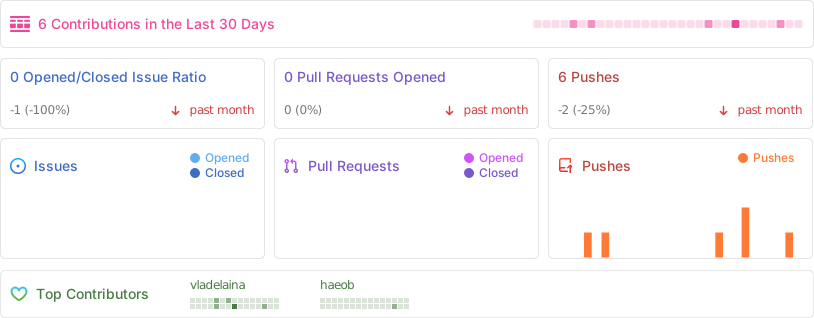
Project Status
🌟Star History
✨Acknowledgements
With special appreciation to 猫屋敷梨梨Official for the beautiful icon design.
Special thanks to the following contributors(chronological order):


























































🗝️Copyright Notice
This project is released under the Apache License 2.0 open source license.
Icon copyright notice:
- The software icon was created by 猫屋敷梨梨Official who reserves all rights. Without explicit authorization from the original creator, it may not be used for any commercial purposes.
Font licenses:
- MIT:
- ProFontWindows Essence.ttf
- SIL Open Font License:
- DaddyTimeMono Essence.otf, DepartureMono Essence.otf, Rec Mono Casual Essence.ttf, Terminess Nerd Font Essence.ttf
- OFL (Open Font License):
- Jacquard 12 Essence.ttf, Jacquarda Bastarda 9 Essence.ttf, Pixelify Sans Essence.ttf, Rubik Burned Essence.ttf, Rubik Glitch Essence.ttf, Rubik Marker Hatch Essence.ttf, Rubik Puddles Essence.ttf, Wallpoet Essence.ttf
Wallpaper:
- Author: 猫屋敷梨梨Official
- Dynamic wallpaper link: 猫屋敷梨梨「星之所在」曲绘夜晚版 & 猫屋敷梨梨-「星之所在」曲绘黄昏版
Copyright © 2025-2026 - Catime
By vladelaina
Made with ❤️ & ⌨️
Contributors


Similar repos


Languages
C
98.5%
💌A tiny (995KB) but mighty timer in **pure C** ! — almost no memory usage!❤️🔥 Supports clock, countdown, stopwatch, Pomodoro, and fully customizable tray animations (GIFs, CPU/Mem%) 💘 Don't be shy, join here🧸: https://discord.com/invite/W3tW2gtp6g
See the codeREADME
v1.5.0 is out! 🎉 Download Now - Only 995KB!
A pure C-written, ultra-lightweight Windows countdown and Pomodoro tool with a clean transparent interface,
extensive customization, powerful shortcuts, and negligible resource consumption—all in just 995KB.
🎨 Powerful Tray Animations
Your tray icon can now come alive! Catime brings powerful custom animation features:
- Custom Animations: Use GIF, WebP, ANI, and static images like PNG & JPG as your tray icon.
- System Status: Supports real-time display of CPU %, Memory %, Battery %, and Caps Lock status.
[!TIP] Looking for more fun animations? Check out our companion project, MemeTray!
💫Plugins
Plugins simply write their output to ./output.txt, and Catime displays it in real time—it's that simple!
[!TIP] Looking for more useful Plugins? Check out our companion project, Catime-Plugins!
❤️🔥Staying tuned with us
⭐ Star us and witness the evolution of this pure C-crafted minimalist time tool—stay tuned for exciting updates and new features!
<img src="https://github.com/user-attachments/assets/50cfc9d4-3d3f-4370-b233-89d76f78977e" />
📥 Download
-
GitHub Releases
Download the latest release from GitHub Releases.
-
Scoop
scoop bucket add extras scoop install catime -
Winget
winget install --id VladElaina.Catime
📑User Guide
- Left-click tray icon: Set time
- Right-click tray icon: Set menu
- Edit mode: Drag to adjust position, scroll wheel to resize, Ctrl+scroll wheel to adjust opacity, 🖱️ right-click to exit edit mode
Configuration file saved at
%LOCALAPPDATA%\Catime\config.ini
⚡Font Optimization
Reduce custom font file size by 90%+ with the official Font Simplification Tool.
Since Catime only displays numbers and symbols (
0-9,:,.), most font characters are unnecessary.Recommendation: Keep your original font files as backups. Future software updates may require additional characters beyond the current set.
🛠️ Development
Prerequisites: MinGW and CMake are required to build Catime.
Getting Started
git clone https://github.com/vladelaina/Catime.git
cd Catime

# INSTALL DEPENDENCIES
# Ubuntu/Debian
sudo apt update && sudo apt install -y mingw-w64 cmake

# Arch Linux
sudo pacman -Syu --noconfirm mingw-w64 cmake

# Windows - See setup instructions below
📋 Windows Setup Instructions
📦 Required Tools
| Tool | Description | Recommended Version Format | Download Link |
|---|---|---|---|
| MinGW | GCC Compiler | x86_64-<version>-release-win32-seh-ucrt-rtv<num>-rev<num>.7z | MinGW Build |
| CMake | Build Tool | cmake-<version>-windows-x86_64.msi | CMake |
🔧 Installation Steps
1. Install MinGW
- Download
x86_64-<version>-release-win32-seh-ucrt-rtv<num>-rev<num>.7zfrom MinGW Build - Extract to
C:\mingw64 - Add
C:\mingw64\binto your PATH environment variable:- Open:
Control Panel → System → Advanced System Settings → Environment Variables - Find
Pathin System variables, click "Edit" - Add:
C:\mingw64\bin
- Open:
2. Install CMake
- Download and run
cmake-<version>-windows-x86_64.msifrom CMake - During installation, select "Add CMake to the system PATH"
3. Verify Installation
gcc --version
cmake --version
Building
chmod +x build.sh && ./build.sh   # Linux
build.bat                         # Windows
🎁 Support
Sponsors
Project Status
🌟Star History
✨Acknowledgements
With special appreciation to 猫屋敷梨梨Official for the beautiful icon design.
Special thanks to the following contributors(chronological order):
🗝️Copyright Notice
This project is released under the Apache License 2.0 open source license.
Icon copyright notice:
- The software icon was created by 猫屋敷梨梨Official who reserves all rights. Without explicit authorization from the original creator, it may not be used for any commercial purposes.
Font licenses:
- MIT:
- ProFontWindows Essence.ttf
- SIL Open Font License:
- DaddyTimeMono Essence.otf, DepartureMono Essence.otf, Rec Mono Casual Essence.ttf, Terminess Nerd Font Essence.ttf
- OFL (Open Font License):
- Jacquard 12 Essence.ttf, Jacquarda Bastarda 9 Essence.ttf, Pixelify Sans Essence.ttf, Rubik Burned Essence.ttf, Rubik Glitch Essence.ttf, Rubik Marker Hatch Essence.ttf, Rubik Puddles Essence.ttf, Wallpoet Essence.ttf
Wallpaper:
- Author: 猫屋敷梨梨Official
- Dynamic wallpaper link: 猫屋敷梨梨「星之所在」曲绘夜晚版 & 猫屋敷梨梨-「星之所在」曲绘黄昏版
Copyright © 2025-2026 - Catime
By vladelaina
Made with ❤️ & ⌨️
Similar repos
Contributors
Languages
C
98.5%