MOROS: Obscure Rust Operating System 🦉
See the code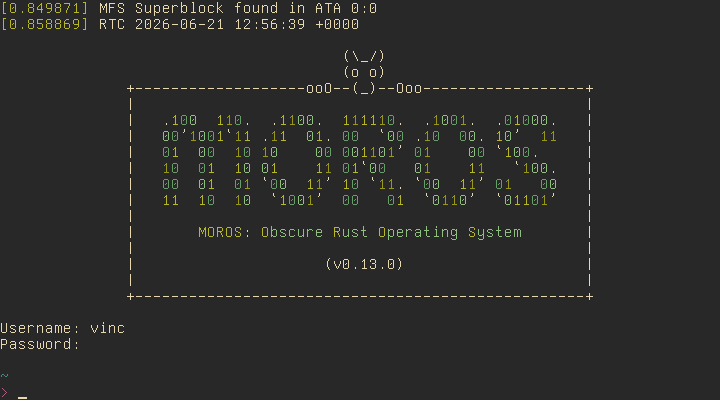
MOROS is a text-based hobby operating system written in Rust by Vincent Ollivier.
It targets computers with a x86-64 architecture and a BIOS, drawing inspiration from Unix, Plan 9, and DOS to provide a simple and efficient environment for computing and communication from the command line.
This project started from the seventh post of the second edition of Writing an OS in Rust by Philipp Oppermann and aims to showcase what can be accomplished after completing an OSDev tutorial, while reading the OSDev wiki along with many open source kernels.
Note: the kernel is currently being refactored to support the i686 architecture in addition to x86-64.


Documentation is available here
MOROS runs on x86-64 computers from around 2005 to 2020, as well as emulators like Bochs, VirtualBox, and QEMU with the latter being the main development platform.
You will need git, gcc, make, curl, qemu-img,
and qemu-system-x86_64 on the host system.
Clone the repo:
$ git clone https://github.com/vinc/moros
$ cd moros
Install the required tools with make setup or the following commands:
$ curl https://sh.rustup.rs -sSf | sh -s -- -y --default-toolchain none
$ rustup show
$ cargo install bootimage
Build the image to disk.img:
$ make image output=video keyboard=qwerty
Run MOROS in QEMU:
$ make qemu output=video nic=rtl8139
Run natively on a x86 computer by copying the bootloader and the kernel to a hard drive or USB stick (but there is currently no USB driver so the filesystem will not be available in that case):
$ sudo dd if=target/x86_64-moros/release/bootimage-moros.bin of=/dev/sdx
MOROS will open a console in diskless mode after boot if no filesystem is detected. The following command will setup the filesystem on a hard drive, allowing you to exit the diskless mode and log in as a normal user:
> install
Be careful not to overwrite the hard drive of your OS when using dd inside
your OS, and install or disk format inside MOROS if you don't use an
emulator.
Run the test suite in QEMU:
$ make test
MOROS is released under MIT.
Overall
Maintained
Code review
crates.io
Latest release
Releases this year
(top 24 of 32)
2,593 followers · starred Apr 2025
81 followers · starred Oct 2023
218 followers · starred Jun 2024
385 followers · starred Jan 2022
MOROS: Obscure Rust Operating System 🦉
See the code
MOROS is a text-based hobby operating system written in Rust by Vincent Ollivier.
It targets computers with a x86-64 architecture and a BIOS, drawing inspiration from Unix, Plan 9, and DOS to provide a simple and efficient environment for computing and communication from the command line.
This project started from the seventh post of the second edition of Writing an OS in Rust by Philipp Oppermann and aims to showcase what can be accomplished after completing an OSDev tutorial, while reading the OSDev wiki along with many open source kernels.
Note: the kernel is currently being refactored to support the i686 architecture in addition to x86-64.
Documentation is available here
MOROS runs on x86-64 computers from around 2005 to 2020, as well as emulators like Bochs, VirtualBox, and QEMU with the latter being the main development platform.
You will need git, gcc, make, curl, qemu-img,
and qemu-system-x86_64 on the host system.
Clone the repo:
$ git clone https://github.com/vinc/moros
$ cd moros
Install the required tools with make setup or the following commands:
$ curl https://sh.rustup.rs -sSf | sh -s -- -y --default-toolchain none
$ rustup show
$ cargo install bootimage
Build the image to disk.img:
$ make image output=video keyboard=qwerty
Run MOROS in QEMU:
$ make qemu output=video nic=rtl8139
Run natively on a x86 computer by copying the bootloader and the kernel to a hard drive or USB stick (but there is currently no USB driver so the filesystem will not be available in that case):
$ sudo dd if=target/x86_64-moros/release/bootimage-moros.bin of=/dev/sdx
MOROS will open a console in diskless mode after boot if no filesystem is detected. The following command will setup the filesystem on a hard drive, allowing you to exit the diskless mode and log in as a normal user:
> install
Be careful not to overwrite the hard drive of your OS when using dd inside
your OS, and install or disk format inside MOROS if you don't use an
emulator.
Run the test suite in QEMU:
$ make test
MOROS is released under MIT.
Overall
Maintained
Code review
crates.io
Latest release
Releases this year
(top 24 of 32)
2,593 followers · starred Apr 2025
81 followers · starred Oct 2023
218 followers · starred Jun 2024
385 followers · starred Jan 2022