A pixel-art racing game you drive with your voice. NeuDecide (43 MB speech-to-tool-call model) runs locally: no speech-to-text, no cloud.
JavaScript
3
1 commits
updated Oct 10, 2026
A pixel-art racing game you drive with your voice. Say "go left", "speed up" or "jump" and the car does it.
There is no speech-to-text and no chatbot in the loop. NeuDecide, a small (43 MB) speech-to-tool-call model by Neuphonic, hears your voice and picks a game command directly. It runs on your own machine: natively next to the page, or entirely inside the browser with WebAssembly.
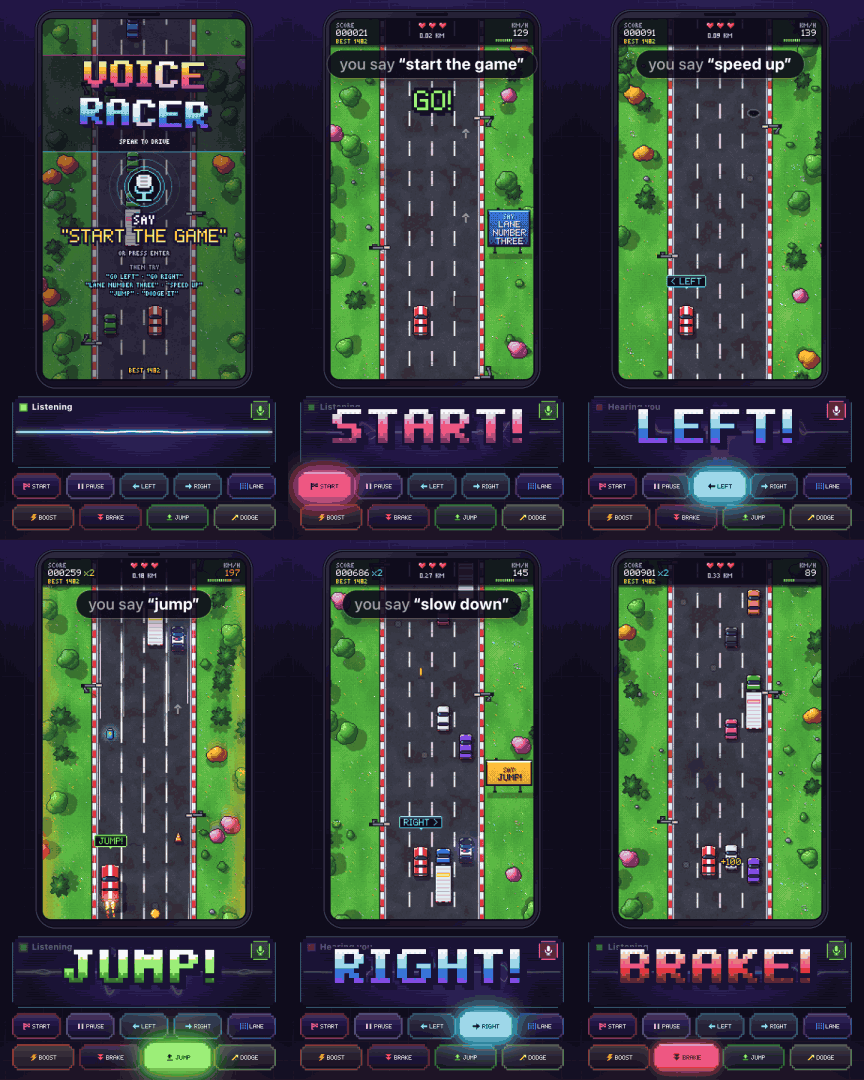
Six spoken commands, decided by the native engine. The voice is a macOS text-to-speech voice played into the browser as its microphone. A GIF has no sound, so the caption shows what was said.
flowchart LR
  mic["Microphone"] --> vad["Voice detector<br/>(energy VAD)"]
  subgraph nd["NeuDecide, run by our JavaScript engine"]
    ae["Audio encoder"] --> te["Tool encoder"]
    menu["Tool menu<br/>9 game commands + noAction, as JSON"] --> te
    te --> dec["Constrained decoder<br/>(only valid tool-call JSON)"]
  end
  vad -- "16 kHz utterance" --> ae
  dec -- "moveLeft()" --> gate["Confidence gate"]
  gate --> game["Game"]
moveLeft, moveRight, moveToLane, speedUp,
slowDown, jump, dodge, start, pause, noAction, see src/voice/tools.js).
A grammar-constrained decoder can only write a valid tool call, and the game acts the moment the call is
determined, before decoding even finishes.The engine that runs the model is a JavaScript port of the neudecide Python package (tokenizer, constrained decoding,
inference loop) on ONNX Runtime: onnxruntime-node for the native engine, onnxruntime-web (WASM,
in a Web Worker) in the browser. More detail in docs/ARCHITECTURE.md.
You need Node 22 or newer, a microphone, and desktop Chrome (or Edge).
git clone https://github.com/vimalananddev/voice-racer.git
cd voice-racer
npm install
Download the model (once, about 43 MB). It is free, but gated on Hugging Face: sign in, accept the terms at
https://huggingface.co/neuphonic/neudecide, then use the Hugging Face CLI, hf:
brew install hf                  # or: pipx install huggingface_hub   or: uv tool install huggingface_hub
hf auth login                    # paste a read token from https://huggingface.co/settings/tokens
hf download neuphonic/neudecide --local-dir models/neudecide
No CLI? Download config.json, tokenizer.json, audio_encoder_q4.onnx, tool_encoder_q4.onnx and
decoder_step_q4.onnx from the model page's Files and versions tab into models/neudecide/.
(models/README.md has the details.) Then:
npm start
Pressing Enter instead of clicking turns on the mic and starts the race in one go (then skip step 3).
npm start runs the game page on port 5180 and the native voice engine on ws://127.0.0.1:5190, both on this
machine only. Ctrl-C stops both. Busy ports? PORT=5280 VOICE_PORT=5290 npm start (the printed address then
carries ?localport=5290). npm run check runs a quick smoke test that needs no microphone.
npm run dev runs only the game page, so the in-browser engine is used. Without a native engine, the browser console
shows one failed WebSocket connection to ws://127.0.0.1:5190 per page load: that is the page looking for the native
engine, and it is expected.
| say | does | hit rate* |
|---|---|---|
| "start the game" | start, restart after a crash, or resume (Enter works too) | 19/24 |
| "go left" · "go right" | one lane left / right | 30/32 · 31/32 |
| "lane number three" | go straight to lane 1-4 | 53/56 |
| "speed up" | boost for ~2.5 s | 24/24 |
| "slow down" | brake for ~2 s | 24/24 |
| "jump" | hop over cones, oil and potholes (not over cars) | 23/24 |
| "dodge it" | the game moves you to the safest lane | 23/24 |
| "pause the game" · "resume" | pause / carry on | 21/24 · 24/24 |
* Synthetic voices (macOS text-to-speech), quiet room, no game sound in the microphone, native engine. Real voices and rooms will differ.
Tips:
All latency and hit-rate figures in this README were measured on an M1 Pro MacBook Pro (the browser engine in desktop Chrome), with synthetic voices.
| engine | how to pick it | where it runs | from the end of your speech to the game reacting |
|---|---|---|---|
| Native (default) | npm start, or ?engine=local | onnxruntime-node next to the page (the tool encoder on 5 threads on an M1 Pro; min(6, cores - 2) on other machines) | ~200 ms (model time ~80-100 ms) |
| Browser | ?engine=browser, or automatic when no native engine answers | onnxruntime-web (WASM) in a Web Worker | ~0.3-0.6 s (4 threads: ~0.35 s; ~0.7 s where only 1 thread works) |
| Remote | ?engine=ws://host:5190/?token=… | the native engine on another machine | that machine's model time + the network |
The ~200 ms includes the 120 ms the voice detector waits to be sure you have stopped talking (with ?ptt=1 it starts
when you release the talk key instead). Almost all of the model time is the tool encoder: it mixes the tool menu
with your audio from its first layer, so it cannot be cached and runs for every command. WebGPU is not used: it fails on
Apple GPUs (the model needs 11 storage buffers, the limit is 10).
If the engine stops mid-game, the page says "Voice is reconnecting…" and reconnects by itself. In the default mode, a native engine that is not back within 4 s is replaced by the browser engine (reload to go back). The keyboard always works.
The engine is scripts/remote-voice-server.mjs. It was tested on macOS and on Linux (arm64), and should run anywhere
onnxruntime-node does. A machine with more CPU cores is faster per command. On that machine, with the repo,
npm install and the model in place:
TOKEN=pick-a-secret HOST=0.0.0.0 PORT=5190 npm run engine
Then open http://localhost:5180/?engine=ws://<that-machine>:5190/?token=pick-a-secret on the machine with the game.
The ?dev=1 panel names the engine by the hostname it reports; start it with ENGINE_NAME=desktop (any name) to show
something else, for example before you record the panel (?record=1 just says "Remote"). Always set a TOKEN when
HOST is not 127.0.0.1, and use it on a network you trust: the link is plain ws://. Even simpler and private: keep the engine on 127.0.0.1 there and use an
SSH tunnel, ssh -N -L 5195:127.0.0.1:5190 you@that-machine, then open ?engine=ws://127.0.0.1:5195.
The engine prints its thread settings at start-up; TOOL_THREADS=n tries others. See the header of
scripts/remote-voice-server.mjs for all options and the protocol.
| option | what it does |
|---|---|
?dev=1 | the developer panel: the tool call, latency, engine, confidence and a decision log, instead of the clean panel |
?record=1 | a clean layout for screen recording (9:16 window: one column; 4:5, 1:1 or 16:9: two columns), quieter game sound, a faster day-to-night cycle and busier traffic |
?ptt=1 | push-to-talk: hold T (or hold the mic button) while you speak |
?engine=local · ?engine=browser · ?engine=ws://host:port/?token=… | pick the engine (default: native if it answers, else browser; native and wasm work too) |
?voice=mock | no model at all: the keyboard fakes voice events (for working on the UI) |
?minconf=0.6 | a stricter confidence gate (default 0.45; lower lets noise through) |
?tools=fast | a shorter tool menu: faster, but less accurate |
?tod=fast · ?traffic=busy | the recording pacing outside ?record=1 (=normal turns it off inside) |
?tod=night | start at that time of day (day, sunset, dusk, night or dawn) |
?sfx=0 | no game sound at all |
?ec=0 · ?ns=0 · ?agc=0 | turn off the browser's echo cancellation / noise suppression / auto gain on the mic (on by default: they help keep game sound out of the mic) |
?resampler=own · ?resampler=browser | force how the mic is resampled to 16 kHz (default: the browser's own in Chrome / Edge, ours elsewhere) |
?brand=@yourhandle | a small watermark in the corner |
Developer options: ?god=1 (the car cannot crash) and ?keepalive=1 (keeps running in a background tab). The browser
console has more: see docs/ARCHITECTURE.md.
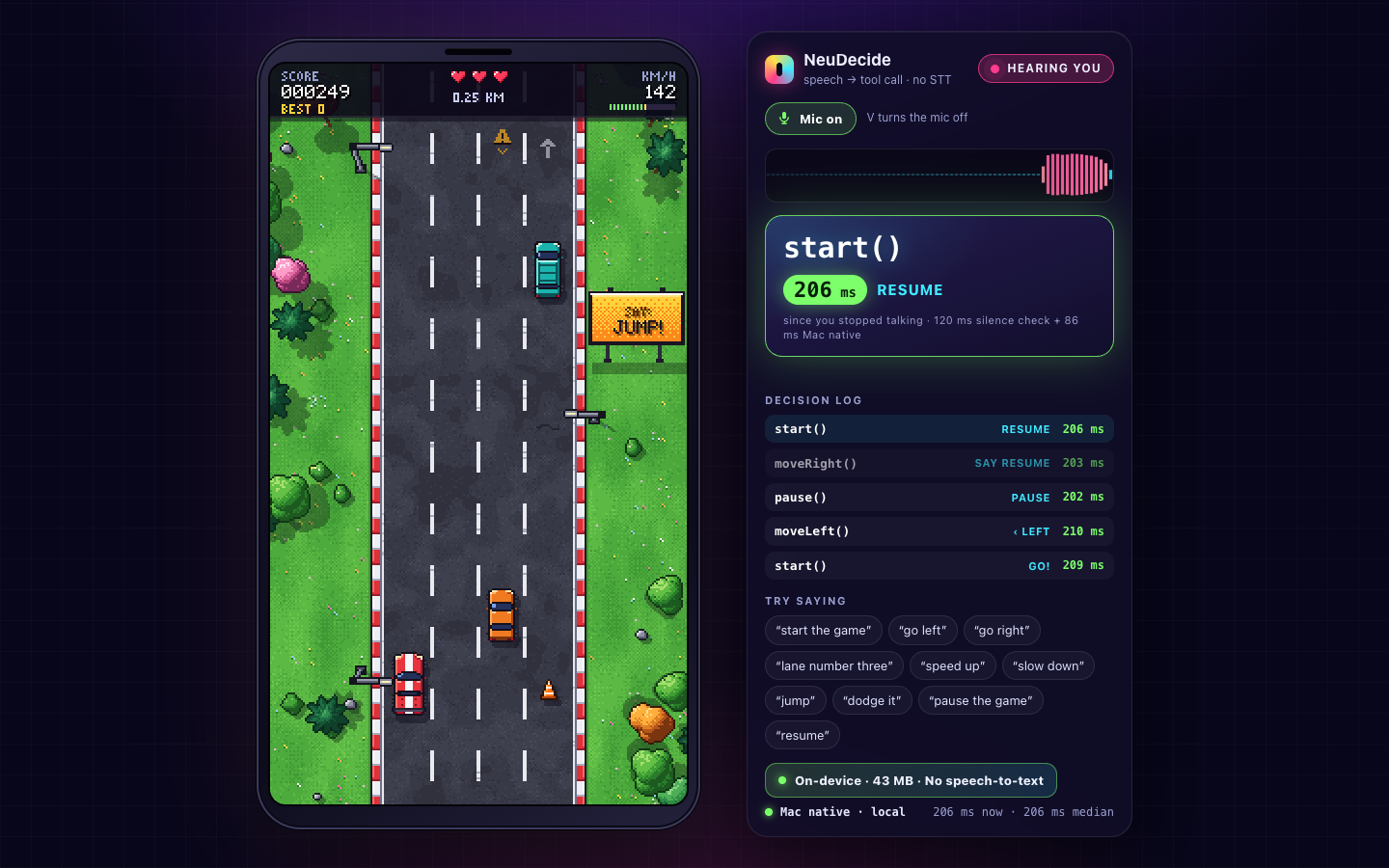
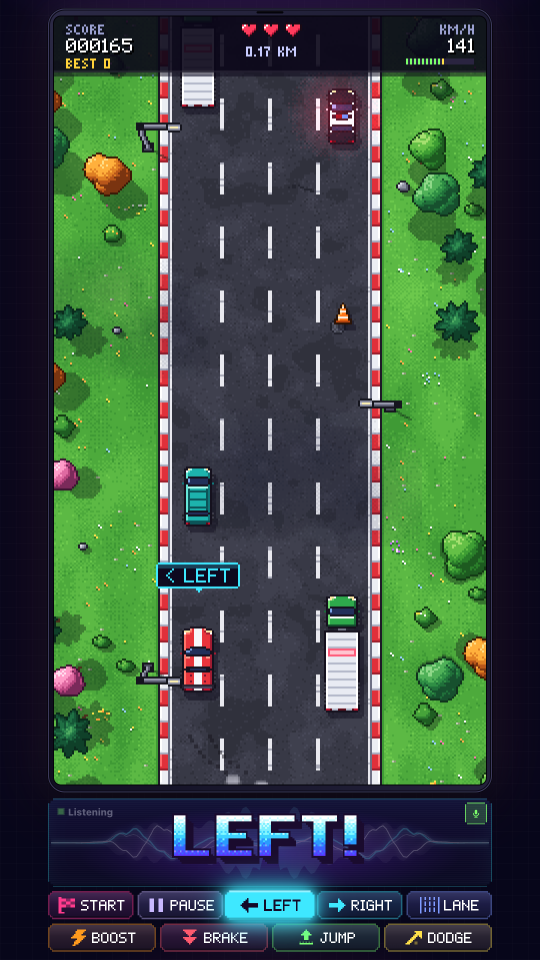
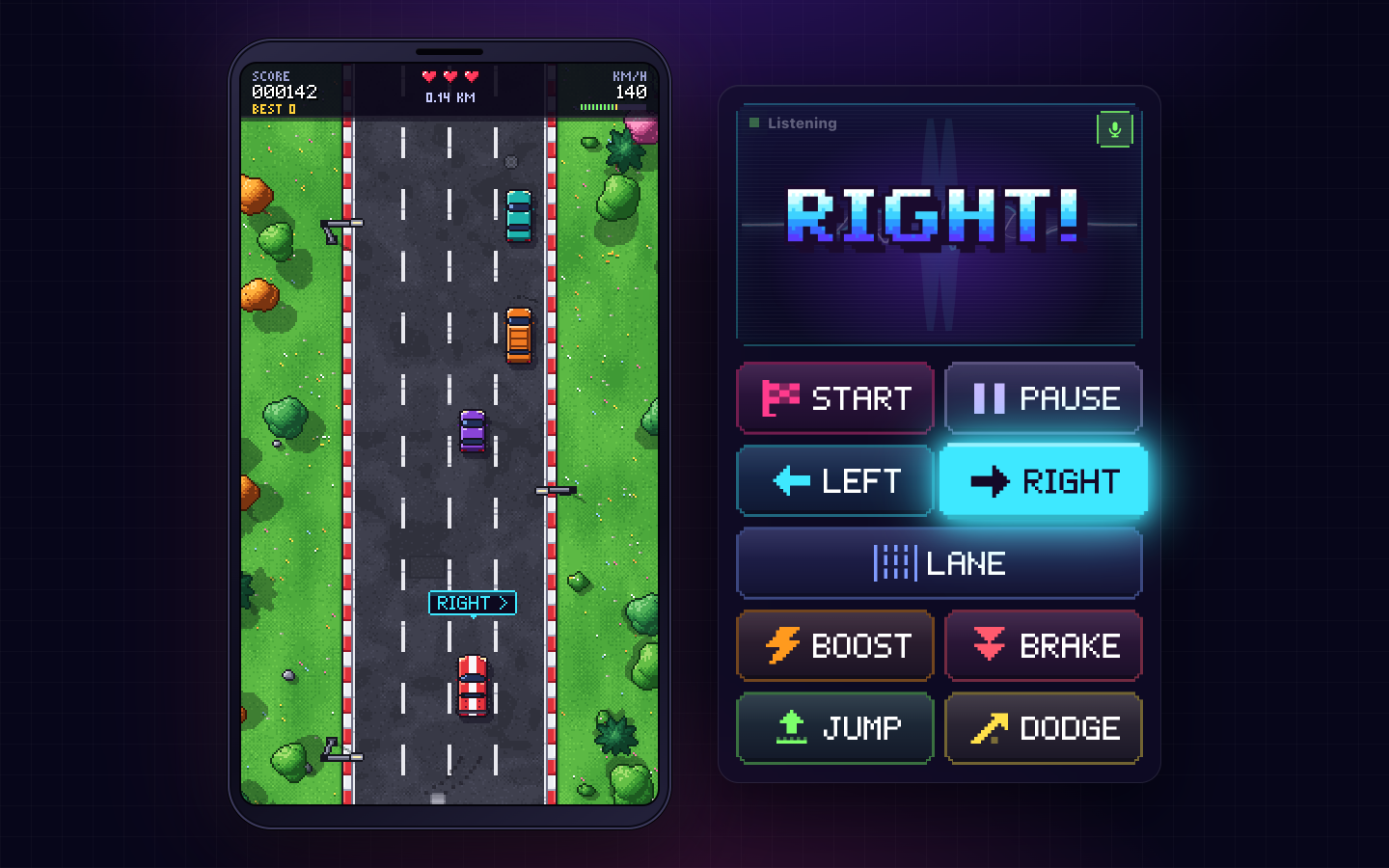
Left: ?dev=1 (real decisions and latencies from a test run). Right: ?record=1 in a 9:16 window.
| key | does |
|---|---|
| V | microphone on / off |
T (with ?ptt=1) | hold to talk |
| ← → or A D | one lane left / right |
| Shift + ← → | far left / far right (keyboard and touch buttons only) |
| 1 2 3 4 | go to that lane |
| ↑ W / ↓ S | boost / brake |
| Space / X | jump / dodge |
| Enter / P | start or resume / pause |
| M | game sound on / off |
On a touch screen, touch buttons appear under the game. Playing from a phone needs your own HTTPS setup in front of
the game server: server.mjs listens on 127.0.0.1 only, and browsers allow the microphone only on https:// or
localhost.
index.html, styles.css        the page
server.mjs                    static server (127.0.0.1 only; COOP/COEP headers for multi-threaded WASM)
scripts/
  start.mjs                   npm start: the game server + the native engine
  remote-voice-server.mjs     the native voice engine (WebSocket), also for another machine
  vendor-ort.mjs              copies onnxruntime-web into vendor/ort/ (runs after npm install)
  check.mjs                   npm run check: smoke test, no microphone or audio files
src/
  main.js                     wiring: engine choice, microphone, voice events -> game actions
  game/                       the racer: world, traffic, sprites and font (all drawn in code), lighting, HUD,
                              synthesised sound effects
  ui/                         the voice panel (show-overlay.js; overlay.js is the ?dev=1 panel), layout,
                              title card, touch buttons, mock voice
  voice/                      NeuDecide in JavaScript: tokenizer, constrained decoding, inference core, Web Worker,
                              microphone capture, VAD, confidence gate, tool menu
models/README.md              how to get the model (the weights go in models/neudecide/, never in git)
docs/                         ARCHITECTURE.md, screenshots
No build step and no bundler: plain ES modules served as static files.
neudecide Python package this JavaScript engine is ported from.onnxruntime-web and onnxruntime-node.toktrie.See NOTICE for details.
Voice Racer is an independent project and is not affiliated with or endorsed by Neuphonic. NeuDecide is a model by Neuphonic; the name is used only to identify it.
Apache License 2.0. Copyright 2026 Vimal Anand.
The NeuDecide model weights are not part of this repository and are covered by their own terms on Hugging Face.
A pixel-art racing game you drive with your voice. NeuDecide (43 MB speech-to-tool-call model) runs locally: no speech-to-text, no cloud.
JavaScript
3
1 commits
updated Oct 10, 2026
A pixel-art racing game you drive with your voice. Say "go left", "speed up" or "jump" and the car does it.
There is no speech-to-text and no chatbot in the loop. NeuDecide, a small (43 MB) speech-to-tool-call model by Neuphonic, hears your voice and picks a game command directly. It runs on your own machine: natively next to the page, or entirely inside the browser with WebAssembly.
Six spoken commands, decided by the native engine. The voice is a macOS text-to-speech voice played into the browser as its microphone. A GIF has no sound, so the caption shows what was said.
flowchart LR
  mic["Microphone"] --> vad["Voice detector<br/>(energy VAD)"]
  subgraph nd["NeuDecide, run by our JavaScript engine"]
    ae["Audio encoder"] --> te["Tool encoder"]
    menu["Tool menu<br/>9 game commands + noAction, as JSON"] --> te
    te --> dec["Constrained decoder<br/>(only valid tool-call JSON)"]
  end
  vad -- "16 kHz utterance" --> ae
  dec -- "moveLeft()" --> gate["Confidence gate"]
  gate --> game["Game"]
moveLeft, moveRight, moveToLane, speedUp,
slowDown, jump, dodge, start, pause, noAction, see src/voice/tools.js).
A grammar-constrained decoder can only write a valid tool call, and the game acts the moment the call is
determined, before decoding even finishes.The engine that runs the model is a JavaScript port of the neudecide Python package (tokenizer, constrained decoding,
inference loop) on ONNX Runtime: onnxruntime-node for the native engine, onnxruntime-web (WASM,
in a Web Worker) in the browser. More detail in docs/ARCHITECTURE.md.
You need Node 22 or newer, a microphone, and desktop Chrome (or Edge).
git clone https://github.com/vimalananddev/voice-racer.git
cd voice-racer
npm install
Download the model (once, about 43 MB). It is free, but gated on Hugging Face: sign in, accept the terms at
https://huggingface.co/neuphonic/neudecide, then use the Hugging Face CLI, hf:
brew install hf                  # or: pipx install huggingface_hub   or: uv tool install huggingface_hub
hf auth login                    # paste a read token from https://huggingface.co/settings/tokens
hf download neuphonic/neudecide --local-dir models/neudecide
No CLI? Download config.json, tokenizer.json, audio_encoder_q4.onnx, tool_encoder_q4.onnx and
decoder_step_q4.onnx from the model page's Files and versions tab into models/neudecide/.
(models/README.md has the details.) Then:
npm start
Pressing Enter instead of clicking turns on the mic and starts the race in one go (then skip step 3).
npm start runs the game page on port 5180 and the native voice engine on ws://127.0.0.1:5190, both on this
machine only. Ctrl-C stops both. Busy ports? PORT=5280 VOICE_PORT=5290 npm start (the printed address then
carries ?localport=5290). npm run check runs a quick smoke test that needs no microphone.
npm run dev runs only the game page, so the in-browser engine is used. Without a native engine, the browser console
shows one failed WebSocket connection to ws://127.0.0.1:5190 per page load: that is the page looking for the native
engine, and it is expected.
| say | does | hit rate* |
|---|---|---|
| "start the game" | start, restart after a crash, or resume (Enter works too) | 19/24 |
| "go left" · "go right" | one lane left / right | 30/32 · 31/32 |
| "lane number three" | go straight to lane 1-4 | 53/56 |
| "speed up" | boost for ~2.5 s | 24/24 |
| "slow down" | brake for ~2 s | 24/24 |
| "jump" | hop over cones, oil and potholes (not over cars) | 23/24 |
| "dodge it" | the game moves you to the safest lane | 23/24 |
| "pause the game" · "resume" | pause / carry on | 21/24 · 24/24 |
* Synthetic voices (macOS text-to-speech), quiet room, no game sound in the microphone, native engine. Real voices and rooms will differ.
Tips:
All latency and hit-rate figures in this README were measured on an M1 Pro MacBook Pro (the browser engine in desktop Chrome), with synthetic voices.
| engine | how to pick it | where it runs | from the end of your speech to the game reacting |
|---|---|---|---|
| Native (default) | npm start, or ?engine=local | onnxruntime-node next to the page (the tool encoder on 5 threads on an M1 Pro; min(6, cores - 2) on other machines) | ~200 ms (model time ~80-100 ms) |
| Browser | ?engine=browser, or automatic when no native engine answers | onnxruntime-web (WASM) in a Web Worker | ~0.3-0.6 s (4 threads: ~0.35 s; ~0.7 s where only 1 thread works) |
| Remote | ?engine=ws://host:5190/?token=… | the native engine on another machine | that machine's model time + the network |
The ~200 ms includes the 120 ms the voice detector waits to be sure you have stopped talking (with ?ptt=1 it starts
when you release the talk key instead). Almost all of the model time is the tool encoder: it mixes the tool menu
with your audio from its first layer, so it cannot be cached and runs for every command. WebGPU is not used: it fails on
Apple GPUs (the model needs 11 storage buffers, the limit is 10).
If the engine stops mid-game, the page says "Voice is reconnecting…" and reconnects by itself. In the default mode, a native engine that is not back within 4 s is replaced by the browser engine (reload to go back). The keyboard always works.
The engine is scripts/remote-voice-server.mjs. It was tested on macOS and on Linux (arm64), and should run anywhere
onnxruntime-node does. A machine with more CPU cores is faster per command. On that machine, with the repo,
npm install and the model in place:
TOKEN=pick-a-secret HOST=0.0.0.0 PORT=5190 npm run engine
Then open http://localhost:5180/?engine=ws://<that-machine>:5190/?token=pick-a-secret on the machine with the game.
The ?dev=1 panel names the engine by the hostname it reports; start it with ENGINE_NAME=desktop (any name) to show
something else, for example before you record the panel (?record=1 just says "Remote"). Always set a TOKEN when
HOST is not 127.0.0.1, and use it on a network you trust: the link is plain ws://. Even simpler and private: keep the engine on 127.0.0.1 there and use an
SSH tunnel, ssh -N -L 5195:127.0.0.1:5190 you@that-machine, then open ?engine=ws://127.0.0.1:5195.
The engine prints its thread settings at start-up; TOOL_THREADS=n tries others. See the header of
scripts/remote-voice-server.mjs for all options and the protocol.
| option | what it does |
|---|---|
?dev=1 | the developer panel: the tool call, latency, engine, confidence and a decision log, instead of the clean panel |
?record=1 | a clean layout for screen recording (9:16 window: one column; 4:5, 1:1 or 16:9: two columns), quieter game sound, a faster day-to-night cycle and busier traffic |
?ptt=1 | push-to-talk: hold T (or hold the mic button) while you speak |
?engine=local · ?engine=browser · ?engine=ws://host:port/?token=… | pick the engine (default: native if it answers, else browser; native and wasm work too) |
?voice=mock | no model at all: the keyboard fakes voice events (for working on the UI) |
?minconf=0.6 | a stricter confidence gate (default 0.45; lower lets noise through) |
?tools=fast | a shorter tool menu: faster, but less accurate |
?tod=fast · ?traffic=busy | the recording pacing outside ?record=1 (=normal turns it off inside) |
?tod=night | start at that time of day (day, sunset, dusk, night or dawn) |
?sfx=0 | no game sound at all |
?ec=0 · ?ns=0 · ?agc=0 | turn off the browser's echo cancellation / noise suppression / auto gain on the mic (on by default: they help keep game sound out of the mic) |
?resampler=own · ?resampler=browser | force how the mic is resampled to 16 kHz (default: the browser's own in Chrome / Edge, ours elsewhere) |
?brand=@yourhandle | a small watermark in the corner |
Developer options: ?god=1 (the car cannot crash) and ?keepalive=1 (keeps running in a background tab). The browser
console has more: see docs/ARCHITECTURE.md.
Left: ?dev=1 (real decisions and latencies from a test run). Right: ?record=1 in a 9:16 window.
| key | does |
|---|---|
| V | microphone on / off |
T (with ?ptt=1) | hold to talk |
| ← → or A D | one lane left / right |
| Shift + ← → | far left / far right (keyboard and touch buttons only) |
| 1 2 3 4 | go to that lane |
| ↑ W / ↓ S | boost / brake |
| Space / X | jump / dodge |
| Enter / P | start or resume / pause |
| M | game sound on / off |
On a touch screen, touch buttons appear under the game. Playing from a phone needs your own HTTPS setup in front of
the game server: server.mjs listens on 127.0.0.1 only, and browsers allow the microphone only on https:// or
localhost.
index.html, styles.css        the page
server.mjs                    static server (127.0.0.1 only; COOP/COEP headers for multi-threaded WASM)
scripts/
  start.mjs                   npm start: the game server + the native engine
  remote-voice-server.mjs     the native voice engine (WebSocket), also for another machine
  vendor-ort.mjs              copies onnxruntime-web into vendor/ort/ (runs after npm install)
  check.mjs                   npm run check: smoke test, no microphone or audio files
src/
  main.js                     wiring: engine choice, microphone, voice events -> game actions
  game/                       the racer: world, traffic, sprites and font (all drawn in code), lighting, HUD,
                              synthesised sound effects
  ui/                         the voice panel (show-overlay.js; overlay.js is the ?dev=1 panel), layout,
                              title card, touch buttons, mock voice
  voice/                      NeuDecide in JavaScript: tokenizer, constrained decoding, inference core, Web Worker,
                              microphone capture, VAD, confidence gate, tool menu
models/README.md              how to get the model (the weights go in models/neudecide/, never in git)
docs/                         ARCHITECTURE.md, screenshots
No build step and no bundler: plain ES modules served as static files.
neudecide Python package this JavaScript engine is ported from.onnxruntime-web and onnxruntime-node.toktrie.See NOTICE for details.
Voice Racer is an independent project and is not affiliated with or endorsed by Neuphonic. NeuDecide is a model by Neuphonic; the name is used only to identify it.
Apache License 2.0. Copyright 2026 Vimal Anand.
The NeuDecide model weights are not part of this repository and are covered by their own terms on Hugging Face.



