
A lightweight native macOS utility for running scripts and commands in the background
Rust
7
80 commits
updated Sep 19, 2026
See what people are saying (1)
README
Something In The Background
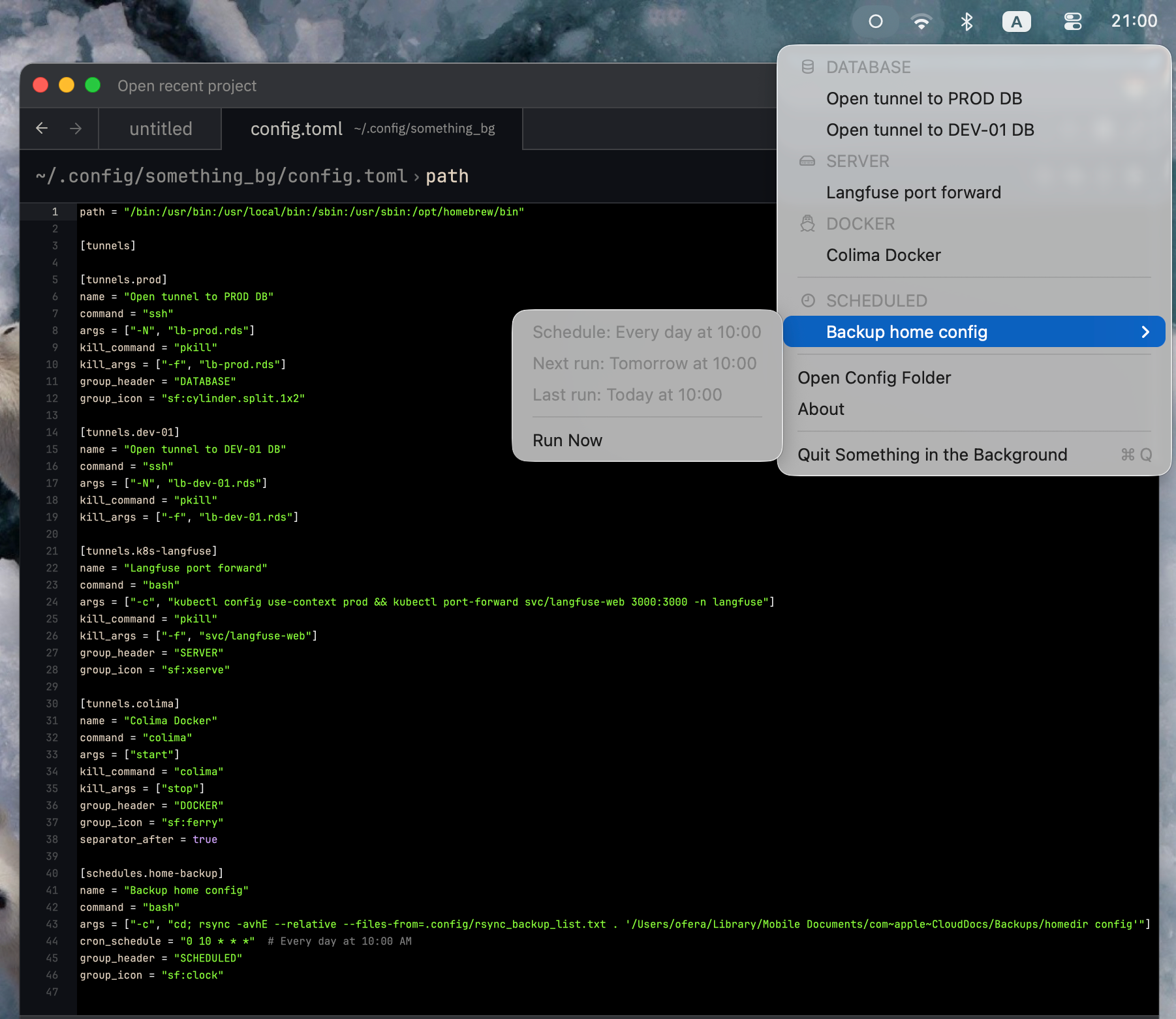
A native menu bar utility for managing background processes, SSH tunnels, and scheduled tasks.
Features
- Tiny native macOS app with a Rust core (less than 1MB)
- Run any script or CLI task without keeping a terminal open
- Fire-and-forget one-time commands (silent, with notification, or in a terminal)
- Auto-discover scripts from a directory
- Run scripts on a schedule without cron, or launchd
- Controlled from the menu bar
- Cross-platform support (macOS, Linux, Windows)
- Everything is configured with one simple config file
Installation
macOS
Install from GitHub Releases
On an Apple Silicon Mac, download something_bg-macos-arm64.zip from the GitHub Releases page, unzip it, then move Something in the Background.app to /Applications.
Starting with v1.10.1, GitHub release builds are signed with a Developer ID certificate and notarized by Apple before publication.
Starting with v1.11.0, the macOS app uses Sparkle for secure in-app updates. Open the status menu and choose Check for Updates... to run Sparkle's standard interactive update flow. The app also checks at launch and once per hour. Starting with v1.14.1, finding a newer version automatically opens Sparkle's update prompt with Install, Later, and Skip Version choices. The menu keeps Update Available... after either choice: Later allows another automatic reminder, while Skip This Version suppresses reminders for that version. You can still open the update manually from the menu. Automatic checks stay silent when no update is available or a check fails. The first v1.11.0 installation is manual because older versions do not contain the updater.
The packaged macOS release currently targets Apple Silicon (arm64). Intel Mac users can build the app from source on an Intel Mac.
Build from source
Step 1: Install Rust (skip if already installed)
curl --proto '=https' --tlsv1.2 -sSf https://sh.rustup.rs | sh
source $HOME/.cargo/env
Step 2: Install build tools
xcode-select --install
cargo install cargo-bundle
Step 3: Build and install
git clone https://github.com/vim-zz/something_bg.git
cd something_bg
./scripts/bundle-macos.sh
cp -r "target/release/bundle/osx/Something in the Background.app" /Applications/
Launch from Applications or run: open "/Applications/Something in the Background.app"
Source builds do not require Sparkle. When Sparkle.framework is absent, the app continues to run and disables Check for Updates.... To build a Sparkle-enabled bundle, fetch the pinned framework and provide the public EdDSA key:
./scripts/fetch-sparkle.sh
SOMETHING_BG_SPARKLE_PUBLIC_ED_KEY="your_public_key" \
SOMETHING_BG_REQUIRE_SPARKLE=1 \
./scripts/bundle-macos.sh
For local development, these variables may instead be stored in a git-ignored
.env file at the repository root. The macOS bundle and local Sparkle fixture
scripts load that file automatically.
Test macOS updates locally
The full replacement flow must use a bundled app, signed update ZIP, and HTTP appcast; cargo run cannot exercise it. After creating a Sparkle key pair, prepare the fixture without installing or launching anything:
SOMETHING_BG_SPARKLE_PUBLIC_ED_KEY="your_public_key" \
SOMETHING_BG_SPARKLE_PRIVATE_KEY="your_private_key" \
./scripts/prepare-local-sparkle-update.sh
The script writes ignored files under target/sparkle-dev/ and prints separate commands to serve the fixture, install the seed bundle manually, and verify the replacement marker.
Linux
Install from GitHub Releases
Download the latest Linux tarball from the GitHub Releases page, then extract and run the binary:
tar -xzf something_bg-linux-x86_64-unknown-linux-gnu.tar.gz
chmod +x something_bg_linux
./something_bg_linux
Move something_bg_linux somewhere on your PATH if you want to launch it more easily later.
Build from source
Prerequisites (Ubuntu/Debian):
curl --proto '=https' --tlsv1.2 -sSf https://sh.rustup.rs | sh
source $HOME/.cargo/env
sudo apt update
sudo apt install build-essential pkg-config libayatana-appindicator3-dev libgtk-3-dev libxdo-dev
Build and run:
git clone https://github.com/vim-zz/something_bg.git
cd something_bg
cargo run -p something_bg_linux --release
Windows
Build on Windows:
# Install Rust from https://rustup.rs/
git clone https://github.com/vim-zz/something_bg.git
cd something_bg
cargo build -p something_bg_windows --release
.\target\release\something_bg_windows.exe
Connection errors on macOS
If a connection command cannot start or exits with an error, its native menu item shows a warning status icon while keeping its original name and the app sends a compact notification. Open View Details from the notification or Show Error… in the connection’s submenu to inspect the command and logs. The window supports text selection, Copy Command, and Copy Logs. Choose Retry from the failed connection’s submenu to try again.
The copied command includes the configured PATH and shell-quoted arguments. Logs retain the most recent 64 KiB of stdout and stderr, with a notice when earlier output was truncated. The menu retains the latest failure until retry or app exit; notifications retain the matching failure snapshot.
Detection uses launch failures and nonzero exit status. A process that is still running is not probed for connection health, and successful service-start commands such as colima start remain active.
Configuration
Configuration is stored in ~/.config/something_bg/config.toml (created on first run).
Start at login (macOS)
Choose Settings → Start at Login to launch the app automatically when you log in. It is off by default and uses macOS’s native Login Items service (macOS 13 or later, from the installed app bundle). The toggle also saves this preference in config.toml:
[settings]
start_at_login = true
Manual config changes take effect through Settings → Reload or at the next app launch. The menu reflects macOS’s actual registration status. If approval is required, use Open Login Items Settings… to allow the app in System Settings; a mixed checkmark means it is awaiting approval, not enabled. Turning the toggle off removes the login registration. Config comments and unrelated settings are preserved. Linux and Windows retain this setting but do not act on it.
Example
version = 2

[settings]
start_at_login = false

[environment]
path = "/bin:/usr/bin:/usr/local/bin:/opt/homebrew/bin"

[[sections]]
id = "database"
title = "DATABASE"
icon = "sf:cylinder.fill"
kind = "tunnel"

[[sections.items]]
id = "database-prod"
name = "PROD"
start = ["ssh", "-N", "-L", "5432:localhost:5432", "user@server.com"]
stop = ["pkill", "-f", "user@server.com"]

[[sections]]
id = "kubernetes"
title = "KUBERNETES"
icon = "sf:cloud.fill"
kind = "tunnel"

[[sections.items]]
id = "k8s-service"
name = "API Service"
start = ["kubectl", "port-forward", "svc/api", "8080:8080"]
stop = ["pkill", "-f", "svc/api"]

[[sections]]
id = "personal"
title = "PERSONAL"
icon = "sf:person.fill"
kind = "command"

[[sections.items]]
id = "fix-quarantine"
name = "Fix Whisperer Quarantine"
run = ["xattr", "-dr", "com.apple.quarantine", "/Applications/whisperer.app"]

[[sections.items]]
id = "deploy"
name = "Deploy"
run = ["bash", "/Users/me/scripts/deploy.sh"]
output = "terminal"

[[sections]]
id = "scheduled"
title = "SCHEDULED"
icon = "sf:clock.fill"
kind = "scheduled-task"

[[sections.items]]
id = "daily-backup"
name = "Daily Backup"
run = ["/usr/local/bin/backup.sh"]
cron = "0 6 * * *"
Fields
version— Config schema version; the current version is2.sections— Ordered menu sections. The app inserts separators between them by default.- Section
id— Stable identifier, unique across sections. - Section
titleandicon— Optional visible heading and SF Symbol. - Section
kind—"tunnel","command", or"scheduled-task". - Section
separator— Optional;falserenders the section flush with the one above it, with no divider. Useful for attaching a link or command to the group it belongs to. - Item
id— Stable identifier, unique within its kind. - Item
name— Display name. - Tunnel
startandstop— Executable followed by its exact argument list. - Command
run— Executable followed by arguments;outputcontrols output handling. - Scheduled-task
runandcron— Command and five-field cron expression.
The order of [[sections]] and [[sections.items]] entries is the menu order. Commands are executed directly; use ["bash", "-c", "..."] when shell syntax such as pipes or && is required.
Legacy unversioned files and version = 1 files are migrated automatically. The original is retained as config.toml.v1.bak, while config.toml is rewritten in the current format.
One-Time Commands
Run any command with a single click from the menu bar. Each command has a configurable output mode:
| Mode | Behavior | Best for |
|---|---|---|
silent (default) | Fire and forget, no output | Instant commands (xattr, pkill) |
notify | Run in background, show notification on completion with last 5 lines of output | Scripts that take seconds to minutes |
terminal | Open a terminal window with live output | Long/interactive scripts, debugging |
version = 2

[[sections]]
id = "utilities"
title = "UTILITIES"
kind = "command"

[[sections.items]]
id = "fix-quarantine"
name = "Fix Quarantine"
run = ["xattr", "-dr", "com.apple.quarantine", "/Applications/myapp.app"]
# output defaults to "silent"

[[sections.items]]
id = "backup"
name = "Run Backup"
run = ["bash", "/usr/local/bin/backup.sh"]
output = "notify"

[[sections.items]]
id = "deploy"
name = "Deploy"
run = ["bash", "/usr/local/bin/deploy.sh"]
output = "terminal"
Scripts Directory
Auto-discover shell scripts from a directory. All *.sh files appear in the menu under a "Scripts" header, sorted alphabetically. Default output mode is notify.
version = 2

[scripts]
directory = "~/.config/something_bg/scripts"
output = "notify"
section = "scripts"

[[sections]]
id = "scripts"
title = "SCRIPTS"
icon = "sf:terminal.fill"
kind = "command"
Filenames are title-cased for display: delete-logs.sh → "Delete Logs".
Scheduled Tasks
Common cron patterns:
0 * * * *— Every hour*/15 * * * *— Every 15 minutes0 6 * * *— Daily at 6am0 9 * * 1— Mondays at 9am
SF Symbols (macOS icons)
Common symbols for section icon:
sf:cylinder.fill— Databasesf:shippingbox.fill— Cache/Redissf:cloud.fill— Cloud/Kubernetessf:server.rack— Serversf:network— Networksf:clock.fill— Scheduled taskssf:hammer.fill— Development
Browse all symbols at developer.apple.com/sf-symbols or use the SF Symbols app.
Reload the configuration from the tray menu after editing the file.
Download statistics
The Daily download statistics GitHub Actions workflow captures release download counts every day at 00:17 UTC. It can also be started from Actions → Daily download statistics → Run workflow once the workflow is on the default branch.
The first run creates the download-stats branch with:
snapshots/YYYY-MM-DD.json: cumulative counters by asset ID, OS, and release tag.daily.csv: increases between snapshots, grouped by OS and app version.REPORT.md: daily downloads trend charts by OS and then by the latest five versions, with a link to the full CSV data. The same report appears in the workflow summary.daily-downloads.svg: the chart embedded using native GitHub Markdown image support, covering the latest 60 calendar days and combining all releases per OS. Unknown counts and multi-day intervals appear as gaps instead of zeros.daily-downloads-by-version.svg: the same daily window, summed across operating systems for the five highest semantic versions in the latest snapshot. Minor, patch, and prerelease tags remain separate; dates before a version was observed and unknown intervals appear as gaps.
View the download report
after the first run. Collection uses the workflow's built-in GITHUB_TOKEN with
contents: write; no additional secret or analytics server is needed. Repository
rules must allow this workflow to create and update the download-stats branch.
Only packaged macOS, Linux, and Windows assets are counted, including published prereleases. Architectures are combined per OS/version; appcasts, checksums, and unsigned build intermediates are excluded. These are download counts, including updates and repeat downloads, not unique users or active installations.
The initial snapshot establishes a baseline, and reruns preserve the first snapshot of each UTC day. Observations measure the interval between runs, not exact calendar days. Missed days are reported as a multi-day interval; missing assets and counter resets are marked unknown instead of fabricating daily counts. The raw snapshots retain asset IDs so replacing an archive does not silently inflate download counts. GitHub may delay scheduled runs and disables schedules in public repositories after 60 days without repository activity; re-enable the workflow if that happens.
License
MIT


Similar repos


Languages
Rust
80.6%
Python
10.6%
Shell
6.7%
Swift
2.1%
A lightweight native macOS utility for running scripts and commands in the background
Rust
7
80 commits
updated Sep 19, 2026
See what people are saying (1)
README
Something In The Background
A native menu bar utility for managing background processes, SSH tunnels, and scheduled tasks.
Features
- Tiny native macOS app with a Rust core (less than 1MB)
- Run any script or CLI task without keeping a terminal open
- Fire-and-forget one-time commands (silent, with notification, or in a terminal)
- Auto-discover scripts from a directory
- Run scripts on a schedule without cron, or launchd
- Controlled from the menu bar
- Cross-platform support (macOS, Linux, Windows)
- Everything is configured with one simple config file
Installation
macOS
Install from GitHub Releases
On an Apple Silicon Mac, download something_bg-macos-arm64.zip from the GitHub Releases page, unzip it, then move Something in the Background.app to /Applications.
Starting with v1.10.1, GitHub release builds are signed with a Developer ID certificate and notarized by Apple before publication.
Starting with v1.11.0, the macOS app uses Sparkle for secure in-app updates. Open the status menu and choose Check for Updates... to run Sparkle's standard interactive update flow. The app also checks at launch and once per hour. Starting with v1.14.1, finding a newer version automatically opens Sparkle's update prompt with Install, Later, and Skip Version choices. The menu keeps Update Available... after either choice: Later allows another automatic reminder, while Skip This Version suppresses reminders for that version. You can still open the update manually from the menu. Automatic checks stay silent when no update is available or a check fails. The first v1.11.0 installation is manual because older versions do not contain the updater.
The packaged macOS release currently targets Apple Silicon (arm64). Intel Mac users can build the app from source on an Intel Mac.
Build from source
Step 1: Install Rust (skip if already installed)
curl --proto '=https' --tlsv1.2 -sSf https://sh.rustup.rs | sh
source $HOME/.cargo/env
Step 2: Install build tools
xcode-select --install
cargo install cargo-bundle
Step 3: Build and install
git clone https://github.com/vim-zz/something_bg.git
cd something_bg
./scripts/bundle-macos.sh
cp -r "target/release/bundle/osx/Something in the Background.app" /Applications/
Launch from Applications or run: open "/Applications/Something in the Background.app"
Source builds do not require Sparkle. When Sparkle.framework is absent, the app continues to run and disables Check for Updates.... To build a Sparkle-enabled bundle, fetch the pinned framework and provide the public EdDSA key:
./scripts/fetch-sparkle.sh
SOMETHING_BG_SPARKLE_PUBLIC_ED_KEY="your_public_key" \
SOMETHING_BG_REQUIRE_SPARKLE=1 \
./scripts/bundle-macos.sh
For local development, these variables may instead be stored in a git-ignored
.env file at the repository root. The macOS bundle and local Sparkle fixture
scripts load that file automatically.
Test macOS updates locally
The full replacement flow must use a bundled app, signed update ZIP, and HTTP appcast; cargo run cannot exercise it. After creating a Sparkle key pair, prepare the fixture without installing or launching anything:
SOMETHING_BG_SPARKLE_PUBLIC_ED_KEY="your_public_key" \
SOMETHING_BG_SPARKLE_PRIVATE_KEY="your_private_key" \
./scripts/prepare-local-sparkle-update.sh
The script writes ignored files under target/sparkle-dev/ and prints separate commands to serve the fixture, install the seed bundle manually, and verify the replacement marker.
Linux
Install from GitHub Releases
Download the latest Linux tarball from the GitHub Releases page, then extract and run the binary:
tar -xzf something_bg-linux-x86_64-unknown-linux-gnu.tar.gz
chmod +x something_bg_linux
./something_bg_linux
Move something_bg_linux somewhere on your PATH if you want to launch it more easily later.
Build from source
Prerequisites (Ubuntu/Debian):
curl --proto '=https' --tlsv1.2 -sSf https://sh.rustup.rs | sh
source $HOME/.cargo/env
sudo apt update
sudo apt install build-essential pkg-config libayatana-appindicator3-dev libgtk-3-dev libxdo-dev
Build and run:
git clone https://github.com/vim-zz/something_bg.git
cd something_bg
cargo run -p something_bg_linux --release
Windows
Build on Windows:
# Install Rust from https://rustup.rs/
git clone https://github.com/vim-zz/something_bg.git
cd something_bg
cargo build -p something_bg_windows --release
.\target\release\something_bg_windows.exe
Connection errors on macOS
If a connection command cannot start or exits with an error, its native menu item shows a warning status icon while keeping its original name and the app sends a compact notification. Open View Details from the notification or Show Error… in the connection’s submenu to inspect the command and logs. The window supports text selection, Copy Command, and Copy Logs. Choose Retry from the failed connection’s submenu to try again.
The copied command includes the configured PATH and shell-quoted arguments. Logs retain the most recent 64 KiB of stdout and stderr, with a notice when earlier output was truncated. The menu retains the latest failure until retry or app exit; notifications retain the matching failure snapshot.
Detection uses launch failures and nonzero exit status. A process that is still running is not probed for connection health, and successful service-start commands such as colima start remain active.
Configuration
Configuration is stored in ~/.config/something_bg/config.toml (created on first run).
Start at login (macOS)
Choose Settings → Start at Login to launch the app automatically when you log in. It is off by default and uses macOS’s native Login Items service (macOS 13 or later, from the installed app bundle). The toggle also saves this preference in config.toml:
[settings]
start_at_login = true
Manual config changes take effect through Settings → Reload or at the next app launch. The menu reflects macOS’s actual registration status. If approval is required, use Open Login Items Settings… to allow the app in System Settings; a mixed checkmark means it is awaiting approval, not enabled. Turning the toggle off removes the login registration. Config comments and unrelated settings are preserved. Linux and Windows retain this setting but do not act on it.
Example
version = 2

[settings]
start_at_login = false

[environment]
path = "/bin:/usr/bin:/usr/local/bin:/opt/homebrew/bin"

[[sections]]
id = "database"
title = "DATABASE"
icon = "sf:cylinder.fill"
kind = "tunnel"

[[sections.items]]
id = "database-prod"
name = "PROD"
start = ["ssh", "-N", "-L", "5432:localhost:5432", "user@server.com"]
stop = ["pkill", "-f", "user@server.com"]

[[sections]]
id = "kubernetes"
title = "KUBERNETES"
icon = "sf:cloud.fill"
kind = "tunnel"

[[sections.items]]
id = "k8s-service"
name = "API Service"
start = ["kubectl", "port-forward", "svc/api", "8080:8080"]
stop = ["pkill", "-f", "svc/api"]

[[sections]]
id = "personal"
title = "PERSONAL"
icon = "sf:person.fill"
kind = "command"

[[sections.items]]
id = "fix-quarantine"
name = "Fix Whisperer Quarantine"
run = ["xattr", "-dr", "com.apple.quarantine", "/Applications/whisperer.app"]

[[sections.items]]
id = "deploy"
name = "Deploy"
run = ["bash", "/Users/me/scripts/deploy.sh"]
output = "terminal"

[[sections]]
id = "scheduled"
title = "SCHEDULED"
icon = "sf:clock.fill"
kind = "scheduled-task"

[[sections.items]]
id = "daily-backup"
name = "Daily Backup"
run = ["/usr/local/bin/backup.sh"]
cron = "0 6 * * *"
Fields
version— Config schema version; the current version is2.sections— Ordered menu sections. The app inserts separators between them by default.- Section
id— Stable identifier, unique across sections. - Section
titleandicon— Optional visible heading and SF Symbol. - Section
kind—"tunnel","command", or"scheduled-task". - Section
separator— Optional;falserenders the section flush with the one above it, with no divider. Useful for attaching a link or command to the group it belongs to. - Item
id— Stable identifier, unique within its kind. - Item
name— Display name. - Tunnel
startandstop— Executable followed by its exact argument list. - Command
run— Executable followed by arguments;outputcontrols output handling. - Scheduled-task
runandcron— Command and five-field cron expression.
The order of [[sections]] and [[sections.items]] entries is the menu order. Commands are executed directly; use ["bash", "-c", "..."] when shell syntax such as pipes or && is required.
Legacy unversioned files and version = 1 files are migrated automatically. The original is retained as config.toml.v1.bak, while config.toml is rewritten in the current format.
One-Time Commands
Run any command with a single click from the menu bar. Each command has a configurable output mode:
| Mode | Behavior | Best for |
|---|---|---|
silent (default) | Fire and forget, no output | Instant commands (xattr, pkill) |
notify | Run in background, show notification on completion with last 5 lines of output | Scripts that take seconds to minutes |
terminal | Open a terminal window with live output | Long/interactive scripts, debugging |
version = 2

[[sections]]
id = "utilities"
title = "UTILITIES"
kind = "command"

[[sections.items]]
id = "fix-quarantine"
name = "Fix Quarantine"
run = ["xattr", "-dr", "com.apple.quarantine", "/Applications/myapp.app"]
# output defaults to "silent"

[[sections.items]]
id = "backup"
name = "Run Backup"
run = ["bash", "/usr/local/bin/backup.sh"]
output = "notify"

[[sections.items]]
id = "deploy"
name = "Deploy"
run = ["bash", "/usr/local/bin/deploy.sh"]
output = "terminal"
Scripts Directory
Auto-discover shell scripts from a directory. All *.sh files appear in the menu under a "Scripts" header, sorted alphabetically. Default output mode is notify.
version = 2

[scripts]
directory = "~/.config/something_bg/scripts"
output = "notify"
section = "scripts"

[[sections]]
id = "scripts"
title = "SCRIPTS"
icon = "sf:terminal.fill"
kind = "command"
Filenames are title-cased for display: delete-logs.sh → "Delete Logs".
Scheduled Tasks
Common cron patterns:
0 * * * *— Every hour*/15 * * * *— Every 15 minutes0 6 * * *— Daily at 6am0 9 * * 1— Mondays at 9am
SF Symbols (macOS icons)
Common symbols for section icon:
sf:cylinder.fill— Databasesf:shippingbox.fill— Cache/Redissf:cloud.fill— Cloud/Kubernetessf:server.rack— Serversf:network— Networksf:clock.fill— Scheduled taskssf:hammer.fill— Development
Browse all symbols at developer.apple.com/sf-symbols or use the SF Symbols app.
Reload the configuration from the tray menu after editing the file.
Download statistics
The Daily download statistics GitHub Actions workflow captures release download counts every day at 00:17 UTC. It can also be started from Actions → Daily download statistics → Run workflow once the workflow is on the default branch.
The first run creates the download-stats branch with:
snapshots/YYYY-MM-DD.json: cumulative counters by asset ID, OS, and release tag.daily.csv: increases between snapshots, grouped by OS and app version.REPORT.md: daily downloads trend charts by OS and then by the latest five versions, with a link to the full CSV data. The same report appears in the workflow summary.daily-downloads.svg: the chart embedded using native GitHub Markdown image support, covering the latest 60 calendar days and combining all releases per OS. Unknown counts and multi-day intervals appear as gaps instead of zeros.daily-downloads-by-version.svg: the same daily window, summed across operating systems for the five highest semantic versions in the latest snapshot. Minor, patch, and prerelease tags remain separate; dates before a version was observed and unknown intervals appear as gaps.
View the download report
after the first run. Collection uses the workflow's built-in GITHUB_TOKEN with
contents: write; no additional secret or analytics server is needed. Repository
rules must allow this workflow to create and update the download-stats branch.
Only packaged macOS, Linux, and Windows assets are counted, including published prereleases. Architectures are combined per OS/version; appcasts, checksums, and unsigned build intermediates are excluded. These are download counts, including updates and repeat downloads, not unique users or active installations.
The initial snapshot establishes a baseline, and reruns preserve the first snapshot of each UTC day. Observations measure the interval between runs, not exact calendar days. Missed days are reported as a multi-day interval; missing assets and counter resets are marked unknown instead of fabricating daily counts. The raw snapshots retain asset IDs so replacing an archive does not silently inflate download counts. GitHub may delay scheduled runs and disables schedules in public repositories after 60 days without repository activity; re-enable the workflow if that happens.
License
MIT
Similar repos
Languages
Rust
80.6%
Python
10.6%
Shell
6.7%
Swift
2.1%