
Modern fuzzy finder for Vim with minimal dependencies
Vim Script
163
803 commits
updated Sep 22, 2026
README
fuzzbox.vim
A modern fuzzy finder with minimal dependencies. Written in vim9script using Vim's native fuzzing matching, background job, and popup window features, it's fast and works out of the box on Mac, Linux, and Windows.
Screenshot
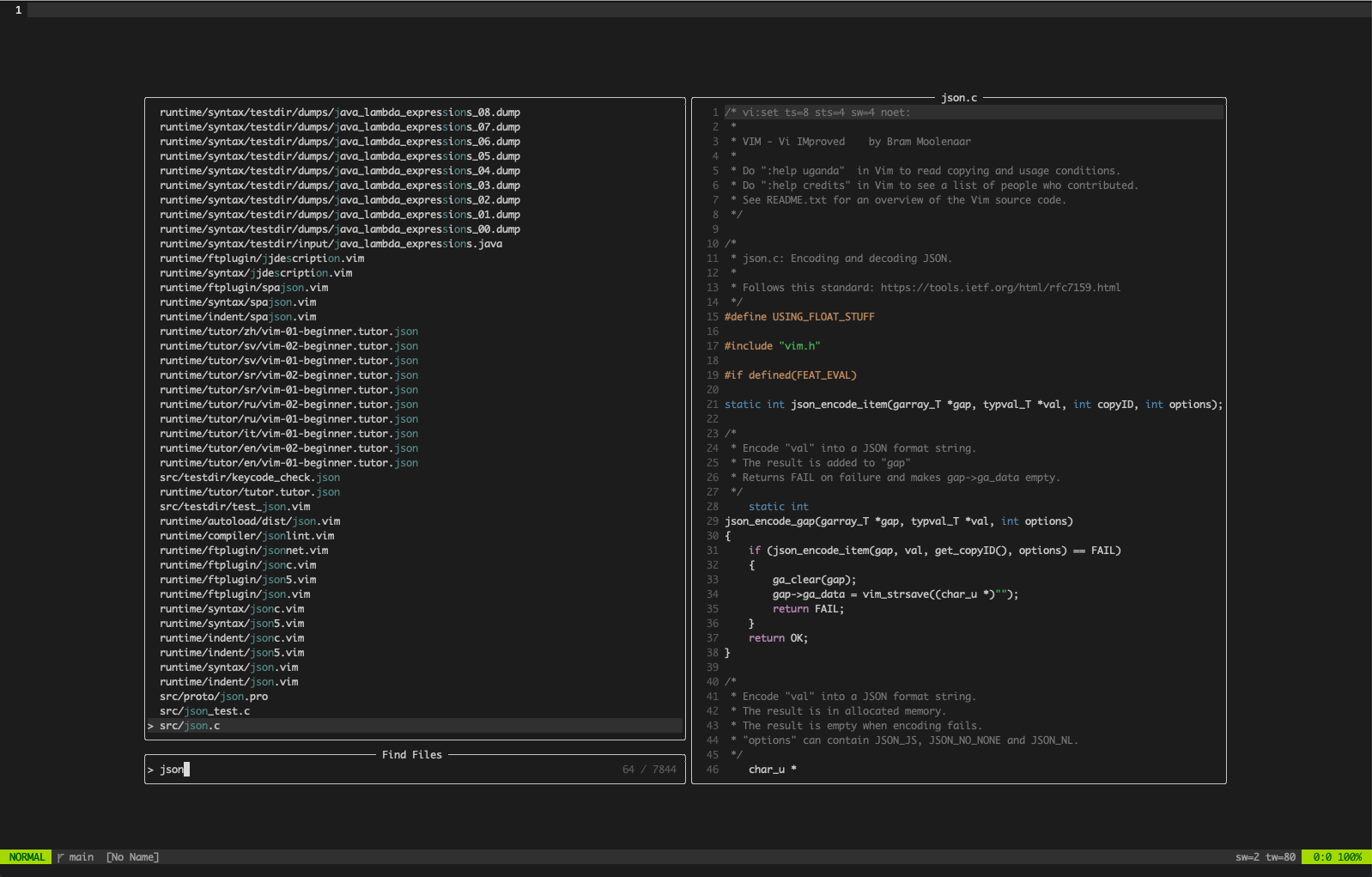 Visit the showcase for other examples
Requirements
- Vim >= 9.0 (plugin is written in vim9script, Vim 9+ required, Neovim not supported)
Fuzzbox uses programs pre-installed on almost all Mac, Linux, and Windows
systems for finding files and searching in files by default (e.g. grep,
findstr), but uses faster alternatives where possible (e.g. git grep).
Optional dependencies
- ripgrep - used to find files and search in files, recommended
- ugrep - used to find files and search in files if ripgrep not installed
- ag - used to find files and search in files if neither ripgrep or ugrep installed
- fd - used to find files if none of ripgrep, ugrep, or ag are installed
- git - used to find files and search in files where allowed and no alternative dependency installed
- ctags - used to generate tags for tag search (Universal Ctags implementation is required)
Compatible plugins
- vim-devicons - used to show devicons when listing files if installed
- vim-nerdfont - alternative plugin to show devicons, used if installed and vim-devicons not installed
- vim-glyph-palette - used to colorize devicons if installed, instead of Fuzzbox's own color mappings
- vim-nerdtree-syntax-highlight - used to colorize devicons if installed, and vim-nerdtree installed
- yegappan/lsp - used as backend for LSP commands with fuzzbox-lsp.vim extension
- unicode.vim - used as data source for Unicode search with fuzzbox-unicode.vim extension
Install
Any plugin manager will work, or you can use Vim's built-in package support:
For vim-plug
Plug 'vim-fuzzbox/fuzzbox.vim'
As Vim package
git clone https://github.com/vim-fuzzbox/fuzzbox.vim ~/.vim/pack/plugins/start/fuzzbox
Commands
| Command | Description |
|---|---|
| FuzzyFiles | search files in current working directory (CWD) |
| FuzzyFilesRoot | search files in the project/vcs root directory |
| FuzzyGrep [str] | search for string in CWD, use [str] if provided |
| FuzzyGrepRoot [str] | search for string in the project/vcs root directory |
| FuzzyBuffers | search opened buffers |
| FuzzyMru | search most recent used files |
| FuzzyMruCwd | search most recent used files in CWD |
| FuzzyMruRoot | search most recent used files in project/vcs root |
| FuzzyInBuffer [str] | search for string in buffer, use [str] if provided |
| FuzzyHelp | search subjects/tags in help documents |
| FuzzyCommands | search built-in and user-defined commands |
| FuzzyColors | search installed color schemes |
| FuzzyCmdHistory | search the command line history |
| FuzzySearchHistory | search the search string history |
| FuzzyHighlights | search highlight groups |
| FuzzyRegisters | search registers, see :h registers |
| FuzzyQuickfix | search the quickfix list, see :h quickfix |
| FuzzyLoclist | search the location list, see :h location-list |
| FuzzyArglist | search the argument list, see :h arglist |
| FuzzyChanges | search the change list, see :h changelist |
| FuzzyJumps | search jumps, see :h jumplist |
| FuzzyMarks | search marks, see :h mark-motions |
| FuzzyTags | search tags in tagfiles(), see :h tags |
| FuzzyTagsRoot | search tags in the project/vcs root directory |
| FuzzyGitFiles | search files in output from git ls-files |
| FuzzyGitGrep | search for string in CWD using git grep |
| FuzzyPrevious | reloads the previous selector and search string |
- For FuzzyGrep and FuzzyInBuffer, you can define a keymap like this to search
the word under cursor.
nnoremap <leader>fw :FuzzyGrep <C-R><C-W><CR> - FuzzyFiles requires one of
rg,ugrep,ag,fd,findorpowershell. If none ofrg,ugrep,ag, orfdare installed it will also usegit ls-fileswhen in a git repo andg:fuzzbox_respect_gitignoreis true. - FuzzyGrep requires one of
rg,ugrep,ag,git,greporfindstr. If none ofrg,ugreporagare installed it will usegit grepin preference togreporfindstr, even when not in a git repo. - FuzzyTags requires
ctags(Universal Ctags) to generate a tags file. - FuzzyGitFiles and FuzzyGitGrep are only useful when
g:fuzzbox_respect_gitignoreis false. - FuzzyMru can be configured to start in CWD by setting
g:fuzzbox_mru_cwd_only
Mappings
" Normal mode
nnoremap <silent> <leader>fb :FuzzyBuffers<CR>
nnoremap <silent> <leader>ff :FuzzyFiles<CR>
nnoremap <silent> <leader>fg :FuzzyGrep<CR>
nnoremap <silent> <leader>fh :FuzzyHelp<CR>
nnoremap <silent> <leader>fi :FuzzyInBuffer<CR>
nnoremap <silent> <leader>fr :FuzzyMru<CR>
nnoremap <silent> <leader>fp :FuzzyPrevious<CR>
nnoremap <silent> <leader>fq :FuzzyQuickfix<CR>
" Visual mode
xnoremap <silent> <leader>ff <Cmd>FuzzyFiles<CR>
xnoremap <silent> <leader>fg <Cmd>FuzzyGrep<CR>
xnoremap <silent> <leader>fi <Cmd>FuzzyInBuffer<CR>
You can set g:fuzzbox_mappings = 0 to disable these default mappings.
Fuzzbox will not overwrite mappings from your vimrc when adding default mappings.
Navigation
- <CTRL-P> or <Up> moves up by one line in the menu window
- <CTRL-N> or <Down> moves down by one line in the menu window
- <PageUp> scrolls up half a page in the menu window
- <PageDown> scrolls down half a page in the menu window
- <S-Up> scrolls up half a page in the preview window
- <S-Down> scrolls down half a page in the preview window
- <CTRL-B> or <Home> moves the cursor to the start of the prompt
- <CTRL-E> or <End> moves the cursor to the end of the prompt
- <CTRL-Left> moves the cursor one word left in the prompt
- <CTRL-Right> moves the cursor one word right in the prompt
- <CTRL-W> deletes the word before the cursor in the prompt
- <CTRL-U> deletes all characters before the cursor in the prompt
- <CTRL-\> toggles text wrap in the menu window (off by default)
- <CTRL-C> or <ESC> exits Fuzzbox, closing all the windows
You can use g:fuzzbox_keymaps to change these defaults. The cursor movement
and editing keymaps match those used for cmdline editing in Vim. If you prefer
Emacs style keymaps set g:fuzzbox_emacs_keys to true.
Navigation with the mouse is also supported. A single mouse click in the menu window moves the cursor line, double click selects a line. The mouse wheel can be used to scroll in both the preview and menu windows.
Command specific keymaps
-
FuzzyHighlights
- <CTRL-Y> toggles white preview background color
-
FuzzyMru
- <CTRL-Y> toggles between all MRU files and CWD only
-
FuzzyBuffers, FuzzyFiles, FuzzyGrep, FuzzyInBuffer, FuzzyMru, FuzzyQuickfix, FuzzyMarks, FuzzyTags
- <CTRL-S> or <CTRL-X> opens selected file in horizontal split
- <CTRL-V> opens selected file in vertical split
- <CTRL-T> opens selected file in new tab page
-
FuzzyBuffers, FuzzyFiles, FuzzyGrep, FuzzyInBuffer, FuzzyMru, FuzzyQuickfix
- <CTRL-Q> sends results to quickfix list
Send results to quickfix list only includes results currently in the menu buffer, which effectively limits the results to a few hundred at most (this is probably what you want, sending thousands of results to the quickfix list is slow).
Options
g:fuzzbox_mappings
Enable default set of leader mappings (see above for details). Default 1
let g:fuzzbox_mappings = 1
g:fuzzbox_devicons
Show devicons when listing files (e.g. FuzzyFiles, FuzzyGrep). Default 1
let g:fuzzbox_devicons = 1
This option requires
vim-devicons,
vim-nerdfont, or use of
g:fuzzbox_devicons_glyph_func
g:fuzzbox_dropdown
Enable dropdown theme (prompt at top rather than bottom). Default 0
let g:fuzzbox_dropdown = 0
g:fuzzbox_preview
Enable preview window in supported selectors (e.g. FuzzyFiles). Default 1
let g:fuzzbox_preview = 1
g:fuzzbox_preview_cutoff
Disable preview window when columns are less than this value. Default 120
let g:fuzzbox_preview_cutoff = 120
g:fuzzbox_compact
Enable compact layout, reduces default window dimensions. Default 0
let g:fuzzbox_compact = 0
g:fuzzbox_compact_after
Enable compact layout when columns are greater then this value. Default 420
let g:fuzzbox_compact_after = 420
g:fuzzbox_counter
Show count of matches. Default 1, set to 0 if you don't want a counter to be shown for most selectors.
let g:fuzzbox_counter = 1
This option is ignored by some selectors/commands, e.g. FuzzyFiles, FuzzyGrep
g:fuzzbox_scrollbar
Show a scrollbar in the menu window when the results do not fit. Default 0
let g:fuzzbox_scrollbar = 0
This option does not affect whether the menu window is scrollable, it always is, just whether a scrollbar is shown.
g:fuzzbox_prompt_sign
Sign used as prefix for the input in the prompt window. Default '>', must be a string occupying one or two display cells, or an empty string to disable.
let g:fuzzbox_prompt_sign = '>'
g:fuzzbox_selection_sign
Sign used to indicate the current selection in the menu window. Default '>', must be a string occupying one or two display cells, or an empty string.
let g:fuzzbox_selection_sign = '>'
The prompt and selection sign options use Vim's signcolumn feature. Most color schemes don't set a background for the sign column. If your sign column has a background color, you might want to clear the highlighting, e.g.
highlight clear SignColumn
g:fuzzbox_menu_wrap
Enable text wrap in the menu window. Default 0
let g:fuzzbox_menu_wrap = 0
You can also use CTRL-\ to toggle text wrap in the menu while Fuzzbox is open.
g:fuzzbox_preview_wrap
Enable text wrap in the preview window. Default 1
let g:fuzzbox_preview_wrap = 1
g:fuzzbox_borderchars
Set the borderchars of popup windows. Must be a list of 4 or 8 characters.
Default varies depending on whether &encoding is set to utf-8 or not.
" utf-8
let g:fuzzbox_borderchars = ['─', '│', '─', '│', '╭', '╮', '╯', '╰']

" other
let g:fuzzbox_borderchars = ['-', '|', '-', '|']
g:fuzzbox_loadingchars
Set the characters to use for each frame of the loading indicator. Must be a
list of strings, though usually a list of individual characters. Default also
varies depending on whether &encoding is set to utf-8 or not.
" utf-8
let g:fuzzbox_loadingchars = ['⠋', '⠙', '⠹', '⠸', '⠼', '⠴', '⠦', '⠧', '⠇', '⠏']

" other
let g:fuzzbox_loadingchars = ['|', '/', '-', '\']
Example using multiple characters for each frame:
let g:fuzzbox_loadingchars = ['⢎⡰', '⢎⡡', '⢎⡑', '⢎⠱', '⠎⡱', '⢊⡱', '⢌⡱', '⢆⡱']
g:fuzzbox_dynamic_preview_title
Change the title of the preview window dynamically where supported. Default 1
let g:fuzzbox_dynamic_preview_title = 1
g:fuzzbox_reuse_windows
Fuzzbox avoids opening files in windows containing special buffers, like buffers
created by file explorer plugins or help and quickfix buffers. Use this to add
exceptions, the match is on either buftype or filetype. Default ['netrw']
(Netrw is Vim's built-in file explorer plugin)
let g:fuzzbox_reuse_windows = ['netrw']
Example usage
let g:fuzzbox_reuse_windows = ['netrw', 'bufexplorer', 'mru', 'terminal']
g:fuzzbox_respect_gitignore
Make FuzzyFiles & FuzzyGrep respect .gitignore. Default 1. Only work when
- inside a git repository and git is installed
- or either rg or fd is installed for FuzzyFiles
- or either rg or ag is installed for FuzzyGrep
let g:fuzzbox_respect_gitignore = 1
This option can also be set specifically for FuzzyFiles and/or FuzzyGrep using
g:fuzzbox_files_respect_gitignore and g:fuzzbox_grep_respect_gitignore
g:fuzzbox_respect_wildignore
Make FuzzyFiles & FuzzyGrep respect Vim's |wildignore| option. Default 0
let g:fuzzbox_respect_wildignore = 0
Fuzzbox parses &wildignore when the plugin is loaded, and appends patterns to
g:fuzzbox_exclude_dir and g:fuzzbox_exclude_file. Patterns with a / are
assumed to be directory patterns, patterns without are assumed to be a file
patterns. This is not exactly the same as Vim's parsing of &wildignore. See
:h autocmd-patterns
g:fuzzbox_include_hidden
Make FuzzyFiles & FuzzyGrep include hidden files. Default 1. Only applied when
- rg, fd or PowerShell Get-ChildItem used with FuzzyFiles
- rg or ag used with FuzzyGrep
let g:fuzzbox_include_hidden = 1
This option can also be set specifically for FuzzyFiles and/or FuzzyGrep using
g:fuzzbox_files_include_hidden and g:fuzzbox_grep_include_hidden
g:fuzzbox_follow_symlinks
Make FuzzyFiles & FuzzyGrep follow symbolic links. Not applied when using git-ls-files, PowerShell Get-ChildItem, git-grep or findstr. Default 0
let g:fuzzbox_follow_symlinks = 0
This option can also be set specifically for FuzzyFiles and/or FuzzyGrep using
g:fuzzbox_files_follow_symlinks and g:fuzzbox_grep_follow_symlinks
g:fuzzbox_recurse_submodules
Make FuzzyFiles & FuzzyGrep recurse into submodules when using git-ls-files or git-grep. Default 0. Only applies when
- inside a git repository and git is installed
- and neither rg or fd is installed for FuzzyFiles
- and neither rg or ag is installed for FuzzyGrep
let g:fuzzbox_recurse_submodules = 0
This option can also be set specifically for FuzzyFiles and/or FuzzyGrep using
g:fuzzbox_files_recurse_submodules and g:fuzzbox_grep_recurse_submodules
Note: recursing into submodules is incompatible with including untracked files, so enabling this option will remove untracked files from the results.
g:fuzzbox_root_patterns
Patterns to find a project root in supported commands, e.g. FuzzyFilesRoot. These commands find a "root" directory to use as the working directory by walking up the directory tree looking for any match of these glob patterns. Default is intentionally conservative, using common VCS root markers only.
let g:fuzzbox_root_patterns = ['.git', '.hg', '.svn']
Example usage
let g:fuzzbox_root_patterns = ['.git', 'package.json', 'pyproject.toml']
g:fuzzbox_exclude_file
Make FuzzyFiles, FuzzyGrep, and FuzzyMru always exclude files matching these
glob patterns. Applies whether .gitignore is respected or not. Default
['*.swp', 'tags']
let g:fuzzbox_exclude_file = ['*.swp', 'tags']
This option can also be set specifically for FuzzyFiles, FuzzyGrep, and FuzzyMru
using g:fuzzbox_files_exclude_file and g:fuzzbox_grep_exclude_file etc.
g:fuzzbox_exclude_dir
Make FuzzyFiles, FuzzyGrep, and FuzzyMru always exclude these directories.
Applies whether .gitignore is respected or not. Default
['.git', '.hg', '.svn']
let g:fuzzbox_exclude_dir = ['.git', '.hg', '.svn']
This option can also be set specifically for FuzzyFiles, FuzzyGrep, and FuzzyMru
using g:fuzzbox_files_exclude_dir and g:fuzzbox_grep_exclude_dir etc.
g:fuzzbox_ripgrep_options
Add custom ripgrep options for FuzzyFiles & FuzzyGrep. Appended to the generated
options. Default []
let g:fuzzbox_ripgrep_options = []
Example usage
let g:fuzzbox_ripgrep_options = [
  \ "--no-config",
  \ "--max-filesize=1M",
  \ "--no-ignore-parent",
  \ "--ignore-file " . expand('~/.ignore')
  \ ]
This option can also be set specifically for FuzzyFiles and/or FuzzyGrep using
g:fuzzbox_files_ripgrep_options and g:fuzzbox_grep_ripgrep_options
g:fuzzbox_ugrep_options
Add custom ugrep options for FuzzyFiles & FuzzyGrep. Appended to the generated
options. Default []. Ripgrep is normally preferred to ugrep, if you have
installed both ripgrep will be used and this option will be ignored unless you
set g:fuzzbox_files_executable and/or g:fuzzbox_grep_executable to ugrep.
let g:fuzzbox_ugrep_options = []
Example usage
let g:fuzzbox_ugrep_options = [
  \ "--no-config",
  \ "--max-size=1M"
  \ ]
This option can also be set specifically for FuzzyFiles and/or FuzzyGrep using
g:fuzzbox_files_ugrep_options and g:fuzzbox_grep_ugrep_options
g:fuzzbox_files_executable
Fuzzbox identifies a suitable executable program for obtaining a list of files
in the target directory in the following order of preference: rg, ugrep,
ag, fd, fdfind, git, and then find on Unix or powershell on Windows.
This option allows you to override that and set your preferred executable, e.g.
let g:fuzzbox_files_executable = 'ugrep'
g:fuzzbox_grep_executable
Fuzzbox identifies a suitable executable program to search in files in the
target directory in the following order of preference: rg, ugrep, ag,
git, and then grep on Unix or findstr on Windows.
This option allows you to override that and set your preferred executable, e.g.
let g:fuzzbox_grep_executable = 'ugrep'
g:fuzzbox_devicons_colorize
List of filetypes to be used in autocmd to colorize devicons. By default Fuzzbox only applies devicon colors to the Fuzzbox menu window, but you can use this to apply Fuzzbox devicon colors outside of Fuzzbox, or to disable Fuzzbox devicon colors, which you might want to do if using another plugin to colorize devicons.
let g:fuzzbox_devicons_colorize = ['fuzzbox_menu']
Example usage
let g:fuzzbox_devicons_colorize = ['fuzzbox_menu', 'bufexplorer', nerdtree']
If using another plugin to colorize devicons, you'll probably want to set this
to an empty list and use the fuzzbox_menu filetype with the other plugin.
g:fuzzbox_devicons_color_table
Add custom mappings for colorizing devicon glyphs. A dictionary of filename
patterns and colors. Colors must be either color names in Vim's v:colornames
dict or hex colors in #rrggbb format. Default {}
let g:fuzzbox_devicons_color_table = {}
Example usage
let g:fuzzbox_devicons_color_table = { '*.vala': 'mediumpurple', '*.jl': '#9558B2' }
g:fuzzbox_devicons_glyph_func
Specify a custom function for obtaining devicon glyphs from file names or paths. By default Fuzzbox integrates with vim-devicons to obtain glyphs and measure byte widths. You can use this option to obtain devicon glyphs from another nerdfont compatible plugin, or your own custom function. Default ''
let g:fuzzbox_devicons_glyph_func = ''
Example usage
let g:fuzzbox_devicons_glyph_func = 'nerdfont#find'
The function should take a single string argument and return a single glyph.
g:fuzzbox_devicons_color_func
Specify a custom function for colorizing devicon glyphs. By default Fuzzbox does this with an internal function using a small set of common file name patterns and colors, but you may want more extensive support for file name patterns not recognised by Fuzzbox and to apply the same colors to Fuzzbox as other plugins. Default ''
let g:fuzzbox_devicons_color_func = ''
Example usage
let g:fuzzbox_devicons_color_func = 'glyph_palette#apply'
The function should take no arguments or accept any number of arguments.
g:fuzzbox_keymaps
Change navigation keymaps. The following are the defaults:
let g:fuzzbox_keymaps = {
  \ 'menu_up': ["\<C-p>", "\<Up>"],
  \ 'menu_down': ["\<C-n>", "\<Down>"],
  \ 'menu_select': ["\<CR>"],
  \ 'menu_page_up': [],
  \ 'menu_page_down': [],
  \ 'menu_scroll_up': ["\<PageUp>"],
  \ 'menu_scroll_down': ["\<PageDown>"],
  \ 'menu_shift_up': [],
  \ 'menu_shift_down': [],
  \ 'menu_toggle_wrap': ["\<C-\>"],
  \ 'preview_page_up': [],
  \ 'preview_page_down': [],
  \ 'preview_scroll_up': ["\<S-Up>"],
  \ 'preview_scroll_down': ["\<S-Down>"],
  \ 'preview_shift_up': [],
  \ 'preview_shift_down': [],
  \ 'cursor_left': ["\<Left>"],
  \ 'cursor_right': ["\<Right>"],
  \ 'cursor_end': ["\<C-e>", "\<End>"],
  \ 'cursor_begining': ["\<C-b>", "\<Home>"],
  \ 'cursor_word_left': ["\<C-Left>"],
  \ 'cursor_word_right': ["\<C-Right>"],
  \ 'backspace': ["\<C-h>", "\<BS>"],
  \ 'delete': ["\<Del>"],
  \ 'delete_all': [],
  \ 'delete_word': ["\<C-w>"],
  \ 'delete_prefix': ["\<C-u>"],
  \ 'exit': ["\<Esc>", "\<c-c>", "\<c-[>"],
  \ }
g:fuzzbox_emacs_keys
Use Emacs style keymaps in the prompt window, default 0. Modifies the default keymaps as follows:
{
  'cursor_left': ["\<C-b>", "\<Left>"],
  'cursor_right': ["\<C-f>", "\<Right>"],
  'cursor_begining': ["\<C-a>", "\<Home>"],
  'cursor_end': ["\<C-e>", "\<End>"],
  'cursor_word_left': ["\<A-b>", "\<C-Left>"],
  'cursor_word_right': ["\<A-f>", "\<C-Right>"],
  'delete': ["\<C-d>", "\<Del>"],
  'delete_suffix': ["\<C-k>"]
}
g:fuzzbox_buffers_exclude
FuzzyBuffers will exclude the buffers in this list. Buffers not included in
Vim's buffer list are excluded by default, so this is only necessary for buffers
included in Vim's buffer list, but you want hidden by FuzzyBuffers (possibly
from a badly behaved plugin). The match is on buffer name or type. Default []
let g:fuzzbox_buffers_exclude = []
Example usage:
let g:fuzzbox_buffers_exclude = ['terminal']
g:fuzzbox_mru_cwd_only
Default FuzzyMru to only show recent files in current working directory. You can
still use CTRL-Y to toggle between all MRU files and CWD files only. Default 0
let g:fuzzbox_mru_cwd_only = 0
This is equivalent to using FuzzyMruCwd, but shorter to type and allows for
only one default leader mapping for FuzzyMru that is easily configurable.
g:fuzzbox_window_defaults
Window configuration defaults for all selectors. The Fuzzbox defaults are listed below. Options set here are merged into the Fuzzbox defaults, so you only need to include those you wish to change.
{
'preview': 1,         " Enable the preview window, set to 0 to disable
'preview_ratio': 0.5, " 0.5 means preview window will take 50% of the layout
'maxwidth': 0.8,      " Width when preview is enabled, default 80%
'minwidth': 0.5,      " Width when preview not enabled, default 50%
'maxheight': 0.8,     " Height when preview is enabled, default 80%
'minheight': 0.5,     " Height when preview not enabled, default 50%
'compact': 0,         " Enable compact layout, reduce dimensions by 10%
'width': auto,        " Width applied whether preview enabled or not
'height': auto,       " Height applied whether preview enabled or not
'xoffset': auto       " x offset of the windows, centered by default
'yoffset': auto       " y offset of the windows, centered by default
}
- preview is ignored by commands that do not support it, e.g. FuzzyCmdHistory
- x and y offsets are by default calculated to center the windows on the screen
- width, height, and x and y offsets > 0 and < 1 are resolved as percentages
- width, height, and x and y offsets >= 1 are fixed numbers of lines and cols
- invalid values for preview_ratio, width, height, and x & y offsets are ignored
- min and max width and height values are always resolved as percentages
Note: you can use this to change the default Fuzzbox window dimensions when the Vim window is resized, e.g.
augroup FuzzboxResize
  autocmd!
  autocmd VimEnter,VimResized *
    \ let g:fuzzbox_window_defaults = &columns > 160 ?
    \   {} : { 'width': 0.9, 'height': 0.7, 'preview': 0 }
augroup END
g:fuzzbox_window_options
Selector specific window configuration options. Allows the window configuration to vary for different selectors. The following defaults are set by Fuzzbox:
{
  'highlights': {
    'preview_ratio': 0.7,
   },
   'colors': {
     'compact': 1,
   },
   'help': {
     'preview_ratio': 0.6,
  },
}
Values set in g:fuzzbox_window_options will override the defaults. For
example, you can disable preview window for FuzzyFiles and friends with:
let g:fuzzbox_window_options = { 'files': { 'preview': 0 } }
or you change the width of the preview window for FuzzyHighlights with:
let g:fuzzbox_window_options = { 'highlights': { 'preview_ratio': 0.5 } }
g:fuzzbox_async_step
Fuzzbox mimics async processing to fuzzy match in batches, which avoids problems running Vim's built in fuzzy matching on massive lists at once. The size of these batches is the async step value, which defaults to 10,000. This default should work well for most developer workstations, but you might want to reduce if you notice a lack of responsiveness on low spec machines
let g:fuzzbox_async_step = 10000
g:fuzzbox_async_limit
Fuzzbox limits the number of async results shown in the menu window at any time. This improves performance, especially when devicons are enabled, but also limits the number of scrollable results. The default limit is 200, but you may wish to increase it if you don't use devicons and/or have a very high spec machine.
let g:fuzzbox_async_limit = 200
User autocommands
Fuzzbox adds four User autocmd events which can be used to run arbitrary
commands when Fuzzbox is opening, opened, closing, and closed. This can help aid
compatibility with other plugins, or customise behaviour, e.g.
augroup MyFuzzbox
  autocmd!
  autocmd User FuzzboxOpening windo set nocursorline
  autocmd User FuzzboxOpened echow 'Fuzzbox opened!'
  autocmd User FuzzboxClosing echow 'Fuzzbox closing...'
  autocmd User FuzzboxClosed windo set cursorline
augroup END
Syntax highlighting
It is also possible to modify the colors used for highlighting. The defaults are
shown below, you can change them in your vimrc. See :help :highlight if you are
unfamiliar with Vim highlighting
highlight default link fuzzboxCursor Cursor
highlight default link fuzzboxNormal Normal
highlight default link fuzzboxBorder Normal
highlight default link fuzzboxCounter NonText
highlight default link fuzzboxLoading Normal
highlight default link fuzzboxMatching Special
highlight default link fuzzboxPreviewMatch Search
highlight default link fuzzboxPreviewLine Search
highlight default link fuzzboxPreviewCol CurSearch
highlight default link fuzzboxSelectionSign CursorLine
Note: when the popup is open, Fuzzbox will technically hide the terminal cursor and clear the Cursor highlight group. This is to work around limitations in how |popupwin| operates. To allow fuzzboxCursor to be linked to Cursor (the default), the resolved properties of Cursor are copied to fuzzboxCursor where possible.
Custom commands
Fuzzbox commands just launch selectors with options. You can create custom
commands in your vimrc using the fuzzbox#Launch() autoload function. Here
is an example command to find all files in CWD using ripgrep:
command! FuzzyFilesAll call fuzzbox#Launch('files', #{command: 'rg -uu --files', title: 'Find Files (All)'})
And another example to search in all files in CWD using ripgrep:
command! FuzzyGrepAll call fuzzbox#Launch('grep', #{command: 'rg -uu --vimgrep $* .', title: 'Live Grep (All)'})
Note the use of $* as placeholder to specify where the text to be searched will
be included, this is necessary for ripgrep as it requires a path when stdout is
not a tty, and Fuzzbox runs the grep command via a job, not in a shell. This is
similar to the placeholder in Vim's &grepprg, see :help 'grepprg'.
Custom selectors
At its core, Fuzzbox is a nice interface to fuzzy search and select items from
lists, and you can use the same interface to create your own custom selectors in
your vimrc using the fuzzbox#Select() autoload function.
The function requires a callback option which is a function to call when an item is selected. The callback is invoked with two arguments, the ID of the window containing the results, and the selected result as a string.
Here is a simple example selector to toggle some pre-defined Vim options:
function! s:FuzzyToggleCb(wid, result)
  execute 'setlocal inv' .. a:result
endfunction
command! FuzzyToggle call fuzzbox#Select(
  \ ['cursorcolumn', 'list', 'number', 'relativenumber', 'spell', 'wrap'],
  \ #{
  \   title: 'Toggle Option',
  \   callback: function('s:FuzzyToggleCb')
  \ })
This uses legacy Vim script, but you can easily rewrite for Vim9 script if you
are using that in your vimrc.
Extensions
More comprehensive customisation is supported via extensions, which are somewhat experimental and currently undocumented. If you are interested in creating an extension check out the example at https://github.com/vim-fuzzbox/fuzzbox-foo.vim and please open an issue if you have any questions.
Credits
Fuzzbox was originally created as Fuzzyy by Nachuan Tang (@Donaldttt) and is currently developed and maintained by Mark Woods (@mmrwoods). Many other people have contributed code to fix bugs and add new features, and by submitting issues to report bugs or suggest new features. Thanks for all the contributions!
The Fuzzbox logo is adapted from an image on fuzzboxes.org and is used with kind permission of Nick Sternberg.


Similar repos


Languages
Vim Script
97.5%
Shell
1.7%
Modern fuzzy finder for Vim with minimal dependencies
Vim Script
163
803 commits
updated Sep 22, 2026
README
fuzzbox.vim
A modern fuzzy finder with minimal dependencies. Written in vim9script using Vim's native fuzzing matching, background job, and popup window features, it's fast and works out of the box on Mac, Linux, and Windows.
Screenshot
Visit the showcase for other examples
Requirements
- Vim >= 9.0 (plugin is written in vim9script, Vim 9+ required, Neovim not supported)
Fuzzbox uses programs pre-installed on almost all Mac, Linux, and Windows
systems for finding files and searching in files by default (e.g. grep,
findstr), but uses faster alternatives where possible (e.g. git grep).
Optional dependencies
- ripgrep - used to find files and search in files, recommended
- ugrep - used to find files and search in files if ripgrep not installed
- ag - used to find files and search in files if neither ripgrep or ugrep installed
- fd - used to find files if none of ripgrep, ugrep, or ag are installed
- git - used to find files and search in files where allowed and no alternative dependency installed
- ctags - used to generate tags for tag search (Universal Ctags implementation is required)
Compatible plugins
- vim-devicons - used to show devicons when listing files if installed
- vim-nerdfont - alternative plugin to show devicons, used if installed and vim-devicons not installed
- vim-glyph-palette - used to colorize devicons if installed, instead of Fuzzbox's own color mappings
- vim-nerdtree-syntax-highlight - used to colorize devicons if installed, and vim-nerdtree installed
- yegappan/lsp - used as backend for LSP commands with fuzzbox-lsp.vim extension
- unicode.vim - used as data source for Unicode search with fuzzbox-unicode.vim extension
Install
Any plugin manager will work, or you can use Vim's built-in package support:
For vim-plug
Plug 'vim-fuzzbox/fuzzbox.vim'
As Vim package
git clone https://github.com/vim-fuzzbox/fuzzbox.vim ~/.vim/pack/plugins/start/fuzzbox
Commands
| Command | Description |
|---|---|
| FuzzyFiles | search files in current working directory (CWD) |
| FuzzyFilesRoot | search files in the project/vcs root directory |
| FuzzyGrep [str] | search for string in CWD, use [str] if provided |
| FuzzyGrepRoot [str] | search for string in the project/vcs root directory |
| FuzzyBuffers | search opened buffers |
| FuzzyMru | search most recent used files |
| FuzzyMruCwd | search most recent used files in CWD |
| FuzzyMruRoot | search most recent used files in project/vcs root |
| FuzzyInBuffer [str] | search for string in buffer, use [str] if provided |
| FuzzyHelp | search subjects/tags in help documents |
| FuzzyCommands | search built-in and user-defined commands |
| FuzzyColors | search installed color schemes |
| FuzzyCmdHistory | search the command line history |
| FuzzySearchHistory | search the search string history |
| FuzzyHighlights | search highlight groups |
| FuzzyRegisters | search registers, see :h registers |
| FuzzyQuickfix | search the quickfix list, see :h quickfix |
| FuzzyLoclist | search the location list, see :h location-list |
| FuzzyArglist | search the argument list, see :h arglist |
| FuzzyChanges | search the change list, see :h changelist |
| FuzzyJumps | search jumps, see :h jumplist |
| FuzzyMarks | search marks, see :h mark-motions |
| FuzzyTags | search tags in tagfiles(), see :h tags |
| FuzzyTagsRoot | search tags in the project/vcs root directory |
| FuzzyGitFiles | search files in output from git ls-files |
| FuzzyGitGrep | search for string in CWD using git grep |
| FuzzyPrevious | reloads the previous selector and search string |
- For FuzzyGrep and FuzzyInBuffer, you can define a keymap like this to search
the word under cursor.
nnoremap <leader>fw :FuzzyGrep <C-R><C-W><CR> - FuzzyFiles requires one of
rg,ugrep,ag,fd,findorpowershell. If none ofrg,ugrep,ag, orfdare installed it will also usegit ls-fileswhen in a git repo andg:fuzzbox_respect_gitignoreis true. - FuzzyGrep requires one of
rg,ugrep,ag,git,greporfindstr. If none ofrg,ugreporagare installed it will usegit grepin preference togreporfindstr, even when not in a git repo. - FuzzyTags requires
ctags(Universal Ctags) to generate a tags file. - FuzzyGitFiles and FuzzyGitGrep are only useful when
g:fuzzbox_respect_gitignoreis false. - FuzzyMru can be configured to start in CWD by setting
g:fuzzbox_mru_cwd_only
Mappings
" Normal mode
nnoremap <silent> <leader>fb :FuzzyBuffers<CR>
nnoremap <silent> <leader>ff :FuzzyFiles<CR>
nnoremap <silent> <leader>fg :FuzzyGrep<CR>
nnoremap <silent> <leader>fh :FuzzyHelp<CR>
nnoremap <silent> <leader>fi :FuzzyInBuffer<CR>
nnoremap <silent> <leader>fr :FuzzyMru<CR>
nnoremap <silent> <leader>fp :FuzzyPrevious<CR>
nnoremap <silent> <leader>fq :FuzzyQuickfix<CR>
" Visual mode
xnoremap <silent> <leader>ff <Cmd>FuzzyFiles<CR>
xnoremap <silent> <leader>fg <Cmd>FuzzyGrep<CR>
xnoremap <silent> <leader>fi <Cmd>FuzzyInBuffer<CR>
You can set g:fuzzbox_mappings = 0 to disable these default mappings.
Fuzzbox will not overwrite mappings from your vimrc when adding default mappings.
Navigation
- <CTRL-P> or <Up> moves up by one line in the menu window
- <CTRL-N> or <Down> moves down by one line in the menu window
- <PageUp> scrolls up half a page in the menu window
- <PageDown> scrolls down half a page in the menu window
- <S-Up> scrolls up half a page in the preview window
- <S-Down> scrolls down half a page in the preview window
- <CTRL-B> or <Home> moves the cursor to the start of the prompt
- <CTRL-E> or <End> moves the cursor to the end of the prompt
- <CTRL-Left> moves the cursor one word left in the prompt
- <CTRL-Right> moves the cursor one word right in the prompt
- <CTRL-W> deletes the word before the cursor in the prompt
- <CTRL-U> deletes all characters before the cursor in the prompt
- <CTRL-\> toggles text wrap in the menu window (off by default)
- <CTRL-C> or <ESC> exits Fuzzbox, closing all the windows
You can use g:fuzzbox_keymaps to change these defaults. The cursor movement
and editing keymaps match those used for cmdline editing in Vim. If you prefer
Emacs style keymaps set g:fuzzbox_emacs_keys to true.
Navigation with the mouse is also supported. A single mouse click in the menu window moves the cursor line, double click selects a line. The mouse wheel can be used to scroll in both the preview and menu windows.
Command specific keymaps
-
FuzzyHighlights
- <CTRL-Y> toggles white preview background color
-
FuzzyMru
- <CTRL-Y> toggles between all MRU files and CWD only
-
FuzzyBuffers, FuzzyFiles, FuzzyGrep, FuzzyInBuffer, FuzzyMru, FuzzyQuickfix, FuzzyMarks, FuzzyTags
- <CTRL-S> or <CTRL-X> opens selected file in horizontal split
- <CTRL-V> opens selected file in vertical split
- <CTRL-T> opens selected file in new tab page
-
FuzzyBuffers, FuzzyFiles, FuzzyGrep, FuzzyInBuffer, FuzzyMru, FuzzyQuickfix
- <CTRL-Q> sends results to quickfix list
Send results to quickfix list only includes results currently in the menu buffer, which effectively limits the results to a few hundred at most (this is probably what you want, sending thousands of results to the quickfix list is slow).
Options
g:fuzzbox_mappings
Enable default set of leader mappings (see above for details). Default 1
let g:fuzzbox_mappings = 1
g:fuzzbox_devicons
Show devicons when listing files (e.g. FuzzyFiles, FuzzyGrep). Default 1
let g:fuzzbox_devicons = 1
This option requires
vim-devicons,
vim-nerdfont, or use of
g:fuzzbox_devicons_glyph_func
g:fuzzbox_dropdown
Enable dropdown theme (prompt at top rather than bottom). Default 0
let g:fuzzbox_dropdown = 0
g:fuzzbox_preview
Enable preview window in supported selectors (e.g. FuzzyFiles). Default 1
let g:fuzzbox_preview = 1
g:fuzzbox_preview_cutoff
Disable preview window when columns are less than this value. Default 120
let g:fuzzbox_preview_cutoff = 120
g:fuzzbox_compact
Enable compact layout, reduces default window dimensions. Default 0
let g:fuzzbox_compact = 0
g:fuzzbox_compact_after
Enable compact layout when columns are greater then this value. Default 420
let g:fuzzbox_compact_after = 420
g:fuzzbox_counter
Show count of matches. Default 1, set to 0 if you don't want a counter to be shown for most selectors.
let g:fuzzbox_counter = 1
This option is ignored by some selectors/commands, e.g. FuzzyFiles, FuzzyGrep
g:fuzzbox_scrollbar
Show a scrollbar in the menu window when the results do not fit. Default 0
let g:fuzzbox_scrollbar = 0
This option does not affect whether the menu window is scrollable, it always is, just whether a scrollbar is shown.
g:fuzzbox_prompt_sign
Sign used as prefix for the input in the prompt window. Default '>', must be a string occupying one or two display cells, or an empty string to disable.
let g:fuzzbox_prompt_sign = '>'
g:fuzzbox_selection_sign
Sign used to indicate the current selection in the menu window. Default '>', must be a string occupying one or two display cells, or an empty string.
let g:fuzzbox_selection_sign = '>'
The prompt and selection sign options use Vim's signcolumn feature. Most color schemes don't set a background for the sign column. If your sign column has a background color, you might want to clear the highlighting, e.g.
highlight clear SignColumn
g:fuzzbox_menu_wrap
Enable text wrap in the menu window. Default 0
let g:fuzzbox_menu_wrap = 0
You can also use CTRL-\ to toggle text wrap in the menu while Fuzzbox is open.
g:fuzzbox_preview_wrap
Enable text wrap in the preview window. Default 1
let g:fuzzbox_preview_wrap = 1
g:fuzzbox_borderchars
Set the borderchars of popup windows. Must be a list of 4 or 8 characters.
Default varies depending on whether &encoding is set to utf-8 or not.
" utf-8
let g:fuzzbox_borderchars = ['─', '│', '─', '│', '╭', '╮', '╯', '╰']

" other
let g:fuzzbox_borderchars = ['-', '|', '-', '|']
g:fuzzbox_loadingchars
Set the characters to use for each frame of the loading indicator. Must be a
list of strings, though usually a list of individual characters. Default also
varies depending on whether &encoding is set to utf-8 or not.
" utf-8
let g:fuzzbox_loadingchars = ['⠋', '⠙', '⠹', '⠸', '⠼', '⠴', '⠦', '⠧', '⠇', '⠏']

" other
let g:fuzzbox_loadingchars = ['|', '/', '-', '\']
Example using multiple characters for each frame:
let g:fuzzbox_loadingchars = ['⢎⡰', '⢎⡡', '⢎⡑', '⢎⠱', '⠎⡱', '⢊⡱', '⢌⡱', '⢆⡱']
g:fuzzbox_dynamic_preview_title
Change the title of the preview window dynamically where supported. Default 1
let g:fuzzbox_dynamic_preview_title = 1
g:fuzzbox_reuse_windows
Fuzzbox avoids opening files in windows containing special buffers, like buffers
created by file explorer plugins or help and quickfix buffers. Use this to add
exceptions, the match is on either buftype or filetype. Default ['netrw']
(Netrw is Vim's built-in file explorer plugin)
let g:fuzzbox_reuse_windows = ['netrw']
Example usage
let g:fuzzbox_reuse_windows = ['netrw', 'bufexplorer', 'mru', 'terminal']
g:fuzzbox_respect_gitignore
Make FuzzyFiles & FuzzyGrep respect .gitignore. Default 1. Only work when
- inside a git repository and git is installed
- or either rg or fd is installed for FuzzyFiles
- or either rg or ag is installed for FuzzyGrep
let g:fuzzbox_respect_gitignore = 1
This option can also be set specifically for FuzzyFiles and/or FuzzyGrep using
g:fuzzbox_files_respect_gitignore and g:fuzzbox_grep_respect_gitignore
g:fuzzbox_respect_wildignore
Make FuzzyFiles & FuzzyGrep respect Vim's |wildignore| option. Default 0
let g:fuzzbox_respect_wildignore = 0
Fuzzbox parses &wildignore when the plugin is loaded, and appends patterns to
g:fuzzbox_exclude_dir and g:fuzzbox_exclude_file. Patterns with a / are
assumed to be directory patterns, patterns without are assumed to be a file
patterns. This is not exactly the same as Vim's parsing of &wildignore. See
:h autocmd-patterns
g:fuzzbox_include_hidden
Make FuzzyFiles & FuzzyGrep include hidden files. Default 1. Only applied when
- rg, fd or PowerShell Get-ChildItem used with FuzzyFiles
- rg or ag used with FuzzyGrep
let g:fuzzbox_include_hidden = 1
This option can also be set specifically for FuzzyFiles and/or FuzzyGrep using
g:fuzzbox_files_include_hidden and g:fuzzbox_grep_include_hidden
g:fuzzbox_follow_symlinks
Make FuzzyFiles & FuzzyGrep follow symbolic links. Not applied when using git-ls-files, PowerShell Get-ChildItem, git-grep or findstr. Default 0
let g:fuzzbox_follow_symlinks = 0
This option can also be set specifically for FuzzyFiles and/or FuzzyGrep using
g:fuzzbox_files_follow_symlinks and g:fuzzbox_grep_follow_symlinks
g:fuzzbox_recurse_submodules
Make FuzzyFiles & FuzzyGrep recurse into submodules when using git-ls-files or git-grep. Default 0. Only applies when
- inside a git repository and git is installed
- and neither rg or fd is installed for FuzzyFiles
- and neither rg or ag is installed for FuzzyGrep
let g:fuzzbox_recurse_submodules = 0
This option can also be set specifically for FuzzyFiles and/or FuzzyGrep using
g:fuzzbox_files_recurse_submodules and g:fuzzbox_grep_recurse_submodules
Note: recursing into submodules is incompatible with including untracked files, so enabling this option will remove untracked files from the results.
g:fuzzbox_root_patterns
Patterns to find a project root in supported commands, e.g. FuzzyFilesRoot. These commands find a "root" directory to use as the working directory by walking up the directory tree looking for any match of these glob patterns. Default is intentionally conservative, using common VCS root markers only.
let g:fuzzbox_root_patterns = ['.git', '.hg', '.svn']
Example usage
let g:fuzzbox_root_patterns = ['.git', 'package.json', 'pyproject.toml']
g:fuzzbox_exclude_file
Make FuzzyFiles, FuzzyGrep, and FuzzyMru always exclude files matching these
glob patterns. Applies whether .gitignore is respected or not. Default
['*.swp', 'tags']
let g:fuzzbox_exclude_file = ['*.swp', 'tags']
This option can also be set specifically for FuzzyFiles, FuzzyGrep, and FuzzyMru
using g:fuzzbox_files_exclude_file and g:fuzzbox_grep_exclude_file etc.
g:fuzzbox_exclude_dir
Make FuzzyFiles, FuzzyGrep, and FuzzyMru always exclude these directories.
Applies whether .gitignore is respected or not. Default
['.git', '.hg', '.svn']
let g:fuzzbox_exclude_dir = ['.git', '.hg', '.svn']
This option can also be set specifically for FuzzyFiles, FuzzyGrep, and FuzzyMru
using g:fuzzbox_files_exclude_dir and g:fuzzbox_grep_exclude_dir etc.
g:fuzzbox_ripgrep_options
Add custom ripgrep options for FuzzyFiles & FuzzyGrep. Appended to the generated
options. Default []
let g:fuzzbox_ripgrep_options = []
Example usage
let g:fuzzbox_ripgrep_options = [
  \ "--no-config",
  \ "--max-filesize=1M",
  \ "--no-ignore-parent",
  \ "--ignore-file " . expand('~/.ignore')
  \ ]
This option can also be set specifically for FuzzyFiles and/or FuzzyGrep using
g:fuzzbox_files_ripgrep_options and g:fuzzbox_grep_ripgrep_options
g:fuzzbox_ugrep_options
Add custom ugrep options for FuzzyFiles & FuzzyGrep. Appended to the generated
options. Default []. Ripgrep is normally preferred to ugrep, if you have
installed both ripgrep will be used and this option will be ignored unless you
set g:fuzzbox_files_executable and/or g:fuzzbox_grep_executable to ugrep.
let g:fuzzbox_ugrep_options = []
Example usage
let g:fuzzbox_ugrep_options = [
  \ "--no-config",
  \ "--max-size=1M"
  \ ]
This option can also be set specifically for FuzzyFiles and/or FuzzyGrep using
g:fuzzbox_files_ugrep_options and g:fuzzbox_grep_ugrep_options
g:fuzzbox_files_executable
Fuzzbox identifies a suitable executable program for obtaining a list of files
in the target directory in the following order of preference: rg, ugrep,
ag, fd, fdfind, git, and then find on Unix or powershell on Windows.
This option allows you to override that and set your preferred executable, e.g.
let g:fuzzbox_files_executable = 'ugrep'
g:fuzzbox_grep_executable
Fuzzbox identifies a suitable executable program to search in files in the
target directory in the following order of preference: rg, ugrep, ag,
git, and then grep on Unix or findstr on Windows.
This option allows you to override that and set your preferred executable, e.g.
let g:fuzzbox_grep_executable = 'ugrep'
g:fuzzbox_devicons_colorize
List of filetypes to be used in autocmd to colorize devicons. By default Fuzzbox only applies devicon colors to the Fuzzbox menu window, but you can use this to apply Fuzzbox devicon colors outside of Fuzzbox, or to disable Fuzzbox devicon colors, which you might want to do if using another plugin to colorize devicons.
let g:fuzzbox_devicons_colorize = ['fuzzbox_menu']
Example usage
let g:fuzzbox_devicons_colorize = ['fuzzbox_menu', 'bufexplorer', nerdtree']
If using another plugin to colorize devicons, you'll probably want to set this
to an empty list and use the fuzzbox_menu filetype with the other plugin.
g:fuzzbox_devicons_color_table
Add custom mappings for colorizing devicon glyphs. A dictionary of filename
patterns and colors. Colors must be either color names in Vim's v:colornames
dict or hex colors in #rrggbb format. Default {}
let g:fuzzbox_devicons_color_table = {}
Example usage
let g:fuzzbox_devicons_color_table = { '*.vala': 'mediumpurple', '*.jl': '#9558B2' }
g:fuzzbox_devicons_glyph_func
Specify a custom function for obtaining devicon glyphs from file names or paths. By default Fuzzbox integrates with vim-devicons to obtain glyphs and measure byte widths. You can use this option to obtain devicon glyphs from another nerdfont compatible plugin, or your own custom function. Default ''
let g:fuzzbox_devicons_glyph_func = ''
Example usage
let g:fuzzbox_devicons_glyph_func = 'nerdfont#find'
The function should take a single string argument and return a single glyph.
g:fuzzbox_devicons_color_func
Specify a custom function for colorizing devicon glyphs. By default Fuzzbox does this with an internal function using a small set of common file name patterns and colors, but you may want more extensive support for file name patterns not recognised by Fuzzbox and to apply the same colors to Fuzzbox as other plugins. Default ''
let g:fuzzbox_devicons_color_func = ''
Example usage
let g:fuzzbox_devicons_color_func = 'glyph_palette#apply'
The function should take no arguments or accept any number of arguments.
g:fuzzbox_keymaps
Change navigation keymaps. The following are the defaults:
let g:fuzzbox_keymaps = {
  \ 'menu_up': ["\<C-p>", "\<Up>"],
  \ 'menu_down': ["\<C-n>", "\<Down>"],
  \ 'menu_select': ["\<CR>"],
  \ 'menu_page_up': [],
  \ 'menu_page_down': [],
  \ 'menu_scroll_up': ["\<PageUp>"],
  \ 'menu_scroll_down': ["\<PageDown>"],
  \ 'menu_shift_up': [],
  \ 'menu_shift_down': [],
  \ 'menu_toggle_wrap': ["\<C-\>"],
  \ 'preview_page_up': [],
  \ 'preview_page_down': [],
  \ 'preview_scroll_up': ["\<S-Up>"],
  \ 'preview_scroll_down': ["\<S-Down>"],
  \ 'preview_shift_up': [],
  \ 'preview_shift_down': [],
  \ 'cursor_left': ["\<Left>"],
  \ 'cursor_right': ["\<Right>"],
  \ 'cursor_end': ["\<C-e>", "\<End>"],
  \ 'cursor_begining': ["\<C-b>", "\<Home>"],
  \ 'cursor_word_left': ["\<C-Left>"],
  \ 'cursor_word_right': ["\<C-Right>"],
  \ 'backspace': ["\<C-h>", "\<BS>"],
  \ 'delete': ["\<Del>"],
  \ 'delete_all': [],
  \ 'delete_word': ["\<C-w>"],
  \ 'delete_prefix': ["\<C-u>"],
  \ 'exit': ["\<Esc>", "\<c-c>", "\<c-[>"],
  \ }
g:fuzzbox_emacs_keys
Use Emacs style keymaps in the prompt window, default 0. Modifies the default keymaps as follows:
{
  'cursor_left': ["\<C-b>", "\<Left>"],
  'cursor_right': ["\<C-f>", "\<Right>"],
  'cursor_begining': ["\<C-a>", "\<Home>"],
  'cursor_end': ["\<C-e>", "\<End>"],
  'cursor_word_left': ["\<A-b>", "\<C-Left>"],
  'cursor_word_right': ["\<A-f>", "\<C-Right>"],
  'delete': ["\<C-d>", "\<Del>"],
  'delete_suffix': ["\<C-k>"]
}
g:fuzzbox_buffers_exclude
FuzzyBuffers will exclude the buffers in this list. Buffers not included in
Vim's buffer list are excluded by default, so this is only necessary for buffers
included in Vim's buffer list, but you want hidden by FuzzyBuffers (possibly
from a badly behaved plugin). The match is on buffer name or type. Default []
let g:fuzzbox_buffers_exclude = []
Example usage:
let g:fuzzbox_buffers_exclude = ['terminal']
g:fuzzbox_mru_cwd_only
Default FuzzyMru to only show recent files in current working directory. You can
still use CTRL-Y to toggle between all MRU files and CWD files only. Default 0
let g:fuzzbox_mru_cwd_only = 0
This is equivalent to using FuzzyMruCwd, but shorter to type and allows for
only one default leader mapping for FuzzyMru that is easily configurable.
g:fuzzbox_window_defaults
Window configuration defaults for all selectors. The Fuzzbox defaults are listed below. Options set here are merged into the Fuzzbox defaults, so you only need to include those you wish to change.
{
'preview': 1,         " Enable the preview window, set to 0 to disable
'preview_ratio': 0.5, " 0.5 means preview window will take 50% of the layout
'maxwidth': 0.8,      " Width when preview is enabled, default 80%
'minwidth': 0.5,      " Width when preview not enabled, default 50%
'maxheight': 0.8,     " Height when preview is enabled, default 80%
'minheight': 0.5,     " Height when preview not enabled, default 50%
'compact': 0,         " Enable compact layout, reduce dimensions by 10%
'width': auto,        " Width applied whether preview enabled or not
'height': auto,       " Height applied whether preview enabled or not
'xoffset': auto       " x offset of the windows, centered by default
'yoffset': auto       " y offset of the windows, centered by default
}
- preview is ignored by commands that do not support it, e.g. FuzzyCmdHistory
- x and y offsets are by default calculated to center the windows on the screen
- width, height, and x and y offsets > 0 and < 1 are resolved as percentages
- width, height, and x and y offsets >= 1 are fixed numbers of lines and cols
- invalid values for preview_ratio, width, height, and x & y offsets are ignored
- min and max width and height values are always resolved as percentages
Note: you can use this to change the default Fuzzbox window dimensions when the Vim window is resized, e.g.
augroup FuzzboxResize
  autocmd!
  autocmd VimEnter,VimResized *
    \ let g:fuzzbox_window_defaults = &columns > 160 ?
    \   {} : { 'width': 0.9, 'height': 0.7, 'preview': 0 }
augroup END
g:fuzzbox_window_options
Selector specific window configuration options. Allows the window configuration to vary for different selectors. The following defaults are set by Fuzzbox:
{
  'highlights': {
    'preview_ratio': 0.7,
   },
   'colors': {
     'compact': 1,
   },
   'help': {
     'preview_ratio': 0.6,
  },
}
Values set in g:fuzzbox_window_options will override the defaults. For
example, you can disable preview window for FuzzyFiles and friends with:
let g:fuzzbox_window_options = { 'files': { 'preview': 0 } }
or you change the width of the preview window for FuzzyHighlights with:
let g:fuzzbox_window_options = { 'highlights': { 'preview_ratio': 0.5 } }
g:fuzzbox_async_step
Fuzzbox mimics async processing to fuzzy match in batches, which avoids problems running Vim's built in fuzzy matching on massive lists at once. The size of these batches is the async step value, which defaults to 10,000. This default should work well for most developer workstations, but you might want to reduce if you notice a lack of responsiveness on low spec machines
let g:fuzzbox_async_step = 10000
g:fuzzbox_async_limit
Fuzzbox limits the number of async results shown in the menu window at any time. This improves performance, especially when devicons are enabled, but also limits the number of scrollable results. The default limit is 200, but you may wish to increase it if you don't use devicons and/or have a very high spec machine.
let g:fuzzbox_async_limit = 200
User autocommands
Fuzzbox adds four User autocmd events which can be used to run arbitrary
commands when Fuzzbox is opening, opened, closing, and closed. This can help aid
compatibility with other plugins, or customise behaviour, e.g.
augroup MyFuzzbox
  autocmd!
  autocmd User FuzzboxOpening windo set nocursorline
  autocmd User FuzzboxOpened echow 'Fuzzbox opened!'
  autocmd User FuzzboxClosing echow 'Fuzzbox closing...'
  autocmd User FuzzboxClosed windo set cursorline
augroup END
Syntax highlighting
It is also possible to modify the colors used for highlighting. The defaults are
shown below, you can change them in your vimrc. See :help :highlight if you are
unfamiliar with Vim highlighting
highlight default link fuzzboxCursor Cursor
highlight default link fuzzboxNormal Normal
highlight default link fuzzboxBorder Normal
highlight default link fuzzboxCounter NonText
highlight default link fuzzboxLoading Normal
highlight default link fuzzboxMatching Special
highlight default link fuzzboxPreviewMatch Search
highlight default link fuzzboxPreviewLine Search
highlight default link fuzzboxPreviewCol CurSearch
highlight default link fuzzboxSelectionSign CursorLine
Note: when the popup is open, Fuzzbox will technically hide the terminal cursor and clear the Cursor highlight group. This is to work around limitations in how |popupwin| operates. To allow fuzzboxCursor to be linked to Cursor (the default), the resolved properties of Cursor are copied to fuzzboxCursor where possible.
Custom commands
Fuzzbox commands just launch selectors with options. You can create custom
commands in your vimrc using the fuzzbox#Launch() autoload function. Here
is an example command to find all files in CWD using ripgrep:
command! FuzzyFilesAll call fuzzbox#Launch('files', #{command: 'rg -uu --files', title: 'Find Files (All)'})
And another example to search in all files in CWD using ripgrep:
command! FuzzyGrepAll call fuzzbox#Launch('grep', #{command: 'rg -uu --vimgrep $* .', title: 'Live Grep (All)'})
Note the use of $* as placeholder to specify where the text to be searched will
be included, this is necessary for ripgrep as it requires a path when stdout is
not a tty, and Fuzzbox runs the grep command via a job, not in a shell. This is
similar to the placeholder in Vim's &grepprg, see :help 'grepprg'.
Custom selectors
At its core, Fuzzbox is a nice interface to fuzzy search and select items from
lists, and you can use the same interface to create your own custom selectors in
your vimrc using the fuzzbox#Select() autoload function.
The function requires a callback option which is a function to call when an item is selected. The callback is invoked with two arguments, the ID of the window containing the results, and the selected result as a string.
Here is a simple example selector to toggle some pre-defined Vim options:
function! s:FuzzyToggleCb(wid, result)
  execute 'setlocal inv' .. a:result
endfunction
command! FuzzyToggle call fuzzbox#Select(
  \ ['cursorcolumn', 'list', 'number', 'relativenumber', 'spell', 'wrap'],
  \ #{
  \   title: 'Toggle Option',
  \   callback: function('s:FuzzyToggleCb')
  \ })
This uses legacy Vim script, but you can easily rewrite for Vim9 script if you
are using that in your vimrc.
Extensions
More comprehensive customisation is supported via extensions, which are somewhat experimental and currently undocumented. If you are interested in creating an extension check out the example at https://github.com/vim-fuzzbox/fuzzbox-foo.vim and please open an issue if you have any questions.
Credits
Fuzzbox was originally created as Fuzzyy by Nachuan Tang (@Donaldttt) and is currently developed and maintained by Mark Woods (@mmrwoods). Many other people have contributed code to fix bugs and add new features, and by submitting issues to report bugs or suggest new features. Thanks for all the contributions!
The Fuzzbox logo is adapted from an image on fuzzboxes.org and is used with kind permission of Nick Sternberg.
Similar repos
Languages
Vim Script
97.5%
Shell
1.7%