Build full-stack Next.js apps, incredibly fast
See the code[!NOTE]
Note: Only critical bugs are being addressed right now as we are planning a complete rewrite in the very near future!


Kirimase is a command-line tool for building full-stack Next.js apps faster. It supercharges your development workflow, allowing you to quickly integrate packages and scaffold resources for your application with best practices in mind.
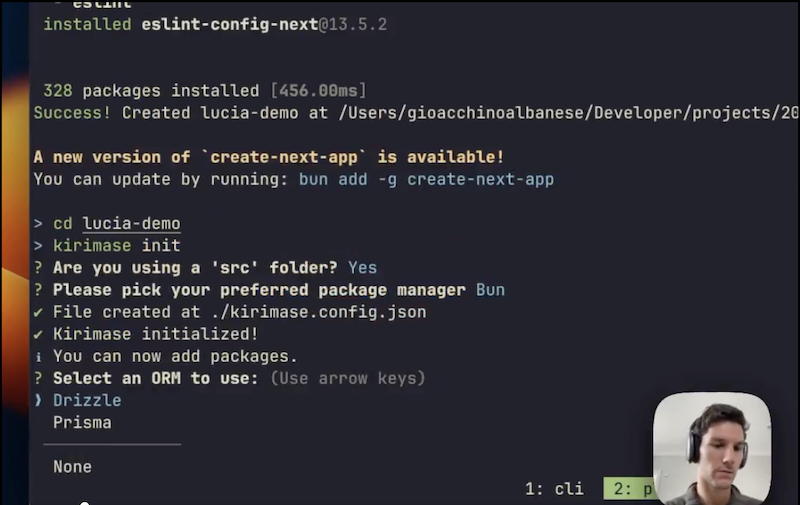
Watch the most recent demo here
Check out the official tutorial here
Install Kirimase CLI globally:
npm install -g kirimase
If you don't already have a Nextjs app, run create-next-app with your preferred package manager.
Then run the following command within the directory of your project:
kirimase init
Note: Kirimase is not compatible with the the pages directory.
Run these commands within the directory of your Nextjs app:
kirimase addInitializes and configures the following packages for your Next.js project, categorized into:
package.json for immediate use of drizzle-kit.<Toaster />) to the root layout for instant toast notifications in your Next.js app.Kirimase also adds relevant keys to your .env which you'll need to provide values for.
kirimase generateAkin to rails scaffold but for Next.js:
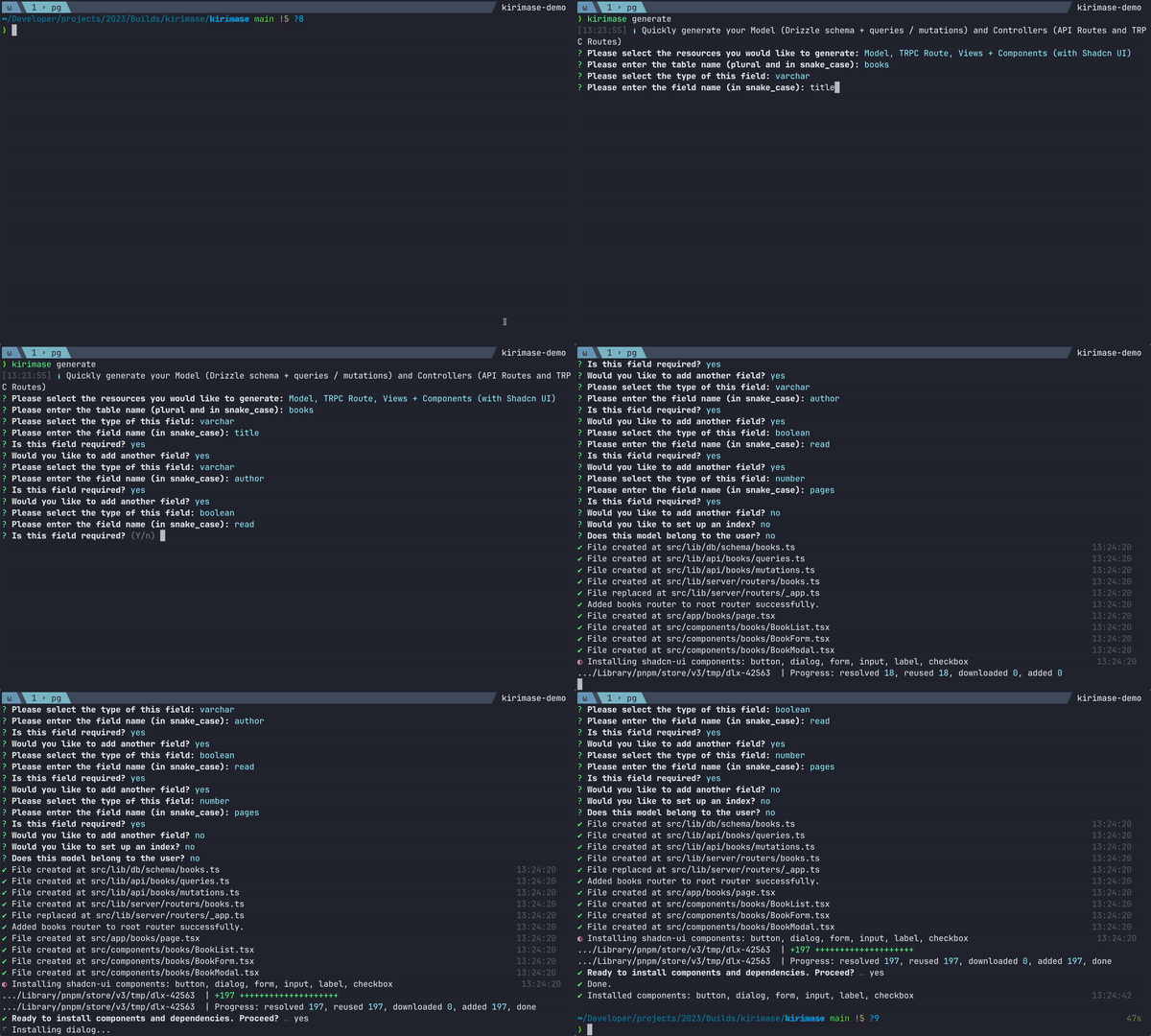

Kirimase generates:
As of v0.0.23, you can run kirimase init and kirimase add entirely via the command line as follows:
kirimase init -sf yes -pm bun --orm prisma -db pg -a next-auth -ap github discord -mp trpc stripe resend -cl shadcn-ui -ie yes
| Command | Short Flag | Long Option | Description | Argument |
|---|---|---|---|---|
| init | - | - | initialise and configure kirimase | - |
| - | -h | --headless | initialise without any ui | yes or no |
| - | -sf | --src-folder | use a src folder | yes or no |
| - | -pm | --package-manager | package manager | <pm> |
| - | -cl | --component-lib | component library | <component-lib> |
| - | -o | --orm | orm | <orm> |
| - | -db | --db | database ("pg", "mysql", "sqlite") | <db> |
| - | -dbp | --db-provider | database provider - important if using drizzle | <dbp> |
| - | -a | --auth | auth | <auth> |
| - | -ap | --auth-providers | auth providers (if using next-auth) | <providers> |
| - | -mp | --misc-packages | packages ("trpc", "shadcn-ui", "resend") | <packages> |
| - | -ie | --include-example | include example | yes or no |
Keen on enhancing Kirimase? Contributions, bug reports, and feature requests are always welcome. Feel free to open an issue or submit a pull request.
To run locally:
pnpm i
pnpm run dev

npm install -g . (in a second terminal - this will then make kirimase available across your machine using "kirimase *command*")
(top 24 of 29)
3,036 followers · starred Mar 2026
10,732 followers · starred Feb 2024
1,552 followers · starred Jan 2025
3,919 followers · starred May 2024
Build full-stack Next.js apps, incredibly fast
See the code[!NOTE]
Note: Only critical bugs are being addressed right now as we are planning a complete rewrite in the very near future!
Kirimase is a command-line tool for building full-stack Next.js apps faster. It supercharges your development workflow, allowing you to quickly integrate packages and scaffold resources for your application with best practices in mind.
Watch the most recent demo here
Check out the official tutorial here
Install Kirimase CLI globally:
npm install -g kirimase
If you don't already have a Nextjs app, run create-next-app with your preferred package manager.
Then run the following command within the directory of your project:
kirimase init
Note: Kirimase is not compatible with the the pages directory.
Run these commands within the directory of your Nextjs app:
kirimase addInitializes and configures the following packages for your Next.js project, categorized into:
package.json for immediate use of drizzle-kit.<Toaster />) to the root layout for instant toast notifications in your Next.js app.Kirimase also adds relevant keys to your .env which you'll need to provide values for.
kirimase generateAkin to rails scaffold but for Next.js:
Kirimase generates:
As of v0.0.23, you can run kirimase init and kirimase add entirely via the command line as follows:
kirimase init -sf yes -pm bun --orm prisma -db pg -a next-auth -ap github discord -mp trpc stripe resend -cl shadcn-ui -ie yes
| Command | Short Flag | Long Option | Description | Argument |
|---|---|---|---|---|
| init | - | - | initialise and configure kirimase | - |
| - | -h | --headless | initialise without any ui | yes or no |
| - | -sf | --src-folder | use a src folder | yes or no |
| - | -pm | --package-manager | package manager | <pm> |
| - | -cl | --component-lib | component library | <component-lib> |
| - | -o | --orm | orm | <orm> |
| - | -db | --db | database ("pg", "mysql", "sqlite") | <db> |
| - | -dbp | --db-provider | database provider - important if using drizzle | <dbp> |
| - | -a | --auth | auth | <auth> |
| - | -ap | --auth-providers | auth providers (if using next-auth) | <providers> |
| - | -mp | --misc-packages | packages ("trpc", "shadcn-ui", "resend") | <packages> |
| - | -ie | --include-example | include example | yes or no |
Keen on enhancing Kirimase? Contributions, bug reports, and feature requests are always welcome. Feel free to open an issue or submit a pull request.
To run locally:
pnpm i
pnpm run dev

npm install -g . (in a second terminal - this will then make kirimase available across your machine using "kirimase *command*")
(top 24 of 29)
3,036 followers · starred Mar 2026
10,732 followers · starred Feb 2024
1,552 followers · starred Jan 2025
3,919 followers · starred May 2024