
README
ClipSync AI
Your clipboard, with a brain — and nothing ever leaves your machine.
Here's the problem nobody talks about: every "smart clipboard" app takes the most sensitive thing on your device — your clipboard, full of passwords, one-time codes, half-written messages, medical notes — and ships it off to somebody else's server. We thought that was backwards. So we built a clipboard app that does all of its thinking right there on your own hardware.
No account. No server. No telemetry. No "we value your privacy" page that means nothing. Just an app that works with the Wi-Fi off.


-1a1a1c?style=flat-square)



Launch video
The launch cut — desktop (16:9) and phone (9:16). Autoplays and loops right here; click either to watch full-res with sound.
Screenshots
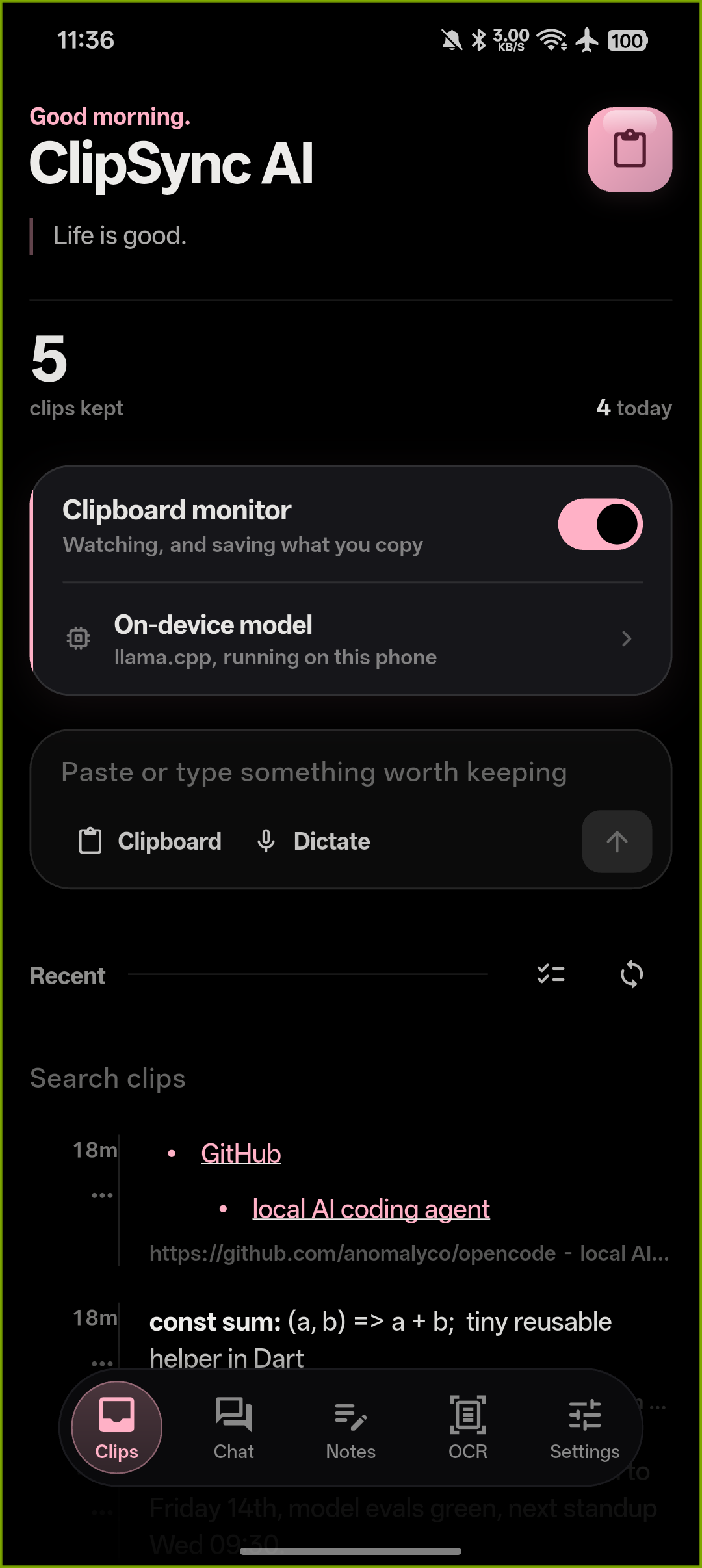
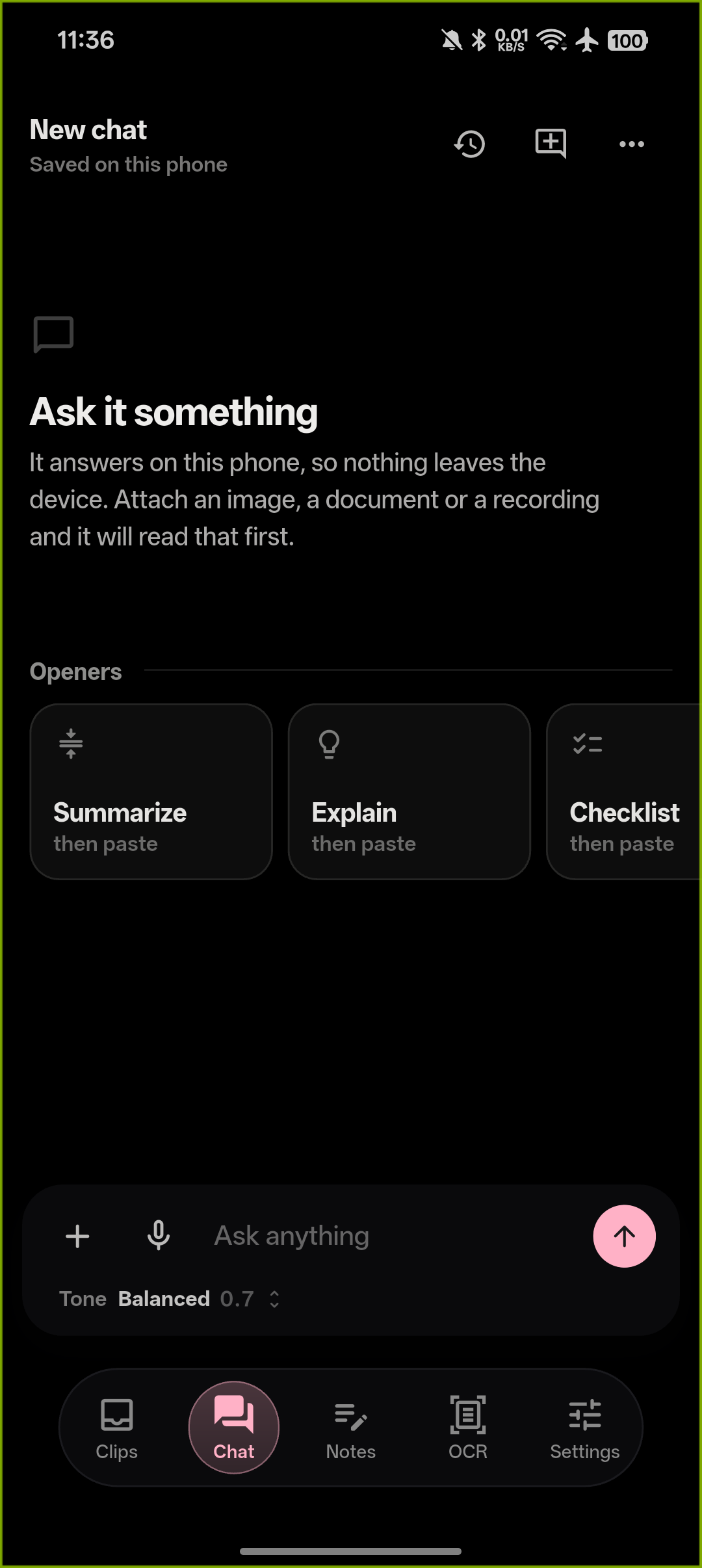
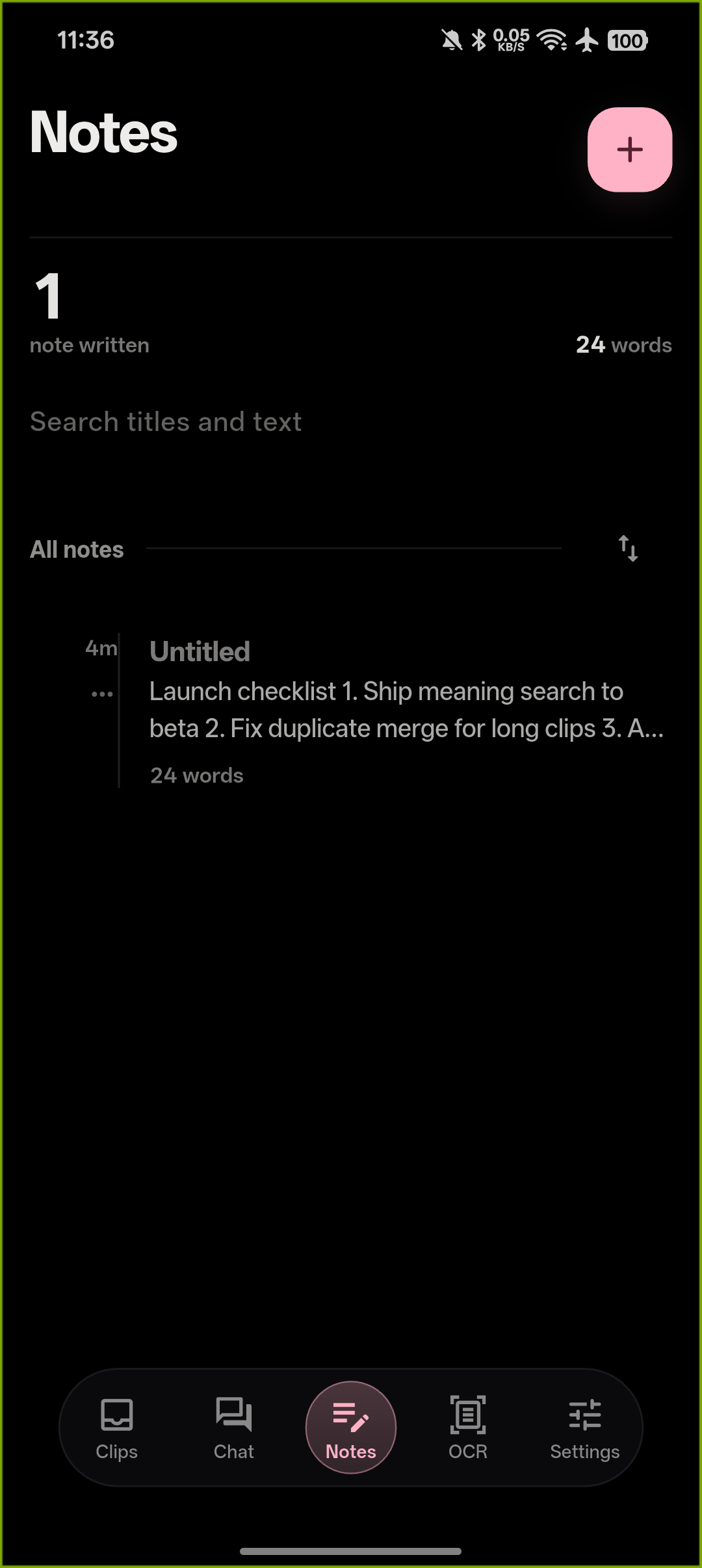
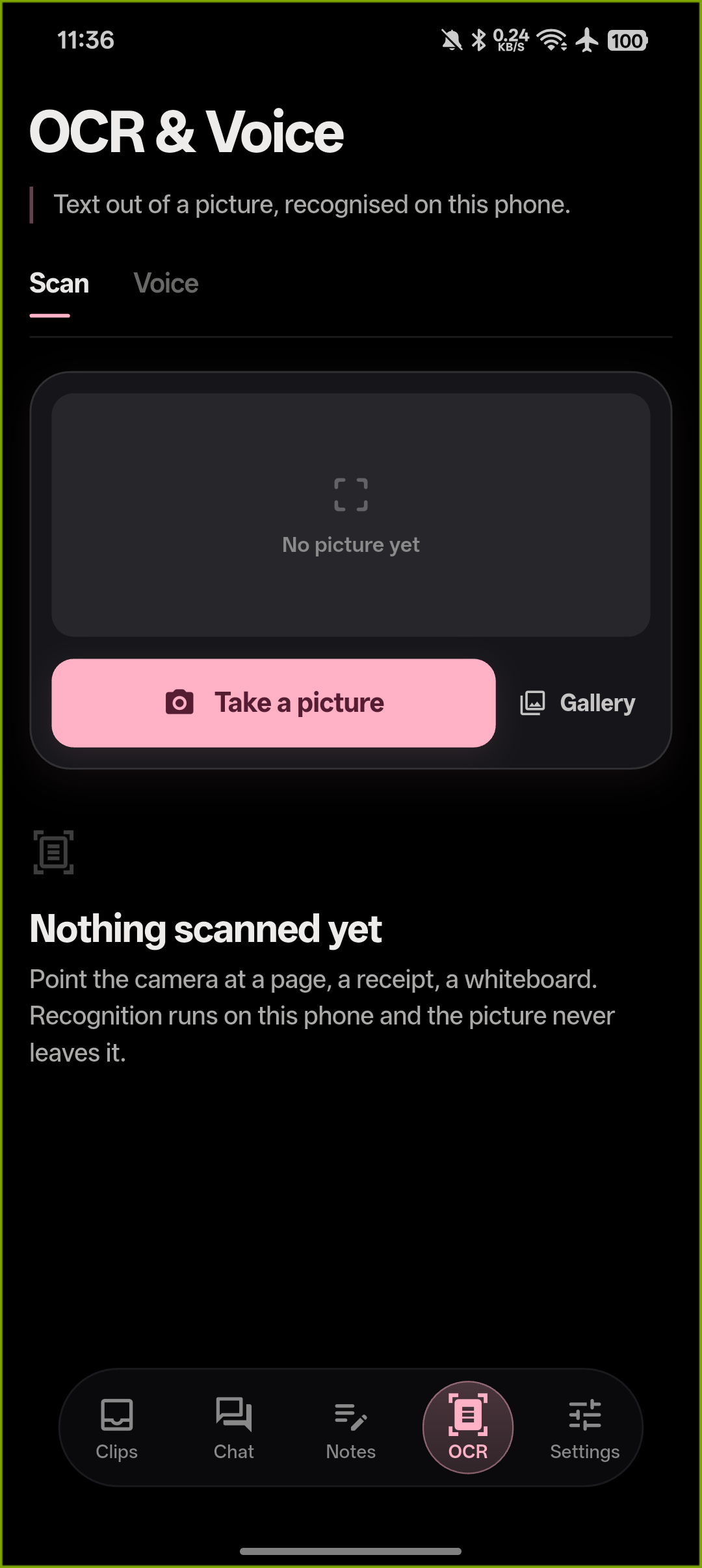
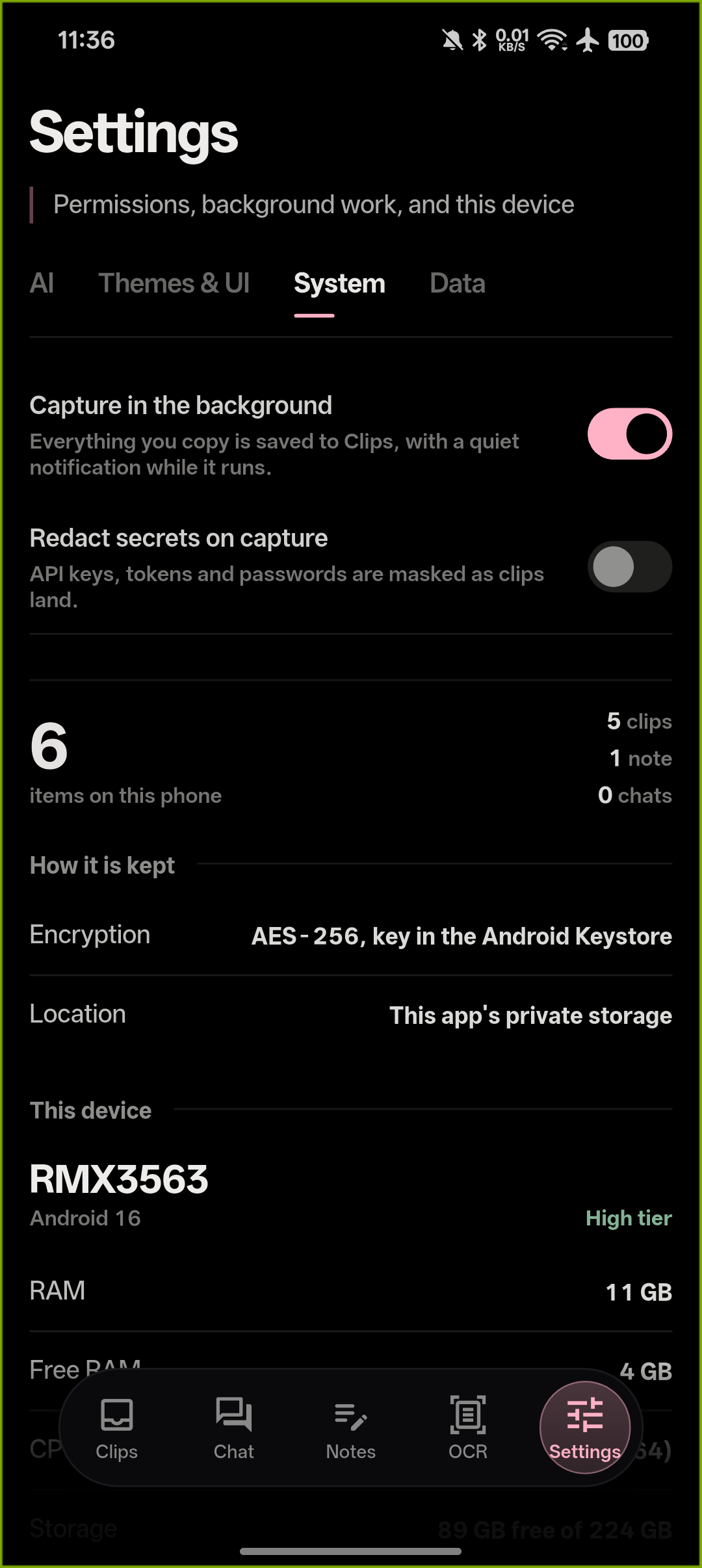
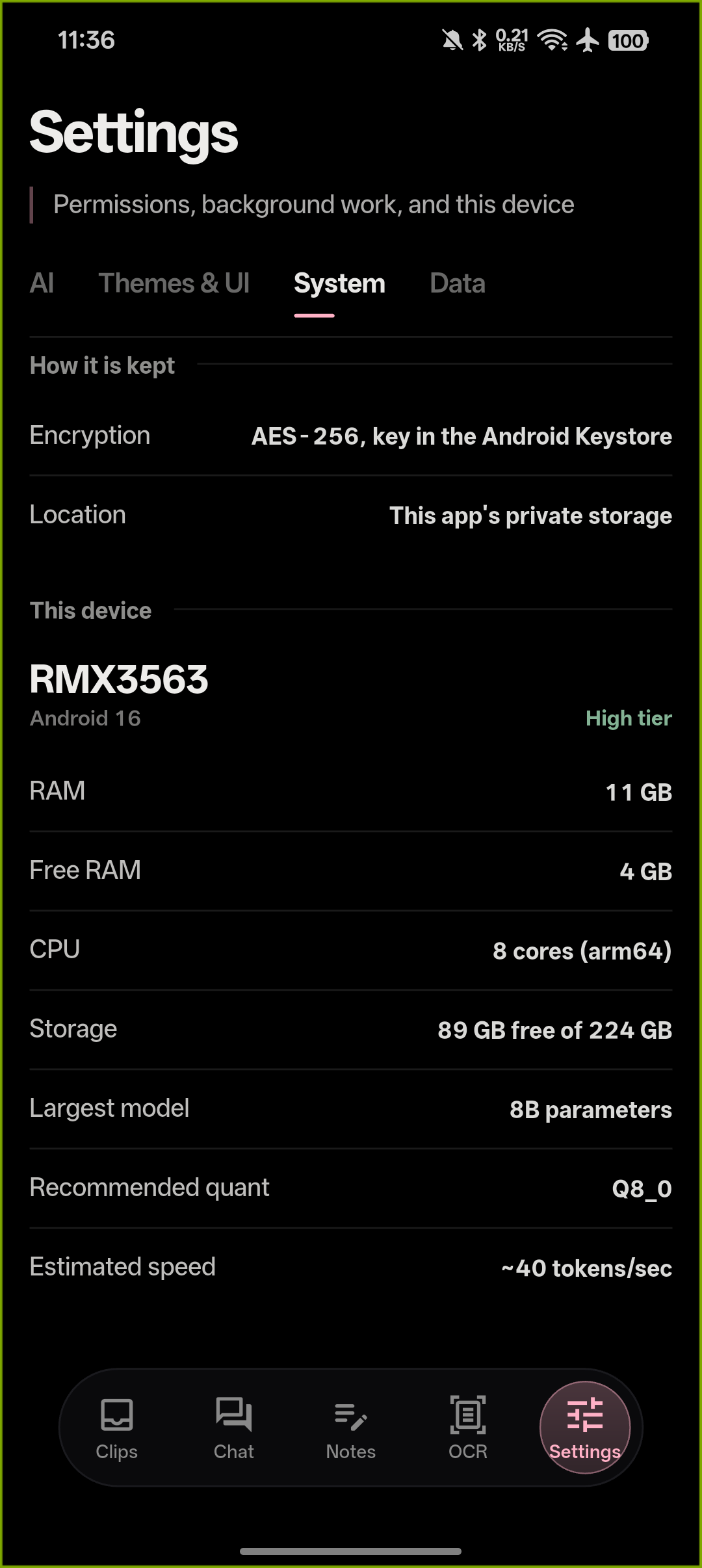
Dashboard · Chat · Notes · OCR & Voice · Settings · Meaning search — all running on a real device, fully offline.
Video walkthrough
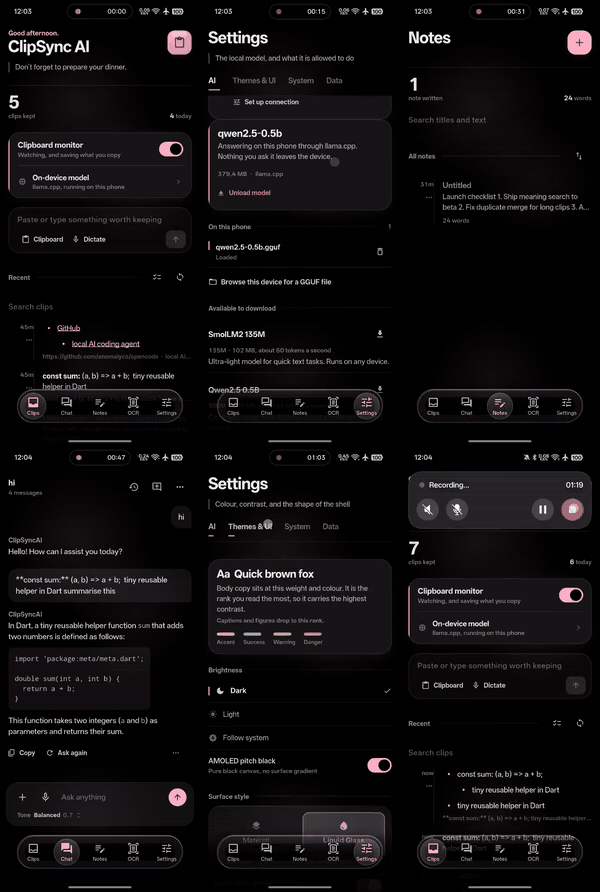
Ten or so seconds across every screen, straight off the phone.
What it does, in plain words
You copy stuff all day. ClipSync AI quietly keeps it, cleans it up, and makes it useful:
- Copy anything — it gets saved automatically, even from other apps.
- Ask for a summary, a cleanup, or a retitle — a real AI model running on your device does it in seconds.
- Chat with your clips — ask questions, attach documents, images, or voice notes.
- Keep notes — with tags, search, and the same AI help built into the editor.
- Scan and dictate — point the camera at text, or just talk. Both work offline.
- Join clips — pick two or more and merge them into one, oldest first.
- Redact secrets — one tap masks API keys, tokens, passwords and card numbers, or turn on auto-redact and they never get saved at all.
- Search by meaning — download the small indexing model and the feed ranks by what clips mean, not just the words in them.
- Lock it all — a PIN over the whole app, with fingerprint or face unlock where the device has it.
The original is never thrown away. Every AI result sits next to what you copied, not on top of it.
Two apps, one repo, zero cloud
This repository builds two separate programs. Same idea, each one native to its home:
📱 Android — a Flutter app that loads a GGUF model straight into llama.cpp inside its own process. Your phone becomes the AI server. Works with Qwen 0.5B up to Llama 7B depending on your RAM.
🖥️ Windows — a single no-installer program (~23 MB) that carries its own llama.cpp runtime inside it, the same way the phone build does. Pick a GGUF from the catalogue (it downloads with a progress bar) or import one you own, and it runs entirely on this PC with nothing else installed — Ollama reference, minus the server. Prefer a service instead? Add your own API key for OpenAI, Anthropic, Gemini, Groq, Mistral, xAI or OpenRouter (opt-in twice, key sealed to your Windows account). It still talks to an existing local server too — Ollama, LM Studio, llama.cpp, Jan — and with no model at all, a built-in engine still cleans, classifies, and tags every clip, and the app is honest about which buttons need a model and hides the ones that don't.
🐧 Linux & 🍏 macOS — the same Flutter app as Android, built for the desktop. Linux produces a .deb and an .rpm with a proper /usr/lib/clip-sync-ai layout, desktop entry, and hicolor icon; macOS produces .dmg/.zip for both Apple Silicon and Intel. Both are built fully in GitHub Actions — see Build for Linux & macOS (GitHub Actions) below.
Neither one has ever sent a single clip anywhere. That's not a setting. There's just no code that does it.
How your stuff stays yours
- On-device inference. The model file lives in your app folder. Your words go in, the answer comes out, and nothing in between touches a network.
- Encrypted storage. Everything is sealed with AES-256 — clips, notes, chats, settings, each with its own key. On Android the keys live in the system keystore; on Windows they're locked to your Windows account. Lose the device, and the files are scrap.
- A lock on the front door. Set a PIN and the app asks for it on launch and every return from the background — on Windows too. Fingerprint or face unlocks it where the hardware exists (Android, macOS); everywhere else the PIN does.
- Secrets never land. Auto-redact masks API keys, tokens, passwords and card numbers before a clip is saved, and clips can self-destruct: keep them forever, a day, a week, or a month.
- You can check. Turn on airplane mode (or pull the network cable on your PC). Everything keeps working except downloading new models. That's the whole privacy audit, and it takes ten seconds.
A quick tour
Clips — your clipboard history: searchable, pinnable, and relevance-ranked, so a title hit beats a body hit and rare words beat common ones. Load the indexing model and search turns semantic — "that AWS key from last week" finds the key. Every clip gets a title and tags at capture (written by the model when one is loaded), every entry can be cleaned up, summarised, retitled, joined with others, or redacted — and saving something twice gets you asked: keep both, merge, or discard. Delete offers an undo, because everyone fat-fingers sometimes.
Chat — a real conversation with the model, streamed live, with markdown rendering. Attach a document, a photo (read by on-device OCR first), a voice note (transcribed first), or just paste. Long-press any message to copy it, summarise it, save it to notes, or regenerate the reply.
Notes — a markdown editor with tags and search. The AI bar can summarise, expand, fix grammar, or pull out action items — and every one of those can be undone.
Capture (OCR & Voice) — scan text from a photo or a region of your screen, dictate instead of typing. Results are editable before you save them, because recognition is never perfect and we'd rather admit it. On Android you can also share text straight into Clips from any app's share sheet, or file the clipboard from a Quick Settings tile without opening the app.
Settings — four tidy tabs: AI (models, downloads, device advice, model-server connection, and the meaning-search indexing model), Themes & UI, System (clipboard service, permissions, redact-on-capture), Data (privacy lock with PIN and biometrics, clip lifetime, export everything to markdown, or wipe with confirmation). The Model connection dialog offers presets for OpenAI, Gemini, Claude, and other providers, or a custom OpenAI-compatible gateway — with opt-in confirmation before any chat data is sent.
The look and feel
We rebuilt the whole interface around one design system, so everything feels like it came from the same hands:
- Liquid Glass navigation — a floating glass capsule with a lensed rim, refraction, and chromatic shimmer on modern Android. Nine sliders and live preview if you like to tinker.
- Eight soft accents — muted, pigment-like colours (Rose Quartz is the default), all checked for readability automatically.
- AMOLED black for OLED screens, or a warm off-black everywhere else. No pure-black flatness, no glow spam.
- Desktop differences that make sense — on Windows the capsule becomes a left rail, swipes become hover actions, the camera becomes screen-region capture, and there are global hotkeys (
Ctrl+Shift+Vto summon,Ctrl+Shift+Cto tidy,Ctrl+Shift+Hfor a Win+V-style history popup that pastes back into whatever you're in) plus a tray icon. A mouse is not a thumb, so we didn't pretend.
Build it yourself
Android
You'll need the Flutter SDK (stable) and Android SDK with platform 36:
flutter pub get
flutter build apk --release
The APK lands at build/app/outputs/flutter-apk/app-release.apk. Want smaller files? Add --split-per-abi.
Check our work:
flutter analyze && flutter test
Windows
You need... nothing. Seriously — the C# compiler already lives inside Windows:
windows\build.cmd
That runs all 600 tests first (and stops if any fail), then writes both executables to windows/build/, each with the llama.cpp runtime embedded. Run the one that matches your machine — x86 works everywhere, though embedded models want the 64-bit build.
Linux & macOS (GitHub Actions)
Desktop binaries for Linux and macOS are built entirely in the cloud — you never need a Linux or a Mac to ship them. The workflow lives at .github/workflows/desktop.yml, is pinned to Flutter 3.47.1 for reproducible builds, and produces:
| Artifact | Platform | Notes |
|---|---|---|
clip-sync-ai_<ver>_amd64.deb | Linux x86_64 | Installs to /usr/lib/clip-sync-ai, /usr/bin launcher, desktop entry, hicolor icon |
clip-sync-ai_<ver>.x86_64.rpm | Linux x86_64 | Same package contents, RPM metadata |
clip-sync-ai-linux-x64.tar.xz | Linux x86_64 | Portable bundle, run right after extracting |
ClipSyncAI_<ver>_macos_arm64.dmg + .zip | macOS Apple Silicon | Built on macos-latest |
ClipSyncAI_<ver>_macos_x64.dmg + .zip | macOS Intel | Built on macos-15-intel |
How to trigger a build:
- Push (or already have) this repository on GitHub with Actions enabled.
- Go to Actions → "Desktop builds (Linux & macOS)" → Run workflow (the workflow also runs automatically on every push to
main). - From the green run, download the artifacts — links to the
.deb,.rpm,.tar.xz,.dmgand.zipfor each job.
Package details worth knowing:
- Linux — a
debdepends onlibgtk-3-0,libsecret-1-0andzenity(used by the file picker); therpmmirrors those as Requires. Storage is encrypted with the same AES-256 scheme, keys held by the Secret Service (GNOME Keyring and friends). - macOS — builds are unsigned and then ad-hoc signed so the ARM64 app can launch; on first run use right-click → Open to get past Gatekeeper. Voice transcription works on macOS (Whisper ships there); on Linux the voice button is hidden because Whisper has no Linux build. Touch ID unlocks the app lock where the Mac has it.
- Everything stays local: the same embedded llama.cpp engine runs on the desktop, and any AI provider you configure is opt-in with confirmation.
- Windows (native app) note: the C# build keeps PIN-only locking — Windows Hello needs the full Windows SDK to compile against, which the offline
cscbuild deliberately avoids — and keyword-ranked search, since its embedded runtime has no embedding path. Same clips, same honesty, slightly shorter feature list.
What you'll need
Android: version 7.0 or newer · 4 GB RAM for small models, 6–8 GB+ for bigger ones · 1–5 GB free for model files.
Windows: Windows 7 or newer, 32- or 64-bit · .NET Framework 4.0+ (already there on Windows 8 and up) · the exe itself is ~23 MB, plus however much a downloaded model weighs. Embedded models need the 64-bit build; everything else works on either.
Linux (from the .deb/.rpm): glibc 2.28+, GTK 3, Secret Service daemon, zenity; a Vulkan-capable GPU is fine, OpenGL fallback included.
macOS: macOS 12.0+ (Monterey or newer), Apple Silicon or Intel.
One honest note
Fresh, unsigned builds sometimes get a suspicious look from antivirus (Malwarebytes in particular) — an unknown program that watches the clipboard and sets hotkeys sounds like spyware until you look closer. Everything here uses the official documented APIs, asks for no admin rights, and the binaries now ship with full version identity. If your scanner complains, allowlist the file and consider reporting the false positive — it helps every small developer shipping honest software.
License
MIT — do what you like, just keep the notice.
Disclaimer
ClipSync AI is an open-source project provided "as is", without warranty of any kind, express or implied, including but not limited to the warranties of merchantability, fitness for a particular purpose, and non-infringement. The author(s) and contributors shall not be held liable for any damage, data loss, malfunction, or other consequence arising from installing, building, or using this software on any device. By downloading, installing, or using this software, you acknowledge that you do so entirely at your own risk. Always back up your data before installing software from any source, including this repository.
Similar repos


README
ClipSync AI
Your clipboard, with a brain — and nothing ever leaves your machine.
Here's the problem nobody talks about: every "smart clipboard" app takes the most sensitive thing on your device — your clipboard, full of passwords, one-time codes, half-written messages, medical notes — and ships it off to somebody else's server. We thought that was backwards. So we built a clipboard app that does all of its thinking right there on your own hardware.
No account. No server. No telemetry. No "we value your privacy" page that means nothing. Just an app that works with the Wi-Fi off.
Launch video
The launch cut — desktop (16:9) and phone (9:16). Autoplays and loops right here; click either to watch full-res with sound.
Screenshots
Dashboard · Chat · Notes · OCR & Voice · Settings · Meaning search — all running on a real device, fully offline.
Video walkthrough
Ten or so seconds across every screen, straight off the phone.
What it does, in plain words
You copy stuff all day. ClipSync AI quietly keeps it, cleans it up, and makes it useful:
- Copy anything — it gets saved automatically, even from other apps.
- Ask for a summary, a cleanup, or a retitle — a real AI model running on your device does it in seconds.
- Chat with your clips — ask questions, attach documents, images, or voice notes.
- Keep notes — with tags, search, and the same AI help built into the editor.
- Scan and dictate — point the camera at text, or just talk. Both work offline.
- Join clips — pick two or more and merge them into one, oldest first.
- Redact secrets — one tap masks API keys, tokens, passwords and card numbers, or turn on auto-redact and they never get saved at all.
- Search by meaning — download the small indexing model and the feed ranks by what clips mean, not just the words in them.
- Lock it all — a PIN over the whole app, with fingerprint or face unlock where the device has it.
The original is never thrown away. Every AI result sits next to what you copied, not on top of it.
Two apps, one repo, zero cloud
This repository builds two separate programs. Same idea, each one native to its home:
📱 Android — a Flutter app that loads a GGUF model straight into llama.cpp inside its own process. Your phone becomes the AI server. Works with Qwen 0.5B up to Llama 7B depending on your RAM.
🖥️ Windows — a single no-installer program (~23 MB) that carries its own llama.cpp runtime inside it, the same way the phone build does. Pick a GGUF from the catalogue (it downloads with a progress bar) or import one you own, and it runs entirely on this PC with nothing else installed — Ollama reference, minus the server. Prefer a service instead? Add your own API key for OpenAI, Anthropic, Gemini, Groq, Mistral, xAI or OpenRouter (opt-in twice, key sealed to your Windows account). It still talks to an existing local server too — Ollama, LM Studio, llama.cpp, Jan — and with no model at all, a built-in engine still cleans, classifies, and tags every clip, and the app is honest about which buttons need a model and hides the ones that don't.
🐧 Linux & 🍏 macOS — the same Flutter app as Android, built for the desktop. Linux produces a .deb and an .rpm with a proper /usr/lib/clip-sync-ai layout, desktop entry, and hicolor icon; macOS produces .dmg/.zip for both Apple Silicon and Intel. Both are built fully in GitHub Actions — see Build for Linux & macOS (GitHub Actions) below.
Neither one has ever sent a single clip anywhere. That's not a setting. There's just no code that does it.
How your stuff stays yours
- On-device inference. The model file lives in your app folder. Your words go in, the answer comes out, and nothing in between touches a network.
- Encrypted storage. Everything is sealed with AES-256 — clips, notes, chats, settings, each with its own key. On Android the keys live in the system keystore; on Windows they're locked to your Windows account. Lose the device, and the files are scrap.
- A lock on the front door. Set a PIN and the app asks for it on launch and every return from the background — on Windows too. Fingerprint or face unlocks it where the hardware exists (Android, macOS); everywhere else the PIN does.
- Secrets never land. Auto-redact masks API keys, tokens, passwords and card numbers before a clip is saved, and clips can self-destruct: keep them forever, a day, a week, or a month.
- You can check. Turn on airplane mode (or pull the network cable on your PC). Everything keeps working except downloading new models. That's the whole privacy audit, and it takes ten seconds.
A quick tour
Clips — your clipboard history: searchable, pinnable, and relevance-ranked, so a title hit beats a body hit and rare words beat common ones. Load the indexing model and search turns semantic — "that AWS key from last week" finds the key. Every clip gets a title and tags at capture (written by the model when one is loaded), every entry can be cleaned up, summarised, retitled, joined with others, or redacted — and saving something twice gets you asked: keep both, merge, or discard. Delete offers an undo, because everyone fat-fingers sometimes.
Chat — a real conversation with the model, streamed live, with markdown rendering. Attach a document, a photo (read by on-device OCR first), a voice note (transcribed first), or just paste. Long-press any message to copy it, summarise it, save it to notes, or regenerate the reply.
Notes — a markdown editor with tags and search. The AI bar can summarise, expand, fix grammar, or pull out action items — and every one of those can be undone.
Capture (OCR & Voice) — scan text from a photo or a region of your screen, dictate instead of typing. Results are editable before you save them, because recognition is never perfect and we'd rather admit it. On Android you can also share text straight into Clips from any app's share sheet, or file the clipboard from a Quick Settings tile without opening the app.
Settings — four tidy tabs: AI (models, downloads, device advice, model-server connection, and the meaning-search indexing model), Themes & UI, System (clipboard service, permissions, redact-on-capture), Data (privacy lock with PIN and biometrics, clip lifetime, export everything to markdown, or wipe with confirmation). The Model connection dialog offers presets for OpenAI, Gemini, Claude, and other providers, or a custom OpenAI-compatible gateway — with opt-in confirmation before any chat data is sent.
The look and feel
We rebuilt the whole interface around one design system, so everything feels like it came from the same hands:
- Liquid Glass navigation — a floating glass capsule with a lensed rim, refraction, and chromatic shimmer on modern Android. Nine sliders and live preview if you like to tinker.
- Eight soft accents — muted, pigment-like colours (Rose Quartz is the default), all checked for readability automatically.
- AMOLED black for OLED screens, or a warm off-black everywhere else. No pure-black flatness, no glow spam.
- Desktop differences that make sense — on Windows the capsule becomes a left rail, swipes become hover actions, the camera becomes screen-region capture, and there are global hotkeys (
Ctrl+Shift+Vto summon,Ctrl+Shift+Cto tidy,Ctrl+Shift+Hfor a Win+V-style history popup that pastes back into whatever you're in) plus a tray icon. A mouse is not a thumb, so we didn't pretend.
Build it yourself
Android
You'll need the Flutter SDK (stable) and Android SDK with platform 36:
flutter pub get
flutter build apk --release
The APK lands at build/app/outputs/flutter-apk/app-release.apk. Want smaller files? Add --split-per-abi.
Check our work:
flutter analyze && flutter test
Windows
You need... nothing. Seriously — the C# compiler already lives inside Windows:
windows\build.cmd
That runs all 600 tests first (and stops if any fail), then writes both executables to windows/build/, each with the llama.cpp runtime embedded. Run the one that matches your machine — x86 works everywhere, though embedded models want the 64-bit build.
Linux & macOS (GitHub Actions)
Desktop binaries for Linux and macOS are built entirely in the cloud — you never need a Linux or a Mac to ship them. The workflow lives at .github/workflows/desktop.yml, is pinned to Flutter 3.47.1 for reproducible builds, and produces:
| Artifact | Platform | Notes |
|---|---|---|
clip-sync-ai_<ver>_amd64.deb | Linux x86_64 | Installs to /usr/lib/clip-sync-ai, /usr/bin launcher, desktop entry, hicolor icon |
clip-sync-ai_<ver>.x86_64.rpm | Linux x86_64 | Same package contents, RPM metadata |
clip-sync-ai-linux-x64.tar.xz | Linux x86_64 | Portable bundle, run right after extracting |
ClipSyncAI_<ver>_macos_arm64.dmg + .zip | macOS Apple Silicon | Built on macos-latest |
ClipSyncAI_<ver>_macos_x64.dmg + .zip | macOS Intel | Built on macos-15-intel |
How to trigger a build:
- Push (or already have) this repository on GitHub with Actions enabled.
- Go to Actions → "Desktop builds (Linux & macOS)" → Run workflow (the workflow also runs automatically on every push to
main). - From the green run, download the artifacts — links to the
.deb,.rpm,.tar.xz,.dmgand.zipfor each job.
Package details worth knowing:
- Linux — a
debdepends onlibgtk-3-0,libsecret-1-0andzenity(used by the file picker); therpmmirrors those as Requires. Storage is encrypted with the same AES-256 scheme, keys held by the Secret Service (GNOME Keyring and friends). - macOS — builds are unsigned and then ad-hoc signed so the ARM64 app can launch; on first run use right-click → Open to get past Gatekeeper. Voice transcription works on macOS (Whisper ships there); on Linux the voice button is hidden because Whisper has no Linux build. Touch ID unlocks the app lock where the Mac has it.
- Everything stays local: the same embedded llama.cpp engine runs on the desktop, and any AI provider you configure is opt-in with confirmation.
- Windows (native app) note: the C# build keeps PIN-only locking — Windows Hello needs the full Windows SDK to compile against, which the offline
cscbuild deliberately avoids — and keyword-ranked search, since its embedded runtime has no embedding path. Same clips, same honesty, slightly shorter feature list.
What you'll need
Android: version 7.0 or newer · 4 GB RAM for small models, 6–8 GB+ for bigger ones · 1–5 GB free for model files.
Windows: Windows 7 or newer, 32- or 64-bit · .NET Framework 4.0+ (already there on Windows 8 and up) · the exe itself is ~23 MB, plus however much a downloaded model weighs. Embedded models need the 64-bit build; everything else works on either.
Linux (from the .deb/.rpm): glibc 2.28+, GTK 3, Secret Service daemon, zenity; a Vulkan-capable GPU is fine, OpenGL fallback included.
macOS: macOS 12.0+ (Monterey or newer), Apple Silicon or Intel.
One honest note
Fresh, unsigned builds sometimes get a suspicious look from antivirus (Malwarebytes in particular) — an unknown program that watches the clipboard and sets hotkeys sounds like spyware until you look closer. Everything here uses the official documented APIs, asks for no admin rights, and the binaries now ship with full version identity. If your scanner complains, allowlist the file and consider reporting the false positive — it helps every small developer shipping honest software.
License
MIT — do what you like, just keep the notice.
Disclaimer
ClipSync AI is an open-source project provided "as is", without warranty of any kind, express or implied, including but not limited to the warranties of merchantability, fitness for a particular purpose, and non-infringement. The author(s) and contributors shall not be held liable for any damage, data loss, malfunction, or other consequence arising from installing, building, or using this software on any device. By downloading, installing, or using this software, you acknowledge that you do so entirely at your own risk. Always back up your data before installing software from any source, including this repository.