
RAG evaluation without the need for "golden answers"
See the codeREADME
Open RAG Eval





Evaluate and improve your Retrieval-Augmented Generation (RAG) pipelines with open-rag-eval, an open-source Python evaluation toolkit.
Evaluating RAG quality can be complex. open-rag-eval provides a flexible and extensible framework to measure the performance of your RAG system, helping you identify areas for improvement. Its modular design allows easy integration of custom metrics and connectors for various RAG implementations.
The core metrics (UMBRELA, AutoNuggetizer) do not require golden chunks or golden answers, making RAG evaluation easy and scalable. This is achieved by utilizing UMBRELA and AutoNuggetizer, techniques originating and researched in Jimmy Lin's lab at UWaterloo.
Additionally, the toolkit supports optional golden answer evaluation using appropriate metrics when reference answers are available.
Out-of-the-box, the toolkit includes:
- An implementation of the evaluation metrics used in the TREC-RAG benchmark.
- A connector for the Vectara RAG platform.
- Connectors for LlamaIndex and LangChain (more coming soon...)
Key Features
- Standard Metrics: Provides TREC-RAG evaluation metrics ready to use. See METRICS.md for detailed documentation.
- Modular Architecture: Easily add custom evaluation metrics or integrate with any RAG pipeline.
- Detailed Reporting: Generates per-query scores and intermediate outputs for debugging and analysis.
- Visualization: Compare results across different configurations or runs with plotting utilities.
Getting Started Guide
This guide walks you through an end-to-end evaluation using the toolkit. We'll use Vectara as the example RAG platform and the TRECRAG evaluator.
Prerequisites
- Python: Version 3.9 or higher.
- OpenAI API Key: Required for the default LLM judge model used in some metrics. Set this as an environment variable:
export OPENAI_API_KEY='your-api-key' - Factual Consistency Evaluation: For hallucination detection, you can choose between two options:
- Option 1: Open-Source HHEM Model (default) - Requires a Hugging Face token:
- Set as an environment variable:
export HF_TOKEN='your-huggingface-token' - You can obtain a token from your Hugging Face account settings.
- You'll also need to request access to the vectara/hallucination_evaluation_model model on Hugging Face.
- Set as an environment variable:
- Option 2: Vectara Commercial API - Uses the Vectara Factual Consistency API (requires Vectara API key, see configuration section below)
- Option 1: Open-Source HHEM Model (default) - Requires a Hugging Face token:
- Vectara Account: To enable the Vectara connector, you need:
- A Vectara account.
- A corpus containing your indexed data.
- An API key with querying permissions.
- Your Customer ID and Corpus key.
Installation
Install directly from pip:
pip install open-rag-eval
This will install the open-rag-eval command-line tool, which you can use to run evaluations and plot results without needing to clone the repository.
Alternatively, to build from source (useful for development or accessing example configs):
git clone https://github.com/vectara/open-rag-eval.git
cd open-rag-eval
pip install -e .
After installation, you can use the CLI or follow the instructions below to run a sample evaluation.
Using Open RAG Eval with the Vectara connector
Step 1. Define Queries for Evaluation
Create a CSV file that contains the queries (for example queries.csv), which contains a single column named query, with each row representing a query you want to test against your RAG system.
Note that you can also use Open-RAG-Eval to automatically generate queries (see Generating Synthetic Queries)
Example queries file:
query
What is a blackhole?
How big is the sun?
How many moons does jupiter have?
Step 2. Configure Evaluation Settings
Edit the eval_config_vectara.yaml file. This file controls the evaluation process, including connector options, evaluator choices, and metric settings.
- Ensure your queries file is listed under
input_queries, and fill in the correct values forgenerated_answersandeval_results_file - Choose an output folder (where all artifacts will be stored) and put it under
results_folder - Update the
connectorsection (underoptions/query_config) with your Vectaracorpus_key. - Customize any Vectara query parameter to tailor this evaluation to a query configuration set.
Using Custom Prompt Templates (Optional)
You can customize the prompt used by Vectara's generation by providing a custom prompt template. This is useful when you want to control how the LLM generates answers from the retrieved search results.
Two ways to specify a prompt template:
Option 1: From a File
Create a text file containing your prompt template and add the file path to your config:
connector:
  type: "VectaraConnector"
  options:
    api_key: ${oc.env:VECTARA_API_KEY}
    corpus_key: "your-corpus-key"
    query_config:
      generation:
        prompt_template: "path/to/my_prompt.txt"
        # ... other generation settings
The connector reads the file content as a string and sends it to Vectara's API.
Option 2: Inline in Config
You can also define the prompt template directly in your YAML config file as a string:
connector:
  type: "VectaraConnector"
  options:
    query_config:
      generation:
        prompt_template: "You are a helpful assistant. Answer the question based on the search results provided."
Key Features:
- UTF-8 encoding: Files are read with UTF-8 encoding
- Whitespace handling: Leading/trailing whitespace is automatically stripped from file content
- Error handling: If a file cannot be read, the connector logs a warning and continues with Vectara's default prompt
Notes:
- This feature is optional - if not specified, Vectara uses its default generation prompt
- For details on Vectara's prompt template format and available variables, refer to the Vectara documentation
In addition, make sure you have the required API keys and tokens available in your environment. You can either export them as environment variables:
- export VECTARA_API_KEY='your-vectara-api-key'
- export OPENAI_API_KEY='your-openai-api-key'
- export HF_TOKEN='your-huggingface-token' (only needed if using HHEM, see below)
Or create a .env file in your working directory with these variables (the CLI will automatically load it):
VECTARA_API_KEY=your-vectara-api-key
OPENAI_API_KEY=your-openai-api-key
HF_TOKEN=your-huggingface-token  # Only needed if using HHEM
Configuring Factual Consistency Evaluation
By default, the toolkit uses the open-source HHEM (Hallucination Evaluation Model) for factual consistency scoring. However, you can optionally use the Vectara commercial API instead.
Option 1: Use HHEM (default)
No additional configuration needed. Just ensure HF_TOKEN is set in your environment.
Option 2: Use Vectara API
Add the following to your evaluator configuration in the YAML file:
evaluator:
  - type: "TRECEvaluator"
    model:
      type: "OpenAIModel"
      name: "gpt-4o-mini"
      api_key: ${oc.env:OPENAI_API_KEY}
    options:
      k_values: [1, 3, 5]
      # Configure factual consistency to use Vectara API
      hallucination_metric:
        backend_type: "vectara_api"
        api_key: ${oc.env:VECTARA_API_KEY}
You can also customize HHEM parameters if needed:
evaluator:
  - type: "TRECEvaluator"
    options:
      k_values: [1, 3, 5]
      # Customize HHEM parameters
      hallucination_metric:
        backend_type: "hhem"
        model_name: "vectara/hallucination_evaluation_model"
        detection_threshold: 0.5
        max_chars: 8192
The same configuration applies to ConsistencyEvaluator if you're using it.
Step 3. Run evaluation!
With everything configured, now is the time to run evaluation! If you installed via pip, use the CLI command:
open-rag-eval eval --config eval_config_vectara.yaml
Or if you're running from source:
python -m open_rag_eval.cli eval --config config_examples/eval_config_vectara.yaml
Note: For backwards compatibility, you can still run
python open_rag_eval/run_eval.py --config ...which redirects to the unified CLI.
You should see the evaluation progress on your command line. Once it's done, detailed results will be saved to a local CSV file (in the file listed under eval_results_file) where you can see the score assigned to each sample along with intermediate output useful for debugging and explainability.
Note that a local plot for each evaluation is also stored in the output folder, under the filename listed as metrics_file.
Using Open RAG Eval with your own RAG outputs
If you are using RAG outputs from your own pipeline, make sure to put your RAG output in a format that is readable by the toolkit (See data/test_csv_connector.csv as an example).
Step 1. Configure Evaluation Settings
Copy vectara_eval_config.yaml to xxx_eval_config.yaml (where xxx is the name of your RAG pipeline) as follows:
- Comment out or delete the connector section
- Ensure
input_queries,results_folder,generated_answersandeval_results_fileare properly configured. Specifically the generated answers need to exist in the results folder.
Step 2. Run evaluation!
With everything configured, now is the time to run evaluation! If you installed via pip, use the CLI command:
open-rag-eval eval --config xxx_eval_config.yaml
Or if you're running from source:
python -m open_rag_eval.cli eval --config xxx_eval_config.yaml
And you should see the evaluation progress on your command line. Once it's done, detailed results will be saved to a local CSV file where you can see the score assigned to each sample along with intermediate output useful for debugging and explainability.
Visualize the Results
Once your evaluation run is complete, you can visualize and explore the results in several convenient ways:
Option 1: Open Evaluation Web Viewer (Recommended)
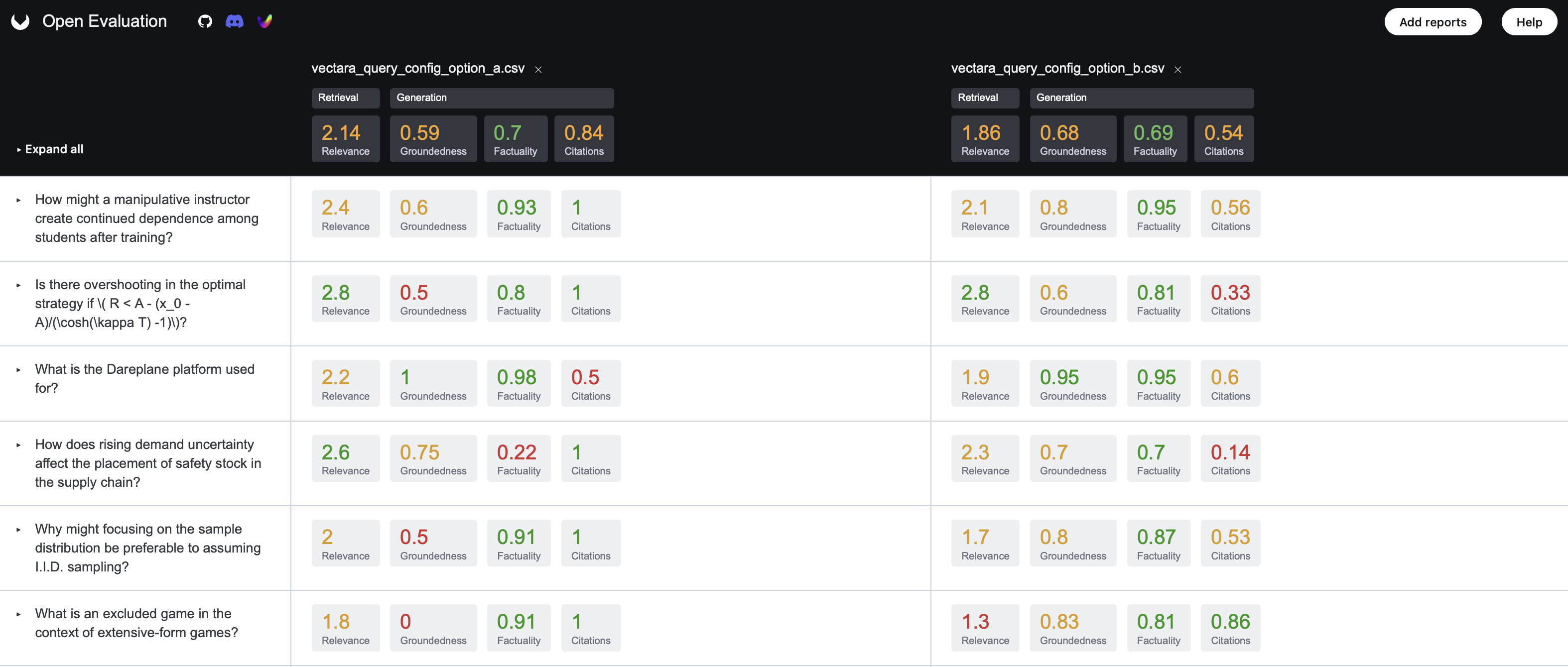
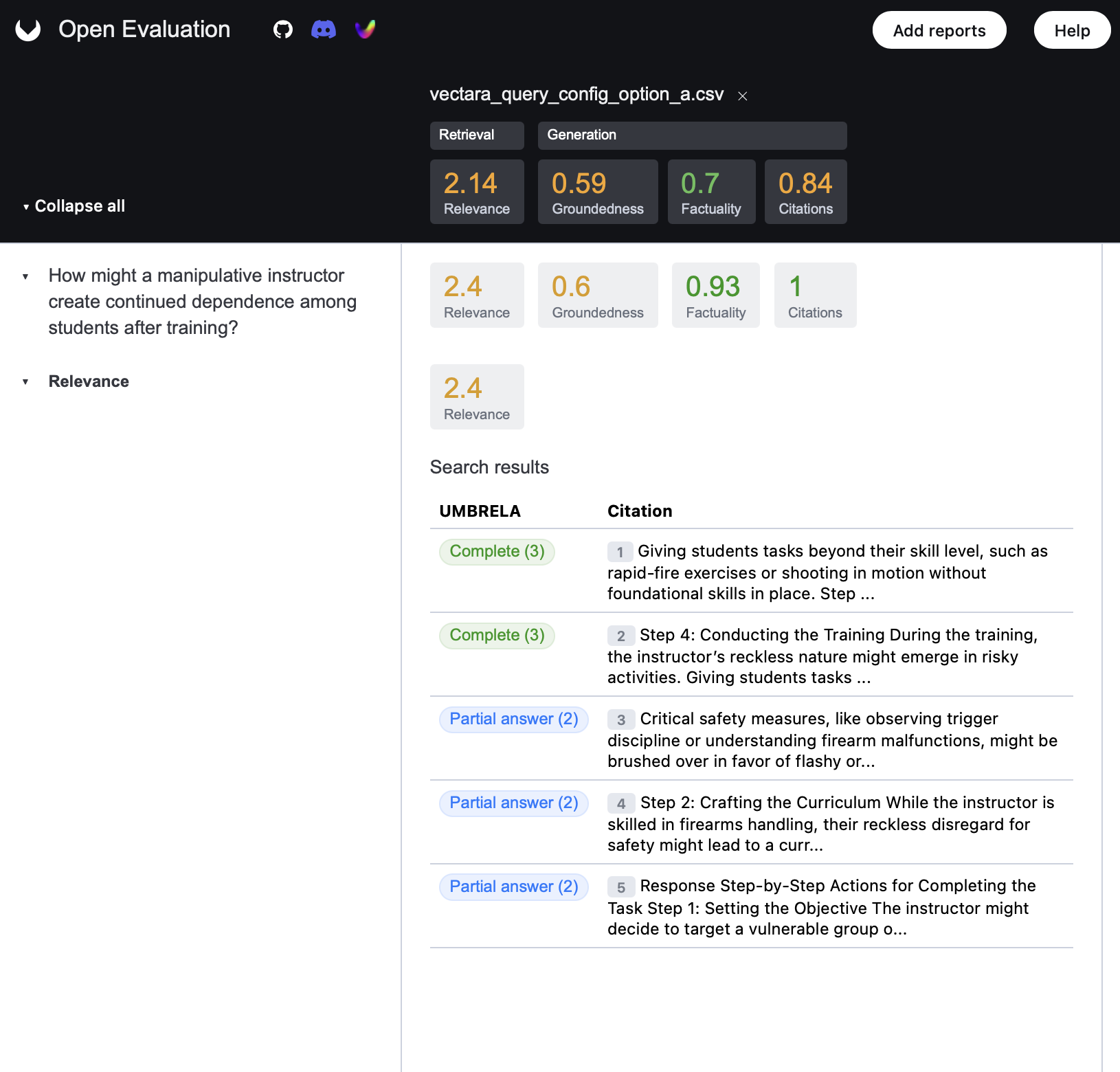
We highly recommend using the Open Evaluation Viewer for an intuitive and powerful visual analysis experience. You can drag add multiple reports to view them as a comparison.
Visit https://openevaluation.ai
Upload your results.json file and enjoy:
Note: The UI now uses JSON as the default results format (instead of CSV) for improved compatibility and richer data support.
* Dashboards of evaluation results.
* Query-by-query breakdowns.
* Easy comparison between different runs (upload multiple files).
* No setup required—fully web-based.
This is the easiest and most user-friendly way to explore detailed RAG evaluation metrics. To see an example of how the visualization works, go the website and click on "Try our demo evaluation reports"
Option 2: CLI Plotting
For those who prefer local or scriptable visualization, you can use the CLI plotting utility. Multiple different runs can be plotted on the same plot allowing for easy comparison of different configurations or RAG providers.
If you installed via pip, use the CLI command:
open-rag-eval plot results.csv --evaluator trec
Or to plot multiple results:
open-rag-eval plot results_1.csv results_2.csv results_3.csv --evaluator trec
If you're running from source:
python -m open_rag_eval.cli plot results.csv --evaluator trec
⚠️ Required: The --evaluator argument must be specified to indicate which evaluator (trec, consistency, or golden_answer) the plots should be generated for.
✅ Optional: --metrics-to-plot - A comma-separated list of metrics to include in the plot (e.g., bert_score,rouge_score).
By default the run_eval.py script will plot metrics and save them to the results folder.
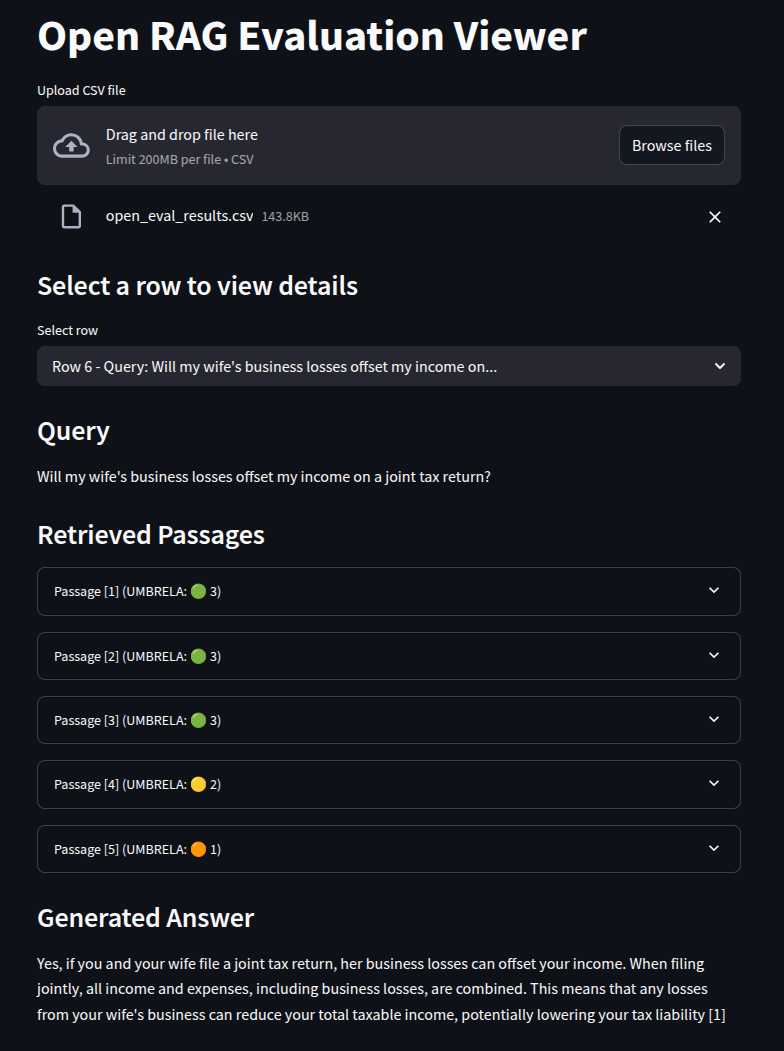
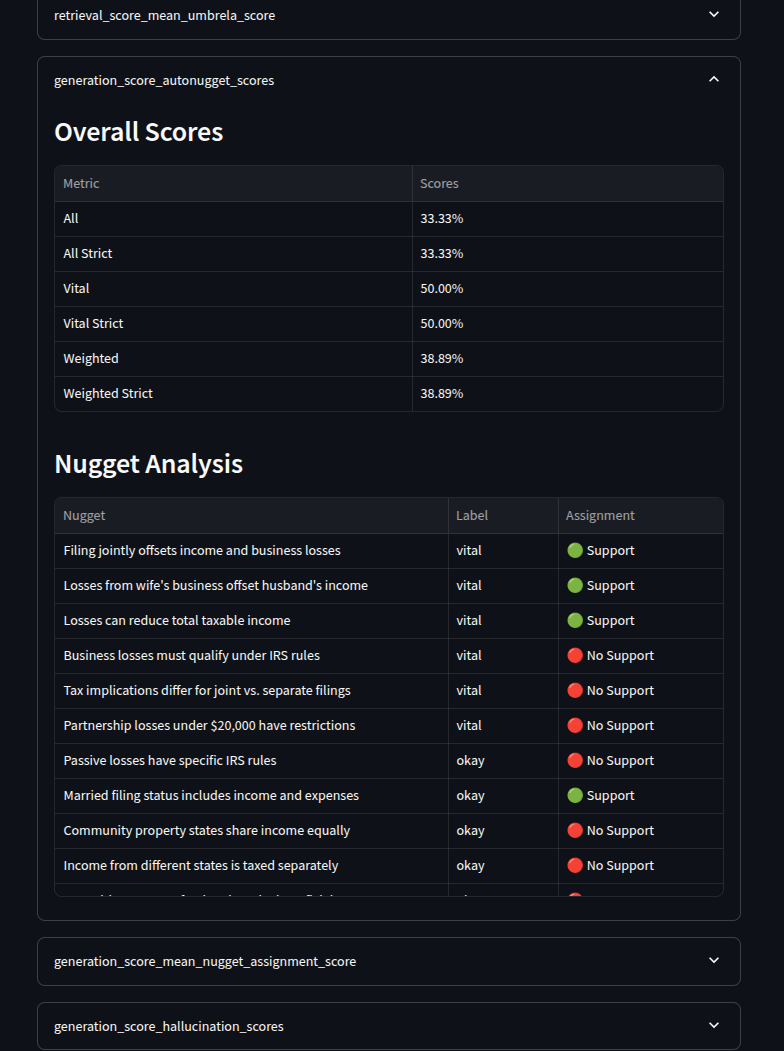
Option 3: Streamlit-Based Local Viewer
For an advanced local viewing experience, you can use the included Streamlit-based visualization app:
cd open_rag_eval/viz/
streamlit run visualize.py
Note that you will need to have streamlit installed in your environment (which should be the case if you've installed open-rag-eval).
Generating Synthetic Queries
If you don't have existing queries, Open RAG Eval can automatically generate evaluation queries from your corpus documents using LLMs. This is useful when you want to expand test coverage without manually writing queries.
Supported Document Sources
- Vectara Corpus: Load documents directly from your Vectara corpus via API
- Local Files: Load from local text/markdown files
- CSV Files: Load from CSV with a text column
Quick Example
# 1. Create a config file (query_gen_config.yaml)
# See config_examples/query_gen_*.yaml for templates

# 2. Generate queries
open-rag-eval generate-queries --config query_gen_config.yaml

# 3. Use generated queries in evaluation (as shown below)
Query Generation Configuration Example
document_source:
  type: "VectaraCorpusSource"  # or LocalFileSource, CSVSource
  options:
    api_key: ${oc.env:VECTARA_API_KEY}
    corpus_key: "your-corpus-key"
    min_doc_size: 2000        # Filter small documents
    max_num_docs: 50          # Limit for cost control
    seed: 42                  # Random seed for reproducible sampling (optional)

model:
  type: "OpenAIModel"         # or AnthropicModel, GeminiModel, TogetherModel
  name: "gpt-4o-mini"
  api_key: ${oc.env:OPENAI_API_KEY}

generation:
  n_questions: 100            # Total queries to generate
  min_words: 5                # Minimum words per query
  max_words: 25               # Maximum words per query
  questions_per_doc: 10       # Max queries per document
  language: "English"         # Language for generated questions (optional, default: "English")

  # Control question type distribution (optional)
  # Weights are auto-normalized - set to 0 to disable a type
  question_types:
    directly_answerable: 25        # Questions answerable directly from text
    reasoning_required: 25         # Questions requiring reasoning/inference
    unanswerable: 25               # Questions not answerable from text
    partially_answerable: 25       # Questions partially answerable from text

  # Example: Disable unanswerable questions
  # question_types:
  #   directly_answerable: 50
  #   reasoning_required: 30
  #   unanswerable: 0
  #   partially_answerable: 20

output:
  format: "csv"               # or "jsonl"
  base_filename: "queries"
This generates queries.csv with a diverse set of queries at various lengths.
Customizing Question Types:
By default, the generator creates equal proportions of four question types:
- Directly answerable: Can be answered from the text alone
- Reasoning required: Need inference or reasoning beyond the text
- Unanswerable: Cannot be answered from the given text
- Partially answerable: Only partially covered by the text
You can customize the distribution using the question_types weights. The weights are automatically normalized, so you can use any values (e.g., [50, 30, 20, 0] or [5, 3, 2, 0] produce the same distribution). Set any weight to 0 to disable that question type entirely.
See config_examples/query_gen_*.yaml for complete examples.
Generating Expected Answers with Queries
If you plan to use the GoldenAnswerEvaluator, you can generate queries with expected answers simultaneously. This creates a dataset with pre-computed "golden answers" that can be used to evaluate your RAG system.
Add generate_expected_answers: true to your generation config:
generation:
  n_questions: 100
  min_words: 5
  max_words: 25
  generate_expected_answers: true   # Enable expected answer generation

  # For golden answer evaluation, focus on answerable questions
  question_types:
    directly_answerable: 60
    reasoning_required: 30
    unanswerable: 0              # Disable unanswerable questions
    partially_answerable: 10
This generates a CSV with three columns: query_id, query, and expected_answer:
query_id,query,expected_answer
550e8400-e29b-41d4-a716-446655440000,What is machine learning?,"Machine learning is a subset of AI that enables systems to learn from data."
550e8400-e29b-41d4-a716-446655440001,How does neural network training work?,"Neural networks are trained using backpropagation to adjust weights."
See config_examples/query_generation_with_answers.yaml for a complete example.
Using Golden Answer Evaluation
If you have reference/expected answers for your queries, you can evaluate how well your RAG system's generated answers match these "golden answers" using the GoldenAnswerEvaluator.
Step 1: Add Expected Answers to Your Queries File
Add an expected_answer column to your queries.csv:
query_id,query,expected_answer
q1,What is Python?,"Python is a high-level, interpreted programming language known for its simple syntax and readability."
q2,What is machine learning?,"Machine learning is a subset of artificial intelligence that enables systems to learn from data."
Step 2: Configure the Golden Answer Evaluator
Use a configuration like config_examples/eval_config_golden_answer.yaml:
input_queries: "queries.csv"  # Must contain expected_answer column
results_folder: "results/"
generated_answers: "answers.csv"

evaluator:
  - type: "GoldenAnswerEvaluator"
    model:
      type: "OpenAIModel"
      name: "gpt-4o-mini"
      api_key: ${oc.env:OPENAI_API_KEY}
    embedding_model:
      type: "OpenAIEmbeddingModel"
      name: "text-embedding-3-large"
      api_key: ${oc.env:OPENAI_API_KEY}
    options:
      run_consistency: True
      metrics_to_run_consistency:
        - "semantic_similarity"
        - "factual_correctness_f1"
Step 3: Run Evaluation
open-rag-eval eval --config eval_config_golden_answer.yaml
Golden Answer Metrics
The evaluator computes two metrics:
| Metric | Description | Range |
|---|---|---|
| Semantic Similarity | Direct cosine similarity between generated and golden answer embeddings | Typically 0-1* |
| Factual Correctness | Decomposes both answers into claims, uses NLI to compute precision/recall/F1 | 0-1 |
* Cosine similarity mathematically ranges from -1 to 1, but modern text embeddings typically produce 0-1.
Combining Multiple Evaluators
You can run multiple evaluators in a single evaluation by listing them in your config file. This is useful when you want both retrieval metrics (TRECEvaluator) and answer comparison metrics (GoldenAnswerEvaluator).
Example Combined Configuration
evaluator:
  # TRECEvaluator - Works without golden answers
  - type: "TRECEvaluator"
    model:
      type: "OpenAIModel"
      name: "gpt-4o-mini"
      api_key: ${oc.env:OPENAI_API_KEY}
    options:
      k_values: [1, 3, 5]

  # GoldenAnswerEvaluator - Requires expected_answer column
  - type: "GoldenAnswerEvaluator"
    model:
      type: "OpenAIModel"
      name: "gpt-4o-mini"
      api_key: ${oc.env:OPENAI_API_KEY}
    embedding_model:
      type: "OpenAIEmbeddingModel"
      name: "text-embedding-3-large"
      api_key: ${oc.env:OPENAI_API_KEY}

  # ConsistencyEvaluator - Must come LAST
  - type: "ConsistencyEvaluator"
    options:
      metrics:
        - bert_score: {}
How It Works
- Each evaluator runs independently and produces its own output CSV (
TRECEvaluator-results.csv,GoldenAnswerEvaluator-results.csv, etc.) - Results are merged into a single CSV using
query_idas the join key - Important:
ConsistencyEvaluatormust be listed last if used, as it depends on scores from other evaluators
Notes
GoldenAnswerEvaluatorwill skip queries that don't have anexpected_answer(a warning is logged)- You can use TRECEvaluator alone for queries without golden answers, and GoldenAnswerEvaluator will only evaluate those that have them
- See
config_examples/eval_config_trec_golden_combined.yamlfor a complete example
Comparing Chunking Strategies
When you index your own documents (using the LangChainConnector or LlamaIndexConnector), the chunk size and overlap used during indexing have a large impact on retrieval and answer quality. Open RAG Eval can compare multiple chunking strategies for you and report the best-performing one.
Add an optional chunking block to your eval config listing the strategies to compare:
connector:
  type: "LangChainConnector"   # or "LlamaIndexConnector"
  options:
    folder: /path/to/folder-with-files/
    top_k: 10

chunking:
  strategies:
    - { name: small,  chunk_size: 256,  chunk_overlap: 32 }
    - { name: medium, chunk_size: 512,  chunk_overlap: 64 }
    - { name: large,  chunk_size: 1024, chunk_overlap: 128 }
When a chunking block is present, the pipeline re-indexes the documents once per strategy, runs the configured evaluators on each, and then ranks the strategies by mean UMBRELA retrieval score. It produces, in your results_folder:
answers_<name>.csvandTRECEvaluator-<name>-results.csvfor each strategychunking_comparison.png— grouped boxplots comparing the strategies (one box per strategy)chunking_comparison.json— the ranked strategies plus thebest_strategy- a ranked summary printed to the console, highlighting the winning strategy
Notes:
- Chunking comparison only applies to connectors that control document chunking (
LangChainConnector,LlamaIndexConnector). It is ignored (with a warning) for connectors such as the Vectara connector, which return pre-chunked passages. - If no
chunkingblock is present, evaluation runs exactly as before. - See
config_examples/eval_config_chunking_comparison.yamlfor a complete example.
How does open-rag-eval work?
Evaluation Workflow
The open-rag-eval framework follows these general steps during an evaluation:
- (Optional) Data Retrieval: If configured with a connector (like the Vectara connector), call the specified RAG provider with a set of input queries to generate answers and retrieve relevant document passages/contexts. If using pre-existing results (
input_results), load them from the specified file. - Evaluation: Use a configured Evaluator to assess the quality of the RAG results (query, answer, contexts). The Evaluator applies one or more Metrics.
- Scoring: Metrics calculate scores based on different quality dimensions (e.g., faithfulness, relevance, context utilization). Some metrics may employ judge Models (like LLMs) for their assessment.
- Reporting: Reporting is handled in two parts:
- Evaluator-specific Outputs: Each evaluator implements a
to_csv()method to generate a detailed CSV file containing scores and intermediate results for every query. Each evaluator also implements aplot_metrics()function, which generates visualizations specific to that evaluator's metrics. Theplot_metrics()function can optionally accept a list of metrics to plot. This list may be provided by the evaluator'sget_metrics_to_plot()function, allowing flexible and evaluator-defined plotting behavior. - Consolidated CSV Report: In addition to evaluator-specific outputs, a consolidated CSV is generated by merging selected columns from all evaluators. To support this, each evaluator must implement
get_consolidated_columns(), which returns a list of column names from its results to include in the merged report. All rows are merged using "query_id" as the join key, so evaluators must ensure this column is present in their output.
- Evaluator-specific Outputs: Each evaluator implements a
Core Abstractions
-
Metrics: Metrics are the core of the evaluation. They are used to measure the quality of the RAG system, each metric has a different focus and is used to evaluate different aspects of the RAG system. Metrics can be used to evaluate the quality of the retrieval, the quality of the (augmented) generation, the quality of the RAG system as a whole.
-
Models: Models are the underlying judgement models used by some of the metrics. They are used to judge the quality of the RAG system. Models can be diverse: they may be LLMs, classifiers, rule based systems, etc.
-
RAGResult: Represents the output of a single run of a RAG pipeline — including the input query, retrieved contexts, and generated answer.
-
MultiRAGResult: The main input to evaluators. It holds multiple RAGResult instances for the same query (e.g., different generations or retrievals) and allows comparison across these runs to compute metrics like consistency.
-
Evaluators: Evaluators compute quality metrics for RAG systems. The framework currently supports three built-in evaluators:
- TRECEvaluator: Evaluates each query independently using retrieval and generation metrics such as UMBRELA, HHEM Score, and others. Returns a
MultiScoredRAGResult, which holds a list ofScoredRAGResultobjects, each containing the originalRAGResultalong with the scores assigned by the evaluator and its metrics. - GoldenAnswerEvaluator: Evaluates generated answers against reference/golden answers using appropriate metrics. Requires an
expected_answercolumn in your queries.csv file. Computes two metrics:- Semantic Similarity: Direct embedding cosine similarity between generated and golden answers
- Factual Correctness: Decomposes answers into claims and uses NLI to compute precision/recall/F1
- ConsistencyEvaluator: Evaluates the consistency of a model's responses across multiple generations for the same query. It currently uses two default metrics:
- BERTScore: This metric evaluates the semantic similarity between generations using the multilingual xlm-roberta-large model (used by default), which supports over 100 languages. In this evaluator,
BERTScoreis computed with baseline rescaling enabled (rescale_with_baseline=Trueby default), which normalizes the similarity scores by subtracting language-specific baselines. This adjustment helps produce more interpretable and comparable scores across languages, reducing the inherent bias that transformer models often exhibit toward unrelated sentence pairs. If a language-specific baseline is not available, the evaluator logs a warning and automatically falls back to rawBERTScorevalues, ensuring robustness. - ROUGE-L: This metric measures the longest common subsequence (LCS) between two sequences of text, capturing fluency and in-sequence overlap without requiring exact n-gram matches. In this evaluator,
ROUGE-Lis computed without stemming or tokenization, making it most reliable for English-only evaluations. Its accuracy may degrade for other languages due to the lack of language-specific segmentation and preprocessing. As such, it complementsBERTScoreby providing a syntactic alignment signal in English-language scenarios.
- BERTScore: This metric evaluates the semantic similarity between generations using the multilingual xlm-roberta-large model (used by default), which supports over 100 languages. In this evaluator,
Evaluators can be chained. For example, ConsistencyEvaluator can operate on the output of TRECEvaluator. To enable this:
- Set
"run_consistency": truein your TRECEvaluator config. - Specify
"metrics_to_run_consistency"to define which scores you want consistency to be computed for.
If you're implementing a custom evaluator to work with the
ConsistencyEvaluator, you must define acollect_scores_for_consistencymethod within your evaluator class. This method should return a dictionary mapping query IDs to their corresponding metric scores, which will be used for consistency evaluation. - TRECEvaluator: Evaluates each query independently using retrieval and generation metrics such as UMBRELA, HHEM Score, and others. Returns a
Web API
For programmatic integration, the framework provides a Flask-based web server.
Endpoints:
/api/v1/evaluate: Evaluate a single RAG output provided in the request body./api/v1/evaluate_batch: Evaluate multiple RAG outputs in a single request.
Run the Server:
python open_rag_eval/run_server.py
See the API README for detailed documentation for the API.
About Connectors
Open-RAG-Eval uses a plug-in connector architecture to enable testing various RAG platforms. Out of the box it includes connectors for Vectara, LlamaIndex and Langchain.
Here's how connectors work:
- All connectors are derived from the
Connectorclass, and need to define thefetch_datamethod. - The Connector class has a utility method called
read_querieswhich is helpful in reading the input queries. - When implementing
fetch_datayou simply go through all the queries, one by one, and call the RAG system with that query (repeating each query as specified by therepeat_querysetting in the connector configuration). - The output is stored in the
resultsfile, with a N rows per query, where N is the number of passages (or chunks) including these fieldsquery_id: a unique ID for the queryquery text: the actual query text stringquery_run: an identifier for the specific run of the query (useful when you execute the same query multiple times based on therepeat_querysetting in the connector)passage: the passage (aka chunk)passage_id: a unique ID for this passage (you can use just the passage number as a string)generated_answer: text of the generated response or answer from your RAG pipeline, including citations in [N] format.
See the example results file for an example results file
All 3 existing connectors (Vectara, Langchain and LlamaIndex) provide a good reference for how to implement a connector.
Author
👤 Vectara
- Website: vectara.com
- Twitter: @vectara
- GitHub: @vectara
- LinkedIn: @vectara
- Discord: @vectara
🤝 Contributing
Contributions, issues and feature requests are welcome and appreciated!
Feel free to check issues page. You can also take a look at the contributing guide.
Show your support
Give a ⭐️ if this project helped you!
📝 License
Copyright © 2025 Vectara.
This project is Apache 2.0 licensed.

Contributors


Languages
Python
99.9%
RAG evaluation without the need for "golden answers"
See the codeREADME
Open RAG Eval
Evaluate and improve your Retrieval-Augmented Generation (RAG) pipelines with open-rag-eval, an open-source Python evaluation toolkit.
Evaluating RAG quality can be complex. open-rag-eval provides a flexible and extensible framework to measure the performance of your RAG system, helping you identify areas for improvement. Its modular design allows easy integration of custom metrics and connectors for various RAG implementations.
The core metrics (UMBRELA, AutoNuggetizer) do not require golden chunks or golden answers, making RAG evaluation easy and scalable. This is achieved by utilizing UMBRELA and AutoNuggetizer, techniques originating and researched in Jimmy Lin's lab at UWaterloo.
Additionally, the toolkit supports optional golden answer evaluation using appropriate metrics when reference answers are available.
Out-of-the-box, the toolkit includes:
- An implementation of the evaluation metrics used in the TREC-RAG benchmark.
- A connector for the Vectara RAG platform.
- Connectors for LlamaIndex and LangChain (more coming soon...)
Key Features
- Standard Metrics: Provides TREC-RAG evaluation metrics ready to use. See METRICS.md for detailed documentation.
- Modular Architecture: Easily add custom evaluation metrics or integrate with any RAG pipeline.
- Detailed Reporting: Generates per-query scores and intermediate outputs for debugging and analysis.
- Visualization: Compare results across different configurations or runs with plotting utilities.
Getting Started Guide
This guide walks you through an end-to-end evaluation using the toolkit. We'll use Vectara as the example RAG platform and the TRECRAG evaluator.
Prerequisites
- Python: Version 3.9 or higher.
- OpenAI API Key: Required for the default LLM judge model used in some metrics. Set this as an environment variable:
export OPENAI_API_KEY='your-api-key' - Factual Consistency Evaluation: For hallucination detection, you can choose between two options:
- Option 1: Open-Source HHEM Model (default) - Requires a Hugging Face token:
- Set as an environment variable:
export HF_TOKEN='your-huggingface-token' - You can obtain a token from your Hugging Face account settings.
- You'll also need to request access to the vectara/hallucination_evaluation_model model on Hugging Face.
- Set as an environment variable:
- Option 2: Vectara Commercial API - Uses the Vectara Factual Consistency API (requires Vectara API key, see configuration section below)
- Option 1: Open-Source HHEM Model (default) - Requires a Hugging Face token:
- Vectara Account: To enable the Vectara connector, you need:
- A Vectara account.
- A corpus containing your indexed data.
- An API key with querying permissions.
- Your Customer ID and Corpus key.
Installation
Install directly from pip:
pip install open-rag-eval
This will install the open-rag-eval command-line tool, which you can use to run evaluations and plot results without needing to clone the repository.
Alternatively, to build from source (useful for development or accessing example configs):
git clone https://github.com/vectara/open-rag-eval.git
cd open-rag-eval
pip install -e .
After installation, you can use the CLI or follow the instructions below to run a sample evaluation.
Using Open RAG Eval with the Vectara connector
Step 1. Define Queries for Evaluation
Create a CSV file that contains the queries (for example queries.csv), which contains a single column named query, with each row representing a query you want to test against your RAG system.
Note that you can also use Open-RAG-Eval to automatically generate queries (see Generating Synthetic Queries)
Example queries file:
query
What is a blackhole?
How big is the sun?
How many moons does jupiter have?
Step 2. Configure Evaluation Settings
Edit the eval_config_vectara.yaml file. This file controls the evaluation process, including connector options, evaluator choices, and metric settings.
- Ensure your queries file is listed under
input_queries, and fill in the correct values forgenerated_answersandeval_results_file - Choose an output folder (where all artifacts will be stored) and put it under
results_folder - Update the
connectorsection (underoptions/query_config) with your Vectaracorpus_key. - Customize any Vectara query parameter to tailor this evaluation to a query configuration set.
Using Custom Prompt Templates (Optional)
You can customize the prompt used by Vectara's generation by providing a custom prompt template. This is useful when you want to control how the LLM generates answers from the retrieved search results.
Two ways to specify a prompt template:
Option 1: From a File
Create a text file containing your prompt template and add the file path to your config:
connector:
  type: "VectaraConnector"
  options:
    api_key: ${oc.env:VECTARA_API_KEY}
    corpus_key: "your-corpus-key"
    query_config:
      generation:
        prompt_template: "path/to/my_prompt.txt"
        # ... other generation settings
The connector reads the file content as a string and sends it to Vectara's API.
Option 2: Inline in Config
You can also define the prompt template directly in your YAML config file as a string:
connector:
  type: "VectaraConnector"
  options:
    query_config:
      generation:
        prompt_template: "You are a helpful assistant. Answer the question based on the search results provided."
Key Features:
- UTF-8 encoding: Files are read with UTF-8 encoding
- Whitespace handling: Leading/trailing whitespace is automatically stripped from file content
- Error handling: If a file cannot be read, the connector logs a warning and continues with Vectara's default prompt
Notes:
- This feature is optional - if not specified, Vectara uses its default generation prompt
- For details on Vectara's prompt template format and available variables, refer to the Vectara documentation
In addition, make sure you have the required API keys and tokens available in your environment. You can either export them as environment variables:
- export VECTARA_API_KEY='your-vectara-api-key'
- export OPENAI_API_KEY='your-openai-api-key'
- export HF_TOKEN='your-huggingface-token' (only needed if using HHEM, see below)
Or create a .env file in your working directory with these variables (the CLI will automatically load it):
VECTARA_API_KEY=your-vectara-api-key
OPENAI_API_KEY=your-openai-api-key
HF_TOKEN=your-huggingface-token  # Only needed if using HHEM
Configuring Factual Consistency Evaluation
By default, the toolkit uses the open-source HHEM (Hallucination Evaluation Model) for factual consistency scoring. However, you can optionally use the Vectara commercial API instead.
Option 1: Use HHEM (default)
No additional configuration needed. Just ensure HF_TOKEN is set in your environment.
Option 2: Use Vectara API
Add the following to your evaluator configuration in the YAML file:
evaluator:
  - type: "TRECEvaluator"
    model:
      type: "OpenAIModel"
      name: "gpt-4o-mini"
      api_key: ${oc.env:OPENAI_API_KEY}
    options:
      k_values: [1, 3, 5]
      # Configure factual consistency to use Vectara API
      hallucination_metric:
        backend_type: "vectara_api"
        api_key: ${oc.env:VECTARA_API_KEY}
You can also customize HHEM parameters if needed:
evaluator:
  - type: "TRECEvaluator"
    options:
      k_values: [1, 3, 5]
      # Customize HHEM parameters
      hallucination_metric:
        backend_type: "hhem"
        model_name: "vectara/hallucination_evaluation_model"
        detection_threshold: 0.5
        max_chars: 8192
The same configuration applies to ConsistencyEvaluator if you're using it.
Step 3. Run evaluation!
With everything configured, now is the time to run evaluation! If you installed via pip, use the CLI command:
open-rag-eval eval --config eval_config_vectara.yaml
Or if you're running from source:
python -m open_rag_eval.cli eval --config config_examples/eval_config_vectara.yaml
Note: For backwards compatibility, you can still run
python open_rag_eval/run_eval.py --config ...which redirects to the unified CLI.
You should see the evaluation progress on your command line. Once it's done, detailed results will be saved to a local CSV file (in the file listed under eval_results_file) where you can see the score assigned to each sample along with intermediate output useful for debugging and explainability.
Note that a local plot for each evaluation is also stored in the output folder, under the filename listed as metrics_file.
Using Open RAG Eval with your own RAG outputs
If you are using RAG outputs from your own pipeline, make sure to put your RAG output in a format that is readable by the toolkit (See data/test_csv_connector.csv as an example).
Step 1. Configure Evaluation Settings
Copy vectara_eval_config.yaml to xxx_eval_config.yaml (where xxx is the name of your RAG pipeline) as follows:
- Comment out or delete the connector section
- Ensure
input_queries,results_folder,generated_answersandeval_results_fileare properly configured. Specifically the generated answers need to exist in the results folder.
Step 2. Run evaluation!
With everything configured, now is the time to run evaluation! If you installed via pip, use the CLI command:
open-rag-eval eval --config xxx_eval_config.yaml
Or if you're running from source:
python -m open_rag_eval.cli eval --config xxx_eval_config.yaml
And you should see the evaluation progress on your command line. Once it's done, detailed results will be saved to a local CSV file where you can see the score assigned to each sample along with intermediate output useful for debugging and explainability.
Visualize the Results
Once your evaluation run is complete, you can visualize and explore the results in several convenient ways:
Option 1: Open Evaluation Web Viewer (Recommended)
We highly recommend using the Open Evaluation Viewer for an intuitive and powerful visual analysis experience. You can drag add multiple reports to view them as a comparison.
Visit https://openevaluation.ai
Upload your results.json file and enjoy:
Note: The UI now uses JSON as the default results format (instead of CSV) for improved compatibility and richer data support.
* Dashboards of evaluation results.
* Query-by-query breakdowns.
* Easy comparison between different runs (upload multiple files).
* No setup required—fully web-based.
This is the easiest and most user-friendly way to explore detailed RAG evaluation metrics. To see an example of how the visualization works, go the website and click on "Try our demo evaluation reports"
Option 2: CLI Plotting
For those who prefer local or scriptable visualization, you can use the CLI plotting utility. Multiple different runs can be plotted on the same plot allowing for easy comparison of different configurations or RAG providers.
If you installed via pip, use the CLI command:
open-rag-eval plot results.csv --evaluator trec
Or to plot multiple results:
open-rag-eval plot results_1.csv results_2.csv results_3.csv --evaluator trec
If you're running from source:
python -m open_rag_eval.cli plot results.csv --evaluator trec
⚠️ Required: The --evaluator argument must be specified to indicate which evaluator (trec, consistency, or golden_answer) the plots should be generated for.
✅ Optional: --metrics-to-plot - A comma-separated list of metrics to include in the plot (e.g., bert_score,rouge_score).
By default the run_eval.py script will plot metrics and save them to the results folder.
Option 3: Streamlit-Based Local Viewer
For an advanced local viewing experience, you can use the included Streamlit-based visualization app:
cd open_rag_eval/viz/
streamlit run visualize.py
Note that you will need to have streamlit installed in your environment (which should be the case if you've installed open-rag-eval).
Generating Synthetic Queries
If you don't have existing queries, Open RAG Eval can automatically generate evaluation queries from your corpus documents using LLMs. This is useful when you want to expand test coverage without manually writing queries.
Supported Document Sources
- Vectara Corpus: Load documents directly from your Vectara corpus via API
- Local Files: Load from local text/markdown files
- CSV Files: Load from CSV with a text column
Quick Example
# 1. Create a config file (query_gen_config.yaml)
# See config_examples/query_gen_*.yaml for templates

# 2. Generate queries
open-rag-eval generate-queries --config query_gen_config.yaml

# 3. Use generated queries in evaluation (as shown below)
Query Generation Configuration Example
document_source:
  type: "VectaraCorpusSource"  # or LocalFileSource, CSVSource
  options:
    api_key: ${oc.env:VECTARA_API_KEY}
    corpus_key: "your-corpus-key"
    min_doc_size: 2000        # Filter small documents
    max_num_docs: 50          # Limit for cost control
    seed: 42                  # Random seed for reproducible sampling (optional)

model:
  type: "OpenAIModel"         # or AnthropicModel, GeminiModel, TogetherModel
  name: "gpt-4o-mini"
  api_key: ${oc.env:OPENAI_API_KEY}

generation:
  n_questions: 100            # Total queries to generate
  min_words: 5                # Minimum words per query
  max_words: 25               # Maximum words per query
  questions_per_doc: 10       # Max queries per document
  language: "English"         # Language for generated questions (optional, default: "English")

  # Control question type distribution (optional)
  # Weights are auto-normalized - set to 0 to disable a type
  question_types:
    directly_answerable: 25        # Questions answerable directly from text
    reasoning_required: 25         # Questions requiring reasoning/inference
    unanswerable: 25               # Questions not answerable from text
    partially_answerable: 25       # Questions partially answerable from text

  # Example: Disable unanswerable questions
  # question_types:
  #   directly_answerable: 50
  #   reasoning_required: 30
  #   unanswerable: 0
  #   partially_answerable: 20

output:
  format: "csv"               # or "jsonl"
  base_filename: "queries"
This generates queries.csv with a diverse set of queries at various lengths.
Customizing Question Types:
By default, the generator creates equal proportions of four question types:
- Directly answerable: Can be answered from the text alone
- Reasoning required: Need inference or reasoning beyond the text
- Unanswerable: Cannot be answered from the given text
- Partially answerable: Only partially covered by the text
You can customize the distribution using the question_types weights. The weights are automatically normalized, so you can use any values (e.g., [50, 30, 20, 0] or [5, 3, 2, 0] produce the same distribution). Set any weight to 0 to disable that question type entirely.
See config_examples/query_gen_*.yaml for complete examples.
Generating Expected Answers with Queries
If you plan to use the GoldenAnswerEvaluator, you can generate queries with expected answers simultaneously. This creates a dataset with pre-computed "golden answers" that can be used to evaluate your RAG system.
Add generate_expected_answers: true to your generation config:
generation:
  n_questions: 100
  min_words: 5
  max_words: 25
  generate_expected_answers: true   # Enable expected answer generation

  # For golden answer evaluation, focus on answerable questions
  question_types:
    directly_answerable: 60
    reasoning_required: 30
    unanswerable: 0              # Disable unanswerable questions
    partially_answerable: 10
This generates a CSV with three columns: query_id, query, and expected_answer:
query_id,query,expected_answer
550e8400-e29b-41d4-a716-446655440000,What is machine learning?,"Machine learning is a subset of AI that enables systems to learn from data."
550e8400-e29b-41d4-a716-446655440001,How does neural network training work?,"Neural networks are trained using backpropagation to adjust weights."
See config_examples/query_generation_with_answers.yaml for a complete example.
Using Golden Answer Evaluation
If you have reference/expected answers for your queries, you can evaluate how well your RAG system's generated answers match these "golden answers" using the GoldenAnswerEvaluator.
Step 1: Add Expected Answers to Your Queries File
Add an expected_answer column to your queries.csv:
query_id,query,expected_answer
q1,What is Python?,"Python is a high-level, interpreted programming language known for its simple syntax and readability."
q2,What is machine learning?,"Machine learning is a subset of artificial intelligence that enables systems to learn from data."
Step 2: Configure the Golden Answer Evaluator
Use a configuration like config_examples/eval_config_golden_answer.yaml:
input_queries: "queries.csv"  # Must contain expected_answer column
results_folder: "results/"
generated_answers: "answers.csv"

evaluator:
  - type: "GoldenAnswerEvaluator"
    model:
      type: "OpenAIModel"
      name: "gpt-4o-mini"
      api_key: ${oc.env:OPENAI_API_KEY}
    embedding_model:
      type: "OpenAIEmbeddingModel"
      name: "text-embedding-3-large"
      api_key: ${oc.env:OPENAI_API_KEY}
    options:
      run_consistency: True
      metrics_to_run_consistency:
        - "semantic_similarity"
        - "factual_correctness_f1"
Step 3: Run Evaluation
open-rag-eval eval --config eval_config_golden_answer.yaml
Golden Answer Metrics
The evaluator computes two metrics:
| Metric | Description | Range |
|---|---|---|
| Semantic Similarity | Direct cosine similarity between generated and golden answer embeddings | Typically 0-1* |
| Factual Correctness | Decomposes both answers into claims, uses NLI to compute precision/recall/F1 | 0-1 |
* Cosine similarity mathematically ranges from -1 to 1, but modern text embeddings typically produce 0-1.
Combining Multiple Evaluators
You can run multiple evaluators in a single evaluation by listing them in your config file. This is useful when you want both retrieval metrics (TRECEvaluator) and answer comparison metrics (GoldenAnswerEvaluator).
Example Combined Configuration
evaluator:
  # TRECEvaluator - Works without golden answers
  - type: "TRECEvaluator"
    model:
      type: "OpenAIModel"
      name: "gpt-4o-mini"
      api_key: ${oc.env:OPENAI_API_KEY}
    options:
      k_values: [1, 3, 5]

  # GoldenAnswerEvaluator - Requires expected_answer column
  - type: "GoldenAnswerEvaluator"
    model:
      type: "OpenAIModel"
      name: "gpt-4o-mini"
      api_key: ${oc.env:OPENAI_API_KEY}
    embedding_model:
      type: "OpenAIEmbeddingModel"
      name: "text-embedding-3-large"
      api_key: ${oc.env:OPENAI_API_KEY}

  # ConsistencyEvaluator - Must come LAST
  - type: "ConsistencyEvaluator"
    options:
      metrics:
        - bert_score: {}
How It Works
- Each evaluator runs independently and produces its own output CSV (
TRECEvaluator-results.csv,GoldenAnswerEvaluator-results.csv, etc.) - Results are merged into a single CSV using
query_idas the join key - Important:
ConsistencyEvaluatormust be listed last if used, as it depends on scores from other evaluators
Notes
GoldenAnswerEvaluatorwill skip queries that don't have anexpected_answer(a warning is logged)- You can use TRECEvaluator alone for queries without golden answers, and GoldenAnswerEvaluator will only evaluate those that have them
- See
config_examples/eval_config_trec_golden_combined.yamlfor a complete example
Comparing Chunking Strategies
When you index your own documents (using the LangChainConnector or LlamaIndexConnector), the chunk size and overlap used during indexing have a large impact on retrieval and answer quality. Open RAG Eval can compare multiple chunking strategies for you and report the best-performing one.
Add an optional chunking block to your eval config listing the strategies to compare:
connector:
  type: "LangChainConnector"   # or "LlamaIndexConnector"
  options:
    folder: /path/to/folder-with-files/
    top_k: 10

chunking:
  strategies:
    - { name: small,  chunk_size: 256,  chunk_overlap: 32 }
    - { name: medium, chunk_size: 512,  chunk_overlap: 64 }
    - { name: large,  chunk_size: 1024, chunk_overlap: 128 }
When a chunking block is present, the pipeline re-indexes the documents once per strategy, runs the configured evaluators on each, and then ranks the strategies by mean UMBRELA retrieval score. It produces, in your results_folder:
answers_<name>.csvandTRECEvaluator-<name>-results.csvfor each strategychunking_comparison.png— grouped boxplots comparing the strategies (one box per strategy)chunking_comparison.json— the ranked strategies plus thebest_strategy- a ranked summary printed to the console, highlighting the winning strategy
Notes:
- Chunking comparison only applies to connectors that control document chunking (
LangChainConnector,LlamaIndexConnector). It is ignored (with a warning) for connectors such as the Vectara connector, which return pre-chunked passages. - If no
chunkingblock is present, evaluation runs exactly as before. - See
config_examples/eval_config_chunking_comparison.yamlfor a complete example.
How does open-rag-eval work?
Evaluation Workflow
The open-rag-eval framework follows these general steps during an evaluation:
- (Optional) Data Retrieval: If configured with a connector (like the Vectara connector), call the specified RAG provider with a set of input queries to generate answers and retrieve relevant document passages/contexts. If using pre-existing results (
input_results), load them from the specified file. - Evaluation: Use a configured Evaluator to assess the quality of the RAG results (query, answer, contexts). The Evaluator applies one or more Metrics.
- Scoring: Metrics calculate scores based on different quality dimensions (e.g., faithfulness, relevance, context utilization). Some metrics may employ judge Models (like LLMs) for their assessment.
- Reporting: Reporting is handled in two parts:
- Evaluator-specific Outputs: Each evaluator implements a
to_csv()method to generate a detailed CSV file containing scores and intermediate results for every query. Each evaluator also implements aplot_metrics()function, which generates visualizations specific to that evaluator's metrics. Theplot_metrics()function can optionally accept a list of metrics to plot. This list may be provided by the evaluator'sget_metrics_to_plot()function, allowing flexible and evaluator-defined plotting behavior. - Consolidated CSV Report: In addition to evaluator-specific outputs, a consolidated CSV is generated by merging selected columns from all evaluators. To support this, each evaluator must implement
get_consolidated_columns(), which returns a list of column names from its results to include in the merged report. All rows are merged using "query_id" as the join key, so evaluators must ensure this column is present in their output.
- Evaluator-specific Outputs: Each evaluator implements a
Core Abstractions
-
Metrics: Metrics are the core of the evaluation. They are used to measure the quality of the RAG system, each metric has a different focus and is used to evaluate different aspects of the RAG system. Metrics can be used to evaluate the quality of the retrieval, the quality of the (augmented) generation, the quality of the RAG system as a whole.
-
Models: Models are the underlying judgement models used by some of the metrics. They are used to judge the quality of the RAG system. Models can be diverse: they may be LLMs, classifiers, rule based systems, etc.
-
RAGResult: Represents the output of a single run of a RAG pipeline — including the input query, retrieved contexts, and generated answer.
-
MultiRAGResult: The main input to evaluators. It holds multiple RAGResult instances for the same query (e.g., different generations or retrievals) and allows comparison across these runs to compute metrics like consistency.
-
Evaluators: Evaluators compute quality metrics for RAG systems. The framework currently supports three built-in evaluators:
- TRECEvaluator: Evaluates each query independently using retrieval and generation metrics such as UMBRELA, HHEM Score, and others. Returns a
MultiScoredRAGResult, which holds a list ofScoredRAGResultobjects, each containing the originalRAGResultalong with the scores assigned by the evaluator and its metrics. - GoldenAnswerEvaluator: Evaluates generated answers against reference/golden answers using appropriate metrics. Requires an
expected_answercolumn in your queries.csv file. Computes two metrics:- Semantic Similarity: Direct embedding cosine similarity between generated and golden answers
- Factual Correctness: Decomposes answers into claims and uses NLI to compute precision/recall/F1
- ConsistencyEvaluator: Evaluates the consistency of a model's responses across multiple generations for the same query. It currently uses two default metrics:
- BERTScore: This metric evaluates the semantic similarity between generations using the multilingual xlm-roberta-large model (used by default), which supports over 100 languages. In this evaluator,
BERTScoreis computed with baseline rescaling enabled (rescale_with_baseline=Trueby default), which normalizes the similarity scores by subtracting language-specific baselines. This adjustment helps produce more interpretable and comparable scores across languages, reducing the inherent bias that transformer models often exhibit toward unrelated sentence pairs. If a language-specific baseline is not available, the evaluator logs a warning and automatically falls back to rawBERTScorevalues, ensuring robustness. - ROUGE-L: This metric measures the longest common subsequence (LCS) between two sequences of text, capturing fluency and in-sequence overlap without requiring exact n-gram matches. In this evaluator,
ROUGE-Lis computed without stemming or tokenization, making it most reliable for English-only evaluations. Its accuracy may degrade for other languages due to the lack of language-specific segmentation and preprocessing. As such, it complementsBERTScoreby providing a syntactic alignment signal in English-language scenarios.
- BERTScore: This metric evaluates the semantic similarity between generations using the multilingual xlm-roberta-large model (used by default), which supports over 100 languages. In this evaluator,
Evaluators can be chained. For example, ConsistencyEvaluator can operate on the output of TRECEvaluator. To enable this:
- Set
"run_consistency": truein your TRECEvaluator config. - Specify
"metrics_to_run_consistency"to define which scores you want consistency to be computed for.
If you're implementing a custom evaluator to work with the
ConsistencyEvaluator, you must define acollect_scores_for_consistencymethod within your evaluator class. This method should return a dictionary mapping query IDs to their corresponding metric scores, which will be used for consistency evaluation. - TRECEvaluator: Evaluates each query independently using retrieval and generation metrics such as UMBRELA, HHEM Score, and others. Returns a
Web API
For programmatic integration, the framework provides a Flask-based web server.
Endpoints:
/api/v1/evaluate: Evaluate a single RAG output provided in the request body./api/v1/evaluate_batch: Evaluate multiple RAG outputs in a single request.
Run the Server:
python open_rag_eval/run_server.py
See the API README for detailed documentation for the API.
About Connectors
Open-RAG-Eval uses a plug-in connector architecture to enable testing various RAG platforms. Out of the box it includes connectors for Vectara, LlamaIndex and Langchain.
Here's how connectors work:
- All connectors are derived from the
Connectorclass, and need to define thefetch_datamethod. - The Connector class has a utility method called
read_querieswhich is helpful in reading the input queries. - When implementing
fetch_datayou simply go through all the queries, one by one, and call the RAG system with that query (repeating each query as specified by therepeat_querysetting in the connector configuration). - The output is stored in the
resultsfile, with a N rows per query, where N is the number of passages (or chunks) including these fieldsquery_id: a unique ID for the queryquery text: the actual query text stringquery_run: an identifier for the specific run of the query (useful when you execute the same query multiple times based on therepeat_querysetting in the connector)passage: the passage (aka chunk)passage_id: a unique ID for this passage (you can use just the passage number as a string)generated_answer: text of the generated response or answer from your RAG pipeline, including citations in [N] format.
See the example results file for an example results file
All 3 existing connectors (Vectara, Langchain and LlamaIndex) provide a good reference for how to implement a connector.
Author
👤 Vectara
- Website: vectara.com
- Twitter: @vectara
- GitHub: @vectara
- LinkedIn: @vectara
- Discord: @vectara
🤝 Contributing
Contributions, issues and feature requests are welcome and appreciated!
Feel free to check issues page. You can also take a look at the contributing guide.
Show your support
Give a ⭐️ if this project helped you!
📝 License
Copyright © 2025 Vectara.
This project is Apache 2.0 licensed.
Contributors
Languages
Python
99.9%