Gradle plugin that generates dependency graphs from your project.
See the codeGradle plugin that lets you visualize your dependencies in a graph.
Gradle 3.3 or higher is required.
buildscript {
  repositories {
    mavenCentral()
  }
  dependencies {
    classpath "com.vanniktech:gradle-dependency-graph-generator-plugin:0.8.0"
  }
}

apply plugin: "com.vanniktech.dependency.graph.generator"
Note that this plugin can be applied at the root of the project or at a specific project. Both cases will just work.
buildscript {
  repositories {
    maven { url "https://oss.sonatype.org/content/repositories/snapshots" }
  }
  dependencies {
    classpath "com.vanniktech:gradle-dependency-graph-generator-plugin:0.9.0-SNAPSHOT"
  }
}

apply plugin: "com.vanniktech.dependency.graph.generator"
By default, this plugin provides two reporting tasks:
generateDependencyGraph | generateProjectDependencyGraph |
|---|---|
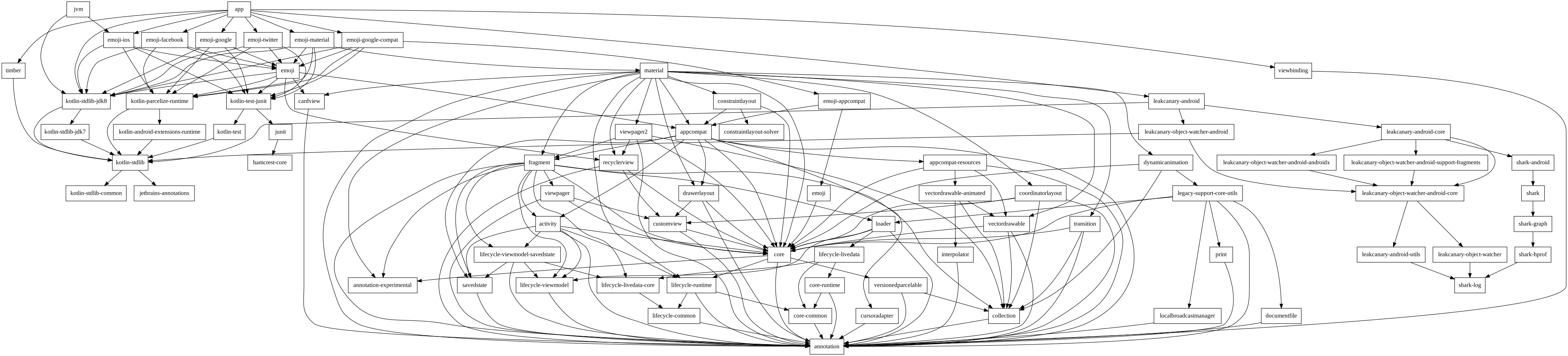 | 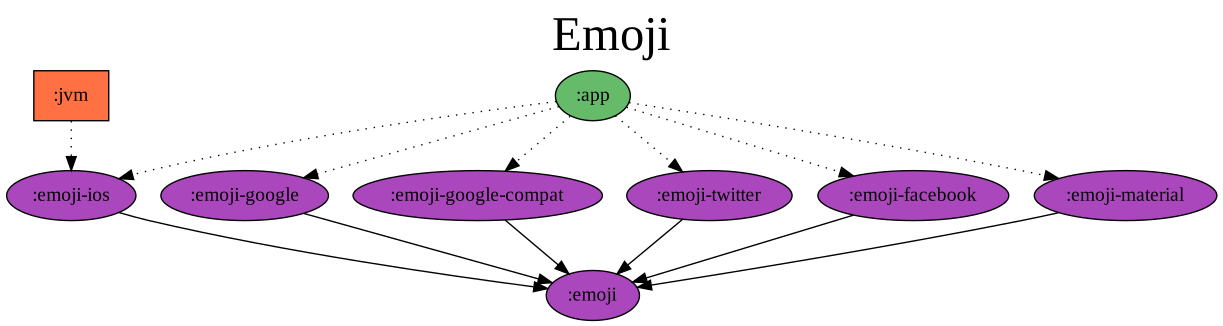 |
Generates a complete dependency graph in build/reports/dependency-graph/ | Generates a dependency graph of the project modules in build/reports/project-dependency-graph/ |
Source project: vanniktech/Emoji
The graphs are generated in .png, .svg & .dot format.
There are extension points to be able to generate graphs which only include some dependencies and their transitive ones. The trick is to hook a Generator in over the dependencyGraphGenerator extension. Note that this is extremely experimental and will likely change between releases. It's still fun though.
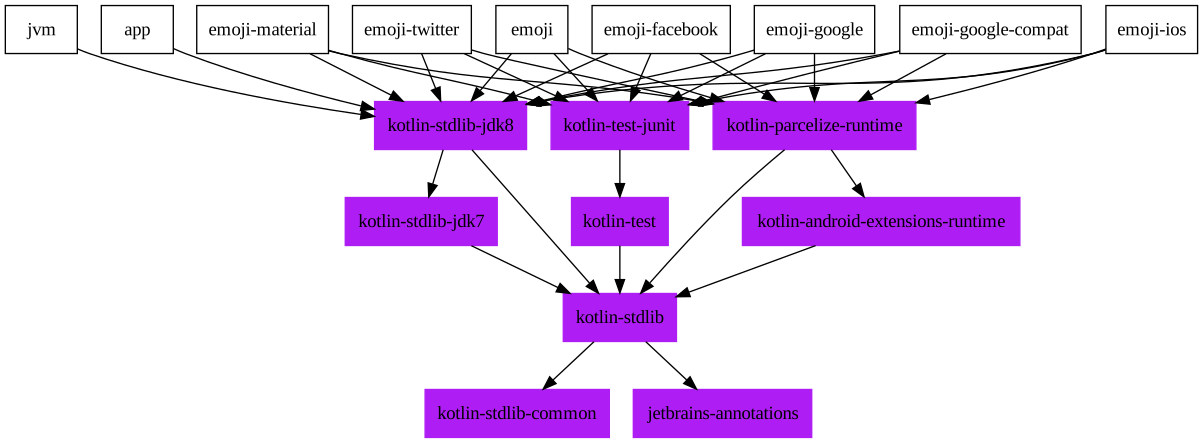
We only want to show which Jetbrains libraries we're using.
import com.vanniktech.dependency.graph.generator.DependencyGraphGeneratorPlugin
import guru.nidi.graphviz.attribute.Color
import guru.nidi.graphviz.attribute.Style

plugins.apply(DependencyGraphGeneratorPlugin)

dependencyGraphGenerator {
  generators {
    jetbrainsLibraries {
      include = { dependency -> dependency.getModuleGroup().startsWith("org.jetbrains") } // Only want Jetbrains.
      children = { true } // Include transitive dependencies.
      dependencyNode = { node, dependency -> node.add(Style.FILLED, Color.rgb("#AF1DF5")) } // Give them some color.
    }
  }
}
import com.vanniktech.dependency.graph.generator.DependencyGraphGeneratorExtension
import com.vanniktech.dependency.graph.generator.DependencyGraphGeneratorPlugin
import guru.nidi.graphviz.attribute.Color
import guru.nidi.graphviz.attribute.Style

plugins.apply(DependencyGraphGeneratorPlugin::class.java)

configure<DependencyGraphGeneratorExtension> {
  generators.create("jetbrainsLibraries") {
    include = { dependency -> dependency.moduleGroup.startsWith("org.jetbrains") } // Only want Jetbrains.
    children = { true } // Include transitive dependencies.
    dependencyNode = { node, dependency -> node.add(Style.FILLED, Color.rgb("#AF1DF5")) } // Give them some color.
  }
}
This will generate a new task generateDependencyGraphJetbrainsLibraries which when run will yield this graph:
Copyright (C) 2018 Vanniktech - Niklas Baudy
Licensed under the Apache License, Version 2.0
Overall
Maintained
Code review
Latest release
Releases this year
4,112 followers · starred Jan 2020
42 followers · starred Aug 2022
557 followers · starred Jul 2024
3,428 followers · starred Mar 2018
Gradle plugin that generates dependency graphs from your project.
See the codeGradle plugin that lets you visualize your dependencies in a graph.
Gradle 3.3 or higher is required.
buildscript {
  repositories {
    mavenCentral()
  }
  dependencies {
    classpath "com.vanniktech:gradle-dependency-graph-generator-plugin:0.8.0"
  }
}

apply plugin: "com.vanniktech.dependency.graph.generator"
Note that this plugin can be applied at the root of the project or at a specific project. Both cases will just work.
buildscript {
  repositories {
    maven { url "https://oss.sonatype.org/content/repositories/snapshots" }
  }
  dependencies {
    classpath "com.vanniktech:gradle-dependency-graph-generator-plugin:0.9.0-SNAPSHOT"
  }
}

apply plugin: "com.vanniktech.dependency.graph.generator"
By default, this plugin provides two reporting tasks:
generateDependencyGraph | generateProjectDependencyGraph |
|---|---|
| |
Generates a complete dependency graph in build/reports/dependency-graph/ | Generates a dependency graph of the project modules in build/reports/project-dependency-graph/ |
Source project: vanniktech/Emoji
The graphs are generated in .png, .svg & .dot format.
There are extension points to be able to generate graphs which only include some dependencies and their transitive ones. The trick is to hook a Generator in over the dependencyGraphGenerator extension. Note that this is extremely experimental and will likely change between releases. It's still fun though.
We only want to show which Jetbrains libraries we're using.
import com.vanniktech.dependency.graph.generator.DependencyGraphGeneratorPlugin
import guru.nidi.graphviz.attribute.Color
import guru.nidi.graphviz.attribute.Style

plugins.apply(DependencyGraphGeneratorPlugin)

dependencyGraphGenerator {
  generators {
    jetbrainsLibraries {
      include = { dependency -> dependency.getModuleGroup().startsWith("org.jetbrains") } // Only want Jetbrains.
      children = { true } // Include transitive dependencies.
      dependencyNode = { node, dependency -> node.add(Style.FILLED, Color.rgb("#AF1DF5")) } // Give them some color.
    }
  }
}
import com.vanniktech.dependency.graph.generator.DependencyGraphGeneratorExtension
import com.vanniktech.dependency.graph.generator.DependencyGraphGeneratorPlugin
import guru.nidi.graphviz.attribute.Color
import guru.nidi.graphviz.attribute.Style

plugins.apply(DependencyGraphGeneratorPlugin::class.java)

configure<DependencyGraphGeneratorExtension> {
  generators.create("jetbrainsLibraries") {
    include = { dependency -> dependency.moduleGroup.startsWith("org.jetbrains") } // Only want Jetbrains.
    children = { true } // Include transitive dependencies.
    dependencyNode = { node, dependency -> node.add(Style.FILLED, Color.rgb("#AF1DF5")) } // Give them some color.
  }
}
This will generate a new task generateDependencyGraphJetbrainsLibraries which when run will yield this graph:
Copyright (C) 2018 Vanniktech - Niklas Baudy
Licensed under the Apache License, Version 2.0
Overall
Maintained
Code review
Latest release
Releases this year
4,112 followers · starred Jan 2020
42 followers · starred Aug 2022
557 followers · starred Jul 2024
3,428 followers · starred Mar 2018



