
See what people are saying (1)
README
Timeline
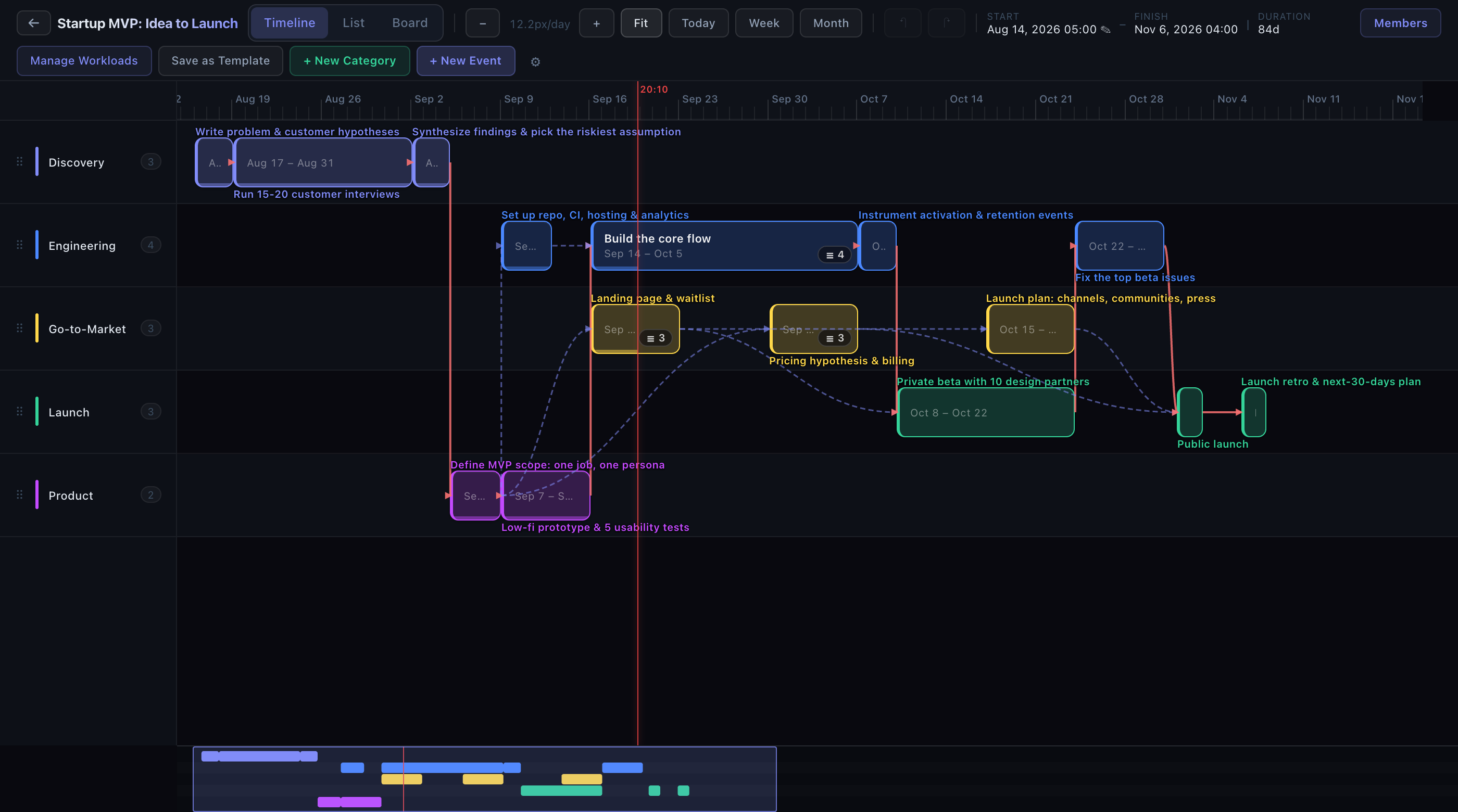
A self-hosted team project planner whose Gantt-style timeline is drawn on canvas, so dragging, zooming, dependency arrows, and the critical path stay smooth with hundreds of events on screen, including in Safari. Create a project, invite teammates with roles, and plan it on a surface you can drag, resize, zoom, and pan. Every project is isolated to its members.
Timeline is free and open source under the Apache 2.0 license. You can use it, modify it, and redistribute it, including commercially.
Try it in two minutes
Requires Docker. No other setup: no .env,
no database to install.
git clone https://github.com/vakahnke/Timeline.git
cd Timeline
SEED_DEMO=1 docker compose up --build
Open http://localhost:5173 and sign in as demo with password demo12345.
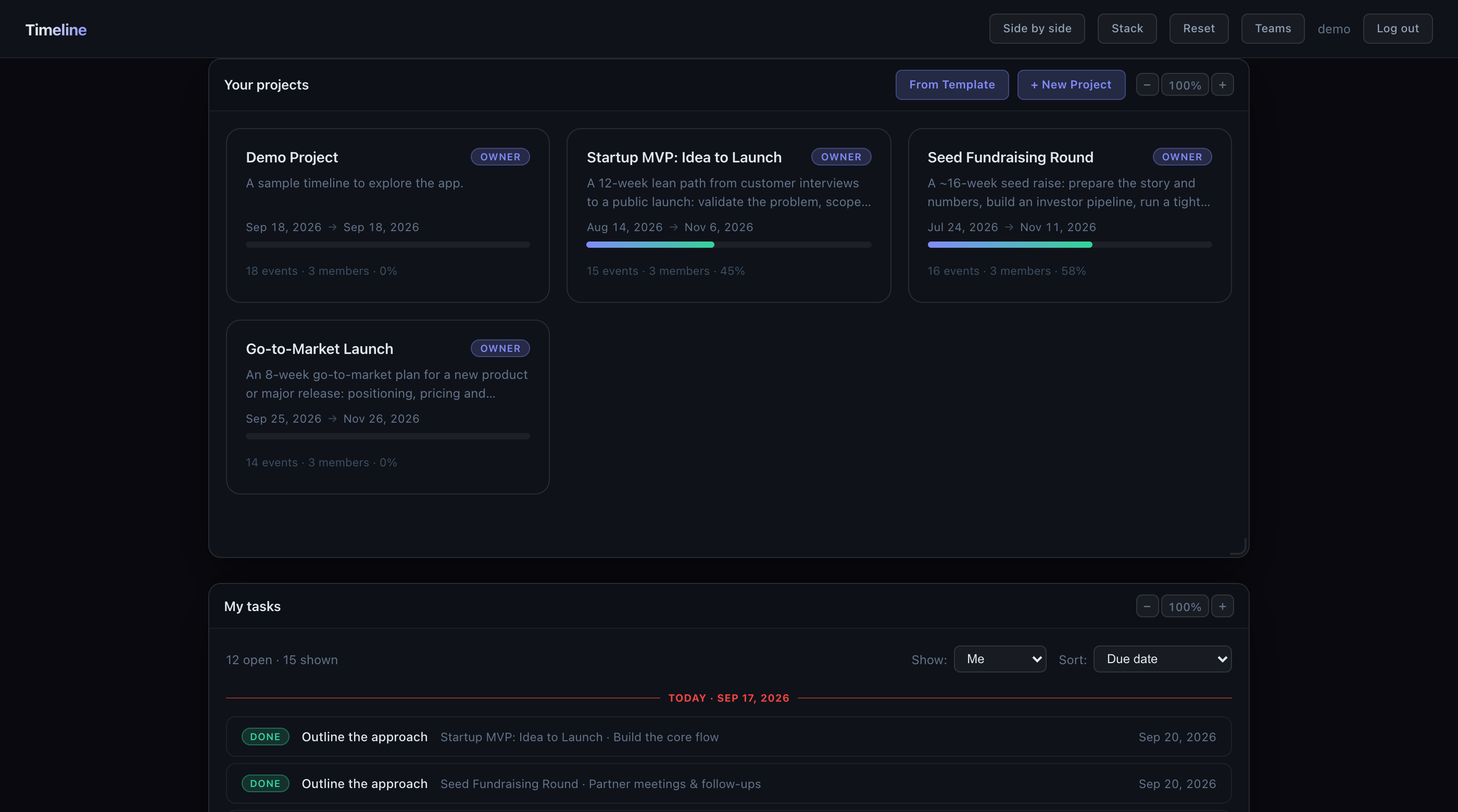
The seed creates three users and four projects, including two startup plans that
are already in flight so the timeline, board, and task panels have content.
| Username | Password | Role on the sample projects |
|---|---|---|
demo | demo12345 | Owner |
editor | demo12345 | Editor |
viewer | demo12345 | Viewer |
Leave SEED_DEMO off for an empty instance. The first account you register will
need approval in the Django admin unless you set REQUIRE_ACCOUNT_APPROVAL=0
(see .env.example).
What you get
The timeline. Hold Ctrl (⌘ on a Mac) and drag an event to move it, drag its
edge to resize it, or drag it onto another track to recategorize. A plain drag
pans the canvas, so you never nudge an event by accident. Zoom smoothly from months down to minutes with
Ctrl/⌘ + scroll or a pinch. Pan by dragging empty space. Press 0 to fit the
whole project. A minimap at the bottom shows the whole plan and lets you jump
around long projects. Dependencies draw as arrows and the critical path is
highlighted automatically.
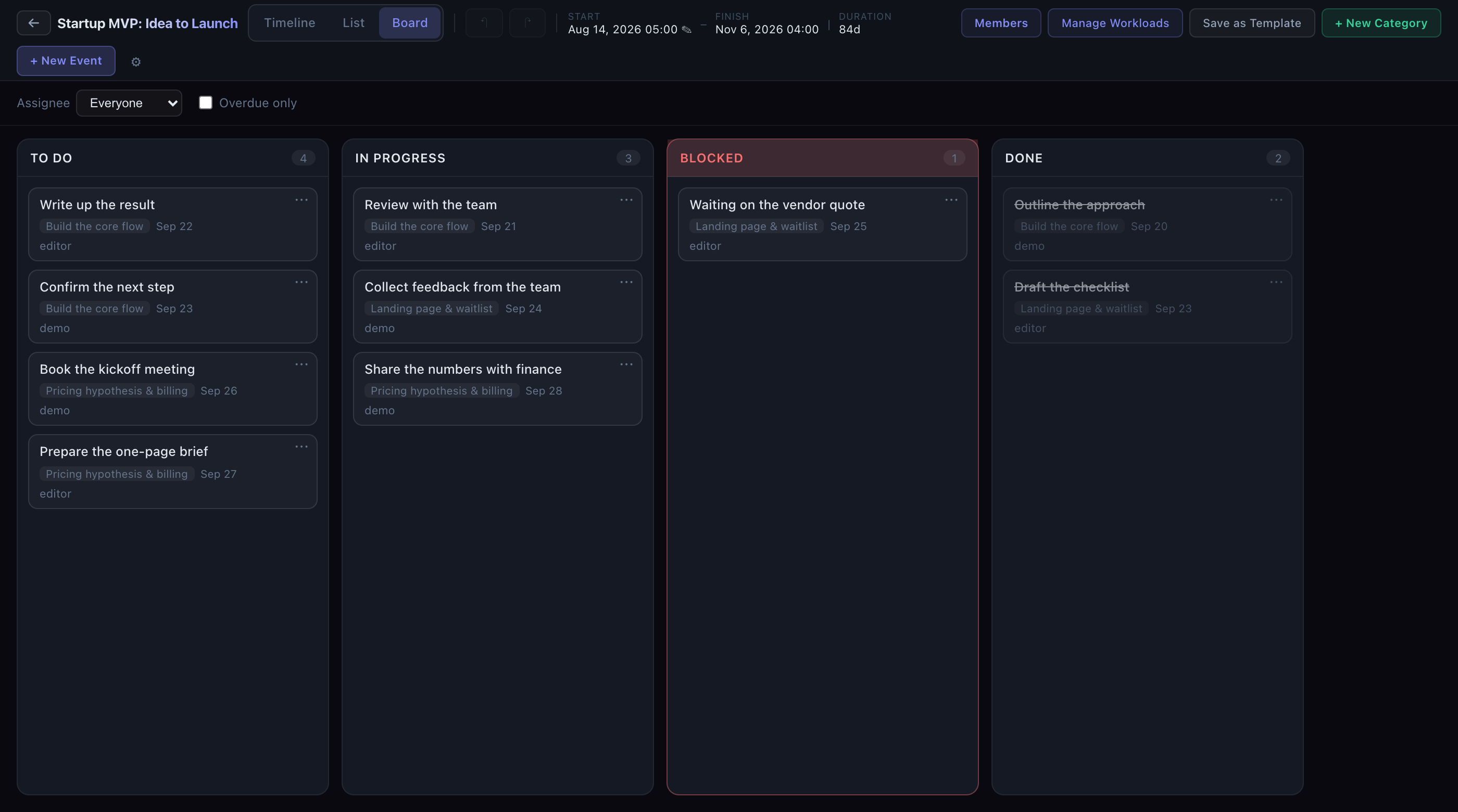
Three views of one plan. Timeline for planning, a board grouped by task status for day-to-day work, and a list view that works on a phone.
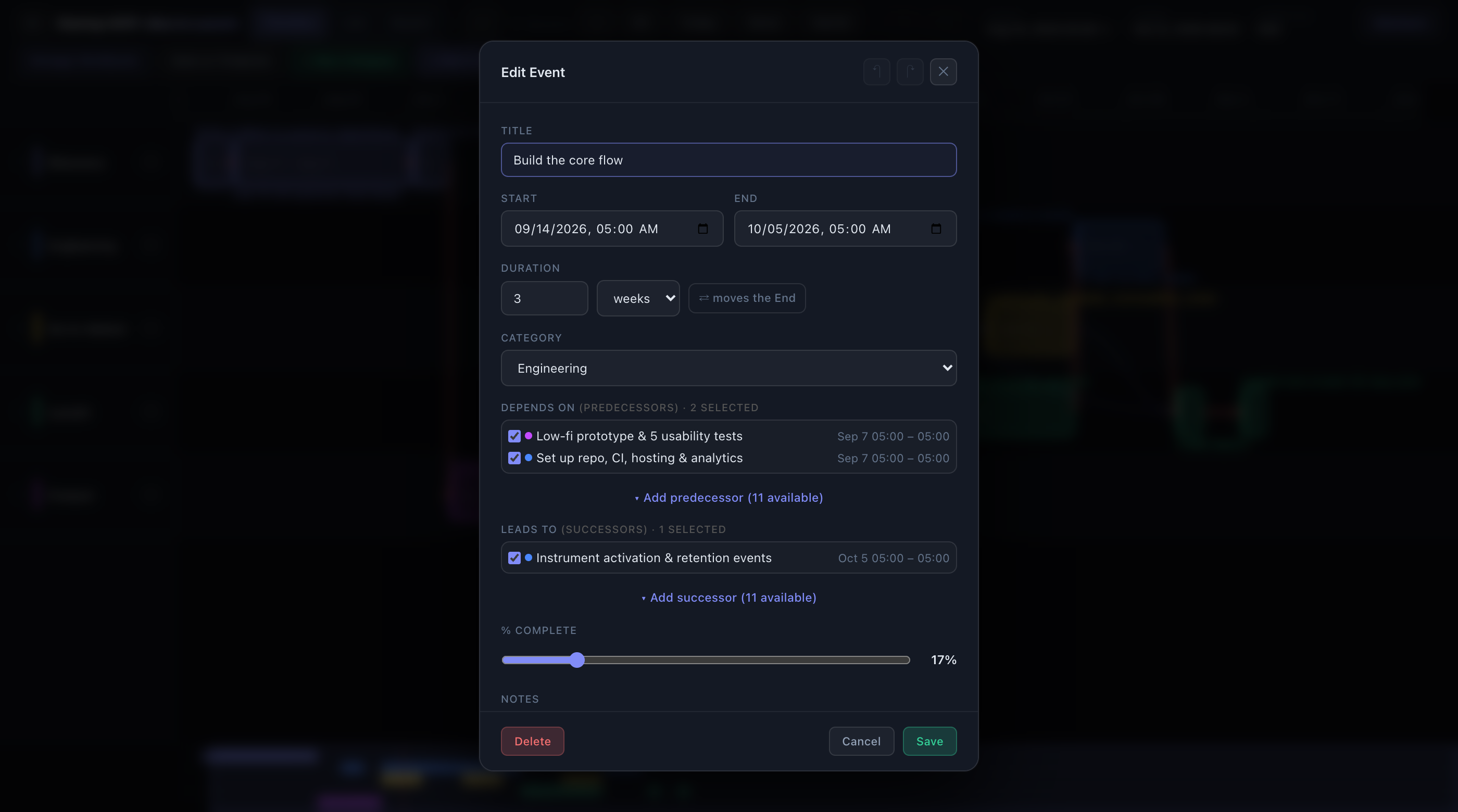
Events with substance. Each event has notes, a percent-complete slider, predecessors and successors you pick from a list, sub-tasks with owners and due dates, and a comment thread.
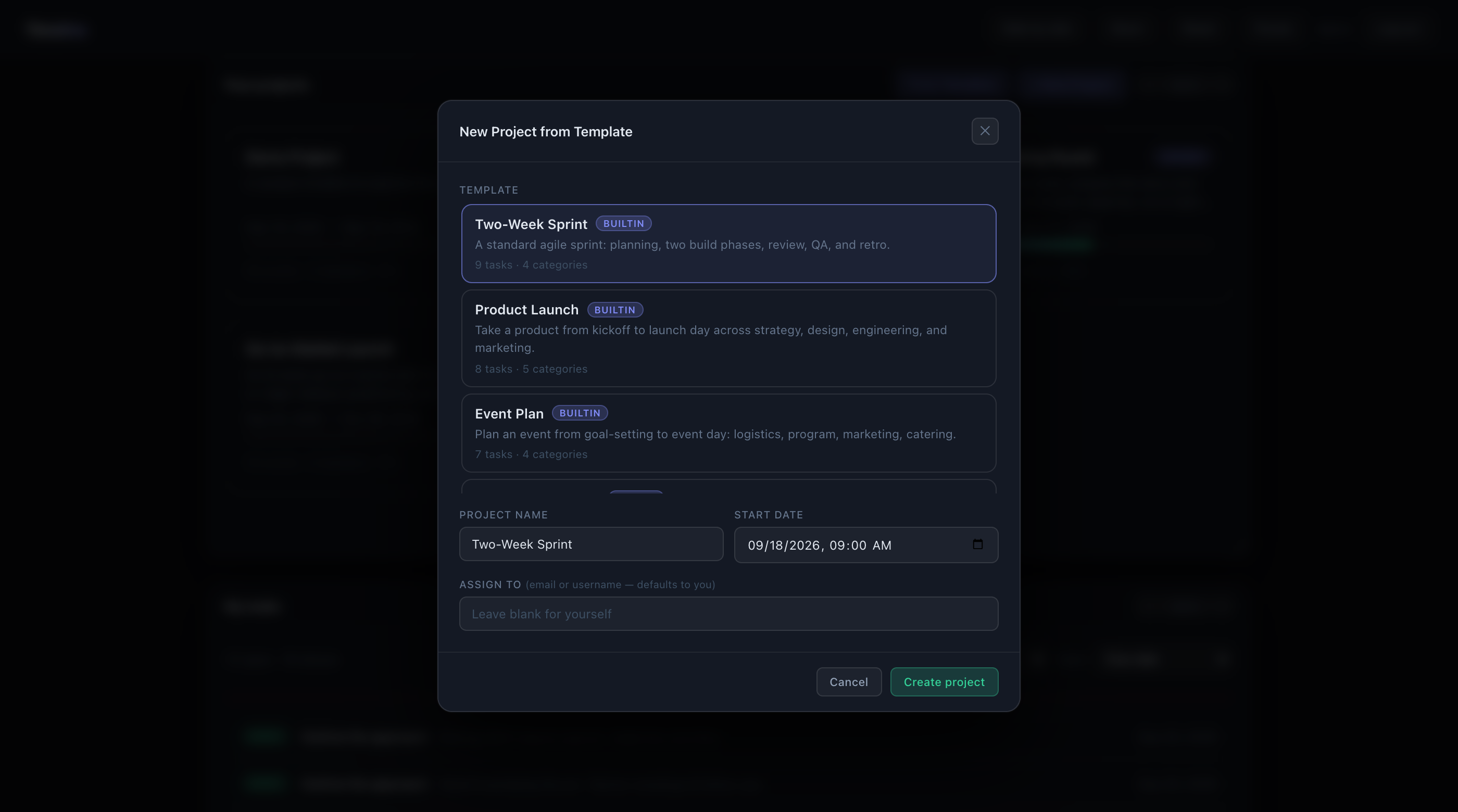
Templates. Start a project from a built-in plan anchored to a date you choose, or save any project of your own as a template. Built-ins cover business, engineering, and hobby projects:
- Business: Startup MVP: Idea to Launch, Seed Fundraising Round, Customer Discovery Sprint, Go-to-Market Launch, Hire a Key Role, Quarterly OKR Cycle, Incorporate & Set Up the Company
- Work: Two-Week Sprint, Product Launch, Event Plan, Custom Shop Build
- Hobby: Homebrew a Batch of Ale, Backyard Raised-Bed Garden, First Marathon, Solid-Wood Dining Table Build, Record & Release a Song, Write Your First Novel, Frame-Off Classic Car Restore, Hand-Knit Sweater, Open Water Diver Certification, Build a Steel-String Acoustic
Teams and roles. Every project is private to its members. Roles are owner, editor, commenter, and viewer. Reusable teams let you add a whole group to a project at one role in a click, and team membership changes flow through to projects live.
A dashboard that knows what you owe. Your projects with progress bars, and a "My tasks" list across all of them sorted by due date.
An API you can build on. Everything the UI does goes through a documented
REST API with JWT auth. Swagger UI lives at /api/docs/ and ReDoc at
/api/redoc/ on any running instance.
Documentation
- User Guide: accounts, projects, the timeline (gestures and shortcuts), templates, teams, roles, the admin console
- Architecture: tenancy model, data model, auth flow, frontend design, request flow
- Deployment: production stack, environment variables, nginx and gunicorn, CI
- AWS Deployment: a worked example on EC2 with Terraform, Cloudflare, and HTTPS
- Design docs: how larger features are designed before they are built, plus the designs for the board and permissions
Tech stack
| Layer | Stack |
|---|---|
| Backend | Python, Django 4.2, Django REST Framework, SimpleJWT, drf-spectacular, PostgreSQL 16 |
| Frontend | React 18, Vite 5, React Router 6, @dnd-kit for the board. Plain JSX and CSS, no UI kit |
| Infra | Docker Compose for dev and prod, nginx + gunicorn in prod, GitHub Actions CI |
The timeline canvas, dependency arrows, lane backgrounds, and minimap are drawn on HTML canvas rather than the DOM, which is what keeps panning and zooming smooth with hundreds of events, including on Safari.
Development
The dev stack runs Postgres, the Django API, and the Vite dev server with hot reload in containers. Source directories are mounted, so edits show up immediately.
docker compose up --build
| Surface | URL |
|---|---|
| App (hot reload) | http://localhost:5173 |
| API | http://localhost:8000/api/ |
| API docs (Swagger) | http://localhost:8000/api/docs/ |
| Django admin | http://localhost:8000/admin/ |
Postgres is published on host port 5433 so it does not collide with a local
Postgres. Copy .env.example to .env if you want to change any setting; the
defaults work without it.
Useful commands:
docker compose exec backend python manage.py load_sample          # seed demo users and projects
docker compose exec backend python manage.py load_sample --clear  # reseed from scratch
docker compose exec backend python manage.py createsuperuser      # for /admin
docker compose exec backend python manage.py test                 # backend test suite
CI runs on every push and pull request: Django system checks, a missing-migration
check, migrations and tests against a Postgres service, and a production build of
the frontend. See .github/workflows/ci.yml.
Production
The production stack is a single origin behind nginx: it serves the built SPA and
proxies /api, /admin, and static files to gunicorn, with Postgres alongside,
all in Docker.
cp .env.example .env    # set DJANGO_DEBUG=0, a real DJANGO_SECRET_KEY, your domain, RUN_COLLECTSTATIC=1
docker compose -f docker-compose.prod.yml up -d --build
Deployment covers the environment variables, TLS options, and backups. AWS Deployment is a complete worked example with Terraform.
API overview
All endpoints take a JWT in the Authorization header. The live schema at
/api/docs/ is the reference; this is the shape.
| Method | Path | Notes |
|---|---|---|
| POST | /api/auth/register/, /api/auth/token/, /api/auth/token/refresh/, /api/auth/logout/ | register, sign in, refresh, revoke |
| GET | /api/me/ | current user |
| GET/POST/PATCH/DELETE | /api/projects/, /api/projects/<id>/ | your projects |
| GET/POST/PATCH/DELETE | /api/projects/<id>/members/ | members (owner only) |
| GET/POST/PATCH/DELETE | /api/projects/<id>/events/, /api/projects/<id>/categories/ | viewers read, editors write |
| POST | /api/projects/<id>/events/bulk/ | bulk-create events |
| GET/POST/DELETE | /api/templates/, /api/templates/instantiate/ | built-in and saved templates |
| GET/POST/PATCH/DELETE | /api/teams/, /api/teams/<id>/members/ | reusable teams |
| POST | /api/projects/<id>/add-team/ | add a team at a role (owner only) |
Project structure
Timeline/
├── backend/                 # Django + DRF
│   ├── timeline_project/     # settings, root urls, wsgi
│   ├── projects/             # tenancy: Project, Membership, Team, Template, auth, permissions
│   ├── events/               # timeline domain: Category, Event, Task, Comment, load_sample
│   └── Dockerfile · entrypoint.sh · requirements.txt
├── frontend/                # React + Vite SPA
│   └── src/
│       ├── pages/            # Login, Register, ProjectsDashboard, ProjectTimeline, Teams
│       ├── components/       # Timeline, EventBlock, Minimap, Board, Toolbar, modals and panels
│       ├── auth/ · routes/ · ui/
│       └── api.js            # JWT client with single-flight token refresh
├── nginx/                   # prod reverse proxy + SPA serving
├── terraform/               # optional AWS infrastructure
├── docker-compose.yml       # dev stack
├── docker-compose.prod.yml  # prod stack
└── docs/                    # user guide, architecture, deployment, design docs
index.html at the repo root is the original single-file prototype the app grew
out of. It is kept for reference and is not part of the build.
Contributing
Contributions are welcome, from typo fixes to new views. The short version:
- Fork the repo and create a branch from
main. - Run the dev stack and make your change. Add or update tests in
backend/when you touch the API or data model. - Make sure
python manage.py testpasses and the frontend builds (npm run buildinfrontend/). CI runs the same checks on your pull request. - Open a pull request that says what changed and why. Screenshots help for anything visual.
For a larger feature, open an issue or a design doc first. The design docs README describes the process: a short document that captures the current state, prior art, and the proposed design, so the discussion happens before the code.
Some directions that would be good contributions, roughly in order of effort:
- iCalendar export of a project's events (RFC 5545)
- Import and export for Microsoft Project XML
- Manual card ordering within board columns
- Guest access for people outside the team, read-only, without an account
- A schedule-health check over the dependency graph: missing links, dangling tasks, unusually high float
Security
If you find a vulnerability, please report it privately rather than in a public issue. Use GitHub's "Report a vulnerability" button on the Security tab of this repository. SECURITY.md has the details.
License
Apache License 2.0. See LICENSE and NOTICE. Third-party dependencies and their licenses are listed in THIRD_PARTY_LICENSES.md.
Contributors

109 commits
Similar repos


Languages
Python
42.3%
JavaScript
38.2%
CSS
11.3%
HTML
6.3%
HCL
1.2%
See what people are saying (1)
README
Timeline
A self-hosted team project planner whose Gantt-style timeline is drawn on canvas, so dragging, zooming, dependency arrows, and the critical path stay smooth with hundreds of events on screen, including in Safari. Create a project, invite teammates with roles, and plan it on a surface you can drag, resize, zoom, and pan. Every project is isolated to its members.
Timeline is free and open source under the Apache 2.0 license. You can use it, modify it, and redistribute it, including commercially.
Try it in two minutes
Requires Docker. No other setup: no .env,
no database to install.
git clone https://github.com/vakahnke/Timeline.git
cd Timeline
SEED_DEMO=1 docker compose up --build
Open http://localhost:5173 and sign in as demo with password demo12345.
The seed creates three users and four projects, including two startup plans that
are already in flight so the timeline, board, and task panels have content.
| Username | Password | Role on the sample projects |
|---|---|---|
demo | demo12345 | Owner |
editor | demo12345 | Editor |
viewer | demo12345 | Viewer |
Leave SEED_DEMO off for an empty instance. The first account you register will
need approval in the Django admin unless you set REQUIRE_ACCOUNT_APPROVAL=0
(see .env.example).
What you get
The timeline. Hold Ctrl (⌘ on a Mac) and drag an event to move it, drag its
edge to resize it, or drag it onto another track to recategorize. A plain drag
pans the canvas, so you never nudge an event by accident. Zoom smoothly from months down to minutes with
Ctrl/⌘ + scroll or a pinch. Pan by dragging empty space. Press 0 to fit the
whole project. A minimap at the bottom shows the whole plan and lets you jump
around long projects. Dependencies draw as arrows and the critical path is
highlighted automatically.
Three views of one plan. Timeline for planning, a board grouped by task status for day-to-day work, and a list view that works on a phone.
Events with substance. Each event has notes, a percent-complete slider, predecessors and successors you pick from a list, sub-tasks with owners and due dates, and a comment thread.
Templates. Start a project from a built-in plan anchored to a date you choose, or save any project of your own as a template. Built-ins cover business, engineering, and hobby projects:
- Business: Startup MVP: Idea to Launch, Seed Fundraising Round, Customer Discovery Sprint, Go-to-Market Launch, Hire a Key Role, Quarterly OKR Cycle, Incorporate & Set Up the Company
- Work: Two-Week Sprint, Product Launch, Event Plan, Custom Shop Build
- Hobby: Homebrew a Batch of Ale, Backyard Raised-Bed Garden, First Marathon, Solid-Wood Dining Table Build, Record & Release a Song, Write Your First Novel, Frame-Off Classic Car Restore, Hand-Knit Sweater, Open Water Diver Certification, Build a Steel-String Acoustic
Teams and roles. Every project is private to its members. Roles are owner, editor, commenter, and viewer. Reusable teams let you add a whole group to a project at one role in a click, and team membership changes flow through to projects live.
A dashboard that knows what you owe. Your projects with progress bars, and a "My tasks" list across all of them sorted by due date.
An API you can build on. Everything the UI does goes through a documented
REST API with JWT auth. Swagger UI lives at /api/docs/ and ReDoc at
/api/redoc/ on any running instance.
Documentation
- User Guide: accounts, projects, the timeline (gestures and shortcuts), templates, teams, roles, the admin console
- Architecture: tenancy model, data model, auth flow, frontend design, request flow
- Deployment: production stack, environment variables, nginx and gunicorn, CI
- AWS Deployment: a worked example on EC2 with Terraform, Cloudflare, and HTTPS
- Design docs: how larger features are designed before they are built, plus the designs for the board and permissions
Tech stack
| Layer | Stack |
|---|---|
| Backend | Python, Django 4.2, Django REST Framework, SimpleJWT, drf-spectacular, PostgreSQL 16 |
| Frontend | React 18, Vite 5, React Router 6, @dnd-kit for the board. Plain JSX and CSS, no UI kit |
| Infra | Docker Compose for dev and prod, nginx + gunicorn in prod, GitHub Actions CI |
The timeline canvas, dependency arrows, lane backgrounds, and minimap are drawn on HTML canvas rather than the DOM, which is what keeps panning and zooming smooth with hundreds of events, including on Safari.
Development
The dev stack runs Postgres, the Django API, and the Vite dev server with hot reload in containers. Source directories are mounted, so edits show up immediately.
docker compose up --build
| Surface | URL |
|---|---|
| App (hot reload) | http://localhost:5173 |
| API | http://localhost:8000/api/ |
| API docs (Swagger) | http://localhost:8000/api/docs/ |
| Django admin | http://localhost:8000/admin/ |
Postgres is published on host port 5433 so it does not collide with a local
Postgres. Copy .env.example to .env if you want to change any setting; the
defaults work without it.
Useful commands:
docker compose exec backend python manage.py load_sample          # seed demo users and projects
docker compose exec backend python manage.py load_sample --clear  # reseed from scratch
docker compose exec backend python manage.py createsuperuser      # for /admin
docker compose exec backend python manage.py test                 # backend test suite
CI runs on every push and pull request: Django system checks, a missing-migration
check, migrations and tests against a Postgres service, and a production build of
the frontend. See .github/workflows/ci.yml.
Production
The production stack is a single origin behind nginx: it serves the built SPA and
proxies /api, /admin, and static files to gunicorn, with Postgres alongside,
all in Docker.
cp .env.example .env    # set DJANGO_DEBUG=0, a real DJANGO_SECRET_KEY, your domain, RUN_COLLECTSTATIC=1
docker compose -f docker-compose.prod.yml up -d --build
Deployment covers the environment variables, TLS options, and backups. AWS Deployment is a complete worked example with Terraform.
API overview
All endpoints take a JWT in the Authorization header. The live schema at
/api/docs/ is the reference; this is the shape.
| Method | Path | Notes |
|---|---|---|
| POST | /api/auth/register/, /api/auth/token/, /api/auth/token/refresh/, /api/auth/logout/ | register, sign in, refresh, revoke |
| GET | /api/me/ | current user |
| GET/POST/PATCH/DELETE | /api/projects/, /api/projects/<id>/ | your projects |
| GET/POST/PATCH/DELETE | /api/projects/<id>/members/ | members (owner only) |
| GET/POST/PATCH/DELETE | /api/projects/<id>/events/, /api/projects/<id>/categories/ | viewers read, editors write |
| POST | /api/projects/<id>/events/bulk/ | bulk-create events |
| GET/POST/DELETE | /api/templates/, /api/templates/instantiate/ | built-in and saved templates |
| GET/POST/PATCH/DELETE | /api/teams/, /api/teams/<id>/members/ | reusable teams |
| POST | /api/projects/<id>/add-team/ | add a team at a role (owner only) |
Project structure
Timeline/
├── backend/                 # Django + DRF
│   ├── timeline_project/     # settings, root urls, wsgi
│   ├── projects/             # tenancy: Project, Membership, Team, Template, auth, permissions
│   ├── events/               # timeline domain: Category, Event, Task, Comment, load_sample
│   └── Dockerfile · entrypoint.sh · requirements.txt
├── frontend/                # React + Vite SPA
│   └── src/
│       ├── pages/            # Login, Register, ProjectsDashboard, ProjectTimeline, Teams
│       ├── components/       # Timeline, EventBlock, Minimap, Board, Toolbar, modals and panels
│       ├── auth/ · routes/ · ui/
│       └── api.js            # JWT client with single-flight token refresh
├── nginx/                   # prod reverse proxy + SPA serving
├── terraform/               # optional AWS infrastructure
├── docker-compose.yml       # dev stack
├── docker-compose.prod.yml  # prod stack
└── docs/                    # user guide, architecture, deployment, design docs
index.html at the repo root is the original single-file prototype the app grew
out of. It is kept for reference and is not part of the build.
Contributing
Contributions are welcome, from typo fixes to new views. The short version:
- Fork the repo and create a branch from
main. - Run the dev stack and make your change. Add or update tests in
backend/when you touch the API or data model. - Make sure
python manage.py testpasses and the frontend builds (npm run buildinfrontend/). CI runs the same checks on your pull request. - Open a pull request that says what changed and why. Screenshots help for anything visual.
For a larger feature, open an issue or a design doc first. The design docs README describes the process: a short document that captures the current state, prior art, and the proposed design, so the discussion happens before the code.
Some directions that would be good contributions, roughly in order of effort:
- iCalendar export of a project's events (RFC 5545)
- Import and export for Microsoft Project XML
- Manual card ordering within board columns
- Guest access for people outside the team, read-only, without an account
- A schedule-health check over the dependency graph: missing links, dangling tasks, unusually high float
Security
If you find a vulnerability, please report it privately rather than in a public issue. Use GitHub's "Report a vulnerability" button on the Security tab of this repository. SECURITY.md has the details.
License
Apache License 2.0. See LICENSE and NOTICE. Third-party dependencies and their licenses are listed in THIRD_PARTY_LICENSES.md.
Similar repos
Contributors
109 commits
Languages
Python
42.3%
JavaScript
38.2%
CSS
11.3%
HTML
6.3%
HCL
1.2%