[NeurIPS 2026 E&D] 𝗣𝗶𝘁𝗰𝗵𝗕𝗲𝗻𝗰𝗵: Measuring Pitch Hearing in Audio-Language Models
Python
1
3 commits
updated Oct 7, 2026
Milan Liessens Dujardin1* · Song-Ze Yu1* · Craver Corbyn Thomas-Smith2 · David M. Chan1 · Karina Nguyen2
1University of California, Berkeley · 2Thoughtful Lab · *Equal contribution




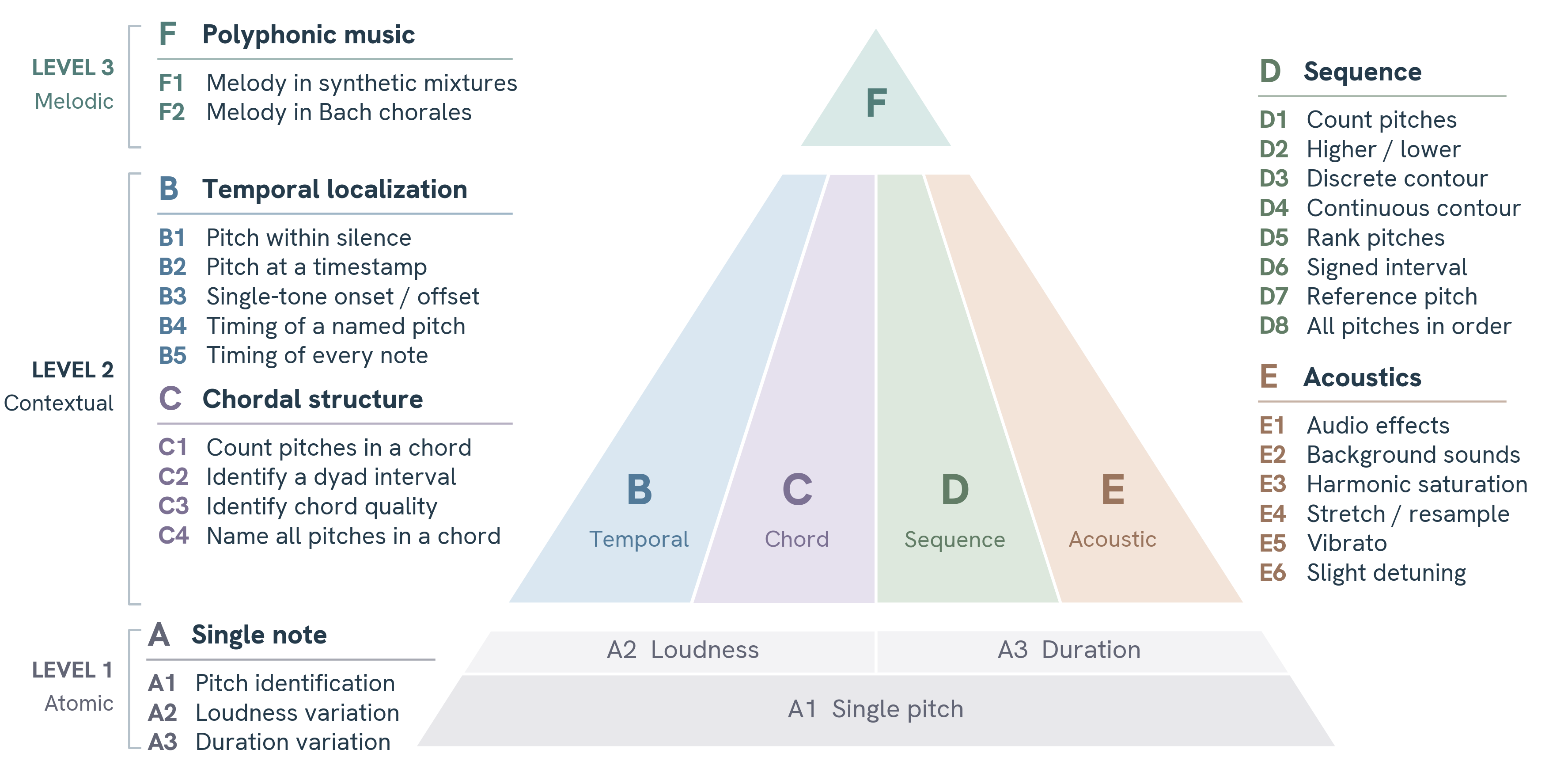
Benchmark suite for evaluating pitch and acoustic perception in audio language models (ALMs). Probes pitch identification, temporal localisation, chord recognition, melodic contour, robustness to audio effects, and more. The paper comparison uses MIDI, SPN and Hz; D8/F1/F2 use Ordered Note F1 and other tasks use accuracy.
Table 1: all 28 tasks × 8 models is the canonical paper comparison, including DSP and Basic Pitch. CSV, LaTeX, and source mapping are generated together. The reproduction guide documents the metrics, sample coverage, and underlying evidence.
PYTHONPATH=src python -m pitchbench.analysis.table1 --check
This checks the committed table against its evidence without model calls, audio,
or third-party Python packages. Omit --check to regenerate all formats.
Regenerate Figures 1–4 with the paper layout:
PYTHONPATH=src python -m pitchbench.analysis.publication
The figure generator uses saved evidence and bundled fonts; it makes no model calls.
Skip this step when evaluating an existing Parquet dataset.
| Platform | Command |
|---|---|
| Linux / WSL | sudo apt install fluidsynth |
| macOS | brew install fluid-synth |
| Windows | choco install fluidsynth or download from fluidsynth.org |
A GM soundfont is also required. Place any .sf2 or .sf3 in data/soundfonts/ — no further configuration needed.
Linux / WSL:
sudo apt install fluid-soundfont-gm
mkdir -p data/soundfonts
cp /usr/share/sounds/sf2/FluidR3_GM.sf2 data/soundfonts/
macOS / cross-platform:
curl -L "http://ftp.debian.org/debian/pool/main/f/fluid-soundfont/fluid-soundfont-gm_3.1-5.3_all.deb" \
     -o /tmp/fluid.deb
cd /tmp && ar x fluid.deb && tar xf data.tar.* ./usr/share/sounds/sf2/FluidR3_GM.sf2
mkdir -p data/soundfonts && cp /tmp/usr/share/sounds/sf2/FluidR3_GM.sf2 data/soundfonts/
SF2 resolution order: PITCHBENCH_SF2 env var → data/soundfonts/ → /usr/share/sounds/sf2/FluidR3_GM.sf2.
python3 -m venv .venv
source .venv/bin/activate        # Linux / macOS
# .venv\Scripts\activate         # Windows
pip install -e .               # install the version in this checkout
Use the source installation above for the scoring protocol and reproduction commands documented here.
For development tools:
uv sync --extra dev # installs pytest + pytest-mock
Requires Python ≥ 3.12.
OpenRouter — add to .env:
OPENROUTER_KEY=sk-or-...
Use --model openrouter/<provider>/<model>. Some models may require a ~ prefix, e.g. openrouter/~google/gemini-flash-latest.
DashScope — add to .env:
DASHSCOPE_API_KEY=sk-...
Use --model dashscope/<model>.
Local server — use an OpenAI-compatible audio endpoint:
--model http://localhost:8001 --name my-local-model
PitchBench separates stimulus generation from model evaluation. Generate once, evaluate any number of models.
pitchbench generate paper
pitchbench generate a          # single category
pitchbench generate a1         # single experiment
Writes WAV files and a Parquet dataset to data/generated/<exp>/. Re-running is safe: existing rows are skipped.
data/generated/pitchbench_a1_single_pitch_id/
  *.wav               # one file per condition
  _questions.parquet  # HuggingFace-compatible schema
  _questions.csv      # human-readable companion
pitchbench --list
pitchbench evaluate paper --model openrouter/<provider>/<model>
pitchbench evaluate a1  --model openrouter/<provider>/<model>

# Quick test (20 stimuli, stratified)
pitchbench evaluate a1  --model openrouter/<provider>/<model> --sample-n 20 --sample-seed 0
Results land in results/evaluation/<model_slug>/<YYYYMMDD_HHMMSS>/.
paper selects exactly the 28 Table 1 tasks and queries MIDI/SPN/Hz only.
It rejects missing tasks before reporting overall. all includes extra tasks
such as Y1 and the additional reference variants.
Evaluation uses the stored stimuli; it does not require local audio synthesis
or regenerate conditions to filter out instruments. Condition filtering belongs
to analyze presets. D8/F1/F2 export Ordered Note F1 through the task summary,
CSV and overall score. B3/B4/B5 export their timing accuracy as task-level scores;
the paper overall is the equal-weight mean of all 28 tasks. Numeric summaries
and CSVs retain unrounded scores; rounding is applied only for display.
In tmux (recommended for long runs):
tmux new-session -d -s mymodel "source .venv/bin/activate && \
  pitchbench evaluate paper --model openrouter/<provider>/<model> 2>&1 | tee logs/eval_mymodel_\$(date +%Y%m%d_%H%M%S).log"
Without any model specification, the system defaults to the localhost:8001 endpoint. See the Audio Flamingo Next server example for a local backend.
pitchbench analyze --preset q1 --model openrouter/<provider>/<model>
Writes to results/analysis/<model_slug>/<run>/ and generates a summary of the ablations.
Batch (multiple models):
python -m pitchbench.analysis.run_analysis q1 \
    --models openrouter/<provider>/<model1> \
             openrouter/<provider>/<model2> \
             dashscope/<model3>
results/evaluation/<model_slug>/<YYYYMMDD_HHMMSS>/
  pitchbench_<exp>/
    results_<model>.json      # metadata, git commit, per-item responses
    results_<model>.csv       # one row per stimulus
    accuracies_<model>.csv    # aggregate metrics
    plots/                    # per-format CI plots
results/evaluation/summary/ is populated automatically after each run (aggregated_accuracies.csv, accuracy plots by instrument / notation / note).
The paper benchmark contains 28 tasks across categories A–F. The package also provides four optional tasks: D7b, D7c, D7d, and Y1.
| ID | Script | What it tests |
|---|---|---|
| a1 | single_pitch_id | Baseline: identify one sustained note across all sources and formats |
| a2 | single_pitch_by_loudness | Pitch accuracy under different loudness levels |
| a3 | single_pitch_by_duration | Pitch accuracy under different durations |
| ID | Script | What it tests |
|---|---|---|
| b1 | single_pitch_within_silence | Hidden note in a silent clip |
| b2 | pitch_at_timestamp | Which pitch is playing at a queried timestamp in a multi-note sequence |
| b3 | timestamp_single_pitch | Detect when a single note starts/ends |
| b4 | timestamp_specific_pitch | Onset/offset of a named target pitch among distractors |
| b5 | timestamp_multiple_pitches | Full timing transcription of all notes in a sequence |
| ID | Script | What it tests |
|---|---|---|
| c1 | chord_count_pitches | Count distinct pitches in a chord (dyads, triads, 7ths) |
| c2 | chord_dyad_interval | Name the interval (semitone count) between two simultaneous tones |
| c3 | chord_quality | Name chord quality and/or root+quality from a sounding chord |
| c4 | chord_pitches | List every note in a chord |
| ID | Script | What it tests |
|---|---|---|
| d1 | sequence_count_pitches | Count distinct pitches in a sequential passage |
| d2 | dyad_lower_higher_difference | Binary higher/lower judgment |
| d3 | contour_discrete | Output up/down tokens for each step-wise transition |
| d4 | contour_continuous | Output up/down tokens for each monotonic movement |
| d5 | sequence_ranking_by_pitch | Rank sequential tones from lowest to highest |
| d6 | sequence_dyad_interval | Name the melodic interval between two sequential notes |
| d7a | pitch_with_reference | Pitch identification given a labelled reference tone (variant used in the evaluation) |
| d7b | pitch_with_reference_split | Same, but reference and target in separate audio clips |
| d7c | pitch_with_reference | Variant with different set of pitches |
| d7d | pitch_with_reference_split | Split-clip variant with a different set of pitches |
| d8 | sequence_pitches | Transcribe all pitches in a note sequence in order |
| ID | Script | What it tests |
|---|---|---|
| e1 | audio_effects | Pitch under effects like high-pass/low-pass filtering, distortion, reverb, chorus |
| e2 | background | Pitch over real-world backgrounds (crowd, rain, bells, street) at varying loudness levels |
| e3 | harmonic_saturation | Pitch with harmonic saturation / overdrive |
| e4 | time_stretching | Pitch with time-stretching (speed change without pitch shift) |
| e5 | vibrato | Pitch with vibrato at varying rates and depths |
| e6 | slightly_off | Detuned tones (up to 45 % of a semitone) |
| ID | Script | What it tests |
|---|---|---|
| f1 | melodic_line_atonal | Transcribe one designated voice from 2–3 simultaneous synthetic voices (atonal) |
| f2 | melodic_line_tonal | Same task over tonal melodic material from Bach chorales |
| ID | Script | What it tests |
|---|---|---|
| y1 | single_pitch_id_mcq | MCQ variant of a1: pick the correct pitch from labelled options |
sine, sawtooth, square, trianglepiano, electric_keyboard, guitar, flute, trumpet, trombone, clarinet, oboe, violin, cello, organ, bass, synth_lead, synth_pad, voicewhite_noise synthesised; real recordings in data/preloaded/background/<name>.mp3src/pitchbench/
config.py # runtime constants and env wiring
configs/
benchmark_config.py # paper-locked data-gen parameters
analysis_config.py # analysis-mode presets/overrides
plot_config.py # labels/colors for figures
user_config.py # user-overridable settings
sound/
engine.py # central audio synthesis engine
model/
query.py # ALM query facade (local/OpenRouter/DashScope)
dispatcher.py # provider-aware request dispatch
cost.py # API usage/cost tracking
experiments/
run.py # pitchbench CLI
scripts/ # one .py per experiment (32 total)
helpers/
cat_a.py ... cat_f.py # per-category generate + evaluate helpers
audit.py # condition/result audit utilities
data.py # Parquet I/O
music.py # pitch/notation conversion helpers
plots.py # experiment plotting helpers
results.py # result writers, aggregators, summary CSVs
sampling.py # stratified sampling
setup.py # experiment setup helpers
timing_layout.py # timing-grid utilities
analysis/
analyze.py # core analysis pipeline
a1.py # A1 line plots + heatmaps
ablation.py # ablation summaries
combine.py # combine multi-run CSV outputs
overview.py # overview plots/tables
run_analysis.py # batch analysis CLI
replay.py # canonical 28-task raw-answer replay
table1.py # Table 1 exports from verified evidence
publication.py # generate manuscript Figures 1–4
fonts/ # bundled publication fonts and license
baselines/
evaluation.py # frozen-dataset baseline runner
runtime.py # DSP and Basic Pitch adapters
data/
preloaded/ # background recordings (gitignored)
generated/ # created by `pitchbench generate`
configs/
paper_baselines.yaml # reusable baseline recipe
baselines-requirements.txt # separate pinned ONNX inference environment
paper/
evaluation/ # compressed saved ALM answers (replay inputs)
analysis/ # separate diagnostic sample and numeric evidence
figures-and-tables/ # publication tables and A1 figures
results/
table1-recomputed/ # full-precision paper scores and provenance
Set PITCHBENCH_ROOT to override the project root for data/ and results/.
| Variable | Default | Purpose |
|---|---|---|
PITCHBENCH_ROOT | . | Project root (data/, results/) |
PITCHBENCH_SF2 | auto-discovered | GM soundfont path override |
PITCHBENCH_LOCAL_URL | http://localhost:8001 | Default local model server |
OPENROUTER_KEY | — | OpenRouter API key |
PITCHBENCH_CONCURRENCY_OPENROUTER | 20 | Max parallel OpenRouter calls |
PITCHBENCH_CONCURRENCY_DASHSCOPE | 10 | Max parallel DashScope calls |
LOCAL_CONCURRENCY | 2 | Max parallel local server calls |
uv run pytest
Tests cover CLI resolution, Parquet I/O, result aggregation, sequence scoring, baseline adapters, Table 1 consistency, sampling, and API routing. No network calls or audio generation required.
MIT — see LICENSE.
[NeurIPS 2026 E&D] 𝗣𝗶𝘁𝗰𝗵𝗕𝗲𝗻𝗰𝗵: Measuring Pitch Hearing in Audio-Language Models
Python
1
3 commits
updated Oct 7, 2026
Milan Liessens Dujardin1* · Song-Ze Yu1* · Craver Corbyn Thomas-Smith2 · David M. Chan1 · Karina Nguyen2
1University of California, Berkeley · 2Thoughtful Lab · *Equal contribution
Benchmark suite for evaluating pitch and acoustic perception in audio language models (ALMs). Probes pitch identification, temporal localisation, chord recognition, melodic contour, robustness to audio effects, and more. The paper comparison uses MIDI, SPN and Hz; D8/F1/F2 use Ordered Note F1 and other tasks use accuracy.
Table 1: all 28 tasks × 8 models is the canonical paper comparison, including DSP and Basic Pitch. CSV, LaTeX, and source mapping are generated together. The reproduction guide documents the metrics, sample coverage, and underlying evidence.
PYTHONPATH=src python -m pitchbench.analysis.table1 --check
This checks the committed table against its evidence without model calls, audio,
or third-party Python packages. Omit --check to regenerate all formats.
Regenerate Figures 1–4 with the paper layout:
PYTHONPATH=src python -m pitchbench.analysis.publication
The figure generator uses saved evidence and bundled fonts; it makes no model calls.
Skip this step when evaluating an existing Parquet dataset.
| Platform | Command |
|---|---|
| Linux / WSL | sudo apt install fluidsynth |
| macOS | brew install fluid-synth |
| Windows | choco install fluidsynth or download from fluidsynth.org |
A GM soundfont is also required. Place any .sf2 or .sf3 in data/soundfonts/ — no further configuration needed.
Linux / WSL:
sudo apt install fluid-soundfont-gm
mkdir -p data/soundfonts
cp /usr/share/sounds/sf2/FluidR3_GM.sf2 data/soundfonts/
macOS / cross-platform:
curl -L "http://ftp.debian.org/debian/pool/main/f/fluid-soundfont/fluid-soundfont-gm_3.1-5.3_all.deb" \
     -o /tmp/fluid.deb
cd /tmp && ar x fluid.deb && tar xf data.tar.* ./usr/share/sounds/sf2/FluidR3_GM.sf2
mkdir -p data/soundfonts && cp /tmp/usr/share/sounds/sf2/FluidR3_GM.sf2 data/soundfonts/
SF2 resolution order: PITCHBENCH_SF2 env var → data/soundfonts/ → /usr/share/sounds/sf2/FluidR3_GM.sf2.
python3 -m venv .venv
source .venv/bin/activate        # Linux / macOS
# .venv\Scripts\activate         # Windows
pip install -e .               # install the version in this checkout
Use the source installation above for the scoring protocol and reproduction commands documented here.
For development tools:
uv sync --extra dev # installs pytest + pytest-mock
Requires Python ≥ 3.12.
OpenRouter — add to .env:
OPENROUTER_KEY=sk-or-...
Use --model openrouter/<provider>/<model>. Some models may require a ~ prefix, e.g. openrouter/~google/gemini-flash-latest.
DashScope — add to .env:
DASHSCOPE_API_KEY=sk-...
Use --model dashscope/<model>.
Local server — use an OpenAI-compatible audio endpoint:
--model http://localhost:8001 --name my-local-model
PitchBench separates stimulus generation from model evaluation. Generate once, evaluate any number of models.
pitchbench generate paper
pitchbench generate a          # single category
pitchbench generate a1         # single experiment
Writes WAV files and a Parquet dataset to data/generated/<exp>/. Re-running is safe: existing rows are skipped.
data/generated/pitchbench_a1_single_pitch_id/
  *.wav               # one file per condition
  _questions.parquet  # HuggingFace-compatible schema
  _questions.csv      # human-readable companion
pitchbench --list
pitchbench evaluate paper --model openrouter/<provider>/<model>
pitchbench evaluate a1  --model openrouter/<provider>/<model>

# Quick test (20 stimuli, stratified)
pitchbench evaluate a1  --model openrouter/<provider>/<model> --sample-n 20 --sample-seed 0
Results land in results/evaluation/<model_slug>/<YYYYMMDD_HHMMSS>/.
paper selects exactly the 28 Table 1 tasks and queries MIDI/SPN/Hz only.
It rejects missing tasks before reporting overall. all includes extra tasks
such as Y1 and the additional reference variants.
Evaluation uses the stored stimuli; it does not require local audio synthesis
or regenerate conditions to filter out instruments. Condition filtering belongs
to analyze presets. D8/F1/F2 export Ordered Note F1 through the task summary,
CSV and overall score. B3/B4/B5 export their timing accuracy as task-level scores;
the paper overall is the equal-weight mean of all 28 tasks. Numeric summaries
and CSVs retain unrounded scores; rounding is applied only for display.
In tmux (recommended for long runs):
tmux new-session -d -s mymodel "source .venv/bin/activate && \
  pitchbench evaluate paper --model openrouter/<provider>/<model> 2>&1 | tee logs/eval_mymodel_\$(date +%Y%m%d_%H%M%S).log"
Without any model specification, the system defaults to the localhost:8001 endpoint. See the Audio Flamingo Next server example for a local backend.
pitchbench analyze --preset q1 --model openrouter/<provider>/<model>
Writes to results/analysis/<model_slug>/<run>/ and generates a summary of the ablations.
Batch (multiple models):
python -m pitchbench.analysis.run_analysis q1 \
    --models openrouter/<provider>/<model1> \
             openrouter/<provider>/<model2> \
             dashscope/<model3>
results/evaluation/<model_slug>/<YYYYMMDD_HHMMSS>/
  pitchbench_<exp>/
    results_<model>.json      # metadata, git commit, per-item responses
    results_<model>.csv       # one row per stimulus
    accuracies_<model>.csv    # aggregate metrics
    plots/                    # per-format CI plots
results/evaluation/summary/ is populated automatically after each run (aggregated_accuracies.csv, accuracy plots by instrument / notation / note).
The paper benchmark contains 28 tasks across categories A–F. The package also provides four optional tasks: D7b, D7c, D7d, and Y1.
| ID | Script | What it tests |
|---|---|---|
| a1 | single_pitch_id | Baseline: identify one sustained note across all sources and formats |
| a2 | single_pitch_by_loudness | Pitch accuracy under different loudness levels |
| a3 | single_pitch_by_duration | Pitch accuracy under different durations |
| ID | Script | What it tests |
|---|---|---|
| b1 | single_pitch_within_silence | Hidden note in a silent clip |
| b2 | pitch_at_timestamp | Which pitch is playing at a queried timestamp in a multi-note sequence |
| b3 | timestamp_single_pitch | Detect when a single note starts/ends |
| b4 | timestamp_specific_pitch | Onset/offset of a named target pitch among distractors |
| b5 | timestamp_multiple_pitches | Full timing transcription of all notes in a sequence |
| ID | Script | What it tests |
|---|---|---|
| c1 | chord_count_pitches | Count distinct pitches in a chord (dyads, triads, 7ths) |
| c2 | chord_dyad_interval | Name the interval (semitone count) between two simultaneous tones |
| c3 | chord_quality | Name chord quality and/or root+quality from a sounding chord |
| c4 | chord_pitches | List every note in a chord |
| ID | Script | What it tests |
|---|---|---|
| d1 | sequence_count_pitches | Count distinct pitches in a sequential passage |
| d2 | dyad_lower_higher_difference | Binary higher/lower judgment |
| d3 | contour_discrete | Output up/down tokens for each step-wise transition |
| d4 | contour_continuous | Output up/down tokens for each monotonic movement |
| d5 | sequence_ranking_by_pitch | Rank sequential tones from lowest to highest |
| d6 | sequence_dyad_interval | Name the melodic interval between two sequential notes |
| d7a | pitch_with_reference | Pitch identification given a labelled reference tone (variant used in the evaluation) |
| d7b | pitch_with_reference_split | Same, but reference and target in separate audio clips |
| d7c | pitch_with_reference | Variant with different set of pitches |
| d7d | pitch_with_reference_split | Split-clip variant with a different set of pitches |
| d8 | sequence_pitches | Transcribe all pitches in a note sequence in order |
| ID | Script | What it tests |
|---|---|---|
| e1 | audio_effects | Pitch under effects like high-pass/low-pass filtering, distortion, reverb, chorus |
| e2 | background | Pitch over real-world backgrounds (crowd, rain, bells, street) at varying loudness levels |
| e3 | harmonic_saturation | Pitch with harmonic saturation / overdrive |
| e4 | time_stretching | Pitch with time-stretching (speed change without pitch shift) |
| e5 | vibrato | Pitch with vibrato at varying rates and depths |
| e6 | slightly_off | Detuned tones (up to 45 % of a semitone) |
| ID | Script | What it tests |
|---|---|---|
| f1 | melodic_line_atonal | Transcribe one designated voice from 2–3 simultaneous synthetic voices (atonal) |
| f2 | melodic_line_tonal | Same task over tonal melodic material from Bach chorales |
| ID | Script | What it tests |
|---|---|---|
| y1 | single_pitch_id_mcq | MCQ variant of a1: pick the correct pitch from labelled options |
sine, sawtooth, square, trianglepiano, electric_keyboard, guitar, flute, trumpet, trombone, clarinet, oboe, violin, cello, organ, bass, synth_lead, synth_pad, voicewhite_noise synthesised; real recordings in data/preloaded/background/<name>.mp3src/pitchbench/
config.py # runtime constants and env wiring
configs/
benchmark_config.py # paper-locked data-gen parameters
analysis_config.py # analysis-mode presets/overrides
plot_config.py # labels/colors for figures
user_config.py # user-overridable settings
sound/
engine.py # central audio synthesis engine
model/
query.py # ALM query facade (local/OpenRouter/DashScope)
dispatcher.py # provider-aware request dispatch
cost.py # API usage/cost tracking
experiments/
run.py # pitchbench CLI
scripts/ # one .py per experiment (32 total)
helpers/
cat_a.py ... cat_f.py # per-category generate + evaluate helpers
audit.py # condition/result audit utilities
data.py # Parquet I/O
music.py # pitch/notation conversion helpers
plots.py # experiment plotting helpers
results.py # result writers, aggregators, summary CSVs
sampling.py # stratified sampling
setup.py # experiment setup helpers
timing_layout.py # timing-grid utilities
analysis/
analyze.py # core analysis pipeline
a1.py # A1 line plots + heatmaps
ablation.py # ablation summaries
combine.py # combine multi-run CSV outputs
overview.py # overview plots/tables
run_analysis.py # batch analysis CLI
replay.py # canonical 28-task raw-answer replay
table1.py # Table 1 exports from verified evidence
publication.py # generate manuscript Figures 1–4
fonts/ # bundled publication fonts and license
baselines/
evaluation.py # frozen-dataset baseline runner
runtime.py # DSP and Basic Pitch adapters
data/
preloaded/ # background recordings (gitignored)
generated/ # created by `pitchbench generate`
configs/
paper_baselines.yaml # reusable baseline recipe
baselines-requirements.txt # separate pinned ONNX inference environment
paper/
evaluation/ # compressed saved ALM answers (replay inputs)
analysis/ # separate diagnostic sample and numeric evidence
figures-and-tables/ # publication tables and A1 figures
results/
table1-recomputed/ # full-precision paper scores and provenance
Set PITCHBENCH_ROOT to override the project root for data/ and results/.
| Variable | Default | Purpose |
|---|---|---|
PITCHBENCH_ROOT | . | Project root (data/, results/) |
PITCHBENCH_SF2 | auto-discovered | GM soundfont path override |
PITCHBENCH_LOCAL_URL | http://localhost:8001 | Default local model server |
OPENROUTER_KEY | — | OpenRouter API key |
PITCHBENCH_CONCURRENCY_OPENROUTER | 20 | Max parallel OpenRouter calls |
PITCHBENCH_CONCURRENCY_DASHSCOPE | 10 | Max parallel DashScope calls |
LOCAL_CONCURRENCY | 2 | Max parallel local server calls |
uv run pytest
Tests cover CLI resolution, Parquet I/O, result aggregation, sequence scoring, baseline adapters, Table 1 consistency, sampling, and API routing. No network calls or audio generation required.
MIT — see LICENSE.



