Feature flags for serverless functions
See the code
[!NOTE]
This project is a Community Project.The project is maintained and supported by the community. Upstash may contribute but does not officially support or assume responsibility for it.
Edge Flags is a low latency feature flagging solution running at the edge and storing data in a global Redis database. It is designed to be used with Next.js and Vercel but we will soon roll out support for other popular frameworks and platforms. Let us know what you are looking for!
production, preview and development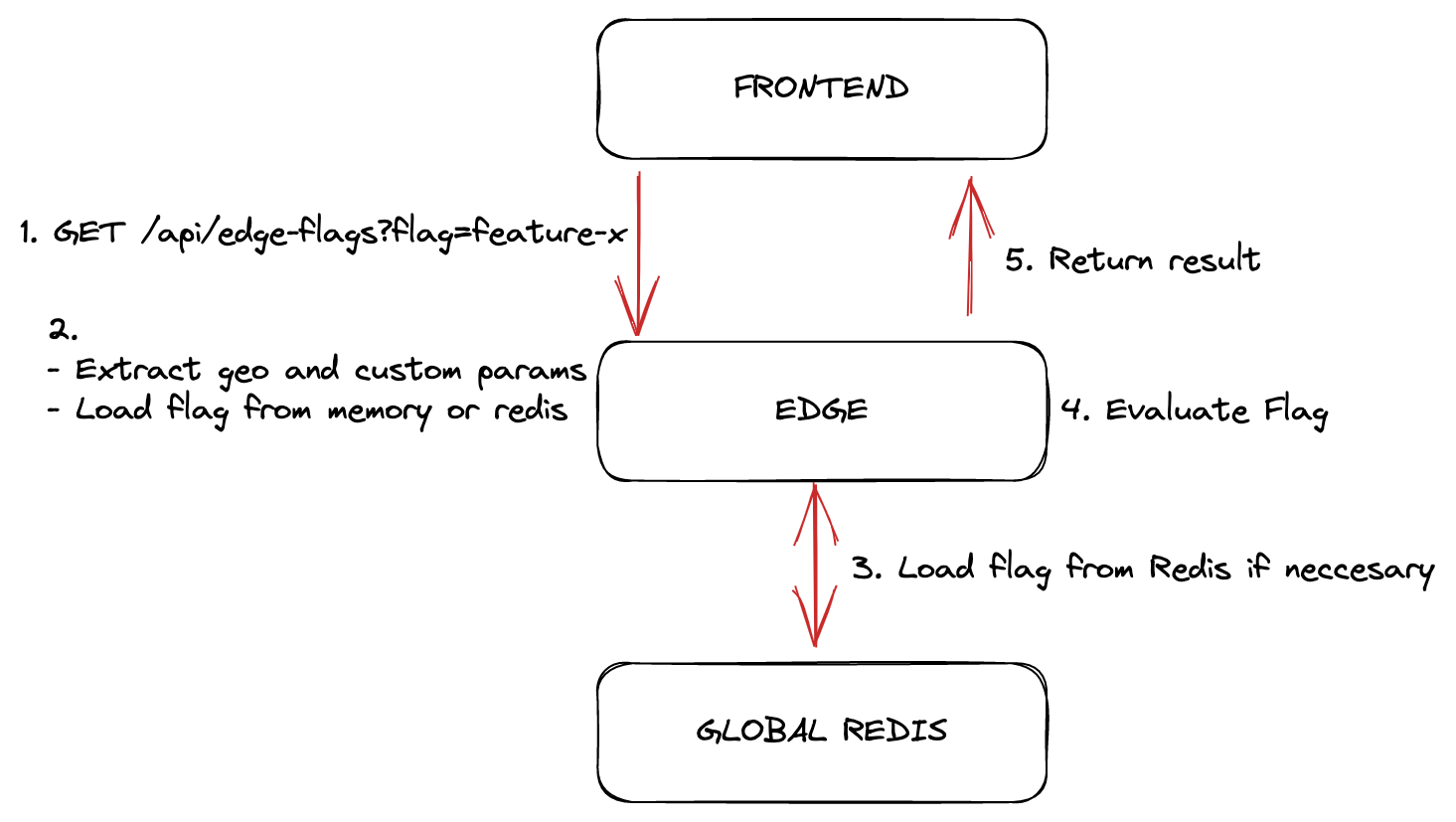
Go to console.upstash.com/redis and create a new global database.
After creating the db, copy the UPSTASH_REDIS_REST_URL and UPSTASH_REDIS_REST_TOKEN to your .env file.
npx @upstash/edge-flags-dashboard in your project to open the self-hosted dashboard.npx @upstash/edge-flags-dashboard
You can also use the hosted version at https://edge-flags-dashboard.vercel.app.
Create a flag from the dashboard. See our docs for more information.
Install @upstash/edge-flags in your project
npm install @upstash/edge-flags
// /app/api/edge-flags/route.ts
import { createEdgeHandler } from "@upstash/edge-flags";

export const GET = createEdgeHandler({
  cacheMaxAge: 0, // cache time in seconds, 0 disables the cache
  redisUrl: process.env.UPSTASH_REDIS_REST_URL!, // omit to load from env automatically
  redisToken: process.env.UPSTASH_REDIS_REST_TOKEN!, // omit to load from env automatically
});

export const runtime = "edge";
// /app/page.tsx
import { useFlag } from "@upstash/edge-flags";

export default function Example() {
  const { isEnabled, isLoading, error } = useFlag("flag-name");

  if (error) return <div>Error: {error}</div>;
  if (isLoading) return <div>Loading...</div>;

  return <div>Is my feature enabled: {isEnabled}</div>;
}
useFlag accepts an optional object that can be used to pass custom attributes
to be evaluated in the flag rules.
const attributes = {
  userId: "chronark",
  role: "admin",
};

useFlag("flag-name", attributes);
This monorepo is managed by turborepo and uses pnpm for dependency management.
pnpm install
pnpm build
All configuration is stored in Redis String data types. Each flag is
accessible through a key like
STRING
edge-flags:{TENANT}:flags:{FLAG_NAME}:{ENVIRONMENT}
In addition to the flags, there will be a single set that contains all the flag IDs. We can not guarantee the database is only used for edge-flags so we need to keep track of the flags we have created instead of using a potentially expensive
SCAN operation.
SET
edge-flags:{TENANT}:flags
TENANT is currently unused (set as default) but reserved for future use.
ie for managing multiple projects int a single databaseFLAG_NAME is the unique identifier for the flagENVIRONMENT is the environment the flag is targeting. ie production,
preview, developmentThis project was originally created by
3,226 followers · starred Jan 2023
186 followers · starred Jul 2024
Feature flags for serverless functions
See the code
[!NOTE]
This project is a Community Project.The project is maintained and supported by the community. Upstash may contribute but does not officially support or assume responsibility for it.
Edge Flags is a low latency feature flagging solution running at the edge and storing data in a global Redis database. It is designed to be used with Next.js and Vercel but we will soon roll out support for other popular frameworks and platforms. Let us know what you are looking for!
production, preview and development
Go to console.upstash.com/redis and create a new global database.
After creating the db, copy the UPSTASH_REDIS_REST_URL and UPSTASH_REDIS_REST_TOKEN to your .env file.
npx @upstash/edge-flags-dashboard in your project to open the self-hosted dashboard.npx @upstash/edge-flags-dashboard
You can also use the hosted version at https://edge-flags-dashboard.vercel.app.
Create a flag from the dashboard. See our docs for more information.
Install @upstash/edge-flags in your project
npm install @upstash/edge-flags
// /app/api/edge-flags/route.ts
import { createEdgeHandler } from "@upstash/edge-flags";

export const GET = createEdgeHandler({
  cacheMaxAge: 0, // cache time in seconds, 0 disables the cache
  redisUrl: process.env.UPSTASH_REDIS_REST_URL!, // omit to load from env automatically
  redisToken: process.env.UPSTASH_REDIS_REST_TOKEN!, // omit to load from env automatically
});

export const runtime = "edge";
// /app/page.tsx
import { useFlag } from "@upstash/edge-flags";

export default function Example() {
  const { isEnabled, isLoading, error } = useFlag("flag-name");

  if (error) return <div>Error: {error}</div>;
  if (isLoading) return <div>Loading...</div>;

  return <div>Is my feature enabled: {isEnabled}</div>;
}
useFlag accepts an optional object that can be used to pass custom attributes
to be evaluated in the flag rules.
const attributes = {
  userId: "chronark",
  role: "admin",
};

useFlag("flag-name", attributes);
This monorepo is managed by turborepo and uses pnpm for dependency management.
pnpm install
pnpm build
All configuration is stored in Redis String data types. Each flag is
accessible through a key like
STRING
edge-flags:{TENANT}:flags:{FLAG_NAME}:{ENVIRONMENT}
In addition to the flags, there will be a single set that contains all the flag IDs. We can not guarantee the database is only used for edge-flags so we need to keep track of the flags we have created instead of using a potentially expensive
SCAN operation.
SET
edge-flags:{TENANT}:flags
TENANT is currently unused (set as default) but reserved for future use.
ie for managing multiple projects int a single databaseFLAG_NAME is the unique identifier for the flagENVIRONMENT is the environment the flag is targeting. ie production,
preview, developmentThis project was originally created by
3,226 followers · starred Jan 2023
186 followers · starred Jul 2024