
Server-Side Harness Engineering: Everything = Plugin.
Python
29
366 commits
updated Sep 15, 2026
See what people are saying
README
plap
An extensible OpenAI-compatible model harness
Responses and Chat Completions through one plugin-driven model loop.
plap moves model-harness behavior into the server:
- Python plugins can add tools and modify response execution through hooks.
- Threads let several models work with separate histories.
- Client tool calls and private plugin state can continue across requests.
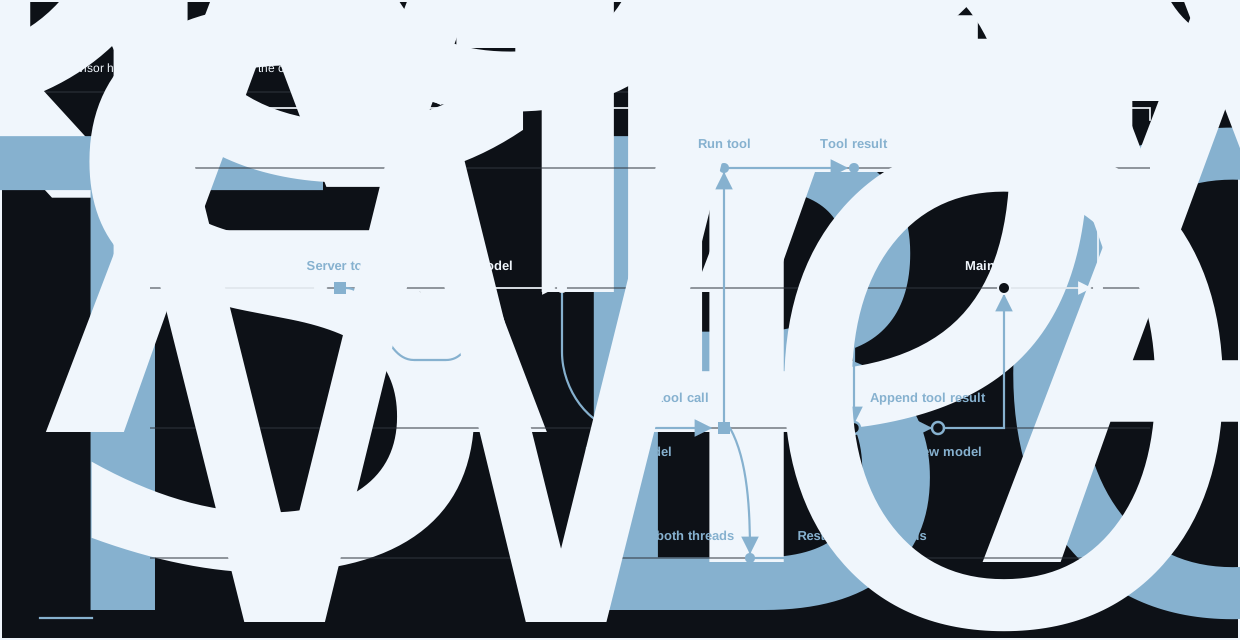
Together, these capabilities let plap run multi-model workflows behind an OpenAI-compatible API. Those workflows can have client-involving side effects too, as the advisor plugin does:
Start plap
You need Pixi and Docker.
Create your local environment file:
cp .env.example .env
Add an OpenRouter key to .env:
OPENROUTER_API_KEY=your-key
Start the development server:
pixi run dev
This starts temporary PostgreSQL and telemetry containers, applies migrations, creates a development API key, and runs the server. The command prints the active model, URLs, and log path.
Keep it running. In another terminal, load the generated client settings:
source .dev/.env
Send a response
The OpenAI Python client is already installed in the Pixi environment. Start a Python session:
pixi run python
Point the client at plap:
import os

from openai import OpenAI

client = OpenAI(
    base_url=os.environ["PLAP_DEV_BASE_URL"],
    api_key=os.environ["PLAP_DEV_API_KEY"],
)
Responses
response = client.responses.create(
    model=os.environ["PLAP_DEV_MODEL"],
    input="Say hello in one sentence.",
)

print(response.output_text)
Chat Completions
completion = client.chat.completions.create(
    model=os.environ["PLAP_DEV_MODEL"],
    messages=[{"role": "user", "content": "Say hello in one sentence."}],
)

print(completion.choices[0].message.content)
You now have a working local plap server. To carry model and plugin state into later requests, continue with Continue a Conversation.
Add something
Write your first plugin to add a server_time tool that the model can call.
The documentation covers the event bus, server tools, hooks, reasoning summaries, state, separate model contexts, and the lower-level LLM library.
Development commands
pixi run setup
pixi run pytest tests/unit
pixi run ruff check src tests scripts
pixi run ruff format --check src tests scripts
Tests marked money or expensive may call live providers and use credentials from root .env.
License
plap is licensed under the Apache License 2.0.
Similar repos


Languages
Python
98.4%
Shell
1.0%
Server-Side Harness Engineering: Everything = Plugin.
Python
29
366 commits
updated Sep 15, 2026
See what people are saying
README
plap
An extensible OpenAI-compatible model harness
Responses and Chat Completions through one plugin-driven model loop.
plap moves model-harness behavior into the server:
- Python plugins can add tools and modify response execution through hooks.
- Threads let several models work with separate histories.
- Client tool calls and private plugin state can continue across requests.
Together, these capabilities let plap run multi-model workflows behind an OpenAI-compatible API. Those workflows can have client-involving side effects too, as the advisor plugin does:
Start plap
You need Pixi and Docker.
Create your local environment file:
cp .env.example .env
Add an OpenRouter key to .env:
OPENROUTER_API_KEY=your-key
Start the development server:
pixi run dev
This starts temporary PostgreSQL and telemetry containers, applies migrations, creates a development API key, and runs the server. The command prints the active model, URLs, and log path.
Keep it running. In another terminal, load the generated client settings:
source .dev/.env
Send a response
The OpenAI Python client is already installed in the Pixi environment. Start a Python session:
pixi run python
Point the client at plap:
import os

from openai import OpenAI

client = OpenAI(
    base_url=os.environ["PLAP_DEV_BASE_URL"],
    api_key=os.environ["PLAP_DEV_API_KEY"],
)
Responses
response = client.responses.create(
    model=os.environ["PLAP_DEV_MODEL"],
    input="Say hello in one sentence.",
)

print(response.output_text)
Chat Completions
completion = client.chat.completions.create(
    model=os.environ["PLAP_DEV_MODEL"],
    messages=[{"role": "user", "content": "Say hello in one sentence."}],
)

print(completion.choices[0].message.content)
You now have a working local plap server. To carry model and plugin state into later requests, continue with Continue a Conversation.
Add something
Write your first plugin to add a server_time tool that the model can call.
The documentation covers the event bus, server tools, hooks, reasoning summaries, state, separate model contexts, and the lower-level LLM library.
Development commands
pixi run setup
pixi run pytest tests/unit
pixi run ruff check src tests scripts
pixi run ruff format --check src tests scripts
Tests marked money or expensive may call live providers and use credentials from root .env.
License
plap is licensed under the Apache License 2.0.
Similar repos
Languages
Python
98.4%
Shell
1.0%