
The Discord music status that works with any media player
See the codeREADME
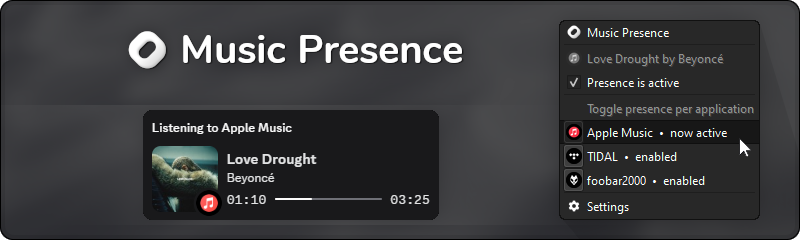






Music Presence shows your friends on Discord what music you are listening to.
It works with any media player, be that e.g. Apple Music, Spotify or even foobar2000. When you play music with an app, it is automatically detected and appears in the tray menu, as you can see in the screenshot above!
These are some of the most notable features
- Shows the correct album cover 100% of the time for every media player, no missing covers
- Shows the exact current playback position, if the media player supports it
- Fine-grained control over which applications are shared and which are not
- The tray icon changes and reflects whether your status is currently active or not
- Looks and feels like an official integration, but with many more features
Download






You can also install Music Presence using a package manager:
- On macOS via Homebrew:
$ brew install music-presence - On Arch via the AUR:
$ yay -S music-presence-bin(unofficial, verify before installing)
Need help? Read How to install and use Music Presence or join our Discord: discord.gg/musicpresence
Download • Discord • Donate • Documentation • Changelog • Roadmap • Privacy
Features
-
Music Presence works with any media player!
Currently 100+ different players are supported. Adding a missing one is trivial! -
Shows the correct album cover image 100% of the time!
This works with any media player and is achieved without the use of external image sources. -
You have the option to show the artist name, song title, player name or the media type after the "Listening to" text. Examples are: "Listening to Billie Eilish", "Listening to Happier Than Ever", "Listening to Spotify" or "Listening to Music".
-
Shows animated album artwork directly in your status for supported players. This currently works with Apple Music and TIDAL. Album cover videos are converted on the fly and may take a few seconds to load. This is disabled by default and must be enabled explicitly.
-
You can also show paused media in your status for as long as you want! Love that one song so much, you wanna show it forever? Just play it once, pause it and basically sticky pin it to your profile card.
-
Fine-grained control over which applications are shared in your status and what your status looks like, including individual settings and the option to override settings for each media player individually.
-
Perfect synergy with Spotify and the official Spotify integration! Podcasts can be shown in your status with the title "Listening to a Podcast", while the official Spotify integration doesn't show podcasts. You can also just use Music Presence for Spotify podcasts and use the official Spotify integration for music.
-
The tray icon changes and reflects the current state of Music Presence, i.e. whether it is currently sharing media in your status, whether it's waiting for media playback or if it has been disabled by you entirely.
-
Always shows the exact playback position with a progress bar, if the media player supports it.
-
Obsoletes the need for other Rich Presence applications or plugins for your music player, by giving you unified controls and customization for all media players in a single place.
-
In-app and automatic updates of Music Presence, so you don't have to install new versions by downloading them manually. In addition to that you're always informed about any changes and additions with an informational popup.
-
Shows a "Play on Apple Music" button or similar for supported players. This is currently available for Apple Music, TIDAL, Deezer and Spotify only. The button may not always show due to API rate limiting. Additionally to buttons, you also get the option to load and show additional artists, not just the main one.
-
And much, much more...
Looking for scrobbling, browser support and listening along?
Check out musicpresence.app, specifically the "Timeline" section. I have big plans for the future!
Further links
- Supported media players
- What if my media player is not detected?
- Integrating with Music Presence for third-parties
- Verifying your download
Donations
The development of this project solely depends on the effort of a single developer. Your financial support allows me to invest more of my time into this project and helps cover recurring server and domain costs, which ultimately helps in making improvements and working on new features that are waiting to be implemented!
Any donation is highly appreciated. Thank you!
- Patreon – membership with additional perks
- Buy me a coffee – option for one-time donations
- GitHub Sponsors – donate directly here on GitHub and get a sponsor badge
- LiberaPay – option for recurring donations to build a steady side income
You can read here for more information.
Community
Our community is slowly growing over on our Discord server!
If you ever encounter an issue, have a question or simply want to chat with me and other users of Music Presence, you are more than welcome to swing by. I'm usually very active there and respond to messages rather quickly.
Star History
Media
Links to other places on the internet that mention Music Presence
- 24.07.2025 r/lastfm A universal last.fm scrobbler is coming – for any media player on any desktop device
- 07.07.2025 Peerlist Music Presence ranked #2 on Peerlist's Launchpad with the most upvotes
- 27.06.2025 r/discordapp Share any music player as a Discord activity with my tool Music Presence
- 17.12.2024 Wotaku Wiki Featured on wotaku.wiki under Music
- 14.11.2024 freemediaheckyeah Featured on fmhy.net under Client Customization
- 06.11.2024 r/AppleMusic The Discord integration you've been waiting for – Music Presence
- 01.11.2024 r/foobar2000 Discord status problems? Try Music Presence and never look back
- 24.09.2024 GitHub Featured in NoPlagiarism/awesome-discord-activities
- 21.09.2024 GitHub Featured in MoonWalker440/Music-Megathread
- 21.09.2024 MusicBee Forum A new Discord Rich Presence for MusicBee
Improving media players
Some media players report incomplete song metadata. The following is a list of bug reports that were submitted in order to improve what metadata these players report, so that they can work better with Music Presence in the future.
- 25.06.2024 MediaSession API does not report the album to the Windows system
Many media players are built on-top of Chromium, especially media players of popular streaming services, which unfortunately does not report the current album name. This affects players like TIDAL amongst quite a few others. Initially reported this to TIDAL here.
Disclaimer
- This software is not affiliated with or endorsed by Discord.
- This software is not affiliated with or endorsed by any streaming service, media player or company that distributes music, including but not limited to those displayed within the Music Presence app.
Copyright (c) 2024-2025 Jonas van den Berg
Contributors

444 commits

3 commits
Similar repos


Languages
C++
100.0%
The Discord music status that works with any media player
See the codeREADME
Music Presence shows your friends on Discord what music you are listening to.
It works with any media player, be that e.g. Apple Music, Spotify or even foobar2000. When you play music with an app, it is automatically detected and appears in the tray menu, as you can see in the screenshot above!
These are some of the most notable features
- Shows the correct album cover 100% of the time for every media player, no missing covers
- Shows the exact current playback position, if the media player supports it
- Fine-grained control over which applications are shared and which are not
- The tray icon changes and reflects whether your status is currently active or not
- Looks and feels like an official integration, but with many more features
Download
You can also install Music Presence using a package manager:
- On macOS via Homebrew:
$ brew install music-presence - On Arch via the AUR:
$ yay -S music-presence-bin(unofficial, verify before installing)
Need help? Read How to install and use Music Presence or join our Discord: discord.gg/musicpresence
Download • Discord • Donate • Documentation • Changelog • Roadmap • Privacy
Features
-
Music Presence works with any media player!
Currently 100+ different players are supported. Adding a missing one is trivial! -
Shows the correct album cover image 100% of the time!
This works with any media player and is achieved without the use of external image sources. -
You have the option to show the artist name, song title, player name or the media type after the "Listening to" text. Examples are: "Listening to Billie Eilish", "Listening to Happier Than Ever", "Listening to Spotify" or "Listening to Music".
-
Shows animated album artwork directly in your status for supported players. This currently works with Apple Music and TIDAL. Album cover videos are converted on the fly and may take a few seconds to load. This is disabled by default and must be enabled explicitly.
-
You can also show paused media in your status for as long as you want! Love that one song so much, you wanna show it forever? Just play it once, pause it and basically sticky pin it to your profile card.
-
Fine-grained control over which applications are shared in your status and what your status looks like, including individual settings and the option to override settings for each media player individually.
-
Perfect synergy with Spotify and the official Spotify integration! Podcasts can be shown in your status with the title "Listening to a Podcast", while the official Spotify integration doesn't show podcasts. You can also just use Music Presence for Spotify podcasts and use the official Spotify integration for music.
-
The tray icon changes and reflects the current state of Music Presence, i.e. whether it is currently sharing media in your status, whether it's waiting for media playback or if it has been disabled by you entirely.
-
Always shows the exact playback position with a progress bar, if the media player supports it.
-
Obsoletes the need for other Rich Presence applications or plugins for your music player, by giving you unified controls and customization for all media players in a single place.
-
In-app and automatic updates of Music Presence, so you don't have to install new versions by downloading them manually. In addition to that you're always informed about any changes and additions with an informational popup.
-
Shows a "Play on Apple Music" button or similar for supported players. This is currently available for Apple Music, TIDAL, Deezer and Spotify only. The button may not always show due to API rate limiting. Additionally to buttons, you also get the option to load and show additional artists, not just the main one.
-
And much, much more...
Looking for scrobbling, browser support and listening along?
Check out musicpresence.app, specifically the "Timeline" section. I have big plans for the future!
Further links
- Supported media players
- What if my media player is not detected?
- Integrating with Music Presence for third-parties
- Verifying your download
Donations
The development of this project solely depends on the effort of a single developer. Your financial support allows me to invest more of my time into this project and helps cover recurring server and domain costs, which ultimately helps in making improvements and working on new features that are waiting to be implemented!
Any donation is highly appreciated. Thank you!
- Patreon – membership with additional perks
- Buy me a coffee – option for one-time donations
- GitHub Sponsors – donate directly here on GitHub and get a sponsor badge
- LiberaPay – option for recurring donations to build a steady side income
You can read here for more information.
Community
Our community is slowly growing over on our Discord server!
If you ever encounter an issue, have a question or simply want to chat with me and other users of Music Presence, you are more than welcome to swing by. I'm usually very active there and respond to messages rather quickly.
Star History
Media
Links to other places on the internet that mention Music Presence
- 24.07.2025 r/lastfm A universal last.fm scrobbler is coming – for any media player on any desktop device
- 07.07.2025 Peerlist Music Presence ranked #2 on Peerlist's Launchpad with the most upvotes
- 27.06.2025 r/discordapp Share any music player as a Discord activity with my tool Music Presence
- 17.12.2024 Wotaku Wiki Featured on wotaku.wiki under Music
- 14.11.2024 freemediaheckyeah Featured on fmhy.net under Client Customization
- 06.11.2024 r/AppleMusic The Discord integration you've been waiting for – Music Presence
- 01.11.2024 r/foobar2000 Discord status problems? Try Music Presence and never look back
- 24.09.2024 GitHub Featured in NoPlagiarism/awesome-discord-activities
- 21.09.2024 GitHub Featured in MoonWalker440/Music-Megathread
- 21.09.2024 MusicBee Forum A new Discord Rich Presence for MusicBee
Improving media players
Some media players report incomplete song metadata. The following is a list of bug reports that were submitted in order to improve what metadata these players report, so that they can work better with Music Presence in the future.
- 25.06.2024 MediaSession API does not report the album to the Windows system
Many media players are built on-top of Chromium, especially media players of popular streaming services, which unfortunately does not report the current album name. This affects players like TIDAL amongst quite a few others. Initially reported this to TIDAL here.
Disclaimer
- This software is not affiliated with or endorsed by Discord.
- This software is not affiliated with or endorsed by any streaming service, media player or company that distributes music, including but not limited to those displayed within the Music Presence app.
Copyright (c) 2024-2025 Jonas van den Berg
Similar repos
Contributors
444 commits
3 commits
Languages
C++
100.0%