
Connect your business. RevenueOS finds opportunities, executes approved revenue work, and measures what happened. Self-hosted, MIT.
0
stars
0
commits
Python
primary language
Sep 13, 2026
updated
README
RevenueOS
Connect once. Everything runs free. Pay when you agree with the result.
Runtime proof · Architecture · Security & approval model · Integrations · Community vs Hosted · Capabilities
RevenueOS is a revenue department for one business.
- Connect once. Give it your website; it fills in the rest and labels every guess.
- Discover. It reads the site, your ads, your leads and your mailbox and turns what it finds into a short list of actions.
- Approve. Nothing changes until you approve an action.
- Execute. It deploys the site fix, pauses the wasting campaign, sends the email, books the call, raises the invoice.
- Measure. It re-checks the world and records before → after next to the action.
- Pay. Nothing is charged until it has measured a result you agreed with.
Connect once → Discover → Approve → Execute → Measure → (agree) → Pay
Try it on your site in one command
pip install revenueos
revenueos demo https://yoursite.com
No account, nothing stored. It prints what is costing the site customers and which of those fixes RevenueOS deploys itself once connected. Run on the neutral example domain, exactly as printed:
RevenueOS demo — Example Domain (https://example.com)

  1 pages crawled · ad/analytics tags: none · booking link: no · phones: none seen

  1. MISSING DESCRIPTION — https://example.com
     Page has no meta description.
     → RevenueOS writes the fix as a deliverable you approve, then re-checks the page.
  2. THIN PAGE — https://example.com
     Only ~127 characters of body text were extracted.
     → RevenueOS writes the fix as a deliverable you approve, then re-checks the page.
  3. NO SITEMAP — https://example.com
     No sitemap.xml was discovered at the host root or under the site path.
     → RevenueOS writes the fix as a deliverable you approve, then re-checks the page.
  4. NO CANONICAL — https://example.com
     The homepage declares no canonical URL.
     → RevenueOS deploys this fix itself once the site is connected (git or WordPress), then re-checks it.

  4 finding(s). Everything above runs free, every day, once connected:
     pip install revenueos && revenueos init --from https://example.com && revenueos serve
  You pay only when you agree with a measured result.
On a real business the same command also reads the homepage for tappable phone numbers, LocalBusiness schema, booking links and ad tags (Meta Pixel, Google Ads, GA4), and the Watch-it-work view streams each check as it runs.
Run the demo from GitHub, no install
Add one step to any workflow and read the job summary:
- uses: unempyd/revenueos@main
  with:
    url: https://yoursite.com
Connect once
revenueos init --from https://yoursite.com   # the site fills the questionnaire; every inference is labelled
revenueos serve                              # TODAY / RESULTS / Connections / Spend on http://127.0.0.1:8791
Connections are accounts you authorise once — Stripe, Google (Search Console, GA4, Calendar, Ads), Meta Ads, a git-hosted site, WordPress — read-only until you flip allow changes. Every change still waits for your approval on TODAY. Details and the runtime proofs: docs/integrations.md.
Pay when you agree with the result
Everything runs free: every worker, the panel, the executors. When RevenueOS has measured a result on an action you approved, it keeps running free for 14 more days, then continuous operation asks for Pro ($99/month). One-shot runs and the panel never lock. There is no trial clock that starts before you have seen a result.
What the customer sees
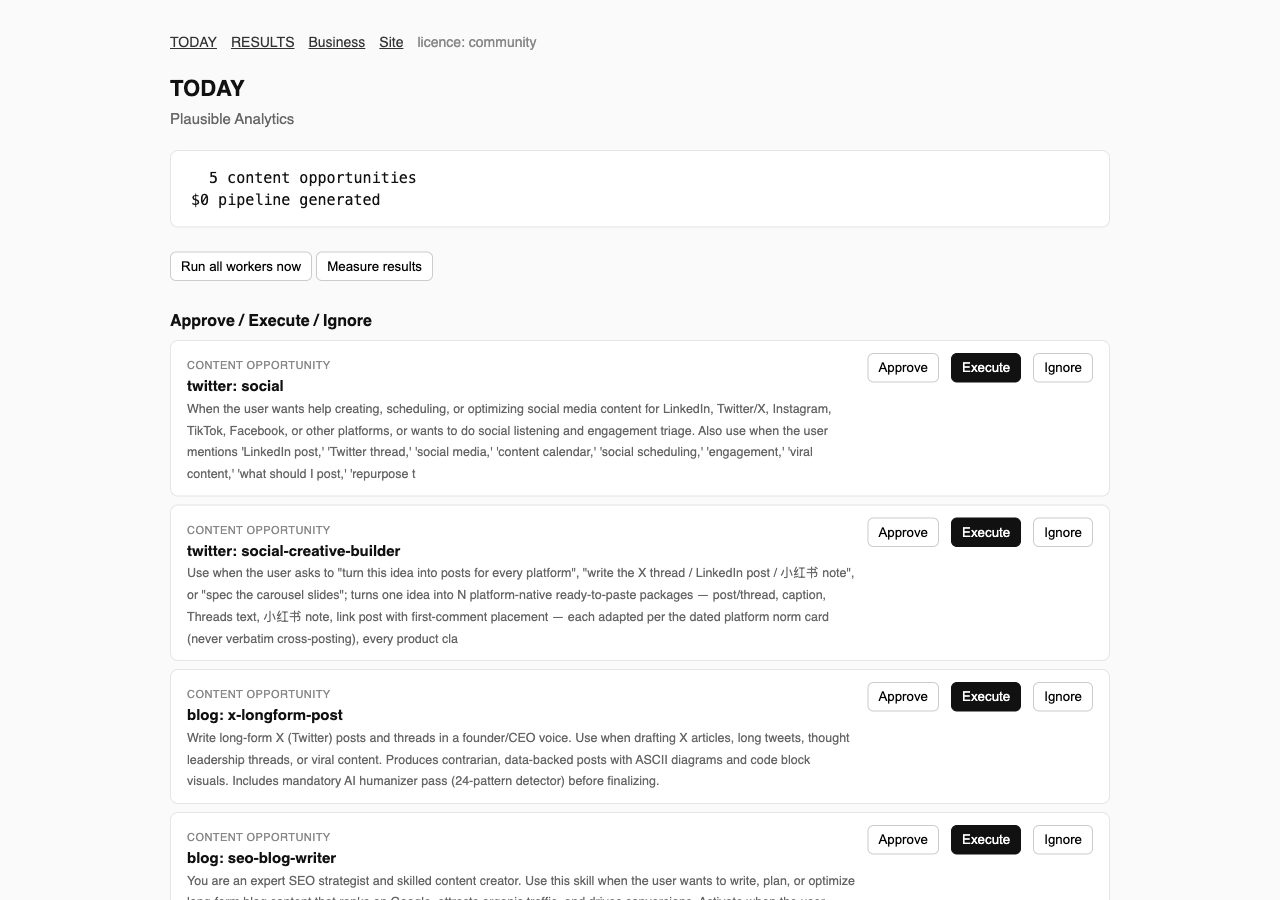
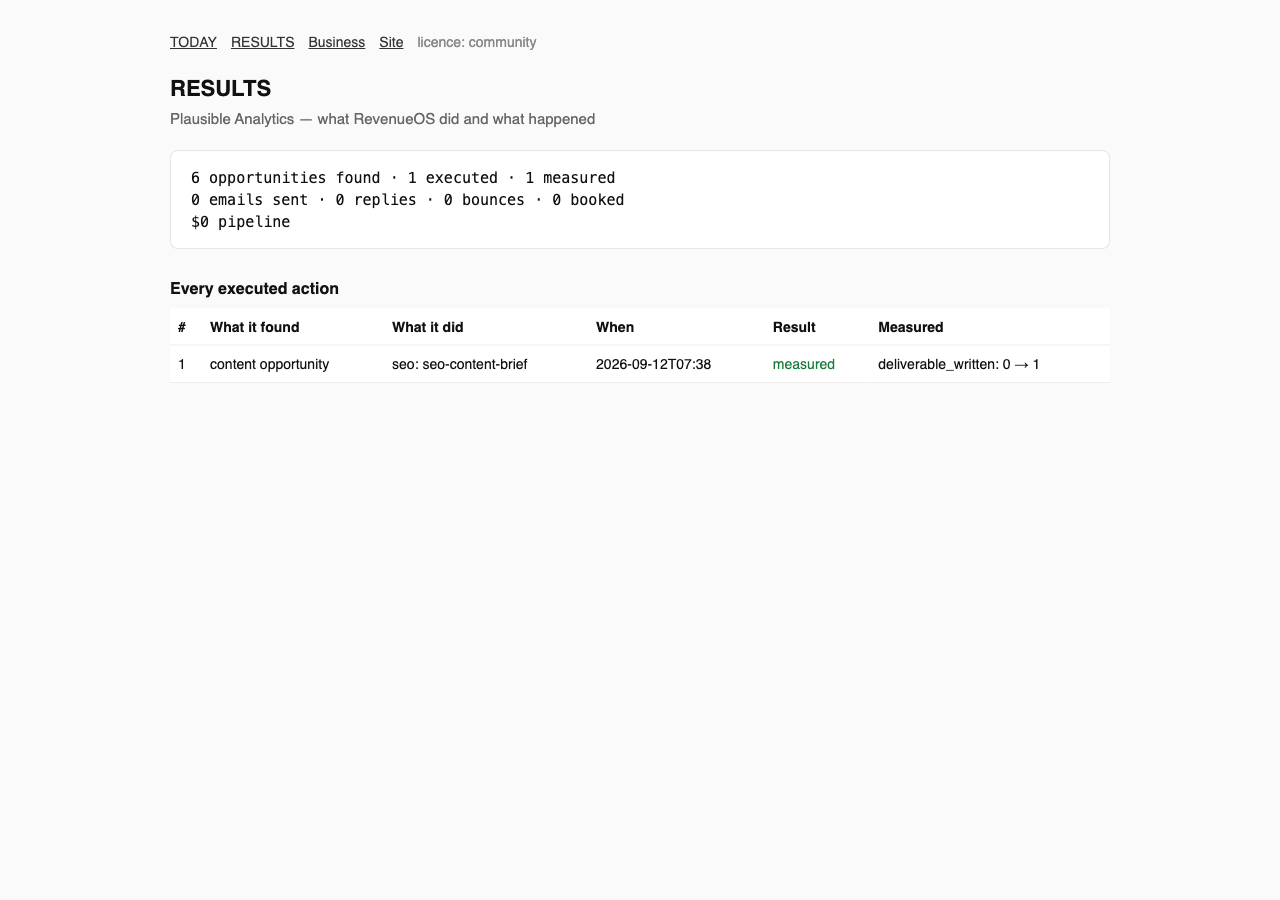
Both screens come from a real run against a real business (see below); nothing in them is mocked.
Verified runtime proof
On 2026-09-12 RevenueOS was connected to Plausible Analytics using only its public web presence (read-only; no email sent), then run end to end:
| Stage | What happened |
|---|---|
| Discover | 12 pages crawled, competitor authority checked, Hacker News searched with a strict relevance gate, 6 content opportunities queued |
| Approve → Execute | one opportunity approved; Claude executed the RevenueOS SEO content-brief skill in 1 m 23 s and produced a 14 KB deliverable |
| Measure | the outcome deliverable_written 0 → 1 was recorded and shown in RESULTS |
The full transcript, including what it did not find and why, is in docs/proof.md. RevenueOS reports opportunities found, actions executed, execution time and measured outcomes. It does not claim revenue it has not measured.
Install
pip install revenueos   # or: uv tool install revenueos
revenueos init --from https://yoursite.com   # or `revenueos init` for the questionnaire
revenueos run all                    # every worker once
revenueos today                      # the brief
revenueos approve 1 && revenueos execute 1
revenueos run measure && revenueos results
revenueos serve                      # the same surface as a web panel on http://127.0.0.1:8791
From source:
git clone https://github.com/unempyd/revenueos && cd revenueos
uv sync && (cd orchestrator && npm install)
uv run revenueos init
Requirements: Python 3.12+, Node 20+ (scheduler and connector CLIs). An LLM is optional:
RevenueOS uses ANTHROPIC_API_KEY if set, otherwise a signed-in Claude Code CLI; without
either, every worker still runs its deterministic checks.
Workers
| Worker | Discovers | Executes (after approval) | Measures |
|---|---|---|---|
seo | crawl defects, authority gap, indexing surface | the matching SEO skill | re-crawl: fixed or not |
ads-audit | wasted spend, over-pacing, concentration in ad exports; search terms that spend, convert nothing and are not excluded (drop Google's keyword and search-term downloads beside the export); then the full control audit: 97 Google / 72 Meta controls (414 across 12 platforms) evaluated under the upstream runtime contract, pass/fail only with evidence | the matching ads skill | next export delta; the next search-term read; a failing control re-checked by the next audit |
ads-live | the same on connected Google Ads / Meta accounts, with keywords, quality scores, search terms and negative-keyword lists read from Google Ads; wasting campaigns become pause / budget actions | ads_pause, ads_budget | next spend read |
analytics | Search Console queries losing clicks, GA4 channel results | the title/description skill | next Search Console read |
billing | Stripe revenue, MRR, customers, open invoices | send_invoice | Stripe paid status |
discover | prospects from lead lists or an external prospecting service, through the qualification gate (business email + website + real company; reported as found · contactable · qualified) | — | via outreach |
outreach | first-touch drafts from your canon | sends (daily cap, suppression list, unsubscribe footer) | replies, booked, pipeline value |
inbox | replies, bounces and STOP requests on your mailbox | — | feeds outreach outcomes |
content | content work matched to your channels | Claude produces the deliverable; publishes it to WordPress after a second approval | published 0 → 1 on the live URL |
monitor | Hacker News threads that pass a strict relevance gate | — | — |
measure | — | — | records every outcome above |
revenueos orchestrator runs the workers on a schedule (data/automations.json);
revenueos serve is the control panel with password sessions, onboarding, the brief and results.
It keeps working between sessions
RevenueOS holds an objective for the business (revenueos objective add "…", the last
onboarding question, or a MANDATE.md at the workspace root that the heartbeat reads and the orchestrator reports on /health) and a heartbeat worker, scheduled every 30 minutes, that reads the
state of that objective: what is pending, what was approved and not yet run, what was measured,
what failed and why, what is blocked and what would unblock it. It writes one dated event per run,
sets the next action, and leaves a message for you only when a human is needed
(revenueos messages, or the "Inbox from RevenueOS" block on TODAY). Nothing in it sends,
publishes or spends.
Specialised roles (revenueos agent run research|marketing|sales|measurement "<task>") answer
one question each with cited evidence, may spawn sub-tasks two levels deep, and can only
propose actions, which land on TODAY like every other one. Every measured outcome becomes a
dated lesson (revenueos learn, learning-loop/LESSONS.md) that is injected into the next
prompts; role specs are refined by small evidence-backed edits with snapshots and rollback
(revenueos refine <role> …). Any of this works without a model, except the roles, which then say
so instead of answering.
Community and Hosted
RevenueOS Community (free, MIT): everything — every worker, continuous operation, the control panel, connections and executors, the capability packs (13 packs, 790 skills, 104 agents, 64 connector CLIs), the MCP server and the Claude Code plugin — free until RevenueOS has measured a result you approved, then 14 more days.
RevenueOS Pro / Business / Agency ($99 / $299 / $999 per month): keeps continuous operation on after that, and adds several brands under one install (Business) or client workspaces (Agency). Run it yourself, or ask us to run it for you. A signed licence key, emailed after payment, unlocks the tier. Details: docs/community-vs-hosted.md.
Security and approval
Workers never send, publish or spend. Only an approved Execute does, and it is bounded by a
daily send cap, a suppression list, List-Unsubscribe and reply-STOP handling. Credentials
live in the environment, never in the workspace. The panel refuses to bind a public address
without a password. See docs/security-and-approval.md and
SECURITY.md.
Integrations
Website crawl, Hacker News, ad-platform exports (CSV), lead-list CSVs, SMTP/IMAP mailboxes, 64 connector CLIs (analytics, CRM, email, SEO, ads, enrichment) keyed by environment variables, and an optional external prospecting service. See docs/integrations.md.
Deployment
Dockerfile, docker-compose.yml (orchestrator, panel, optional TLS proxy) and deploy/
(runbook, Fly.io, Railway, smoke test). See deploy/README.md.
Licence
RevenueOS is MIT-licensed. It includes permissively licensed open-source components, listed
with their licences in NOTICE.md and reproduced in THIRD_PARTY_LICENSES/.
Provenance of every included file is recorded in VENDOR.json.
Develop
uv sync --extra dev --extra mcp && uv run pytest -q
(cd orchestrator && npm test && npm run typecheck)
uv run ruff check src tests
See CONTRIBUTING.md.
See what people are saying
Similar repos


Languages
Python
76.5%
JavaScript
16.5%
HTML
3.8%
TypeScript
1.6%
CSS
1.1%
Connect your business. RevenueOS finds opportunities, executes approved revenue work, and measures what happened. Self-hosted, MIT.
0
stars
0
commits
Python
primary language
Sep 13, 2026
updated
README
RevenueOS
Connect once. Everything runs free. Pay when you agree with the result.
Runtime proof · Architecture · Security & approval model · Integrations · Community vs Hosted · Capabilities
RevenueOS is a revenue department for one business.
- Connect once. Give it your website; it fills in the rest and labels every guess.
- Discover. It reads the site, your ads, your leads and your mailbox and turns what it finds into a short list of actions.
- Approve. Nothing changes until you approve an action.
- Execute. It deploys the site fix, pauses the wasting campaign, sends the email, books the call, raises the invoice.
- Measure. It re-checks the world and records before → after next to the action.
- Pay. Nothing is charged until it has measured a result you agreed with.
Connect once → Discover → Approve → Execute → Measure → (agree) → Pay
Try it on your site in one command
pip install revenueos
revenueos demo https://yoursite.com
No account, nothing stored. It prints what is costing the site customers and which of those fixes RevenueOS deploys itself once connected. Run on the neutral example domain, exactly as printed:
RevenueOS demo — Example Domain (https://example.com)

  1 pages crawled · ad/analytics tags: none · booking link: no · phones: none seen

  1. MISSING DESCRIPTION — https://example.com
     Page has no meta description.
     → RevenueOS writes the fix as a deliverable you approve, then re-checks the page.
  2. THIN PAGE — https://example.com
     Only ~127 characters of body text were extracted.
     → RevenueOS writes the fix as a deliverable you approve, then re-checks the page.
  3. NO SITEMAP — https://example.com
     No sitemap.xml was discovered at the host root or under the site path.
     → RevenueOS writes the fix as a deliverable you approve, then re-checks the page.
  4. NO CANONICAL — https://example.com
     The homepage declares no canonical URL.
     → RevenueOS deploys this fix itself once the site is connected (git or WordPress), then re-checks it.

  4 finding(s). Everything above runs free, every day, once connected:
     pip install revenueos && revenueos init --from https://example.com && revenueos serve
  You pay only when you agree with a measured result.
On a real business the same command also reads the homepage for tappable phone numbers, LocalBusiness schema, booking links and ad tags (Meta Pixel, Google Ads, GA4), and the Watch-it-work view streams each check as it runs.
Run the demo from GitHub, no install
Add one step to any workflow and read the job summary:
- uses: unempyd/revenueos@main
  with:
    url: https://yoursite.com
Connect once
revenueos init --from https://yoursite.com   # the site fills the questionnaire; every inference is labelled
revenueos serve                              # TODAY / RESULTS / Connections / Spend on http://127.0.0.1:8791
Connections are accounts you authorise once — Stripe, Google (Search Console, GA4, Calendar, Ads), Meta Ads, a git-hosted site, WordPress — read-only until you flip allow changes. Every change still waits for your approval on TODAY. Details and the runtime proofs: docs/integrations.md.
Pay when you agree with the result
Everything runs free: every worker, the panel, the executors. When RevenueOS has measured a result on an action you approved, it keeps running free for 14 more days, then continuous operation asks for Pro ($99/month). One-shot runs and the panel never lock. There is no trial clock that starts before you have seen a result.
What the customer sees
Both screens come from a real run against a real business (see below); nothing in them is mocked.
Verified runtime proof
On 2026-09-12 RevenueOS was connected to Plausible Analytics using only its public web presence (read-only; no email sent), then run end to end:
| Stage | What happened |
|---|---|
| Discover | 12 pages crawled, competitor authority checked, Hacker News searched with a strict relevance gate, 6 content opportunities queued |
| Approve → Execute | one opportunity approved; Claude executed the RevenueOS SEO content-brief skill in 1 m 23 s and produced a 14 KB deliverable |
| Measure | the outcome deliverable_written 0 → 1 was recorded and shown in RESULTS |
The full transcript, including what it did not find and why, is in docs/proof.md. RevenueOS reports opportunities found, actions executed, execution time and measured outcomes. It does not claim revenue it has not measured.
Install
pip install revenueos   # or: uv tool install revenueos
revenueos init --from https://yoursite.com   # or `revenueos init` for the questionnaire
revenueos run all                    # every worker once
revenueos today                      # the brief
revenueos approve 1 && revenueos execute 1
revenueos run measure && revenueos results
revenueos serve                      # the same surface as a web panel on http://127.0.0.1:8791
From source:
git clone https://github.com/unempyd/revenueos && cd revenueos
uv sync && (cd orchestrator && npm install)
uv run revenueos init
Requirements: Python 3.12+, Node 20+ (scheduler and connector CLIs). An LLM is optional:
RevenueOS uses ANTHROPIC_API_KEY if set, otherwise a signed-in Claude Code CLI; without
either, every worker still runs its deterministic checks.
Workers
| Worker | Discovers | Executes (after approval) | Measures |
|---|---|---|---|
seo | crawl defects, authority gap, indexing surface | the matching SEO skill | re-crawl: fixed or not |
ads-audit | wasted spend, over-pacing, concentration in ad exports; search terms that spend, convert nothing and are not excluded (drop Google's keyword and search-term downloads beside the export); then the full control audit: 97 Google / 72 Meta controls (414 across 12 platforms) evaluated under the upstream runtime contract, pass/fail only with evidence | the matching ads skill | next export delta; the next search-term read; a failing control re-checked by the next audit |
ads-live | the same on connected Google Ads / Meta accounts, with keywords, quality scores, search terms and negative-keyword lists read from Google Ads; wasting campaigns become pause / budget actions | ads_pause, ads_budget | next spend read |
analytics | Search Console queries losing clicks, GA4 channel results | the title/description skill | next Search Console read |
billing | Stripe revenue, MRR, customers, open invoices | send_invoice | Stripe paid status |
discover | prospects from lead lists or an external prospecting service, through the qualification gate (business email + website + real company; reported as found · contactable · qualified) | — | via outreach |
outreach | first-touch drafts from your canon | sends (daily cap, suppression list, unsubscribe footer) | replies, booked, pipeline value |
inbox | replies, bounces and STOP requests on your mailbox | — | feeds outreach outcomes |
content | content work matched to your channels | Claude produces the deliverable; publishes it to WordPress after a second approval | published 0 → 1 on the live URL |
monitor | Hacker News threads that pass a strict relevance gate | — | — |
measure | — | — | records every outcome above |
revenueos orchestrator runs the workers on a schedule (data/automations.json);
revenueos serve is the control panel with password sessions, onboarding, the brief and results.
It keeps working between sessions
RevenueOS holds an objective for the business (revenueos objective add "…", the last
onboarding question, or a MANDATE.md at the workspace root that the heartbeat reads and the orchestrator reports on /health) and a heartbeat worker, scheduled every 30 minutes, that reads the
state of that objective: what is pending, what was approved and not yet run, what was measured,
what failed and why, what is blocked and what would unblock it. It writes one dated event per run,
sets the next action, and leaves a message for you only when a human is needed
(revenueos messages, or the "Inbox from RevenueOS" block on TODAY). Nothing in it sends,
publishes or spends.
Specialised roles (revenueos agent run research|marketing|sales|measurement "<task>") answer
one question each with cited evidence, may spawn sub-tasks two levels deep, and can only
propose actions, which land on TODAY like every other one. Every measured outcome becomes a
dated lesson (revenueos learn, learning-loop/LESSONS.md) that is injected into the next
prompts; role specs are refined by small evidence-backed edits with snapshots and rollback
(revenueos refine <role> …). Any of this works without a model, except the roles, which then say
so instead of answering.
Community and Hosted
RevenueOS Community (free, MIT): everything — every worker, continuous operation, the control panel, connections and executors, the capability packs (13 packs, 790 skills, 104 agents, 64 connector CLIs), the MCP server and the Claude Code plugin — free until RevenueOS has measured a result you approved, then 14 more days.
RevenueOS Pro / Business / Agency ($99 / $299 / $999 per month): keeps continuous operation on after that, and adds several brands under one install (Business) or client workspaces (Agency). Run it yourself, or ask us to run it for you. A signed licence key, emailed after payment, unlocks the tier. Details: docs/community-vs-hosted.md.
Security and approval
Workers never send, publish or spend. Only an approved Execute does, and it is bounded by a
daily send cap, a suppression list, List-Unsubscribe and reply-STOP handling. Credentials
live in the environment, never in the workspace. The panel refuses to bind a public address
without a password. See docs/security-and-approval.md and
SECURITY.md.
Integrations
Website crawl, Hacker News, ad-platform exports (CSV), lead-list CSVs, SMTP/IMAP mailboxes, 64 connector CLIs (analytics, CRM, email, SEO, ads, enrichment) keyed by environment variables, and an optional external prospecting service. See docs/integrations.md.
Deployment
Dockerfile, docker-compose.yml (orchestrator, panel, optional TLS proxy) and deploy/
(runbook, Fly.io, Railway, smoke test). See deploy/README.md.
Licence
RevenueOS is MIT-licensed. It includes permissively licensed open-source components, listed
with their licences in NOTICE.md and reproduced in THIRD_PARTY_LICENSES/.
Provenance of every included file is recorded in VENDOR.json.
Develop
uv sync --extra dev --extra mcp && uv run pytest -q
(cd orchestrator && npm test && npm run typecheck)
uv run ruff check src tests
See CONTRIBUTING.md.
See what people are saying
Similar repos
Languages
Python
76.5%
JavaScript
16.5%
HTML
3.8%
TypeScript
1.6%
CSS
1.1%