
UnderPeaks is a dev-first headless CMS that generates real Flutter and Next.js apps from a single data model. Self-hosted, API-first, and built for developers who want full control over their backend, content, and generated code.
See the codeSee what people are saying
README
Underpeaks Core




Build your backend once. Generate the rest.
Underpeaks is a self-hosted, developer-first headless CMS that generates production-ready Flutter and Next.js applications from a single content model. Define your data once, and get a real backend, a content editor, a REST API, and — if you want it — a working mobile and web app, generated straight from it.
Why Underpeaks
If you've ever built the same app for web and mobile, you know the tax: two codebases, two sets of backend glue code, one data model you're keeping in sync by hand. Change a field, update it in both places, miss one, ship a bug.
Underpeaks makes that one action — change the model, regenerate both. It also handles the backend work that quietly eats your week: auth that holds across devices, file storage without leaked keys, rate limits, consistent data.
No website builder, no drag-and-drop page editor. You already know how to build a frontend — Underpeaks builds the backend.
Underpeaks Core vs Underpeaks Studio
| Underpeaks Core | Underpeaks Studio | |
|---|---|---|
| Hosting | Self-hosted, your infrastructure | Hosted, managed for you |
| Cost | Free, forever, open source | Paid, tiered plans |
| Database | 5 adapters: Supabase, PostgreSQL, MySQL, MongoDB, Firebase | Supabase (managed) |
| Code generation | Full Flutter + Next.js | Full Flutter + Next.js |
| Team members | Unlimited | Scales with plan |
| Integrations | — | AI, email, SMS/OTP, payments, and more |
| Support | Community (Discord) | Email → priority → Slack → dedicated, by plan |
Not sure which one you need? Start with Core — you can always move to Studio later once you know your usage.
1. Register an Account
Underpeaks Core needs a license key issued from Underpeaks Studio, even when you're running everything yourself.
- Go to https://underpeaks.com
- Sign up for a free account
- Once logged in, generate a license key from your dashboard — you'll paste this into Core during setup
Keep this tab open; you'll need the key again shortly.
2. Get the Code
git clone https://github.com/underpeaks/underpeaks-core.git
cd underpeaks-core
npm install
3. Choose Your Database
Core supports five database backends — pick whichever you're most comfortable with:
- Supabase
- PostgreSQL
- MySQL
- MongoDB
- Firebase
You don't need to set up any environment variables by hand. The installer (next step) handles all of that for you — you'll just need your chosen database's connection details ready (host, credentials, project URL/keys, etc., depending on which one you pick).
4. Run the App
npm run dev
Visit http://localhost:3000 in your browser. Since this is a fresh install, you'll be automatically directed to the installer.
5. Run the Installer
The installer walks you through everything:
- Choose your database type — pick from the 5 options above
- Enter your connection details — the installer writes your
.envconfiguration for you - Database connection test — confirms Core can reach your database
- Table creation — creates all required system tables
- Demo content (optional) — seeds a working example project so you have something to explore right away
- Admin account creation — set the email and password for your first Core user
- License key — paste the license key you generated in step 1
Once the installer finishes, you'll be redirected to sign in.
6. First Login
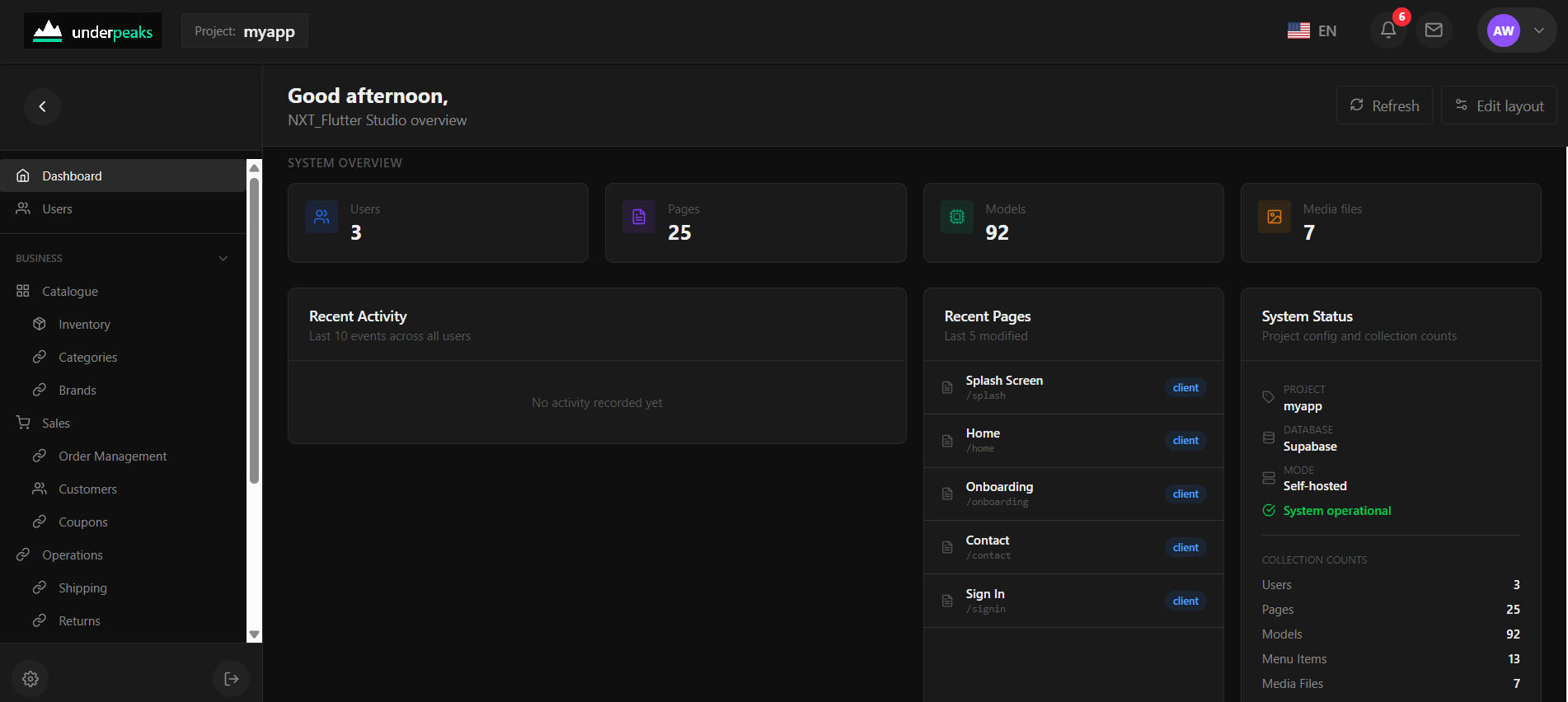
Sign in with the admin credentials you just created. You'll land in the Console — Core's admin dashboard.
7. Quick Tour
| Section | What it does |
|---|---|
| Dashboard | Overview stats and KPIs for your project |
| Shared Models | Define your data models — the schemas that power everything else |
| Pages | Build admin and client-facing pages using your models |
| Menu | Control what shows in your sidebar navigation |
| Navigator | Map out how pages connect and navigate to one another |
| Theme | Customize colors and branding |
| Storage | Upload and manage media files |
| Users | Manage who has access to your Core instance |
| Settings | Project name, license key, SMTP, API keys, and more |
Generate a Flutter or Next.js App
Once you've defined a model and attached it to a page, install the CLI and generate:
npm install -g underpeaks-nxf
nxf login
nxf generate flutter   # or nextjs
See the docs for the full code generation guide.
Links
Contributing
Issues and pull requests are welcome. If you're planning a larger change, please open an issue first to discuss it — this project is actively maintained by a single developer, so a heads-up saves everyone time.
Next Steps
- Create your first model under Shared Models
- Build a page for it under Pages
- Explore the generated admin views instantly — no extra config required
If you run into issues, check that your .env.local values match your database exactly, and that the database itself is reachable from wherever you're running Core.
Questions or feedback? Join the Discord or open an issue on GitHub. Underpeaks is built and maintained by one person, so please be patient with response times.
License
Underpeaks Core is licensed under the Apache License 2.0.
Similar repos


Languages
TypeScript
98.8%
UnderPeaks is a dev-first headless CMS that generates real Flutter and Next.js apps from a single data model. Self-hosted, API-first, and built for developers who want full control over their backend, content, and generated code.
See the codeSee what people are saying
README
Underpeaks Core
Build your backend once. Generate the rest.
Underpeaks is a self-hosted, developer-first headless CMS that generates production-ready Flutter and Next.js applications from a single content model. Define your data once, and get a real backend, a content editor, a REST API, and — if you want it — a working mobile and web app, generated straight from it.
Why Underpeaks
If you've ever built the same app for web and mobile, you know the tax: two codebases, two sets of backend glue code, one data model you're keeping in sync by hand. Change a field, update it in both places, miss one, ship a bug.
Underpeaks makes that one action — change the model, regenerate both. It also handles the backend work that quietly eats your week: auth that holds across devices, file storage without leaked keys, rate limits, consistent data.
No website builder, no drag-and-drop page editor. You already know how to build a frontend — Underpeaks builds the backend.
Underpeaks Core vs Underpeaks Studio
| Underpeaks Core | Underpeaks Studio | |
|---|---|---|
| Hosting | Self-hosted, your infrastructure | Hosted, managed for you |
| Cost | Free, forever, open source | Paid, tiered plans |
| Database | 5 adapters: Supabase, PostgreSQL, MySQL, MongoDB, Firebase | Supabase (managed) |
| Code generation | Full Flutter + Next.js | Full Flutter + Next.js |
| Team members | Unlimited | Scales with plan |
| Integrations | — | AI, email, SMS/OTP, payments, and more |
| Support | Community (Discord) | Email → priority → Slack → dedicated, by plan |
Not sure which one you need? Start with Core — you can always move to Studio later once you know your usage.
1. Register an Account
Underpeaks Core needs a license key issued from Underpeaks Studio, even when you're running everything yourself.
- Go to https://underpeaks.com
- Sign up for a free account
- Once logged in, generate a license key from your dashboard — you'll paste this into Core during setup
Keep this tab open; you'll need the key again shortly.
2. Get the Code
git clone https://github.com/underpeaks/underpeaks-core.git
cd underpeaks-core
npm install
3. Choose Your Database
Core supports five database backends — pick whichever you're most comfortable with:
- Supabase
- PostgreSQL
- MySQL
- MongoDB
- Firebase
You don't need to set up any environment variables by hand. The installer (next step) handles all of that for you — you'll just need your chosen database's connection details ready (host, credentials, project URL/keys, etc., depending on which one you pick).
4. Run the App
npm run dev
Visit http://localhost:3000 in your browser. Since this is a fresh install, you'll be automatically directed to the installer.
5. Run the Installer
The installer walks you through everything:
- Choose your database type — pick from the 5 options above
- Enter your connection details — the installer writes your
.envconfiguration for you - Database connection test — confirms Core can reach your database
- Table creation — creates all required system tables
- Demo content (optional) — seeds a working example project so you have something to explore right away
- Admin account creation — set the email and password for your first Core user
- License key — paste the license key you generated in step 1
Once the installer finishes, you'll be redirected to sign in.
6. First Login
Sign in with the admin credentials you just created. You'll land in the Console — Core's admin dashboard.
7. Quick Tour
| Section | What it does |
|---|---|
| Dashboard | Overview stats and KPIs for your project |
| Shared Models | Define your data models — the schemas that power everything else |
| Pages | Build admin and client-facing pages using your models |
| Menu | Control what shows in your sidebar navigation |
| Navigator | Map out how pages connect and navigate to one another |
| Theme | Customize colors and branding |
| Storage | Upload and manage media files |
| Users | Manage who has access to your Core instance |
| Settings | Project name, license key, SMTP, API keys, and more |
Generate a Flutter or Next.js App
Once you've defined a model and attached it to a page, install the CLI and generate:
npm install -g underpeaks-nxf
nxf login
nxf generate flutter   # or nextjs
See the docs for the full code generation guide.
Links
Contributing
Issues and pull requests are welcome. If you're planning a larger change, please open an issue first to discuss it — this project is actively maintained by a single developer, so a heads-up saves everyone time.
Next Steps
- Create your first model under Shared Models
- Build a page for it under Pages
- Explore the generated admin views instantly — no extra config required
If you run into issues, check that your .env.local values match your database exactly, and that the database itself is reachable from wherever you're running Core.
Questions or feedback? Join the Discord or open an issue on GitHub. Underpeaks is built and maintained by one person, so please be patient with response times.
License
Underpeaks Core is licensed under the Apache License 2.0.
Similar repos
Languages
TypeScript
98.8%