
LeechCore - Physical Memory Acquisition Library & The LeechAgent Remote Memory Acquisition Agent
C
959
205 commits
updated Sep 27, 2026
README
The LeechCore Physical Memory Acquisition Library:
The LeechCore Memory Acquisition Library focuses on Physical Memory Acquisition using various hardware and software based methods.
LeechCore provides API-based access to various hardware and software based memory sources via its C/C++, Python and C# APIs. Download the latest release of the library here on Github. If using Python it's recommended to install the leechcorepyc python pip package which is available for 64-bit Linux and Windows.
Use the LeechCore library locally or connect to, over the network, a LeechAgent to acquire physical memory or run commands remotely. The connection is by default compressed and secured with mutually authenticated kerberos - making it ideal in incident response when combined with analysis and live memory capture using Comae DumpIt or WinPMEM - even over high latency low-bandwidth connections!
The LeechCore library is used by PCILeech and The Memory Process File System (MemProcFS).
The LeechCore library is supported on 32/64-bit Windows (.dll), x64 and arm64 Linux (.so) and macOS. No executable exists for LeechCore - the library is always loaded by other applications using it - such as PCILeech and MemProcFS.
For detailed information about individual memory acquisition methods, the API and related examples please check out the LeechCore wiki.
Memory Acquisition Methods:
Software based memory acquisition methods:
Please find a summary of the supported software based memory acquisition methods listed below. Please note that the LeechAgent only provides a network connection to a remote LeechCore library. It's possible to use both hardware and software based memory acquisition once connected.
| Device | Type | Volatile | Write | Linux Support | Plugin |
|---|---|---|---|---|---|
| RAW physical memory dump | File | No | No | Yes | No |
| Full Microsoft Crash Dump | File | No | No | Yes | No |
| Full ELF Core Dump | File | No | No | Yes | No |
| QEMU | Live Memory | Yes | Yes | No | No |
| VMware | Live Memory | Yes | Yes | No | No |
| VMware memory save file | File | No | No | Yes | No |
| TotalMeltdown | CVE-2018-1038 | Yes | Yes | No | No |
| DumpIt /LIVEKD | Live Memory | Yes | No | No | No |
| WinPMEM | Live Memory | Yes | No | No | No |
| LiveKd | Live Memory | Yes | No | No | No |
| LiveCloudKd | Live Memory | Yes | Yes | No | Yes |
| libmicrovmi | Live Memory | Yes | Yes | Yes | Yes |
| Hyper-V Saved State | File | No | No | No | Yes |
| LeechAgent* | Remote | No | No |
Hardware based memory acquisition methods:
Please find a summary of the supported hardware based memory acquisition methods listed below. All hardware based memory acquisition methods are supported on both Windows and Linux.
| Device | Type | Interface | Speed | 64-bit memory access | PCIe TLP access | Project Sponsor |
|---|---|---|---|---|---|---|
| ZDMA | FPGA | Thunderbolt3 | 1000MB/s | Yes | Yes | 💖 |
| GBOX | FPGA | OCuLink | 400MB/s | Yes | Yes | 💖 |
| LeetDMA | FPGA | USB-C | 190MB/s | Yes | Yes | 💖 |
| CaptainDMA M2 | FPGA | USB-C | 190MB/s | Yes | Yes | 💖 |
| CaptainDMA M2 100T | FPGA | USB-C | 220MB/s | Yes | Yes | 💖 |
| CaptainDMA 4.1th | FPGA | USB-C | 190MB/s | Yes | Yes | 💖 |
| CaptainDMA 75T | FPGA | USB-C | 200MB/s | Yes | Yes | 💖 |
| CaptainDMA 100T | FPGA | USB-C | 220MB/s | Yes | Yes | 💖 |
| AC701/FT601 | FPGA | USB3 | 190MB/s | Yes | Yes | |
| USB3380-EVB | USB3380 | USB3 | 150MB/s | No | No | |
| DMA patched HP iLO | BMC | TCP | 1MB/s | Yes | No |
The LeechAgent Memory Acquisition and Analysis Agent:
The LeechAgent Memory Acquisition and Analysis Agent exists for Windows only. It allows users of the LeechCore library (PCILeech and MemProcFS) to connect to remotely installed LeechAgents over the network. The connection is secured, by default, with mutually authenticated encrypted kerberos.
Once connected physical memory may be acquired over the secure compressed connection. Memory analysis scripts, written in Python, may also be submitted for remote processing by the LeechAgent.
The LeechAgent authenticates all incoming connections against membership in the Local Administrators group. The clients must also authenticate the agent itself against the SPN used by the agent - please check the Application Event Log for information about the SPN and also successful authentication events against the agent.
There is also a possibility to run the LeechAgent in interactive mode (as a normal program). If run in interactive mode a user may also start the LeechAgent in "insecure" mode - which means no authentication or logging at all.
The LeechAgent listens on the port tcp/28473 - please ensure network connectivity for this port in the firewall. Also, if doing live capture ensure that LeechAgent (if running in interactive mode) is started as an administrator.
For more information please check the LeechCore wiki and the blog entry about remote live memory capture with the LeechAgent.
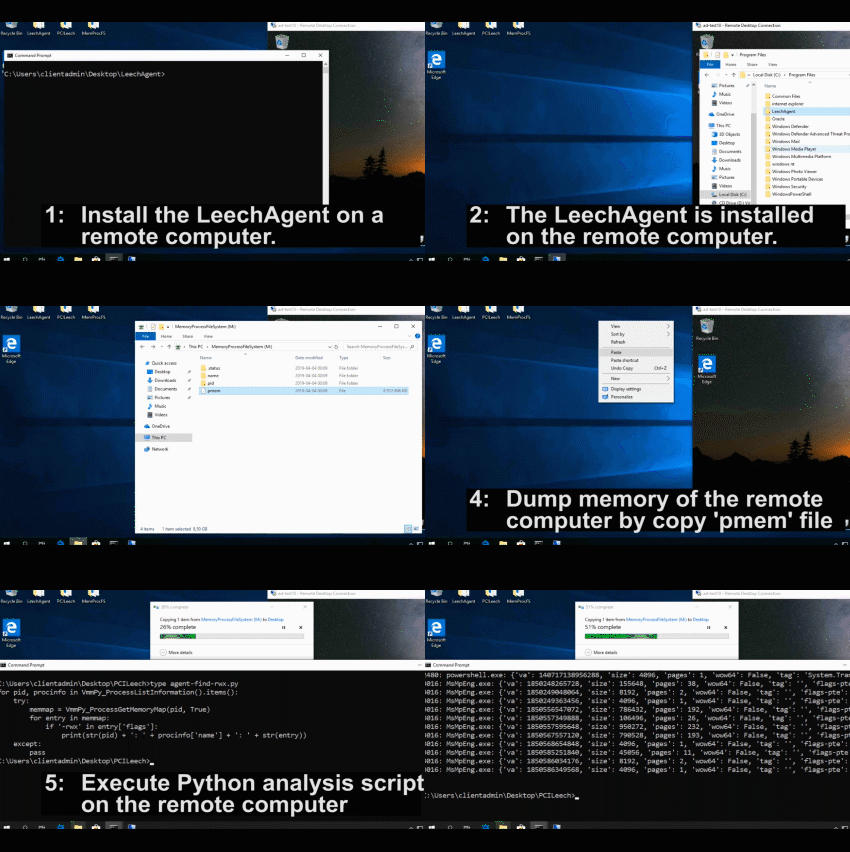
The videos below shows the process of installing the LeechAgent to a remote computer, connecting to it with MemProcFS to analyze and dump the memory while also connecting to it in parallel with PCILeech to submit a Python memory analysis script that make use of the MemProcFS API to analyze the remote CPU page tables for rwx-sections.
Examples:
Installing the LeechAgent on the local system (run as elevated administrator)'. Please ensure that the LeechAgent.exe is on the local C: drive before installing the agent service. Please also ensure that dependencies such as required .dll and/or .sys files (and optional Python sub-subfolder) are put in the same directory as the LeechAgent before running the install command.
LeechAgent.exe -install
Installing the LeechAgent on a remote system (or on the local system) in the Program Files\LeechAgent folder. An Actice Directory environment with remote access to the Service Manager of the target system is required. For additional information see the wiki entry about installing LeechAgent.
LeechAgent.exe -remoteinstall <remotecomputer.contoso.com>
Uninstall an existing, locally installed, LeechAgent. The agent service will be uninstalled but any files will remain.
LeechAgent.exe -uninstall
Uninstall a LeechAgent from a remote system and delete the Program Files\LeechAgent folder.
LeechAgent.exe -remoteuninstall <remotecomputer.contoso.com>
Start the LeechAgent in interactive mode only accepting connections from administrative users over kerberos-secured connections. Remember to start as elevated administrator if clients accessing LeechAgent should load WinPMEM to access live memory.
LeechAgent.exe -interactive
Start the LeechAgent in interactive insecure mode - accepting connections from all clients with access to port tcp/28473. NB! unauthenticated clients may dump memory and submit Python scripts running as SYSTEM. Use with care for testing only!
LeechAgent.exe -interactive -insecure
Start the LeechAgent in interactive mode with DumpIt LIVEKD to allow connecting clients to access live memory. Start as elevated administrator. Only accept connections from administrative users over kerberos-secured connections.
DumpIt.exe /LIVEKD /A LeechAgent.exe /C -interactive
Start the LeechAgent in interactive mode with DumpIt LIVEKD to allow connecting clients to access live memory. Start as elevated administrator. Accept connections from all clients with access to port tcp/28473 without any form of authentication.
DumpIt.exe /LIVEKD /A LeechAgent.exe /C "-interactive -insecure"
PCILeech and MemProcFS community:
Find all this a bit overwhelming? Or just want to ask a quick question? Join the PCILeech and MemProcFS DMA community server at Discord!

Building:
Pre-built binaries, modules and configuration files are found in the latest release. Build instructions are found in the Wiki in the Building section.
Contributing:
PCILeech, MemProcFS and LeechCore are open source but not open contribution. PCILeech, MemProcFS and LeechCore offers a highly flexible plugin architecture that will allow for contributions in the form of plugins. If you wish to make a contribution, other than a plugin, to the core projects please contact me before starting to develop.
Links:
- Twitter:
- Discord:

- PCILeech: https://github.com/ufrisk/pcileech
- PCILeech FPGA: https://github.com/ufrisk/pcileech-fpga
- LeechCore: https://github.com/ufrisk/LeechCore
- MemProcFS: https://github.com/ufrisk/MemProcFS
- Blog: http://blog.frizk.net

Changelog:
Previous releases (click to expand):
v1.0-1.8 * Initial Release and various updates. Please see individual relases for more information.- API: New handle based API to support multiple concurrent open devices.
NB! API contains breaking changes compared to v1.x API versions. - FPGA related performance improvements and bug fixes.
- New features:
- AMD support.
- User-settable physical memory map.
- External device plugins - see the LeechCore-plugin project for details.
- Sysinternals LiveKd Hyper-V VM-introspection (slow).
- Bug fixes.
- Support for LiveCloudKd.
- Bug fixes.
- Minor API additions.
- FPGA: R/W "shadow" config space (requires v4.9+ bitstream).
- LeechAgent: Full multi-device support.
- Bug fixes.
- Remake of Python package
leechcorepycnow also available on pip.
- Bug fixes.
- Read/Write PCI Express Transaction Layer Packets, PCIe TLPs, FPGA devices only.
- Bug fixes.
- Updates to support MemProcFS v4.
- Separate releases for Windows and Linux.
- Bug fixes.
- Remote LeechAgent support for MemProcFS.
- VMWare live memory VM introspection (Windows host only).
- Bug fixes.
- 32-bit support.
- Support for Active Memory and Full Bitmap Microsoft Crash Dump files.
- Support for the FT2232H USB2 chip.
- Support for Enigma X1 hardware.
- Plugin support for libmicrovmi:
- Support for Xen, KVM, VirtualBox, QEMU on Linux.
- Pre-bundled on Linux x64 (libmicrovmi)
- Thank you Wenzel for this contribution.
- Bug fixes.
- Visual Studio 2022 Support.
- New write fpga algorithm.
- Support for MemProcFS v5.
- FPGA performance improvements.
- ARM64 Windows support.
- VMM loopback device.
- Multi-threaded file access.
- Volatile memory file support.
- Support for LiME memory dump files.
- Improved FPGA performance for smaller reads.
- QEMU support on Linux (VM live memory introspection).
- Improved MemProcFS remoting via a remote LeechAgent. Full MemProcFS remote support over SMB - tcp/445. Perfect for memory forensics Incident Response (IR)!
- PCIe BAR information and user callback (easier implementation of custom devices).
- ARM64 memory dump (.dmp) and VMWare Fusion (.vmem/.vmsn) support.
- Improved handling of PCIe TLP user callback.
- Bug fixes.
- I/O BAR support.
- Support for plugin device drivers.
- Linux PCIe FPGA performance improvements.
- Linux PCIe FPGA multiple devices (devindex) supported.
- Bug fixes.
- Hibernation file support.
- Bug fixes.
- Windows 11 24H2 hibernation file support.
- ZDMA fast-write "lockless" support.
- macOS support
- LeechAgent gRPC support.
- LeechAgent Linux support.
- Breaking change: LeechAgent is incompatible with previous versions (unless compressed memory is explicitly disabled).
- Support for FTDI FT601 driver 1.4 (FTD3XXWU.dll)
- Improved FPGA error handling and recovery.
- bug fix: hibernation file support.
- Support for non-ascii characters in file paths.
Latest:
- Bug fixes.
Significant stargazers

238 followers · starred Oct 2022

36 followers · starred Jun 2022

235 followers · starred Sep 2024
Similar repos


Languages
C
99.4%
LeechCore - Physical Memory Acquisition Library & The LeechAgent Remote Memory Acquisition Agent
C
959
205 commits
updated Sep 27, 2026
README
The LeechCore Physical Memory Acquisition Library:
The LeechCore Memory Acquisition Library focuses on Physical Memory Acquisition using various hardware and software based methods.
LeechCore provides API-based access to various hardware and software based memory sources via its C/C++, Python and C# APIs. Download the latest release of the library here on Github. If using Python it's recommended to install the leechcorepyc python pip package which is available for 64-bit Linux and Windows.
Use the LeechCore library locally or connect to, over the network, a LeechAgent to acquire physical memory or run commands remotely. The connection is by default compressed and secured with mutually authenticated kerberos - making it ideal in incident response when combined with analysis and live memory capture using Comae DumpIt or WinPMEM - even over high latency low-bandwidth connections!
The LeechCore library is used by PCILeech and The Memory Process File System (MemProcFS).
The LeechCore library is supported on 32/64-bit Windows (.dll), x64 and arm64 Linux (.so) and macOS. No executable exists for LeechCore - the library is always loaded by other applications using it - such as PCILeech and MemProcFS.
For detailed information about individual memory acquisition methods, the API and related examples please check out the LeechCore wiki.
Memory Acquisition Methods:
Software based memory acquisition methods:
Please find a summary of the supported software based memory acquisition methods listed below. Please note that the LeechAgent only provides a network connection to a remote LeechCore library. It's possible to use both hardware and software based memory acquisition once connected.
| Device | Type | Volatile | Write | Linux Support | Plugin |
|---|---|---|---|---|---|
| RAW physical memory dump | File | No | No | Yes | No |
| Full Microsoft Crash Dump | File | No | No | Yes | No |
| Full ELF Core Dump | File | No | No | Yes | No |
| QEMU | Live Memory | Yes | Yes | No | No |
| VMware | Live Memory | Yes | Yes | No | No |
| VMware memory save file | File | No | No | Yes | No |
| TotalMeltdown | CVE-2018-1038 | Yes | Yes | No | No |
| DumpIt /LIVEKD | Live Memory | Yes | No | No | No |
| WinPMEM | Live Memory | Yes | No | No | No |
| LiveKd | Live Memory | Yes | No | No | No |
| LiveCloudKd | Live Memory | Yes | Yes | No | Yes |
| libmicrovmi | Live Memory | Yes | Yes | Yes | Yes |
| Hyper-V Saved State | File | No | No | No | Yes |
| LeechAgent* | Remote | No | No |
Hardware based memory acquisition methods:
Please find a summary of the supported hardware based memory acquisition methods listed below. All hardware based memory acquisition methods are supported on both Windows and Linux.
| Device | Type | Interface | Speed | 64-bit memory access | PCIe TLP access | Project Sponsor |
|---|---|---|---|---|---|---|
| ZDMA | FPGA | Thunderbolt3 | 1000MB/s | Yes | Yes | 💖 |
| GBOX | FPGA | OCuLink | 400MB/s | Yes | Yes | 💖 |
| LeetDMA | FPGA | USB-C | 190MB/s | Yes | Yes | 💖 |
| CaptainDMA M2 | FPGA | USB-C | 190MB/s | Yes | Yes | 💖 |
| CaptainDMA M2 100T | FPGA | USB-C | 220MB/s | Yes | Yes | 💖 |
| CaptainDMA 4.1th | FPGA | USB-C | 190MB/s | Yes | Yes | 💖 |
| CaptainDMA 75T | FPGA | USB-C | 200MB/s | Yes | Yes | 💖 |
| CaptainDMA 100T | FPGA | USB-C | 220MB/s | Yes | Yes | 💖 |
| AC701/FT601 | FPGA | USB3 | 190MB/s | Yes | Yes | |
| USB3380-EVB | USB3380 | USB3 | 150MB/s | No | No | |
| DMA patched HP iLO | BMC | TCP | 1MB/s | Yes | No |
The LeechAgent Memory Acquisition and Analysis Agent:
The LeechAgent Memory Acquisition and Analysis Agent exists for Windows only. It allows users of the LeechCore library (PCILeech and MemProcFS) to connect to remotely installed LeechAgents over the network. The connection is secured, by default, with mutually authenticated encrypted kerberos.
Once connected physical memory may be acquired over the secure compressed connection. Memory analysis scripts, written in Python, may also be submitted for remote processing by the LeechAgent.
The LeechAgent authenticates all incoming connections against membership in the Local Administrators group. The clients must also authenticate the agent itself against the SPN used by the agent - please check the Application Event Log for information about the SPN and also successful authentication events against the agent.
There is also a possibility to run the LeechAgent in interactive mode (as a normal program). If run in interactive mode a user may also start the LeechAgent in "insecure" mode - which means no authentication or logging at all.
The LeechAgent listens on the port tcp/28473 - please ensure network connectivity for this port in the firewall. Also, if doing live capture ensure that LeechAgent (if running in interactive mode) is started as an administrator.
For more information please check the LeechCore wiki and the blog entry about remote live memory capture with the LeechAgent.
The videos below shows the process of installing the LeechAgent to a remote computer, connecting to it with MemProcFS to analyze and dump the memory while also connecting to it in parallel with PCILeech to submit a Python memory analysis script that make use of the MemProcFS API to analyze the remote CPU page tables for rwx-sections.
Examples:
Installing the LeechAgent on the local system (run as elevated administrator)'. Please ensure that the LeechAgent.exe is on the local C: drive before installing the agent service. Please also ensure that dependencies such as required .dll and/or .sys files (and optional Python sub-subfolder) are put in the same directory as the LeechAgent before running the install command.
LeechAgent.exe -install
Installing the LeechAgent on a remote system (or on the local system) in the Program Files\LeechAgent folder. An Actice Directory environment with remote access to the Service Manager of the target system is required. For additional information see the wiki entry about installing LeechAgent.
LeechAgent.exe -remoteinstall <remotecomputer.contoso.com>
Uninstall an existing, locally installed, LeechAgent. The agent service will be uninstalled but any files will remain.
LeechAgent.exe -uninstall
Uninstall a LeechAgent from a remote system and delete the Program Files\LeechAgent folder.
LeechAgent.exe -remoteuninstall <remotecomputer.contoso.com>
Start the LeechAgent in interactive mode only accepting connections from administrative users over kerberos-secured connections. Remember to start as elevated administrator if clients accessing LeechAgent should load WinPMEM to access live memory.
LeechAgent.exe -interactive
Start the LeechAgent in interactive insecure mode - accepting connections from all clients with access to port tcp/28473. NB! unauthenticated clients may dump memory and submit Python scripts running as SYSTEM. Use with care for testing only!
LeechAgent.exe -interactive -insecure
Start the LeechAgent in interactive mode with DumpIt LIVEKD to allow connecting clients to access live memory. Start as elevated administrator. Only accept connections from administrative users over kerberos-secured connections.
DumpIt.exe /LIVEKD /A LeechAgent.exe /C -interactive
Start the LeechAgent in interactive mode with DumpIt LIVEKD to allow connecting clients to access live memory. Start as elevated administrator. Accept connections from all clients with access to port tcp/28473 without any form of authentication.
DumpIt.exe /LIVEKD /A LeechAgent.exe /C "-interactive -insecure"
PCILeech and MemProcFS community:
Find all this a bit overwhelming? Or just want to ask a quick question? Join the PCILeech and MemProcFS DMA community server at Discord!
Building:
Pre-built binaries, modules and configuration files are found in the latest release. Build instructions are found in the Wiki in the Building section.
Contributing:
PCILeech, MemProcFS and LeechCore are open source but not open contribution. PCILeech, MemProcFS and LeechCore offers a highly flexible plugin architecture that will allow for contributions in the form of plugins. If you wish to make a contribution, other than a plugin, to the core projects please contact me before starting to develop.
Links:
- Twitter:
- Discord:
- PCILeech: https://github.com/ufrisk/pcileech
- PCILeech FPGA: https://github.com/ufrisk/pcileech-fpga
- LeechCore: https://github.com/ufrisk/LeechCore
- MemProcFS: https://github.com/ufrisk/MemProcFS
- Blog: http://blog.frizk.net
Changelog:
Previous releases (click to expand):
v1.0-1.8 * Initial Release and various updates. Please see individual relases for more information.- API: New handle based API to support multiple concurrent open devices.
NB! API contains breaking changes compared to v1.x API versions. - FPGA related performance improvements and bug fixes.
- New features:
- AMD support.
- User-settable physical memory map.
- External device plugins - see the LeechCore-plugin project for details.
- Sysinternals LiveKd Hyper-V VM-introspection (slow).
- Bug fixes.
- Support for LiveCloudKd.
- Bug fixes.
- Minor API additions.
- FPGA: R/W "shadow" config space (requires v4.9+ bitstream).
- LeechAgent: Full multi-device support.
- Bug fixes.
- Remake of Python package
leechcorepycnow also available on pip.
- Bug fixes.
- Read/Write PCI Express Transaction Layer Packets, PCIe TLPs, FPGA devices only.
- Bug fixes.
- Updates to support MemProcFS v4.
- Separate releases for Windows and Linux.
- Bug fixes.
- Remote LeechAgent support for MemProcFS.
- VMWare live memory VM introspection (Windows host only).
- Bug fixes.
- 32-bit support.
- Support for Active Memory and Full Bitmap Microsoft Crash Dump files.
- Support for the FT2232H USB2 chip.
- Support for Enigma X1 hardware.
- Plugin support for libmicrovmi:
- Support for Xen, KVM, VirtualBox, QEMU on Linux.
- Pre-bundled on Linux x64 (libmicrovmi)
- Thank you Wenzel for this contribution.
- Bug fixes.
- Visual Studio 2022 Support.
- New write fpga algorithm.
- Support for MemProcFS v5.
- FPGA performance improvements.
- ARM64 Windows support.
- VMM loopback device.
- Multi-threaded file access.
- Volatile memory file support.
- Support for LiME memory dump files.
- Improved FPGA performance for smaller reads.
- QEMU support on Linux (VM live memory introspection).
- Improved MemProcFS remoting via a remote LeechAgent. Full MemProcFS remote support over SMB - tcp/445. Perfect for memory forensics Incident Response (IR)!
- PCIe BAR information and user callback (easier implementation of custom devices).
- ARM64 memory dump (.dmp) and VMWare Fusion (.vmem/.vmsn) support.
- Improved handling of PCIe TLP user callback.
- Bug fixes.
- I/O BAR support.
- Support for plugin device drivers.
- Linux PCIe FPGA performance improvements.
- Linux PCIe FPGA multiple devices (devindex) supported.
- Bug fixes.
- Hibernation file support.
- Bug fixes.
- Windows 11 24H2 hibernation file support.
- ZDMA fast-write "lockless" support.
- macOS support
- LeechAgent gRPC support.
- LeechAgent Linux support.
- Breaking change: LeechAgent is incompatible with previous versions (unless compressed memory is explicitly disabled).
- Support for FTDI FT601 driver 1.4 (FTD3XXWU.dll)
- Improved FPGA error handling and recovery.
- bug fix: hibernation file support.
- Support for non-ascii characters in file paths.
Latest:
- Bug fixes.
Similar repos
Significant stargazers
238 followers · starred Oct 2022
36 followers · starred Jun 2022
235 followers · starred Sep 2024
Languages
C
99.4%