A small utility to remove frame rate limit, change FOV, add widescreen support and more for Elden Ring
C#
1,385
22 commits
updated Jun 21, 2024
A small utility to remove frame rate limit, change FOV (Field of View), add widescreen supprt, alter Game Speed and various game modifications for Elden Ring written in C#. More features soon! Patches games memory while running, does not modify any game files. Works with every game version (legit steam & oh-not-so-legit), should work with all future updates.
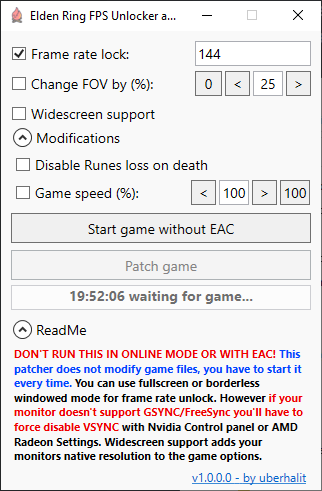
Make sure the game is running in offline mode and the AntiCheat (EAC) isn't running..
The graphic setup has to be done only once but as the patcher hot-patches the memory you have to start the patcher every time you want to use any of its features. The game enforces VSYNC and forces 60 Hz in fullscreen even on 144 Hz monitors so we have to override these.
Display -> Change resolution
3D Settings -> Manage 3D settings -> Program Settings -> Elden RingPreferred refresh rate to Highest availableVertical sync to Off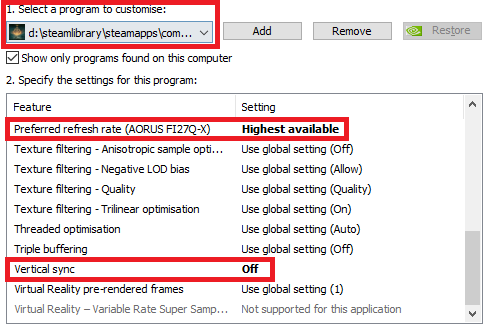
Elden Ring FPS Unlocker and more and start the game through the first buttonPatch gameDisplay settingsAdvanced Display Settings -> Display Adapter PropertiesMonitor tab and make sure your monitor is set to the highest Refresh rate possible:Gaming -> Elden Ring or add it manually if it's missing: Add -> Browse -> Elden RingWait for Vertical Refresh to Enhanced Sync, Fast Sync or Always Off:Elden Ring FPS Unlocker and more and start the game through the first buttonPatch game3D Settings -> Manage 3D settings -> Program Settings -> Elden RingMonitor Technology to G-SYNCVertical sync on Use the 3D application setting now to help remove frame time stutters (see here)Preferred refresh rate is still set to Highest available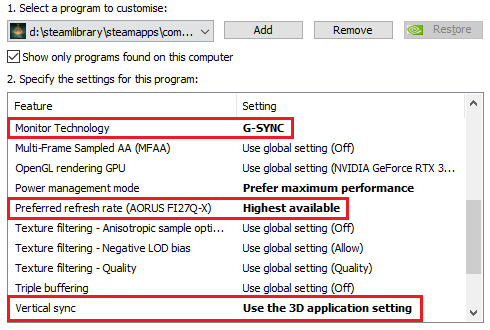
Elden Ring FPS Unlocker and more and start the game through the first buttonPatch gameIncrease or decrease the games Field Of Fiew (FOV) between -95% and +95%.
Adds your monitors native resolution to the games video options overwriting the default 1920x1080 resolution. This will allow widescreen monitors to use their full resolution and aspect ratio.
Normally you don't have to tick this checkbox (except when you are drinking rum while sailing the sea). Ticking this will tell the utility to not start Steam when it tries to launch the game. If your game isn't starting then untick this.
Will disable the automatic camera rotation adjustments when you are moving. This is mostly intended for mouse users, enabling it on non-native windows controllers might not work correctly.
If you press your target lock-on key and no target is in sight the game will reset the camera position and disable your input while it's doing so. Ticking this checkbox will remove this behaviour of the game.
Like 'Unseen Aid' in Sekiro you will not lose any Runes upon death with this option enabled.
Slow down the game to beat a boss like a game journalist or speed it up and become gud. Game speed acts as a global time scale and is used by the game itself to create a dramatic effect in a few cutscenes. All game physics (even opening the menu) will be affected equally: all time-critical windows like dodge and deflect will be proportionally prolonged or shortened while the amount of damage given and taken as well as all other damage physics will be unaltered. A hit from an enemy on 150% game speed will do the exact same damage as on 80%, the deflect window on 50% is exactly twice as long as on 100% and so on. Of course, your character will be affected by the speed too so even though a time window might be different now, the speed which you can react on it is different too. Be aware that the speed modifier can potentially crash the game in certain cutscenes and NPC interactions so use it with caution.
Fullscreen optimization for Elden Ring: right mouse click on eldenring.exe -> Compatibility-> tick 'Disable fullscreen optimizations'Elden Ring FPS Unlocker and more to your antivirus's exclusion listSteam Broadcast (streaming via overlay)Use Visual Studio 2022 to build and remove the missing icon.ico from build process.
Feel free to open an issue or create a pull request at any time
This project is licensed under the MIT License - see the LICENSE file for details
57 followers · starred Jul 2023
132 followers · starred Jul 2022
70 followers · starred Feb 2022
208 followers · starred Mar 2023
A small utility to remove frame rate limit, change FOV, add widescreen support and more for Elden Ring
C#
1,385
22 commits
updated Jun 21, 2024
A small utility to remove frame rate limit, change FOV (Field of View), add widescreen supprt, alter Game Speed and various game modifications for Elden Ring written in C#. More features soon! Patches games memory while running, does not modify any game files. Works with every game version (legit steam & oh-not-so-legit), should work with all future updates.
Make sure the game is running in offline mode and the AntiCheat (EAC) isn't running..
The graphic setup has to be done only once but as the patcher hot-patches the memory you have to start the patcher every time you want to use any of its features. The game enforces VSYNC and forces 60 Hz in fullscreen even on 144 Hz monitors so we have to override these.
Display -> Change resolution3D Settings -> Manage 3D settings -> Program Settings -> Elden RingPreferred refresh rate to Highest availableVertical sync to OffElden Ring FPS Unlocker and more and start the game through the first buttonPatch gameDisplay settingsAdvanced Display Settings -> Display Adapter PropertiesMonitor tab and make sure your monitor is set to the highest Refresh rate possible:Gaming -> Elden Ring or add it manually if it's missing: Add -> Browse -> Elden RingWait for Vertical Refresh to Enhanced Sync, Fast Sync or Always Off:Elden Ring FPS Unlocker and more and start the game through the first buttonPatch game3D Settings -> Manage 3D settings -> Program Settings -> Elden RingMonitor Technology to G-SYNCVertical sync on Use the 3D application setting now to help remove frame time stutters (see here)Preferred refresh rate is still set to Highest availableElden Ring FPS Unlocker and more and start the game through the first buttonPatch gameIncrease or decrease the games Field Of Fiew (FOV) between -95% and +95%.
Adds your monitors native resolution to the games video options overwriting the default 1920x1080 resolution. This will allow widescreen monitors to use their full resolution and aspect ratio.
Normally you don't have to tick this checkbox (except when you are drinking rum while sailing the sea). Ticking this will tell the utility to not start Steam when it tries to launch the game. If your game isn't starting then untick this.
Will disable the automatic camera rotation adjustments when you are moving. This is mostly intended for mouse users, enabling it on non-native windows controllers might not work correctly.
If you press your target lock-on key and no target is in sight the game will reset the camera position and disable your input while it's doing so. Ticking this checkbox will remove this behaviour of the game.
Like 'Unseen Aid' in Sekiro you will not lose any Runes upon death with this option enabled.
Slow down the game to beat a boss like a game journalist or speed it up and become gud. Game speed acts as a global time scale and is used by the game itself to create a dramatic effect in a few cutscenes. All game physics (even opening the menu) will be affected equally: all time-critical windows like dodge and deflect will be proportionally prolonged or shortened while the amount of damage given and taken as well as all other damage physics will be unaltered. A hit from an enemy on 150% game speed will do the exact same damage as on 80%, the deflect window on 50% is exactly twice as long as on 100% and so on. Of course, your character will be affected by the speed too so even though a time window might be different now, the speed which you can react on it is different too. Be aware that the speed modifier can potentially crash the game in certain cutscenes and NPC interactions so use it with caution.
Fullscreen optimization for Elden Ring: right mouse click on eldenring.exe -> Compatibility-> tick 'Disable fullscreen optimizations'Elden Ring FPS Unlocker and more to your antivirus's exclusion listSteam Broadcast (streaming via overlay)Use Visual Studio 2022 to build and remove the missing icon.ico from build process.
Feel free to open an issue or create a pull request at any time
This project is licensed under the MIT License - see the LICENSE file for details
57 followers · starred Jul 2023
132 followers · starred Jul 2022
70 followers · starred Feb 2022
208 followers · starred Mar 2023



