
Model-free, online 6D object pose tracking from monocular RGB-D, with robust multi-object tracking and recovery from occlusion.
Jupyter Notebook
113
102 commits
updated Sep 24, 2026
README
Point2Pose
Occlusion-Recovering 6D Pose Tracking and 3D Reconstruction for Multiple Unknown Objects via 2D Point Trackers
European Conference on Computer Vision (ECCV) 2026
Tzu-Yuan Lin1 · Ho Jae Lee1 · Kevin Doherty2,§ · Yonghyeon Lee1 · Sangbae Kim1
1Massachusetts Institute of Technology 2Boston Dynamics
§Work conducted in personal time and independently of the author's affiliated organization.




📰 News and Updates
- [09/2026] Point2Pose now runs real-time at 30 Hz on a NVIDIA 4090 GPU!
- [09/2026] The live demo can now re-measure an object's bounding box from the fused SDF. Press
bwhile tracking. Details - [08/2026] Model-based Point2Pose is released along with Gaussian splats reconstruction!
- [06/2026] Point2Pose is accepted to ECCV 2026!
🎯 About
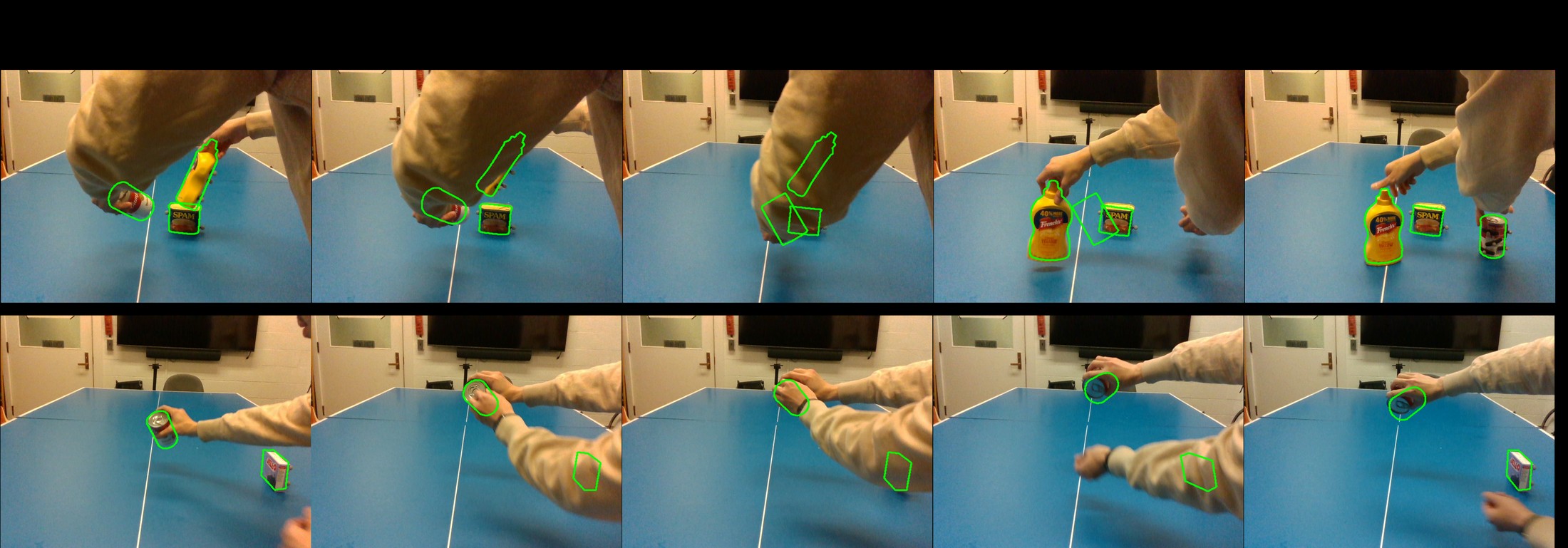
Point2Pose is a model-free method for causal 6D pose tracking of multiple rigid objects from RGB-D video, initialized from a few clicked image points. Long-range 2D point tracks keep correspondences alive, so a fully occluded object is re-localized the instant it reappears — and each target is reconstructed as a textured mesh while tracking.
Disclaimer
The readme is AI-generated. Please submit an issue if you find any problem.
🆕 Model-Based Point2Pose
We recently made a model-based variant of Point2Pose. The new framework supports:
- Model-based tracking. Given a Gaussian or mesh model, the system can track its 6D pose. README
- Gaussian Splats Reconstruction. The new pipeline supports Gaussian splat reconstruction for higher visual modality. README
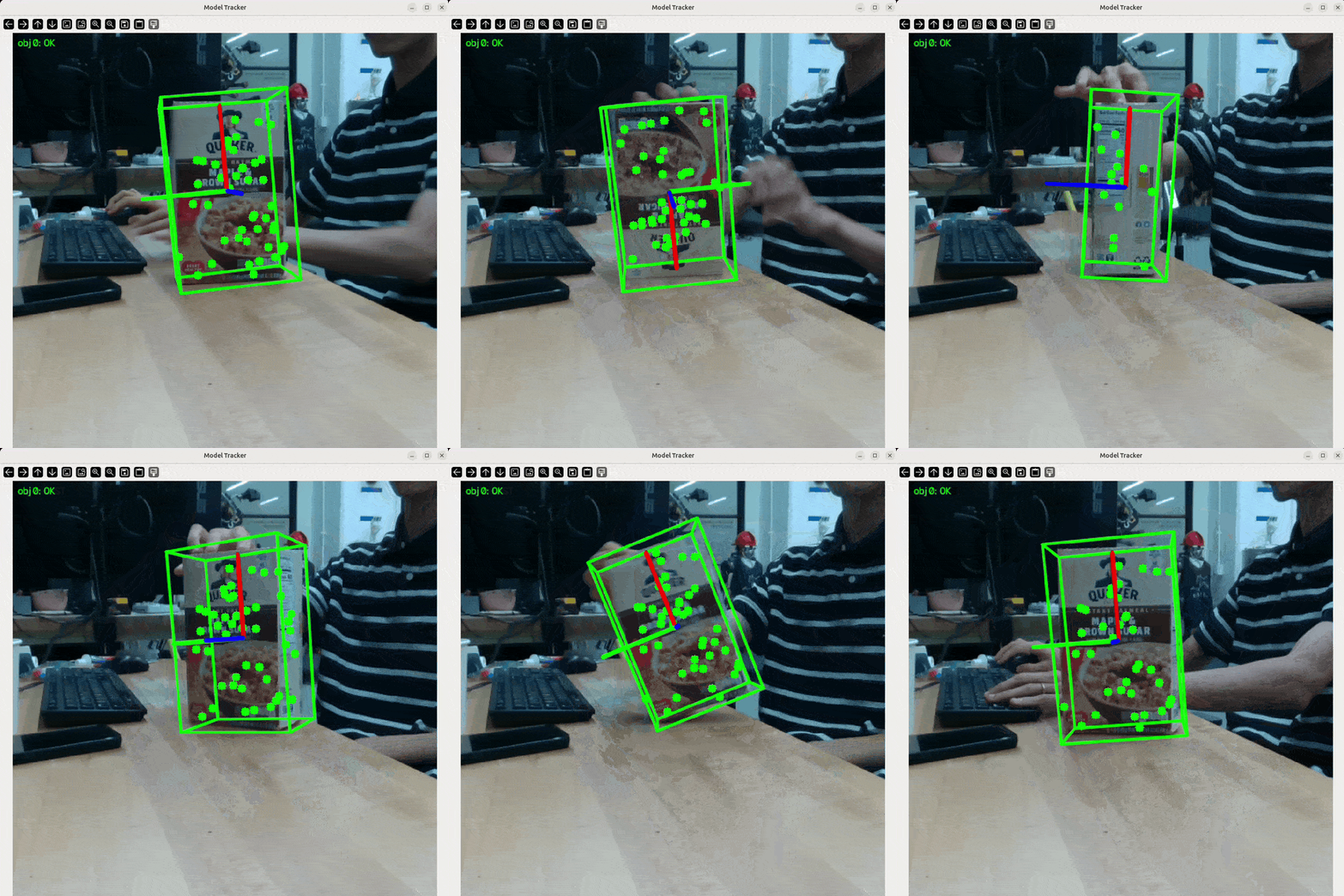
Model-based tracking and the 3DGS reconstruction pipeline are contributed by Sang Min Kim. Sangmin is a great researcher on 3D vision and robotics! Check out his other work
📑 Table of Contents
- About
- Installation
- Model-Based Point2Pose
- RealSense Live Demo
- Running on Datasets
- Configuration & Architecture
- Outputs and Logging
- Repository Structure
- Known Issues
- Acknowledgements
- License
- Citation
🛠 Installation
Tested on Ubuntu 22.04 with Python 3.11, PyTorch 2.4 + CUDA 12.1, and an NVIDIA RTX 4090.
1. Clone the repository
git clone --recurse-submodules git@github.com:tzuyuan/point-to-pose.git
cd point-to-pose
(Already cloned? git submodule update --init --recursive.)
2. Create the environment
conda env create -f environment.yml
conda activate point2pose
That is the whole setup — there is no package to install. Every entry-point script
adds the repository root to sys.path, so run everything from the repository
root and imports resolve on their own:
python examples/realsense_tracking/realsense_tracking.py
python experiments/ho3d/run_ho3d_single.py -v AP12 ...
The pins in environment.yml are the exact versions the paper
results were produced with (Ubuntu 22.04 · Python 3.11 · CUDA 12.1 · RTX 4090).
Three extras are commented out at the bottom of the file — uncomment what you
need: pycuda (CUDA TSDF fusion, needs nvcc at install time), transformers
(Track-On2 backend), lcm (LCM pose publishing).
Using pip / venv instead of conda
python -m venv .venv && source .venv/bin/activate
pip install -r requirements.txt
# other CUDA build: pip install -r requirements.txt --extra-index-url https://download.pytorch.org/whl/cu121
requirements.txt carries the same pins as environment.yml.
3. Third-party components
Three components are not on PyPI and must be installed from source. The quick route:
pip install --no-build-isolation -r requirements-third-party.txt
(--no-build-isolation matters — these packages import torch at build time.) Or clone them individually, which is preferable if you want to read or patch their code:
| Component | Used for | Install |
|---|---|---|
| SAM2 real-time | Segmentation (required) | git clone git@github.com:Gy920/segment-anything-2-real-time.git && cd segment-anything-2-real-time && pip install -e . |
| tapnet (BootsTAPIR) | Default point tracker (required) | git clone https://github.com/deepmind/tapnet.git && cd tapnet && pip install . |
| LightGlue | SuperPoint keypoint sampling (required) | git clone https://github.com/cvg/LightGlue.git && cd LightGlue && pip install -e . |
4. Download checkpoints
# SAM2 (from inside the segment-anything-2-real-time clone)
cd checkpoints && ./download_ckpts.sh
# then copy/symlink sam2.1_hiera_small.pt (default) and/or
# sam2.1_hiera_large.pt into point-to-pose/checkpoints/sam2.1/

# BootsTAPIR (default tracker)
wget -P checkpoints/tapir https://storage.googleapis.com/dm-tapnet/causal_tapir_checkpoint.npy
Expected layout (paths are configurable in the YAML configs):
checkpoints/
├── sam2.1/    sam2.1_hiera_small.pt          # segmentation (default)
│              sam2.1_hiera_large.pt          # segmentation (higher fidelity)
├── tapir/     causal_bootstapir_checkpoint.pt # default point tracker
├── tapnext/   tapnextpp_ckpt.pt              # optional tracker
└── trackon/   trackon2_dinov2_checkpoint.pt  # optional tracker
Choosing a SAM2 checkpoint
SAM2 runs on every frame, so which checkpoint you pick is the single biggest lever on live latency. The default config uses small; large is what the paper results were produced with.
| Checkpoint | model_cfg | Latency* | Use it for |
|---|---|---|---|
sam2.1_hiera_small.pt | configs/sam2.1/sam2.1_hiera_s.yaml | ~15 ms | Default. Live tracking — configs/realsense/default.yaml |
sam2.1_hiera_large.pt | configs/sam2.1/sam2.1_hiera_l.yaml | ~35 ms | Best mask quality — configs/realsense/default_high_res.yaml, dataset runs |
sam2.1_hiera_tiny.pt | configs/sam2.1/sam2.1_hiera_t.yaml | faster still | When even small is too slow |
*Measured on an RTX 4090 at 640×480, single object. Swap by editing the segmenter: block:
segmenter:
  type: sam2
  params:
    model_cfg: configs/sam2.1/sam2.1_hiera_s.yaml   # _l.yaml for large
    checkpoint: <repo>/checkpoints/sam2.1/sam2.1_hiera_small.pt
    device: cuda
⚠️ Update the paths in the configs. The YAML files under configs/ currently contain absolute paths (
/home/justin/code/point-to-pose/...,/home/justin/data/...). Pointcheckpoint_path,debug_dir, andpose_save_pathat your own locations before running.
Swappable point trackers
The default tracker is BootsTAPIR (type: tapir). Four alternatives ship with the repo — all implement the same Tracker interface (initialize, add_query_points, track_once) and are selected purely by the tracker: block of the pipeline config. Example blocks for each are in configs/realsense/default.yaml.
type | Method | Latency* | Notes |
|---|---|---|---|
tapir | BootsTAPIR | ~18 ms | Default; used for all paper results |
tapnext | TAPNext++ | ~12 ms | Causal SSM state; strongest occlusion re-detection on single-object scenes |
trackon | Track-On2 / Track-On-R | ~22 ms | Global patch-classification re-detection with a FIFO point memory |
litetracker | LiteTracker | ~6 ms | Training-free causal CoTracker3; fastest, but local search only |
cotracker3_online | CoTracker3 | ~41 ms | Reference baseline |
* Tracker forward pass only, RTX 4090, at each tracker's benchmark resolution.
TAPNext++ setup (type: tapnext)
Lives in tapnet/tapnext/ of the tapnet repo, which must be recent enough to include it (commit 7f13cb6, Apr 2026 or later):
cd tapnet && git pull   # or: git checkout origin/main -- tapnet/tapnext tapnet/tapnextpp
wget -P checkpoints/tapnext https://storage.googleapis.com/dm-tapnet/tapnextpp/tapnextpp_ckpt.pt
A 512-resolution fine-tuned checkpoint also exists (https://storage.googleapis.com/gresearch/tapnextpp/tapnextpp_512.ckpt, use with input_resolution: 512).
Caveat: TAPNext queries are position-only. Points added mid-stream are injected on the next processed frame; anchor-frame (past keyframe) queries are injected by position alone, since the recurrent state cannot be rewound. Its fixed 256×256 input also starves small objects when several share a frame, so it underperforms TAPIR on multi-object scenes.
Track-On2 setup (type: trackon)
cd third_party
git clone https://github.com/gorkaydemir/track_on.git
pip install mmcv==2.2.0 -f https://download.openmmlab.com/mmcv/dist/cu121/torch2.4/index.html
pip install "transformers>=4.56.1"
The mmcv wheel URL must match your torch/CUDA version; see the track_on README for building from source.
# DINOv2 backbone (default, ungated; ViT backbone auto-downloads from HF)
wget -O checkpoints/trackon/trackon2_dinov2_checkpoint.pt "https://huggingface.co/gorkaydemir/track_on2/resolve/main/trackon2_dinov2_checkpoint.pt?download=true"

# DINOv3 variants (better real-world numbers, esp. Track-On-R)
wget -O checkpoints/trackon/trackon2_dinov3_checkpoint.pt "https://huggingface.co/gorkaydemir/track_on2/resolve/main/trackon2_dinov3_checkpoint.pt?download=true"
wget -O checkpoints/trackon/track_on_r.pt "https://huggingface.co/gorkaydemir/track_on_r/resolve/main/track_on_r.pt?download=true"
DINOv3 variants require access to facebook/dinov3-vits16plus-pretrain-lvd1689m (gated Meta license) plus huggingface-cli login, and vit_backbone: dinov3_s_plus in the config. Accuracy of the DINOv2 checkpoint is comparable per the authors, and it needs no login. mmcv ops are fp32-only.
LiteTracker setup (type: litetracker)
cd third_party
git clone https://github.com/ImFusionGmbH/lite-tracker.git
No extra Python dependencies. Point checkpoint_path at the CoTracker3 scaled_online.pth weights (CC BY-NC — non-commercial). Like CoTracker3, localization is a local search around the previous position: robust for smooth motion, but it cannot re-detect a point that moved far while occluded.
🎥 RealSense Live Demo
Click a few points on any object in the live feed and Point2Pose starts tracking its 6D pose and reconstructing its mesh — no CAD model, no training.
Requirements
- Intel RealSense RGB-D camera (tested on D435i / D455), USB 3.0
- NVIDIA GPU with CUDA (≥8 GB recommended)
pyrealsense2, SAM2 and TAPIR checkpoints in place
1. Set your camera serial
rs-enumerate-devices -s # find your serial
Set it in the config you plan to use:
# configs/realsense/default.yaml
realsense:
  params:
    rs_serial: 941322070969
Other keys worth checking in the same file: pipeline.params.max_num_obj (how many objects to track), estimate_init_pose, debug_level, save_pose / pose_save_path, and the tracker: block.
configs/realsense/default.yaml is tuned for live tracking: TAPIR runs on a SAM-mask-centred crop (type: tapir_crop) at 256×256, all query points are refined in one chunk rather than the hardcoded 64, SAM2 runs the small checkpoint instead of large, and per-frame debug images are off. configs/realsense/default_high_res.yaml is the slower, higher-fidelity variant — 512×512, sam2.1_hiera_large, debug images on.
2. Run
conda activate point2pose
python examples/realsense_tracking/realsense_tracking.py     # 2D overlay only
3. Controls
| Key / mouse | Action |
|---|---|
| Left click | Add a positive prompt point to the current object |
| Right click | Add a negative prompt point (background / exclusion) |
n | Finish this object and start prompting the next object |
s | Start tracking with the collected prompts |
r | Reset all prompt points |
b | Start re-measuring the object box from the fused SDF; press again to fix it |
q | Quit |
Workflow: click 1–3 points on object #1 → press n → click points on object #2 → … → press s. A live SAM2 mask preview updates as you click, so you can verify the segmentation before committing. Once tracking starts, the window shows the masks, the tracked points, the estimated pose axes/box, and the frame counter.
Refining the object box from the SDF (b)
The box you get at startup is fitted to a single masked view, so it only covers the first visible surface and systematically underestimates the object along the viewing direction — the depth axis can come out at essentially zero. Since the pipeline is already fusing a TSDF of each object while it tracks, that volume is a much better thing to measure once you have looked at the object from a few sides.
Press b during a tracking session to start measuring the box from the fused SDF instead. The overlay reports which state you are in:
| Overlay | Meaning |
|---|---|
BBox [b]: OFF | Still the original single-view box — nothing has been measured yet |
BBox [b]: ESTIMATING | Re-measured on every keyframe, so the box keeps tightening as you move around the object |
BBox [b]: FIXED | Frozen at the last measurement; further keyframes no longer change it |
So the usual flow is: start tracking, walk the camera around the object, press b and watch the box settle, then press b again to lock it in. Pressing b re-measures immediately rather than waiting for the next keyframe, so the box responds to the keypress. A third press resumes estimating.
Measuring a fused TSDF needs some care, because depth noise and mask leakage both end up in the volume. Three filters run before the box is fitted:
- Observation weight — a voxel carved by one noisy depth pixel keeps a weight of 1 forever, while real surface is re-observed on every keyframe. This is what removes depth speckle.
- Morphological opening — deletes isolated voxels and one-voxel bridges that survive the weight test.
- Connected components — the filter that matters most. When the mask leaks onto the table or your hand, those fragments fuse as blobs disconnected from the object, and a box drawn around the union spans the empty gap between them. Only the largest connected surface is kept.
On a synthetic object of known size fused from 12 views, the refined box recovers the true extent exactly on clean depth and to within one voxel (4 mm) with 3 mm of depth noise, against a single-view baseline that misses the depth axis completely.
Tuning lives under reconstructor.params in the config: bbox_sdf_min_weight, bbox_sdf_open_iters and bbox_sdf_keep_component_ratio control the three filters above, bbox_sdf_min_integrations sets how much SDF coverage to wait for, and bbox_sdf_max_rel_extent_change rejects implausible jumps. bbox_sdf_refine_enable chooses which state the session starts in — it ships as false, so the box stays put until you ask for it. The feature needs sdf_backend: python_tsdf; nvblox keeps no dense grid to measure.
3D visualization (Rerun)
realsense_tracking_3d.py runs the exact same demo and adds a live 3D UI:
python examples/realsense_tracking/realsense_tracking_3d.py \
    --config configs/realsense/default.yaml \
    --viz-config configs/visualization/pose_3d_demo.yaml
Both flags are optional (without --viz-config, a visualization_3d: section in the pipeline config is used, otherwise built-in defaults). The Rerun viewer shows, on a scrubbable timeline:
- Object frame · map — the keypoint map, the growing TSDF mesh, camera trajectory, live-textured camera frustum, and keyframe frustums with RGB thumbnails.
- Camera frame · trails — the full map posed in the camera frame with fading per-point traces; the frustum turns red when tracking is lost and green again on recovery.
- RGB / Events — tracked points, SAM2 masks, and reprojection whiskers colored by pixel error.
- Residual / Tracking — residual (mm), inliers, tracked points, and FPS plots.
A button strip in the cv2 window toggles layers (map · mesh · kfs · traj · bbox · traces · 2d · mask · reproj) and cycles point coloring (track_id → inlier → frame_id → uncertainty → object). Set visualization_3d.rerun.save_rrd: ./debug/session.rrd to record the whole session and replay it later with rerun session.rrd — handy for cutting demo videos offline.
Other UI modes via ui_mode: web (viser, browser-based), combined (single cv2 dashboard with mp4 recording), windows (two Open3D windows). Full details: examples/realsense_tracking/README_3D_VIZ.md.
Recording sequences
To capture RGB-D for offline runs (saved in the YCBMultiTrack layout: rgb/, depth/ uint16 mm, cam_K.txt):
python examples/realsense_tracking/record_rgbd.py --out ~/data/my_take01 [--serial N]
# keys: r / space = start-stop recording, q / esc = quit
Demo troubleshooting
| Symptom | Fix |
|---|---|
| Camera not found | Check rs_serial in the config and USB 3.0 connection |
| CUDA OOM | Drop from the default sam2.1_hiera_small.pt to sam2.1_hiera_tiny.pt, lower the tracker resolution, or reduce sampler.params.num_points |
| Object flagged "lost" and never recovers | RealSense stereo depth residuals are ~3 mm; keep register.params.residual_thres and map_growth_max_mean_residual at ~0.006 (already set in default.yaml) |
| Pose rejected during normal handheld motion | Relax pose_jump_guard_trans_thres / pose_jump_guard_rot_deg_thres |
| Poor tracking | Better lighting, more textured surfaces, add negative prompt points to exclude background |
📊 Running on Datasets
Point2Pose is evaluated on HO3D-v3, YCBInEOAT, and our own YCBMultiTrack (synthetic + real). Every runner takes --data_path, --out_dir, and --config_path; the paper settings live in configs/ho3d_exp/eccv_final.yaml, configs/ycbineoat/eccv_final.yaml, and configs/ycbinisaac/eccv_final.yaml.
# HO3D — single sequence / all 13 evaluation sequences
python experiments/ho3d/run_ho3d_single.py -v AP12 \
    --data_path /path/to/HO3D_V3 --out_dir results/ho3d_single \
    -c configs/ho3d_exp/eccv_final.yaml
python experiments/ho3d/run_ho3d_all.py \
    --data_path /path/to/HO3D_V3 --out_dir results/ho3d_all \
    -c configs/ho3d_exp/eccv_final.yaml

# YCBInEOAT
python experiments/ycbineoat/run_ycbineoat_all.py \
    --data_path /path/to/YCBInEOAT -m /path/to/YCB_models_with_ply \
    --out_dir results/ycbineoat_all -c configs/ycbineoat/eccv_final.yaml

# YCBMultiTrack (synthetic + real)
python experiments/ycbinisaac/run_ycbinisaac_all.py \
    --data_path /path/to/YCBMultiTrack -m /path/to/YCB_models \
    --out_dir results/ycbinisaac_all -c configs/ycbinisaac/eccv_final.yaml
Each runner writes per-sequence poses, ADD / ADD-S AUC tables, error-vs-time plots, and exported meshes (Chamfer distance against the ground-truth mesh where available) into --out_dir. Ablations from the paper are driven by experiments/ho3d/run_ho3d_ablation.py, which sweeps every configs/ho3d_exp/eccv_abla_*.yaml config into its own output folder (--data_path, --config_glob, --output_root).
Dataset layout. YCBInIsaacReader / YcbineoatReader expect, per sequence: rgb/ (or jpg/), depth/, cam_K.txt, plus masks/<object>/ and annotated_poses/<object>/ for evaluation; Ho3dReader reads the standard HO3D evaluation/<seq>/ layout. See point2pose/io/sources/dataset/datareader.py.
🧩 Configuration & Architecture
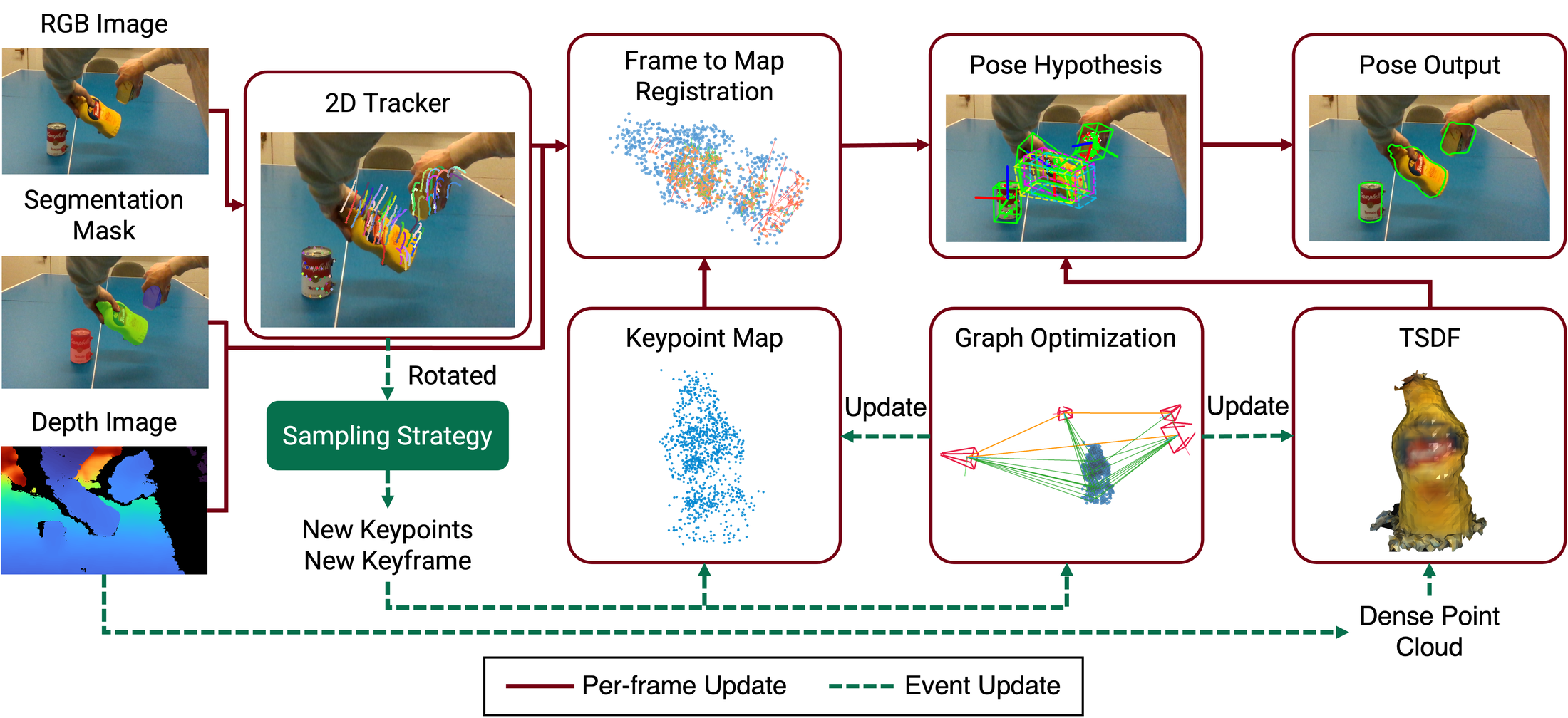
The pipeline is a registry of interchangeable modules assembled from one YAML file. Every block has a type (registry key) and a params dict, so swapping a component never requires touching code.
| Block | Registry keys |
|---|---|
segmenter | sam2, dummy |
tracker | tapir, tapnext, trackon, litetracker, cotracker3_online, cotracker3_offline |
sampler | super_point_balanced, super_point_fps, super_point, uniform_fps, random, orb |
register | svd_residual_outlier, svd_cluster_ransac, svd_cluster_sdf_refine, svd_cluster, svd_ransac, svd, svd_outlier_sdf, svd_uncertainty_irls, svd_uncertainty_outlier, pnp_cluster_ransac, open3d_icp, teaserpp |
local_optimizer / global_optimizer | lm_graph, lm_graph_reproj, lm_graph_sdf, isam2 |
criterion | rotation_threshold, rotation_threshold_and_min_num, rotation_threshold_and_min_num_spread, rotation_grid, registration_residual, uncertainty_ratio, uncertainty_number, mask_area, iteration |
reconstructor | sdf_builder |
Key pipeline parameters: max_num_obj, frame_reg_mode (f2f / f2m / hybrid), estimate_init_pose, use_graph_optimization, and the pose-jump-guard / map-growth gates. configs/realsense/default.yaml is the annotated reference config, tuned for live speed; configs/realsense/default_high_res.yaml is the higher-fidelity variant.
The object box normally comes from a single masked view, so it only covers the first visible surface. Setting reconstructor.params.bbox_sdf_refine_enable re-measures it from the fused TSDF instead, after noise rejection (per-voxel observation weight, morphological opening) and discontinuity removal (connected components, so mask leaks onto the table or hand do not stretch the box). The bbox_sdf_* keys in default.yaml document each filter.
Adding a new module is three steps: subclass the base class in point2pose/core/, decorate it with @TRACKER.register_module("my_tracker") (or the relevant registry), and point the config's type at the new key.
💾 Outputs and Logging
Set in the pipeline config:
pipeline:
  params:
    save_pose: true
    pose_save_path: /path/to/poses
    debug_level: 1                 # 0-2
    debug_dir: /path/to/debug
| File | Contents |
|---|---|
obj_<i>_pose.txt | Per-object pose in TUM format: timestamp tx ty tz qx qy qz qw (meters) |
registration_stats.txt | Per-frame registration diagnostics: iterations, threshold, residual mean/median/max, inlier counts |
<debug_dir>/output_images/ | Annotated frames (points, masks, pose box) when visualization.params.save_images: true |
| exported meshes | Reconstructed TSDF meshes (.ply, optionally textured .glb) written by the dataset runners |
Full description: doc/pose_logging.md.
📁 Repository Structure
point2pose/
├── core/           base classes + module registry
├── data_types/     Frame, KeyFrame, PointTrackTable, results
├── io/             dataset readers, RealSense source, pose/point-cloud logging
├── modules/        segmenter · tracker · sampler · register · optimizer · criterion · reconstruction
├── pipeline/       ModularPipeline and its components
├── visualization/  Rerun / viser / Open3D dashboards
└── utils/          transforms, Lie algebra, evaluation, mesh metrics

configs/            per-dataset and per-experiment YAML (eccv_final.yaml = paper settings)
environment.yml     conda environment (requirements.txt carries the same pins for pip/venv)
examples/           RealSense live demo (2D, 3D viz, recorder)
experiments/        dataset runners, ablations, tracker sweep
scripts/            benchmarks, debug visualization, paper/poster figures
test/               pytest unit tests (`pytest`)
doc/                pose logging and RealSense tracker docs
⚠️ Known Issues
- OpenCV window hangs when importing torchvision first. With torchvision 0.19 + opencv-python 4.11, importing torchvision before the first
cv2.namedWindowcall makes that call spin forever. The tracker modules therefore defer heavy imports until construction — when writing new scripts with an OpenCV UI, create the window before constructingModularPipeline(the RealSense demo already does this). - Global bf16 autocast. The SAM2 segmenter module enables global bf16 autocast at import time; be aware if you mix in fp32-only ops (e.g. mmcv used by Track-On).
- numpy pinning.
rerun-sdk≥ 0.36 needs numpy ≥ 2, while numba (< 2.3) and tensorflow (< 2.2) impose upper bounds — numpy 2.1.3 satisfies all three. - Absolute paths in configs. The shipped YAML files reference the authors' machine paths; update them for your setup.
🙏 Acknowledgements
This work builds on excellent open-source projects: SAM2 and its real-time fork, TAPIR / BootsTAPIR and TAPNext, Track-On2, LiteTracker, CoTracker3, LightGlue / SuperPoint, GTSAM, Open3D, and Rerun. We also thank the authors of BundleTrack, BundleSDF, and FoundationPose for their datasets and baselines.
📄 License
Released under the BSD 3-Clause License. Third-party components keep their own licenses — note in particular that CoTracker3 weights (used by cotracker3_online and litetracker) are CC BY-NC (non-commercial).
📚 Citation
If you find Point2Pose useful in your research, please cite:
@inproceedings{lin2026point2pose,
  title     = {Point2Pose: Occlusion-Recovering 6D Pose Tracking and 3D Reconstruction
               for Multiple Unknown Objects via 2D Point Trackers},
  author    = {Lin, Tzu-Yuan and Lee, Ho Jae and Doherty, Kevin and Lee, Yonghyeon and Kim, Sangbae},
  booktitle = {European Conference on Computer Vision (ECCV)},
  year      = {2026},
}
Significant stargazers

108 followers · starred Sep 2026
Similar repos


Model-free, online 6D object pose tracking from monocular RGB-D, with robust multi-object tracking and recovery from occlusion.
Jupyter Notebook
113
102 commits
updated Sep 24, 2026
README
Point2Pose
Occlusion-Recovering 6D Pose Tracking and 3D Reconstruction for Multiple Unknown Objects via 2D Point Trackers
European Conference on Computer Vision (ECCV) 2026
Tzu-Yuan Lin1 · Ho Jae Lee1 · Kevin Doherty2,§ · Yonghyeon Lee1 · Sangbae Kim1
1Massachusetts Institute of Technology 2Boston Dynamics
§Work conducted in personal time and independently of the author's affiliated organization.
📰 News and Updates
- [09/2026] Point2Pose now runs real-time at 30 Hz on a NVIDIA 4090 GPU!
- [09/2026] The live demo can now re-measure an object's bounding box from the fused SDF. Press
bwhile tracking. Details - [08/2026] Model-based Point2Pose is released along with Gaussian splats reconstruction!
- [06/2026] Point2Pose is accepted to ECCV 2026!
🎯 About
Point2Pose is a model-free method for causal 6D pose tracking of multiple rigid objects from RGB-D video, initialized from a few clicked image points. Long-range 2D point tracks keep correspondences alive, so a fully occluded object is re-localized the instant it reappears — and each target is reconstructed as a textured mesh while tracking.
Disclaimer
The readme is AI-generated. Please submit an issue if you find any problem.
🆕 Model-Based Point2Pose
We recently made a model-based variant of Point2Pose. The new framework supports:
- Model-based tracking. Given a Gaussian or mesh model, the system can track its 6D pose. README
- Gaussian Splats Reconstruction. The new pipeline supports Gaussian splat reconstruction for higher visual modality. README
Model-based tracking and the 3DGS reconstruction pipeline are contributed by Sang Min Kim. Sangmin is a great researcher on 3D vision and robotics! Check out his other work
📑 Table of Contents
- About
- Installation
- Model-Based Point2Pose
- RealSense Live Demo
- Running on Datasets
- Configuration & Architecture
- Outputs and Logging
- Repository Structure
- Known Issues
- Acknowledgements
- License
- Citation
🛠 Installation
Tested on Ubuntu 22.04 with Python 3.11, PyTorch 2.4 + CUDA 12.1, and an NVIDIA RTX 4090.
1. Clone the repository
git clone --recurse-submodules git@github.com:tzuyuan/point-to-pose.git
cd point-to-pose
(Already cloned? git submodule update --init --recursive.)
2. Create the environment
conda env create -f environment.yml
conda activate point2pose
That is the whole setup — there is no package to install. Every entry-point script
adds the repository root to sys.path, so run everything from the repository
root and imports resolve on their own:
python examples/realsense_tracking/realsense_tracking.py
python experiments/ho3d/run_ho3d_single.py -v AP12 ...
The pins in environment.yml are the exact versions the paper
results were produced with (Ubuntu 22.04 · Python 3.11 · CUDA 12.1 · RTX 4090).
Three extras are commented out at the bottom of the file — uncomment what you
need: pycuda (CUDA TSDF fusion, needs nvcc at install time), transformers
(Track-On2 backend), lcm (LCM pose publishing).
Using pip / venv instead of conda
python -m venv .venv && source .venv/bin/activate
pip install -r requirements.txt
# other CUDA build: pip install -r requirements.txt --extra-index-url https://download.pytorch.org/whl/cu121
requirements.txt carries the same pins as environment.yml.
3. Third-party components
Three components are not on PyPI and must be installed from source. The quick route:
pip install --no-build-isolation -r requirements-third-party.txt
(--no-build-isolation matters — these packages import torch at build time.) Or clone them individually, which is preferable if you want to read or patch their code:
| Component | Used for | Install |
|---|---|---|
| SAM2 real-time | Segmentation (required) | git clone git@github.com:Gy920/segment-anything-2-real-time.git && cd segment-anything-2-real-time && pip install -e . |
| tapnet (BootsTAPIR) | Default point tracker (required) | git clone https://github.com/deepmind/tapnet.git && cd tapnet && pip install . |
| LightGlue | SuperPoint keypoint sampling (required) | git clone https://github.com/cvg/LightGlue.git && cd LightGlue && pip install -e . |
4. Download checkpoints
# SAM2 (from inside the segment-anything-2-real-time clone)
cd checkpoints && ./download_ckpts.sh
# then copy/symlink sam2.1_hiera_small.pt (default) and/or
# sam2.1_hiera_large.pt into point-to-pose/checkpoints/sam2.1/

# BootsTAPIR (default tracker)
wget -P checkpoints/tapir https://storage.googleapis.com/dm-tapnet/causal_tapir_checkpoint.npy
Expected layout (paths are configurable in the YAML configs):
checkpoints/
├── sam2.1/    sam2.1_hiera_small.pt          # segmentation (default)
│              sam2.1_hiera_large.pt          # segmentation (higher fidelity)
├── tapir/     causal_bootstapir_checkpoint.pt # default point tracker
├── tapnext/   tapnextpp_ckpt.pt              # optional tracker
└── trackon/   trackon2_dinov2_checkpoint.pt  # optional tracker
Choosing a SAM2 checkpoint
SAM2 runs on every frame, so which checkpoint you pick is the single biggest lever on live latency. The default config uses small; large is what the paper results were produced with.
| Checkpoint | model_cfg | Latency* | Use it for |
|---|---|---|---|
sam2.1_hiera_small.pt | configs/sam2.1/sam2.1_hiera_s.yaml | ~15 ms | Default. Live tracking — configs/realsense/default.yaml |
sam2.1_hiera_large.pt | configs/sam2.1/sam2.1_hiera_l.yaml | ~35 ms | Best mask quality — configs/realsense/default_high_res.yaml, dataset runs |
sam2.1_hiera_tiny.pt | configs/sam2.1/sam2.1_hiera_t.yaml | faster still | When even small is too slow |
*Measured on an RTX 4090 at 640×480, single object. Swap by editing the segmenter: block:
segmenter:
  type: sam2
  params:
    model_cfg: configs/sam2.1/sam2.1_hiera_s.yaml   # _l.yaml for large
    checkpoint: <repo>/checkpoints/sam2.1/sam2.1_hiera_small.pt
    device: cuda
⚠️ Update the paths in the configs. The YAML files under configs/ currently contain absolute paths (
/home/justin/code/point-to-pose/...,/home/justin/data/...). Pointcheckpoint_path,debug_dir, andpose_save_pathat your own locations before running.
Swappable point trackers
The default tracker is BootsTAPIR (type: tapir). Four alternatives ship with the repo — all implement the same Tracker interface (initialize, add_query_points, track_once) and are selected purely by the tracker: block of the pipeline config. Example blocks for each are in configs/realsense/default.yaml.
type | Method | Latency* | Notes |
|---|---|---|---|
tapir | BootsTAPIR | ~18 ms | Default; used for all paper results |
tapnext | TAPNext++ | ~12 ms | Causal SSM state; strongest occlusion re-detection on single-object scenes |
trackon | Track-On2 / Track-On-R | ~22 ms | Global patch-classification re-detection with a FIFO point memory |
litetracker | LiteTracker | ~6 ms | Training-free causal CoTracker3; fastest, but local search only |
cotracker3_online | CoTracker3 | ~41 ms | Reference baseline |
* Tracker forward pass only, RTX 4090, at each tracker's benchmark resolution.
TAPNext++ setup (type: tapnext)
Lives in tapnet/tapnext/ of the tapnet repo, which must be recent enough to include it (commit 7f13cb6, Apr 2026 or later):
cd tapnet && git pull   # or: git checkout origin/main -- tapnet/tapnext tapnet/tapnextpp
wget -P checkpoints/tapnext https://storage.googleapis.com/dm-tapnet/tapnextpp/tapnextpp_ckpt.pt
A 512-resolution fine-tuned checkpoint also exists (https://storage.googleapis.com/gresearch/tapnextpp/tapnextpp_512.ckpt, use with input_resolution: 512).
Caveat: TAPNext queries are position-only. Points added mid-stream are injected on the next processed frame; anchor-frame (past keyframe) queries are injected by position alone, since the recurrent state cannot be rewound. Its fixed 256×256 input also starves small objects when several share a frame, so it underperforms TAPIR on multi-object scenes.
Track-On2 setup (type: trackon)
cd third_party
git clone https://github.com/gorkaydemir/track_on.git
pip install mmcv==2.2.0 -f https://download.openmmlab.com/mmcv/dist/cu121/torch2.4/index.html
pip install "transformers>=4.56.1"
The mmcv wheel URL must match your torch/CUDA version; see the track_on README for building from source.
# DINOv2 backbone (default, ungated; ViT backbone auto-downloads from HF)
wget -O checkpoints/trackon/trackon2_dinov2_checkpoint.pt "https://huggingface.co/gorkaydemir/track_on2/resolve/main/trackon2_dinov2_checkpoint.pt?download=true"

# DINOv3 variants (better real-world numbers, esp. Track-On-R)
wget -O checkpoints/trackon/trackon2_dinov3_checkpoint.pt "https://huggingface.co/gorkaydemir/track_on2/resolve/main/trackon2_dinov3_checkpoint.pt?download=true"
wget -O checkpoints/trackon/track_on_r.pt "https://huggingface.co/gorkaydemir/track_on_r/resolve/main/track_on_r.pt?download=true"
DINOv3 variants require access to facebook/dinov3-vits16plus-pretrain-lvd1689m (gated Meta license) plus huggingface-cli login, and vit_backbone: dinov3_s_plus in the config. Accuracy of the DINOv2 checkpoint is comparable per the authors, and it needs no login. mmcv ops are fp32-only.
LiteTracker setup (type: litetracker)
cd third_party
git clone https://github.com/ImFusionGmbH/lite-tracker.git
No extra Python dependencies. Point checkpoint_path at the CoTracker3 scaled_online.pth weights (CC BY-NC — non-commercial). Like CoTracker3, localization is a local search around the previous position: robust for smooth motion, but it cannot re-detect a point that moved far while occluded.
🎥 RealSense Live Demo
Click a few points on any object in the live feed and Point2Pose starts tracking its 6D pose and reconstructing its mesh — no CAD model, no training.
Requirements
- Intel RealSense RGB-D camera (tested on D435i / D455), USB 3.0
- NVIDIA GPU with CUDA (≥8 GB recommended)
pyrealsense2, SAM2 and TAPIR checkpoints in place
1. Set your camera serial
rs-enumerate-devices -s # find your serial
Set it in the config you plan to use:
# configs/realsense/default.yaml
realsense:
  params:
    rs_serial: 941322070969
Other keys worth checking in the same file: pipeline.params.max_num_obj (how many objects to track), estimate_init_pose, debug_level, save_pose / pose_save_path, and the tracker: block.
configs/realsense/default.yaml is tuned for live tracking: TAPIR runs on a SAM-mask-centred crop (type: tapir_crop) at 256×256, all query points are refined in one chunk rather than the hardcoded 64, SAM2 runs the small checkpoint instead of large, and per-frame debug images are off. configs/realsense/default_high_res.yaml is the slower, higher-fidelity variant — 512×512, sam2.1_hiera_large, debug images on.
2. Run
conda activate point2pose
python examples/realsense_tracking/realsense_tracking.py     # 2D overlay only
3. Controls
| Key / mouse | Action |
|---|---|
| Left click | Add a positive prompt point to the current object |
| Right click | Add a negative prompt point (background / exclusion) |
n | Finish this object and start prompting the next object |
s | Start tracking with the collected prompts |
r | Reset all prompt points |
b | Start re-measuring the object box from the fused SDF; press again to fix it |
q | Quit |
Workflow: click 1–3 points on object #1 → press n → click points on object #2 → … → press s. A live SAM2 mask preview updates as you click, so you can verify the segmentation before committing. Once tracking starts, the window shows the masks, the tracked points, the estimated pose axes/box, and the frame counter.
Refining the object box from the SDF (b)
The box you get at startup is fitted to a single masked view, so it only covers the first visible surface and systematically underestimates the object along the viewing direction — the depth axis can come out at essentially zero. Since the pipeline is already fusing a TSDF of each object while it tracks, that volume is a much better thing to measure once you have looked at the object from a few sides.
Press b during a tracking session to start measuring the box from the fused SDF instead. The overlay reports which state you are in:
| Overlay | Meaning |
|---|---|
BBox [b]: OFF | Still the original single-view box — nothing has been measured yet |
BBox [b]: ESTIMATING | Re-measured on every keyframe, so the box keeps tightening as you move around the object |
BBox [b]: FIXED | Frozen at the last measurement; further keyframes no longer change it |
So the usual flow is: start tracking, walk the camera around the object, press b and watch the box settle, then press b again to lock it in. Pressing b re-measures immediately rather than waiting for the next keyframe, so the box responds to the keypress. A third press resumes estimating.
Measuring a fused TSDF needs some care, because depth noise and mask leakage both end up in the volume. Three filters run before the box is fitted:
- Observation weight — a voxel carved by one noisy depth pixel keeps a weight of 1 forever, while real surface is re-observed on every keyframe. This is what removes depth speckle.
- Morphological opening — deletes isolated voxels and one-voxel bridges that survive the weight test.
- Connected components — the filter that matters most. When the mask leaks onto the table or your hand, those fragments fuse as blobs disconnected from the object, and a box drawn around the union spans the empty gap between them. Only the largest connected surface is kept.
On a synthetic object of known size fused from 12 views, the refined box recovers the true extent exactly on clean depth and to within one voxel (4 mm) with 3 mm of depth noise, against a single-view baseline that misses the depth axis completely.
Tuning lives under reconstructor.params in the config: bbox_sdf_min_weight, bbox_sdf_open_iters and bbox_sdf_keep_component_ratio control the three filters above, bbox_sdf_min_integrations sets how much SDF coverage to wait for, and bbox_sdf_max_rel_extent_change rejects implausible jumps. bbox_sdf_refine_enable chooses which state the session starts in — it ships as false, so the box stays put until you ask for it. The feature needs sdf_backend: python_tsdf; nvblox keeps no dense grid to measure.
3D visualization (Rerun)
realsense_tracking_3d.py runs the exact same demo and adds a live 3D UI:
python examples/realsense_tracking/realsense_tracking_3d.py \
    --config configs/realsense/default.yaml \
    --viz-config configs/visualization/pose_3d_demo.yaml
Both flags are optional (without --viz-config, a visualization_3d: section in the pipeline config is used, otherwise built-in defaults). The Rerun viewer shows, on a scrubbable timeline:
- Object frame · map — the keypoint map, the growing TSDF mesh, camera trajectory, live-textured camera frustum, and keyframe frustums with RGB thumbnails.
- Camera frame · trails — the full map posed in the camera frame with fading per-point traces; the frustum turns red when tracking is lost and green again on recovery.
- RGB / Events — tracked points, SAM2 masks, and reprojection whiskers colored by pixel error.
- Residual / Tracking — residual (mm), inliers, tracked points, and FPS plots.
A button strip in the cv2 window toggles layers (map · mesh · kfs · traj · bbox · traces · 2d · mask · reproj) and cycles point coloring (track_id → inlier → frame_id → uncertainty → object). Set visualization_3d.rerun.save_rrd: ./debug/session.rrd to record the whole session and replay it later with rerun session.rrd — handy for cutting demo videos offline.
Other UI modes via ui_mode: web (viser, browser-based), combined (single cv2 dashboard with mp4 recording), windows (two Open3D windows). Full details: examples/realsense_tracking/README_3D_VIZ.md.
Recording sequences
To capture RGB-D for offline runs (saved in the YCBMultiTrack layout: rgb/, depth/ uint16 mm, cam_K.txt):
python examples/realsense_tracking/record_rgbd.py --out ~/data/my_take01 [--serial N]
# keys: r / space = start-stop recording, q / esc = quit
Demo troubleshooting
| Symptom | Fix |
|---|---|
| Camera not found | Check rs_serial in the config and USB 3.0 connection |
| CUDA OOM | Drop from the default sam2.1_hiera_small.pt to sam2.1_hiera_tiny.pt, lower the tracker resolution, or reduce sampler.params.num_points |
| Object flagged "lost" and never recovers | RealSense stereo depth residuals are ~3 mm; keep register.params.residual_thres and map_growth_max_mean_residual at ~0.006 (already set in default.yaml) |
| Pose rejected during normal handheld motion | Relax pose_jump_guard_trans_thres / pose_jump_guard_rot_deg_thres |
| Poor tracking | Better lighting, more textured surfaces, add negative prompt points to exclude background |
📊 Running on Datasets
Point2Pose is evaluated on HO3D-v3, YCBInEOAT, and our own YCBMultiTrack (synthetic + real). Every runner takes --data_path, --out_dir, and --config_path; the paper settings live in configs/ho3d_exp/eccv_final.yaml, configs/ycbineoat/eccv_final.yaml, and configs/ycbinisaac/eccv_final.yaml.
# HO3D — single sequence / all 13 evaluation sequences
python experiments/ho3d/run_ho3d_single.py -v AP12 \
    --data_path /path/to/HO3D_V3 --out_dir results/ho3d_single \
    -c configs/ho3d_exp/eccv_final.yaml
python experiments/ho3d/run_ho3d_all.py \
    --data_path /path/to/HO3D_V3 --out_dir results/ho3d_all \
    -c configs/ho3d_exp/eccv_final.yaml

# YCBInEOAT
python experiments/ycbineoat/run_ycbineoat_all.py \
    --data_path /path/to/YCBInEOAT -m /path/to/YCB_models_with_ply \
    --out_dir results/ycbineoat_all -c configs/ycbineoat/eccv_final.yaml

# YCBMultiTrack (synthetic + real)
python experiments/ycbinisaac/run_ycbinisaac_all.py \
    --data_path /path/to/YCBMultiTrack -m /path/to/YCB_models \
    --out_dir results/ycbinisaac_all -c configs/ycbinisaac/eccv_final.yaml
Each runner writes per-sequence poses, ADD / ADD-S AUC tables, error-vs-time plots, and exported meshes (Chamfer distance against the ground-truth mesh where available) into --out_dir. Ablations from the paper are driven by experiments/ho3d/run_ho3d_ablation.py, which sweeps every configs/ho3d_exp/eccv_abla_*.yaml config into its own output folder (--data_path, --config_glob, --output_root).
Dataset layout. YCBInIsaacReader / YcbineoatReader expect, per sequence: rgb/ (or jpg/), depth/, cam_K.txt, plus masks/<object>/ and annotated_poses/<object>/ for evaluation; Ho3dReader reads the standard HO3D evaluation/<seq>/ layout. See point2pose/io/sources/dataset/datareader.py.
🧩 Configuration & Architecture
The pipeline is a registry of interchangeable modules assembled from one YAML file. Every block has a type (registry key) and a params dict, so swapping a component never requires touching code.
| Block | Registry keys |
|---|---|
segmenter | sam2, dummy |
tracker | tapir, tapnext, trackon, litetracker, cotracker3_online, cotracker3_offline |
sampler | super_point_balanced, super_point_fps, super_point, uniform_fps, random, orb |
register | svd_residual_outlier, svd_cluster_ransac, svd_cluster_sdf_refine, svd_cluster, svd_ransac, svd, svd_outlier_sdf, svd_uncertainty_irls, svd_uncertainty_outlier, pnp_cluster_ransac, open3d_icp, teaserpp |
local_optimizer / global_optimizer | lm_graph, lm_graph_reproj, lm_graph_sdf, isam2 |
criterion | rotation_threshold, rotation_threshold_and_min_num, rotation_threshold_and_min_num_spread, rotation_grid, registration_residual, uncertainty_ratio, uncertainty_number, mask_area, iteration |
reconstructor | sdf_builder |
Key pipeline parameters: max_num_obj, frame_reg_mode (f2f / f2m / hybrid), estimate_init_pose, use_graph_optimization, and the pose-jump-guard / map-growth gates. configs/realsense/default.yaml is the annotated reference config, tuned for live speed; configs/realsense/default_high_res.yaml is the higher-fidelity variant.
The object box normally comes from a single masked view, so it only covers the first visible surface. Setting reconstructor.params.bbox_sdf_refine_enable re-measures it from the fused TSDF instead, after noise rejection (per-voxel observation weight, morphological opening) and discontinuity removal (connected components, so mask leaks onto the table or hand do not stretch the box). The bbox_sdf_* keys in default.yaml document each filter.
Adding a new module is three steps: subclass the base class in point2pose/core/, decorate it with @TRACKER.register_module("my_tracker") (or the relevant registry), and point the config's type at the new key.
💾 Outputs and Logging
Set in the pipeline config:
pipeline:
  params:
    save_pose: true
    pose_save_path: /path/to/poses
    debug_level: 1                 # 0-2
    debug_dir: /path/to/debug
| File | Contents |
|---|---|
obj_<i>_pose.txt | Per-object pose in TUM format: timestamp tx ty tz qx qy qz qw (meters) |
registration_stats.txt | Per-frame registration diagnostics: iterations, threshold, residual mean/median/max, inlier counts |
<debug_dir>/output_images/ | Annotated frames (points, masks, pose box) when visualization.params.save_images: true |
| exported meshes | Reconstructed TSDF meshes (.ply, optionally textured .glb) written by the dataset runners |
Full description: doc/pose_logging.md.
📁 Repository Structure
point2pose/
├── core/           base classes + module registry
├── data_types/     Frame, KeyFrame, PointTrackTable, results
├── io/             dataset readers, RealSense source, pose/point-cloud logging
├── modules/        segmenter · tracker · sampler · register · optimizer · criterion · reconstruction
├── pipeline/       ModularPipeline and its components
├── visualization/  Rerun / viser / Open3D dashboards
└── utils/          transforms, Lie algebra, evaluation, mesh metrics

configs/            per-dataset and per-experiment YAML (eccv_final.yaml = paper settings)
environment.yml     conda environment (requirements.txt carries the same pins for pip/venv)
examples/           RealSense live demo (2D, 3D viz, recorder)
experiments/        dataset runners, ablations, tracker sweep
scripts/            benchmarks, debug visualization, paper/poster figures
test/               pytest unit tests (`pytest`)
doc/                pose logging and RealSense tracker docs
⚠️ Known Issues
- OpenCV window hangs when importing torchvision first. With torchvision 0.19 + opencv-python 4.11, importing torchvision before the first
cv2.namedWindowcall makes that call spin forever. The tracker modules therefore defer heavy imports until construction — when writing new scripts with an OpenCV UI, create the window before constructingModularPipeline(the RealSense demo already does this). - Global bf16 autocast. The SAM2 segmenter module enables global bf16 autocast at import time; be aware if you mix in fp32-only ops (e.g. mmcv used by Track-On).
- numpy pinning.
rerun-sdk≥ 0.36 needs numpy ≥ 2, while numba (< 2.3) and tensorflow (< 2.2) impose upper bounds — numpy 2.1.3 satisfies all three. - Absolute paths in configs. The shipped YAML files reference the authors' machine paths; update them for your setup.
🙏 Acknowledgements
This work builds on excellent open-source projects: SAM2 and its real-time fork, TAPIR / BootsTAPIR and TAPNext, Track-On2, LiteTracker, CoTracker3, LightGlue / SuperPoint, GTSAM, Open3D, and Rerun. We also thank the authors of BundleTrack, BundleSDF, and FoundationPose for their datasets and baselines.
📄 License
Released under the BSD 3-Clause License. Third-party components keep their own licenses — note in particular that CoTracker3 weights (used by cotracker3_online and litetracker) are CC BY-NC (non-commercial).
📚 Citation
If you find Point2Pose useful in your research, please cite:
@inproceedings{lin2026point2pose,
  title     = {Point2Pose: Occlusion-Recovering 6D Pose Tracking and 3D Reconstruction
               for Multiple Unknown Objects via 2D Point Trackers},
  author    = {Lin, Tzu-Yuan and Lee, Ho Jae and Doherty, Kevin and Lee, Yonghyeon and Kim, Sangbae},
  booktitle = {European Conference on Computer Vision (ECCV)},
  year      = {2026},
}
Significant stargazers
108 followers · starred Sep 2026