
See what people are saying
README
tyto.chat Client
Standalone React SPA for the tyto.chat platform. Consumes the core backend API and connects to Mercure for real-time message delivery.
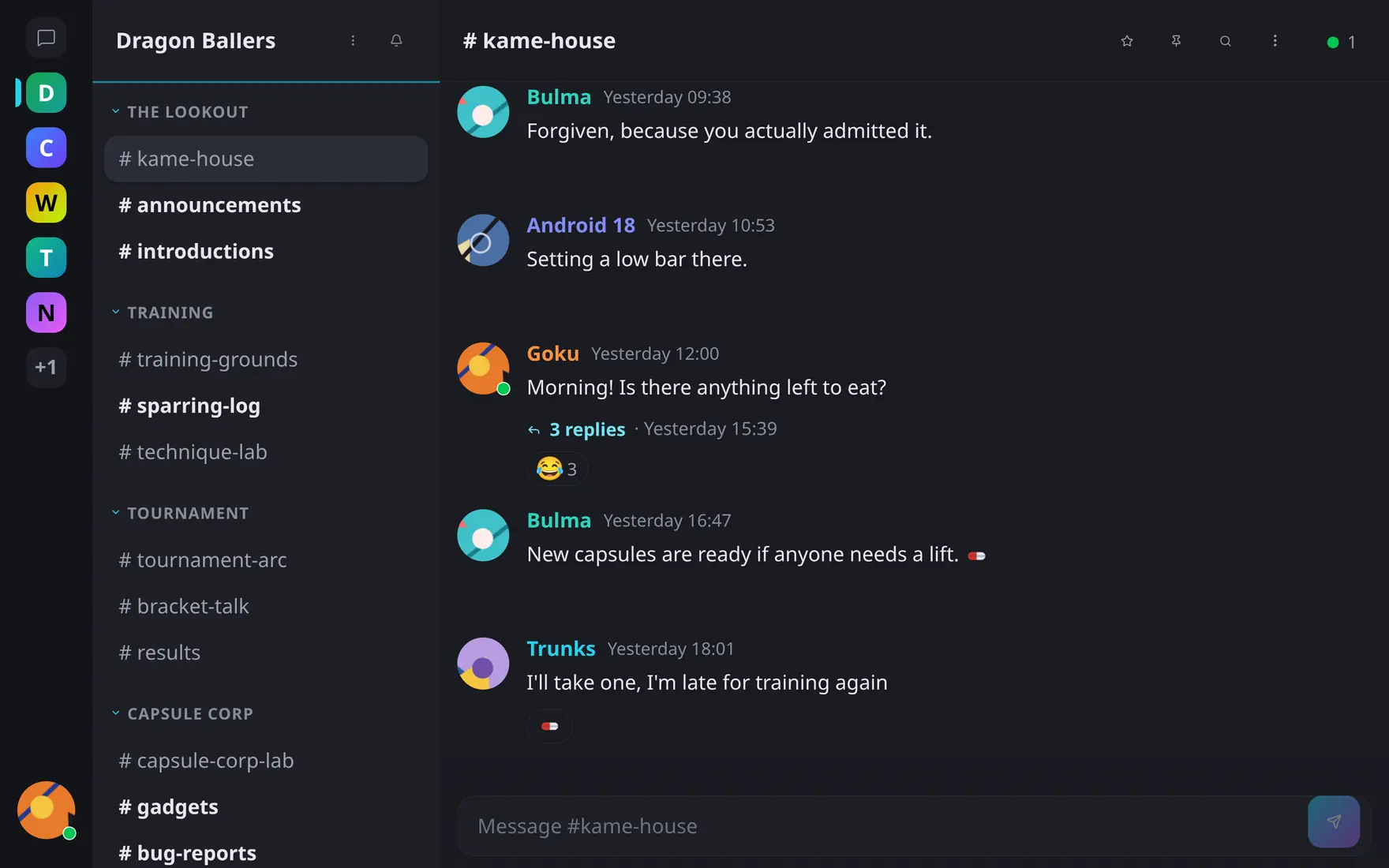
This document will be most useful for developers working on the codebase. If you just want to install and run your own Tyto server, tyto.chat has you covered — see below.
Screenshots
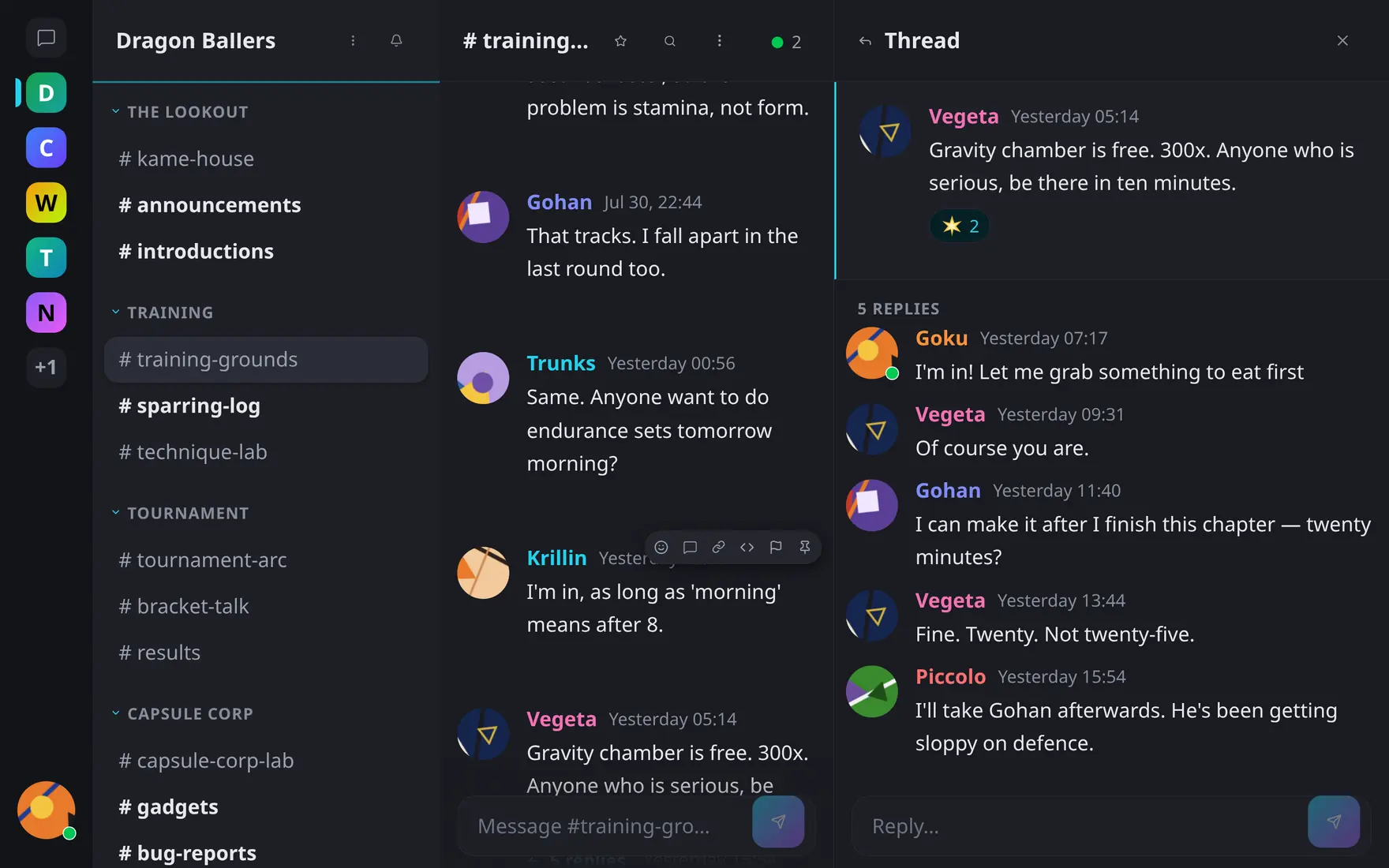
Threads open beside the timeline; the channel keeps its own flow. |
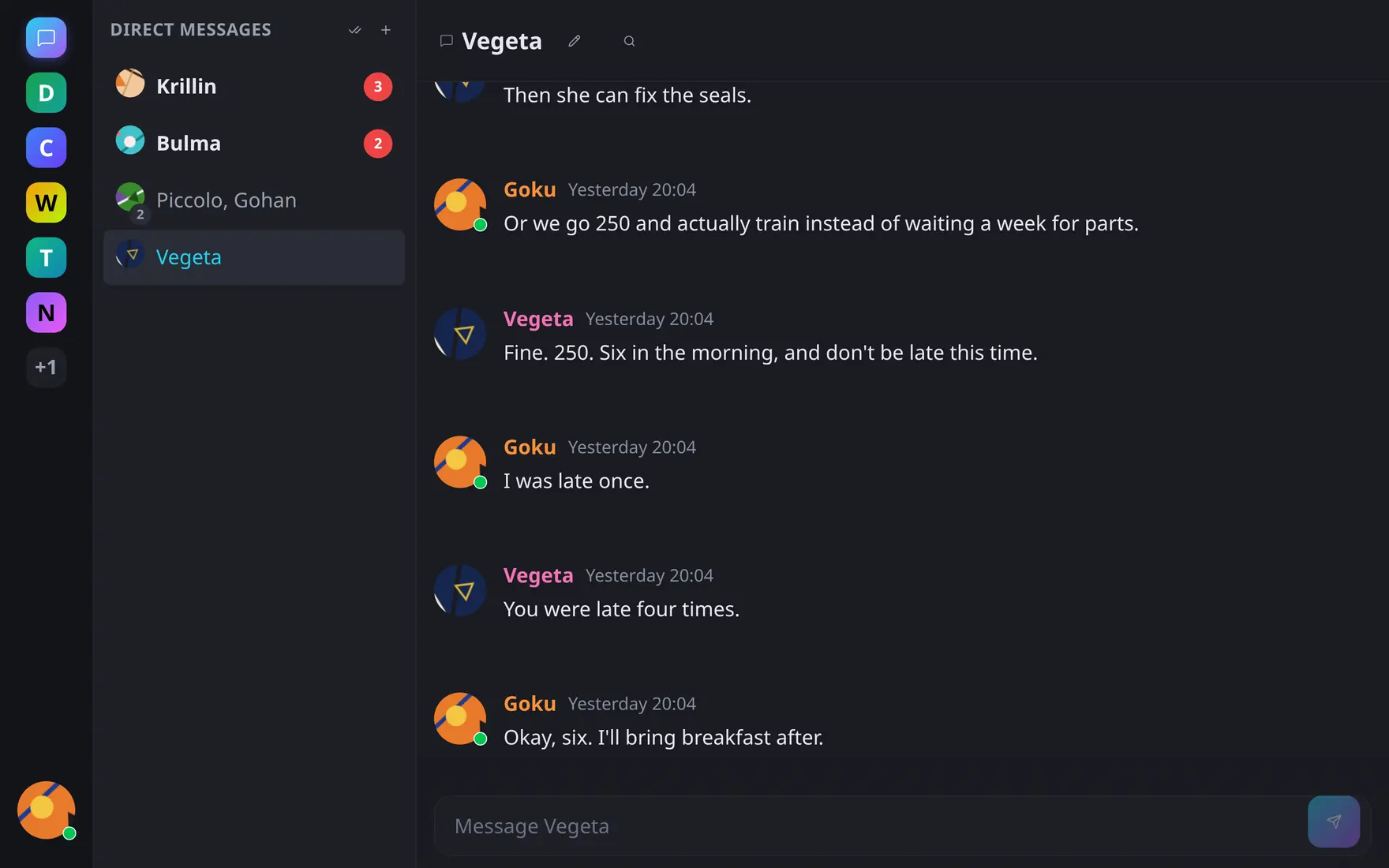
Direct messages, sorted unread-first. |
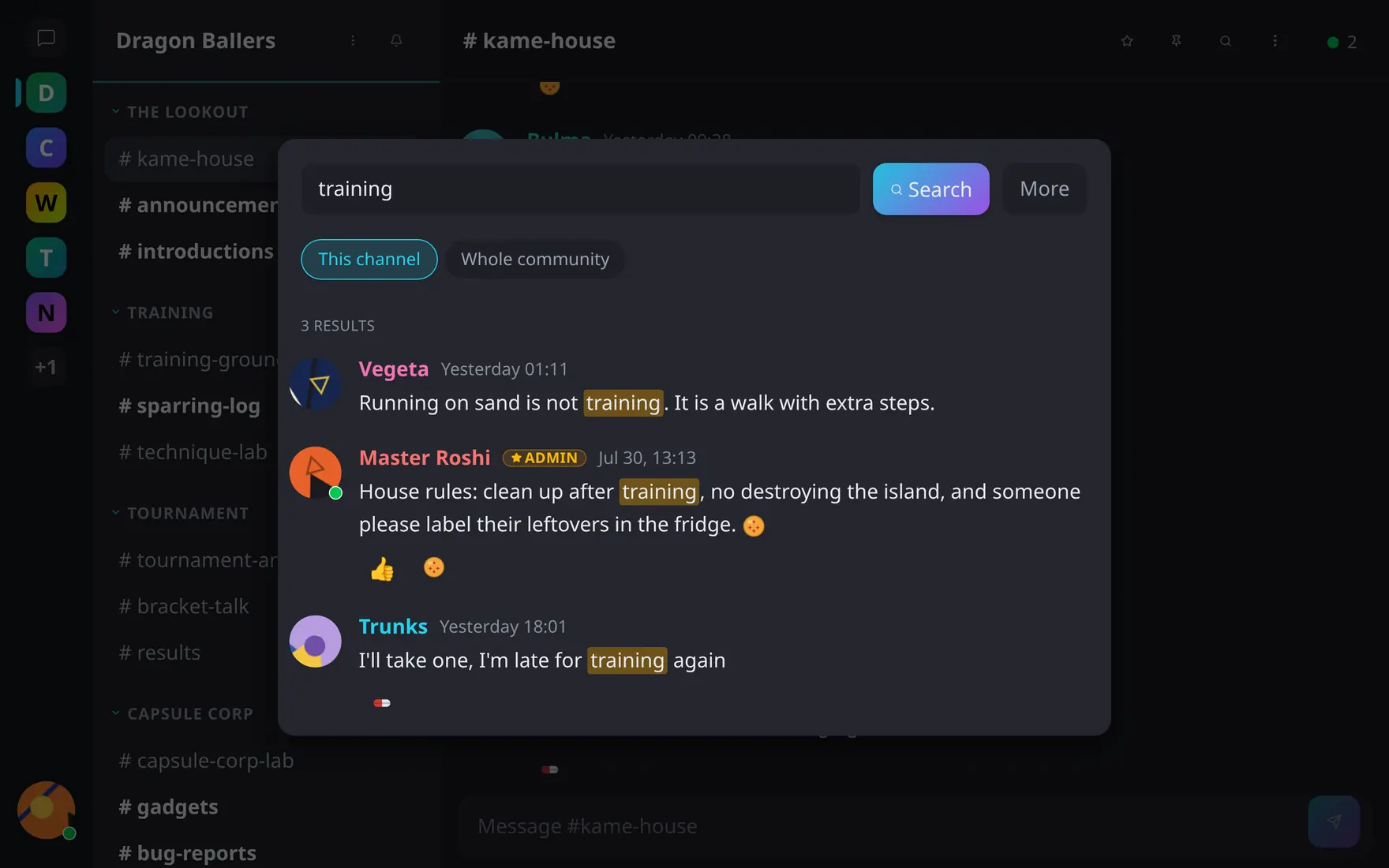
Search with scope, author and date filters, highlighted hits. |
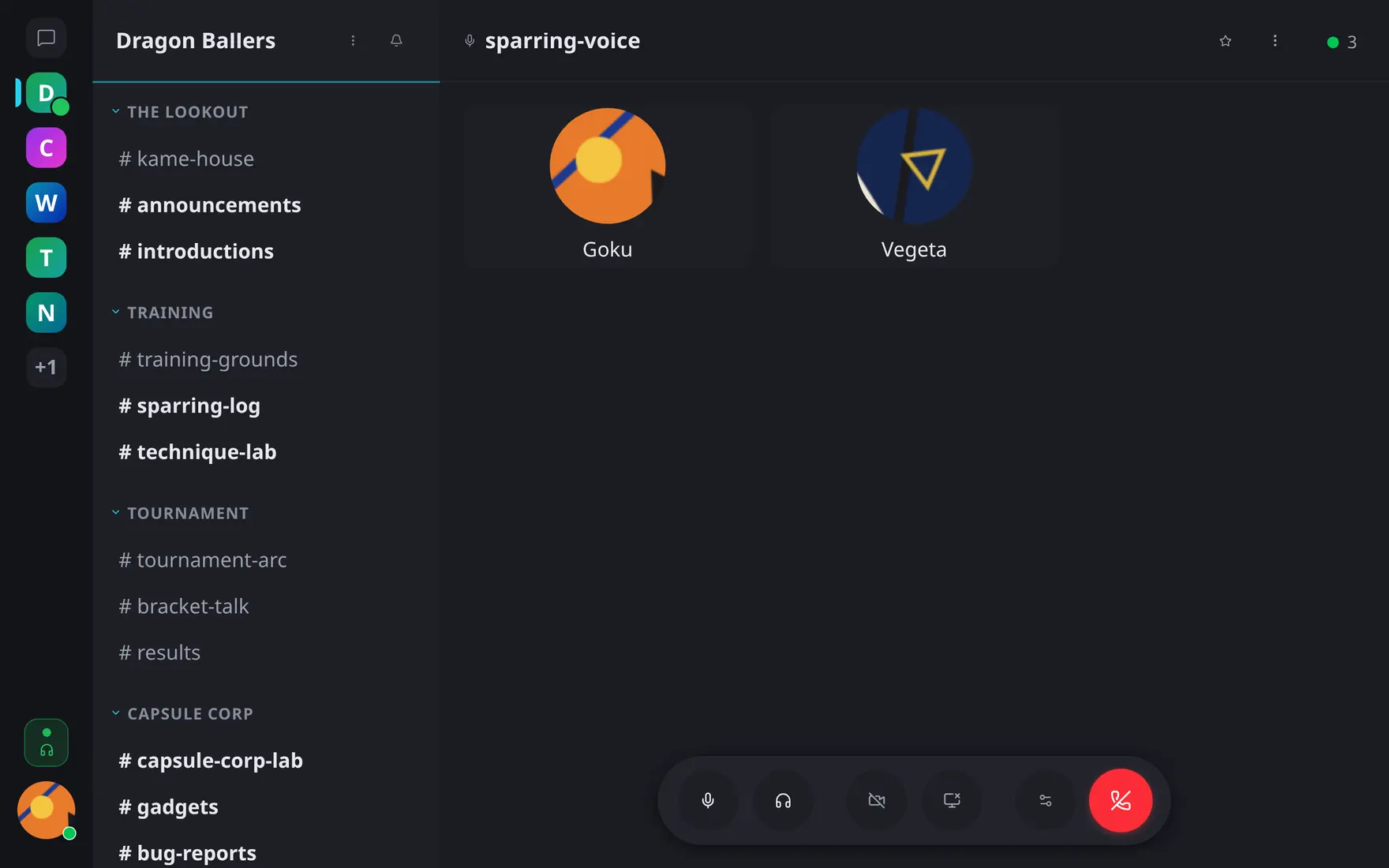
Voice channels on LiveKit: mute, deafen, camera, screen share. |
The same build is responsive down to phone width:

Channel |

Direct messages |

Thread |
More on tyto.chat/features; every screen is documented under tyto.chat/docs.
Running Tyto in production
Production runs the prebuilt client image alongside core via Docker Compose; the app is configured at runtime through container env (no rebuild). Follow the Quick Start; operational guides are in the documentation.
Development setup
Tech stack
- React 19 + TypeScript
- Vite 7 — dev server and bundler
- TanStack Router v1 — file-based routing
- TanStack Query v5 — server state management
- Tailwind CSS v4
- Tiptap — rich text message editor
Requirements
Node.js is provided by DDEV — no local installation needed.
Setup
# 1. Clone the repository into a directory named "client"
git clone https://github.com/tyto-chat/client.git client
cd client

# 2. Start DDEV (installs Node dependencies automatically on first run)
ddev start
The app is now available at https://client.ddev.site.
Optionally, run ddev setup to configure .env.local and install the Playwright browser for E2E tests.
The project name is derived from the directory name. Clone into
clientto match the URLs above and to ensure the Mercure CORS configuration in core allows this origin.
The Chromium browser for Playwright is downloaded once and cached in .playwright-cache/ — subsequent ddev start calls skip the download.
Useful commands
| Command | Description |
|---|---|
ddev start | Start the development environment (Vite starts automatically) |
ddev stop | Stop containers |
ddev setup | First-time setup: install deps, write .env.local, install Playwright |
ddev npm install | Install Node dependencies (without E2E setup) |
ddev npm run build | Production build |
ddev npm run typecheck | Run TypeScript type checking |
ddev npm run lint | Run ESLint |
ddev npm run format | Format with Prettier (format:check to verify only) |
ddev logs | Tail container logs |
Testing
Unit tests (Vitest)
Unit tests live in tests/unit/ and run entirely in-process — no browser or running backend needed.
ddev npm test              # run once
ddev npm run test:watch    # watch mode
ddev npm run test:coverage # with coverage report
ddev npm run test:ui       # Vitest browser UI
E2E tests (Playwright)
End-to-end tests in tests/e2e/ drive a real Chromium browser against the live DDEV stack. Both this client and the core backend must be running, and ddev setup must have been run at least once.
ddev e2e                       # reset core test DB, then run headless (default)
ddev npm run test:e2e:headed   # watch the browser (no DB reset)
ddev npm run test:e2e:ui       # Playwright interactive UI (no DB reset)
Each run:
- Resets the
coretest database to a clean fixture state (the bootstrap admin). - Each Playwright worker seeds its own isolated world on demand — a community (
e2e-w{n}) with a text and an audio channel, plus three role accounts (global admin, a regular member, and a community admin). Workers never share mutable state, so specs run fully in parallel. - Authenticates each role by injecting its JWT into
localStorage(a fresh browser context per test). - Runs the full suite — ~44 spec files scoped by
--projectgroups (seeddev e2e --help).
To run one group or one test:
ddev e2e moderation                                        # only the moderation group
ddev npm run test:e2e -- --project=moderation --grep "admin warns"
What the tests cover (selected)
| Area | Example spec | Description |
|---|---|---|
| Auth | auth.spec.ts | Login, logout, redirect guards, wrong-credential errors |
| Navigation | navigation.spec.ts | Routing, not-found redirects, permalink pages |
| Messaging | messaging.spec.ts | Send/edit/delete, permission boundaries, send-failure rollback |
| Real-time | realtime.spec.ts | Mercure SSE propagation across two sessions |
| Moderation | moderation.spec.ts | Warn/timeout/ban, permission matrix |
| Role visibility | role-visibility.spec.ts | Per-role element gating (anon/member/admin) |
…and ~30 more (threads, search, presence, DMs, attachments, mobile, admin, etc.).
Environment variables
ddev setup writes .env.local automatically — VITE_SERVER_INFO_URL for the app plus the E2E_* origins for Playwright, all derived from your DDEV hostnames. Edit them only if you need non-default backends. (.env.example documents VITE_SERVER_INFO_URL; the E2E_* vars are added by ddev setup.)
| Variable | Description |
|---|---|
VITE_SERVER_INFO_URL | URL of the core backend's server-info endpoint |
E2E_BASE_URL | Frontend origin for Playwright (default: https://client.ddev.site) |
E2E_API_URL | Backend origin for Playwright (default: https://core-test.ddev.site) |
Production deployments configure the app at runtime (no rebuild) via the
container env — see .env.prod.example and the
Quick Start.
Contributing
See the contribution guide and code guidelines. CI runs typecheck, lint, unit tests and the production build on every pull request.
License
MIT.
Similar repos


Languages
TypeScript
98.4%
See what people are saying
README
tyto.chat Client
Standalone React SPA for the tyto.chat platform. Consumes the core backend API and connects to Mercure for real-time message delivery.
This document will be most useful for developers working on the codebase. If you just want to install and run your own Tyto server, tyto.chat has you covered — see below.
Screenshots
|
Threads open beside the timeline; the channel keeps its own flow. |
Direct messages, sorted unread-first. |
|
Search with scope, author and date filters, highlighted hits. |
Voice channels on LiveKit: mute, deafen, camera, screen share. |
The same build is responsive down to phone width:
|
Channel |
Direct messages |
Thread |
More on tyto.chat/features; every screen is documented under tyto.chat/docs.
Running Tyto in production
Production runs the prebuilt client image alongside core via Docker Compose; the app is configured at runtime through container env (no rebuild). Follow the Quick Start; operational guides are in the documentation.
Development setup
Tech stack
- React 19 + TypeScript
- Vite 7 — dev server and bundler
- TanStack Router v1 — file-based routing
- TanStack Query v5 — server state management
- Tailwind CSS v4
- Tiptap — rich text message editor
Requirements
Node.js is provided by DDEV — no local installation needed.
Setup
# 1. Clone the repository into a directory named "client"
git clone https://github.com/tyto-chat/client.git client
cd client

# 2. Start DDEV (installs Node dependencies automatically on first run)
ddev start
The app is now available at https://client.ddev.site.
Optionally, run ddev setup to configure .env.local and install the Playwright browser for E2E tests.
The project name is derived from the directory name. Clone into
clientto match the URLs above and to ensure the Mercure CORS configuration in core allows this origin.
The Chromium browser for Playwright is downloaded once and cached in .playwright-cache/ — subsequent ddev start calls skip the download.
Useful commands
| Command | Description |
|---|---|
ddev start | Start the development environment (Vite starts automatically) |
ddev stop | Stop containers |
ddev setup | First-time setup: install deps, write .env.local, install Playwright |
ddev npm install | Install Node dependencies (without E2E setup) |
ddev npm run build | Production build |
ddev npm run typecheck | Run TypeScript type checking |
ddev npm run lint | Run ESLint |
ddev npm run format | Format with Prettier (format:check to verify only) |
ddev logs | Tail container logs |
Testing
Unit tests (Vitest)
Unit tests live in tests/unit/ and run entirely in-process — no browser or running backend needed.
ddev npm test              # run once
ddev npm run test:watch    # watch mode
ddev npm run test:coverage # with coverage report
ddev npm run test:ui       # Vitest browser UI
E2E tests (Playwright)
End-to-end tests in tests/e2e/ drive a real Chromium browser against the live DDEV stack. Both this client and the core backend must be running, and ddev setup must have been run at least once.
ddev e2e                       # reset core test DB, then run headless (default)
ddev npm run test:e2e:headed   # watch the browser (no DB reset)
ddev npm run test:e2e:ui       # Playwright interactive UI (no DB reset)
Each run:
- Resets the
coretest database to a clean fixture state (the bootstrap admin). - Each Playwright worker seeds its own isolated world on demand — a community (
e2e-w{n}) with a text and an audio channel, plus three role accounts (global admin, a regular member, and a community admin). Workers never share mutable state, so specs run fully in parallel. - Authenticates each role by injecting its JWT into
localStorage(a fresh browser context per test). - Runs the full suite — ~44 spec files scoped by
--projectgroups (seeddev e2e --help).
To run one group or one test:
ddev e2e moderation                                        # only the moderation group
ddev npm run test:e2e -- --project=moderation --grep "admin warns"
What the tests cover (selected)
| Area | Example spec | Description |
|---|---|---|
| Auth | auth.spec.ts | Login, logout, redirect guards, wrong-credential errors |
| Navigation | navigation.spec.ts | Routing, not-found redirects, permalink pages |
| Messaging | messaging.spec.ts | Send/edit/delete, permission boundaries, send-failure rollback |
| Real-time | realtime.spec.ts | Mercure SSE propagation across two sessions |
| Moderation | moderation.spec.ts | Warn/timeout/ban, permission matrix |
| Role visibility | role-visibility.spec.ts | Per-role element gating (anon/member/admin) |
…and ~30 more (threads, search, presence, DMs, attachments, mobile, admin, etc.).
Environment variables
ddev setup writes .env.local automatically — VITE_SERVER_INFO_URL for the app plus the E2E_* origins for Playwright, all derived from your DDEV hostnames. Edit them only if you need non-default backends. (.env.example documents VITE_SERVER_INFO_URL; the E2E_* vars are added by ddev setup.)
| Variable | Description |
|---|---|
VITE_SERVER_INFO_URL | URL of the core backend's server-info endpoint |
E2E_BASE_URL | Frontend origin for Playwright (default: https://client.ddev.site) |
E2E_API_URL | Backend origin for Playwright (default: https://core-test.ddev.site) |
Production deployments configure the app at runtime (no rebuild) via the
container env — see .env.prod.example and the
Quick Start.
Contributing
See the contribution guide and code guidelines. CI runs typecheck, lint, unit tests and the production build on every pull request.
License
MIT.
Similar repos
Languages
TypeScript
98.4%