Firebase Extension to automatically push Firestore documents to Typesense for full-text search with typo tolerance, faceting, and more
TypeScript
183
342 commits
updated Oct 5, 2026
A Firebase function kit to sync data from your Firestore collections to Typesense, to be able to do full-text fuzzy search on your Firestore data, with typo tolerance, faceting, filtering, sorting, curation, synonyms, geosearch and more.
The kit deploys Cloud Functions into your own project that listen to your specified Firestore collections and sync Firestore documents to Typesense on creation, updates and deletes. It also provides a function to help you backfill data.
What is Typesense?
If you're new to Typesense, it is an open source search engine that is simple to use, run and scale, with clean APIs and documentation. Think of it as an open source alternative to Algolia and an easier-to-use, batteries-included alternative to ElasticSearch. Get a quick overview from this guide.
[!NOTE] Up to version 3.x this was a Firebase extension. Firebase Extensions shut down on March 31, 2027, so 4.0.0 ships as a function kit, the npm package
typesense-firestore-search. If you have the extension installed, follow UPGRADING.md.
Before installing the kit, make sure that you have:
Set up a Cloud Firestore database in your Firebase project.
If using Google Workspace for Business, ensure that your default cloud compute based service account has the following roles (which can be found in the Google Cloud Console IAM section):
Set up a Typesense cluster on Typesense Cloud or Self-Hosted (free).
Set up a Typesense Collection either through the Typesense Cloud dashboard or through the API.
Installed firebase-tools 15.32.0 or later (npm install -g firebase-tools@latest).
[!IMPORTANT] ☝️ #3 above is a commonly missed step. The kit does not create the Typesense Collection for you. Instead it syncs data to a Typesense collection you've already created. If you see an HTTP 404 in the function logs, it's most likely because of missing this step.
From your Firebase project directory, install the kit. The CLI prompts for each of the
configuration parameters listed below and writes them to the kit's .env file:
firebase functions:kits:install --package typesense-firestore-search --project=[your-project-id]
Then deploy it:
firebase deploy --only functions:[kit-instance-id] --project=[your-project-id]
To change the configuration later, edit the kit's .env file and deploy again.
One install can sync any number of Firestore collections, each into its own Typesense collection. List them in
FIRESTORE_COLLECTION_PATHS and TYPESENSE_COLLECTION_NAMES (same order), with optional per-collection settings in
FIRESTORE_COLLECTION_FIELDS_LIST and FLATTEN_NESTED_DOCUMENTS_LIST. Subcollection paths with placeholders such as
users/{userId}/books are supported; the placeholder values are added to each Typesense document.
| Parameter | Description |
|---|---|
LOCATION | Where do you want to deploy the functions? You usually want a location close to your database. For help selecting a location, refer to the location selection guide. |
FIRESTORE_DATABASE_REGION | Where the Firestore Database that holds the Firestore collections you want to sync into Typesense is located. Refer to the Cloud Firestore locations guide. |
DATABASE | The Firestore database to sync from. Defaults to (default). |
FIRESTORE_COLLECTION_PATHS | Comma-separated list of Firestore collection paths to index, e.g. users,users/{userId}/books. |
TYPESENSE_COLLECTION_NAMES | Comma-separated list of Typesense collection names, in the same order as the Firestore collection paths (you need to create these collections in Typesense yourself). |
FIRESTORE_COLLECTION_FIELDS_LIST | Pipe-separated list of comma-separated field lists, one per collection, e.g. `name,email |
FLATTEN_NESTED_DOCUMENTS_LIST | Comma-separated list of true/false, one per collection. Set true for Typesense Server v0.23.1 and below, since indexing nested objects is natively supported only in v0.24 and above. |
TYPESENSE_HOSTS | A comma-separated list of Typesense Hosts (only domain without https or port number). For single node clusters, a single hostname is sufficient. For multi-node Highly Available or (Search Delivery Network) SDN Clusters, please be sure to mention all hostnames in a comma-separated list. |
TYPESENSE_API_KEY | A Typesense API key with admin permissions. Click on "Generate API Key" in cluster dashboard in Typesense Cloud. Stored in Secret Manager. |
LOG_TYPESENSE_INSERTS | Should data inserted into Typesense be logged in Cloud Logging? This can be useful for debugging, but should not be enabled in production. |
⚠️ The kit connects to Typesense over HTTPS on port 443, since your data goes from Firebase to Typesense over the public internet and we want your data to be encrypted in transit. For Typesense Cloud, HTTPS is already configured for you.
When self-hosting Typesense, you want to make sure you set
--api-port=443and also get an SSL certificate from say LetsEncrypt or any registrar and configure Typesense to use it using the--ssl-certificateand--ssl-certificate-keyserver parameters. Alternatively, if you're running Typesense on your local machine, you can also set up a local HTTPS tunnel using something like ngrok (ngrok http 8108) and use the ngrok hostname in the kit configuration.
If you have a Firestore database called (default) with a collection inside it called users in the nam5 region like this:
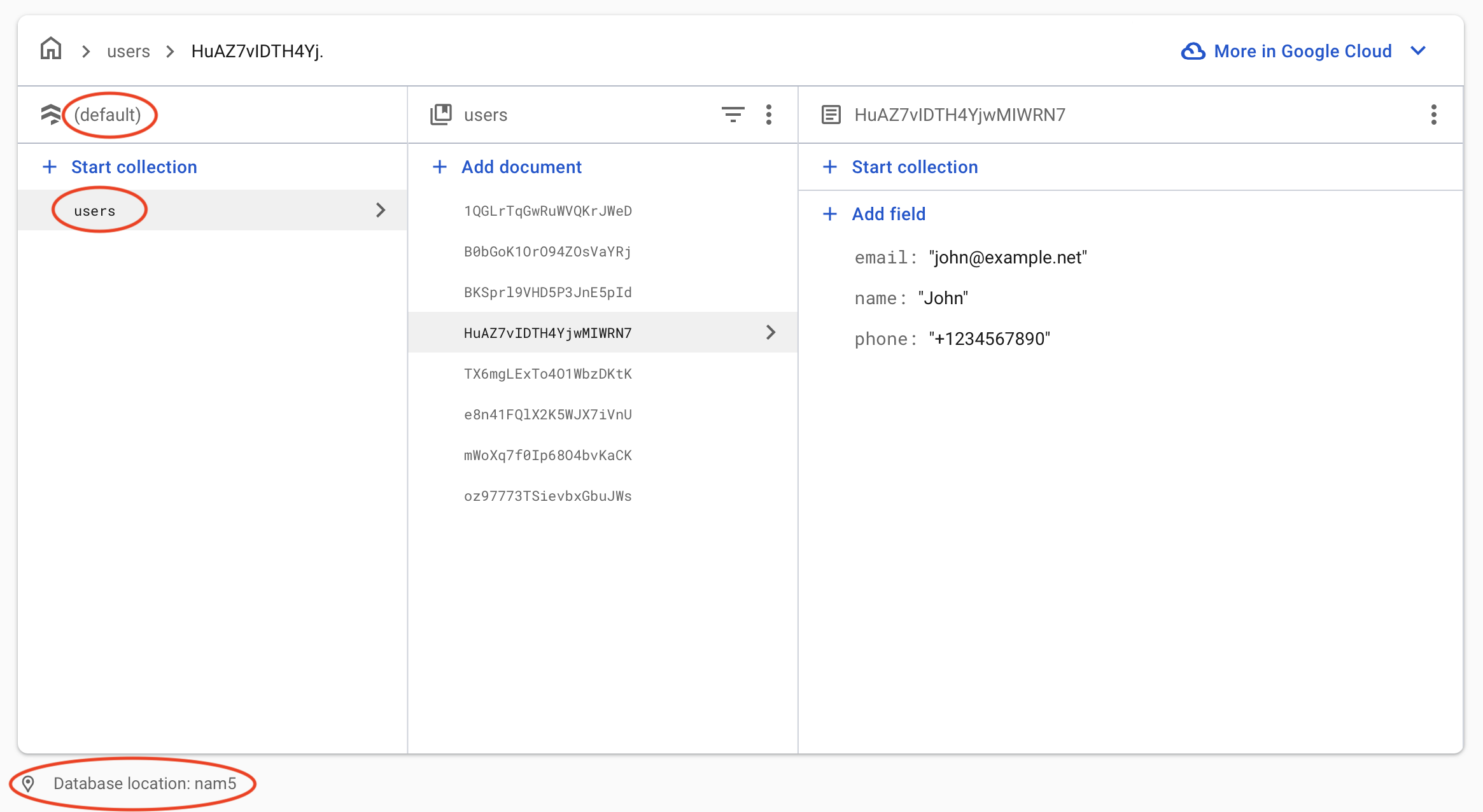
Here's the kit configuration, if you want to sync the users Firestore collection to Typesense:
LOCATION=us-central1
FIRESTORE_DATABASE_REGION=nam5
DATABASE=(default)
FIRESTORE_COLLECTION_PATHS=users
TYPESENSE_COLLECTION_NAMES=users
FIRESTORE_COLLECTION_FIELDS_LIST=
FLATTEN_NESTED_DOCUMENTS_LIST=false
TYPESENSE_HOSTS=xyz.a1.typesense.net
LOG_TYPESENSE_INSERTS=false
The kit only syncs data that was created or changed in Firestore after it was deployed. In order to backfill data that already exists in your Firestore collections to your Typesense Collections:
typesense_sync through the Firestore UI.backfill and contents of {trigger: true}backfill document in the previous step to {trigger: true, firestore_collections: ["path/to/firestore_collection_1", "path/to/firestore_collection_2"] }This will trigger the backfill background Cloud function, which will read data from your Firestore collection(s) and create equivalent documents in your Typesense collection.
[!NOTE] The
backfillfunction is deployed with the Cloud Functions default timeout of 540 seconds (9 minutes). If you're backfilling a large collection (e.g. hundreds of thousands of documents or more) and the function times out before finishing, you can increase the timeout up to 3600 seconds (1 hour) from the Google Cloud Console by editing thebackfillCloud Run service and bumping the request timeout.
indexOnWrite: A function that indexes data into Typesense when it's triggered by Firestore changes.
backfill: A function that backfills data from Firestore collections into Typesense, triggered when a Firestore document with the path typesense_sync/backfill has the contents of trigger: true.
The kit's functions run as a service account created for the kit, which is granted the following project IAM roles at deploy time:
To deploy Cloud Functions, your project must be on the Blaze (pay as you go) plan.
The functions are written in strict TypeScript (src, compiled to lib); the repository root is the published
package. Dependencies are managed with pnpm, which refuses versions younger than 7 days (minimumReleaseAge in
pnpm-workspace.yaml).
With Nix, nix develop provides Node 22, pnpm and Java (for the Firestore emulator). Otherwise install those yourself.
Docker is needed for the local Typesense server.
pnpm install
pnpm format        # oxfmt (pnpm format:check in CI)
pnpm typecheck     # tsc, strict
pnpm lint          # oxlint, type-aware
pnpm lint:guard    # rejects `any`, @ts-ignore/@ts-expect-error and lint-disable comments
pnpm emulator
pnpm typesenseServer
Add records in the Firestore UI and they should be created in Typesense.
pnpm test:unit         # no emulator needed
pnpm test:integration  # builds, starts Typesense via docker compose if needed, runs each spec against the emulator
pnpm test              # both
The integration specs read their configuration from test/integration/fixtures/*.env.
Update the version in package.json
Add entry to CHANGELOG.md
Run pnpm test
Publish (prereleases with --tag next):
pnpm publish --tag next
The prepack hook rebuilds lib and adds an npm-shrinkwrap.json without dev dependencies, since kits are
installed with npm. The direct dependencies use exact versions, so the shrinkwrap pins the same versions the tests
ran against.
Create release in GitHub
Please read through the FAQ below, search through past GitHub issues, past threads in our knowledge base and if you're unable to find an answer, please open a GitHub issue in this repo or join our Slack community and ask there.
My Typesense collection is empty, even after deploying the kit. What could be wrong?
The kit only syncs changes from your Firestore collections from the time when it is deployed. To backfill existing data from your Firestore collections into Typesense, you want to run the backfill step described here.
My Typesense collection is missing some records. What could be wrong?
This almost always is because the collection schema in Typesense does not match the structure of the documents in Firebase, and so Typesense is rejecting the documents due to validation failure. All validation errors returned by Typesense are logged in detail in the Cloud Functions logs, which are accessible via the Firebase web console. You want to search the logs for both the backfill function and also the indexOnWrite function.
The backfill function is not getting triggered. What could be wrong?
The backfill function watches for changes to a document with ID called backfill, in a Firestore collection called typesense_sync. This document should have a key called trigger with a boolean value of true. So if you've already created this key, you want to change its value to false and then change it back to true to re-trigger the backfill function.
How do I sync multiple collections?
List them all in one install. Read more here
How do I backfill just a single collection?
See the last bullet point under the backfilling instructions here
21 followers · starred Aug 2021
164 followers · starred Oct 2024
Firebase Extension to automatically push Firestore documents to Typesense for full-text search with typo tolerance, faceting, and more
TypeScript
183
342 commits
updated Oct 5, 2026
A Firebase function kit to sync data from your Firestore collections to Typesense, to be able to do full-text fuzzy search on your Firestore data, with typo tolerance, faceting, filtering, sorting, curation, synonyms, geosearch and more.
The kit deploys Cloud Functions into your own project that listen to your specified Firestore collections and sync Firestore documents to Typesense on creation, updates and deletes. It also provides a function to help you backfill data.
What is Typesense?
If you're new to Typesense, it is an open source search engine that is simple to use, run and scale, with clean APIs and documentation. Think of it as an open source alternative to Algolia and an easier-to-use, batteries-included alternative to ElasticSearch. Get a quick overview from this guide.
[!NOTE] Up to version 3.x this was a Firebase extension. Firebase Extensions shut down on March 31, 2027, so 4.0.0 ships as a function kit, the npm package
typesense-firestore-search. If you have the extension installed, follow UPGRADING.md.
Before installing the kit, make sure that you have:
Set up a Cloud Firestore database in your Firebase project.
If using Google Workspace for Business, ensure that your default cloud compute based service account has the following roles (which can be found in the Google Cloud Console IAM section):
Set up a Typesense cluster on Typesense Cloud or Self-Hosted (free).
Set up a Typesense Collection either through the Typesense Cloud dashboard or through the API.
Installed firebase-tools 15.32.0 or later (npm install -g firebase-tools@latest).
[!IMPORTANT] ☝️ #3 above is a commonly missed step. The kit does not create the Typesense Collection for you. Instead it syncs data to a Typesense collection you've already created. If you see an HTTP 404 in the function logs, it's most likely because of missing this step.
From your Firebase project directory, install the kit. The CLI prompts for each of the
configuration parameters listed below and writes them to the kit's .env file:
firebase functions:kits:install --package typesense-firestore-search --project=[your-project-id]
Then deploy it:
firebase deploy --only functions:[kit-instance-id] --project=[your-project-id]
To change the configuration later, edit the kit's .env file and deploy again.
One install can sync any number of Firestore collections, each into its own Typesense collection. List them in
FIRESTORE_COLLECTION_PATHS and TYPESENSE_COLLECTION_NAMES (same order), with optional per-collection settings in
FIRESTORE_COLLECTION_FIELDS_LIST and FLATTEN_NESTED_DOCUMENTS_LIST. Subcollection paths with placeholders such as
users/{userId}/books are supported; the placeholder values are added to each Typesense document.
| Parameter | Description |
|---|---|
LOCATION | Where do you want to deploy the functions? You usually want a location close to your database. For help selecting a location, refer to the location selection guide. |
FIRESTORE_DATABASE_REGION | Where the Firestore Database that holds the Firestore collections you want to sync into Typesense is located. Refer to the Cloud Firestore locations guide. |
DATABASE | The Firestore database to sync from. Defaults to (default). |
FIRESTORE_COLLECTION_PATHS | Comma-separated list of Firestore collection paths to index, e.g. users,users/{userId}/books. |
TYPESENSE_COLLECTION_NAMES | Comma-separated list of Typesense collection names, in the same order as the Firestore collection paths (you need to create these collections in Typesense yourself). |
FIRESTORE_COLLECTION_FIELDS_LIST | Pipe-separated list of comma-separated field lists, one per collection, e.g. `name,email |
FLATTEN_NESTED_DOCUMENTS_LIST | Comma-separated list of true/false, one per collection. Set true for Typesense Server v0.23.1 and below, since indexing nested objects is natively supported only in v0.24 and above. |
TYPESENSE_HOSTS | A comma-separated list of Typesense Hosts (only domain without https or port number). For single node clusters, a single hostname is sufficient. For multi-node Highly Available or (Search Delivery Network) SDN Clusters, please be sure to mention all hostnames in a comma-separated list. |
TYPESENSE_API_KEY | A Typesense API key with admin permissions. Click on "Generate API Key" in cluster dashboard in Typesense Cloud. Stored in Secret Manager. |
LOG_TYPESENSE_INSERTS | Should data inserted into Typesense be logged in Cloud Logging? This can be useful for debugging, but should not be enabled in production. |
⚠️ The kit connects to Typesense over HTTPS on port 443, since your data goes from Firebase to Typesense over the public internet and we want your data to be encrypted in transit. For Typesense Cloud, HTTPS is already configured for you.
When self-hosting Typesense, you want to make sure you set
--api-port=443and also get an SSL certificate from say LetsEncrypt or any registrar and configure Typesense to use it using the--ssl-certificateand--ssl-certificate-keyserver parameters. Alternatively, if you're running Typesense on your local machine, you can also set up a local HTTPS tunnel using something like ngrok (ngrok http 8108) and use the ngrok hostname in the kit configuration.
If you have a Firestore database called (default) with a collection inside it called users in the nam5 region like this:
Here's the kit configuration, if you want to sync the users Firestore collection to Typesense:
LOCATION=us-central1
FIRESTORE_DATABASE_REGION=nam5
DATABASE=(default)
FIRESTORE_COLLECTION_PATHS=users
TYPESENSE_COLLECTION_NAMES=users
FIRESTORE_COLLECTION_FIELDS_LIST=
FLATTEN_NESTED_DOCUMENTS_LIST=false
TYPESENSE_HOSTS=xyz.a1.typesense.net
LOG_TYPESENSE_INSERTS=false
The kit only syncs data that was created or changed in Firestore after it was deployed. In order to backfill data that already exists in your Firestore collections to your Typesense Collections:
typesense_sync through the Firestore UI.backfill and contents of {trigger: true}backfill document in the previous step to {trigger: true, firestore_collections: ["path/to/firestore_collection_1", "path/to/firestore_collection_2"] }This will trigger the backfill background Cloud function, which will read data from your Firestore collection(s) and create equivalent documents in your Typesense collection.
[!NOTE] The
backfillfunction is deployed with the Cloud Functions default timeout of 540 seconds (9 minutes). If you're backfilling a large collection (e.g. hundreds of thousands of documents or more) and the function times out before finishing, you can increase the timeout up to 3600 seconds (1 hour) from the Google Cloud Console by editing thebackfillCloud Run service and bumping the request timeout.
indexOnWrite: A function that indexes data into Typesense when it's triggered by Firestore changes.
backfill: A function that backfills data from Firestore collections into Typesense, triggered when a Firestore document with the path typesense_sync/backfill has the contents of trigger: true.
The kit's functions run as a service account created for the kit, which is granted the following project IAM roles at deploy time:
To deploy Cloud Functions, your project must be on the Blaze (pay as you go) plan.
The functions are written in strict TypeScript (src, compiled to lib); the repository root is the published
package. Dependencies are managed with pnpm, which refuses versions younger than 7 days (minimumReleaseAge in
pnpm-workspace.yaml).
With Nix, nix develop provides Node 22, pnpm and Java (for the Firestore emulator). Otherwise install those yourself.
Docker is needed for the local Typesense server.
pnpm install
pnpm format        # oxfmt (pnpm format:check in CI)
pnpm typecheck     # tsc, strict
pnpm lint          # oxlint, type-aware
pnpm lint:guard    # rejects `any`, @ts-ignore/@ts-expect-error and lint-disable comments
pnpm emulator
pnpm typesenseServer
Add records in the Firestore UI and they should be created in Typesense.
pnpm test:unit         # no emulator needed
pnpm test:integration  # builds, starts Typesense via docker compose if needed, runs each spec against the emulator
pnpm test              # both
The integration specs read their configuration from test/integration/fixtures/*.env.
Update the version in package.json
Add entry to CHANGELOG.md
Run pnpm test
Publish (prereleases with --tag next):
pnpm publish --tag next
The prepack hook rebuilds lib and adds an npm-shrinkwrap.json without dev dependencies, since kits are
installed with npm. The direct dependencies use exact versions, so the shrinkwrap pins the same versions the tests
ran against.
Create release in GitHub
Please read through the FAQ below, search through past GitHub issues, past threads in our knowledge base and if you're unable to find an answer, please open a GitHub issue in this repo or join our Slack community and ask there.
My Typesense collection is empty, even after deploying the kit. What could be wrong?
The kit only syncs changes from your Firestore collections from the time when it is deployed. To backfill existing data from your Firestore collections into Typesense, you want to run the backfill step described here.
My Typesense collection is missing some records. What could be wrong?
This almost always is because the collection schema in Typesense does not match the structure of the documents in Firebase, and so Typesense is rejecting the documents due to validation failure. All validation errors returned by Typesense are logged in detail in the Cloud Functions logs, which are accessible via the Firebase web console. You want to search the logs for both the backfill function and also the indexOnWrite function.
The backfill function is not getting triggered. What could be wrong?
The backfill function watches for changes to a document with ID called backfill, in a Firestore collection called typesense_sync. This document should have a key called trigger with a boolean value of true. So if you've already created this key, you want to change its value to false and then change it back to true to re-trigger the backfill function.
How do I sync multiple collections?
List them all in one install. Read more here
How do I backfill just a single collection?
See the last bullet point under the backfilling instructions here
21 followers · starred Aug 2021
164 followers · starred Oct 2024



