The filesystem for agents.
See the code
The filesystem for agents.




⚠️ Warning: This software is in BETA. It may still contain bugs and unexpected behavior. Use caution with production data and ensure you have backups.
AgentFS is a filesystem explicitly designed for AI agents. Just as traditional filesystems provide file and directory abstractions for applications, AgentFS provides the storage abstractions that AI agents need.
The AgentFS repository consists of the following:
AgentFS provides the following benefits for agent state management:
Read more about the motivation for AgentFS in the announcement blog post.
Install the AgentFS CLI:
curl -fsSL https://agentfs.ai/install | bash
Initialize an agent filesystem:
$ agentfs init my-agent
Created agent filesystem: .agentfs/my-agent.db
Agent ID: my-agent
Inspect the agent filesystem:
$ agentfs fs my-agent ls
Using agent: my-agent
f hello.txt

$ agentfs fs my-agent cat hello.txt
hello from agent
You can also use a database path directly:
$ agentfs fs .agentfs/my-agent.db cat hello.txt
hello from agent
View the agent's action timeline:
$ agentfs timeline my-agent
ID   TOOL                 STATUS       DURATION STARTED
4    execute_code         pending            -- 2024-01-05 09:44:20
3    api_call             error           300ms 2024-01-05 09:44:15
2    read_file            success          50ms 2024-01-05 09:44:10
1    web_search           success        1200ms 2024-01-05 09:43:45
You can mount an agent filesystem using FUSE (Linux) or NFS (macOS):
$ agentfs mount my-agent ./mnt
$ echo "hello" > ./mnt/hello.txt
$ cat ./mnt/hello.txt
hello
You can also run a program in an experimental sandbox with the agent filesystem mounted at /agent:
$ agentfs run /bin/bash
Welcome to AgentFS!

$ echo "hello from agent" > /agent/hello.txt
$ cat /agent/hello.txt
hello from agent
$ exit
Read the User Manual for complete documentation.
Install the SDK in your project:
npm install agentfs-sdk
Use it in your agent code:
import { AgentFS } from 'agentfs-sdk';

// Persistent storage with identifier
const agent = await AgentFS.open({ id: 'my-agent' });
// Creates: .agentfs/my-agent.db

// Or use ephemeral in-memory database
const ephemeralAgent = await AgentFS.open();

// Key-value operations
await agent.kv.set('user:preferences', { theme: 'dark' });
const prefs = await agent.kv.get('user:preferences');

// Filesystem operations
await agent.fs.writeFile('/output/report.pdf', pdfBuffer);
const files = await agent.fs.readdir('/output');

// Tool call tracking
await agent.tools.record(
  'web_search',
  Date.now() / 1000,
  Date.now() / 1000 + 1.5,
  { query: 'AI' },
  { results: [...] }
);
This source repository also contains examples that demonstrate how to integrate AgentFS with some popular AI frameworks:
See the examples directory for more details.
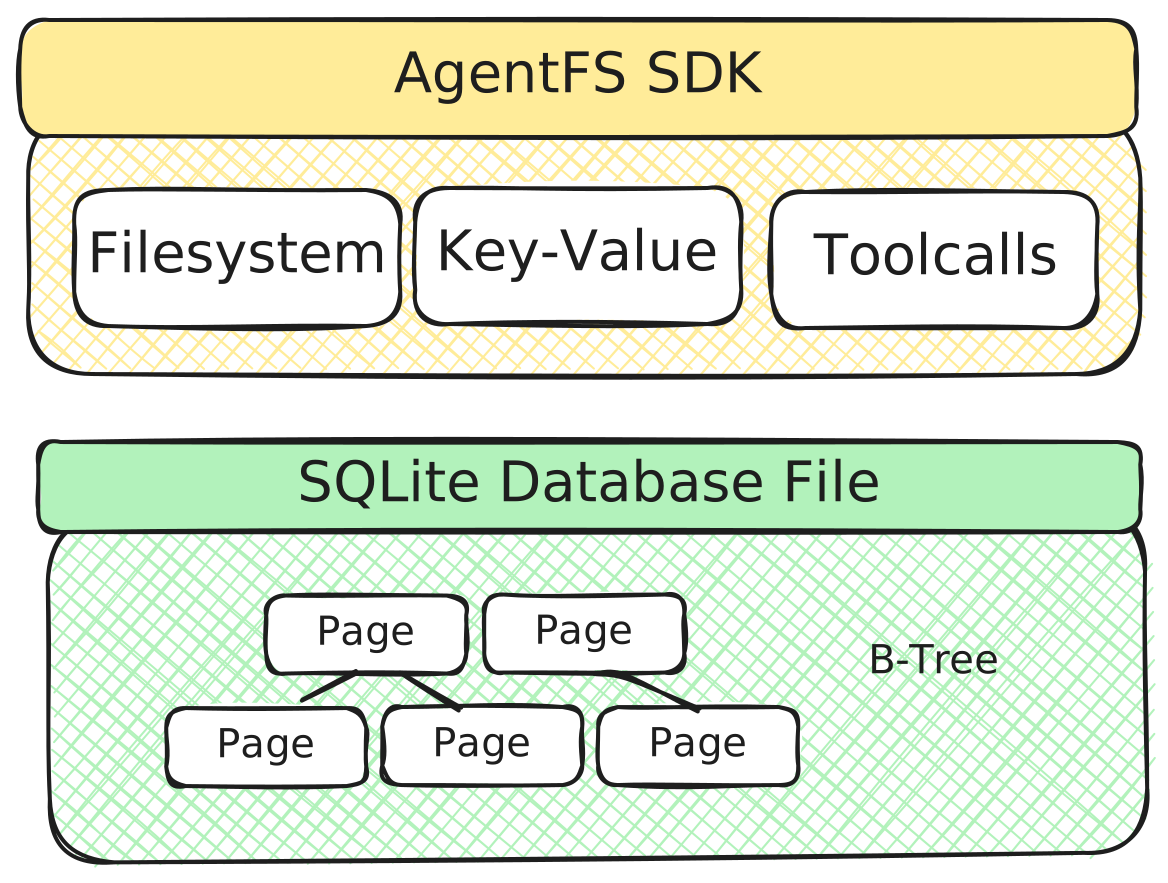
AgentFS is an agent filesystem accessible through an SDK that provides three essential interfaces for agent state management:
At the heart of AgentFS is the agent filesystem, a complete SQLite-based storage system for agents implemented using Turso. Everything an agent does—every file it creates, every piece of state it stores, every tool it invokes—lives in a single SQLite database file.
Bubblewrap provides filesystem isolation using Linux namespaces and overlays. While you could achieve similar isolation with a bwrap call that mounts / read-only and uses --tmp-overlay on the working directory, the key difference is persistence and queryability: with AgentFS, the upper filesystem is stored in a single SQLite database file, which you can query, snapshot, and move to another machine. Read more about the motivation in the announcement blog post.
Docker Sandbox and AgentFS are complementary rather than competing. AgentFS answers "what happened and what's the state?" while Docker Sandboxes answer "how do I run this safely?" You could use both together: run an agent inside a Docker Sandbox for security, while using AgentFS inside that sandbox for structured state management and audit trails.
Git worktrees let you check out multiple branches of a repository into separate directories, allowing agents to work on independent copies of the source code—similar to AgentFS. But AgentFS solves the problem at a lower level. With git worktrees, nothing prevents an agent from modifying files outside its worktree: another agent's worktree, system files, or anything else on the filesystem. The isolation is purely conventional, not enforced. AgentFS provides filesystem-level copy-on-write isolation that's system-wide and cannot be bypassed—letting you safely run untrusted agents. And because it operates below git, it also handles untracked files, making it useful beyond just version-controlled source code.
The filesystem layer gives us capabilities that block devices can't. First, because everything is stored in structured SQLite tables, you can query the filesystem, which is essential for auditability and debugging agent behavior. Second, SQLite's write-ahead log enables snapshotting and time-travel forking by capturing every filesystem change. Third, we can provide an SDK that works in environments such as serverless or the browser, where there's no way to mount a block device at all. Note that this approach works fine with containers and VMs too—you can use AgentFS via remote filesystem protocols like NFS or through mechanisms like virtio-fuse.
MIT
(top 24 of 123)
4,390 followers · starred Dec 2025
13,166 followers · starred Mar 2026
363 followers · starred Nov 2025
228 followers · starred Dec 2025
The filesystem for agents.
See the code
The filesystem for agents.
⚠️ Warning: This software is in BETA. It may still contain bugs and unexpected behavior. Use caution with production data and ensure you have backups.
AgentFS is a filesystem explicitly designed for AI agents. Just as traditional filesystems provide file and directory abstractions for applications, AgentFS provides the storage abstractions that AI agents need.
The AgentFS repository consists of the following:
AgentFS provides the following benefits for agent state management:
Read more about the motivation for AgentFS in the announcement blog post.
Install the AgentFS CLI:
curl -fsSL https://agentfs.ai/install | bash
Initialize an agent filesystem:
$ agentfs init my-agent
Created agent filesystem: .agentfs/my-agent.db
Agent ID: my-agent
Inspect the agent filesystem:
$ agentfs fs my-agent ls
Using agent: my-agent
f hello.txt

$ agentfs fs my-agent cat hello.txt
hello from agent
You can also use a database path directly:
$ agentfs fs .agentfs/my-agent.db cat hello.txt
hello from agent
View the agent's action timeline:
$ agentfs timeline my-agent
ID   TOOL                 STATUS       DURATION STARTED
4    execute_code         pending            -- 2024-01-05 09:44:20
3    api_call             error           300ms 2024-01-05 09:44:15
2    read_file            success          50ms 2024-01-05 09:44:10
1    web_search           success        1200ms 2024-01-05 09:43:45
You can mount an agent filesystem using FUSE (Linux) or NFS (macOS):
$ agentfs mount my-agent ./mnt
$ echo "hello" > ./mnt/hello.txt
$ cat ./mnt/hello.txt
hello
You can also run a program in an experimental sandbox with the agent filesystem mounted at /agent:
$ agentfs run /bin/bash
Welcome to AgentFS!

$ echo "hello from agent" > /agent/hello.txt
$ cat /agent/hello.txt
hello from agent
$ exit
Read the User Manual for complete documentation.
Install the SDK in your project:
npm install agentfs-sdk
Use it in your agent code:
import { AgentFS } from 'agentfs-sdk';

// Persistent storage with identifier
const agent = await AgentFS.open({ id: 'my-agent' });
// Creates: .agentfs/my-agent.db

// Or use ephemeral in-memory database
const ephemeralAgent = await AgentFS.open();

// Key-value operations
await agent.kv.set('user:preferences', { theme: 'dark' });
const prefs = await agent.kv.get('user:preferences');

// Filesystem operations
await agent.fs.writeFile('/output/report.pdf', pdfBuffer);
const files = await agent.fs.readdir('/output');

// Tool call tracking
await agent.tools.record(
  'web_search',
  Date.now() / 1000,
  Date.now() / 1000 + 1.5,
  { query: 'AI' },
  { results: [...] }
);
This source repository also contains examples that demonstrate how to integrate AgentFS with some popular AI frameworks:
See the examples directory for more details.
AgentFS is an agent filesystem accessible through an SDK that provides three essential interfaces for agent state management:
At the heart of AgentFS is the agent filesystem, a complete SQLite-based storage system for agents implemented using Turso. Everything an agent does—every file it creates, every piece of state it stores, every tool it invokes—lives in a single SQLite database file.
Bubblewrap provides filesystem isolation using Linux namespaces and overlays. While you could achieve similar isolation with a bwrap call that mounts / read-only and uses --tmp-overlay on the working directory, the key difference is persistence and queryability: with AgentFS, the upper filesystem is stored in a single SQLite database file, which you can query, snapshot, and move to another machine. Read more about the motivation in the announcement blog post.
Docker Sandbox and AgentFS are complementary rather than competing. AgentFS answers "what happened and what's the state?" while Docker Sandboxes answer "how do I run this safely?" You could use both together: run an agent inside a Docker Sandbox for security, while using AgentFS inside that sandbox for structured state management and audit trails.
Git worktrees let you check out multiple branches of a repository into separate directories, allowing agents to work on independent copies of the source code—similar to AgentFS. But AgentFS solves the problem at a lower level. With git worktrees, nothing prevents an agent from modifying files outside its worktree: another agent's worktree, system files, or anything else on the filesystem. The isolation is purely conventional, not enforced. AgentFS provides filesystem-level copy-on-write isolation that's system-wide and cannot be bypassed—letting you safely run untrusted agents. And because it operates below git, it also handles untracked files, making it useful beyond just version-controlled source code.
The filesystem layer gives us capabilities that block devices can't. First, because everything is stored in structured SQLite tables, you can query the filesystem, which is essential for auditability and debugging agent behavior. Second, SQLite's write-ahead log enables snapshotting and time-travel forking by capturing every filesystem change. Third, we can provide an SDK that works in environments such as serverless or the browser, where there's no way to mount a block device at all. Note that this approach works fine with containers and VMs too—you can use AgentFS via remote filesystem protocols like NFS or through mechanisms like virtio-fuse.
MIT
(top 24 of 123)
4,390 followers · starred Dec 2025
13,166 followers · starred Mar 2026
363 followers · starred Nov 2025
228 followers · starred Dec 2025



