GitHub profile badge for contributions using shuding/cobe
See the codeA daily-updating GitHub contribution analytics badge showing where the owners of repositories you contribute to are located. Click the badge to open an interactive Cobe globe on GitHub Pages.
This is a standalone project that uses Cobe, an external WebGL globe library, to render its interactive page. It is not a fork of Cobe.
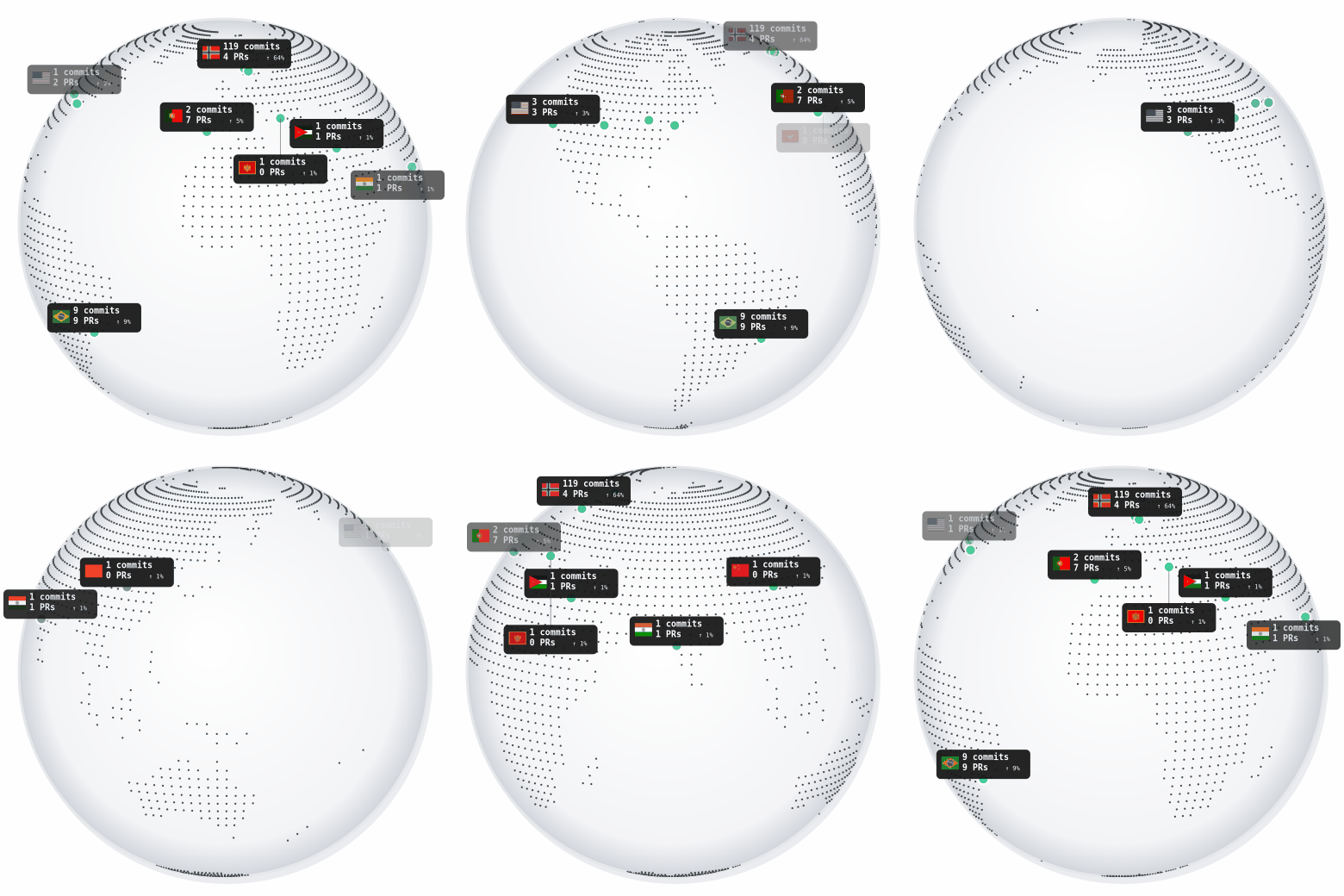
The animated GIF badge shows a rotating dotted world map with country markers, flags, commit and PR counts, and each country's percentage of tracked contributions. Its flag and label are compact to minimize overlap. The globe completes one seamless rotation per loop. Clicking the badge opens the interactive version, where the globe can be dragged and zoomed. The interactive globe uses the same daily-generated data.json as the badge and displays the Cobe world map with flag emoji in its live marker labels. Contributions in the same country share one marker and one label with summed counts and links to all contributing repositories. Markers outside a recognized country are shown separately without a flag.
Co-authored-by: trailer (matched by login or GitHub noreply/public email).source field, and falling back to a commits-search lookup (picking the oldest repository by creation date) to catch repositories that duplicate another repo's commit history without being a registered GitHub fork. Origins are cached per repository so this only runs once per distinct repository, not once per commit.badge.gif for the animated profile badge and data.json for the interactive page.index.html, which loads Cobe in the browser and renders the interactive globe..github/workflows/badge-update.yml) regenerates and commits the badge and shared analytics data.Fork the repository, then the workflow will automatically use your GitHub username to generate the badge. No changes to the workflow are needed.
Add the badge to your profile README using the linked-image Markdown below. Replace turbolego with your GitHub username:
[](https://<YOUR_USERNAME>.github.io/github-contrib-globe-badge/)
The outer link opens the interactive GitHub Pages globe in a new browser tab when the profile visitor clicks the badge link.
.
├─ index.html                         # interactive Cobe globe served by GitHub Pages
├─ data.json                          # generated contribution data consumed by index.html
├─ badge.gif                          # generated animated profile badge
├─ badge/generate-badge.js            # badge and analytics-data generator
└─ .github/workflows/badge-update.yml # daily generation and commit workflow
The contribution date range is controlled by the author-date:>2023-01-01 query in badge/generate-badge.js. The interactive page imports Cobe from jsDelivr and can be customised through the globe options and page styles in index.html.
npm install
# For local testing, set GITHUB_ACTOR to your GitHub username:
GITHUB_ACTOR=<YOUR_USERNAME> node badge/generate-badge.js
The generator writes both badge.gif and data.json. In the GitHub Actions workflow, GITHUB_ACTOR is automatically set to ${{ github.repository_owner }} (the fork owner), so no manual configuration is required. To update the committed badge and country codes from the existing data.json without querying GitHub again, run node badge/generate-badge.js --render-only.
GitHub Pages is configured to serve the repository's main branch root at:
https://turbolego.github.io/github-contrib-globe-badge/
The interactive globe rendering is powered by Cobe by Shu Ding. Flag images for the GIF are from flag-icons (MIT). Cobe is credited here as a dependency; the contributors listed for this repository reflect its own commit history.
MIT
GitHub profile badge for contributions using shuding/cobe
See the codeA daily-updating GitHub contribution analytics badge showing where the owners of repositories you contribute to are located. Click the badge to open an interactive Cobe globe on GitHub Pages.
This is a standalone project that uses Cobe, an external WebGL globe library, to render its interactive page. It is not a fork of Cobe.
The animated GIF badge shows a rotating dotted world map with country markers, flags, commit and PR counts, and each country's percentage of tracked contributions. Its flag and label are compact to minimize overlap. The globe completes one seamless rotation per loop. Clicking the badge opens the interactive version, where the globe can be dragged and zoomed. The interactive globe uses the same daily-generated data.json as the badge and displays the Cobe world map with flag emoji in its live marker labels. Contributions in the same country share one marker and one label with summed counts and links to all contributing repositories. Markers outside a recognized country are shown separately without a flag.
Co-authored-by: trailer (matched by login or GitHub noreply/public email).source field, and falling back to a commits-search lookup (picking the oldest repository by creation date) to catch repositories that duplicate another repo's commit history without being a registered GitHub fork. Origins are cached per repository so this only runs once per distinct repository, not once per commit.badge.gif for the animated profile badge and data.json for the interactive page.index.html, which loads Cobe in the browser and renders the interactive globe..github/workflows/badge-update.yml) regenerates and commits the badge and shared analytics data.Fork the repository, then the workflow will automatically use your GitHub username to generate the badge. No changes to the workflow are needed.
Add the badge to your profile README using the linked-image Markdown below. Replace turbolego with your GitHub username:
[](https://<YOUR_USERNAME>.github.io/github-contrib-globe-badge/)
The outer link opens the interactive GitHub Pages globe in a new browser tab when the profile visitor clicks the badge link.
.
├─ index.html                         # interactive Cobe globe served by GitHub Pages
├─ data.json                          # generated contribution data consumed by index.html
├─ badge.gif                          # generated animated profile badge
├─ badge/generate-badge.js            # badge and analytics-data generator
└─ .github/workflows/badge-update.yml # daily generation and commit workflow
The contribution date range is controlled by the author-date:>2023-01-01 query in badge/generate-badge.js. The interactive page imports Cobe from jsDelivr and can be customised through the globe options and page styles in index.html.
npm install
# For local testing, set GITHUB_ACTOR to your GitHub username:
GITHUB_ACTOR=<YOUR_USERNAME> node badge/generate-badge.js
The generator writes both badge.gif and data.json. In the GitHub Actions workflow, GITHUB_ACTOR is automatically set to ${{ github.repository_owner }} (the fork owner), so no manual configuration is required. To update the committed badge and country codes from the existing data.json without querying GitHub again, run node badge/generate-badge.js --render-only.
GitHub Pages is configured to serve the repository's main branch root at:
https://turbolego.github.io/github-contrib-globe-badge/
The interactive globe rendering is powered by Cobe by Shu Ding. Flag images for the GIF are from flag-icons (MIT). Cobe is credited here as a dependency; the contributors listed for this repository reflect its own commit history.
MIT



