An Android application for super-resolution & interpolation. Contains RealSR-NCNN, SRMD-NCNN, RealCUGAN-NCNN, Real-ESRGAN-NCNN, Waifu2x-NCNN, Anime4kcpp, nearest, bilinear, bicubic, AVIR...
C++
2,156
196 commits
updated May 30, 2026
RealSR-NCNN-Android is a simple Android application that based on Waifu2x-NCNN, SRMD-NCNN, RealCUGAN-NCNN, RealSR-NCNN, Real-ESRGAN, Anime4KCPP.
The application does not collect any private information from your device.
Download: Github Release
This repository contains 3 project:
nearest bilinear bicubic and avir lancir.Two ways of selecting files:
Select Image to select an imageTwo ways of running:
Run button and wait some time. The photo view will show the result when the program finish its work. If you like the result, you could click the Save button.help and get more info)input & output
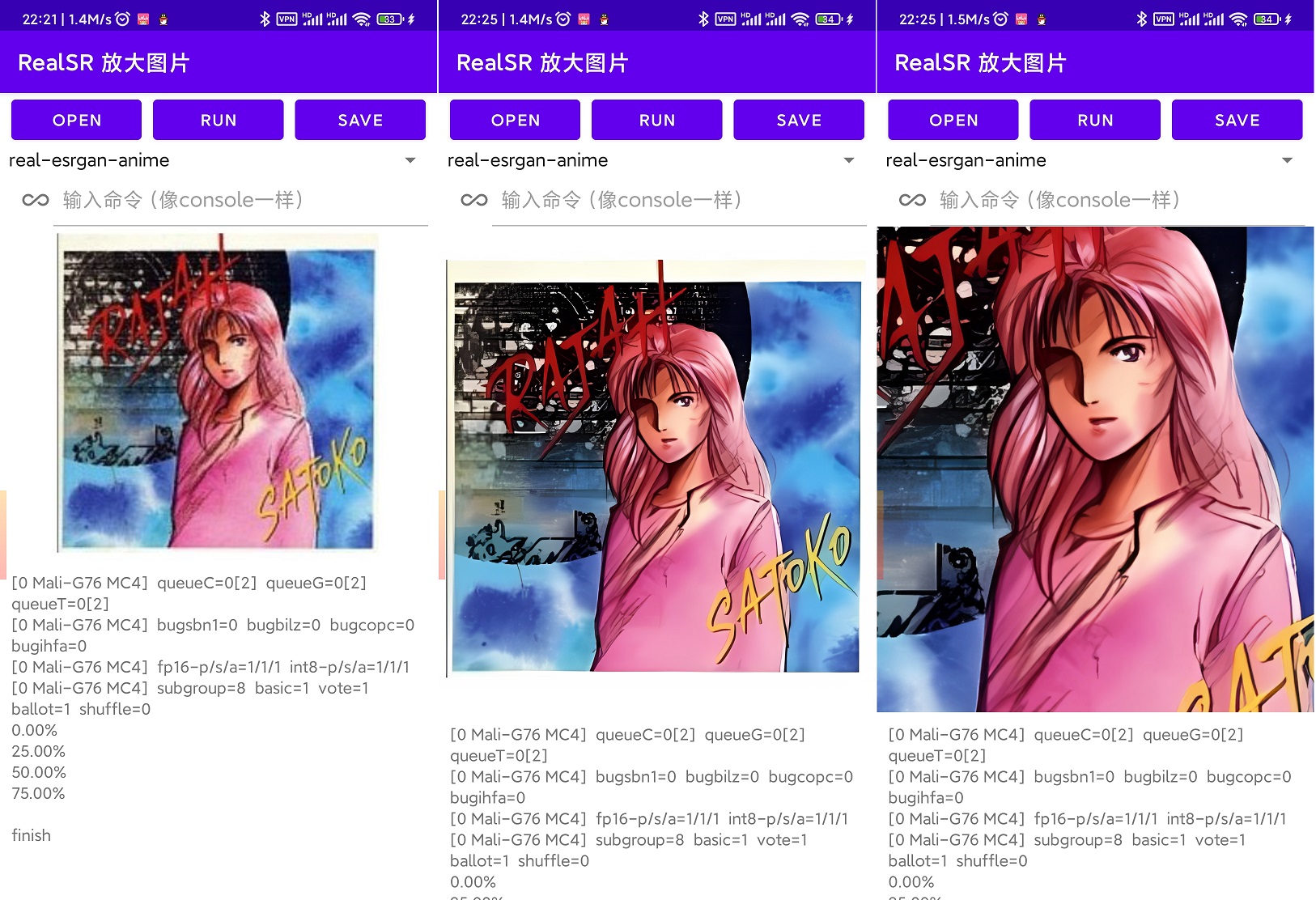
RealSR-NCNN-Android-GUI could load extra models from sdcard automatily in ver 1.7.6. You could download more models from https://huggingface.co/tumuyan2/realsr-models .
Path for custom models (RealSR/ESRGAN/Waifu2x) and save.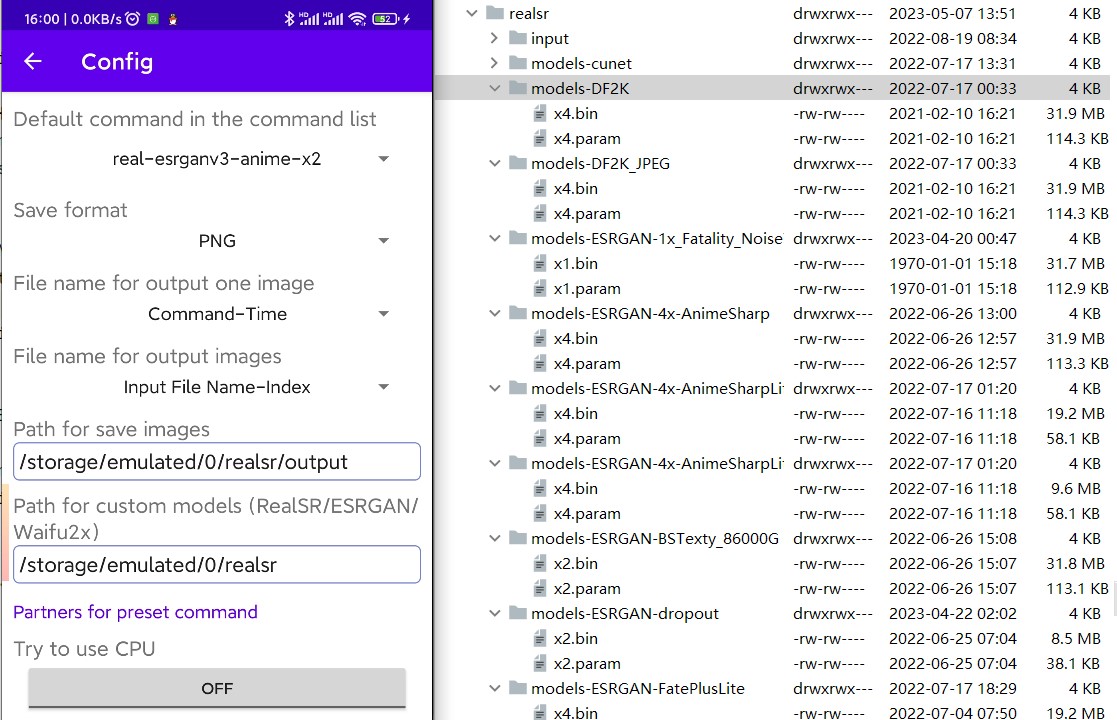
✨ ver 1.11 support mnn models. MNN could support more models than ncnn. ver 1.12 could use -c param or model file name to config the color space.
refer to https://mnn-docs.readthedocs.io/en/latest/tools/convert.html , you could convert ONNX, TFLITE, TorchScript, Tensorflow models to mnn format.
pip install mnnMNNConvert -f ONNX --modelFile "{onnx_path}" --MNNModel "{mnn_path}" --bizCode biz --fp16 --info --detectSparseSpeedUp4xabcdefg.mnn abc-x4-def.mnn or abc_4x_def.mnn, copy to your custom model folder. If the filename contains Grayscale Gray2YCbCr Gray2YUV YCbCr YUV, the App will apply these color space.Also you could convert ESRGAN pth models by yourself.
Download ESRGAN pytorch models from OpenModelDB and unzip it to somewhere.
Download cupscale and unzip it in your PC.
Convert pytorch models to ncnn. Open CupscaleData\bin\pth2ncnn, use pth2ncnn.exe to convert pth files to ncnn file.
Rename models, just like this:
models-Real-ESRGAN-AnimeSharp  // directory should have a suffix of models-Real- or models-ESRGAN-
├─x4.bin                       // models name as x[n], n is scale
├─x4.param
Another way to convert models:
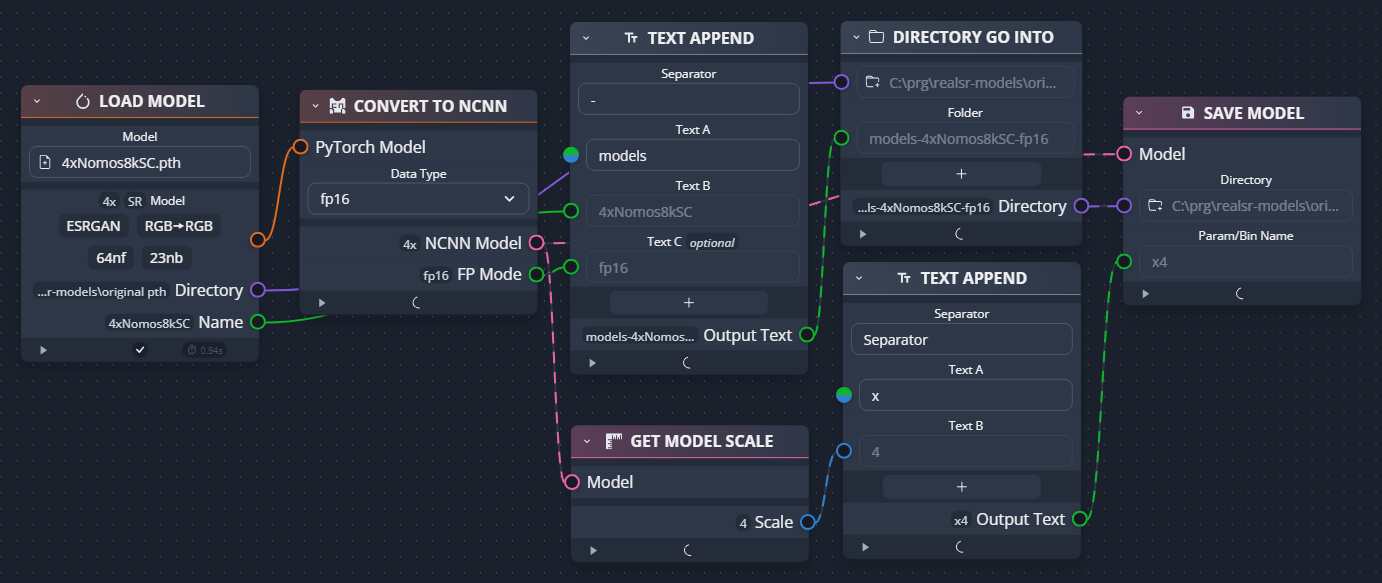
Build RealSR-NCNN-Android-CLI by yourself or download assets.zip from github release page, the zip file contains models & ELF files. Unzip and put them to this folder, then build it with Android Studio.
The direct download link for current version: https://github.com/tumuyan/RealSR-NCNN-Android/releases/download/1.11.1/assets.zip
RealSR-NCNN-Android-GUI\app\src\main\assets\
└─realsr
    │  Anime4k
    │  colors.xml
    │  delegates.xml
    │  libc++_shared.so
    │  libncnn.so
    │  libomp.so
    │  magick
    │  realcugan-ncnn
    │  realsr-ncnn
    │  resize-ncnn
    │  srmd-ncnn
    │  waifu2x-ncnn
    │
    ├─models-nose
    │      up2x-no-denoise.bin
    │      up2x-no-denoise.param
    │
    ├─models-pro
    │      up2x-conservative.bin
    │      up2x-conservative.param
    │      up2x-denoise3x.bin
    │      up2x-denoise3x.param
    │      up2x-no-denoise.bin
    │      up2x-no-denoise.param
    │      up3x-conservative.bin
    │      up3x-conservative.param
    │      up3x-denoise3x.bin
    │      up3x-denoise3x.param
    │      up3x-no-denoise.bin
    │      up3x-no-denoise.param
    │
    ├─models-Real-ESRGAN
    │      x4.bin
    │      x4.param
    │
    ├─models-Real-ESRGAN-anime
    │      x4.bin
    │      x4.param
    │
    ├─models-Real-ESRGANv2-anime
    │      x2.bin
    │      x2.param
    │      x4.bin
    │      x4.param
    │
    ├─models-Real-ESRGANv3-anime
    │      x2.bin
    │      x2.param
    │      x3.bin
    │      x3.param
    │      x4.bin
    │      x4.param
    │
    ├─models-ESRGAN-Nomos8kSC
    │      x4.bin
    │      x4.param
    |
    └─models-se
           up2x-conservative.bin
           up2x-conservative.param
           up2x-denoise1x.bin
           up2x-denoise1x.param
           up2x-denoise2x.bin
           up2x-denoise2x.param
           up2x-denoise3x.bin
           up2x-denoise3x.param
           up2x-no-denoise.bin
           up2x-no-denoise.param
           up3x-conservative.bin
           up3x-conservative.param
           up3x-denoise3x.bin
           up3x-denoise3x.param
           up3x-no-denoise.bin
           up3x-no-denoise.param
           up4x-conservative.bin
           up4x-conservative.param
           up4x-denoise3x.bin
           up4x-denoise3x.param
           up4x-no-denoise.bin
           up4x-no-denoise.param
This is a very simple tool, flexible and powerful, has the following shortcomings (and there are no plans for improvement):
Most of the C code is copied from Nihui, cause of the directory structure had to be adjusted, the original git was broken
8,396 followers · starred Feb 2022
4,155 followers · starred Feb 2022
100 followers · starred Sep 2024
151 followers · starred Jan 2024
An Android application for super-resolution & interpolation. Contains RealSR-NCNN, SRMD-NCNN, RealCUGAN-NCNN, Real-ESRGAN-NCNN, Waifu2x-NCNN, Anime4kcpp, nearest, bilinear, bicubic, AVIR...
C++
2,156
196 commits
updated May 30, 2026
RealSR-NCNN-Android is a simple Android application that based on Waifu2x-NCNN, SRMD-NCNN, RealCUGAN-NCNN, RealSR-NCNN, Real-ESRGAN, Anime4KCPP.
The application does not collect any private information from your device.
Download: Github Release
This repository contains 3 project:
nearest bilinear bicubic and avir lancir.Two ways of selecting files:
Select Image to select an imageTwo ways of running:
Run button and wait some time. The photo view will show the result when the program finish its work. If you like the result, you could click the Save button.help and get more info)input & output
RealSR-NCNN-Android-GUI could load extra models from sdcard automatily in ver 1.7.6. You could download more models from https://huggingface.co/tumuyan2/realsr-models .
Path for custom models (RealSR/ESRGAN/Waifu2x) and save.
✨ ver 1.11 support mnn models. MNN could support more models than ncnn. ver 1.12 could use -c param or model file name to config the color space.
refer to https://mnn-docs.readthedocs.io/en/latest/tools/convert.html , you could convert ONNX, TFLITE, TorchScript, Tensorflow models to mnn format.
pip install mnnMNNConvert -f ONNX --modelFile "{onnx_path}" --MNNModel "{mnn_path}" --bizCode biz --fp16 --info --detectSparseSpeedUp4xabcdefg.mnn abc-x4-def.mnn or abc_4x_def.mnn, copy to your custom model folder. If the filename contains Grayscale Gray2YCbCr Gray2YUV YCbCr YUV, the App will apply these color space.Also you could convert ESRGAN pth models by yourself.
Download ESRGAN pytorch models from OpenModelDB and unzip it to somewhere.
Download cupscale and unzip it in your PC.
Convert pytorch models to ncnn. Open CupscaleData\bin\pth2ncnn, use pth2ncnn.exe to convert pth files to ncnn file.
Rename models, just like this:
models-Real-ESRGAN-AnimeSharp  // directory should have a suffix of models-Real- or models-ESRGAN-
├─x4.bin                       // models name as x[n], n is scale
├─x4.param
Another way to convert models:
Build RealSR-NCNN-Android-CLI by yourself or download assets.zip from github release page, the zip file contains models & ELF files. Unzip and put them to this folder, then build it with Android Studio.
The direct download link for current version: https://github.com/tumuyan/RealSR-NCNN-Android/releases/download/1.11.1/assets.zip
RealSR-NCNN-Android-GUI\app\src\main\assets\
└─realsr
    │  Anime4k
    │  colors.xml
    │  delegates.xml
    │  libc++_shared.so
    │  libncnn.so
    │  libomp.so
    │  magick
    │  realcugan-ncnn
    │  realsr-ncnn
    │  resize-ncnn
    │  srmd-ncnn
    │  waifu2x-ncnn
    │
    ├─models-nose
    │      up2x-no-denoise.bin
    │      up2x-no-denoise.param
    │
    ├─models-pro
    │      up2x-conservative.bin
    │      up2x-conservative.param
    │      up2x-denoise3x.bin
    │      up2x-denoise3x.param
    │      up2x-no-denoise.bin
    │      up2x-no-denoise.param
    │      up3x-conservative.bin
    │      up3x-conservative.param
    │      up3x-denoise3x.bin
    │      up3x-denoise3x.param
    │      up3x-no-denoise.bin
    │      up3x-no-denoise.param
    │
    ├─models-Real-ESRGAN
    │      x4.bin
    │      x4.param
    │
    ├─models-Real-ESRGAN-anime
    │      x4.bin
    │      x4.param
    │
    ├─models-Real-ESRGANv2-anime
    │      x2.bin
    │      x2.param
    │      x4.bin
    │      x4.param
    │
    ├─models-Real-ESRGANv3-anime
    │      x2.bin
    │      x2.param
    │      x3.bin
    │      x3.param
    │      x4.bin
    │      x4.param
    │
    ├─models-ESRGAN-Nomos8kSC
    │      x4.bin
    │      x4.param
    |
    └─models-se
           up2x-conservative.bin
           up2x-conservative.param
           up2x-denoise1x.bin
           up2x-denoise1x.param
           up2x-denoise2x.bin
           up2x-denoise2x.param
           up2x-denoise3x.bin
           up2x-denoise3x.param
           up2x-no-denoise.bin
           up2x-no-denoise.param
           up3x-conservative.bin
           up3x-conservative.param
           up3x-denoise3x.bin
           up3x-denoise3x.param
           up3x-no-denoise.bin
           up3x-no-denoise.param
           up4x-conservative.bin
           up4x-conservative.param
           up4x-denoise3x.bin
           up4x-denoise3x.param
           up4x-no-denoise.bin
           up4x-no-denoise.param
This is a very simple tool, flexible and powerful, has the following shortcomings (and there are no plans for improvement):
Most of the C code is copied from Nihui, cause of the directory structure had to be adjusted, the original git was broken
8,396 followers · starred Feb 2022
4,155 followers · starred Feb 2022
100 followers · starred Sep 2024
151 followers · starred Jan 2024