
README




Read one X post and leave.
A Chrome and Firefox (Manifest V3) extension that opens x.com and twitter.com post links
in a popup instead of sending you to the full site.


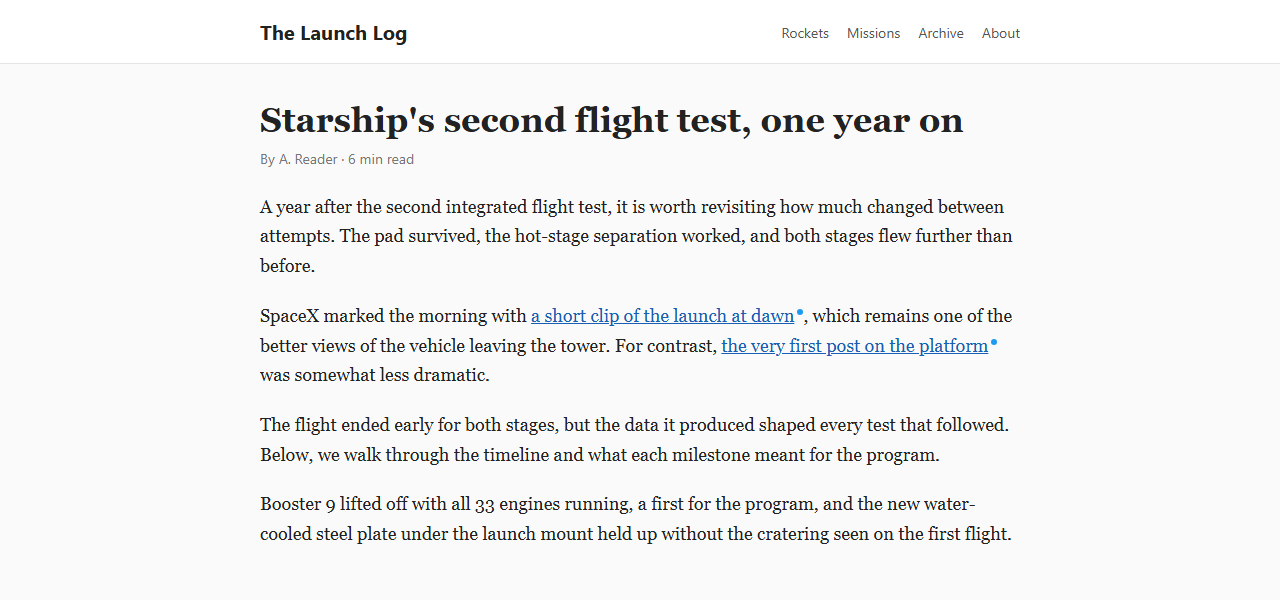 | 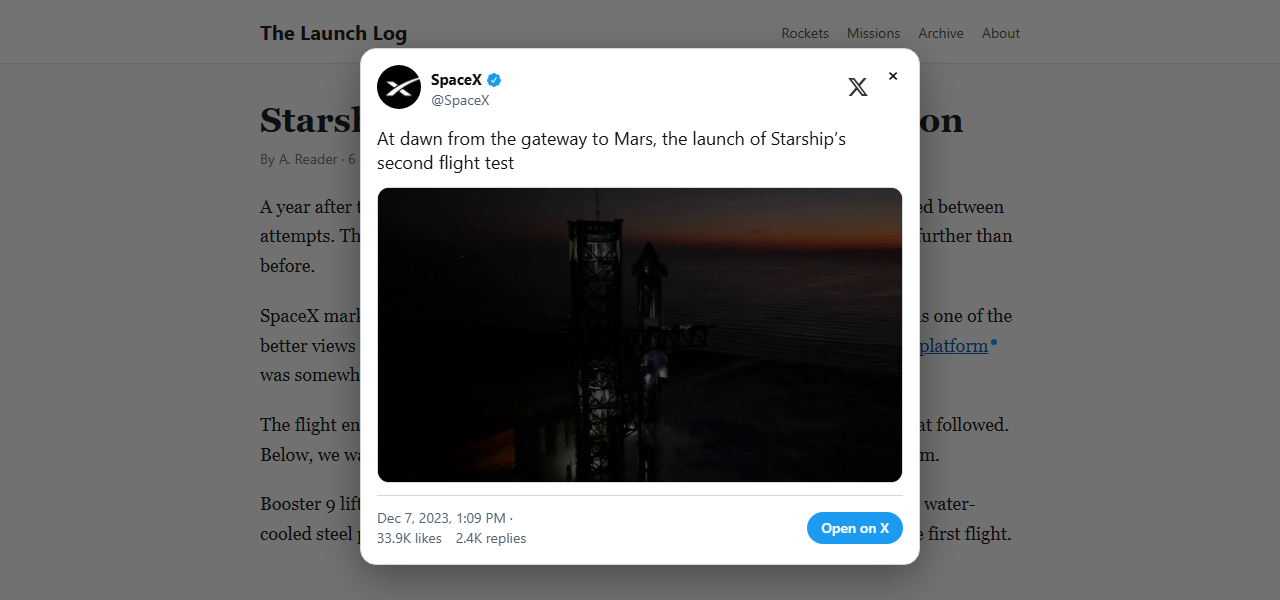 |
| A blue dot marks a link Post Peek can open. | Click it and the post opens in place. Esc closes it. |
Post Peek is an independent, open-source project inspired by Litterbox, the Safari extension by Zhenyi Tan (And a Dinosaur). If you use Safari, use Litterbox itself - it came first, it is free, and it is the better fit there. See Credit.
Features
- Opens post links in a popup so you can read just that post and close it.
- Marks openable links with a small blue dot.
- Renders text, photos, video, link cards, quoted posts, and reply context.
- Fetches posts from X's public syndication endpoint, the one behind X's own embedded posts.
- Never sends cookies or a Referer to X: posts and media are fetched anonymously, so X cannot tie a peek to your account or learn which site you were reading. No account needed.
- Never scans the page or touches its links. The dot is pure CSS; only the clicked link is inspected.
- Nothing for websites to probe: no web-accessible resources, and with dots turned off nothing whatsoever is written to the page.
- Settings stay on your device (local extension storage, never synced).
- No data collection. See PRIVACY.md.
Install
Add to Chrome from the Chrome Web Store - the reviewed build, kept up to date by Chrome.
Add to Firefox from addons.mozilla.org -
Firefox 140 or newer. The listing goes public once Mozilla's first review is done; until
then, download post-peek-<version>-firefox.zip from the
latest release or build it from source as below.
From source
-
Chrome: open
chrome://extensions, enable Developer mode, click Load unpacked, and pick this folder.Firefox: run
npm run build, openabout:debugging#/runtime/this-firefox, click Load Temporary Add-on, and pickdist/post-peek-<version>-firefox.zip. (Pickingmanifest.jsonin this folder does not work: that file is the Chrome manifest, and Firefox needs the rewritten one inside the zip.) -
Serve this folder over HTTP and open the test page, for example:
python -m http.server 8000then visit
http://localhost:8000/test.html. The extension deliberately does not run onfile://pages.
Usage
- Click a post link to peek. Ctrl/Cmd-, Shift-, Alt- or middle-click opens the link normally.
- Esc or clicking the backdrop closes the popup. Quoted posts and "Replying to" open in the same popup.
- Toolbar button: toggle peeking, the dot marker, and the popup theme.
Building for the stores
npm run build
This writes two zips containing only the runtime files (manifest.json, src/,
options/, icons/) - the banner and store art are not packaged:
dist/post-peek-<version>.zipfor the Chrome Web Store, withmanifest.jsonas checked in.dist/post-peek-<version>-firefox.zipfor addons.mozilla.org. Same files, but the manifest is rewritten byscripts/firefox-manifest.js: Firefox runssrc/background.jsas an event page rather than a service worker, and the manifest carries the add-on ID, the minimum Firefox version, and the data-collection declaration AMO requires.
To check the Firefox zip the way AMO will, unzip it and run npx web-ext lint on the
folder; the release workflow does this on every tag.
To regenerate artwork: npm run icons for the extension icons, npm run media for the
banner and screenshots above. Both need Chrome; set CHROME if it is not on the default
Windows path.
Releasing
- Move the
Unreleasednotes in CHANGELOG.md under the new version. - Bump
versioninmanifest.jsonandpackage.json, then commit. - Tag and push:
git tag v1.2.3 && git push origin v1.2.3.
The release workflow checks that the tag matches the
manifest version, builds both zips, lints the Firefox one, and attaches both to a GitHub
release. Upload the plain zip to the Chrome Web Store and the -firefox zip to
addons.mozilla.org.
Layout
manifest.json- MV3 manifest for Chrome. The Firefox manifest is derived from it at build time.src/background.js- service worker (event page on Firefox); fetches posts fromcdn.syndication.twimg.comand proxies images when a page's CSP blockstwimg.com.src/content.js- intercepts clicks on post links and renders the popup inside a closed Shadow DOM.src/content.css- dot marker, matched purely on the link'shref.src/popup-css.js- popup stylesheet embedded as a string (so nothing is web-accessible).options/- settings page (also the toolbar popup).scripts/- icon generator, README artwork renderer, zip builder, and the Chrome-to-Firefox manifest rewrite.test/- dependency-free tests for the packaging and privacy invariants (npm test).test.html- page of links for checking dots and peeking by hand in the browser.media/- banner and the cropped screenshots used above; regenerate withnpm run media.store/- Chrome Web Store and addons.mozilla.org listing copy, screenshots, and promo tiles.
Credit
Post Peek exists because of Litterbox, a Safari extension for iPhone, iPad, and Mac by Zhenyi Tan, who publishes as And a Dinosaur:
- Launch post: Launch: Litterbox, 5 September 2026
- App Store, free: Litterbox - Post Peeker
- Developer: And a Dinosaur
Litterbox got there first with essentially every idea this extension is built on: open a linked x.com post in a popup instead of going to the site; mark the links it can handle so you know before you click; fetch the post through the same API X uses for its own website embeds, so no cookies are sent; and leave a link out to X for when you do want the full thread. Post Peek's blue dot is Litterbox's marker in another shape, and the name "Post Peek" is a clip of Litterbox's own listing name, "Litterbox - Post Peeker".
Some of the words are theirs as well. "Read one X post and leave" is a compression of how Litterbox describes itself on the App Store - "opens x.com links in a popup so you can read the one post and leave."
Post Peek is a separate Chrome and Firefox implementation of that idea, written from scratch. Litterbox is closed source, so no Litterbox code or artwork is used here. Post Peek is not affiliated with, endorsed by, or supported by Zhenyi Tan, And a Dinosaur, or X Corp, so anything wrong with this extension is not theirs to answer for - report it on this repository's issues.
License


See what people are saying
Similar repos


Languages
JavaScript
85.7%
HTML
11.7%
CSS
2.7%
README
Read one X post and leave.
A Chrome and Firefox (Manifest V3) extension that opens x.com and twitter.com post links
in a popup instead of sending you to the full site.
| |
| A blue dot marks a link Post Peek can open. | Click it and the post opens in place. Esc closes it. |
Post Peek is an independent, open-source project inspired by Litterbox, the Safari extension by Zhenyi Tan (And a Dinosaur). If you use Safari, use Litterbox itself - it came first, it is free, and it is the better fit there. See Credit.
Features
- Opens post links in a popup so you can read just that post and close it.
- Marks openable links with a small blue dot.
- Renders text, photos, video, link cards, quoted posts, and reply context.
- Fetches posts from X's public syndication endpoint, the one behind X's own embedded posts.
- Never sends cookies or a Referer to X: posts and media are fetched anonymously, so X cannot tie a peek to your account or learn which site you were reading. No account needed.
- Never scans the page or touches its links. The dot is pure CSS; only the clicked link is inspected.
- Nothing for websites to probe: no web-accessible resources, and with dots turned off nothing whatsoever is written to the page.
- Settings stay on your device (local extension storage, never synced).
- No data collection. See PRIVACY.md.
Install
Add to Chrome from the Chrome Web Store - the reviewed build, kept up to date by Chrome.
Add to Firefox from addons.mozilla.org -
Firefox 140 or newer. The listing goes public once Mozilla's first review is done; until
then, download post-peek-<version>-firefox.zip from the
latest release or build it from source as below.
From source
-
Chrome: open
chrome://extensions, enable Developer mode, click Load unpacked, and pick this folder.Firefox: run
npm run build, openabout:debugging#/runtime/this-firefox, click Load Temporary Add-on, and pickdist/post-peek-<version>-firefox.zip. (Pickingmanifest.jsonin this folder does not work: that file is the Chrome manifest, and Firefox needs the rewritten one inside the zip.) -
Serve this folder over HTTP and open the test page, for example:
python -m http.server 8000then visit
http://localhost:8000/test.html. The extension deliberately does not run onfile://pages.
Usage
- Click a post link to peek. Ctrl/Cmd-, Shift-, Alt- or middle-click opens the link normally.
- Esc or clicking the backdrop closes the popup. Quoted posts and "Replying to" open in the same popup.
- Toolbar button: toggle peeking, the dot marker, and the popup theme.
Building for the stores
npm run build
This writes two zips containing only the runtime files (manifest.json, src/,
options/, icons/) - the banner and store art are not packaged:
dist/post-peek-<version>.zipfor the Chrome Web Store, withmanifest.jsonas checked in.dist/post-peek-<version>-firefox.zipfor addons.mozilla.org. Same files, but the manifest is rewritten byscripts/firefox-manifest.js: Firefox runssrc/background.jsas an event page rather than a service worker, and the manifest carries the add-on ID, the minimum Firefox version, and the data-collection declaration AMO requires.
To check the Firefox zip the way AMO will, unzip it and run npx web-ext lint on the
folder; the release workflow does this on every tag.
To regenerate artwork: npm run icons for the extension icons, npm run media for the
banner and screenshots above. Both need Chrome; set CHROME if it is not on the default
Windows path.
Releasing
- Move the
Unreleasednotes in CHANGELOG.md under the new version. - Bump
versioninmanifest.jsonandpackage.json, then commit. - Tag and push:
git tag v1.2.3 && git push origin v1.2.3.
The release workflow checks that the tag matches the
manifest version, builds both zips, lints the Firefox one, and attaches both to a GitHub
release. Upload the plain zip to the Chrome Web Store and the -firefox zip to
addons.mozilla.org.
Layout
manifest.json- MV3 manifest for Chrome. The Firefox manifest is derived from it at build time.src/background.js- service worker (event page on Firefox); fetches posts fromcdn.syndication.twimg.comand proxies images when a page's CSP blockstwimg.com.src/content.js- intercepts clicks on post links and renders the popup inside a closed Shadow DOM.src/content.css- dot marker, matched purely on the link'shref.src/popup-css.js- popup stylesheet embedded as a string (so nothing is web-accessible).options/- settings page (also the toolbar popup).scripts/- icon generator, README artwork renderer, zip builder, and the Chrome-to-Firefox manifest rewrite.test/- dependency-free tests for the packaging and privacy invariants (npm test).test.html- page of links for checking dots and peeking by hand in the browser.media/- banner and the cropped screenshots used above; regenerate withnpm run media.store/- Chrome Web Store and addons.mozilla.org listing copy, screenshots, and promo tiles.
Credit
Post Peek exists because of Litterbox, a Safari extension for iPhone, iPad, and Mac by Zhenyi Tan, who publishes as And a Dinosaur:
- Launch post: Launch: Litterbox, 5 September 2026
- App Store, free: Litterbox - Post Peeker
- Developer: And a Dinosaur
Litterbox got there first with essentially every idea this extension is built on: open a linked x.com post in a popup instead of going to the site; mark the links it can handle so you know before you click; fetch the post through the same API X uses for its own website embeds, so no cookies are sent; and leave a link out to X for when you do want the full thread. Post Peek's blue dot is Litterbox's marker in another shape, and the name "Post Peek" is a clip of Litterbox's own listing name, "Litterbox - Post Peeker".
Some of the words are theirs as well. "Read one X post and leave" is a compression of how Litterbox describes itself on the App Store - "opens x.com links in a popup so you can read the one post and leave."
Post Peek is a separate Chrome and Firefox implementation of that idea, written from scratch. Litterbox is closed source, so no Litterbox code or artwork is used here. Post Peek is not affiliated with, endorsed by, or supported by Zhenyi Tan, And a Dinosaur, or X Corp, so anything wrong with this extension is not theirs to answer for - report it on this repository's issues.
License
See what people are saying
Similar repos
Languages
JavaScript
85.7%
HTML
11.7%
CSS
2.7%