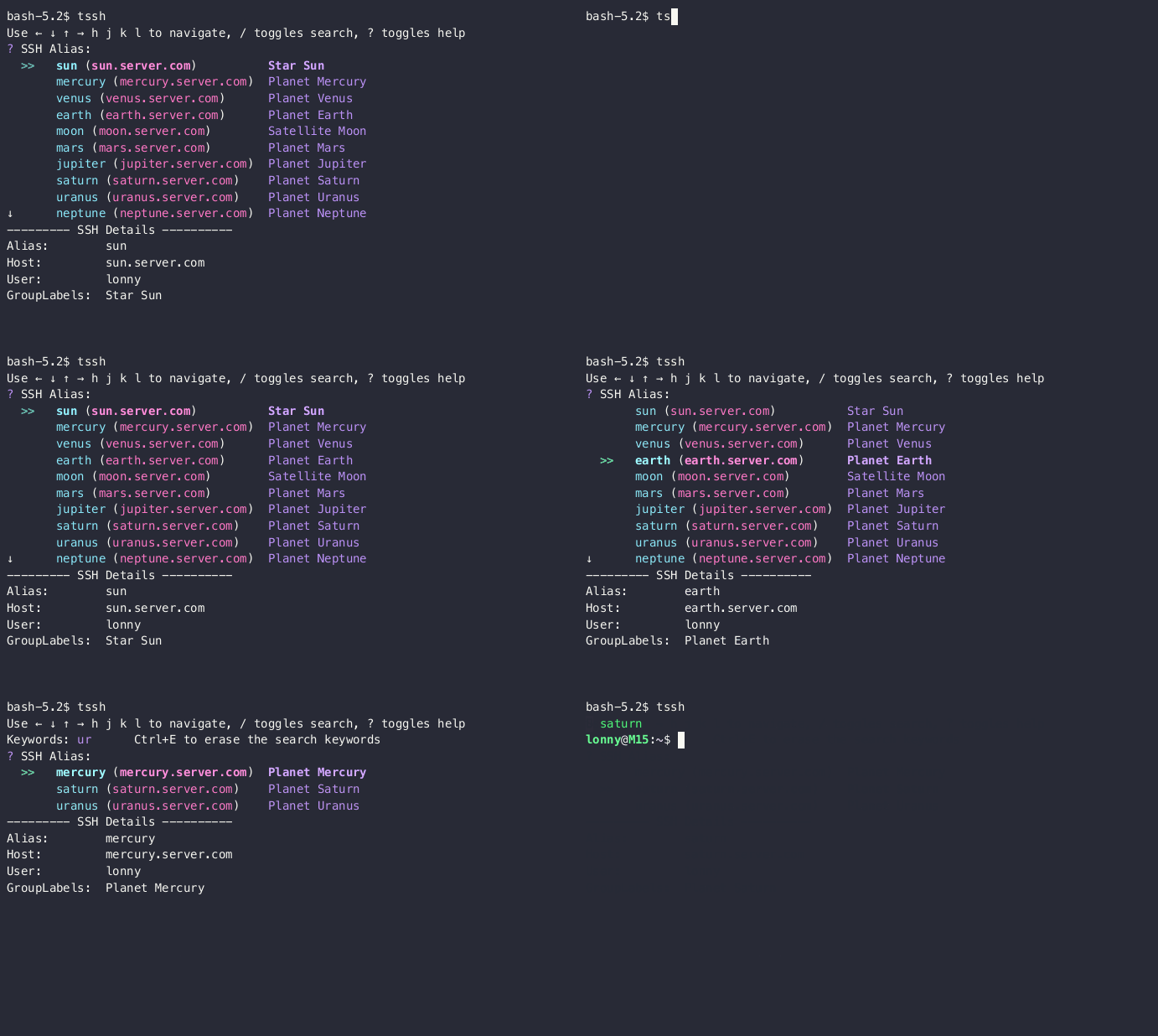
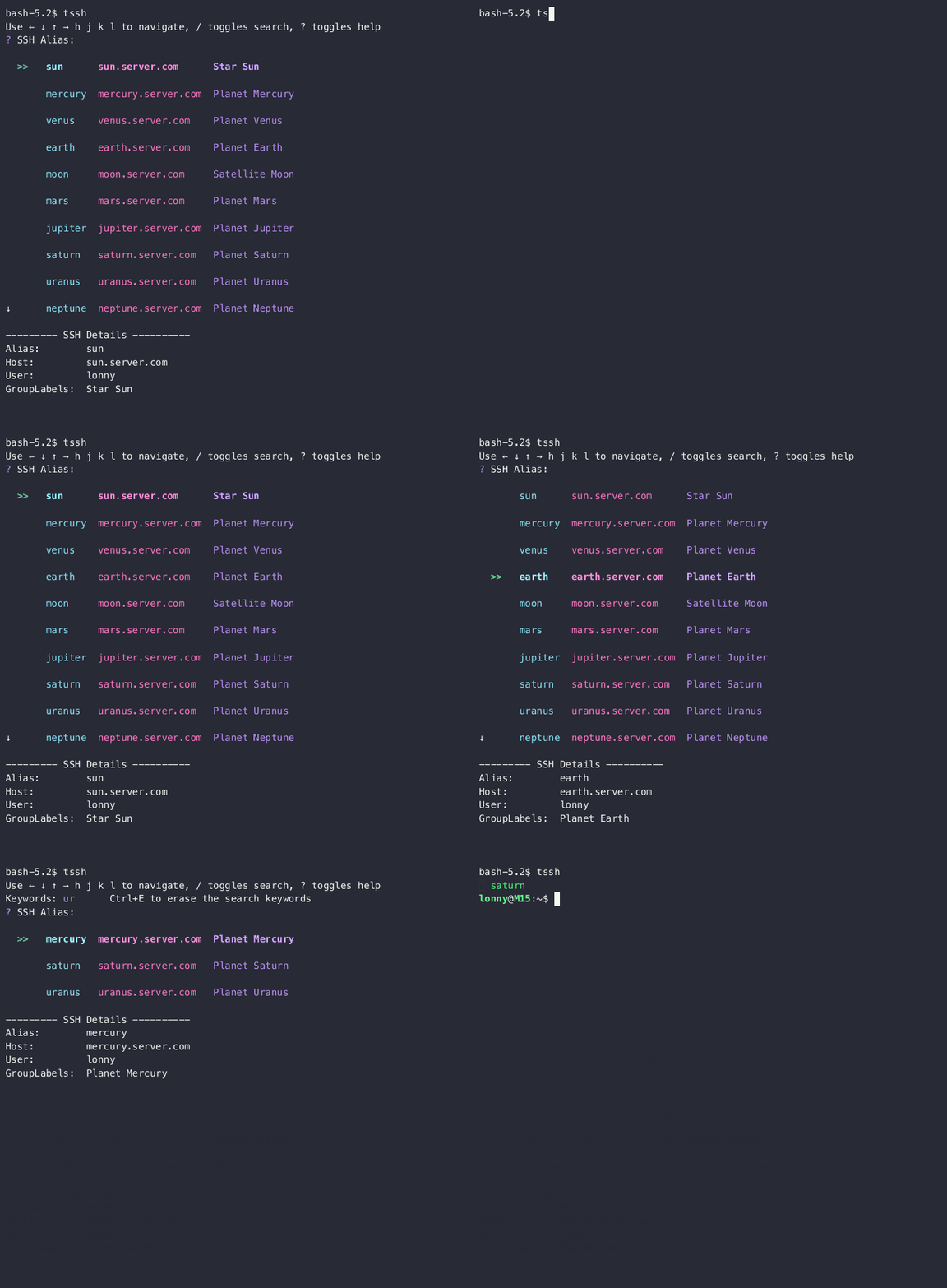
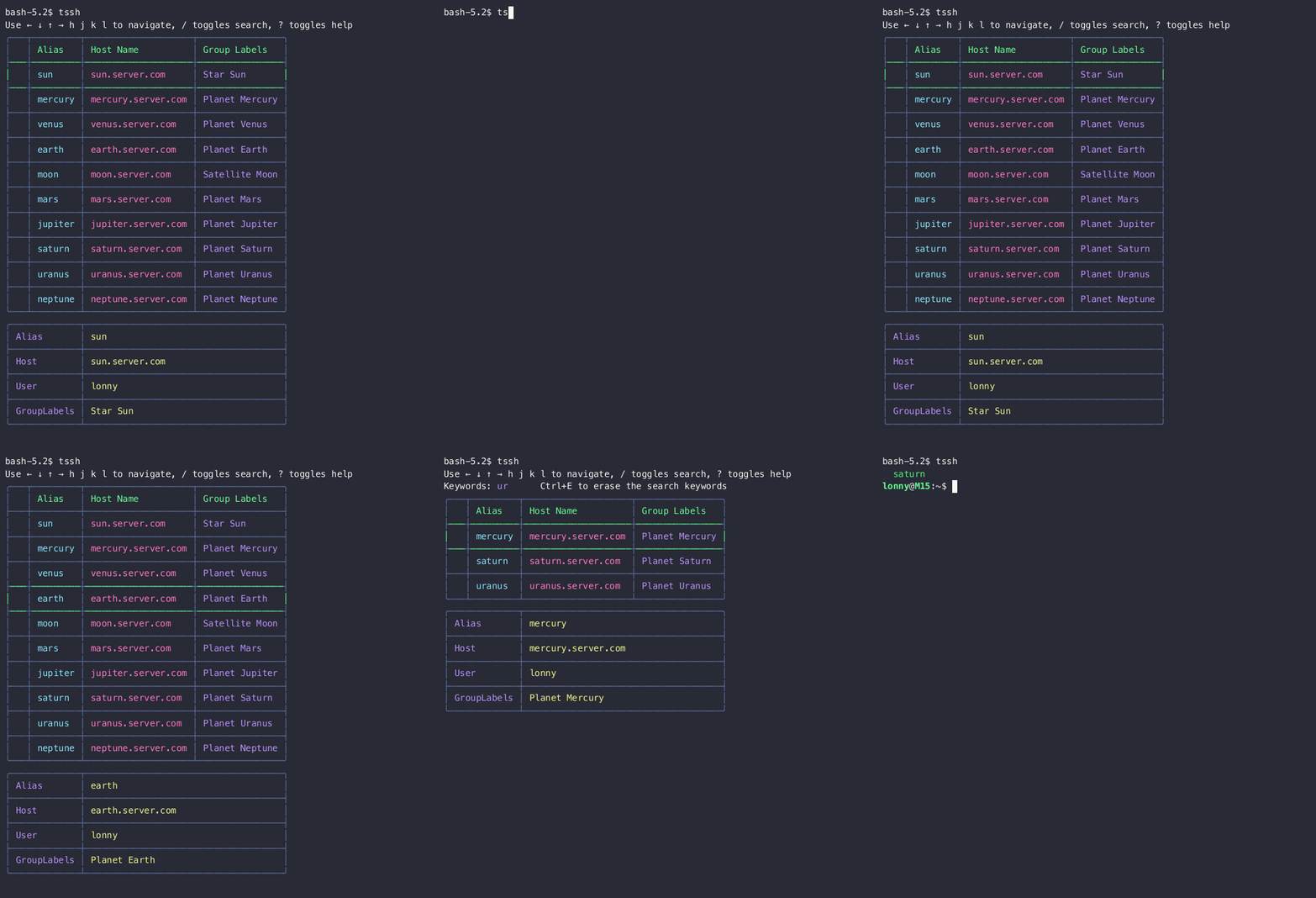
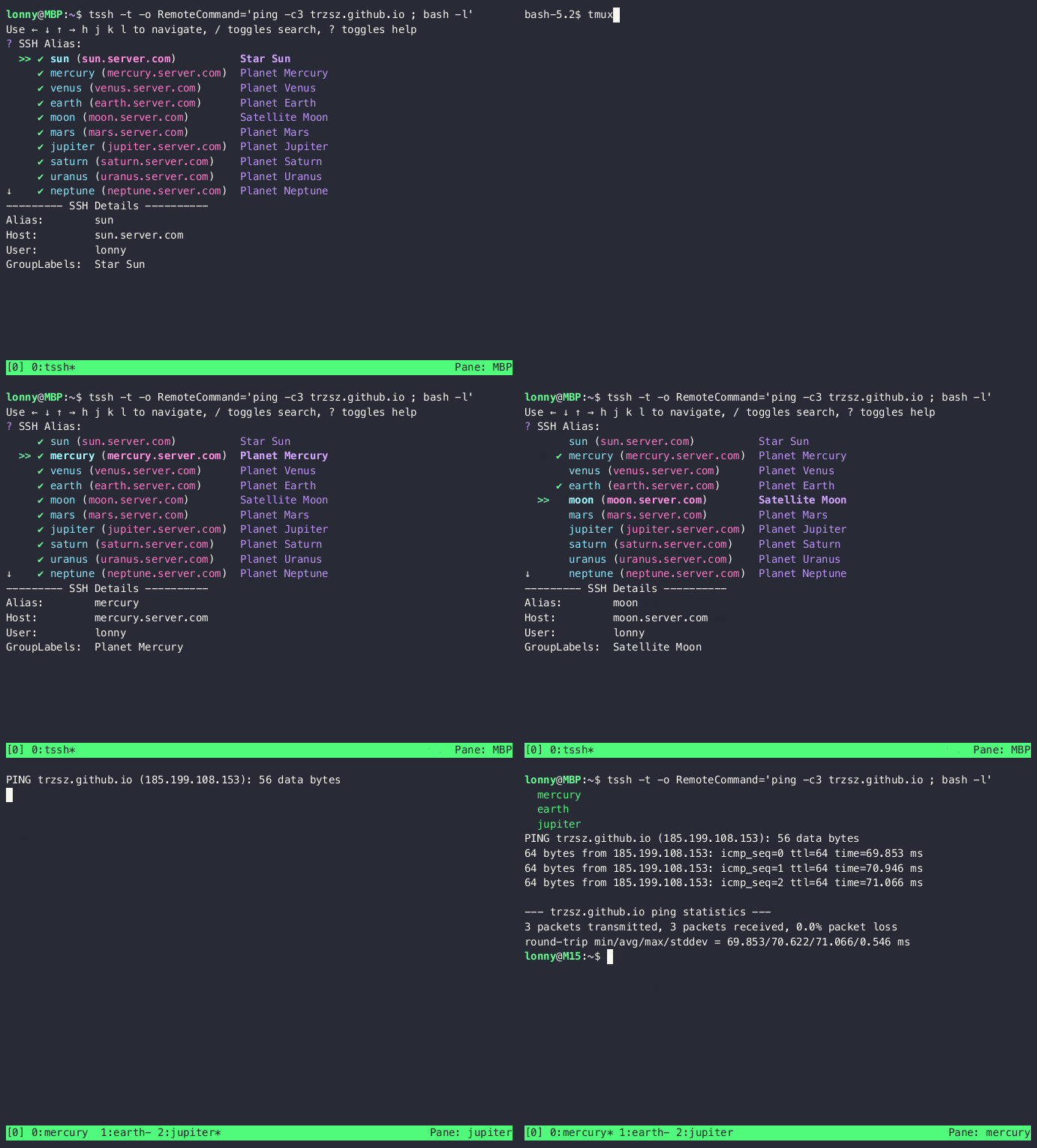
trzsz-ssh ( tssh ) is an ssh client designed as a drop-in replacement for the openssh client. It aims to provide complete compatibility with openssh, mirroring all its features, while also offering additional useful features. Such as login prompt, batch login, remember password, automated interaction, trzsz, zmodem(rz/sz), udp mode like mosh, etc.
See the code


trzsz-ssh ( tssh ) is an ssh client designed as a drop-in replacement for the openssh client. It aims to provide complete compatibility with openssh, mirroring all its features, while also offering additional useful features not found in the openssh client.
trzsz-ssh ( tssh ) with tsshd also supports intermittent connectivity, allows roaming, and can be used on high-latency links such as cellular data connections, unstable Wi-Fi, etc.
trzsz-ssh ( tssh ) works exactly like the openssh client. The following common features have been implemented:
| Features | Support Options  |
|---|---|
| Pseudo TTY | -t -T RequestTTY |
| Algorithms | -c Ciphers KexAlgorithms |
| SSH Proxy | -J -W ProxyJump ProxyCommand |
| Network | -4 -6 AddressFamily ConnectTimeout |
| Command | -s RemoteCommand LocalCommand PermitLocalCommand |
| Multiplexing | -M -S -O ControlMaster ControlPath ControlPersist |
| SSH Agent | -a -A ForwardAgent IdentityAgent IdentitiesOnly SSH_AUTH_SOCK |
| X11 Forward | -x -X -Y ForwardX11 ForwardX11Trusted ForwardX11Timeout XAuthLocation |
| Basic Login | -l -p -i -F HostName Port User IdentityFile CertificateFile SendEnv SetEnv |
| Canonicalize | CanonicalizeHostname CanonicalDomains CanonicalizeMaxDots CanonicalizeFallbackLocal |
| Authentication | PubkeyAuthentication PasswordAuthentication KbdInteractiveAuthentication GSSAPIAuthentication |
| Known Hosts | UserKnownHostsFile GlobalKnownHostsFile StrictHostKeyChecking VerifyHostKeyDNS HashKnownHosts |
| Port Forward | -g -f -N -n -L -R -D LocalForward RemoteForward DynamicForward GatewayPorts ClearAllForwardings StreamLocalBindUnlink StreamLocalBindMask |
| Others | EscapeChar |
trzsz-ssh ( tssh ) offers additional useful features:
💡 Note: The package is named
trzsz-sshin Homebrew, while it’s usually namedtsshelsewhere.
Install with scoop / winget / choco on Windows
scoop install tssh / winget install tssh / choco install tsshscoop install tssh
winget install tssh
choco install tssh
Install with Homebrew on MacOS
brew install trzsz-sshbrew install trzsz-ssh
Install with apt on Ubuntu
sudo apt install tsshsudo apt update && sudo apt install software-properties-common
sudo add-apt-repository ppa:trzsz/ppa && sudo apt update
sudo apt install tssh
Install with apt on Debian
sudo apt install tsshsudo apt install curl gpg
curl -s 'https://keyserver.ubuntu.com/pks/lookup?op=get&search=0x7074ce75da7cc691c1ae1a7c7e51d1ad956055ca' \
| gpg --dearmor -o /usr/share/keyrings/trzsz.gpg
echo 'deb [signed-by=/usr/share/keyrings/trzsz.gpg] https://ppa.launchpadcontent.net/trzsz/ppa/ubuntu jammy main' \
| sudo tee /etc/apt/sources.list.d/trzsz.list
sudo apt update
sudo apt install tssh
Install with dnf on Fedora / CentOS / RHEL
sudo dnf install tsshsudo dnf copr enable @trzsz/trzsz
sudo dnf install tssh
Install with yum on Legacy CentOS / RHEL
sudo yum install tsshInstall with gemfury repository.
echo '[trzsz]
name=Trzsz Repo
baseurl=https://yum.fury.io/trzsz/
enabled=1
gpgcheck=0' | sudo tee /etc/yum.repos.d/trzsz.repo

sudo yum install tssh
Install with wlnmp repository. It's not necessary to configure the epel repository for tssh.
curl -fsSL "https://sh.wlnmp.com/wlnmp.sh" | bash

sudo yum install tssh
Install with yay on ArchLinux
yay -S tsshyay -Syu
yay -S tssh
Install with Chromebrew on ChromeOS
crew install tsshcrew install tssh
Install with pixi / conda / mamba from conda-forge
pixi global install tssh / conda install tssh / mamba install tsshpixi global install tssh
conda install -c conda-forge tssh
mamba install -c conda-forge tssh
Install with Go ( Requires go 1.26 or later )
go install github.com/trzsz/trzsz-ssh/cmd/tssh@latest# latest release
go install github.com/trzsz/trzsz-ssh/cmd/tssh@latest
# latest development version (main branch)
go install github.com/trzsz/trzsz-ssh/cmd/tssh@main
The binaries are usually located in ~/go/bin/ ( C:\Users\your_name\go\bin\ on Windows ).
Build from source ( Requires go 1.26 or later )
sudo make installgit clone --depth 1 https://github.com/trzsz/trzsz-ssh.git
cd trzsz-ssh
make
sudo make install
Download from the GitHub Releases (or Pre-Release) and install locally
download and install locallysudo apt install /tmp/tssh_*.deb
sudo dpkg -i /tmp/tssh_*.deb
sudo dnf install /tmp/tssh_*.rpm
sudo yum install /tmp/tssh_*.rpm
sudo rpm -i /tmp/tssh_*.rpm
tar zxvf tssh_*.tar.gz && sudo cp tssh_*/tssh /usr/bin/
The github.com/trzsz/trzsz-ssh/tssh can be used as a library, for example:
package main

import (
	"log"
	"os"

	"github.com/trzsz/trzsz-ssh/tssh"
)

func main() {
	// Example 1: execute command on remote server
	client, err := tssh.SshLogin(&tssh.SshArgs{Destination: "root@192.168.0.1"})
	if err != nil {
		log.Fatal(err)
	}
	defer client.Close()
	session, err := client.NewSession()
	if err != nil {
		log.Fatal(err)
	}
	defer session.Close()
	output, err := session.CombinedOutput("whoami")
	if err != nil {
		log.Fatal(err)
	}
	log.Printf("I'm %s", string(output))

	// Example 2: run the tssh program
	code := tssh.TsshMain([]string{"-t", "root@192.168.0.1", "bash -l"})
	os.Exit(code)
}
Welcome and thank you for considering contributing. We appreciate all forms of support, from coding and testing to documentation and CI/CD improvements.
Fork and clone the repository https://github.com/trzsz/trzsz-ssh.git.
Make your changes just ensure that the unit tests go test ./tssh pass.
Build the binary go build -o ./bin/ ./cmd/tssh and test it ./bin/tssh.
Once you are happy with your changes, please submit a pull request.


Feel free to email the author lonnywong@qq.com, or create an issue. Welcome to join the QQ group: 318578930.
❤️ Sponsor trzsz ❤️, buy the author a drink 🍺 ? Thank you for your support!
(top 24 of 26)
461 followers · starred Apr 2026
214 followers · starred Jan 2026
150 followers · starred Mar 2026
358 followers · starred Jun 2026
trzsz-ssh ( tssh ) is an ssh client designed as a drop-in replacement for the openssh client. It aims to provide complete compatibility with openssh, mirroring all its features, while also offering additional useful features. Such as login prompt, batch login, remember password, automated interaction, trzsz, zmodem(rz/sz), udp mode like mosh, etc.
See the code
trzsz-ssh ( tssh ) is an ssh client designed as a drop-in replacement for the openssh client. It aims to provide complete compatibility with openssh, mirroring all its features, while also offering additional useful features not found in the openssh client.
trzsz-ssh ( tssh ) with tsshd also supports intermittent connectivity, allows roaming, and can be used on high-latency links such as cellular data connections, unstable Wi-Fi, etc.
trzsz-ssh ( tssh ) works exactly like the openssh client. The following common features have been implemented:
| Features | Support Options |
|---|---|
| Pseudo TTY | -t -T RequestTTY |
| Algorithms | -c Ciphers KexAlgorithms |
| SSH Proxy | -J -W ProxyJump ProxyCommand |
| Network | -4 -6 AddressFamily ConnectTimeout |
| Command | -s RemoteCommand LocalCommand PermitLocalCommand |
| Multiplexing | -M -S -O ControlMaster ControlPath ControlPersist |
| SSH Agent | -a -A ForwardAgent IdentityAgent IdentitiesOnly SSH_AUTH_SOCK |
| X11 Forward | -x -X -Y ForwardX11 ForwardX11Trusted ForwardX11Timeout XAuthLocation |
| Basic Login | -l -p -i -F HostName Port User IdentityFile CertificateFile SendEnv SetEnv |
| Canonicalize | CanonicalizeHostname CanonicalDomains CanonicalizeMaxDots CanonicalizeFallbackLocal |
| Authentication | PubkeyAuthentication PasswordAuthentication KbdInteractiveAuthentication GSSAPIAuthentication |
| Known Hosts | UserKnownHostsFile GlobalKnownHostsFile StrictHostKeyChecking VerifyHostKeyDNS HashKnownHosts |
| Port Forward | -g -f -N -n -L -R -D LocalForward RemoteForward DynamicForward GatewayPorts ClearAllForwardings StreamLocalBindUnlink StreamLocalBindMask |
| Others | EscapeChar |
trzsz-ssh ( tssh ) offers additional useful features:
💡 Note: The package is named
trzsz-sshin Homebrew, while it’s usually namedtsshelsewhere.
Install with scoop / winget / choco on Windows
scoop install tssh / winget install tssh / choco install tsshscoop install tssh
winget install tssh
choco install tssh
Install with Homebrew on MacOS
brew install trzsz-sshbrew install trzsz-ssh
Install with apt on Ubuntu
sudo apt install tsshsudo apt update && sudo apt install software-properties-common
sudo add-apt-repository ppa:trzsz/ppa && sudo apt update
sudo apt install tssh
Install with apt on Debian
sudo apt install tsshsudo apt install curl gpg
curl -s 'https://keyserver.ubuntu.com/pks/lookup?op=get&search=0x7074ce75da7cc691c1ae1a7c7e51d1ad956055ca' \
| gpg --dearmor -o /usr/share/keyrings/trzsz.gpg
echo 'deb [signed-by=/usr/share/keyrings/trzsz.gpg] https://ppa.launchpadcontent.net/trzsz/ppa/ubuntu jammy main' \
| sudo tee /etc/apt/sources.list.d/trzsz.list
sudo apt update
sudo apt install tssh
Install with dnf on Fedora / CentOS / RHEL
sudo dnf install tsshsudo dnf copr enable @trzsz/trzsz
sudo dnf install tssh
Install with yum on Legacy CentOS / RHEL
sudo yum install tsshInstall with gemfury repository.
echo '[trzsz]
name=Trzsz Repo
baseurl=https://yum.fury.io/trzsz/
enabled=1
gpgcheck=0' | sudo tee /etc/yum.repos.d/trzsz.repo

sudo yum install tssh
Install with wlnmp repository. It's not necessary to configure the epel repository for tssh.
curl -fsSL "https://sh.wlnmp.com/wlnmp.sh" | bash

sudo yum install tssh
Install with yay on ArchLinux
yay -S tsshyay -Syu
yay -S tssh
Install with Chromebrew on ChromeOS
crew install tsshcrew install tssh
Install with pixi / conda / mamba from conda-forge
pixi global install tssh / conda install tssh / mamba install tsshpixi global install tssh
conda install -c conda-forge tssh
mamba install -c conda-forge tssh
Install with Go ( Requires go 1.26 or later )
go install github.com/trzsz/trzsz-ssh/cmd/tssh@latest# latest release
go install github.com/trzsz/trzsz-ssh/cmd/tssh@latest
# latest development version (main branch)
go install github.com/trzsz/trzsz-ssh/cmd/tssh@main
The binaries are usually located in ~/go/bin/ ( C:\Users\your_name\go\bin\ on Windows ).
Build from source ( Requires go 1.26 or later )
sudo make installgit clone --depth 1 https://github.com/trzsz/trzsz-ssh.git
cd trzsz-ssh
make
sudo make install
Download from the GitHub Releases (or Pre-Release) and install locally
download and install locallysudo apt install /tmp/tssh_*.deb
sudo dpkg -i /tmp/tssh_*.deb
sudo dnf install /tmp/tssh_*.rpm
sudo yum install /tmp/tssh_*.rpm
sudo rpm -i /tmp/tssh_*.rpm
tar zxvf tssh_*.tar.gz && sudo cp tssh_*/tssh /usr/bin/
The github.com/trzsz/trzsz-ssh/tssh can be used as a library, for example:
package main

import (
	"log"
	"os"

	"github.com/trzsz/trzsz-ssh/tssh"
)

func main() {
	// Example 1: execute command on remote server
	client, err := tssh.SshLogin(&tssh.SshArgs{Destination: "root@192.168.0.1"})
	if err != nil {
		log.Fatal(err)
	}
	defer client.Close()
	session, err := client.NewSession()
	if err != nil {
		log.Fatal(err)
	}
	defer session.Close()
	output, err := session.CombinedOutput("whoami")
	if err != nil {
		log.Fatal(err)
	}
	log.Printf("I'm %s", string(output))

	// Example 2: run the tssh program
	code := tssh.TsshMain([]string{"-t", "root@192.168.0.1", "bash -l"})
	os.Exit(code)
}
Welcome and thank you for considering contributing. We appreciate all forms of support, from coding and testing to documentation and CI/CD improvements.
Fork and clone the repository https://github.com/trzsz/trzsz-ssh.git.
Make your changes just ensure that the unit tests go test ./tssh pass.
Build the binary go build -o ./bin/ ./cmd/tssh and test it ./bin/tssh.
Once you are happy with your changes, please submit a pull request.
Feel free to email the author lonnywong@qq.com, or create an issue. Welcome to join the QQ group: 318578930.
❤️ Sponsor trzsz ❤️, buy the author a drink 🍺 ? Thank you for your support!
(top 24 of 26)
461 followers · starred Apr 2026
214 followers · starred Jan 2026
150 followers · starred Mar 2026
358 followers · starred Jun 2026