
role-model is a protocol for assigning the right model for the right job. Use local and cloud AI together, or route between several cloud providers.
116
stars
863
commits
TypeScript
primary language
Sep 12, 2026
updated
README
role-model
role-model is an open protocol for capability-aware AI routing, plus a reference router that implements
that protocol.
It gives a router a durable contract for describing what a request needs, what an endpoint can do, what policy allows, and why a final routing decision was made.
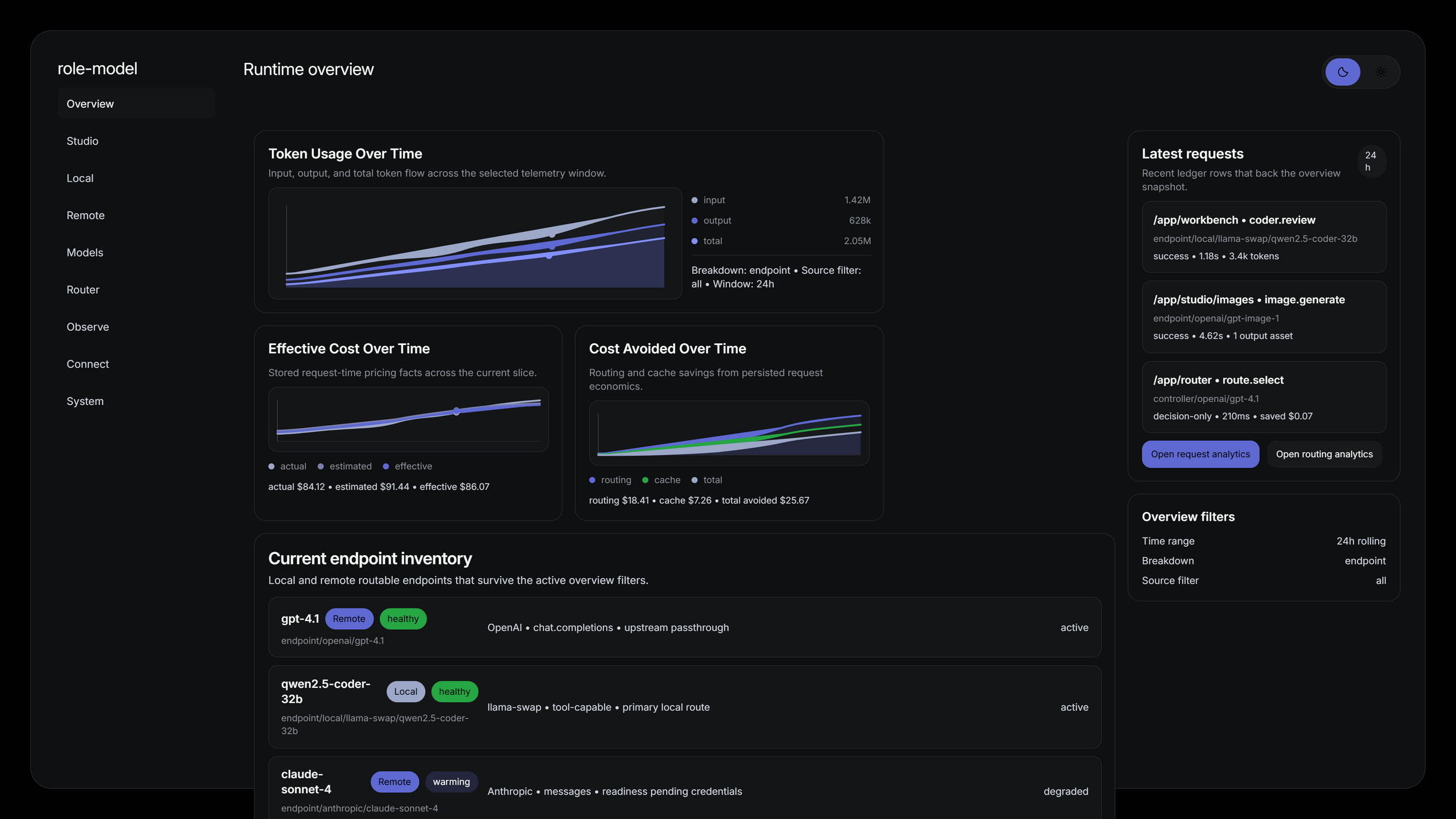
What role-model does
Every AI workload eventually faces the same question: which model should handle this request? The answer
depends on task type, required capabilities, cost, latency, and whether the model is running locally or in
the cloud. role-model makes that decision explicit, explainable, and portable.
At a high level, role-model separates AI routing into a few stable pieces:
- Requests describe task type, required capabilities, modalities, tool needs, and constraints.
- Endpoint identities and profiles describe concrete routable endpoints rather than abstract model names.
- Routing policy applies hard denies, preferences, budgets, and tie-break rules.
- Observability artifacts record the decision, trace, usage, and observed performance.
The reference router supports hybrid routing across three deployment shapes:
- Local / Local - route between local models (e.g., llama-swap peers) based on role, task, and capability
- Local / Cloud - route between a local model and a cloud provider based on cost, latency, and task difficulty
- Cloud / Cloud - route between cloud providers (e.g., OpenAI, DeepSeek, Moonshot) based on capability and economics
This means a single runtime can serve a quick chat request from a fast local model, route a complex coding task to a capable cloud model, and fall back to a cheaper cloud endpoint when the primary is degraded, all under one explainable routing contract.
Install the runtime
For end users, prefer the packaged standalone runtime over a source build.
macOS and Linux
curl -fsSL https://raw.githubusercontent.com/try-works/role-model/main/scripts/install.sh | sh
The installer downloads the latest GitHub Release archive, installs it under
~/.local/share/role-model/<version>/<target>/, and exposes a role-model launcher in
~/.local/bin.
Windows
irm https://raw.githubusercontent.com/try-works/role-model/main/scripts/install.ps1 | iex
The installer downloads the latest GitHub Release archive, installs it under
%LOCALAPPDATA%\Programs\role-model\<version>\<target>\, and creates a role-model.cmd
launcher.
Manual downloads
If you do not want to use installer scripts, download the matching archive from GitHub Releases.
| Platform | Archive | Launch |
|---|---|---|
| Windows | role-model-win32-x64.zip | role-model.bat or role-model.exe |
| macOS x64 | role-model-darwin-x64.tar.gz | role-model |
| macOS arm64 | role-model-darwin-arm64.tar.gz | role-model |
| Linux x64 | role-model-linux-x64.tar.gz | role-model |
Test a release candidate
Stage builds are published separately as GitHub prereleases named stage-rc-<stage-sha>. They run as
role-model-stage on http://127.0.0.1:3457 and use isolated stage state, so they can be tested beside the stable
runtime on port 3456.
Download the candidate archive and SHA256SUMS.txt from its prerelease page, verify the checksum, extract it, and run
the stage launcher. Prereleases are never selected by the normal installer. A candidate is promoted to main and a
stable vMAJOR.MINOR.PATCH release only after a maintainer explicitly records that the exact package was installed
and tested.
Update an installed runtime
Updates are currently manual. Stop the running runtime, back up its persistent state, and then re-run the installer or extract the newer release archive. Installer-based updates keep each application version in a versioned directory and repoint the launcher; they do not remove the persistent runtime state.
On Windows, production state is stored under %LOCALAPPDATA%\role-model-runtime. This includes the Message
Graph and its encryption and scoped-digest keys under
standalone-runtime\track-b\managed-keys. Runtime updates reuse these keys and do not rotate them, so the
Message Graph remains readable after an update.
Do not delete, replace, or copy the Message Graph without both original key files. If either key is missing or invalid, the runtime fails closed instead of generating a replacement that would make existing graph data unreadable. After updating, start the new runtime against the same state directory and confirm the Message Graph opens before removing the old application version.
See Install the router for the complete update and backup guidance.
Installation for Pi
The pi-role-model package connects Pi to an externally running role-model runtime.
Start the role-model runtime first, then install the public Pi package:
pi install npm:@try-works/pi-role-model
For local checkout testing from this repository, install the package directly:
pi install ./packages/pi-role-model
Inside Pi, run:
/role-model setup
/role-model status
/role-model doctor
/role-model alias list
/role-model alias choose
/role-model alias use <alias>
/role-model requests
/role-model explain latest
Use those slash commands only from an interactive Pi session. pi -p "/role-model status" is unsupported because Pi print mode does not currently invoke extension commands.
By default the package connects to http://127.0.0.1:3456 and registers role-model as the
role-model provider using /api/role-model/downstream/openai. Set ROLE_MODEL_ENDPOINT
before starting Pi to use a different local runtime. Remote endpoints require explicit
trusted allowRemote behavior, and runtimes that report authentication.required fail
closed unless a future supported token source is configured. For local development installs
and the full command reference, see
packages/pi-role-model/README.md.
For explicit provider prompts, use the provider-relative role-model alias that Pi lists for provider role-model, for example:
pi --no-session --provider role-model --model baseline.remote-only -p "<prompt>"
baseline.remote-only is the canonical provider-relative form. role-model/<alias> is compatibility-only for Pi surfaces that explicitly require a qualified id. Raw HTTP curl calls to the runtime are debug-only fallback tools, not the primary supported Pi workflow.
Develop from source
Prerequisites
- Node.js 24 (required for
node:sqliteand SEA support) - pnpm 10.x (via
corepack enable) - Go 1.24+ (for llama-swap vendor binary and Windows launcher)
corepack enable
corepack pnpm install
Smoke test
corepack pnpm run smoke
For a fuller walkthrough, see docs/public/quickstart.md.
Development build
Run the bridge and UI in development mode (separate processes):
# Terminal 1: bridge server
cd role-model-router/apps/runtime-host-bridge
corepack pnpm exec tsx scripts/start-for-qa.ts

# Terminal 2: UI dev server
cd role-model-router/apps/runtime-ui
corepack pnpm exec react-router dev --port 5173 --host 127.0.0.1
Then open http://127.0.0.1:5173 in your browser.
Production build (all platforms)
Build the UI and package the SEA runtime:
# Build UI static files
corepack pnpm --filter @role-model-router/runtime-ui run build

# Package the bridge as a single executable
corepack pnpm run runtime:package-sea
Output: role-model-router/dist/release/<platform-arch>/role-model-dev by default. Set
ROLE_MODEL_BUILD_CHANNEL=production for role-model or ROLE_MODEL_BUILD_CHANNEL=stage for
role-model-stage.
Windows desktop launcher
Build a complete Windows package with dedicated browser window:
# 1. Build UI
corepack pnpm --filter @role-model-router/runtime-ui run build

# 2. Package bridge SEA runtime
corepack pnpm run runtime:package-sea

# 3. Build Go launcher
cd role-model-router/apps/launcher
go build -o ../../dist/release/win32-x64/role-model-launcher.exe .

# 4. Bundle UI files
cp -r ../runtime-ui/build/client ../../dist/release/win32-x64/
Then double-click role-model-launcher.exe in dist/release/win32-x64/. It will:
- Start the bridge server on port 3456
- Open Microsoft Edge in app mode (dedicated window)
- Serve the UI directly from the bridge (no separate dev server)
Documentation
| Read this | If you want |
|---|---|
docs/public/README.md | the docs hub |
docs/public/introduction.md | what role-model is and why it exists |
docs/public/quickstart.md | a real end-to-end smoke run |
docs/public/concepts/how-role-model-works.md | the system flow |
docs/public/concepts/protocol-overview.md | the protocol surface |
docs/public/concepts/routing-overview.md | how routing decisions happen |
protocol/README.md | canonical schemas and fixtures |
role-model-router/README.md | reference router packages and runtime apps |
docs/protocol/routing-policy.md | routing policy reference |
docs/protocol/taxonomy-v1.md | taxonomy V1 groups, roles, tasks, and Pi classification |
docs/protocol/roles.md | role metadata reference |
docs/protocol/tasks.md | task metadata reference |
docs/operations/02-ci-and-release-flow.md | CI, release automation, and workflow ownership |
CHANGELOG.md | release history |
Acknowledgements
role-model builds on the work of several open-source projects:
- llama-swap - the vendored local model lifecycle manager that handles process supervision, request forwarding, and model swapping for local endpoints
- LiteLLM - the unified LLM API abstraction whose provider catalog, model metadata, and pricing data inform the routing-compatible provider inventory
License
This repository is licensed under BUSL-1.1 with a project-specific
Additional Use Grant. Internal production use, evaluation, development,
modification, and non-production redistribution are permitted under the root
license. Hosted or managed third-party services, paid product embedding, and
third-party commercialization require a separate commercial license.
See LICENSE for the full terms. Contributions require acceptance of the Contributor License Agreement before they can be merged.
Only individual contributions are accepted. Please do not submit work owned by an employer, client, company, or other entity unless you personally have the right to contribute it under this project's terms.
Contributors

861 commits

2 commits
See what people are saying
Similar repos


Languages
TypeScript
78.9%
Python
14.4%
JavaScript
2.7%
MDX
2.3%
role-model is a protocol for assigning the right model for the right job. Use local and cloud AI together, or route between several cloud providers.
116
stars
863
commits
TypeScript
primary language
Sep 12, 2026
updated
README
role-model
role-model is an open protocol for capability-aware AI routing, plus a reference router that implements
that protocol.
It gives a router a durable contract for describing what a request needs, what an endpoint can do, what policy allows, and why a final routing decision was made.
What role-model does
Every AI workload eventually faces the same question: which model should handle this request? The answer
depends on task type, required capabilities, cost, latency, and whether the model is running locally or in
the cloud. role-model makes that decision explicit, explainable, and portable.
At a high level, role-model separates AI routing into a few stable pieces:
- Requests describe task type, required capabilities, modalities, tool needs, and constraints.
- Endpoint identities and profiles describe concrete routable endpoints rather than abstract model names.
- Routing policy applies hard denies, preferences, budgets, and tie-break rules.
- Observability artifacts record the decision, trace, usage, and observed performance.
The reference router supports hybrid routing across three deployment shapes:
- Local / Local - route between local models (e.g., llama-swap peers) based on role, task, and capability
- Local / Cloud - route between a local model and a cloud provider based on cost, latency, and task difficulty
- Cloud / Cloud - route between cloud providers (e.g., OpenAI, DeepSeek, Moonshot) based on capability and economics
This means a single runtime can serve a quick chat request from a fast local model, route a complex coding task to a capable cloud model, and fall back to a cheaper cloud endpoint when the primary is degraded, all under one explainable routing contract.
Install the runtime
For end users, prefer the packaged standalone runtime over a source build.
macOS and Linux
curl -fsSL https://raw.githubusercontent.com/try-works/role-model/main/scripts/install.sh | sh
The installer downloads the latest GitHub Release archive, installs it under
~/.local/share/role-model/<version>/<target>/, and exposes a role-model launcher in
~/.local/bin.
Windows
irm https://raw.githubusercontent.com/try-works/role-model/main/scripts/install.ps1 | iex
The installer downloads the latest GitHub Release archive, installs it under
%LOCALAPPDATA%\Programs\role-model\<version>\<target>\, and creates a role-model.cmd
launcher.
Manual downloads
If you do not want to use installer scripts, download the matching archive from GitHub Releases.
| Platform | Archive | Launch |
|---|---|---|
| Windows | role-model-win32-x64.zip | role-model.bat or role-model.exe |
| macOS x64 | role-model-darwin-x64.tar.gz | role-model |
| macOS arm64 | role-model-darwin-arm64.tar.gz | role-model |
| Linux x64 | role-model-linux-x64.tar.gz | role-model |
Test a release candidate
Stage builds are published separately as GitHub prereleases named stage-rc-<stage-sha>. They run as
role-model-stage on http://127.0.0.1:3457 and use isolated stage state, so they can be tested beside the stable
runtime on port 3456.
Download the candidate archive and SHA256SUMS.txt from its prerelease page, verify the checksum, extract it, and run
the stage launcher. Prereleases are never selected by the normal installer. A candidate is promoted to main and a
stable vMAJOR.MINOR.PATCH release only after a maintainer explicitly records that the exact package was installed
and tested.
Update an installed runtime
Updates are currently manual. Stop the running runtime, back up its persistent state, and then re-run the installer or extract the newer release archive. Installer-based updates keep each application version in a versioned directory and repoint the launcher; they do not remove the persistent runtime state.
On Windows, production state is stored under %LOCALAPPDATA%\role-model-runtime. This includes the Message
Graph and its encryption and scoped-digest keys under
standalone-runtime\track-b\managed-keys. Runtime updates reuse these keys and do not rotate them, so the
Message Graph remains readable after an update.
Do not delete, replace, or copy the Message Graph without both original key files. If either key is missing or invalid, the runtime fails closed instead of generating a replacement that would make existing graph data unreadable. After updating, start the new runtime against the same state directory and confirm the Message Graph opens before removing the old application version.
See Install the router for the complete update and backup guidance.
Installation for Pi
The pi-role-model package connects Pi to an externally running role-model runtime.
Start the role-model runtime first, then install the public Pi package:
pi install npm:@try-works/pi-role-model
For local checkout testing from this repository, install the package directly:
pi install ./packages/pi-role-model
Inside Pi, run:
/role-model setup
/role-model status
/role-model doctor
/role-model alias list
/role-model alias choose
/role-model alias use <alias>
/role-model requests
/role-model explain latest
Use those slash commands only from an interactive Pi session. pi -p "/role-model status" is unsupported because Pi print mode does not currently invoke extension commands.
By default the package connects to http://127.0.0.1:3456 and registers role-model as the
role-model provider using /api/role-model/downstream/openai. Set ROLE_MODEL_ENDPOINT
before starting Pi to use a different local runtime. Remote endpoints require explicit
trusted allowRemote behavior, and runtimes that report authentication.required fail
closed unless a future supported token source is configured. For local development installs
and the full command reference, see
packages/pi-role-model/README.md.
For explicit provider prompts, use the provider-relative role-model alias that Pi lists for provider role-model, for example:
pi --no-session --provider role-model --model baseline.remote-only -p "<prompt>"
baseline.remote-only is the canonical provider-relative form. role-model/<alias> is compatibility-only for Pi surfaces that explicitly require a qualified id. Raw HTTP curl calls to the runtime are debug-only fallback tools, not the primary supported Pi workflow.
Develop from source
Prerequisites
- Node.js 24 (required for
node:sqliteand SEA support) - pnpm 10.x (via
corepack enable) - Go 1.24+ (for llama-swap vendor binary and Windows launcher)
corepack enable
corepack pnpm install
Smoke test
corepack pnpm run smoke
For a fuller walkthrough, see docs/public/quickstart.md.
Development build
Run the bridge and UI in development mode (separate processes):
# Terminal 1: bridge server
cd role-model-router/apps/runtime-host-bridge
corepack pnpm exec tsx scripts/start-for-qa.ts

# Terminal 2: UI dev server
cd role-model-router/apps/runtime-ui
corepack pnpm exec react-router dev --port 5173 --host 127.0.0.1
Then open http://127.0.0.1:5173 in your browser.
Production build (all platforms)
Build the UI and package the SEA runtime:
# Build UI static files
corepack pnpm --filter @role-model-router/runtime-ui run build

# Package the bridge as a single executable
corepack pnpm run runtime:package-sea
Output: role-model-router/dist/release/<platform-arch>/role-model-dev by default. Set
ROLE_MODEL_BUILD_CHANNEL=production for role-model or ROLE_MODEL_BUILD_CHANNEL=stage for
role-model-stage.
Windows desktop launcher
Build a complete Windows package with dedicated browser window:
# 1. Build UI
corepack pnpm --filter @role-model-router/runtime-ui run build

# 2. Package bridge SEA runtime
corepack pnpm run runtime:package-sea

# 3. Build Go launcher
cd role-model-router/apps/launcher
go build -o ../../dist/release/win32-x64/role-model-launcher.exe .

# 4. Bundle UI files
cp -r ../runtime-ui/build/client ../../dist/release/win32-x64/
Then double-click role-model-launcher.exe in dist/release/win32-x64/. It will:
- Start the bridge server on port 3456
- Open Microsoft Edge in app mode (dedicated window)
- Serve the UI directly from the bridge (no separate dev server)
Documentation
| Read this | If you want |
|---|---|
docs/public/README.md | the docs hub |
docs/public/introduction.md | what role-model is and why it exists |
docs/public/quickstart.md | a real end-to-end smoke run |
docs/public/concepts/how-role-model-works.md | the system flow |
docs/public/concepts/protocol-overview.md | the protocol surface |
docs/public/concepts/routing-overview.md | how routing decisions happen |
protocol/README.md | canonical schemas and fixtures |
role-model-router/README.md | reference router packages and runtime apps |
docs/protocol/routing-policy.md | routing policy reference |
docs/protocol/taxonomy-v1.md | taxonomy V1 groups, roles, tasks, and Pi classification |
docs/protocol/roles.md | role metadata reference |
docs/protocol/tasks.md | task metadata reference |
docs/operations/02-ci-and-release-flow.md | CI, release automation, and workflow ownership |
CHANGELOG.md | release history |
Acknowledgements
role-model builds on the work of several open-source projects:
- llama-swap - the vendored local model lifecycle manager that handles process supervision, request forwarding, and model swapping for local endpoints
- LiteLLM - the unified LLM API abstraction whose provider catalog, model metadata, and pricing data inform the routing-compatible provider inventory
License
This repository is licensed under BUSL-1.1 with a project-specific
Additional Use Grant. Internal production use, evaluation, development,
modification, and non-production redistribution are permitted under the root
license. Hosted or managed third-party services, paid product embedding, and
third-party commercialization require a separate commercial license.
See LICENSE for the full terms. Contributions require acceptance of the Contributor License Agreement before they can be merged.
Only individual contributions are accepted. Please do not submit work owned by an employer, client, company, or other entity unless you personally have the right to contribute it under this project's terms.
See what people are saying
Similar repos
Contributors
861 commits
2 commits
Languages
TypeScript
78.9%
Python
14.4%
JavaScript
2.7%
MDX
2.3%