Download Videos and Audio from most Websites with a simple GUI or CLI. Written in Python, based on yt-dlp
Python
35
153 commits
updated Aug 22, 2026




A PyQt6-based GUI and CLI video downloader that leverages yt-dlp for video extraction and downloading.
The application provides an easy to use graphical user interface with usefull Costumization Settings.
You can also use this as a CLI tool (interactive or for scripting). Learn more
This Tool supports every Site yt-dlp supports + additional ones.
winget if it's not found.Download the zip file for your operating system from the Latest Release
Unpack it
Clone the repository:
git clone https://github.com/truelockmc/video-downloader.git
cd video-downloader
Install the required packages:
pip install -r requirements.txt
Run the main Python script:
python main.py
(or just run the Executable you got from releases)
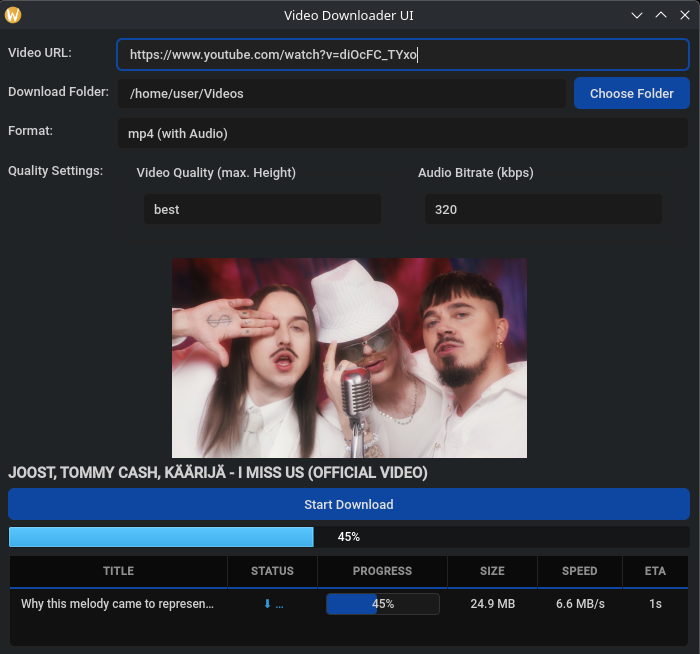
Upon launching, the UI will allow you to input a video URL, choose a download folder, select a file format, and configure quality settings. The downloader will then extract metadata, display a preview, and manage the download process.
This application stores its configuration and logs in a user-writable directory.
| Platform | Path |
|---|---|
| macOS | ~/Library/Application Support/VideoDownloader/ |
| Windows | %APPDATA%\VideoDownloader\ |
| Linux | ~/.config/VideoDownloader/ |
Files in that directory:
download_config.ini - download settings (speed tier, output folder, Deno path)videodownloader.log - application log, capped at 3 filesdeno(.exe) - if you chose to automatically download denoTo troubleshoot a silent crash (e.g. the app closes immediately without showing a window), check the log file.
[!IMPORTANT] On Windows, logging is only going to work if you start the executable using your cmd.
If you have any questions or Encounter Problems feel free to contact me per E-mail (anonyson@proton.me) or Discord. You can also create an Github Issue.
Contributions are welcome! Please open an issue or submit a pull request for any improvements or bug fixes.
Download Videos and Audio from most Websites with a simple GUI or CLI. Written in Python, based on yt-dlp
Python
35
153 commits
updated Aug 22, 2026
A PyQt6-based GUI and CLI video downloader that leverages yt-dlp for video extraction and downloading.
The application provides an easy to use graphical user interface with usefull Costumization Settings.
You can also use this as a CLI tool (interactive or for scripting). Learn more
This Tool supports every Site yt-dlp supports + additional ones.
winget if it's not found.Download the zip file for your operating system from the Latest Release
Unpack it
Clone the repository:
git clone https://github.com/truelockmc/video-downloader.git
cd video-downloader
Install the required packages:
pip install -r requirements.txt
Run the main Python script:
python main.py
(or just run the Executable you got from releases)
Upon launching, the UI will allow you to input a video URL, choose a download folder, select a file format, and configure quality settings. The downloader will then extract metadata, display a preview, and manage the download process.
This application stores its configuration and logs in a user-writable directory.
| Platform | Path |
|---|---|
| macOS | ~/Library/Application Support/VideoDownloader/ |
| Windows | %APPDATA%\VideoDownloader\ |
| Linux | ~/.config/VideoDownloader/ |
Files in that directory:
download_config.ini - download settings (speed tier, output folder, Deno path)videodownloader.log - application log, capped at 3 filesdeno(.exe) - if you chose to automatically download denoTo troubleshoot a silent crash (e.g. the app closes immediately without showing a window), check the log file.
[!IMPORTANT] On Windows, logging is only going to work if you start the executable using your cmd.
If you have any questions or Encounter Problems feel free to contact me per E-mail (anonyson@proton.me) or Discord. You can also create an Github Issue.
Contributions are welcome! Please open an issue or submit a pull request for any improvements or bug fixes.






