
See what people are saying
README
Table of Contents
“We are stuck with technology when what we really want is just stuff that works.” - Douglas Adams
PippinVR
About
This project was created out of the frustration that all MacOS VR virtual screen software (Meta Quest Remote Desktop, Immersed) are proprietary pieces of software. If I have code recording my screen, I want to know what it is actually doing.
PippinVR is named after the Apple Pippin, which itself was named after a relative to the McIntosh apple. The Apple Pippin was meant to be more than a platform just for game consoles, which is what I see VR to be as well.
This code is under the GNUv3 license as I feel strongly that any derivatives of this software should also be Open Source. Contributions are welcome and encouraged.
"Given enough eyeballs, all bugs are shallow" - Eric S. Raymond (The Cathedral and the Bazaar)
Capabilities
So far PippinVR can cast multiple screens from a Mac into a virtual space. It also has the ability to overlay the screens in passthrough, or cycle through settings with "B" (top button on a Meta Quest controller). The screens can be moved with the controller and placed individually.
Menubar and taskbar icons are used so that you can easily shutoff the application when MacOS is stuck in virtual screen mode.
A settings menu can be used the configure the screens, with a default configuration file being placed in ApplicationSupport upon installation.
Dynamic framerate of each virtual screen conserves bandwidth using the wire.
Installation
This respsitory contains both the PippinVR-Server, the server running on MacOS, and PippinVR-Client, a client running on a Meta headset.
Because this code was created with wire transmission in mind, it makes use of Android Debug Bridge (adb) and SideQuest.
Requirements
The following requirements are necessary for running PippinVR:
- MacOS Homebrew
- SideQuest (V 1.21)
- Meta VR Headset (Quest 2, Quest 3, Quest 3s) in Developer Mode. (tested on the Meta Quest 3).
- Make
- Android Platform Tools
- Xcode Command line tools (
xcode-select --install) - Swift (V.60)
- Gradle
- MacOS (tested on MacOS 26.6)
Pippin-VR Server
This section is for the server aspect
Make sure that adb is listening on the specifically bounded port for Pippin.
adb reverse tcp:9943 tcp:9943
in the root directory of PippinVR, run the following command:
make install-server-app
[!NOTE] This installs
PippinVR.appin the/Applicationsfolders automatically.
It should compile and install the server application as a `.app`. The first run will start the virtual screens and then quit out automatically. This is normal, as Pippin needs permission to record.
PippinVR works by recording whats called "Virtual" (non-physical) screens and then sending them to the headset to display. Because it is recording screens, MacOS requires permissions for screen recording.
[!NOTE] To configure Screen recording for PippinVR, the following needs to be configured:
System Settings -> Privacy & Security -> Screen RecordingThis setting needs to be changed each time the app is recompiled.
Pippin-VR server has a settings menu that can be accessed from the menu bar. The settings menu allows changing the screen configurations while displaying to the headset. Displays can be added or removed, with instant refresh once the settings have been applied.
Pippin-VR Client
The client is what is run on the headset as an app, and is what displays the virtual screens in the headset.
To build and install the client on the headset, the following make command calls upon `gradle` to build the android components. The client is created in C++, and relies on the CMAKELISTS.TXT to pull and build required packages (SOIL2 and GLM).
make install-client
Design
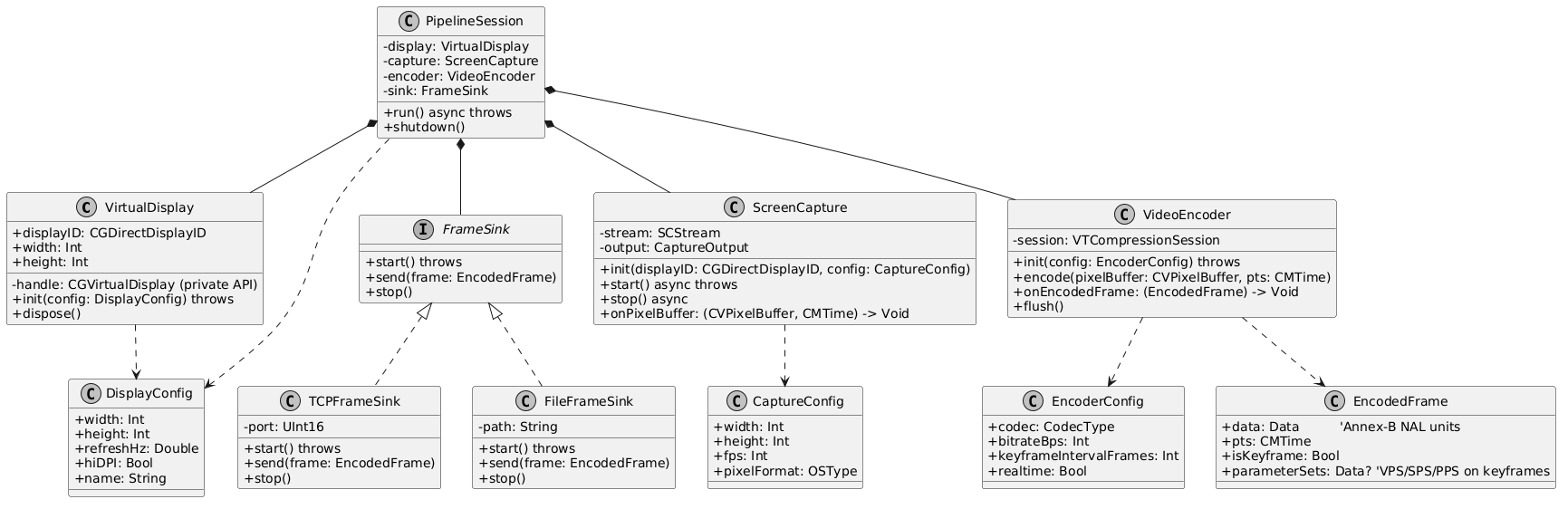
The design of PippinVR-server is outlined as follows:
 The server creates Virtual displays through the
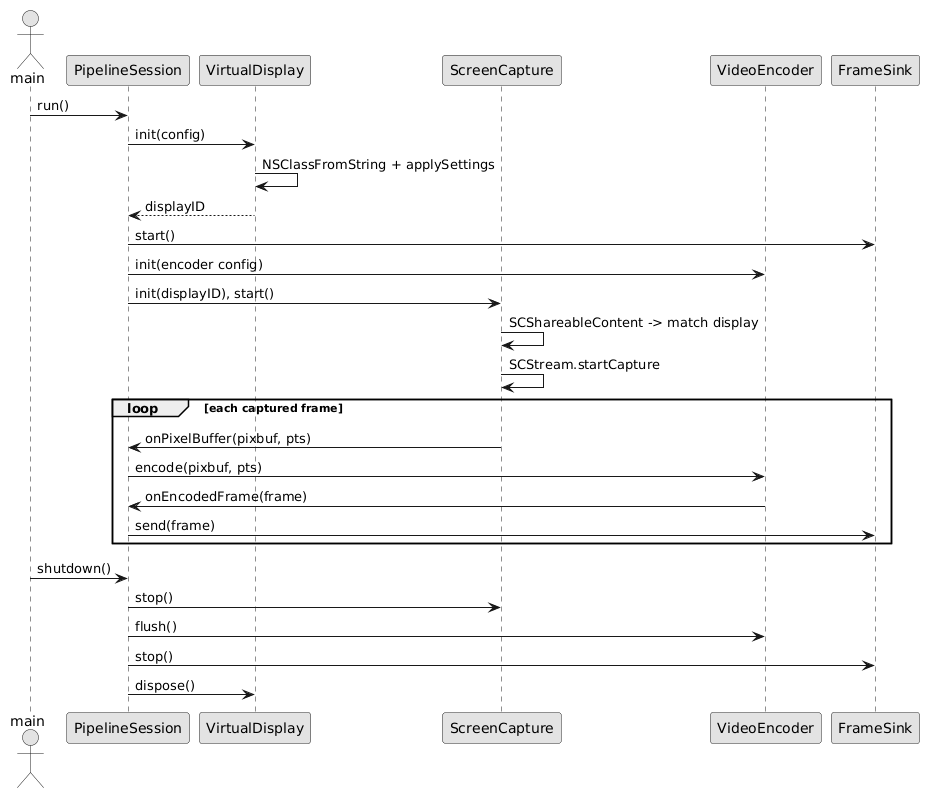
 CGVirtualDisplay, sends it to the VideoEncoder and bundles it as an encoded frame to with a specific StreamID to send over the wire using the MVRS protocol. The frame data is encoded as big-endian, and decoded by the headset using stream identifiers.
Known Issues
- More than three screens has issues of collision, causing the fourth "virtual" screen becoming the Mac screen. This is being worked on.
- Virtual Display positions are not saved after refresh/reboot.
- Meta Quest remote polling sometimes stops working after wake.
- Stale displays with old content will stay in the headset when the
PippinVRapp is disconnected.
Contributing
Contributions are welcome and encouraged (as per the GNUv3 License). To contribute, make sure to use the .pre-commit file. To do so, make sure to install via Homebrew.
pre-commit install
This project will take contributions in the form of pull-requests.
License
GNU GENERAL PUBLIC LICENSE VERSION 3 (GNUv3).
Contributors

2 commits
Similar repos


Languages
C++
57.2%
Swift
39.4%
Makefile
1.4%
See what people are saying
README
Table of Contents
“We are stuck with technology when what we really want is just stuff that works.” - Douglas Adams
PippinVR
About
This project was created out of the frustration that all MacOS VR virtual screen software (Meta Quest Remote Desktop, Immersed) are proprietary pieces of software. If I have code recording my screen, I want to know what it is actually doing.
PippinVR is named after the Apple Pippin, which itself was named after a relative to the McIntosh apple. The Apple Pippin was meant to be more than a platform just for game consoles, which is what I see VR to be as well.
This code is under the GNUv3 license as I feel strongly that any derivatives of this software should also be Open Source. Contributions are welcome and encouraged.
"Given enough eyeballs, all bugs are shallow" - Eric S. Raymond (The Cathedral and the Bazaar)
Capabilities
So far PippinVR can cast multiple screens from a Mac into a virtual space. It also has the ability to overlay the screens in passthrough, or cycle through settings with "B" (top button on a Meta Quest controller). The screens can be moved with the controller and placed individually.
Menubar and taskbar icons are used so that you can easily shutoff the application when MacOS is stuck in virtual screen mode.
A settings menu can be used the configure the screens, with a default configuration file being placed in ApplicationSupport upon installation.
Dynamic framerate of each virtual screen conserves bandwidth using the wire.
Installation
This respsitory contains both the PippinVR-Server, the server running on MacOS, and PippinVR-Client, a client running on a Meta headset.
Because this code was created with wire transmission in mind, it makes use of Android Debug Bridge (adb) and SideQuest.
Requirements
The following requirements are necessary for running PippinVR:
- MacOS Homebrew
- SideQuest (V 1.21)
- Meta VR Headset (Quest 2, Quest 3, Quest 3s) in Developer Mode. (tested on the Meta Quest 3).
- Make
- Android Platform Tools
- Xcode Command line tools (
xcode-select --install) - Swift (V.60)
- Gradle
- MacOS (tested on MacOS 26.6)
Pippin-VR Server
This section is for the server aspect
Make sure that adb is listening on the specifically bounded port for Pippin.
adb reverse tcp:9943 tcp:9943
in the root directory of PippinVR, run the following command:
make install-server-app
[!NOTE] This installs
PippinVR.appin the/Applicationsfolders automatically.
It should compile and install the server application as a `.app`. The first run will start the virtual screens and then quit out automatically. This is normal, as Pippin needs permission to record.
PippinVR works by recording whats called "Virtual" (non-physical) screens and then sending them to the headset to display. Because it is recording screens, MacOS requires permissions for screen recording.
[!NOTE] To configure Screen recording for PippinVR, the following needs to be configured:
System Settings -> Privacy & Security -> Screen RecordingThis setting needs to be changed each time the app is recompiled.
Pippin-VR server has a settings menu that can be accessed from the menu bar. The settings menu allows changing the screen configurations while displaying to the headset. Displays can be added or removed, with instant refresh once the settings have been applied.
Pippin-VR Client
The client is what is run on the headset as an app, and is what displays the virtual screens in the headset.
To build and install the client on the headset, the following make command calls upon `gradle` to build the android components. The client is created in C++, and relies on the CMAKELISTS.TXT to pull and build required packages (SOIL2 and GLM).
make install-client
Design
The design of PippinVR-server is outlined as follows:
The server creates Virtual displays through the CGVirtualDisplay, sends it to the VideoEncoder and bundles it as an encoded frame to with a specific StreamID to send over the wire using the MVRS protocol. The frame data is encoded as big-endian, and decoded by the headset using stream identifiers.
Known Issues
- More than three screens has issues of collision, causing the fourth "virtual" screen becoming the Mac screen. This is being worked on.
- Virtual Display positions are not saved after refresh/reboot.
- Meta Quest remote polling sometimes stops working after wake.
- Stale displays with old content will stay in the headset when the
PippinVRapp is disconnected.
Contributing
Contributions are welcome and encouraged (as per the GNUv3 License). To contribute, make sure to use the .pre-commit file. To do so, make sure to install via Homebrew.
pre-commit install
This project will take contributions in the form of pull-requests.
License
GNU GENERAL PUBLIC LICENSE VERSION 3 (GNUv3).
Similar repos
Contributors
2 commits
Languages
C++
57.2%
Swift
39.4%
Makefile
1.4%